The Best Partner for Your Success
series
M
700
V
The Best Partner for Your Success
MITSUBISHI
CNC
The one and only. Only top level manufactur ing can sur vive.
Mitsubishi CNC M700V Ser ies is a state-of-the-ar t model that provides high-speed and high-accuracy
machining and advanced control technologies. These Functions are for customers who keep challenging
for more production output, with a worldwide recognized machine for today’s globalized industr y.
M700VS Ser ies is an integrated control unit and display type.
M700V W Ser ies also comes with Windows
®XPe.
These t wo types of Mitsubishi CNC M700V Ser ies suppor t top level manufactur ing.
Mitsubishi CNC M700V Series
The best machines for top level manufacturing
M700VS and M700VW Series, advanced Mitsubishi CNCs for next-generation machining
[High-speed, high-accuracy]
High-quality machining by determining appropriate shapes and avoiding unnecessary deceleration
[High-speed, high-accuracy]
High-speed and high-accuracy control of the drive system is achieved by estimating program paths from beginning to end
[Easy operation]
Simple programming system for machining center and lathe
[Customize]
Tools used in developing solutions for control customization
[Complete NANO]
Controls everything from the CNC’s operation to servo processing with a least command increment of 1nm
[5-axis, multi-axis]
From drive units to servo/spindle motors
Advanced CNC components for higher performance
NC DesignerNC Monitor NC Explorer NC Trainer NC Trainer plus
NC Analyzer NC Configurator2 GX Developer NC Maintainer etc.
(Tools)
Mitsubishi CNC
M700VW Series M700VS Series
System Configurations & Product Lines
Personal computer+Windows®
M700VW
Series
Drive Unit
Servo Motor
Spindle Motor
M700VS
Series
series
M
700
V
MELSOFT
Machine Operation Panel
High-performance drive unit MDS-D2/DH2 Series Multi-hybrid drive unit
MDS-DM2 Series
Ultra-compact drive unit with built-in power supply MDS-DJ Series
Low-inertia motor HF-KP Series Medium-inertia motor
HF Series
Direct drive servo motor TM-RB Series
Linear servo motor LM-F Series
Rotary detector MBA Series
Detector for C axis MBE Series High-performance
spindle motor SJ-D Series SJ-V Series
Low-inertia and high-speed spindle motor
SJ-DL Series SJ-VL Series
Tool spindle motor HF-KP Series HF-SP Series
series
M
700
V
Technologies
B a s i c P e r f o r m a n c e a n d F u n c t i o n s
For higher speed and higher accuracy
Bringing the complete nano world closer to you
(Note 1) BPM is the number of machining program blocks processed per minute. (Note 2) M720VS’s machining program processing speed is 67.5kBPM.
M700V Series(Note 2) 168kBPM(Note 1)
M700 Series 135kBPM(Note 1)
Machining Program Processing Speed
M700V Series 2
1 M700 Series
User Macro Processing Performance
M700V Series M700 Series
Built-in PLC Basic Instruction Processing Performance
All operations from program values to servo commands are done in nanometer units. Interpolation is at the nano-unit level even when program commands are in micrometer units.
Speed command fluctuation reduced
In complete nano control, the position command calculation fraction of the interpolation calculation is small, so fluctua-tions in speed command due to the fracfluctua-tions is reduced. This reduces acceleration fluctuations, resulting in finer lines at the time of repeated acceleration/deceleration.
Interpolation calculation accuracy improved
Even with one-micron-unit commands in the machining pro-gram, interpolation is in nanometer units. As the calculation accuracy of a block intersection is improved, lines on the surface is finer.
By setting the number of stations required for the application, the drive automatically sets up equal intervals between each station. Positioning of the axis is only possible by commanding the station number.
Even if a pallet is changed, the axis can always be controlled as an NC axis in the machining area, and as a PLC axis in the setup area, which enables setup of a rotary axis without stopping machining.
PLC Axis
Index Modification Function of
PLC Instructions
Complete Nano Control
Complete nano system (M700V Series) Micron system (Our conventional)
Speed Speed
Acceleration rate Acceleration
rate
Speed fluctuation Speed fluctuation
Y [mm]
X [mm] 6
3
3 6 9
Nano system (M700V Series)
Micron system
Y [mm]
X [mm] 4.458000 4.457000
4.457693 7.794784
7.795000
7.794000
Theoretical value
Theoretical value
PLC axis mixed control Indexing function
Indexing function with magazine axis Decelerator
17 16 15 13 12 11
14
Indexing position
23 22 21 20 19
18
8 7 6 5 4 3 2 1 24
10 9
Servo motor
The index modification function is available, which is one of MELSEC’s wide variety of instructions.
Repetitive programs can be written easily.
X0
M0 X1
PLS M0
Y8
XA
M10 XB
PLS M10
Y12
XAA
M170 XAB
PLS M170
YB2
X0Z0
SM400 X1Z0
Y8Z0 FOR K171
NEXT INC Z0 SM400
MOV KO ZO
Mitsubishi Electric Factory Automation technologies are condensed into a 64 bit RISC
processor and an exclusively developed high speed LSI.
The basic CNC functions, built-in PLC and graphic performance are all improved.
The M700VS has been downsized with power consumption reduced by 66% compared to our
conventional Windows-based control models while maintaining the same performance.
Windows
®XPe-based M700VW was designed with expandability and stability to
enable a higher level of custom functions.
Example of PLC axis mixed control with a pallet changer C
Controlled as a PLC axis independent from an NC axis
Controlled as NC axis
Z Y
X
Setup area Machining area
A A’
M700V Series
Drive unit MDS-D2/DH2
High-gain controlII High-accuracy detector:16million p/rev
High-speed architecture
Table
High-speed optical network
10 steps/µs
100 steps/µs When several similar programs exist... “n” number of same programs can be
series
M
700
V
Technologies
S u p p o r t i n g M a c h i n e To o l A c c u r a c y I m p r o v e m e n t
Calculated control (OMR control) of the drive system based on the machine model realizes
optimum machine operation
A high-speed error-compensation function is used for control-ling the spindle and servo, enabcontrol-ling accurate tapping.
OMR-DD Control (High-speed synchronous tapping)
Machine-end Compensation Control
Corresponds to machine resonance fluctuations
By compensating for the deflection between the motor-end and machine-end, the part shape at a high speed and acceleration rate can be compensated for. The optimal shape can be obtained at a low feed rate and also compensate for the outward expansion of the shape at high feed rates.
Position Loop of Spindle Control
Heavy cutting performance improved
Heavy cutting performance has been improved with the ad-dition of position loop control on the spindle. By lowering the impact load fluctuation, the speed fluctuation rate has been reduced to less than 1/2 of our conventional system.
Time
Speed Speed
Time Reduced by 20%
1 0.8
Orientation time is reduced
Deceleration is performed with the maximum torque to mini-mize the spindle orientation time.
The spindle's constant position loop control has eliminated the zero point return time when switching from the spindle to C-axis.
Spindle/C-axis control
High traceability to command (High-gain control II), which has been developed in servo axis control, is now available on spindles, contributes to shorter machining time and higher accuracy.
At a high feed rate, the optimal shape is expanded due to the deflection between the motor-end and machine-end.
At a high feed rate
Command path
Without compensation At a low
feed rate
The commanded path is compensating for the deflection of error, which provides the ability to produce a correct shape at high feed rates.
Command path
With compensation
Lowering Heat Generation of Spindle Motors
Reduced harmonic current mitigates heat generation in the spindle motor.
Time [s]
<Condition> Rotation speed: 1200r/min 0 0 20 20 40 40 60 60 80 80 100 120
Spindle motor temperature rise characteristics
Combined with MDS-D2 Series
Combined with our conventional series
75.9 deg 67.4 deg
Temperature rise cut by 10%
T e mp e rat u re r is e [d e g ] The commanded program path is compensated inwards at a high feed rate. Optimum Machine Response Direct Drive
At a low feed rate At a high feed rate
Protrusion occurs due to backlash compensation
Optimum backlash compensation reduces the protrusion
Protrusion is reduced by gradually changing the backlash compensation amount according to the reversal of axis travel direction, which enables higher-accuracy machining.
Position-dependent Gradually
Increasing-type Backlash Compensation
Adaptive Notch Filter
This function is used to estimate the resonance frequency of the machine and automatically adjust notch filter parameters. This enables the system to monitor the machine fluctuations and prevents repeated fluctuations caused by aged deterio-ration.
M700V Series
MDS-D2/DH2 servo drive unit
Servo motor Resonance control Frequency Resonance 1
Notch filter 1
Resonance 2
Notch filter 2
Resonance 3
Notch filter 3
Resonance frequency estimating parts
Fine-tune the filters' frequencies within a certain band to respond to the resonance frequency changes Table Linear scale Position control Speed control Current control
Spindle drive unit
Directly compensates synchronization error
Spindle motor Servo motor
Servo drive unit
Time Time C-axis positioning Zero point return C-axis positioning Speed Speed Shortened
Zero point return is not necessary.
<Our conventional series> <MDS-D2/DH2 Series>
<Our conventional series> <MDS-D2/DH2 Series>
Spindle acceleration/ deceleration time shortened
The change of accel/decel characteristics due to motor temperature changes can be
suppressed, which allows the system to be
controlled at a constant accel/decel rate. 1.50 1.60 1.70 1.80 1.90 2.00 2.10 2.20 2.30 2.40 2.50 100
A built-in thermistor detects the spindle motor's temperature to compensate for the acceleration/deceleration time when the motor is at a low temperature. It is also possible to monitor the spindle motor's temperature on the NC screen.
Automatic Temperature Compensation of
Spindle Motor
20 40 60 80
Stator (thermistor) temperature [°C]
Effect of suppressing acceleration/deceleration time fluctuation With compensation [Acceleration] With compensation [Deceleration] Without compensation [Acceleration] Without compensation [Deceleration] S 1 2 0 0 0 A c c e le ra tio n /de c e le rat io n t im e [ s ] NC
MDS-D2 spindle drive
Spindle motor temperature monitor Temperature compensation control Spindle motor temperature data Optimal current control Spindle motor Built-in thermistor −4000 −3000
0 0.5 1 1.5 2 2.5 3 3.5
Without OMR-DD control Servo/spindle synchronization error Spindle speed Servo/spindle synchronization error Spindle speed
With OMR-DD control (M700V Series) −2000 −1000 1000 2000 3000 4000 0 −4000 −3000
0 0.5 1 1.5 2 2.5 3 3.5 −2000 −1000 1000 2000 3000 4000 0 (Sec.) (Sec.) Spindle speed (r/min) Spindle speed (r/min)
This control can compensate for not only the machine friction but also the spring and viscosity elements. Thus quadrant protrusions, which are generated in circular cutting, can be compensated for within a wide range from low-speed to high-speed cutting.
Lost Motion Compensation Control Type 3
Conventional compensation control Conventional compensation is not enough
Lost motion compensation control type 3
+Y +X +Y +X 3µm 3µm +Y +X -X -Y
Two-way Pitch Error Compensation
The pitch error compensation function has been improved. By setting the compensation amounts separately for the positive and negative directions, different compensation can be applied to each direction.
Pitch error compensation amounts are different in the positive and negative directions
Pitch error compensation amount in positive direction
Pitch error compensation amount in negative direction
Actual machine position
Actual machine position without the positive direction compensation Ideal machine position Actual machine position without the negative direction compensation
Commanded machine position
: Compensation division point
1. Mechanical spring element can influence the path
2. Difference between static and dynamic friction is large and steep
series
M
700
V
Technologies
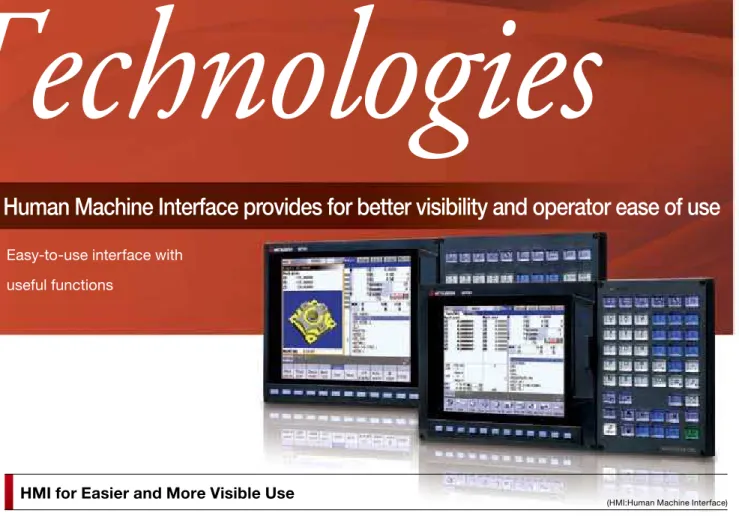
Human Machine Interface provides for better visibility and operator ease of use
Easy-to-use interface with
useful functions
Screen structure linking to the operation processes Pop-up screens
Machining programs in the memory card or in the hard disk (for M700VW Series) can be directly searched and run. Direct edit is also available.
Sub-program call is available from machining programs stored in the memory card or hard disk.
The program format is unlimited.
Simple programming function
Operation Support
HMI for Easier and More Visible Use
Tabs allow the user to select necessary operations from the operation menu, and pop-up screens allow the user to access desired information while the original screen remains displayed. For displays with a touch panel, a keyboard can be displayed on the screen.
Operation processes are divided into three steps, “Monitor”, “Setup” and “Edit”, and necessary information is aggregated into three screens. These screens can be displayed by touch-ing a stouch-ingle button on the keyboard.
Menu customization function
Menu keys on the bottom of the screen can be freely arranged. Frequently used menu keys can be put together on the first page.
Operability of program restart function improved
Even if a machining program is stopped for reasons such as tool breakage, the program can be restarted when it has been stopped using only the INPUT operation.
Manual/Automatic backup function
Batch-backup of the NC data into the memory card/USB memory inserted in the front
inter-face of the display is possible. For the built-in hard disk type M700VW Series, backup in the hard disk is also possible.
Data is automatically backed-up at a certain interval set by the pa-rameter.
Manual/automatic backup function
NAVI MILL (for machining center)/
NAVI LATHE (for lathe)
Operability of operation search improved
Using the program edit screen, it is possible to execute a program from the line specified by the cursor. The operation search immediately detects the edited part to check the content of operation.
Edit screen
Setup screen Monitor screen
The program can be restarted using only the INPUT operation
2-part system display
The Monitor screen of the 2nd part system can be displayed together with the 1st part system. Switching screens is not necessary.
Program Operation
Programs are automatically created for each process when an operator selects machining process and inputs data on screen. A tool path can be graphically drawn for the program check.
This function also supports in-clined surface machining.
Menu list
Shortcut icons to each screen Menu list buttons are
newly introduced. With these buttons, the screen desired for display can be called up directly. The se-lected screen’s function outline is also displayed.
Outline of the selected function appears
2-part system display
An operator sets the shape of the inclined
surface to machine Machining surface view
Guide image area
NAVI MILL (Machining center system) NAVI LATHE (Lathe system)
Guidance function
By pressing the help button, guidance (operation procedure /parameter descriptions/alarm descriptions/G code format) re-garding the currently displayed screen will be shown.
Tab selection
Large amount of information aggregated into one screen
Machining conditions are displayed visually
Icon menu displays screen images
Counter display is automatically enlarged in the manual mode
Pop-up window to avoid screen switching
Keyboard is displayed in the pop-up window (for touch-panel displays)
Visible hierarchy with 2-layer menu display
INPUT Move the cursor
to the line to start
execution Execution starts
from the specified line
*Available with M700V Series (M System) only.
In the case of the M700VW Series, a CF card can be installed in the control unit M700V Series
Insert
CF card CF/PCMCIA card
fully inserted
The M700VW Series is equipped with a PCMCIA II slot
A CF card can be also used with an adapter (HMI:Human Machine Interface)
Program input error warning function
Program check based on a 3D solid model
Decimal point omitted: A decimal point has been left out of the address data
Integration of program check and editing functions
The added 3D solid model check function allows more re-alistic cutting check.*
series
M
700
V
Technologies
For High Quality machining with smoother finish and faster performance
Five-Axis Machining functions such as Tool Center Point and SSS control have been enhanced.
With the enhancement of these functions, five-axis control will provide high-end performance.
The advanced five-axis control provides great potentialities.
The Tool Handle Feed & Interruption function enables you to perform handle feed by making the tool diameter direction as an X or Y axis of complicated workpiece under five-axis machining. The tool position can be changed without moving the tool tip.
High-accuracy machining is realized by controlling each axis so that the tool center point moves linearly at a commanded feed rate even if the rotary axis moves in linear interpolation.
You can rotate or move the origin of the original coordinate system parallel to define a feature coordinate system. To start machining, issue normal program commands to the ar-bitrary plane (inclined surface) in space. The feature coordi-nate system is set again according to the tool axis’s direc-tion. The machining program can be created without paying attention to the direction of the coordinate system or tool axis rotational direction.
This function prevents interference on a machine model (in both manual and automatic operations) before it actually happens in the machine.
The part to interfere can be checked by moving, rotating or en-larging the models.
Interference can be prevented for a tilt-type tool axis and rotating table. (Useful when soft limit is not enough to prevent interference)
Example of detecting a tool interference while a tilt type tool is rotating
When a possibility of interference is detected on a machine model, the motor decelerates to a stop before interfering. The part to interfere is displayed in a different color.
Tool Center Point Control
(Machining Center System)
3D Machine Interference Check
Tool Handle Feed & Interruption
(Machining Center System)
Inclined Surface Machining
(Machining Center System)
Without moving the tool tip, it is possible to change the tool’s position.
Original coordinate
system Z axis
Y axis
X axis
Inclined surface machining
Feature coordinate system
<Tool tilt type> <Table tilt type> <Compound type>
Machine model Check using machine and tool models Register the model data
Motor decelerates to a stop before interfering. The part to interfere changes in color.
Y axis Z axis
X axis
By judging part program paths, unnecessary deceleration is reduced, even when fine steps in the program exist. This provides a smooth finish without deviation for die-mold ma-chining.
This function suppresses the vibrations of the tool by moving the rotary axis smoothly. Even when this function is active, the Tool Center Point path moves according to the command program path.
SSS control can be used during simultaneous five-axis machining.
SSS Control
(Machining Center System)Super Smooth Surface
Provides easy setup of index machining (multiple/inclined surface machining) using a rotary axis.
Enables secure, easy and smooth setup and index machining
R-Navi
(Machining Center System)* Some functions are under development.
With rotary axis pre-filter
Tool position changes smoothly,
causing no vibration at the tool center point which allows the tool to move smoothly.
P0 P1 P2 P3 P4 P5 P6 P7 P8 P9
Q1 Q2 Q8
Q3 Q4 Q5 Q6 Q7
Rotary axis travel commands are smoothed.
Rotary axis travel command
positions are smoothed Travel path of tool center points
Without rotary axis pre-filter
Only during travel with a change in the tool position, the rotary axis will suddenly move causing vibration at the tool center point.
Q1
P0 P1 P2 P3 P4 P5 P6 P7 P8 P9
Q8
Q2 Q3 Q4 Q5 Q6 Q7
Travel with no change in tool’s posture
Travel with change in tool’s posture (Sudden travel)
Vibration occurs
at change of tool’s posture Travel path of tool center points
Travel path of machine rotation centers
Surface accuracy improved in the same machining time. (2 to 10 times higher than our conventional system)
Conventional control
Machining time shorter with the same surface accuracy (5 to 30% faster than our conventional system)
More effective at a higher rate
SSS control
Surface accuracy
Speed High
Low
Low High
Path A Smooth command path
Smooth command path Smooth command path
Interpolation for smooth step cutting
Actual cutting path Actual cutting path
Tiny difference in level Path B
Path A
Path B
Path A
Path B
Scratches on machined surface
With SSS control Without SSS control
Tiny difference in level Tiny difference in level
Inclined coordinate system A sign displayed during selection
Select a machining surface by specifying the figure or name Visually check the
registered surface
Register Select
Manual
Automatic
Three-axis machining program
Register machining
surface Select machining surface Index machining surface Three-axis machining
*M750VS, M750VW only
*M730VW,M750VW only *M730VS,M730VW,M750VS,M750VW only
Workpiece
It is possible to move in the tool axis direction in both X & Y radius directions.
Workpiece
Tool radius direction X Tool radius direction Y
Tool axis direction Workpiece
Path of the tool center point Rotation center
Rotation center Path of the
tool center point
Rotation center Path of the tool center point
OMR-FF Control
Optimum Feed ForwardUnlike conventional control, which simply matches the motor path to the commands, OMR control calculates the ma-chine's status based on a model and applies correction to motor control in order to match not the motor position, but the machine tool position to the commands.
Motor
Ball screw
Table
Guide
Command Current Motor-end Machine-end
NC
OMR-FF Control
Machine Machining Machiningresult
Servo Motor
series
M
700
V
Technologies
V a r i o u s F u n c t i o n s f o r C o m p o u n d M a c h i n i n g
Supports various compound machining applications, from multi-part system program paths for
multi-axis machining centers to multi-axis milling and hobbing.
G code format is available for hobbing.
A spur gear can be machined by synchronously rotating the hob axis and the workpiece axis in a constant ratio. A heli-cal gear can be machined by compensating the workpiece axis according to the gear torsion angle for the Z axis movement.
2-part system synchronous
thread cutting cycle I
2-part system synchronous
thread cutting cycle II
Balance Cut
(Lathe System)Hobbing
(Lathe System)2-part System Synchronous Thread Cutting
(Lathe System)
Guide Bushing Spindle Synchronization Control
(Lathe System)
Separate programs, used in each part system, can be man-aged under a common name in the multi-part system. This function facilitates management of the process programs that are simultaneously executed in the multi-part systems. A maximum of two part systems and 16 axes can be
controlled for the machining center. A maximum of four part systems and 16 axes can be controlled for the lathe.
(A maximum of two part systems and 12 axes for M720VS, M720VW)
Multi-part System Program Management
The control axes of each part system can be exchanged using a program command. This enables the axis defined as the axis of the 1st part system to be operated as the axis of the 2nd part system.
Mixed Control (cross axis control)
(Lathe System)
Milling Interpolation
(Lathe System)This function converts the commands programmed for the orthogonal coordinate axes into linear axis movements (tool movements) and rotary axis movements (workpiece rotation) to control the contours. This enables milling operations using a lathe without a Y axis.
Multi-part Systems Multi-axis
Hob axis
Workpiece axis Machining Center
Compound Lathe
PLC3 PLC1
B
S PLC4
PLC5
C
PLC2
X Z
Y
SP1 SP2
SP3 SP4
Z1 Z2
X1 X2
X3 X4
1st
part system part system2nd
100.PRG 200.PRG 300.PRG
100.PRG 200.PRG 300.PRG
100.PRG 200.PRG 300.PRG n-th part system
1st part system
Workpiece travel command for the 1st part system
Tool travel command for the 2nd part system
The tool moves so as to keep its relative position with the workpiece 2nd
part system n-th part system
Programs are managed separately for each part system. Each part system can have its own program Nos.
Programs are managed separately for each part system.
The same program Nos. can be managed in batch across part systems
Machining programs
MDI
X1
Z2 <Synchronized axis>
Z1 <Base axis>
Synchronization control enables an arbitrary control axis in the other part system to move in synchronization with the movement command assigned to an arbitrary control axis.
Control Axis Synchronization Across
Part Systems
(Lathe System)Control Axis Superimposition
(Lathe System)2-part system synchronous thread cutting allows the 1st part system and the 2nd part system to perform thread cut-ting simultaneously for the same spindle.
2-part system synchronous thread cutting has two com-mands; command (G76.1) for cutting threads in two places simultaneously, which is known as “2-part system
synchronous thread cutting cycle I”; and command (G76.2) for cutting a thread using the two part systems simultane-ously, which is known as “2-part system synchronous thread cutting cycle II”.
This function is for a machine with a spindle motor to rotate a guide bushing: This function allows the guide bushing dle motor (G/B spindle) to synchronize with a reference spin-dle motor (Reference spinspin-dle).
The position error compensation function reduces the spindle’s vibration due to the workpiece’s torsion, and the motor’s overload.
(1st part system)
(2nd part system)
X1 Z1
X2Z2
C1 C1
X1 Z1
X2Z2
Switching C1 axis control from the 1st part system to the 2nd part system
1st part system 1st part system
2nd part system 2nd part system
X1
X2Z2 Z1
Deflection can be minimized by holding tools simultaneously from both sides of the workpiece and using them in syn-chronization to machine the workpiece (balance cutting). The machining time can be reduced by machining with two tools.
This function enables machining using a certain part system simultaneously with that of another part system by superimposing their movements.
This is effective when machining in multiple part systems is ex-ecuted simultaneously. It allows for an axis to shift its coordi-nate system relative to the system using the axis.
X
X
C
Z
Z
Y
X
Z
Y Hypothetical
axis
Milling interpolation plane (G17plane)
G16 (Y-Z cylindrical plane)
G19 (Y-Z plane)
Collet chuck (Reference spindle) Bar feeder
Bar feeder
series
M
700
V
Solution
C u s t o m i z a t i o n / S u p p o r t To o l
NC Designer and other Software Applications tools are available to support the customization
of the machine. Some software applications support a C Language Library to support a higher
level of customization.
Simply by locating parts of various functions on the screen, it is possible to create custom screens easily.
It is possible to check the performance of custom screens on a personal computer.
NC Designer (Screen Design Tool)
Parts displayed on NC (example)
Develop screen configuration
Edit on a personal computer
NC Designer
By laying out ready-made standard parts, you can easily create original screens without programming.
When using touch panel display, a machine operation panel can be built on the NC display.
Events of the standard parts can be described using macros.
Using the C language source generation function of NC Designer, customized functions can be added by program-ming in C language. (Dedicated development environment necessary.)
The MELSEC programming tool, offering a wide array of functions and easy use, allows for convenient program design and debugging. Linking with a simulator or other util-ity allows for the efficient creation of desired programs.
GX Developer (Sequence Programming Tool)
NC Maintainer
M700V Series GX Developer
M700VS Series M700VW Series
Control
Parts displayed
Window Graphic
Servo Selection Tool
When the machine model and input specifications are selected, the selection result for the motor will be displayed. The result can be output in PDF format.
By selecting the machine configuration model and inputting the machine specifications, the optimal servo motor meeting spec-ifications can be selected. Other selection functions which fully support drive system selection are also available. This tool is free of charge. Please contact us.
<Main functions>
Servo motor capacity selection, regenerative resistor capacity selection, spindle acceleration/deceleration time calculation, power supply capacity selection, power supply facility capacity calculation, etc.
An identical NC display screen can be displayed on a per-sonal computer. By connecting a perper-sonal computer to the NC unit when necessary, various data can be checked and set using the same HMI as the standard NC screen.
NC Monitor (Remote Monitoring Tool)
NC Monitor M700V Series
Ethernet communication
The NC data file necessary for NC control and machine op-eration (such as parameters, tool data and common variables) can be edited on a personal computer.
Please contact us to purchase a full function version. (A limited function version is also available free of charge.)
NC Configurator2
(Parameter Setup Support Tool)
NC Configurator2 M700V Series
By connecting the NC and host personal computer via Ethernet, data such as machining programs can easily be shared. This tool is free of charge. Please contact us.
NC Explorer (Data Transfer Tool)
NC1 NC2 NC3
NC4 Ethernet
NC5 NC6
Machining program
NC Explorer
Servo parameters can be automatically adjusted by activat-ing the motor usactivat-ing machinactivat-ing programs for adjustment or vibration signals, and measuring/analyzing the machine char-acteristics.
<Main functions>
Bode diagram measurement display, speed loop gain adjustment, posi-tion loop gain adjustment, notch filter setting, acceleraposi-tion/deceleraposi-tion time constant adjustment, circularity adjustment and servo waveform measurement.
NC Analyzer
(Servo Adjustment Support Tool)
NC Analyzer M700V Series
Ethernet
communication
Memory card USB memory
Ethernet communication
Ethernet communication
A software tool for a personal computer to carry out mainte-nance (such as parameter setting, NC diagnosis and PLC pro-gram diagnosis) of MITSUBISHI CNC on customer’s display.
NC Trainer / NC Trainer plus
(MITSUBISHI CNC Training Tool)
NC Trainer NC Trainer plus
NC Trainer is an application for operating the screens of MITSUBISHI CNC M700V Series and machining programs. This application can be used for learning operating CNC and checking the operations of the machining programs. NC Trainer plus can also be used for checking the PLC program and custom screens.
Memory card
Customer’s display
Diagnosis screen Maintenance screen PLC program diagnosis screen
Control unit
Ethernet communication
series
M
700
V
Ethernet communication
Machining programs Parameters Backup data, etc.
Languages supported Japanese
English German
Italian French
Spanish
Chinese (traditional)
Chinese (simplified) Korean
CF card
Portuguese
Hungarian Dutch
Swedish Turkish
Polish Russian
Czech
●Our cultivated Factory Automation technologies and
experience contribute to offer the best suited systems for users.
●Our FA solutions support high and low hierarchy components,
a network and even applications that control the components and network required for a manufacturing floor.
Max. 30m
Optical communication repeater units (Max. 2)
Max. 30m Max. 30m
Mitsubishi Factory Automation Solutions
Easy to import external data via USB and memory card interfaces.
A wide array of network functions offers good compatibility with various machine configurations.
Solution
Production management Facility maintenance Quality control
Machining network system
CAD/CAM system
MELQIC inspection unit
Electron beam machine
Motion controllerMotion controller
Power measuring
module Energy measuring module MDU
circuit breaker Electric typeindicator
AC servo Inverter Robot
Robot Robot PLC
PLC
Laser EDM
MES interface GOT1000 Information technologies
Control technologies
Distribution technologies
Mechatronics technologies
Drive technologies
Optimized
Waste eliminated
Higher performance
Shorter machining time
Production management system
Higher efficiency
Energy saving
Mitsubishi FA product groups
The NC unit can be connected to a network to serve as the master/local station of the MELSEC CC-Link.
CC-Link
The optical cable can be extended to a maximum of 90m by connecting up to two optical servo communication repeater units between the CNC unit and a servo drive unit.
Optical Communication Repeater Unit
•It is possible to directly search and run the machining programs from the CF card (or PCMCIA card for M700VW Series). Subprogram calls are also available.
•The machining programs in the CF card can be edited directly.
Front IC Card Mode
•Display languages can be switched with a single parameter operation.
•For guidance display, two other languages aside from English are selectable for M700VS Series, or all the desired languages for M700VW Series by option setting.
•Support for 17 languages, securing reliable use worldwide.
Easy to Change Languages
A compact flash memory card (CF card) (Note) /USB memory interface is located on the front of the display. In using CF card, the card slot can be completely covered by a lid so as to prevent foreign materials from entering (IP67).
(Note) M700VW Series is equipped with PCMCIA interface
Memory Card/USB Memory Interface
By connecting a personal computer and an CNC via Ethernet, the machining programs and parameters can be input and output.
Ethernet Communication
A wide range of support features according to various machine configurations
Example of M700VS Series
MITSUBISHI CNC
M700V/M70V
MITSUBISHI CNC
series
M
700
V
D i s p l ay s & Key b o a r d
FCU7-KB024 sheet keys FCU7-KB029 sheet keys FCU7-KB026 clear keys FCU7-KB025 Lathe system sheet keys
FCU7-KB028 Lathe system clear keys
FCU7-KB044 sheet keys FCU7-KB047 clear keys FCU7-KB046 clear keys FCU7-KB048 clear keys
8.4-type 10.4-type 10.4-type touch panel 15-type
M700VS Series Display
Keyboard KeyboardDisplay
ー ー ー ー FCU7-KB045 clear keys FCU7-KB041 clear keys
10.4-type 10.4-type touch panel 15-type 15-type touch panel
M700VW Series Display
Keyboard
[mm]
The internal components of the keyboard are protected against water and oil (IP65F). The interface for USB memory and CF card (PCMCIA II for M700VW Series) are mounted on the front panel of the display. FCU7-KB921 FCU7-KB926 140 260 140 140 [mm]
Key switch 55 points, LED 55 points MITSUBISHI standard key layout
Rotary switches
(spindle override, cutting override) Select switch
(memory protection) Emergency stop push-button
-The internal components of the machine operation panel are protected against water and oil (IP65F).
-Refer to the product brochure for details.
MITSUBISHI CNC Machine Operation Panel
Control Unit
M700VS Series control unit M700VW Series control unit
CNC unit is separated from the operation board.
Fully compatible with
conventional M700 Series Integrated
on the back of display
control unit control unit
* Trademarks
MELDAS, MELSEC, EZSocket, EZMotion, iQ Platform, MELSOFT, GOT, CC-Link, CC-Link/LT and CC-Link IE are either trademarks or registered trademarks of Mitsubishi Electric Corporation in Japan and/or other countries.
Ethernet is a registered trademark of Xerox Corporation in the United States and/or other countries.
Microsoft® and Windows® are either trademarks or registered trademarks of Microsoft Corporation in the United States and/or other countries.
CompactFlash and CF are either trademarks or registered trademarks of SanDisk Corporation in the United States and/or other countries. Other company and product names that appear in this manual are trademarks or registered trademarks of the respective companies.
WARRANTY
Please confirm the following product warranty details before using MITSUBISHI CNC.
Should any fault or defect (hereafter called "failure") for which we are liable occur in this product during the warranty period, we shall provide repair services at no cost through the distributor from which the product was purchased or through a Mitsubishi Electric service provider. Note, however that this shall not apply if the customer was informed prior to purchase of the product that the product is not covered under warranty. Also note that we are not responsible for any on-site readjustment and/or trial run that may be required after a defective unit is replaced.
[Warranty Term]
The term of warranty for this product shall be twenty-four (24) months from the date of delivery of product to the end user, provided the product purchased from us in Japan is installed in Japan (but in no event longer than thirty (30) months, Including the distribution time after shipment from Mitsubishi Electric or its distributor). Note that, for the case where the product purchased from us in or outside Japan is exported and installed in any country other than where it was purchased; please refer to "2. Service in overseas countries" as will be explained.
[Limitations]
(1) The customer is requested to conduct an initial failure diagnosis by him/herself, as a general rule. It can also be carried out by us or our service provider upon the customer’s request and the actual cost will be charged.
(2) This warranty applies only when the conditions, method, environment, etc., of use are in compliance with the terms and conditions and instructions that are set forth in the instruction manual, user’s manual, and the caution label affixed to the product, etc.
(3) Even during the term of warranty, repair costs shall be charged to the customer in the following cases:
(a) a failure caused by improper storage or handling, carelessness or negligence, etc., or a failure caused by the customer’s hardware or software problem
(b) a failure caused by any alteration, etc., to the product made by the customer without Mitsubishi Electric’s approval (c) a failure which may be regarded as avoidable, if the
customer’s equipment in which this product is incorporated is equipped with a safety device required by applicable laws or has any function or structure considered to be indispensable in the light of common sense in the industry
(d) a failure which may be regarded as avoidable if consumable parts designated in the instruction manual, etc. are duly maintained and replaced
(e) any replacement of consumable parts (including a battery, relay and fuse)
(f) a failure caused by external factors such as inevitable accidents, including without limitation fire and abnormal fluctuation of voltage, and acts of God, including without limitation earthquake, lightning, and natural disasters
(g) a failure which is unforeseeable under technologies available at the time of shipment of this product from our company (h) any other failures which we are not responsible for or which
the customer acknowledges we are not responsible for If the customer installs the product purchased from us in his/her machine or equipment, and export it to any country other than where he/she bought it, the customer may sign a paid warranty contract with our local FA center.
This falls under the case where the product purchased from us in or outside Japan is exported and installed in any country other than where it was purchased.
For details please contact the distributor from which the customer purchased the product.
Whether during or after the term of warranty, we assume no responsibility for any damages arising from causes for which we are not responsible, any losses of opportunity and/or profit incurred by the customer due to a failure of this product, any damages, secondary damages or compensation for accidents arising under specific circumstances that either foreseen or unforeseen by Mitsubishi Electric, any damages to products other than this product, or compensation for any replacement work, readjustment and startup test run of on-site machines or any other operations conducted by the customer.
Specifications shown in our catalogs, manuals or technical documents are subject to change without notice.
(1) For the use of this product, its applications should be those that may not result in a serious damage even if any failure or malfunction occurs in the product, and a backup or fail-safe function should operate on an external system to the product when any failure or malfunction occurs.
(2) Mitsubishi CNC is designed and manufactured solely for applications to machine tools to be used for industrial purposes. Do not use this product in any applications other than those specified above, especially those which are substantially influential on the public interest or which are expected to have significant influence on human lives or properties.
1. Warranty Period and Coverage
2. Service in Overseas Countries
3. Exclusion of Responsibility for Compensation against Loss of Opportunity, Secondary Loss, etc. 4. Changes in Product Specifications
5. Product Application
series
M
700
V
S p i n d l e M o to r s
S e r vo M o to r s
D r i ve U n i t s
Number of contr
ol axes
High-performance Servo/Spindle Drive Units MDS-D2/DH2 Series
A line of high-performance multi-hybrid drive units are available. The multi-hybrid drive unit
drives a maximum of three servo axes and one spindle, supporting the ownsizing of units and
offering technical advantages.
A power regeneration system that efficiently
uses energy during deceleration as power contributes to highly-frequent acceleration/
deceleration and energy savings. STO (safe torque off) is now available.(Note) Multi-hybrid Drive Units MDS-DM2 Series
Ultra-compact drive units with built-in power supplies contribute to reducing con-trol panel size. The 2-axis type is added for further downsizing.
High-speed optical communication enables a shorter position interpolation cycle and direct communication between drives, promoting further high-speed and
high-accuracy machining.
A high-efficiency fin and low-loss power module have enabled unit downsizing,
which also leads to a reduction in control panel size. STO (safe torque off) is now available.(Note)
All-in-one compact drive units MDS-DJ Series
With the fastest current control cycle, basic performance is drastically enhanced
(high-gain control). A combination of speed servo motor and high-accuracy detector helps enhance overall drive performance.
High-speed optical communication enables a shorter position interpolation cycle
and direct communication between drives, promoting further high-speed and high-accuracy machining.
A high-efficiency fin and low-loss power module have enabled unit downsizing. A line of drive units driving a maximum of two spindles is available, contributing to a
reduction in control panel size.
STO (safe torque off) is now available.(Note) Medium-inertia, high-accuracy and high-speed
motors
High-inertia machine accuracy is ensured.
Suit-able for machines requiring quick acceleration. Range: 0.5 to 9 [kW]
Maximum speed: 4,000 or 5,000 [r/min] Supports three types of detectors with a
resolu-tion of 260,000, 1 million or 16 million p/rev.
Small-capacity, low-inertia motors Suitable for an auxiliary axis that require
high-speed positioning Range: 0.1 to 0.75[kW]
Maximum speed: 6,000 [r/min]
Supports a detector with a resolution of 260,000p/rev.
Use in clean environments is possible since no ball screws are
used and therefore contamination from grease is not an issue. Elimination of transmission mechanisms which include backlash,
enables smooth and quiet operation even at high speeds. Dimensions:
Length: 290 to 1,010 [mm] Width: 120 to 240 [mm]
High-torque direct-drive combined motor with a
high-gain control system provides quick acceleration and positioning, which makes rotation smoother.
Suitable for a rotary axis that drives a table or spindle head.
Compared with a conventional rotary axis with a de-celeration gear, this motor has higher accuracy and
is maintenance-free, having no wear or backlash. Range:
Maximum torque: 36 to 1,280 [N·m] Medium-inertia Motor HF Series
Linear Servo Motor LM-F Series Direct Drive Servo Motor TM-RB Series
Low-inertia Motor HF-KP Series
Motor energy loss has been significantly reduced
by optimizing the magnetic circuit.
High-speed-specification bearings are equipped
as standard, achieving higher-speed, lower vibra-tion and improved durability.
Product line:
Normal SJ-D Series 3.7 to 11 [kW]
Compact & light SJ-DJ Series 5.5 to 15 [kW]
High-performance New Type Spindle Motor SJ-D Series
A vast range of spindle motors is available, including standard,
high-speed and wide-range output units, all ready to support diversified machine tool needs.
Product line:
Normal SJ-V Series 0.75 to 55 [kW]
Wide-range constant output
SJ-V Series 5.5 to 18.5 [kW]
High-speed SJ-V-Z Series 2.2 to 22 [kW] Hollow-shaft SJ-VS Series 5.5 to 18.5 [kW] High-performance Spindle Motor SJ-V Series
Tapping machine-dedicated spindle motors have joined the new spindle motor line SJ-D Series in an
effort to speed up drilling and tapping.
Our cutting-edge design technologies have brought
forth higher rigidity and lower vibration of motor de-spite its light weight.
The low-inertia reduces acceleration/deceleration time, resulting in higher productivity.
Product line:
Low-inertia SJ-DL Series 0.75 to 7.5 [kW]
Low-inertia, High-speed New Type Spindle Motor SJ-DL Series
The spindle dedicated to tapping machines requiring faster drilling and tapping.
The low-inertia reduces acceleration/deceleration time, resulting in higher productivity. In addition,
when driven by a multi-hybrid drive (MDS-DM2 Series), this motor contributes to downsizing of the cabinet, and energy savings.
Hollow-shaft specifications are also available.
Product line:
Low-inertia normal SJ-VL Series 3.0 to 11 [kW]
Low-inertia hollow shaft SJ-VLS Series 3.7 to 11 [kW]
Low-inertia, High-speed Spindle Motor SJ-VL Series
The optimized electrical design increases
the continuous rated torque per unit volume compared to our conventional
model, contributing to downsizing of the spindle unit.
The mold with cooling jacket is available as an optional feature.
Built-in Spindle Motor SJ-BG Series
Refer to the specifications manuals. Taking advantage of the characteristics of a servo motor such as smallness and
high-output, this motor serves as a compact and high-output spindle motor which
is capable of high-speed rotation (6,000r/min). This motor contributes to downsizing of spindles, such as the
rotary tool spindle. Product line:
Small capacity HF-KP Series 0.4 to 0.9 [kW] Medium capacity HF-SP Series 2.2 to 4 [kW] Tool Spindle Motor HF-KP/HF-SP Series
M a i n S p e c i f i c a t i o n s
Max. number of axes (NC axes + Spindles + PLC axes) Max. number of NC axes (in total for all the part systems) Max. number of spindles
Max. number of PLC axes Max. number of auxiliary axes Max. number of PLC indexing axes Number of simultaneous contouring control axes Max. number of NC axes in a part system Max. number of part systems CF card in control unit Front IC card mode Hard disk mode Least command increment Least control increment
Max. PLC program capacity Milling interpolation
High-speed synchronous tapping(OMR-DD) Guide bushing spindle synchronization Tool spindle synchronization II (Hobbing) Mixed control (cross axis control) Control axis superimposition Control axis synchronization across part systems Balance cut
2-part system synchronous thread cutting Multi-part system program management SSS control (Note 1)
3D Machine Interference check Tool handle feed & interruption Tool center point control
Inclined surface machining command R-Navi
Machining center system Lathe system Machining center system Lathe system
Specifications
Max. program capacity
M730VW 6 Available Available Available 1nm 2,000kB (5,120m) 128,000 steps M720VW 12 8 4 4 6 0.1µm 16 16 6 6 8 1nm 16 16 6 6 6 8 4 1nm 4 4 M730VW 4 6 2 Available Available Available 1nm 2,000kB (5,120m) 128,000 steps M750VW 8 M720VW 12 12 4 4 4 6 2 0.1µm M750VW 8 16 16 6 8 1nm 16 16 6 6 8 4 1nm 4 4 M720VS 12 8 4 6 0.1µm M730VS 4 6 ー 2 ー Available ー 1nm 2,000kB (5,120m) 128,000 steps M750VS 8 M720VS 12 12 4 4 6 2 0.1µm M730VS 6 ー ー Available ー 1nm 2,000kB (5,120m) 128,000 steps M750VS 8
*Maximum specifications including optional specifications are listed.
(Note 1) In order to use this function also in the 2nd part system, the option "High-accuracy control in 2 part systems" is required.
― ― ― △ △ △ ― ― ― △ △ △ ○ ○ ○ ○ ○ ○ ○ ○ ○ ○ ○ ○ ― ― ― △ △ △ ― ― ― △ △ △ ― ― ― △ △ △ ― ― ― △ △ △ ― ― ― △ △ △ ― ― ― △ △ △ ― ― ― △ △ △ ― ― ― △ △ △ ― ― ― △ △ △ ― ― ― △ △ △ ― ― ― △ △ △ ― ― ― △ △ △ ― ― ― △ △ △ ― ― ― △ △ △ ○ ○ ○ ○ ○ ○ ○ ○ ○ ○ ○ ○ △ △ △ ― ― ― △ △ △ ― ― ― ― ― ― ― ― ― ― △ △ ― ― ― ― △ △ ― ― ― ― △ △ ― ― ― ― ― △ ― ― ― ― ― △ ― ― ― △ △ △ ― ― ― △ △ △ ― ― ― △ △ △ ― ― ― △ △ △ ― ― ―
BNP-A1210-G
[ENG]