情報工学実験1
ーメッシュネットワークの構築ー
075730G:
澤岻千明
実験日
2008/7/4,11
提出日
2008/07/18
6班 共同研究者
075711A:
山口藍
075726J:
洌鎌温子
075759E:
真地泰子
課題
1
メッシュネットワークについて、簡潔にまとめよ。 メッシュネットワークとは、ワイヤレス通信機能を持つ機器同士が相互に通信を行うことによって、 アクセスポイントやサービスエリアとは無関係に広がって行く網(Mesh)のようなネットワークのこと。 従来の「インフラストラクチャ(アクセスポイントを介して通信を行なう)」型の無線LANから、 「アドホック(アクセスポイントを介さずに機器同士が直接通信を行なう)」型の無線LANへ。 無線LANネットワークをメッシュ状に繋げることで、次のようなメリット、デメリットがある。 メリット ・ 到達距離の短縮により、アクセスポイントの相互干渉問題の解消 ・ 有線のネットワークと直接繋ぐアクセスポイントは一台だけで良いので、配線コストの削減になる デメリット ・ アドホック型のネットワークでいかに目的地(有線LANへの出口)を探せるか ・ 侵入が容易く、セキュリティに問題がある課題
2
RMRについて簡潔にまとめよ。Rokko Mesh Router シリーズの略である。電源を入れるだけで自立的に無線LANネットワークを構 成するルーター製品。今回の実験でメッシュネットワークを構成する為に使用した。
課題
3
参考資料に基づき、RMRのIPアドレスを設定せよ。
RMRの設置後、ネットワークからmesh007を選択。
ブラウザから https://192.168.71.1を入力しRMRに入る。Username:root、Password:root である。 左のメニューからNetwork Interface のath0を設定。
Mesh Cruzerにも同じ様に ath0を設定し、Rebootで再起動させる。
課題
4
iperfをインストールせよ。動作確認を行い、次の区間のスループットを測定せよ。
MacBook ーRMR MacBook ーMacBook
iperf とはネットワークのスループットを測定するためのフリーソフトウェアである。 メモリー to メモリーのデータ転送をネットワークを介して実施するので、ハードディスクの読み書き がボトルネックになることなく、本当のネットワークスループットが測定できる。 受け取る側は 【iperf -s】 でサーバ側で起動、 送る側は 【iperf -c IPアドレス】 でクライアント側で起動しておく。 MacBook - RMR区間 % iperf -c 192.168.71.1 ――――――――――――――――――――
Client connecting to 192.168.71.1 TCP port 5001 TCP window size: 65.0 KByte (default)
――――――――――――――――――――
[ 3] local 192.168.71.230 port 59670 connected with 192.168.71.1 port 5001 [ 3] 0.0-10.0 sec 10.5 MBytes 8.80 Mbits/sec
MacBook - MacBook 区間
% iperf -c 192.168.71.231
---Client connecting to 192.168.71.231, TCP port 5001
TCP window size: 65.0 KByte (default)
---[ 3] local 192.168.71.233 port 49375 connected with 192.168.71.231 port 5001 [ 3] 0.0-10.0 sec 4.88 MBytes 4.09 Mbits/sec
課題
5
MeshVistaを各自のMacBookにインストールせよ。 MeshVista-v2.5.0-32.jar を解凍すればインストールできる。課題
6
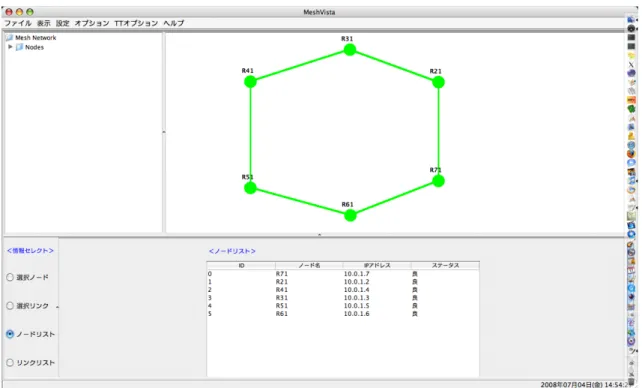
1グループから6グループのRMRを円になるように接続し、tracerouteコマンドやMeshVistaで確 認せよ。ただし、経路を制御しなければ、円状には接続できないので注意すること。経路を制御するコ マンドがRMRマニュアル中に記載されているので参考にすること。図1: MeshVista
ブラウザから RMR へ入り、Mesh Cruzerから goodNbr ip addres に繋げたいIPアドレスを記入。 終わったらRebootする。 MeshVista起動後、上のメニューからプロパティを選択。ここのGatewayにRMRのIPアドレスを 記入。自分たちの班は【192.168.71.1】。すると、視覚的に確認できるようになる。このときのMeshVista の状態を図1に示す。
課題
7
別紙の手順に従って、各グループ2回、自分のグループに設置されているRMRからAODVを用いて1hop、2hop、3hop、4hop、5hopのスループットを計測し、データを取得せよ。 実行結果 ======================================================= AODV 1回目 *1hop RMR:~# iperf -c 10.0.1.6 -i 1 ---Client connecting to 10.0.1.6, TCP port 5001
TCP window size: 16.0 KByte (default)
---[ 5] local 10.0.1.7 port 2078 connected with 10.0.1.6 port 5001
[ 5] 0.0- 1.0 sec 1008 KBytes 8.26 Mbits/sec [ 5] 1.0- 2.0 sec 1016 KBytes 8.32 Mbits/sec [ 5] 2.0- 3.0 sec 776 KBytes 6.36 Mbits/sec [ 5] 3.0- 4.0 sec 1016 KBytes 8.32 Mbits/sec [ 5] 4.0- 5.0 sec 968 KBytes 7.93 Mbits/sec [ 5] 5.0- 6.0 sec 968 KBytes 7.93 Mbits/sec [ 5] 6.0- 7.0 sec 1016 KBytes 8.32 Mbits/sec [ 5] 7.0- 8.0 sec 768 KBytes 6.29 Mbits/sec [ 5] 8.0- 9.0 sec 1008 KBytes 8.26 Mbits/sec [ 5] 9.0-10.0 sec 1008 KBytes 8.26 Mbits/sec [ 5] 0.0-10.0 sec 9.34 MBytes 7.81 Mbits/sec
*2hop
RMR:~# iperf -c 10.0.1.5 -i 1
---Client connecting to 10.0.1.5, TCP port 5001
TCP window size: 16.0 KByte (default)
---[ 5] local 10.0.1.7 port 2061 connected with 10.0.1.5 port 5001 [ 5] 0.0- 1.0 sec 520 KBytes 4.26 Mbits/sec
[ 5] 1.0- 2.0 sec 608 KBytes 4.98 Mbits/sec [ 5] 2.0- 3.0 sec 736 KBytes 6.03 Mbits/sec [ 5] 3.0- 4.0 sec 848 KBytes 6.95 Mbits/sec [ 5] 4.0- 5.0 sec 728 KBytes 5.96 Mbits/sec [ 5] 5.0- 6.0 sec 520 KBytes 4.26 Mbits/sec [ 5] 6.0- 7.0 sec 816 KBytes 6.68 Mbits/sec [ 5] 7.0- 8.0 sec 800 KBytes 6.55 Mbits/sec [ 5] 8.0- 9.0 sec 752 KBytes 6.16 Mbits/sec [ 5] 9.0-10.0 sec 664 KBytes 5.44 Mbits/sec [ 5] 0.0-10.0 sec 6.84 MBytes 5.72 Mbits/sec
*3hop
RMR:~# iperf -c 10.0.1.4 -i 1
---Client connecting to 10.0.1.4, TCP port 5001
TCP window size: 16.0 KByte (default)
---[ 5] local 10.0.1.7 port 3403 connected with 10.0.1.4 port 5001 [ 5] 0.0- 1.0 sec 520 KBytes 4.26 Mbits/sec
[ 5] 1.0- 2.0 sec 256 KBytes 2.10 Mbits/sec [ 5] 2.0- 3.0 sec 280 KBytes 2.29 Mbits/sec [ 5] 3.0- 4.0 sec 136 KBytes 1.11 Mbits/sec [ 5] 4.0- 5.0 sec 168 KBytes 1.38 Mbits/sec [ 5] 5.0- 6.0 sec 584 KBytes 4.78 Mbits/sec [ 5] 6.0- 7.0 sec 416 KBytes 3.41 Mbits/sec
[ 5] 7.0- 8.0 sec 512 KBytes 4.19 Mbits/sec [ 5] 8.0- 9.0 sec 520 KBytes 4.26 Mbits/sec [ 5] 9.0-10.0 sec 432 KBytes 3.54 Mbits/sec [ 5] 0.0-10.0 sec 3.74 MBytes 3.13 Mbits/sec
*4hop
RMR:~# iperf -c 10.0.1.3 -i 1
---Client connecting to 10.0.1.3, TCP port 5001
TCP window size: 16.0 KByte (default)
---[ 5] local 10.0.1.7 port 2721 connected with 10.0.1.3 port 5001 [ 5] 0.0- 1.0 sec 288 KBytes 2.36 Mbits/sec
[ 5] 1.0- 2.0 sec 216 KBytes 1.77 Mbits/sec [ 5] 2.0- 3.0 sec 104 KBytes 852 Kbits/sec [ 5] 3.0- 4.0 sec 264 KBytes 2.16 Mbits/sec [ 5] 4.0- 5.0 sec 312 KBytes 2.56 Mbits/sec [ 5] 5.0- 6.0 sec 296 KBytes 2.42 Mbits/sec [ 5] 6.0- 7.0 sec 288 KBytes 2.36 Mbits/sec [ 5] 7.0- 8.0 sec 208 KBytes 1.70 Mbits/sec [ 5] 8.0- 9.0 sec 256 KBytes 2.10 Mbits/sec [ 5] 9.0-10.0 sec 160 KBytes 1.31 Mbits/sec [ 5] 0.0-10.2 sec 2.34 MBytes 1.93 Mbits/sec
*5hop
RMR:~# iperf -c 10.0.1.2 -i 1
---Client connecting to 10.0.1.2, TCP port 5001
TCP window size: 16.0 KByte (default)
---[ 5] local 10.0.1.7 port 4907 connected with 10.0.1.2 port 5001 [ 5] 0.0- 1.0 sec 208 KBytes 1.70 Mbits/sec
[ 5] 1.0- 2.0 sec 264 KBytes 2.16 Mbits/sec [ 5] 2.0- 3.0 sec 168 KBytes 1.38 Mbits/sec [ 5] 3.0- 4.0 sec 0.00 Bytes 0.00 bits/sec [ 5] 4.0- 5.0 sec 16.0 KBytes 131 Kbits/sec [ 5] 5.0- 6.0 sec 16.0 KBytes 131 Kbits/sec [ 5] 6.0- 7.0 sec 192 KBytes 1.57 Mbits/sec [ 5] 7.0- 8.0 sec 168 KBytes 1.38 Mbits/sec [ 5] 8.0- 9.0 sec 64.0 KBytes 524 Kbits/sec [ 5] 9.0-10.0 sec 40.0 KBytes 328 Kbits/sec [ 5] 0.0-10.1 sec 1.12 MBytes 927 Kbits/sec
=======================================================
AODV 2回目
*1hop
RMR:~# iperf -c 10.0.1.6 -i 1
---Client connecting to 10.0.1.6, TCP port 5001
TCP window size: 28.9 KByte (default)
---[ 5] local 10.0.1.7 port 4683 connected with 10.0.1.6 port 5001 [ 5] 0.0- 1.0 sec 1.02 MBytes 8.59 Mbits/sec
[ 5] 1.0- 2.0 sec 1016 KBytes 8.32 Mbits/sec [ 5] 2.0- 3.0 sec 832 KBytes 6.82 Mbits/sec [ 5] 3.0- 4.0 sec 1.02 MBytes 8.59 Mbits/sec [ 5] 4.0- 5.0 sec 984 KBytes 8.06 Mbits/sec [ 5] 5.0- 6.0 sec 1.00 MBytes 8.39 Mbits/sec [ 5] 6.0- 7.0 sec 1.00 MBytes 8.39 Mbits/sec [ 5] 7.0- 8.0 sec 672 KBytes 5.51 Mbits/sec [ 5] 8.0- 9.0 sec 1000 KBytes 8.19 Mbits/sec [ 5] 9.0-10.0 sec 1.01 MBytes 8.45 Mbits/sec [ 5] 0.0-10.0 sec 9.46 MBytes 7.93 Mbits/sec
*2hop
RMR:~# iperf -c 10.0.1.5 -i 1
---Client connecting to 10.0.1.5, TCP port 5001
TCP window size: 16.0 KByte (default)
---[ 5] local 10.0.1.7 port 4444 connected with 10.0.1.5 port 5001 [ 5] 0.0- 1.0 sec 832 KBytes 6.82 Mbits/sec
[ 5] 1.0- 2.0 sec 784 KBytes 6.42 Mbits/sec [ 5] 2.0- 3.0 sec 856 KBytes 7.01 Mbits/sec [ 5] 3.0- 4.0 sec 768 KBytes 6.29 Mbits/sec [ 5] 4.0- 5.0 sec 608 KBytes 4.98 Mbits/sec [ 5] 5.0- 6.0 sec 784 KBytes 6.42 Mbits/sec [ 5] 6.0- 7.0 sec 808 KBytes 6.62 Mbits/sec [ 5] 7.0- 8.0 sec 800 KBytes 6.55 Mbits/sec [ 5] 8.0- 9.0 sec 736 KBytes 6.03 Mbits/sec [ 5] 9.0-10.0 sec 648 KBytes 5.31 Mbits/sec [ 5] 0.0-10.0 sec 7.45 MBytes 6.25 Mbits/sec
*3hop
RMR:~# iperf -c 10.0.1.4 -i 1
---Client connecting to 10.0.1.4, TCP port 5001 TCP window size: 16.0 KByte (default)
---[ 5] local 10.0.1.7 port 2560 connected with 10.0.1.4 port 5001 [ 5] 0.0- 1.0 sec 392 KBytes 3.21 Mbits/sec
[ 5] 1.0- 2.0 sec 320 KBytes 2.62 Mbits/sec [ 5] 2.0- 3.0 sec 384 KBytes 3.15 Mbits/sec [ 5] 3.0- 4.0 sec 296 KBytes 2.42 Mbits/sec [ 5] 4.0- 5.0 sec 224 KBytes 1.84 Mbits/sec [ 5] 5.0- 6.0 sec 80.0 KBytes 655 Kbits/sec [ 5] 6.0- 7.0 sec 432 KBytes 3.54 Mbits/sec [ 5] 7.0- 8.0 sec 440 KBytes 3.60 Mbits/sec [ 5] 8.0- 9.0 sec 232 KBytes 1.90 Mbits/sec [ 5] 9.0-10.0 sec 360 KBytes 2.95 Mbits/sec [ 5] 0.0-10.0 sec 3.09 MBytes 2.59 Mbits/sec
*4hop
RMR:~# iperf -c 10.0.1.3 -i 1
---Client connecting to 10.0.1.3, TCP port 5001
TCP window size: 16.0 KByte (default)
---[ 5] local 10.0.1.7 port 3653 connected with 10.0.1.3 port 5001 [ 5] 0.0- 1.0 sec 376 KBytes 3.08 Mbits/sec
[ 5] 1.0- 2.0 sec 328 KBytes 2.69 Mbits/sec [ 5] 2.0- 3.0 sec 376 KBytes 3.08 Mbits/sec [ 5] 3.0- 4.0 sec 368 KBytes 3.01 Mbits/sec [ 5] 4.0- 5.0 sec 352 KBytes 2.88 Mbits/sec [ 5] 5.0- 6.0 sec 360 KBytes 2.95 Mbits/sec [ 5] 6.0- 7.0 sec 200 KBytes 1.64 Mbits/sec [ 5] 7.0- 8.0 sec 368 KBytes 3.01 Mbits/sec [ 5] 8.0- 9.0 sec 360 KBytes 2.95 Mbits/sec [ 5] 9.0-10.0 sec 272 KBytes 2.23 Mbits/sec [ 5] 0.0-10.0 sec 3.29 MBytes 2.75 Mbits/sec
*5hop
RMR:~# iperf -c 10.0.1.2 -i 1
---Client connecting to 10.0.1.2, TCP port 5001
TCP window size: 16.0 KByte (default)
---[ 5] local 10.0.1.7 port 2847 connected with 10.0.1.2 port 5001 [ 5] 0.0- 1.0 sec 184 KBytes 1.51 Mbits/sec
[ 5] 1.0- 2.0 sec 88.0 KBytes 721 Kbits/sec [ 5] 2.0- 3.0 sec 16.0 KBytes 131 Kbits/sec
[ 5] 3.0- 4.0 sec 144 KBytes 1.18 Mbits/sec [ 5] 4.0- 5.0 sec 272 KBytes 2.23 Mbits/sec [ 5] 5.0- 6.0 sec 272 KBytes 2.23 Mbits/sec [ 5] 6.0- 7.0 sec 272 KBytes 2.23 Mbits/sec [ 5] 7.0- 8.0 sec 264 KBytes 2.16 Mbits/sec [ 5] 8.0- 9.0 sec 192 KBytes 1.57 Mbits/sec [ 5] 9.0-10.0 sec 176 KBytes 1.44 Mbits/sec [ 5] 0.0-10.1 sec 1.84 MBytes 1.54 Mbits/sec
=======================================================
課題
8
計測が終わったら、各グループ毎にデータをまとめ、ホップ数v.s.スループットの表を作成せよ。 課題7で得られた各自のデータ2つの平均を取ったものを表1に示す。 PPPPPP PPPP group hop1hop 2hop 3hop 4hop 5hop group1 (10.0.1.2) 9.43 5.91 3.61 2.99 2.26 group2 (10.0.1.3) 8.69 5.90 4.05 2.90 2.51 group3 (10.0.1.4) 9.24 6.07 3.56 3.25 1.68 group4 (10.0.1.5) 8.80 6.37 4.44 3.57 2.53 group5 (10.0.1.6) 10.7 6.70 4.92 3.61 2.42 group6 (10.0.1.7) 7.87 5.99 2.66 1.84 1.23 表1 : AODV の結果
課題
9
別紙の手順に従い、OLSRを用いて、課題7と同様のスループット測定をせよ。 実行結果 ======================================================= OLSR 1回目 *1hop RMR:~# iperf -c 10.0.1.6 -i 1 ---Client connecting to 10.0.1.6, TCP port 5001TCP window size: 16.0 KByte (default)
---[ 5] local 10.0.1.7 port 2817 connected with 10.0.1.6 port 5001 [ 5] 0.0- 1.0 sec 824 KBytes 6.75 Mbits/sec
[ 5] 2.0- 3.0 sec 1.04 MBytes 8.72 Mbits/sec [ 5] 3.0- 4.0 sec 848 KBytes 6.95 Mbits/sec [ 5] 4.0- 5.0 sec 1.05 MBytes 8.85 Mbits/sec [ 5] 5.0- 6.0 sec 928 KBytes 7.60 Mbits/sec [ 5] 6.0- 7.0 sec 1.05 MBytes 8.78 Mbits/sec [ 5] 7.0- 8.0 sec 664 KBytes 5.44 Mbits/sec [ 5] 8.0- 9.0 sec 1.05 MBytes 8.85 Mbits/sec [ 5] 9.0-10.0 sec 1.06 MBytes 8.91 Mbits/sec [ 5] 0.0-10.0 sec 9.52 MBytes 7.97 Mbits/sec
*2hop
RMR:~# iperf -c 10.0.1.5 -i 1
---Client connecting to 10.0.1.5, TCP port 5001
TCP window size: 16.0 KByte (default)
---[ 5] local 10.0.1.7 port 4301 connected with 10.0.1.5 port 5001 [ 5] 0.0- 1.0 sec 792 KBytes 6.49 Mbits/sec
[ 5] 1.0- 2.0 sec 936 KBytes 7.67 Mbits/sec [ 5] 2.0- 3.0 sec 952 KBytes 7.80 Mbits/sec [ 5] 3.0- 4.0 sec 736 KBytes 6.03 Mbits/sec [ 5] 4.0- 5.0 sec 920 KBytes 7.54 Mbits/sec [ 5] 5.0- 6.0 sec 936 KBytes 7.67 Mbits/sec [ 5] 6.0- 7.0 sec 928 KBytes 7.60 Mbits/sec [ 5] 7.0- 8.0 sec 936 KBytes 7.67 Mbits/sec [ 5] 8.0- 9.0 sec 624 KBytes 5.11 Mbits/sec [ 5] 9.0-10.0 sec 928 KBytes 7.60 Mbits/sec [ 5] 0.0-10.0 sec 8.49 MBytes 7.12 Mbits/sec
*3hop
RMR:~# iperf -c 10.0.1.4 -i 1
---Client connecting to 10.0.1.4, TCP port 5001
TCP window size: 16.0 KByte (default)
---[ 5] local 10.0.1.7 port 4859 connected with 10.0.1.4 port 5001 [ 5] 0.0- 1.0 sec 48.0 KBytes 393 Kbits/sec
[ 5] 1.0- 2.0 sec 248 KBytes 2.03 Mbits/sec [ 5] 2.0- 3.0 sec 552 KBytes 4.52 Mbits/sec [ 5] 3.0- 4.0 sec 576 KBytes 4.72 Mbits/sec [ 5] 4.0- 5.0 sec 424 KBytes 3.47 Mbits/sec [ 5] 5.0- 6.0 sec 600 KBytes 4.92 Mbits/sec [ 5] 6.0- 7.0 sec 568 KBytes 4.65 Mbits/sec [ 5] 7.0- 8.0 sec 560 KBytes 4.59 Mbits/sec [ 5] 8.0- 9.0 sec 672 KBytes 5.51 Mbits/sec
[ 5] 9.0-10.0 sec 480 KBytes 3.93 Mbits/sec [ 5] 0.0-10.0 sec 4.62 MBytes 3.87 Mbits/sec
*4hop
RMR:~# iperf -c 10.0.1.3 -i 1
---Client connecting to 10.0.1.3, TCP port 5001
TCP window size: 16.0 KByte (default)
---[ 5] local 10.0.1.7 port 2351 connected with 10.0.1.3 port 5001 [ 5] 0.0- 1.0 sec 568 KBytes 4.65 Mbits/sec
[ 5] 1.0- 2.0 sec 464 KBytes 3.80 Mbits/sec [ 5] 2.0- 3.0 sec 496 KBytes 4.06 Mbits/sec [ 5] 3.0- 4.0 sec 352 KBytes 2.88 Mbits/sec [ 5] 4.0- 5.0 sec 408 KBytes 3.34 Mbits/sec [ 5] 5.0- 6.0 sec 424 KBytes 3.47 Mbits/sec [ 5] 6.0- 7.0 sec 448 KBytes 3.67 Mbits/sec [ 5] 7.0- 8.0 sec 504 KBytes 4.13 Mbits/sec [ 5] 8.0- 9.0 sec 440 KBytes 3.60 Mbits/sec [ 5] 9.0-10.0 sec 424 KBytes 3.47 Mbits/sec [ 5] 0.0-10.1 sec 4.43 MBytes 3.69 Mbits/sec
*5hop
RMR:~# iperf -c 10.0.1.2 -i 1
---Client connecting to 10.0.1.2, TCP port 5001
TCP window size: 16.0 KByte (default)
---[ 5] local 10.0.1.7 port 2985 connected with 10.0.1.2 port 5001 [ 5] 0.0- 1.0 sec 312 KBytes 2.56 Mbits/sec
[ 5] 1.0- 2.0 sec 264 KBytes 2.16 Mbits/sec [ 5] 2.0- 3.0 sec 280 KBytes 2.29 Mbits/sec [ 5] 3.0- 4.0 sec 296 KBytes 2.42 Mbits/sec [ 5] 4.0- 5.0 sec 288 KBytes 2.36 Mbits/sec [ 5] 5.0- 6.0 sec 360 KBytes 2.95 Mbits/sec [ 5] 6.0- 7.0 sec 280 KBytes 2.29 Mbits/sec [ 5] 7.0- 8.0 sec 0.00 Bytes 0.00 bits/sec [ 5] 8.0- 9.0 sec 456 KBytes 3.74 Mbits/sec [ 5] 9.0-10.0 sec 280 KBytes 2.29 Mbits/sec [ 5] 0.0-10.2 sec 2.76 MBytes 2.26 Mbits/sec
=======================================================
*1hop
RMR:~# iperf -c 10.0.1.6 -i 1
---Client connecting to 10.0.1.6, TCP port 5001
TCP window size: 21.7 KByte (default)
---[ 5] local 10.0.1.7 port 4237 connected with 10.0.1.6 port 5001 [ 5] 0.0- 1.0 sec 1.00 MBytes 8.39 Mbits/sec
[ 5] 1.0- 2.0 sec 1.09 MBytes 9.11 Mbits/sec [ 5] 2.0- 3.0 sec 1.12 MBytes 9.44 Mbits/sec [ 5] 3.0- 4.0 sec 712 KBytes 5.83 Mbits/sec [ 5] 4.0- 5.0 sec 1.08 MBytes 9.04 Mbits/sec [ 5] 5.0- 6.0 sec 928 KBytes 7.60 Mbits/sec [ 5] 6.0- 7.0 sec 1.08 MBytes 9.04 Mbits/sec [ 5] 7.0- 8.0 sec 904 KBytes 7.41 Mbits/sec [ 5] 8.0- 9.0 sec 976 KBytes 8.00 Mbits/sec [ 5] 9.0-10.0 sec 1.05 MBytes 8.85 Mbits/sec [ 5] 0.0-10.0 sec 9.87 MBytes 8.27 Mbits/sec
*2hop
RMR:~# iperf -c 10.0.1.5 -i 1
---Client connecting to 10.0.1.5, TCP port 5001
TCP window size: 16.0 KByte (default)
---[ 5] local 10.0.1.7 port 3245 connected with 10.0.1.5 port 5001 [ 5] 0.0- 1.0 sec 920 KBytes 7.54 Mbits/sec
[ 5] 1.0- 2.0 sec 696 KBytes 5.70 Mbits/sec [ 5] 2.0- 3.0 sec 880 KBytes 7.21 Mbits/sec [ 5] 3.0- 4.0 sec 872 KBytes 7.14 Mbits/sec [ 5] 4.0- 5.0 sec 832 KBytes 6.82 Mbits/sec [ 5] 5.0- 6.0 sec 856 KBytes 7.01 Mbits/sec [ 5] 6.0- 7.0 sec 928 KBytes 7.60 Mbits/sec [ 5] 7.0- 8.0 sec 896 KBytes 7.34 Mbits/sec [ 5] 8.0- 9.0 sec 824 KBytes 6.75 Mbits/sec [ 5] 9.0-10.0 sec 800 KBytes 6.55 Mbits/sec [ 5] 0.0-10.0 sec 8.31 MBytes 6.96 Mbits/sec
*3hop
RMR:~# iperf -c 10.0.1.4 -i 1
---Client connecting to 10.0.1.4, TCP port 5001
---[ 5] local 10.0.1.7 port 2834 connected with 10.0.1.4 port 5001 [ 5] 0.0- 1.0 sec 520 KBytes 4.26 Mbits/sec
[ 5] 1.0- 2.0 sec 624 KBytes 5.11 Mbits/sec [ 5] 2.0- 3.0 sec 496 KBytes 4.06 Mbits/sec [ 5] 3.0- 4.0 sec 536 KBytes 4.39 Mbits/sec [ 5] 4.0- 5.0 sec 616 KBytes 5.05 Mbits/sec [ 5] 5.0- 6.0 sec 616 KBytes 5.05 Mbits/sec [ 5] 6.0- 7.0 sec 560 KBytes 4.59 Mbits/sec [ 5] 7.0- 8.0 sec 520 KBytes 4.26 Mbits/sec [ 5] 8.0- 9.0 sec 608 KBytes 4.98 Mbits/sec [ 5] 9.0-10.0 sec 648 KBytes 5.31 Mbits/sec [ 5] 0.0-10.1 sec 5.62 MBytes 4.68 Mbits/sec
*4hop
RMR:~# iperf -c 10.0.1.3 -i 1
---Client connecting to 10.0.1.3, TCP port 5001
TCP window size: 16.0 KByte (default)
---[ 5] local 10.0.1.7 port 2443 connected with 10.0.1.3 port 5001 [ 5] 0.0- 1.0 sec 128 KBytes 1.05 Mbits/sec
[ 5] 1.0- 2.0 sec 280 KBytes 2.29 Mbits/sec [ 5] 2.0- 3.0 sec 304 KBytes 2.49 Mbits/sec [ 5] 3.0- 4.0 sec 416 KBytes 3.41 Mbits/sec [ 5] 4.0- 5.0 sec 416 KBytes 3.41 Mbits/sec [ 5] 5.0- 6.0 sec 432 KBytes 3.54 Mbits/sec [ 5] 6.0- 7.0 sec 504 KBytes 4.13 Mbits/sec [ 5] 7.0- 8.0 sec 456 KBytes 3.74 Mbits/sec [ 5] 8.0- 9.0 sec 496 KBytes 4.06 Mbits/sec [ 5] 9.0-10.0 sec 408 KBytes 3.34 Mbits/sec [ 5] 0.0-10.1 sec 3.76 MBytes 3.13 Mbits/sec
*5hop
RMR:~# iperf -c 10.0.1.2 -i 1
---Client connecting to 10.0.1.2, TCP port 5001
TCP window size: 16.0 KByte (default)
---[ 5] local 10.0.1.7 port 2461 connected with 10.0.1.2 port 5001 [ 5] 0.0- 1.0 sec 408 KBytes 3.34 Mbits/sec
[ 5] 1.0- 2.0 sec 280 KBytes 2.29 Mbits/sec [ 5] 2.0- 3.0 sec 368 KBytes 3.01 Mbits/sec [ 5] 3.0- 4.0 sec 232 KBytes 1.90 Mbits/sec [ 5] 4.0- 5.0 sec 552 KBytes 4.52 Mbits/sec
[ 5] 5.0- 6.0 sec 872 KBytes 7.14 Mbits/sec [ 5] 6.0- 7.0 sec 752 KBytes 6.16 Mbits/sec [ 5] 7.0- 8.0 sec 368 KBytes 3.01 Mbits/sec [ 5] 8.0- 9.0 sec 208 KBytes 1.70 Mbits/sec [ 5] 9.0-10.0 sec 360 KBytes 2.95 Mbits/sec [ 5] 0.0-10.0 sec 4.30 MBytes 3.59 Mbits/sec
=======================================================
課題
10
課題9で得られた各自のデータを課題8と同様にまとめよ。 課題9で得られた各自のデータ2つの平均を取ったものを表2に示す。 PPPPPP PPPP group hop1hop 2hop 3hop 4hop 5hop group1 (10.0.1.2) 9.55 5.27 3.30 3.60 2.71 group2 (10.0.1.3) 10.1 7.96 6.98 6.49 4.42 group3 (10.0.1.4) 9.67 7.57 3.91 3.83 3.24 group4 (10.0.1.5) 12.7 7.32 5.34 6.12 4.01 group5 (10.0.1.6) 11.9 6.61 5.80 6.09 4.16 group6 (10.0.1.7) 8.12 7.20 4.28 3.41 2.93 表2 :OLSR の結果
課題
11
AODVとOLSRそれぞれについて、ホップ数とスループットの関係を考察せよ。 AODV• Ad-hoc On-demand Distance Vector Routing Protocolの略。
距離ベクトル型のルーティングプロトコルである。したがって各ノードはネットワークの全体像 を知らず、宛先ノードと次ホップの情報のみでルーチングを行う。
• OLSRと比べると、ホップ数が増えるにつれてスループットも大きく減っている。それぞれの1hop
と5hopを比べてみても、全体的にAODVのほうが小さい。
OLSR
• Optimized Link State Routingの略。Proactive型のルーティングプロトコル。各ノードがMPR
集合を隣接ノードから選ぶことによって、効率的なフラッディングが行なえる。
• AODVと比べると、ホップ数が増えるにつれてスループットも減るのは同じだがその量は緩やか である。そのため、双方の5hopを比べると、OLSRの方が大きい。
課題
12
両方のプロトコルの結果を比較せよ。 課題11でも述べたように、AODVよりもOLSRの方がより多くのデータを転送できるので こちらの方が良い。課題
13
メッシュネットワークの構築に関して、感想を述べよ。 思っていたよりも簡単にネットワークの構築ができたので、とても面白かった。説明書を読んでもあ まり理解できなかったのが残念。いつでも人に聞ける環境に居る訳ではないので、自分で仕様書を理解 できるようになりたい。参考ページに RMRでネットワークを広げる試みがされている、とあったので 興味を持った。ちょっと見てみたい。参考文献
• @IT:【トレンド解説】メッシュ・ネットワーク http://www.atmarkit.co.jp/fnetwork/trend/20030404/broadband.html • Thinktube Inc. -製品&サービス http://www.thinktube.com/products/ • iperf http://homepage2.nifty.com/protocol/iperf/iperf.htm • 外部記憶装置: AODVとは http://dailyblog.justblog.jp/blog/2007/11/aodv 3eff.html• 第6回OLSR (Optimized Link State Routing) プロトコル
http://internet.watch.impress.co.jp/www/column/wp2p/wp2p06.htm
• LaTexコマンドシート一覧
http://www002.upp.so-net.ne.jp/latex/
• LaTex -コマンド一覧