Received 3 December 2020; Revised 12 December 2020; Accepted 14 December 2020; Available online 16 December 2020
Data Processing Note
https://dx.doi.org/10.14889/jpdm.2020.0004
jPOST Tools (I): Utilities for Peak List Processing
Tsuyoshi Tabata
1, Akiyasu C. Yoshizawa
1*, Yasushi Ishihama
1* 1. Graduate School of Pharmaceutical Sciences, Kyoto University, Kyoto 606-8501, JapanORCID: Akiyasu C. Yoshizawa: https://orcid.org/0000-0002-0870-5502 ORCID: Yasushi Ishihama: https://orcid.org/0000-0001-7714-203X
* Corresponding authors.
E-mail addresses: [email protected] (A. C. Yoshizawa) and [email protected] (Y. Ishihama)
© 2020 The Authors. This is an open access article under the CC BY license (https://creativecommons.org/licenses/by/4.0/).
Keywords
Peak picking, Peak list, Mass spectrometry, Software
Abstract
We implemented utilities for generating peak lists: scripts written in Ruby or PHP to split the MGF format peak list file, to integrate results of different peak picking algorithms into a single MGF file, and to modify peak lists generated by ProteoWizard.
1. Introduction
For the analysis of mass spectrometry data from proteome samples, several steps must be paid attention to, the first of which is the generation of peak list. Although programs distributed by mass spectrometer vendors, or mscovert.exe by ProteoWizard [1] are commonly used to generate peak lists; these may not be suitable for the purpose. Herein, we have implemented single function tools to solve these problems. For example, raw data files generated by modern high-performance mass spectrometers may result in huge .mgf files of more than 500 MB, which are time-consuming to perform database search and may cause communication errors to the computational server; e.g. the Mascot server. Our PeaklistSplit splits the files to reduce the search time per search. As the precursor ion for each product ion spectrum, the mass spectrometer tends to select the peak with the greatest intensity in the isotope cluster of interest, not necessarily the monoisotopic ion, and the m/z of the precursor ion may not be properly recorded, especially in the case of high molecular weight ions. We have thus created two tools to address this issue: ProteoWizardPlist and ProteoWizardPlistW. In addition, for use in the ongoing proteome database jPOST [2,3], multiple peak lists are generated from a single raw data in some cases. We developed PeakListMerge, a tool to merge multiple peak lists into a single list to control the false discovery rate based on target-decoy search [4,5].
2. Software Feature
Four packages and three of their wrappers are released. See Supplementary 1 for the overview and availability of each. In the following description, all path names must be absolute path names when running in a Windows environment.
2.1. PeakListSplit
2.1.1. Software Summary
PeakListSplit splits the input peak list into multiple peak lists.
2.1.2. Usage
PeakListSplit.php inFile outFileBaseName ms2Limit
outFileBaseName ... the main part of the output file name (with path) of the peak list (MGF format), which can be specified in the same format as the
printf statement.
e.g. In a case where foobar.%s.split.mgf was specified and the file was split into three parts, the resulting file names will be foobar.0.split.mgf,
foobar.1.split.mgf, and foobar.2.split.mgf (the sequential numbering starts at 0).
If sequential numbering such as %s is not specified, the split result is overwritten with the same file name. The output location of the output file can be specified by including a path in the file name.
ms2Limit ... the upper limit of the number of MS/MS spectra to be stored in a single MGF file. Recommended value = 100000
2.2. PeakListMerge
2.2.1. Software Summary
PeakListMerge merges two or more single spectral-derived peak lists generated by different peak picking algorithms into a single peak list. It cannot be used to merge multiple different spectral-derived peak lists into a single peak list (For the latter purpose, for example, the UNIX ‘cat’ command can be used).
If the original peak list contains peaks which are supposed to be derived from a same precursor ion, no duplication is made based on the scan number and the ion's valence. For the corresponding product ion peaks, users select which peak picking algorithm result is to be adopted; product ion peaks are not merged. Users can customize such that only those peaks with peak intensity greater than or equal to the specified cutoff value will be kept (thins out smaller peaks to prevent too many peaks remaining in the merged peak list).
The input original peak list file name (with path) and the output merged peak list file name (with path) are given as JSON arguments (to keep the number of arguments constant, regardless of the number of the original peak list files).
2.2.2. Usage
PeakListMerge.rb pepTol pepTolU ms2Select ms2minInt inOutFile.json
pepTol ... tolerance value for checking precursor ion duplication. Recommended value = 20
pepTolU ... units for the above argument. Recommended value = ppm [ppm|Da]
ms2Select ... specification of the peak picking algorithm to be used against the original peak list to be employed as product ion peaks. Recommended
value = Wizd [Pilot|MSconverter| Wizd|Dsco] (ProteinPilot, MS converter, ProteoWizard and Proteome Discoverer, respectively)
ms2minInt ... product ion threshold for thinning out less intense peaks from the peak list. Recommended value = 0
inOutFile.json ... The names of all (two or more) input original peak list MGF files (with paths) and the name of the output merged peak list MGF file
(with paths), formatted in the json format. See the following formatting example for details. inFile1/2.mgf.txt are the input file names and peakListName.mgf.txt is the output file name, respectively.
Example of inOutFile.json: { "inFileAry": [ "(path name)/inFile1.mgf.txt", "(path name)/inFile2.mgf.txt" ], "outFile": "(path name)/peakListName.mgf.txt" } 2.3. ProteoWizardPlist / ProteoWizardPlistW 2.3.1. Software Summary
ProteoWizardPlist ... For use with Thermo Fisher .raw files. ProteoWizardPlistW ... For use with SCIEX .wiff files.
ProteoWizardPList/ProteoWizardPlistW runs the msconvert.exe file (ProteoWizard) to perform peak picking and processes its output. Generally, the monoisotopic peak of a peptide will be the lowest mass peak of the isotopic peaks, however, msconvert may sometimes misinterpret the higher mass isotopic peaks as monoisotopic peaks and output these values. This tool checks for isotopic peaks on the lower mass side and corrects for the value if incorrect assignments are made.
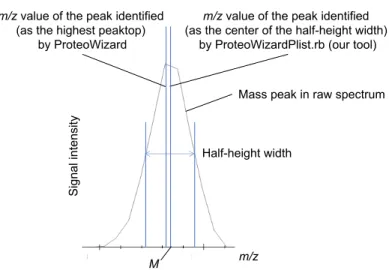
Each peak is often obtained as a distorted (asymmetrical) angular figure rather than a smooth peak shape; as a result, the m/z values that give off-center maxima of the peaks may be identified as peaks. Therefore in the following process, the median of the entire peak's half-width is re-identified as the tentative true peak value for all peaks. In addition, the precursor ion charge value which was returned by ProteoWizard is adopted as is.
The first step of this tool is to (i) obtain the median of m/z half-width (M) of the peak picked by msconvert, and (ii) check if there are any isotope peaks with smaller m/z than or equal to M+pepTol (where pepTol is the specified value); the m/z value of the precursor ion is converted into Dalton and the range of 3, 4, and 5 isotopic peak intervals is searched for, depending on the magnitude of the value. (iii) If there are no isotopic peaks below the range of m/z of M+pepTol (where pepTol is the specified value), the process terminates there and returns the M value. (iv) If an isotopic peak is found at a suitable interval, heights of the peaks are compared and the m/z value of the lowest mass peak is returned.
Figure 1. An example based on real data showing the difference between peak picking with ProteoWizard msconvert and peak picking at step (i).
2.3.2. Usage
ProteoWizardPlist.rb inFile outFile pepTol pepTolUnit dummy ProteoWizardPlistW.rb inFile outFile pepTol pepTolUnit dummy
inFile ... raw input file name (with path) (.raw/.wiff file)
outFile ... output peak list file name (with path) (MGF file)
pepTol ...tolerance value. Recommended value = 9
pepTolUnit ... Unit of pepTol value [ppm|Da]. Recommended value = ppm
dummy ... dummy parameters required for normal operation. Recommended value = dummy
2.4. plistsplit.pl / plistmerge.pl / proteowizardplist.pl
2.4.1. Software Summary
These are wrapper tools for using PeakListSplit.php, PeakListMerge.rb, ProteoWizardPlist.rb or ProteoWizardPlistW.rb, respectively. The arguments are simply the input and output file names with paths, and the recommended values are used for all parameters to execute the corresponding script. Plistmerge.pl automatically generates a json file for the PeakListMerge.rb input. This json file is generated with the name "inOutFile.json" in the directory where the output file is.
In addition, proteowizardplist.plx executes ProteoWizardPlist.rb or ProteoWizardPlistW.rb, whichever is more appropriate, according to the file extension of the input file.
m/z value of the peak identified
(as the highest peaktop)
by ProteoWizard
m/z value of the peak identified
(as the center of the half-height width)
by ProteoWizardPlist.rb (our tool)
Half-height width
m/z
S
ig
na
l i
nt
en
si
ty
M
2.4.2. Usage of plistsplit.pl
plistsplit.pl inFile outFileBaseName ms2Limit
inFile ... input file name (with path) of the peak list (MGF format)
outFileBaseName ... the main part of the output peak list (MGF format) file name (with path). The file name format of the output file will be
outFileBaseName.%s.split.mgf. If split into three pieces, the resulting file name will be foobar.0.split.mgf, foobar.1.split.mgf, and foobar.2.split.mgf (sequential numbers start at 0). If a file with the same name exists in the directory (folder), it will be overwritten.
ms2Limit ... the upper limit of the number of MS/MS spectra to be stored in a single MGF file (any input). If omitted, the recommended value for
PeakListSplit = 100000 is used.
2.4.3. Usage of plistmerge.pl
plistmerge.pl inFile1 inFile2 ………inFilen outFile
inFilen ... enumerate all (two or more) of the input original peak list MGF file names (with path)
outFile ... output peak list/MGF file name (with path). Determines the last argument as the output file name.
2.4.4. Usage of proteowizardplist.pl
proteowizardplist.pl inFile outFile
inFile ... input raw data file name (with path). Run ProteoWizardPlist.rb or ProteoWizardPlistW.rb, whichever is more appropriate, depending on
whether the file has a .raw or .wiff extension.
outFile ... output peak list MGF file name (with path)
2.5. Use and results
The performance of ProteoWizardPlist.rb was evaluated. One raw data file (150211tk04-whole_2m8h-4.raw) of public data JPST000200 (PXID: PXD005159) was used as raw data, and was analyzed by Mascot search against Swiss-Prot (Release2020_01, 42,362 sequences including isoform). Decoy sequences were obtained as reverse sequences of the target sequences. The search results were sorted by Mascot Ion Score, and those with FDR=1% were obtained as the final results.
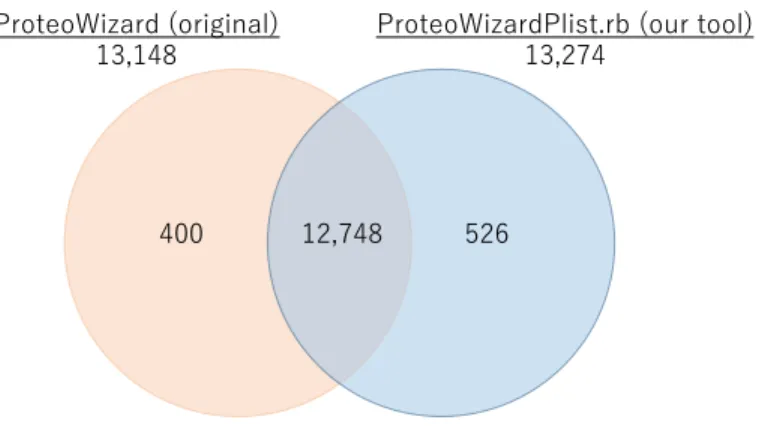
Figure 2. Search results using ProteoWizard and ProteoWizardPlist.rb.
As shown in Figure 2, most of the search results matched, but about 3% of the total results were assigned to different peptides, increasing the overall number of assigned results by about 1% by using ProteoWizardPlist.rb.
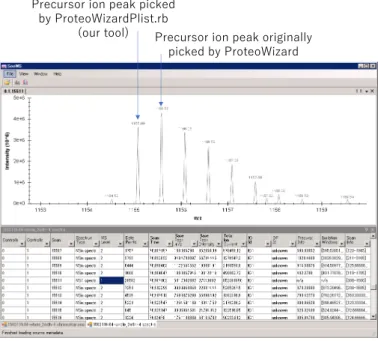
Figure 3 shows an example where a peptide was not assigned in ProteoWizard but was assigned in ProteoWizardPlist.rb in this dataset, as an example that ProteoWizardPlist.rb determined a monoisotopic peak being different from the original peak determined by ProteoWizard.
ProteoWizard (original)
13,148
ProteoWizardPlist.rb (our tool)
13,274
12,748
Figure 3. Example of an different monoisotopic peak assignment.
The original ProteoWizard determined the peak at m/z 1155.59 to be the monoisotopic peak, while ProteoWizardPlist.rb determined the peak at m/z 1155.09 to be the monoisotopic peak. This is an example of a case where ProteoWizard missed the lowest mass side of the isotopic peak and our tool succeeded in its identification.
It is important to note, however, that there are cases where our tool has identified peaks that should not have been so.
3. Installing the software
3.1. Installed directories
Each of these four tools can be installed independently, but the configuration of the directory (folder) to be installed is fixed and unchangeable (because the path name is hard-encoded and will not work if changed). The structure and name of the directory should be as follows:
Figure 4. Software directory structure.
In Figure 4, each symbol indicates the following:
(Name): a directory named Name
[Name]: a file named Name
(A) - (B): B is a subdirectory of A
(A)-[B]: there is a file B in the directory A
Precursor ion peak originally
picked by ProteoWizard
Precursor ion peak picked
by ProteoWizardPlist.rb
(our tool)
(Arbitrary Name) (JobRequestCmd20201127)<Arbitrary Name>
(bin) <Arbitrary Name> (JobObjects) (PeakListMerge) (PeakListSplit) (ProteoWizardPlist) (ProteoWizardPlistW) (ProteoWizard) [plistsplit.plx], [plistmerge.plx], [proteowizardplist.plx]
See details on GitHub
<Arbitrary Name>: indicates that the name of the directory can be changed from the original distribution name to an arbitrary name
Also, within the directory “JobObject/ProteoWizard,” the ProteoWizard package, an external open source software suite distributed under the Apache license by ProteoWizard (http://proteowizard.sourceforge.net/), is automatically installed; it is used by ProteoWizardPlist and ProteoWizardPlistW. In case of installing ProteoWizard separately, it is not available from these programs.
To save time and effort for installation, these programs are distributed as a single zipped file. At
https://github.com/jPOST-tools/JobRequestCmd20201127, click “Code” and select “Download ZIP” to download the zip file. Then, place the zip file in an arbitrary directory and unzip it, and the file will unpack as shown above.
Since these scripts only refer to their own directories, users can delete directories of programs that users do not use. There are no restrictions on adding other directories. Since the Perl scripts refer to their corresponding programs by relative paths, users can install them at any location by rewriting the paths.
3.2. Software Requirements
ProteoWizardPlist and ProteoWizardPlistW each require a separate program distributed by the mass spectrometer vendor.
3.2.1. ProteoWizardPlist
msfilereader 2.2 from Thermo Fisher is required. Installation location is optional.
3.2.2. ProteoWizardPlistW
WiffReader from SCIEX is required; a license must be obtained from SCIEX and a license key must be filled in the following file.
JobObjects/ProteoWizardPlistW/SearchMonoIsotope/SearchMonoIsotope/Program.cs (line number:47). Fill in the * section below correctly (required to launch WiffReader)
--- @"<?xml version=""1.0"" encoding=""utf-8""?> <license_key> <company_name>***************************</company_name> <product_name>***************************</product_name> <features>***************************</features> <key_data>***************************</key_data> </license_key>" --- After filling the license key and saving, Program.cs on Microsoft Visual Studio must be compiled.
This will generate a SearchMonoIsotope.exe file. The location (path) of this file can be specified in the following:
JobObjects/ProteoWizardPlistW/ProteoWizardPlistW0.08/Configure.rb (line number:35). By default, the path is set to
JobObjects/ProteoWizardPlistW/SearchMonoIsotope/SearchMonoIsotope/bin/Debug/SearchMonoIsotope.exe.
Acknowledgments
This work was supported by the Database Integration Coordination Program of the National Bioscience Database Center (NBDC), Japan Science and Technology Agency [15650519, 18063028].
Conflict of Interest
References
[1] Chambers, M.C., MacLean, B., Burke, R., Amode, D., Ruderman, D.L., Neumann, S., Gatto, L., Fischer, B., et al., Nature Biotechnology 2012 30, 918-920.
[2] Okuda,S.; Watanabe,Y.; Moriya,Y.; Kawano,S.; Yamamoto,T.; Matsumoto,M.; Takami,T.; Kobayashi,D.; Araki,N.; Yoshizawa,A.C.; Tabata,T.; Sugiyama,N.; Goto,S.; and Ishihama,Y., Nucleic Acids Res. 2017 45(D1), D1107–D1111.
[3] Moriya,Y.; Kawano,S.; Okuda,S.; Watanabe,Y.; Matsumoto,M.; Takami,T.; Kobayashi,D.; Yamanouchi,Y.; Araki,N.; Yoshizawa,A.C.; Tabata,T.; Iwasaki,M.; Sugiyama,N.; Tanaka,S.; Goto,S.; and Ishihama,Y., Nucleic Acids Res. 2019 47(D1), D1218–D122
[4] Elias, J.E; Haas, W.; Faherty, E. K.; Gygi, S. P., Nature Methods, 2005 2, 667-675. [5] Elias, J.E.; Gygi, S. P., Nature Methods, 2007 4, 207-214.