Jedemo: Demonstrational Authoring Tool for Java Applets
Motoki Miura and Jiro Tanaka
Institute of Information Sciences and Electronics, University of Tsukuba
Tennodai 1-1-1, Tsukuba, Ibaraki 305-8573 Japan {miuramo, jiro}@iplab.is.tsukuba.ac.jp
ABSTRACT
We propose applying demonstration-authoring facilities for applet-based systems. In this paper, we describe a system, which assists applet developers to prepare animated help contents for the web users of their applets.
We have developed Jedemo authoring system and the animator. The applet developers only need to prepare their target applets. Jedemo authoring system captures event-objects generated by user actions from the target applet and displays the event objects as icons. If the developer adds some rules, the captions of the action are generated automatically. Jedemo animator as a demonstration shows the actions and the generated captions. The web users will watch the demonstration and understand the use of the target applet without any trouble.
Jedemo authoring system and the animator are suited for almost all applets. Developers can plug-in Jedemo facilities to their applets. This framework is helpful for both the applet developers and the applet users.
INTRODUCTION
The internet technology, especially World Wide Web technology, has recently become very popular. All sorts of information can easily be accessed using Web browsers.
Most Web browsers can execute Java applets. An applet is a small program, which is transferred from a server via network and executed on the client machine.
Recently, software developers utilize Web for making their products public. Their main purpose is to provide the trial versions of the system to the users. There are two
advantages in presenting the system as an applet. One is reducing user's trouble, because an applet can be downloaded automatically and the user does not have to actually install the system. The other is reducing the version-up cost. Developers can provide users the latest bug-fixed system any time. We could say that applet-based systems have upgrading property.
When software developers upgrade their system, they also need to modify its help documents. It is inefficient to re-edit the old help documents in case the system has changed in appearance or interface. The developers need to describe the new functions from the scratch.
In this paper, we describe an authoring system that allows developers to prepare typical demonstrations for their applets. An animated help (Sukaviriya 1988) means showing a demonstration of the system's behavior. This demonstration is performed with a pseudo mouse cursor as if someone is operating.
WHY IS DEMONSTRATIONAL HELP SUITABLE FOR JAVA APPLETS?
Although textual representation is common for expressing help messages, we have adopted the demonstrational method for our authoring system. It is because of two reasons. First, the demonstration, which shows concrete examples, is fit for explaining the behavior of graphical user interfaces. The users can understand the sequence of operations in an intuitive sense. Second, the demonstration can be constructed easier than text. The demonstration changes the target system by sending event-objects, which emulate user actions. We call the emulating process as “event-driven method.” The event-driven method is more flexible than the movie-playing one. The developers can generate the demonstrational help based on the event-driven method by
recording event-objects.
MECHANISM FOR EVENT-DRIVEN METHOD
An event-driven demonstration needs an event-control mechanism. This mechanism must include three functions: initializing, recording and playing. In order to realize these functions, we adopt the “embedded applet”
mechanism (Miura and Tanaka 1998). The embedded applet adds the event-handling functions to the target applet. It can also embed any type of applet because it works as a special applet-viewer. Figure 1 shows the embedded applet mechanism. We call the embedded applet as “manager.”
The “manager” looks for graphical components: button, panel, and so on, within the target applet and constructs a hierarchical tree model of the components. After the tree model is constructed, the manager adds extra event-listeners to the components. The event-listeners catch event-objects generated by user action, and send them to the manager. Then the manager records the event-objects with information of their source component.
The information is used to throw back the event-object to the source component while playing. This happens because a link to the source component becomes invalid when we play back the recorded event-objects.
COMMAND AND COMMAND-RULE
An event-object usually represents a low-level action such as MouseMove. When it comes to edit a demonstration, we prefer to rearrange high-level actions rather than low-level ones. We introduce the concept of “command,”
which represents one action, made up of a collection of event-objects. Each command is identified by a caption which represents its meaning. The caption can be used not only for editing but also for showing the command list in the demonstration to the user.
The manager is required to obtain the meaning of a
“command” from sequences of event-objects. However, the implementation of the target system varies on how it handles event-objects. Some systems may consider MouseMove events while the others may not. The target applet does not know the existence of the manager, and it is not supposed to provide the information about its implementation.
To provide the implementation knowledge for the manager, we need to arrange “command-rules” for generating commands. A command-rule relates an event-object pattern with a command. We can define the event-object pattern by simple regular expressions. The command-rule collates an event-object stream with the pattern. If matched, a new command corresponding to the
event-object stream is generated. The new command is automatically labeled by the command-rule. When playing, the generated command can invoke smart methods instead of low-level ones with event-objects.
THE PROCESS OF PRODUCING DEMON- STRATION
Target Applet
As a sample of an applet, we have implemented a graph editor applet (GraphApplet). GraphApplet adopts a direct manipulation interface for editing a graph. GraphApplet can layout the nodes by clicking a button. In GraphApplet, the node dragging operation is used for creating a new child node, moving the node, creating a link and deleting a link or node. When you drag down to the node, a new linked child node is generated. When you drag up, the node is moved. Moving the node outside the applet means deleting it.
Jedemo author
The system, named Jedemo (Java Event-driven DEMOnstration) author, is a Java application based on an
“embedded applet” framework. Jedemo author helps developers to prepare a demonstration.
choose a target applet
First, the developer selects a file, which specifies a target applet. When an HTML file is selected, Jedemo author parses the file and looks for the applet's class name from the applet tag.
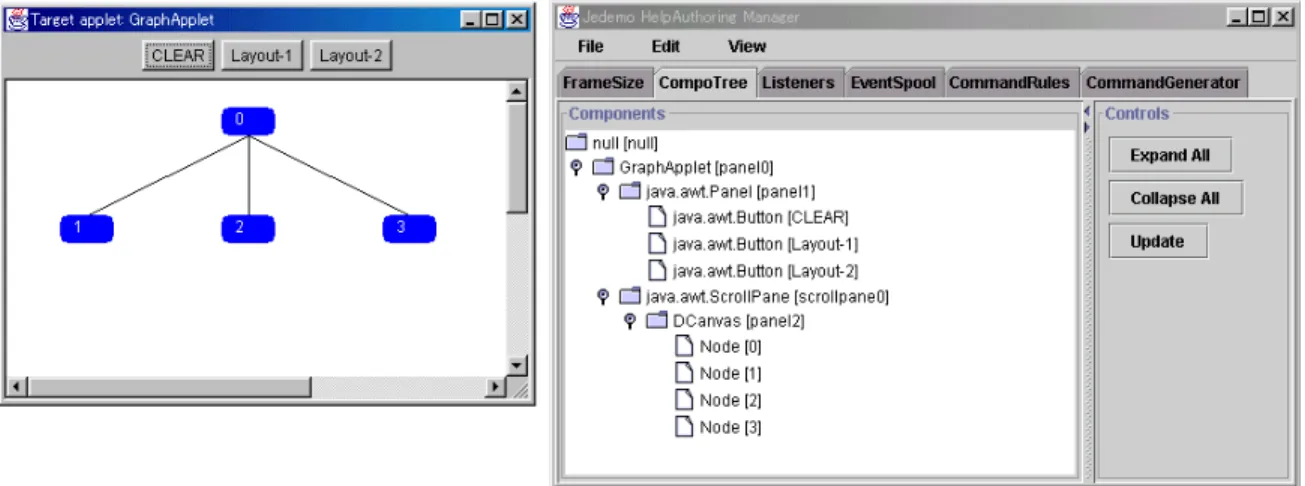
Jedemo author invokes the target applet from the class name and collects the components (Figure 2). After that, some extra event-listeners are added to the components for collecting event-objects.
record as events (path one)
In order to prepare command-rules for the target applet, the developer operates the applet, which is loaded by Jedemo author. Actions performed on the applet generate event-objects. These event-objects are sent to the Jedemo author via extra event-listeners. Each collected event-object is shown as an icon (Figure 3).
After collecting the sample actions, the developer defines a “separator.” The stream of recorded event-objects is composed of effective parts and ineffective parts. The separator picks up the effective sequence of event-objects, which may become a command. We set the types of ineffective event-objects as a separator. In this example case, MouseExited, MouseEntered and MouseMoved event-types are defined as the separator for GraphApplet.
Then Jedemo author looks at the collected event-objects (from the beginning, one by one), checking whether the event-object is an element of the separator set or not.
After applying the separator, the sample event-objects are separated into some rows. Each row except for the separator one represents a candidate command.
The developer modifies the candidate commands by specifying the MouseDragged event-objects so that they can represent a MouseDragged event sequence of any length. In order to modify the candidates, the developer selects an area of the MouseDragged events. After being modified, the specified event-objects are replaced by symbol icons, which stand for “a collection of more than one MouseDragged event.”
After that, Jedemo author collects the unique candidates and generates new command-rules by pressing the
“generate Command-Rules” button. Each collected candidate becomes a pattern of the generated command-rule. A command-rule editor can edit the separator and generated command-rules. The developer makes up the command-rules by adding caption rules to each pattern (Figure 4). The caption rule is used to generate captions to the event sequences automatically.
The caption rule can insert dynamic texts such as component names, button labels, and so on. The dynamic text is generated by the method of the target system's object. To specify the object, we provide these indicators:
@press, @release, @add, @added, @remove,
@removed and @action. Each indicator corresponds to an event source object. For example, a description
create node @add.getLabel() as a child of
@press.getLabel() is replaced with
create node [node number] as a child of [node number]. Every method, which returns a textual value, can be specified.
record as commands (path two)
After preparing these command-rules, the developer operates the applet again. The recorded event-objects are automatically labeled by these command-rules. Therefore once the command-rules are prepared, the developer does not have to write a description of each action in the demonstration. Jedemo author stores the labeled event-object as “command.” The stored commands become a demonstration.
make public the target applet with demonstration Jedemo author outputs an HTML file, which includes rewritten applet tags for publicizing the target applet. The following is the rewritten tag, a fragment source of the HTML file.
Jedemo animator
The user who specifies the new HTML file will see the demonstrational edition of the target applet which is loaded by Jedemo animator like in Figure 5. Jedemo animator also works like an applet-viewer but it can replay recorded commands. If the user wants to watch the demonstration, he only presses the “Start DEMON- STRATION” button. The indices of operation appear in the control window. The animated demonstration is performed by moving the pseudo mouse cursor and by showing some pop-up messages while playing.
DISCUSSION
Though our techniques intend to support all kinds of applets and applications, there is an undesirable case caused by target system's implementation. It is a case when the system includes “drawn components” which are simply drawn on the base component. Usually an application consists of many graphical elements: icons, buttons, menus and so on. These elements can be recognized and identified by Jedemo, because they inherit the component class. However, if these elements are drawn on a base component, it is hard for Jedemo to observe what is happening in the component.
We believe that the demonstrational help is suitable especially for applets because they will be updated frequently. Our help method is valid even if the GUI elements are moved, since it does not have any dependence on these locations.
RELATED WORK
We often see applications, which record the user's action and use them. Macro is popular in editing tools, which may be operated for repetitive tasks. Metamouse (Maulsby 1989) and EAGER (Cypher 1991) detect a repetitive task and generate macros. Chimera (Kurlander and Feinter 1992) shows the generated macros with visual representation. For code generation, Peridot (Myres 1987) makes specification of direct manipulation interface from example actions. Such programming by demons- tration/example systems is powerful for reducing the complicated operations, but it does not focus on presentations.
Bharat (1995) argues about what is needed for the X window system to perform a certain script language. In Macintosh, AppleScript generates a script, which is executable and editable. TkReplay (Crowley 1996) is a system which records and replays actions on Tcl/Tk.
Jedemo tools are intended for general Java applets and applications.
Cartoonist (Sukaviriya and Foley 1990) generates an animated help from UI specification automatically. We work on the generation of the help demonstration without any specifications. If the target system has been developed, Jedemo manager can obtain events occurred in that system.
CONCLUSIONS
We have implemented demonstration-authoring tools for Java applets. Jedemo authoring system enables the developers to make the general applet's demonstration with minimum cost. The command-rules can be reused even if the target system is changed. This technique is of great benefit for both of the developers and the users of applets.
REFERENCES
Apple Computer, Inc., “Introduction to the Macintosh Family – Second Edition.”
Bharat K., Sukaviriya P. and Hudson S., 1995,
“Synthesized Interaction on the X Window System,”
Technical Report 95-07, Graphics and Usability Center, Georgia Tech, USA.
Crowley C., 1996, “TkReplay: Record and Replay for Tk,” In USENIX Tcl/Tk Workshop Toronto, pages 131-140.
Cypher A., 1991, “Eager: Programming Repetitive Tasks by Example,” In Proceedings of CHI, pages 33-39.
Kurlander D. and Feinter S., 1992, “A History-Based Macro By Example System,” In Proceedings of the ACM Symposium on User Interface Software and Technology, pages 99-106.
Maulsby D. L., Witten I. H. and Kittlitz K. A., 1989,
“Metamouse: Specifying Graphical Procedures by Example,” In Proceedings SIGGRAPH ’89, pages 127-136.
Miura M. and Tanaka J., 1998, “A Framework for Event-driven Demonstration based on the Java Toolkit,”
In Asia Pacific Computer Human Interaction (APCHI-98), pages 331-336.
Myers B. A., 1988, “Creating Dynamic Interaction Techniques by Demonstration,” In Proceedings of the ACM SIGGRAPH User Interface Software Symposium, Banff, Canada, pages 190-202.
Sukaviriya P., 1988, “Dynamic Construction of Animated Help from Application Context,” In Proceedings of the ACM SIGGRAPH User Interface
Software Symposium, Banff, Canada, pages 190-202.
Sukaviriya P. and Foley J. D., 1990, “Coupling A UI Framework with Automatic Generation of Context-Sensitive Animated Help,” In Proceedings of the ACM Symposium on User Interface Software and Technology, pages 152-166.
FIGURES
Figure 1: “Embedded applet” mechanism: Jedemo manager applet works as a special applet-viewer. The manager applet adds event-handling functions to the target applet.
Figure 2: Jedemo author looks for the target applet and reconstructs its component structure. The component structure is shown as a tree view.
Figure 3: The recorded event objects are shown as icons.
Jedemo author collects not only mouse event-objects but also some high-level event-objects such as
component-added and action-performed ones.
Figure 4: The developer makes up the command-rules by adding caption rules to each pattern. The caption rule can insert dynamic texts such as component names, button labels, and so on. In this figure, the label of operated node is specified with “@add” and “@press” indicators.
Figure 5: This figure shows the user's view; the Jedemo animator is playing the demonstration, which is recorded by a
developer. (The user can skip some scenes of the demonstration.)