JAIST Repository
https://dspace.jaist.ac.jp/
Title 異種コンピュータ環境における協調仮想都市景観デザ
イン
Author(s) Stefanus, Sarwono Rahadi Citation
Issue Date 2004‑03
Type Thesis or Dissertation Text version author
URL http://hdl.handle.net/10119/1799 Rights
Description 堀口進, 情報科学研究科, 修士
Collaborative Virtual City Design in Heterogeneous Computer Environment
By Stefanus S. Rahadi
A thesis submitted to School of Information Science,
Japan Advanced Institute of Science and Technology, in partial fulfillment of the requirements
for the degree of
Master of Information Science Graduate Program in Information Science
Written under the direction of Professor Susumu Horiguchi
March, 2004
Collaborative Virtual City Design in Heterogeneous Computer Environment
By Stefanus S. Rahadi (210103)
A thesis submitted to School of Information Science,
Japan Advanced Institute of Science and Technology, in partial fulfillment of the requirements
for the degree of
Master of Information Science Graduate Program in Information Science
Written under the direction of Professor Susumu Horiguchi
and approved by
Professor Susumu Horiguchi
Professor Hong Shen
Professor Yasushi Hibino
February, 2004 (Submitted)
Abstract
This research proposed a method to collaborate using networked virtual environment with ability to support heterogeneous computer environment. For such collaboration, we introduce collaboration using remote event. Remote event can be seen as a message sent from one system to other system to activate the functionality on the designated system.
By selecting appropriate event to trigger appropriate remote event, our method enables collaborative city design in heterogeneous computer environment.
To support collaboration using remote event, we adopt client-server model for our system configuration. In addition, we also have to design special behavior of server and clients in order to allow real-time visualization and real-time interaction with virtual environment. In server side, we introduces the method to filter unnecessary events before generating remote event, which keeps the system latency low when the system load is high. As for client side, we introduce the ability to transmit selected event as candidate for remote event, while processing all other events locally. Such ability makes lower server load and enables clients with various platforms and devices to collaborate.
We have built our system consisting one server and several clients. We use various type of clients with compeletely different specification. The clients are ranging from usual computer with keyboard and mouse as input devices and usual monitor as an output device to a very realistic immerse virtual environment generator as an output devices and motion trackers and 3D mouse as input devices. Using these machines, we performed experiments and evaluated system response time in performing city design task. The result proved that our system can serve real-time visualization and interaction as well as supporting heterogeneous computer environment.
Finally, from experiment, we have proven that the performance of our system is very good, where users can have very fast system response and real-time visualization in col- laboration. The system is also very scalable, as the experiment results show the system can take a huge load of events while still keeps low system latency.
It’s all begun with some simple words uttered several years ago...
One of the best things encountered, as I stay in this blue spherical planet whatsoever called earth, happens to be a programming language known as C++; beautiful, simple and yet powerful, as
well as destructive.
And now, here I am.
Acknowledgements
My highest praise to God as I finished my research and thesis. I would like to thank God for allowing me to walk my path in this blue planet and for His divine intervention throughout my life.
I would never finish my research and thesis if I did not get support, cooperative, advises, and help from many people. In this opportunity, I am gratefully honored to thank the following people.
I am gratefully honored to thank Professor Horiguchi for giving me chances to continue my study in Japan and for letting me do what I like the most as I do my research. I have gotten so many supports, but to be honest I could not repay all what he has done. All I can do is to express this gratitude. Thank you very much.
I also would like to thank our laboratory members, especially my long time friends, Fukushi, Yazawa, Matsushima, Sugawara, Fujii, Toda, Ishikawa, Sakai, Hai, and last but not the least Okazaki (not our laboratory member though, but he deserves it). I have gotten so many support from doing casual chit-chat to hearing my demented technical murmurs. I had my best friends once and they will always be my best friends after all.
For all my friends at MacOpenGL, “Thank you very much.” Thank you for our great time in playing with codes, bugs, everything, and for being my inspiration in implementing my system. I could not found any better resources for graphic programming other than asking you all directly. You guys are the greatest.
To my very best friends in Indonesia, I could not express enough gratitude for our best time from junior high up to present. To Dennis, Martinez, and many others that I could not mention in this short paragraph, no friend is better than you are. They are the best of my lifetime.
And at last, I could not be here without any support of all my families in Indonesia.
Their support and caring made everything impossible in my life become possible. Thank you for standing beside me every time and catching me as I fell. Especially to my mother and father, Sunny and David, also my little sister and little brother, Karen and Ruben, all my highest honor and appreciation are theirs.
Stefanus S. Rahadi
Contents
1 Introduction 1
1.1 Collaborative City Design and its Problems . . . 2
1.2 Approach for Solving Collaboration Problems . . . 3
1.3 Research Purpose and Objectives . . . 4
1.4 Thesis Overview . . . 5
2 Collaborative System 6 2.1 Collaboration in Virtual Reality . . . 6
2.2 Collaboration in Networked Virtual Environment . . . 7
2.3 Sharing Virtual Environment with Other Separate System . . . 8
2.4 Collaboration in Heterogeneous Environment . . . 9
2.5 Summary . . . 11
3 Remote Event Based Collaboration for City Design System 12 3.1 Client-Server Model For Collaboration in Heterogeneous Computer Envi- ronment . . . 13
3.2 Collaboration Using Remote Event . . . 15
3.3 Remote Event Selection Based on System Behavior . . . 18
3.4 Representing Virtual Environment Using Separate Scene-graph and Database 21 3.5 Socket-based Collaboration Network and Communication Unit . . . 23
3.6 Summary . . . 24
4 Collaboration System Behavior in Heterogeneous Computer Environ- ment 25 4.1 Collaboration Server with Independent Processes . . . 25
4.2 General Client Behavior to Collaborate in Heterogeneous Computer Envi-
ronment . . . 27
4.3 Collaborating Using Common Personal Computer as Client . . . 30
4.4 Immerse Virtual Environment for Collaboration . . . 32
4.4.1 Using Gesture to Change User Viewpoint . . . 33
4.4.2 Detecting Object Selection in Immerse Virtual Environment . . . . 35
4.4.3 Controller for Immerse Virtual Environment . . . 37
4.5 Summary . . . 38
5 Performance for Collaborating in Heterogeneous Computer Environ- ment 39 5.1 Remote Event Performance in Networked Virtual Environment . . . 39
5.2 Collaboration System Scalability . . . 41
5.3 Response Time Evaluation for Remote Events . . . 41
5.4 Server’s Load for Real-time Interaction with Virtual Environment . . . 46
5.5 Ability to Create Remote Event for Real-time Collaboration . . . 48
5.6 Remote Event’s Latency and Event Filtering . . . 49
5.7 Summary . . . 53
6 Conclusions 54
Bibliography 57
List of Publications 59
Appendix 60
A CAVE System 60
List of Figures
3.1 System configuration . . . 14
3.2 Remote event creation . . . 16
3.3 Data structure of a remote event . . . 17
3.4 Average number of virtual interaction event and other event . . . 19
3.5 Scene-graph and database . . . 22
4.1 Server’s activity diagram . . . 26
4.2 Sequential diagram of client’s collaboration process . . . 28
4.3 Collaboration using Mac client . . . 31
4.4 Screen shot of Mac client . . . 32
4.5 Diagram of CAVE client . . . 33
4.6 Touching object in virtual environment . . . 35
4.7 Interaction using CAVE client . . . 38
5.1 Experimental virtual environment for city design . . . 40
5.2 System response time for 1 to 4 clients . . . 42
5.3 System response time for 4 clients collaboration . . . 44
5.4 System response time for 1 client . . . 45
5.5 Server’s processing time . . . 47
5.6 Remote event creation . . . 49
5.7 Effect of event filter . . . 50
A.1 The CAVE system . . . 61
A.2 Stereo images rendered for left eye and right eye . . . 62
A.3 Shutter glasses and wand . . . 63
Chapter 1 Introduction
In the recent years, computational power advances at an incredible speed. This huge computational power become available not only on high-end workstations, but also on personal computers. This revolution has brought a new era in computing where computer has become an indispensable part in our every day life.
The power to generate visualization or graphics has also increased at a tremendous speed compared to increases of computational power. This advancement is also followed by the availability of graphics system on all computers, ranging from expensive graphic workstations to humble personal digital assistant, making the visualization task which once can only be performed on fast graphic workstation can be done on common personal computers.
One of the field in computer science which exploits computational power and graphic power is virtual reality. For many years, researchers and practitioners have proven that virtual reality helps to evaluate a huge amount of data by generating visualization which gives higher understanding over the data and higher interaction with the data. However, virtual reality requires a huge computational power to process data and requires graphic power to generate visualization out of those data to be presented to its users.
Advantages of virtual reality have made many tasks to consider visualization as their tools to evaluate data. Tasks such as urban planning, architectural design, mechanical design, which depend heavily on data visualization to evaluate the result, consider virtual reality as an requirement. Using virtual reality, practitioners can see directly what they are doing, what the results are and also interact directly with the data.
As a matter of fact, the demand of virtual reality functionality does not stop up to this point. Otherwise practitioners demand interaction with the data and at the same
time collaborate with each other at the same space. While collaboration becomes the most promising feature of virtual reality, collaboration also becomes the hardest part to implement. One of the main reasons is the compatibility and the ability to synchronize between two or more computers to achieve shared sense of space, shared sense of presence, and shared sense of time. This problem will become more difficult if the participants of collaboration uses different computers with different specifications, platforms, and devices.
1.1 Collaborative City Design and its Problems
The availability of huge computation power makes virtual reality technology have the ability to realize various very complex collaboration systems. One of the collaboration tasks that took the advantages of these improvements is urban planning, especially city design [1]. Such task will need all the computation power available to generate realistic 3D visualization for supporting decision making on design phase.
City design is a task of arranging an area with artistic and functional features as its primary consideration. This task will obviously depend heavily on visualization for evaluation process. Realistic visualization will allow city designers to accurately judge the arrangement of buildings and other sites. City designers will work together to arrange the appearance a city, judge and evaluate any result together, as well as to perform discussion with other designers.
As the nature of city design task itself, city designing is considered as a collaboration task that seems to be unequivocally done by several people. City designers are demanding the availability of collaboration support along with the demand of highly realistic visu- alization. In supporting collaboration task, the system must consist of several machines connected with network in order to perform collaboration. Such system will obviously rely on fast-reliable network to support real-time virtual environment update in all par- ticipating systems.
Collaboration in city design needs a collaborative virtual environment where all the participants can modify the environment at the same time. Because this research uses clients which reside on separated place from the other, collaborative virtual environment has to be connected by a network. This can be called as networked virtual environment [2].
The most important character in networked virtual environment is the users are located
in geographically separated places. In this kind of system, typically each user will have his or her own workstation. Networked virtual environment can be a very powerful solution for solving collaboration in virtual reality. As this virtual environment gives the users freedom to modify virtual environment freely at the same time, it also allows the users to work independently without disturbing other users.
While networked virtual environment can be a good solution for collaboration, this virtual environment suffers from a bottle-neck which comes from the network itself. Pre- vious researches on networked virtual reality use various methods to do collaboration, such as heart-beat packet that will be sent at a constant rate or flooding the network by packets in order to achieve real-time interaction. Until now, network is incapable to send huge amount of data in a very fast speed to feed a graphic device. Therefore a method to optimize data usability transmitted over the network and to reduce amount of data transmission is required to achieve real-time interaction.
The other problem arises from heterogeneity aspect. In the recent years, there are many platforms available commercially. Creating a system which accessible to all platforms will be very difficult. The heterogeneity in data representation, input and output devices, even system behavior will make a system is facing a difficulty when collaborating with other systems.
1.2 Approach for Solving Collaboration Problems
From these aspects, we have made the requirement for our system as a system to support collaborative virtual city design. Collaborative virtual city design requires 3D real-time visualization and it must have the ability to collaborate with other users on other ma- chines. Since the system will use several machines which are possibly different machines and different platforms, our systems will also require the support of heterogeneous com- puter environment.
In this research, we propose a system for supporting collaborative city design in 3D virtual environment. The system will enable 3D real-time visualization and real-time collaboration among systems with different specification, platform, and even devices.
The system we proposed is configured as client-server system, where the server will con- trol all the collaboration and all the interaction to the virtual environment. Clients consist of several machines with different specifications and platforms. Users can use their own
workstations to collaborate as clients, giving them freedom to collaborate independently.
To make this collaboration works, we introduce a method which adopts sending event via network to perform collaboration across all participating systems. This event can be called as remote event. By using this remote event, the system updates its virtual environment on server and clients. Thus, the user can share the same virtual environment with all participating users.
By using remote event, the amount of data that must be transmitted over the network can be reduced. The result of using such method not only reduces the network load, but also reduces the server load. Other advantages on using remote event method came from dependencies of virtual environment data. Remote event method allows virtual environment data to be managed locally on each client, therefore these data are not depending on data that are transmitted over the network.
We have implemented the proposed system on heterogeneous computer environment consists of various machines with various platforms. From our implementation, we can conclude that the system can deliver 3D real-time visualization for city design task and also enables users to participate on real-time collaboration with each other. Our imple- mentation also supports heterogeneity in system environment, where our system allows system with immerse virtual environment generated by CAVE (CAVE Automatic Virtual Environment) to interact with other systems which use common interfaces.
1.3 Research Purpose and Objectives
This research is dedicated for proposing a system that can support city design task by providing real-time 3D visualization and collaboration. This system must support hetero- geneous computer environment in performing collaboration task. By supporting hetero- geneity on system, the user will have the freedom to choose their own suitable client to collaborate with each other and systems can deliver the full advantages of each machine as they collaborate.
The objective of this research is to propose a method that can solve the problem re- garding real-time 3D collaboration in heterogeneous computer environment. The pro- posed method will be implemented as a software layer to eliminate heterogeneity among computers and allows them to interact. This software layer will be tested on city design application. However, the design of this software layer will not be limited to be used in
city design application only.
1.4 Thesis Overview
Chapter 1 introduces brief introduction to virtual reality and collaboration, especially virtual reality system for city design task. This chapter also includes our brief approach to solve problem of collaboration in heterogeneous computer environment.
Chapter 2 discusses the existing virtual reality collaboration system, not limited to city design system. In this chapter, we also show some previous researches related to this research along with their advantages and disadvantages.
Chapter 3 describes our proposed system for supporting city design utilizing real-time visualization and real-time collaboration. We also explain how heterogeneous clients can work together in collaboration.
Chapter 4 explains our approach in designing general server and client behavior in order to collaborate together in the same virtual environment. We also describe our design in making clients, consist of common personal computer and immerse virtual environment system, to implement general client behavior along with their own behavior.
Chapter 5 explains various observations obtained from the real experiment on city design task using networked virtual environment on heterogeneous computer environment.
We evaluate the performance of remote event itself and the performance of the system when it receives huge loads.
Finally, chapter 6 concludes all the discussions in this research. In this conclusion chapter, we also describe the possible improvements for this research and future works that have to be done to take this research to the next level..
Chapter 2
Collaborative System
This chapter discusses the collaboration in virtual reality. Here we will describe all the problems related to generating 3D real-time visualization and collaborating with other participants in heterogeneous computer system, that will lead to proposing a system to support city design task.
2.1 Collaboration in Virtual Reality
Performing collaboration in virtual reality can be done in two ways. The first type of collaboration is by using one machine that can be shared with other participants. The second type of collaboration is by using several computers, where each participant will get their own workstation to perform their task.
The first type of collaboration can be seen in a research performed by Coors et al.
[3] which uses virtual table as their interface to interact with virtual environment. This research only uses one computer to generate and display the visualization. The user have to share the same workspace with the other users in order to perform collaboration.
This type of collaboration will have an advantage that the user can feel the presence of other users and collaborate as they are designing an urban area using real model.
Conversely, the participants will have limited freedom to look from different angle or to look at different area, because all participants will have to share the same viewing area.
The other disadvantage is the users do not have direct access to interact with virtual environment. Instead the user will have to ask the others in order to interact with virtual environment.
Karsenty et al. [4] and Valin et al. [5] use the second type of collaboration. In their researches, users are located in different place and equipped by their own workstation to perform the collaboration. The advantage of using such collaboration is they provide more freedom for the participant to change their own viewpoint and manage their own states without interference from other participants. The other advantage comes from the ability of user to directly interact with the virtual environment. Despite the advantages, there are two problems that become the main disadvantages of such collaboration, which are the lack of presence of other users and the difficulty in referring to an object in virtual environment.
This research emphasize on providing collaboration between users and giving them freedom to them to manage their own client and freedom to directly manipulate virtual environment. For this purpose, this research prefers the second type of collaboration and let the user to collaborate using their own preferred client. By giving the user freedom to choose their own suitable client, a problem regarding heterogeneity of the participating client arises. To deal with such problem, this research proposed the method to eliminate heterogeneity and collaborate in real-time 3D virtual environment.
2.2 Collaboration in Networked Virtual Environment
To realize the collaboration as mentioned in Section 2.1, we build our virtual environment based on a networked virtual environment. Singhal et al. [2] defines the networked virtual environment as a system that allows multiple users to interact with each other in real- time, even though those users are located in geographically different places. Obviously, the networked virtual environment will consist of several computers which can communicate over the network and allows a user to collaborate with other participating users.
The research in networked virtual environment started in 1983. Bolt, Beranek, New- man, Perceptronics, and Delta Graphics proposed SIMNET (simulator networking) [6] in which the virtual environment was intended to investigate on how to make a low-cost, high-quality simulators and how to connect these simulators with each other to maintain consistent virtual environment. SIMNET itself is a simulator for training combat army.
This simulator delivered to US ARMY in 1990.
SIMNET is proven to have a very good performance along with an excellent scalability.
SIMNET has shown a very good performance while using a large number of 3D objects in the scene. SIMNET has also shown that the maintaining virtual environment by using information packet sent via network can be a good solution for collaborating over the network.
There are several systems similar to SIMNET, such as SGI Flight and Dogfight. Gray Tarolli from SGI developed Flight for a demo program runs on SGI workstations [2]. At the beginning of 1984, networking ability was added to Flight. Then in early 1985, some SGI programmers modified Flight and made Dogfight where players can shoot each other and interact with each other. The bandwidth requirement of Dogfight is very big, as packets were transmitted at very high rate and flooded the network as large bandwidth was not available at that time.
Collaboration in this research will be performed by sending and receiving packets among the participating computers. Virtual environment will be updated according to these packets. Even now excellent networks that can provide huge bandwidth for collaboration available commercially, this research tries to cut the size of packets delivered to perform collaboration. Huge size of packets will only make high network load and it takes time to process such packets. From our research, we have proven that efficient collaboration can be achieved by using a small data packet called remote events.
2.3 Sharing Virtual Environment with Other Separate System
While focused on collaboration using numbers of workstation connected with network, a system which can share virtual environment and view the virtual environment from many viewpoint is required. The user must be able to change their own viewpoint without interfering the other user and vice versa. This will lead to a new problem in referring to a specific object.
Valin et al. [5] have implemented a system with capability of sharing viewpoints in collaborative virtual environments for interior arrangement. They have used one work- station per user. They have also used Java with DISCIPLE framework to interact with other clients. As the result, they have proven that providing independent workspace to user which is not disturbed by the other user is very useful.
The previous research also adds the ability to share others viewpoint to their system.
They implement sharing viewpoint by giving the functionality for one user to look at the virtual environment from other user’s viewpoint. As the result, they have proven that sharing viewpoint can be very helpful for referring to specific object. And this has been a very helpful feature, especially in the virtual environment contains many similar objects.
This research enables the user to have their own independent workspace and the ability to directly modify the virtual environment without any interference with other user. They even have the ability to independently manage their own corresponding device states in collaboration. These states will not bother the users which use different devices. In this way, we can collaborate with every machine in the system, even that the other systems have different platform and input-output devices.
Compared to the previous research, the proposed system adds support to heterogeneous environment that allows various devices to interact together. These features become the main advantage and a problem in implementing shared viewpoint as the previous research.
Unfortunately, the functionality to allow a user to look from other users’ viewpoint have not been implemented yet. Proposed system aimed to support 3D collaboration in hetero- geneous computer environment, which includes different output devices. On our system, one of the system that will be the candidate for collaboration is CAVE which has the ability to generate immerse virtual environment. We are having a lot of troubles to syn- chronize between users with usual output devices and users with CAVE as their output devices. Considering sharing viewpoint feature become more and more important, we will include this feature in our future work to improve this collaboration system.
2.4 Collaboration in Heterogeneous Environment
Along with the availability of computers, assorted types of computer itself become avail- able publicly. This includes different machines, architecture, platforms, and operating systems. Even these systems can do the same computation or tasks with the same or sim- ilar results, but one system is barely the same as with other systems in term of executing commands and interacting with the user.
In collaboration, the user will likely choose their own suitable system that they are familiar with. Giving user freedom to choose their own suitable system will lead to col- laboration problem, which collaboration is likely to be done in homogeneous computer environment. In homogeneous computer environment, systems are acting similarly and
using the same input-output devices to interact with each other. Thus collaboration can be carried out easily. Unlike collaboration in homogeneous computer environment, het- erogeneous computer environment produces more problems in collaboration. Supporting heterogeneous computer environment in collaboration means making different platform with different interaction paradigm to work together on one virtual environment.
Unfortunately, previous researches [5] [6] suffer one drawback from heterogeneity aspect.
They do not support interaction with other different machines with different platforms.
In this way, the user will have to learn how to use the system before they perform the collaboration. This includes they have to learn how to interact with special input devices as Magellan SpaceMouse [5].
There is a research which supports heterogeneity in collaboration. Karsenty et al. [4]
have developed an application for shared editing in 2D drawing. Their system allows the users to work with their own workstations and share the same 2D drawing context.
The system they proposed enables the user to draw from their own workstations. In this research, they focused on Mac and UNIX as machines for collaboration.
Obviously, Mac and UNIX do not have the same type of drawing contexts for collab- oration. They attempted to create a virtual machine to allow the execution of drawing commands from other machines with other platforms. The availability of collaboration in heterogeneous environment happens to give the users wider usability of the virtual environment itself. They stated that their system is very useful for virtual meeting where the users with different type of machines and platforms share the same drawing board to express their ideas. There is however, one drawback in their research. The drawback came from the availability of realistic 3D visualization. This is very reasonable, because they have designed their application for 2D drawing, not 3D modeling. For collaborating in 3D, especially for collaborative city design, their software design may not be useful.
We propose the system for supporting heterogeneous computer environment. Our sys- tem allows the users to choose their own system to interact with each other. They can choose usual PC to collaborate efficiently. Otherwise they can use CAVE system to gener- ate immerse virtual environment for realistic 3D visualization which concedes the user to directly evaluate the design as if in real world. Thus the designers will have the freedom to choose their preferred degree of reality in doing collaboration.
2.5 Summary
This chapter described currently available collaboration systems, not limited to collabo- ration for city design. Based on result and observation of these researches, we collect all required features to be included in the proposed system. The proposed system is required to have the ability to give users direct interaction with virtual environment from their own preferred workspace. Such system requires to use networked virtual environment to enable collaboration and requires to support heterogeneous computer environment in order to give users freedom in choosing their own suitable client.
Chapter 3
Remote Event Based Collaboration for City Design System
City design is a task in urban planning which arranges buildings and sites with artistic and functionality as the primary consideration. This task definitely requires virtual reality, because 3D graphic visualization will allow city designers to evaluate the design before deploying on real sites. The availability of more realistic visualization allows city designers to evaluate their design more accurate and easier.
City design task is a multi-person task, where several city designers and other partici- pants work together to make the best decisions. Usually, they perform their work by using real model of city terrain and real model of buildings and sites to design and evaluate city areas. They perform their collaboration with these models. The disadvantage on using such models is definitely come from the economic and time constraint value. This method will obviously consume much cost for building real model and take more time to build a real model with appropriate scale.
Regarding the facts above, we try to propose a system to support city design task.
The purpose of our proposed system will enable city designers to work using realistic 3D visualization. We believe that 3D visualization can represent a city as good as a real model. Definitely, the system must give real-time interaction between users and virtual environment. The advantage of this system will be cut in cost and also in time. The system uses 3D models to replace real models, which in fact far cheaper than building real models. In term of time constraint, building 3D models are definitely faster than building real models. These two aspects will be the main advantages on using virtual
reality in city design task.
Providing interaction with virtual environment will not be enough to support city de- sign task. As stated above, to allow city designers to work together, we have to provide collaboration. Collaboration enables the users to interact with virtual environment at the same time, where they can see what the others are doing at the same time. In addition to collaborative virtual environment, the proposed system also supports heterogeneous com- puter environment. Providing such feature will give the user freedom in using their own suitable system for collaboration which means they can work efficiently in collaborating with each other.
This chapter describes the design of our proposed system. Here, we describes config- uration of the proposed system along with the proposed method that allows real-time collaboration and real-time visualization at the same time.
3.1 Client-Server Model For Collaboration in Heterogeneous Computer Environment
For a collaboration system, there are two commonly used configurations. The first type of configuration is client-server configuration, which is a centralized system that depends on a machine with higher degree (server). The second type of configuration is distributed system, which positions all machines in the system on the same degree. Client-server system has an advantage over distributed system in term of controlling the collabora- tion. Using server for collaboration will give better control on interacting with virtual environment. The disadvantage of client-server system is the server may become the bot- tleneck in collaboration if a huge load is given to the server. In a distributed system, the advantage is there will be no machines that will be filled by huge load, which will not produce significant bottleneck in collaboration. On the other hand, distributed system cannot control the collaboration with virtual environment, which is the biggest problem while collaborating in heterogeneous computer environment.
In this research, client-server configuration is preferred instead of distributed configu- ration. The reason of choosing such configuration is to support heterogeneous computer environment on collaboration, which requires the system to have full control of collabo- ration. Heterogeneous computer environment requires interaction to virtual environment from various different type of machines to be controlled in order to maintain valid virtual
Scene Graph
Event Queue Event
Queue Event Queue
Parent
Child
Client Client
Child
Replicated Scene
Replicated Scene
Server
Figure 3.1: System configuration
environment. By adopting client-server in the proposed system, it will in fact introduce all client-server system disadvantages to the proposed system. In order to deal with these disadvantages, we try to design our system to leave other processing in client side, while assigning only 3D collaboration control task to server.
Figure 3.1 shows the configuration of the proposed system, which is based on client- server configuration. This system adopts server controlled 3D collaboration. In other words, the server will be responsible for controlling all 3D objects and user interactions.
Especially in heterogeneous computer environment, controlling collaboration of various different machine is very important because the collaboration will involve several differ- ent systems with different interaction paradigms and devices. Therefore, client-server configuration is the best configuration available.
The server is implemented as multi-process server that enables all process to commu- nicate with each others. Processes in server can be divided into 2 kind of processes, parent process and child process. The parent process is responsible for maintaining the real virtual environment (represented as scene-graph), while child process is responsible
for serving a client. Each participating client will be served by exactly one child process.
These child processes are responsible for obtaining client request for virtual environment modification from network and performing some pre-processing before the request being sent to parent process. For communication between parent and child processes, event queues (implemented as message queues) are used.
In this research, we are using Mac machines and one CAVE machine (SGI Onyx 3200) as clients and SGI Onyx2 as a server. We are using different type of Mac machines for our system, ranging from PowerPC G3 notebook to PowerPC G4 notebook to dual processor PowerPC G4 desktop workstation. These machines also have different graphic capability and amount of memories. We also use CAVE system which can generate immerse virtual environment and allow the user to interact with virtual environment by only using gesture. This client uses SGI Onyx 3200 with InfiniteReality to generate immerse virtual environment. For server, we use an SGI Onyx2 with 2 MIPS processors and 1 GB of RAM. Using these systems to collaborate, we have proven that our proposed system support heterogeneity in specifications, platforms, and devices.
3.2 Collaboration Using Remote Event
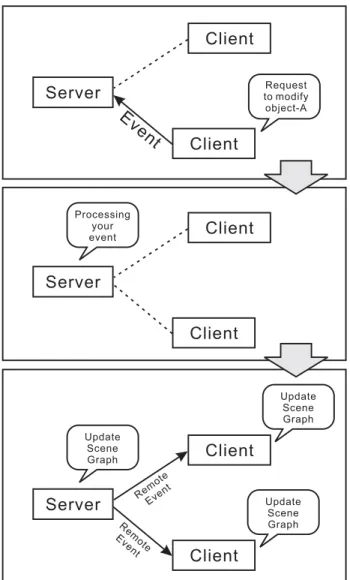
To maintain consistency of all 3D objects in the virtual environment, we have proposed a new method using remote events. Remote event can be seen as a message sent from a machine to activate the functions available in the other machines. As shown in figure 3.2, server will use remote events to maintain 3D objects in virtual environment. These remote events are actually generated based on events submitted by the clients. Server will process all events from clients. Only valid event will generate a remote event. After generating a remote event, server will distribute this remote event to all participating clients. Upon receiving remote events, client will execute a function according to the remote events.
Using remote events in client-server configuration also will solve the problem regarding heterogeneity. The main reason is client will execute a function independently according to remote event received and the client can manage their own state without interference from others. This behavior made the client can be any type of machines with any type of specifications. As long as the clients implement the same event handler, they can collaborate within this system.
Server
Client
Client Event
Request to modify object-A
Server
Client
Client
Processing your event
Server
Client
Client
Update Scene Graph
Update Scene Graph
Update Scene Graph Remote
Event Remote Event
Figure 3.2: Remote event creation
The event or remote event used in this system is produced from user input. As we know that the user input differs from one platform to another. Even with the same input devices, the event produced by one platform still differs from another. This means that we need some kind of event localizer which makes the system only pass understandable event to other system. In section 3.3, we will show how to select event that will become the candidate of remote event and provide the list of event used in this research that can be understood by other machines. All clients and server must follow these events convention and handle these events as expected by the system.
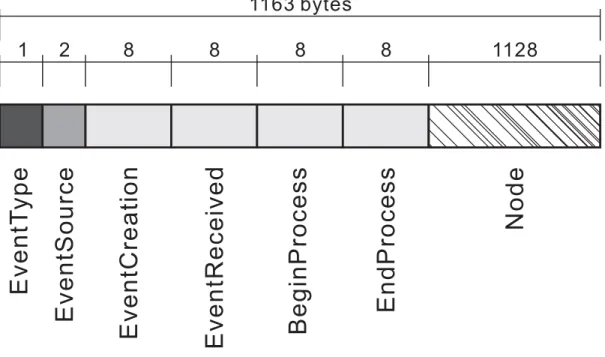
Figure 3.3 shows the remote event used in this system. Each event is 1163 bytes of
EventT y pe EventCreation EventReceived BeginProcess EndProcess Node
EventSource
1163 bytes
1128 8
8 8
8 2
1
Figure 3.3: Data structure of a remote event
data divided into several small structures. A remote event contains several data, such as EventType, EventSource, EventCreation, EventReceived, BeginProcess, EndProcess, and Node. EventTyperepresents the meaning of a remote event, like translation event, rotation event, scaling event, and so on. These data are presented in one byte. EventSource is 2 bytes data which determines the source of an event which generates the remote event.
EventCreation, EventReceived, BeginProcess, and EndProcess are the time stamp for an action. EventCreationremarks the time when the event is created. EventReceivedremarks the time when the event is received by the client. BeginProcess remarks the time when server starts to process the event. EndProcess remarks the time when server finished processing the event. Size of each time stamp is 8 bytes. Time stamps are represented by second andµsecond. These time stamps will be used in filtering events which will cut the server’s processing load and make the collaboration faster. Node represents the data of an event. Client will use these data to update the scene-graph according to its event type. The size ofNode is 1128 bytes.
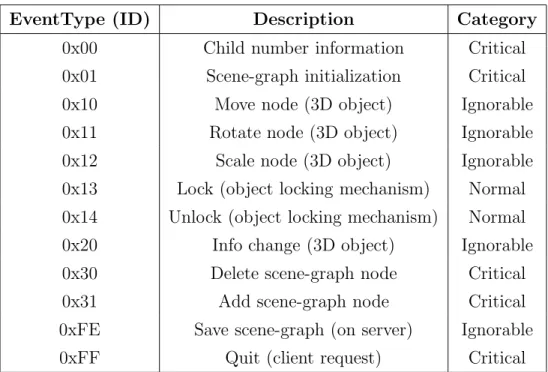
EventTypecontains the event which is understandable to other machines. We define 12 events that can be used for communicating with other machines. The events are listed as follows, child information event, node transmission event, move event, rotate event,
scale event, lock event, unlock event, 3D object information query event, delete event, add event, save command event, and quit notification event. We choose these events by observing the system’s run-time traces and make events from events which directly modified the virtual environment.
Collaboration will be done by using remote event as shown in Figure 3.2. First, the user will generate the event that requests the server to modify the scene-graph. All events from clients received by the server are queued and waiting to be processed. After server processed the event, server can do either accepting the event and generate the remote event or rejecting the event and discard it. Server can accept the event if and only if the event is valid, for example an event which tries to lock an unlocked object.
On the other hand, server can also reject the event because the object is not valid, for example an event which tries to lock a locked object. Upon the acceptance of an event, server will generate a remote event contains complete node information and send it to all clients. When receiving remote events from server, the clients must update the scene- graph accordingly. This means that the clients are doing server’s work in maintaining 3D collaborative environment. In this way, the user can collaborate in the same 3D virtual environment.
3.3 Remote Event Selection Based on System Behavior
The remote events are selected from events produced by the user. For the client side, the program is actually an event-driven application. Event-driven program interacts with the user by using events. An input or action from the user, such as button click, mouse move, and so on, triggers an event. Appropriate object in the program will receive the event and act accordingly using message handler. Message handler will carry out the task as described in an event and execute designated functions accordingly.
All events can be sent to the server, but as the trade-off, such action will give the server a very heavy load. This heavy load comes from processing events from all clients. Such condition is not good, especially in providing real-time collaboration to user. Therefore, some rules to select event that can become the candidate of remote event is required.
In order to select which event will become the candidate of remote event, we have done some experiment to observe the city design process. The observation is focused on the
400
300
200
100
0
VE Interaction Other events
Sample per 10 seconds
Number of events
Figure 3.4: Average number of virtual interaction event and other event
system behavior. From such observation, the virtual environment interaction behavior by sending and receiving event can be seen in detail. Based on this behavior, the rules on selecting events which will be the candidate for remote events are defined.
The experiment uses only one stand-alone client, with a user to operate the program.
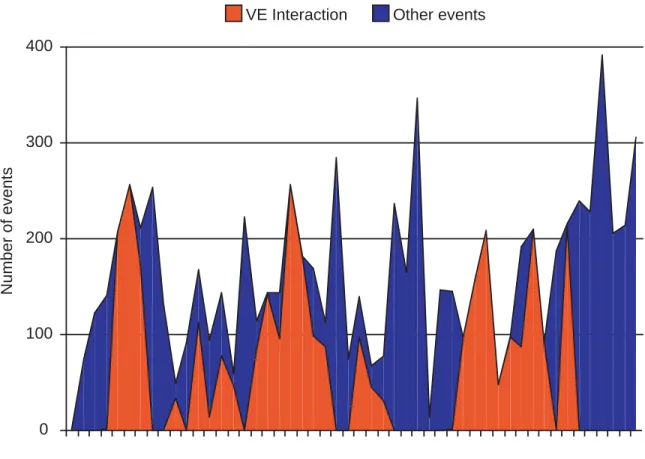
Here, the user is given a task of arranging an area consists of 10 buildings. As the user operates the client machine, the program will log all events created. Data shown on figure 3.4 are the compilation of event log obtained from the experiment.
After the experiment, some interesting data are obtained as shown in Figure 3.4. From experiment, we obtained the number of events produced in 900 seconds. For the sake of simplicity, only some of the sample data, not the whole data is presented from the experiment. These samples are obtained by counting all events created by the client in 10 seconds period. The graph shows 500 seconds of sample, divided to 50 samples.
Basically, events in proposed system can be divided into 2 types, classified as events
for interacting with virtual environment and other events. Events for interacting virtual environment are several different events that will directly modify the virtual environment, or in other words, directly modify the scene-graph. While other events are events with different purposes and uses. These events will not directly modify the scene-graph or even will not modify the scene-graph at all. This type of events are used for managing the state in client, changing the user’s viewpoint, or miscellaneous user interface events.
From Figure 3.4, it is obvious that the amount of virtual environment interaction events are significantly less than other events. For comparison, average of virtual environment interaction events created in 10 seconds is 65.06 events, while average of other events created in 10 seconds is 97.62 events.
Virtual environment interaction events are only created when the user modifies the virtual environments. From observation, the users only interact with virtual environment if needed and within a very short time. Most of the time, they were just observing what they have designed. This becomes the main reason that other events, such as viewpoint change events and user interface events, are created more often compared to virtual environment interaction.
For creating remote events, selection of suitable event that will trigger the remote event creation is required. From this experiment, it is obvious that a client must not send all events to the server. This will only make a huge load on network and server side. Event that will not directly modify virtual environment must be processed locally by the client.
Thus the load for server processing can be cut down.
In this research, we define remote events from virtual environment interaction events based on these results and give these remote events a unique ID consist of a byte of data which is used to recognize the event type. The remote event used in this research is shown in Table 3.1.
From these candidates, we also introduce the category to classify events. This classifi- cation is very important for event filtering which will be introduced in Chapter 5 Section 5.6. These classifications are based on the error an event will create if it is lost or dam- aged. There are 3 categories of events, critical, normal, and ignorable. The definition of each category can be seen as follows.
1. Critical events will make the system fall into unrecoverable fail state if these events are lost.
EventType (ID) Description Category
0x00 Child number information Critical
0x01 Scene-graph initialization Critical
0x10 Move node (3D object) Ignorable
0x11 Rotate node (3D object) Ignorable
0x12 Scale node (3D object) Ignorable
0x13 Lock (object locking mechanism) Normal 0x14 Unlock (object locking mechanism) Normal
0x20 Info change (3D object) Ignorable
0x30 Delete scene-graph node Critical
0x31 Add scene-graph node Critical
0xFE Save scene-graph (on server) Ignorable
0xFF Quit (client request) Critical
Table 3.1: List of remote events with its ID and category recovered if the same type of event gets to the server.
3. Ignorable events will not create any damage to the system if it is lost or damaged.
3.4 Representing Virtual Environment Using Separate Scene-graph and Database
For collaboration, a virtual environment which is accessible to all participants are required.
For the proposed system based on client-server model and remote event as mentioned in section 3.1 and 3.2, virtual environment is represented by separate scene-graph and database.
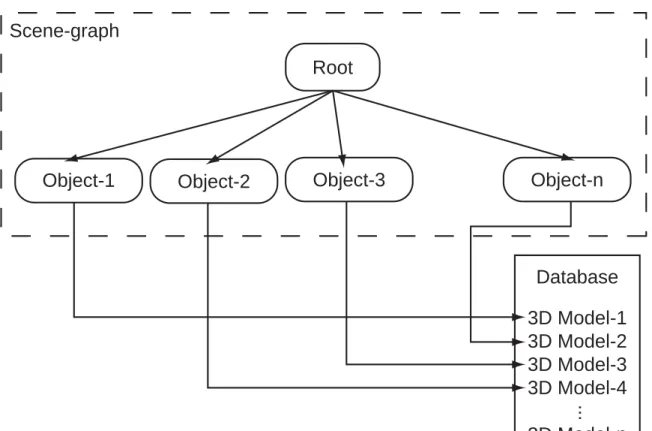
The objects in virtual environment are usually represented in a scene-graph. To enable fast collaboration, the proposed system uses scene-graph and 3D database to represent virtual environment. This scene-graph is replicated on all clients and the client will also manage their own database. The clients cannot modify this scene-graph directly. Only server can modify the scene-graph by using remote events. In this way, the server can completely control all interactions to 3D virtual environment.
Scene-graph
Object-1 Object-2 Object-3 Object-n
Root
Database 3D Model-1 3D Model-2 3D Model-3 3D Model-4 3D Model-n
...
Figure 3.5: Scene-graph and database
Object is represented as node in scene-graph. Each node contains the information regarding the object itself, namely object locations, rotations, scalings, informations, database reference, and object unique identifications. The scene-graph is implemented as a program component which is capable of managing its own state. While the node is implemented as data structure linked as a linked list.
A node in scene-graph will only represent important properties of the object it represent such as locations, rotations, scalings, and object informations. The 3D attributes, such as patches and surfaces, are stored in the database. As shown in Figure 3.5, a node in scene- graph has a pointer to refer to the represented 3D object. Database is only available on client side only. Database contains data which is useful for generating visualization. Server does not have the ability to generate visualization. Server is used only for controlling collaboration and interaction to scene-graph. Therefore server will only have scene-graph.
There are some advantages in using separate scene-graph and database for 3D collab- oration. Dividing virtual environment to scene-graph and database will cut the amount of data transmission. It is obvious that 3D attributes are far bigger than object proper-
ties. If virtual environment is not represented by scene-graph and database, all the object properties and 3D object attributes must be transmitted every time the users collaborate.
This will not be efficient at all, regarding to the load given to the network. Other problem in sending more properties and more attributes to server is the processing time in server.
Processing many attributes and properties will only make huge processing load in server.
Along with these advantages, there is one drawback that comes from using scene-graph and database to represent virtual environment. The drawback is in representing dynamic object such as human and animals. Database stores compiled 3D data, therefore these data are actually static data. Database cannot store dynamic data, such as human with skin deformation. Since our aim is representing virtual environment for city design, which consists of static 3D models such as buildings, we can ignore this drawback.
3.5 Socket-based Collaboration Network and Communication Unit
As stated in Chapter 2 Section 2.2, this research uses network in order to collaborate and interact with virtual environment. Even if now better technology for data transmission and wider bandwidth are available, we still limit the use of network. The network can be flooded with packets (in our research, packets of remote event) in order to do the collaboration. Alternatively, we can choose some important packets and transmit it to the server. This will significantly cut the amount data to be transmitted and also cut the server’s processing load. By using such method, faster and better collaboration than flooding network and server can be achieved.
As an assumption, the network used in our system is fully reliable and ideal. This means that the network layer will deliver all packages sequentially and without any loss.
The assumption made our system is free from failure caused by the network. Even if we assume that the network is ideal, failure management is still implemented for handling error caused by physical defect. The reason for implementing this failure management is to keep the system from crashing if some errors happen in the real network environment.
A machine communicates with the server and other clients by using stream socket.
Stream socket provides full-duplex and sequential stream to our system. Server will maintain all objects and interactions using the data stream. Packets sent in this stream include data of 3D objects, such as object locations, object rotations, and information,
along with the type of modification, time stamps, and source identification. We call these packets as a remote event.
The proposed system is designed to be used in heterogeneous environment, where ma- chine type differs from one to another. The system can communicate using the same communication unit, represent scene-graph using the same scene-graph classes, and read database using the same database classes. Therefore, these components are designed not to depend only on specific platforms.
The communication unit was designed to provide communication functionality to all clients and server. This unit was implemented using BSD stream socket. The socket itself has been a standard feature for many operating systems, consequently BSD socket is accessible to almost all operating systems and the communication unit can be ported easily to other operating systems.
The events streamed in communications unit’s stream are big-endian data. Big-endian data has been a standard in sending and receiving data via network. We tries to use this standard in communicating with other machines. Since our machines (Macs and SGI) are big-endian machines, thus we did not have any trouble in sending and receiving data via network without any necessary data conversion. Problem may arise for all little- endian machines. Those machines will have to convert the stream in order to understand the data. In this way, all clients that use little-endian machine must implement data- conversion function.
3.6 Summary
This chapter describes all methods to realize real-time city design collaboration by using remote events. In implementing the proposed system, we use client-server system con- nected using BSD socket for communication. The collaboration itself is done by sending and receiving event which called remote event.
Remote event is created from event produced from user input. Remote events must be chosen from events that will directly modify the virtual events. Other events which are not the candidate of remote event must be processed locally in client. Thus the server load can be reduced and real-time collaboration can be achieved.
Chapter 4
Collaboration System Behavior in Heterogeneous Computer
Environment
As described in Chapter 3, collaboration in heterogeneous computer environment can be realized using remote event and client-server configuration. To make system with real- time visualization and real-time virtual environment interaction, some special behaviors are required. This chapter complements Chapter 3 by describing server behaviors and client behaviors and their design to achieve such collaboration.
4.1 Collaboration Server with Independent Processes
In order to control collaboration in heterogeneous computer environment, the server is required to serve several different client. In this manner, the server needs to process all interaction independently. On the contrary, the interaction to virtual environment must be controlled by one process to avoid chaos in virtual environment data. Therefore, we need to use child processes to serve heterogeneous client independently and one parent process to control collaboration of these child process.
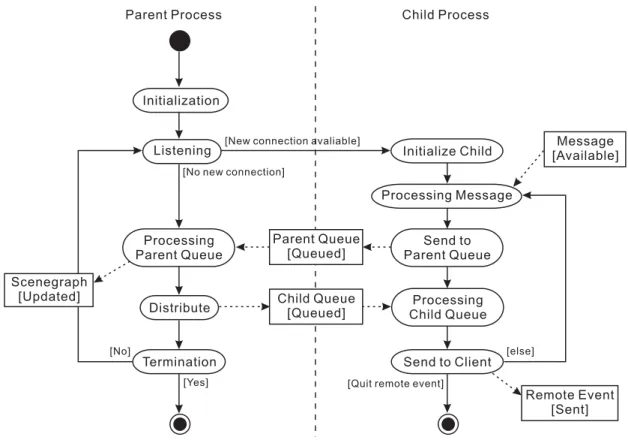
The proposed server is implemented multi-process application as shown in Figure 4.1.
Implementing the server as multi-process application may have many advantages. Since this system will receive many connections from participating clients, it will be better
Parent Process Child Process
Listening Initialize Child Message
[Available]
Processing Parent Queue
Parent Queue [Queued]
Send to Parent Queue
Distribute Child Queue [Queued]
Processing Child Queue
Send to Client
Remote Event [Sent]
Initialization
Processing Message
Termination Scenegraph
[Updated]
[New connection avaliable]
[No new connection]
[Yes]
[No]
[Quit remote event]
[else]
Figure 4.1: Server’s activity diagram
to make a child process for arbitrarily serving each client rather than using one process working serially as scheduled. The second reason why multi-process is preferred rather than single-process is asynchronous behavior of clients. The clients will send event at an arbitrary time. Consequently, the client’s event will have to be processed without waiting for other clients. In this way, multi-process server will have much advantages compared to single-process server.
Figure 4.1 shows the activity diagram of our server. The server process will have 2 kind of processes, parent process and child process. There will be only one parent process handling several child processes. Parent process will create a new child process every time a client connects to the server. Therefore, each client will have one child process. These process will run independently without interfering each other. Processes can communicate with each other using message queue as shown as Parent Queue and Child Queue in Figure 4.1.
The parent process is responsible for processing event received from all child processes.
process will take an event from its queue and process it accordingly. After processing, if the event is valid, parent process will generate a remote event with a complete scene- graph’s node information and distribute it to all child processes. If the event is not valid, the parent process will reject the event and discard it without distributing it to all child processes. The reason for discarding invalid events is there is no advantages to flood the network by sending invalid remote event. We prefer to safe the bandwidth available to send only valid remote event rather than sending both valid and invalid remote events at the same time.
Child processes are responsible for serving all clients. As mentioned before, one child process will serve exactly one client. The first task of a child process is receiving events from client using stream socket. In this case, each child process will have their own com- munication unit. Upon receiving an event from client, the child process will do event pre-processing, such as adding specific information to the event. After pre-processing, child process will send pre-processed event to the parent process using queue to be pro- cessed. The second task is to receive distributed remote events from parent process and send them to clients. When receiving a remote event from parent process, a child process will examine the remote event before sending it to the client and change its own state if necessary.
This server is currently running on SGI Onyx2 with 2 MIPS processors and 1 GB of RAM. One of the most important consideration in deploying our server process in a machine is processing power. In fact, our server can run on any fast machines with big- endian processor. Graphic ability is not required for running server process. Basically, server process only process interaction request to virtual environment. It does not do any rendering process or generating any visualization. From experiment, our server process can take very huge load which proof that our server has a very high scalability feature.
4.2 General Client Behavior to Collaborate in Heterogeneous Computer Environment
To enable heterogeneous clients to work together in a collaboration, some general client behavior are necessary. Client behavior will allow the collaboration among clients and also provide real-time visualization and real-time collaboration. This section describes the design on a client that must be obeyed to work in collaborative virtual environment
Main
Thread Scenegraph Display Object
Reference Server Network
Thread
Thread()
Connect() Initialization Nodes
AddNode()
GetNode()
Event Remote Event
Update
GetNode()
ReferTo()
DisconnectFromServer() Remote Event: Quit
Notification
Message: Redisplay
Initializationphase Collaborationphase Disconnectionphase
Figure 4.2: Sequential diagram of client’s collaboration process using heterogeneous computer environment.
Clients on this system consist of a bunch of different machines with different platforms and even different input-output devices. To enable all of them to work together in the same system, the client will have to implement the same communication unit. Using this communication unit, client can communicate with the server and also the other participating clients. This research uses Mac clients and CAVE clients.
A client will be a thread-based application. There will be many threads used in clients.
The most important threads are graphic thread, network thread and main thread. The most important thing in designing these threads is that they must work independently without interfering or waiting for other threads result.
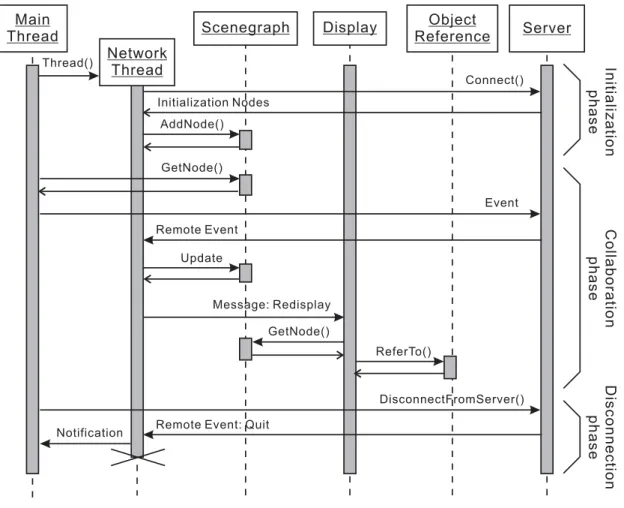
Figure 4.2 shows the sequential diagram of client’s collaboration process. In this figure, graphic thread is represented as Display. Database used for rendering is presented as
Object Reference.
Graphic thread is responsible for rendering 3D visualization and getting user input, such as 3D object selection and camera movement. This thread will use the data from scene-graph replicated locally in client and data from database to render 3D virtual en- vironments.
Network thread is responsible for receiving remote events from server. After receiving a remote event, network thread will modify the scene-graph accordingly. After the scene- graph was updated, network thread will notify graphic thread to do redrawing.
Main thread will be responsible for all application processes, from processing graphical- user-interfaces to processing user input and sending events to server. The communication unit for sending events to server was also implemented in this thread.
These three threads are designed to work at the same time without interfering or waiting for the other threads to finish their process and return values. We can obviously see in figure 4.2, main thread, network thread, and graphic thread communicate only by sending messages without waiting any return values. On the other hand, these threads are sharing the same data with each other. In this way, we expect more efficient processing rather than sequentially obtains user input, processes the data one by one and draws the data to display.
The process of collaborating with other clients is shown in figure 4.2. Collaboration process can be divided to 3 phases, initialization phase, collaboration phase and discon- nection phase.
Initialization phase is executed when user requests to join in a collaboration. When initializing, a new thread called network thread will be created to handle remote events received from server. Network thread will first receive a copy of scene-graph, shown in figure 4.2 as initialization nodes. From these data, network thread will replicate the server’s scene-graph locally by adding each node received from the server to local scene- graph.
Collaboration phase is executed when the user gives an input which triggers an event to modify the scene-graph. As shown in figure 4.2 thread will first get the data from local scene-graph and generate the event accordingly. Main thread will send the event to server.
When network thread received a remote event from server, it will immediately update the scene-graph and send redisplay message to graphic thread. If graphic thread receives a redisplay message, it will get the nodes available in scene-graph and refer to database to
obtain data for rendering. After obtaining the data, graphic thread will render all data to the display. Graphic thread will not only respond to redisplay message from the network threat, but also will respond to user action which produce redisplay message, such as camera repositioning, camera tilting, and camera zooming.
Disconnection phase is executed when the user asks to leave the collaboration area.
This request will trigger an event requesting for disconnection. Server will process this event and create a remote event for quitting. Server will send this remote event to client which requests to quit. When network thread receives this remote event, it will send the notification to main thread that collaboration is over and perform some termination procedure, such as closing socket and cleaning up scene-graph replica. After termination procedure, network thread will terminate itself.
4.3 Collaborating Using Common Personal Computer as Client
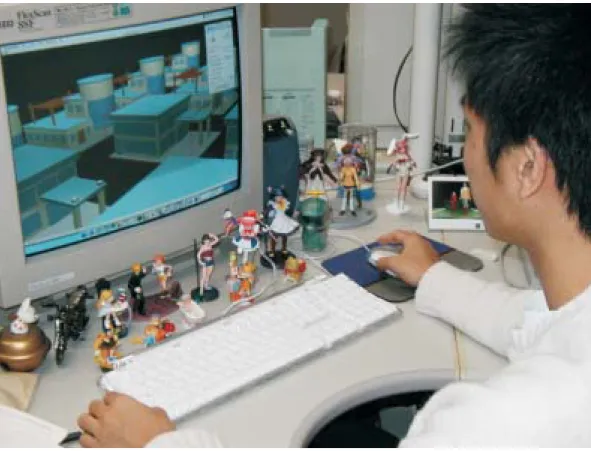
The first client that we choose for this collaboration is Mac client. This represents a usual computer, as seen on Figure 4.3 with usual input-output devices and usual interaction paradigm. This client is very similar to commonly available 3D applications. It has some important functions, such as transforming 3D objects, adding 3D objects to the virtual environment, changing 3D object’s informations, deleting 3D objects from the virtual environment, and changing viewpoint. This client can run in 2 modes, stand-alone mode and collaboration mode.
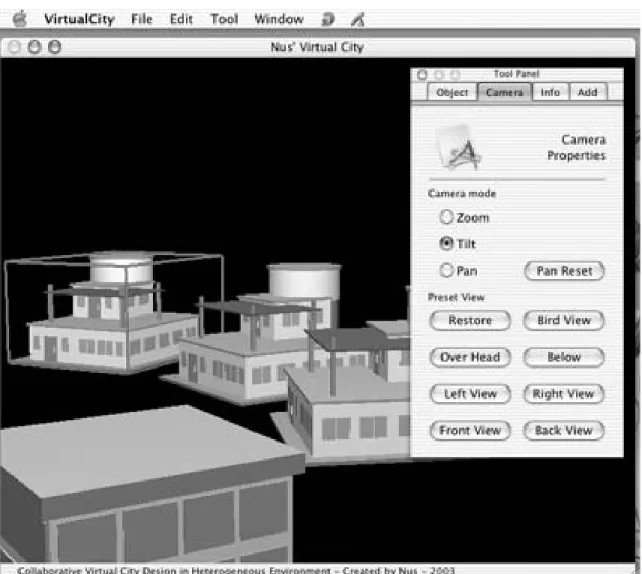
Figure 4.4 shows the screen shot of our collaborative city design. The tool panel on the right is used to generate various events. While in object pane, user can create move, rotate, scale, lock object, unlock object and delete object. In camera pane, the user will not produce event to be sent to server. Camera pane provides the user capability to view the virtual environment from his or her suitable view without disturbing the other. In info pane, the user can query some information regarding an object in virtual environment.
The user can also change the object information in this pane. Add pane is used to add an object from database to virtual environment.
We choose thread-based application for Mac clients because the clients will have to do several tasks at the same time without interfering with each other and thread will have to share the same data with other thread. We cannot use multi-process here because
Figure 4.3: Collaboration using Mac client
multi-process application cannot share the same data with other process, unless it uses shared memory, which obviously gives much overhead.
The client for Mac is implemented natively for Mac OS X. This version is developed using Objective-C, C++, and also C. The reusable part such as database reader, database handler, object reader, and scene-graph is implemented by using C/C++. These compo- nents do not contain any platform specific codes, therefore they can be used in all other machines by only compiling them. The Mac OS X specific codes are implemented in Objective-C. These codes will not be usable to clients other than Mac.
Mac client uses Cocoa as an API. The program itself is built using Cocoa Applica- tion Kit. This API provides almost all functionality to this client, from handling user input to rendering 3D graphics to device context. For rendering, we use OpenGL as our graphic library in cooperation with Cocoa. This graphic library can produce very realistic visualization and have a very good real-time rendering performance.