VLAN での QoS の設定
この章の内容は、次のとおりです。
• VLAN QoS
の概要, 1
ページ• QoS
ポリシーの優先順位, 1 ページ• VLAN QoS
のTCAM
エントリの制限, 3 ページ• VLAN QoS
の注意事項および制約事項, 4 ページ• VLAN QoS
の設定, 5
ページ• VLAN QoS
設定の確認, 8
ページ• VLAN QoS
機能の履歴, 9 ページVLAN QoS の概要
Cisco Nexus 5500
シリーズ デバイスでは、VLANでの分類およびマーキング用のQuality of Service
(
QoS
)ポリシーを設定できます。VLAN
に適用されるポリシーは、VLAN
のレイヤ2
およびス イッチ仮想インターフェイス(SVI)ポートのトラフィックに適用されます。QoS ポリシーの優先順位
QoS
ポリシーのマーキング要件によって優先順位が決まります。 インターフェイスQoS
ポリシー が最優先され、VLAN QoS
ポリシーがその次になり、システムQoS
ポリシーが最も低い優先順位 になります。ただし、VLANに
VLAN QoS
ポリシーとVLAN ACL(VACL)の両方が割り当てられている場
合、VACL
が最優先されます。インターフェイス、システム、および VLAN ポリシーの優先順位例
次に、
CoS 5
のインターフェイス1/1
のトラフィックがqos-group 3
に送信される設定例を示しま す。VLAN 10
およびCoS 5
の他のインターフェイスのトラフィックはqos-group 4
に送信されま す。VLAN 10
およびCoS 5
以外のインターフェイスのトラフィックはqos-group 5
に送信されま す。class-map type qos match-all cm1 match cos 5
policy-map type qos pm-ifc class cm1
set qos-group 3 class class-default policy-map type qos pm-vlan
class cm1
set qos-group 4 class class-default policy-map type qos pm-sys
class cm1
set qos-group 5 class class-default system qos
service-policy type qos input pm-sys vlan configuration 10
service-policy type qos input pm-vlan interface Ethernet1/1
service-policy type qos input pm-ifc
インターフェイスおよびシステム QoS ポリシーの優先順位例
次に、
CoS 5
のインターフェイス1/1
のトラフィックがqos-group 3
に送信される設定例を示しま す。CoS 5
の他のインターフェイスのトラフィックはqos-group 5
に送信されます。class-map type qos match-all cm1 match cos 5
policy-map type qos pm-ifc class cm1
set qos-group 3 class class-default policy-map type qos pm-sys
class cm1
set qos-group 5 class class-default system qos
service-policy type qos input pm-sys interface Ethernet1/1
service-policy type qos input pm-ifc
システムおよび VLAN ポリシーの優先順位例
次に、CoS 5の
VLAN 10
のトラフィックがqos-group 4
に送信される設定例を示します。CoS 5
の 他のVLAN
のトラフィックはqos-group 5
に送信されます。class-map type qos match-all cm1
VLAN での QoS の設定 インターフェイス、システム、および VLAN ポリシーの優先順位例
match cos 5
policy-map type qos pm-vlan class cm1
set qos-group 4 class class-default policy-map type qos pm-sys
class cm1
set qos-group 5 class class-default system qos
service-policy type qos input pm-sys vlan configuration 10
service-policy type qos input pm-vlan
VLAN QoS および VACL ポリシーの優先順位例
この例では、送信元
IP
アドレスが10.10.10.1
のパケットはドロップされます。 ただし、VLAN 10
およびCoS 5
の他のパケットはqos-group 4
に送信されます。ip access-list al1
10 permit ip 10.10.10.1/24 any vlan access-map v-am1
match ip address al1 action drop
vlan filter v-am1 vlan-list 10 class-map type qos match-all cm1
match cos 5
policy-map type qos pm-vlan class cm1
set qos-group 4 class class-default vlan configuration 10
service-policy type qos input pm-vlan
VLAN QoS の TCAM エントリの制限
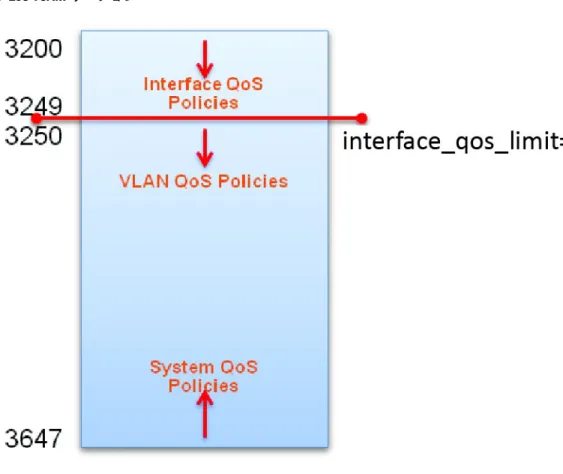
QoS TCAM
リージョンは、インターフェイスQoS、システム QoS、および VLAN QoS
ポリシーに よって共有されます。VLAN QoS
ポリシーを定義するために、インターフェイスQoS
ポリシーのVLAN での QoS の設定
VLAN QoS および VACL ポリシーの優先順位例
TCAM
エントリの数を制限する必要があります。 この制限を設定するには、hardware profile tcamfeature interface-qos limit tcam-size
を使用します。図 1:QoS TCAM リージョン
VLAN QoS の注意事項および制約事項
• VLAN
には、設定するサービス ポリシーに対して少なくとも1
個のアクティブ メンバ ポートが必要です。
VLAN
に少なくとも1
個のアクティブ メンバがない場合にサービス ポリシー を設定すると、設定は受け入れられますが、TCAMはプログラミングされません。• no vlan number
コマンドを使用してVLAN
を削除した場合、そのVLAN
に設定されたサービス ポリシーは残りますが、非アクティブになります。
• TCAM
にはVLAN
でのサービス ポリシーの設定に十分な空きエントリが必要です。•
ロールバックは、インターフェイスQoS
制限がロール バック設定と実行コンフィギュレー ションで異なる場合は、失敗する可能性があります。• QoS
ポリシーが設定されたVLAN
がQoS
ポリシーがないインターフェイスで設定されている場合、show policy-map interface numberコマンドは
VLAN
上に設定されたQoS
ポリシーを 表示しません。VLAN での QoS の設定 VLAN QoS の注意事項および制約事項
VLAN QoS の設定
インターフェイス QoS TCAM 制限の設定または変更
interface_qos_limit
を特定の数に設定する場合、すべてのASIC
のTCAM
のQoS
リージョンにその 数のオフセットを超えるインターフェイス ポリシーを設定することはできません。 たとえば、interface_qos_limit
を1000
に設定する場合、すべてのASIC
のTCAM
のQoS
リージョンにオフセッ ト1000
を超えるインターフェイス ポリシーを設定できません。手順
目的 コマンドまたはアクション
グローバル コンフィギュレーション モード を開始します。
switch# configure terminal
ステップ 1インターフェイス
QoS TCAM
制限を設定し ます。tcam-size
の範囲は7
~446
エントリで す。switch(config)# hardware profile tcam feature interface-qos limit tcam-size
ステップ 2
QoS TCAM
の制限を表示します。switch(config)# show hardware profile tcam feature qos
ステップ 3(任意)
リブートおよびリスタート時に実行コンフィ ギュレーションをスタートアップ コンフィ
switch(config)# copy running-config
startup-config
ステップ 4ギュレーションにコピーして、変更を永続的 に保存します。
次に、インターフェイス
QoS TCAM
制限を20
エントリに設定する例を示します。switch(config)# configure terminal
switch(config)# hardware profile tcam feature interface-qos limit 20 switch(config)# show hardware profile tcam feature qos
Feature Limit (number of tcam entries) ---
interface-qos 20
vlan-qos + global-qos 428
switch(config)# copy running-config startup-config
TCAM からのインターフェイス QoS 制限の削除
はじめる前に
•
すべてのVLAN QoS
ポリシーを削除します。VLAN での QoS の設定
VLAN QoS の設定
手順
目的 コマンドまたはアクション
グローバル コンフィギュレーション モード を開始します。
switch# configure terminal
ステップ 1QoS TCAM
の制限を表示します。switch(config)# show hardware profile tcam feature qos
ステップ 2インターフェイス
QoS TCAM
制限を設定し ます。tcam-size
の範囲は7
~446
エントリで す。switch(config)# no hardware profile tcam feature interface-qos limit tcam-size
ステップ 3
(任意)
リブートおよびリスタート時に実行コンフィ ギュレーションをスタートアップ コンフィ
switch(config)# copy running-config
startup-config
ステップ 4ギュレーションにコピーして、変更を永続的 に保存します。
次に、インターフェイス
QoS TCAM
制限を削除する例を示します。switch(config)# configure terminal
switch(config)# show hardware profile tcam feature qos Feature Limit (number of tcam entries) ---
interface-qos 20
vlan-qos + global-qos 428
switch(config)# no hardware profile tcam feature interface-qos limit 20 switch(config)# copy running-config startup-config
VLAN のサービス ポリシーの設定
はじめる前に
•
インターフェイスQoS
制限を設定する必要があります。•
ポリシー マップを設定する必要があります。• TCAM
にはVLAN
でのサービス ポリシーの設定に十分な空きエントリが必要です。VLAN での QoS の設定 VLAN のサービス ポリシーの設定
手順
目的 コマンドまたはアクション
グローバル コンフィギュレーション モードを開 始します。
switch# configure terminal
ステップ 1VLAN
を作成し、VLANコンフィギュレーション モードを開始します。vlan-number
の範囲は1
~4094
です。switch(config)# vlan configuration vlan-number
ステップ 2VLAN
にポリシー マップを割り当てます。policy-name
は、ポリシー マップに割り当てられswitch(config-vlan)#
service-policy type qos input policy-name
ステップ 3
た名前です。 名前には最大
40
文字までの英数字 を指定できます。(任意)
リブートおよびリスタート時に実行コンフィギュ レーションをスタートアップ コンフィギュレー
switch(config-vlan)# copy
running-config startup-config
ステップ 4ションにコピーして、変更を永続的に保存しま す。
次に、サービス ポリシーを作成し、VLAN 10に割り当てる例を示します。
switch# configure terminal
switch(config)# class-map type qos cm1 switch(config-cmap-qos)# match cos 5
switch(config-cmap-qos)# policy-map type qos pm-vlan switch(config-pmap-qos)# class cm1
switch(config-pmap-c-qos)# set qos-group 4 switch(config-pmap-c-qos)# exit
switch(config-pmap-qos)# exit
switch(config)# vlan configuration 10
switch(config-vlan-config)# service-policy type qos input pm-vlan switch(config-vlan-config)#
VLAN からのサービス ポリシーの削除
手順
目的 コマンドまたはアクション
グローバル コンフィギュレーション モードを開 始します。
switch# configure terminal
ステップ 1VLAN での QoS の設定
VLAN からのサービス ポリシーの削除
目的 コマンドまたはアクション
指定された
VLAN
のVLAN
コンフィギュレーショ ン モードが開始されます。vlan-number
の範囲は1
~4094
です。switch(config)# vlan configuration vlan-number
ステップ 2VLAN
からポリシーを削除します。policy-name
は、ポリシーマップに割り当てられた名前です。switch(config-vlan-config)#no service-policy type qos input policy-name
ステップ 3
名前には最大
40
文字までの英数字を指定できま す。(任意)
リブートおよびリスタート時に実行コンフィギュ レーションをスタートアップ コンフィギュレー
switch(config-vlan-config)# copy
running-config startup-config
ステップ 4ションにコピーして、変更を永続的に保存しま す。
次に、
VLAN 10
からpm-vlan
ポリシー マップを削除する例を示します。swtich# configure terminal
switch(config)# vlan configuration 10
switch(config-vlan-config)# no service-policy type qos input pm-vlan switch(config-vlan-config)# copy running-config startup-config
VLAN QoS 設定の確認
設定を確認するには、次のいずれかのコマンドを使用します。
目的 コマンド
指定するVLANに設定されている
QoS
ポリシー を表示します。show policy-map vlan vlan-number
スイッチで定義されたポリシー マップを表示し ます。 指定したポリシーだけを表示することも できます。
show policy-map [name]
QoSの実行コンフィギュレーションに関する情
報を表示します。running-config ipqos
QoS
のスタートアップ コンフィギュレーション に関する情報を表示します。startup-config ipqos
VLAN での QoS の設定 VLAN QoS 設定の確認
VLAN QoS 機能の履歴
表 1:VLAN QoS 機能の履歴
機能情報 リリース
機能名
この機能が導入されました。
5.1(3)N2(1) VLAN QoS
VLAN での QoS の設定
VLAN QoS 機能の履歴
VLAN での QoS の設定 VLAN QoS 機能の履歴