Malware Detection by Process’s File Activity Monitoring
Nguyen Anh Tien
Faculty of Environment and Information Studies
Keio University
5322 Endo Fujisawa Kanagawa 252-8520 JAPAN
Submitted in partial fulfillment of the requirements for the degree of Bachelor
Advisors:
Professor Hideyuki Tokuda Professor Jun Murai
Associate Professor Hiroyuki Kusumoto Professor Osamu Nakamura
Associate Professor Kazunori Takashio Assistant Professor Rodney D. Van Meter III
Associate Professor Keisuke Uehara Associate Professor Jin Mitsugi
Lecturer Jin Nakazawa Professor Keiji Takeda
Copyright c⃝2012 Nguyen Anh Tien
Abstract of Bachelor’s Thesis
Malware Detection by Process’s File Activity Monitoring
Nowadays, number of malwares is increasing rapidly at exponential rate. Everyday, thousands of new malicious programs is recorded, include not only variant of known malware but also new type of malicious code. With such enormous number of new malwares, the process of create malware signatures from new samples need more and more time and money consuming. On the other hand, malware author tend to use various type of packers or obfuscation methods to evade detection by antivirus scanners. Using code virtualization, malware can hide its behavior from analyzer and harden the reverse engineering process. Therefore, static analysis isn’t effective any more.
In this thesis, we will implement a system to judge process if it is a benign program or it is a malware. Our system use file system filter driver as log module because it is hard for malware to detect and focus only on process’s file activities and choose it as logging target.
After extract behavior features from malwares and benign programs, we use is as train data for our machine learning system. Experimental results have shown that our system give better accuracy in comparison with other method which also focus on file activities.
Keywords: Malware, File System Filter Driver, Support Vector Machines, File Activities
Nguyen Anh Tien Faculty of Environment and Information Studies, Keio University
卒業論文要旨
2012
年度(
平成24
年度)
ファイル操作の監視によるマルウェア検知システムの提案と実装
近年、マルウェアの数が指数関数的に増大している。日々、既知のマルウェアのみでなく、新種の マルウェアも含む数千のマルウェアが記録されている。このような新種のマルウェアの増大によって、
新種の検体のシグネチャファイルを作成する際により多く時間とコストが掛かるようになっている。
一方で、マルウェア作成者はウイルス対策ソフトウェアの検知を回避するために様々な種類パッカー や難読化手法を利用する傾向がある。これらのようなコードの仮想化によって、マルウェアは挙動を 隠し、解析を難しくすることができる。それゆえに静的解析は効果的ではなくなってきている。
本論文では悪性マルウェアを検知するシステムを実装する。本システムはファイルシステムフィル タドライバをログを取得するモジュールとして利用する。これはマルウェアにとって検知が難しいた めである。ログはファイル操作のみを対象としている。
マルウェアと正常なソフトウェアの挙動の特徴を抽出し、それを学習データとして機械学習器に入 力している。実験の結果より、ファイルの操作に着目した他の手法と比較して、提案したシステムは 良い精度であることが示された。
キーワード: マルウェア、 ファイルシステムフィルタドライバ,サポートベクターマシン,ファ イル操作
グエン・アイン・ティエン 環境情報学部、慶應義塾大学
Contents
1 Introduction 1
1.1 Background . . . 1
1.2 Challenges and Goal . . . 2
1.3 Structure of Thesis . . . 2
2 Malware Growing Problem and Countermeasure 3 2.1 The Spread of Malware . . . 3
2.2 Overview of Malware and Malware Types . . . 4
2.3 Malware Countermeasure Method . . . 5
2.3.1 Overview . . . 5
2.3.2 Static Analysis Method . . . 6
2.3.3 Dynamic Analysis Method . . . 6
2.4 Analysis And Detection Problem . . . 7
2.4.1 Packing Technique . . . 7
2.4.2 Self Code Modification and Code Polymorphism . . . 7
2.4.3 Virtual Execution Environment and Anti-VM . . . 8
2.4.4 Other technique . . . 8
2.5 Summary . . . 8
3 Related Works 9 3.1 Malware Analysis Related Work . . . 9
3.1.1 Towards Understanding Malware Behavior by the Extraction of API calls . . 9
3.1.2 Toward Automated Dynamic Malware Analysis using CWSandbox . . . 10
3.1.3 Process Monitor . . . 11
3.2 Malware Detection Related Works . . . 12
3.2.1 Malware Detection Focusing on Behaviors of Process and its Implementation 12
3.2.2 Malware Detection using Windows API Sequence and Machine Learning . . . 13
3.3 Summary . . . 14
4 Malware Detection Using File System Filter Driver 15 4.1 Malware Analysis Focus On File Activity . . . 15
4.2 Windows Filter Driver . . . 16
4.2.1 Overview of Windows Driver . . . 16
4.2.2 Windows Filter Driver . . . 17
4.3 File System Filter Driver . . . 18
4.3.1 Overview of File System Filter Driver . . . 18
4.3.2 I/O Request Packet . . . 19
4.3.3 Filter Manager . . . 20
4.4 Process’s File Activity Monitoring by File System MiniFilter Driver . . . 20
4.4.1 How to monitor process’s file activity . . . 20
4.4.2 MiniFilter Callback Data . . . 21
4.4.3 Summary . . . 24
4.5 Proccess’s File Activity Behavior . . . 24
4.5.1 Definition of File Activities Related Terms . . . 24
4.5.2 Different In Manipulate File System Between Benign and Malicious Program 25 4.6 Support Vector Machine As Detection Module . . . 27
4.6.1 The Advantages of Support Vector Machine . . . 27
4.6.2 Support Vector Machine As Detection Module . . . 28
4.7 Summary . . . 30
5 Implementation 31 5.1 Enviroment and Tools . . . 31
5.2 System Overview . . . 31
5.3 Behavior Logging Module . . . 32
5.4 Log Analysis Module . . . 33
5.5 Training and Detection Module . . . 34
5.6 Summary . . . 35
6 Experiment and Evaluation 36
6.1 Evaluation Overview . . . 36
6.2 Experiment 1: Accuracy . . . 37
6.2.1 Experiment Setup . . . 37
6.2.2 Experimental Results . . . 37
6.3 Experiment 2: Effectiveness of File Activity Monitor . . . 40
6.3.1 Experiment Setup . . . 40
6.3.2 Experiment Result . . . 40
6.4 Evaluation . . . 41
6.4.1 Accuracy Evaluation . . . 41
6.4.2 Effectiveness Evaluation . . . 42
6.5 Summary . . . 43
7 Conclusion and Future Works 44 7.1 Conclusion . . . 44
7.2 Future Work . . . 45
7.2.1 Carefully Choosing Features of Vector . . . 45
7.2.2 Improving Log Extraction Module . . . 45
List of Tables
4.1 Behavior of malware samples . . . 15
4.2 Windows Device Class . . . 18
4.3 Features of Support Vector . . . 30
5.1 Implement environments and Tools . . . 31
6.1 Environment of test case 1 . . . 37
6.2 Environment of Experiment 2 . . . 38
6.3 Behavior of samples in Test case 1 . . . 38
6.4 Classification result of Test case 1 . . . 39
6.5 Behavior of samples of Test case 2 . . . 39
6.6 Classification result of Test case 2 . . . 39
6.7 Classification result for each type of malware . . . 41
List of Figures
2.1 AV-TEST’s malware number report . . . 4
2.2 Common packer used by malware . . . 7
2.3 Malware’s code obfuscation as seen form OllyDbg . . . 8
3.1 Six main categories of suspicious behavior of API call features . . . 10
3.2 Proccess Monitor Screenshot . . . 12
3.3 Malware Detection Mechanism . . . 13
4.1 Diagram illustrating possible driver layer . . . 17
4.2 Overview of file system filter drivers stack . . . 18
4.3 Malware Behavior Log Sample . . . 25
5.1 System Overview . . . 32
5.2 Proccess of logging malware’s file activities . . . 33
Chapter 1
Introduction
1.1 Background
Nowadays, with the help of the Internet, we can access various type of useful service, easier com- munication with other people, able to access massive human knowledge. However, in companion with easier access is more possible vulnerability. One of those threats is malware. By definition of Microsoft [13], ”Malware” is short for malicious software and is typically used as a catch-all term to refer to any software designed to cause damage to a single computer, server, or computer network, whether it’s a virus, spyware, et al. Started from simple small code written by computer geeks, malware is becoming more and more sophisticated and it can be accessed easily and unin- tentionally from internet. Recently, number of malware is increasing rapidly. For example, at day’s end on April 12, Symantec published the summary [16], noting that its latest Virus Definitions file contained 21,383,140 separate signatures. In other news published by Kaspersky Lab on their own website [11], Kaspersky Lab expressed that they now detect 200,000 new malicious programs every day. Also from Kaspersky news, the discovery of Flashback, a 700,000 strong botnet comprised of infected Apple computers running Mac OS or the fact that 99% of all mobile malware detected by Kaspersky Lab was designed for the Android platform proved that malware number on other platform such as Android, iOS, Mac OS is also increasing rapidly. Therefore, these is a need of such techniques which rapidly analyze and detect malware. On the other hand, the purpose of malware author is not only steal information or do damage to system but also changing to another field doesn’t relative to computer science. For example, Stuxnet is a worm which targeted to break Iranian nuclear centrifuge equipment. Recent emergence Flame virus is an other sophisticated computer virus targeted at Iranian nuclear effort. Furthermore, this dangerous malware isn’t came
from single malware writer but the cooperation of the United States and Israel [7]. Those events shown that malware is becoming the weapon of choice for cyber-sabotage.
1.2 Challenges and Goal
In order to protect internet users from threats came from malware, malware researchers provided many counter-measure method such as anti virus sofware. Based on malware’ signature, char- acteristic binary code extract from malware, anti virus software can distinguish malwares among their family and malware from other benign program. Beside of that, researchers also use other static data such as executable file’s meta data. On the other hand, malware author tend to use various type of packers or obfuscation methods to evade detection by antivirus scanners. Using code virtualization, malware can hide its behavior from analyzer and harden the reverse engineer- ing process. Therefore, in companion with statically analysis, dynamically analysing of malware is needed toward understanding malware behavior. In contribution to this process, our research purpose is dynamic analysing malware behavior and user process’s behavior log to judge if that process is malware or benign program.
1.3 Structure of Thesis
The rest of the thesis is structured as following. In chapter 2, we will take a look at current malware growing situation and detection technique used in malware research. Chapter 3 will present some related research and their approach toward malware detection. Chapter 4 is about our system design and method which used to build detection system. After that, chapter 5 shows environment and implementation of malware detection system. Next in chapter 6, we evaluate system on some real data and acquire result for discussion. Finally, in chapter 7, we give the conclusion and future works.
Chapter 2
Malware Growing Problem and Countermeasure
In this chapter we describe the background of the thesis when malware’s number is increasing rapidly. In order to deal with this problem, we introduce malware analysis method which is used widely by malware researchers. Following on, we also mention at detail some evasion techniques used by malware.
2.1 The Spread of Malware
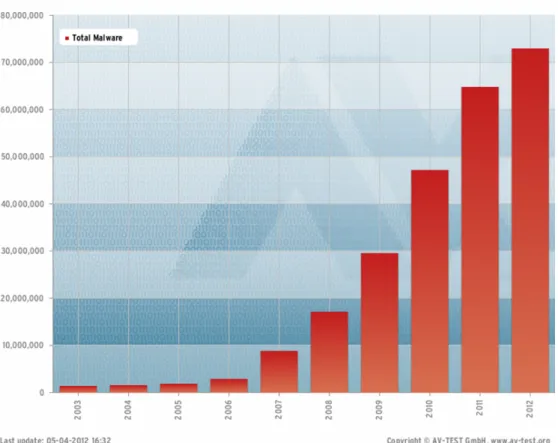
On the internet, there is various threats such as, information leak, user tracking, credit fraud, etc and one of the most serious security problems is the spread of malware. Everyday, a new types or a new various of known malware is detected. According to AV-TEST, the independent IT- Security institute [17] which also perform analysis of anti-virus software, ”Numbers of malware is also increasing rapidly at an exponential rate.” They registers over 55,000 new malicious programs every day. McAfee, the IT security specialists owned by Intel, says it predicts there will be 75 million unique samples of malware in 2011 too.
Because of the characteristic of malware, replicate itself, new various is sometime differs only some bytes in compare with the original. With the easiness of accessibility, internet is became the database of malware source code. With some pre-made tools which is shared silently via email, underground forum, one can quickly create new binary file of malware and ready to deploy.
From now on, Microsoft’s Windows OS is the most targeted platform for malware author. How-
Figure 2.1: AV-TEST’s malware number report
ever, not only Windows but also another platform is becoming new target of malware. According to McAfee, malware on increasingly-popular Mac has grown in Q3, although not by nearly as much as it did in Q2. The fast growing mobile platform such as Android and iOS makes them new target.
However, with the dominant of Microsoft in PC market, malware author will still focus on exploit older Windows OS and newly revealed Windows 8.
2.2 Overview of Malware and Malware Types
”Malware” is short for malicious software, a term to meaning software that can be used to compro- mise computer functions, steal data, bypass access controls, or otherwise cause harm to the host computer. We can briefly define most common types of malware as following:
• Adware : advertising-supported software is a type of malware that automatically delivers advertisements by pop up on websites and in-app ads.
• Bots : are program create with the purpose to receive command and execute it. It is mostly used in botnets ( a network of computers to be controlled by hackers) for DDos attacks.
• Ransomeware : is type of malware that restricts user access to computer by lock or encrypt computer resources and request user’s money in exchange for regain access.
• Rootkit : is a type of software designed to hide the existence of certain processes or programs from normal methods of detection and enable continued privileged access to a computer.
• Spyware : is a type of malicious software that spies on user activity (keystroke, file access, screen capture, etc) without their awareness.
• Trojan Horse: is a type of malware that disguises itself as a normal program to trick user into downloading and installing malware.
• Virus : a type of malware that has ability of replicating itself and spreads to another com- puters in the network. It often attach itself to another program and wait until user execute those infected programs.
• Worm : is most common types of malware which replicates itself in order to spread to other computers. By exploiting operating system vulnerabilities, worm can access target computer and cause harm by consuming bandwidth and overloading web servers.
As we can see above, by defining common types of malware, we realized that malware conduct various functions and can deal big damage to computer system once it is activated. Therefore, there is a definitely need of malware countermeasure methods.
2.3 Malware Countermeasure Method
2.3.1 Overview
To overcome those security problems made by malware, many countermeasure method was pro- vided. In companion with anti-virus software provided by anti-virus vendor, security specialists also find vulnerabilities in active system and propose of fixing method. Malware researchers spend a lot of time to analyze malware’s binary file to toward understanding its behavior and to give detection method. There are two main approach to analyze malware that is static analysis and dynamic analysis. We introduce both of those methods and finally point out some analysis problems.
2.3.2 Static Analysis Method
Static analysis is method that analyze malware without running it. Windows executable file types is call PE (portable executable). PE file structure contain a lot of meta-data about executable file itself such as: PE header, number of sections, align of section in file, import or export API information and most important code section which contains compiled program code. From given malware’s binary file and by extracting those informations, we can not only give a glance at malware image but also disassemble program to analyze its behavior.
There are a lot of related work based on this approach and focus on various aspect of program such as generate API sequences call, classify binaries based on headers information. Some popular tools used in statics analysis is debugger, such as OllyDbg, SoftIce, and disassembler such as Hex-Rays’s product IDA Pro. Debugger allow us to execute program step by step and monitor its control flow and data manipulation. On the other hand, disassembler is able to give a detail disassembled code of program with a lot of useful information. Static analysis’s strong point is that analysis process can be done automatically and can handle vast input binaries, run fast and effective. However, suffer from anti-reversing method is its week point.
2.3.3 Dynamic Analysis Method
Dynamic analysis method is contrasted with static analysis, we analyze malware by executing it in isolated environment such as virtual machine or sandbox to prevent damage to real world system.
By executing it and monitoring its activity, we have a better information about the way it infects to system and its spreading method. For example, we take a system snapshot before and after malware infection and compare them to find out file, registry created, deleted, modified by malware. These other way is monitoring system changes while execute malware. Hence, monitoring tools, system snapshot and comparison is major tools used by this method.
Dynamic analysis isn’t affected by anti-reversing technique and give more detail information but it takes time and costs to prepare virtual execution environment, its analysis process isn’t as fast as static analysis. However, benefit from overcome anti-reversing technique made dynamic analysis new trend of malware research.
2.4 Analysis And Detection Problem
In this section, we give brief information about evasion technique, also called anti-reversing that used by malware author in order to prevent malware from being debugged by analyzer.
2.4.1 Packing Technique
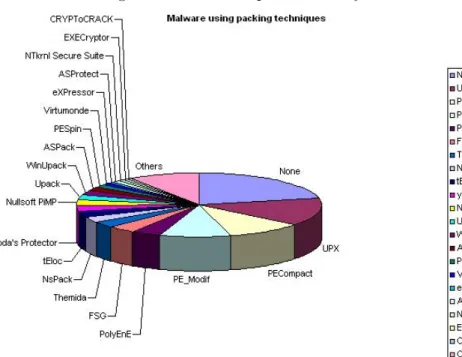
Executable file packing is the process which decreases file size but make it still runnable. Packer compress program code and append its decompression stubs to program’s binaries file to run when extracting. If binary file is packed, static analysis will be meaningless, therefore we need to unpack it first. Packing is considered as most used anti-reversing technique because ”79% of new malware is using some type of packing technique or other.”, statements by Panda Security [15].
Figure 2.2: Common packer used by malware
2.4.2 Self Code Modification and Code Polymorphism
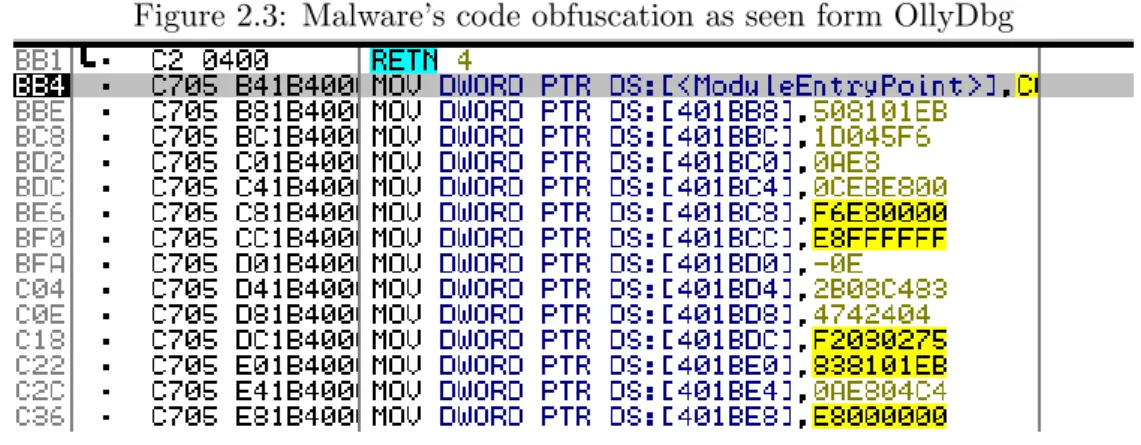
Other technique used by malware author to harden reversing process is self code modification and code polymorphism. Code itself will decode on the fly and after being executed, there is another part of codes delete codes from memory so it leave no trace of code’s behavior. This technique require author have good understand of assembly language and program structure so that it doesn’t use widely.
2.4.3 Virtual Execution Environment and Anti-VM
This technique makes use of different result return by a particular piece of code when running in virtual machines (VM) and real system. Recently revealed Shylock [10], a financial malware plat- form discovered by Trusteer in 2011, which designed to take control a computer, had an improved evasion technique to detect whether it’s running in a virtual machine. It can detect not only VM but also other sandboxes as well. However, it is unclear how long such a trick will help it evade detection, because evasion tactics aren’t actually that effective.
2.4.4 Other technique
Other technique include check for process information about debugging, hooking detection, code obfuscation, junk code etc. Explanation of those techniques is long and out of scope of this thesis.
Figure 2.3: Malware’s code obfuscation as seen form OllyDbg
2.5 Summary
In this section, we presented background of the growing malware, not only its number but also its evasion technique and new target platform. We also introduced some major malware analysis approaching method, their strong and week point. As we can see above, malware implemented many anti-reversing technique to prevent from being analysed by researchers. Therefore, we need to monitor its behavior at lower layer and dynamic analysis is considered as more effective analysis method because of its ability to overcome most anti-reversing technique.
Chapter 3
Related Works
In this chapter, we introduce related works, in the case of malware detection and analysis. First, we describe some related works, both static and dynamic analysis technique. Then, we will point out some of their problem.
3.1 Malware Analysis Related Work
In this section, we introduce some system and tools involved in malware analysis.
3.1.1 Towards Understanding Malware Behavior by the Extraction of API calls
Malware author always try to harden malware reverse engineering process by various method.
One of widely used method is using packers or obfuscation tools to evade detection by anti virus vendor. Windows OS provided to programmer and developer rich-features application programming interface (API) which enables developer make use of almost Windows features and resources. On the other hand, malware authors use API as a powerful tools to exploit and perform malicious action. Therefore, in this paper [1], the author propose a system which fully automated analyze and classify the behavior of API function call based on the malicious intent hidden within any packed program. The four-step methodology of system is described as following:
• Step 1: Unpack the malware.
• Step 2: Disassemble the binary executable to retrieve the assembly program.
• Step 3: Extract API calls and important machine-code features from the disassembly pro- gram.
• Step 4: Map the API calls with MSDN library and analyze the malicious behavior.
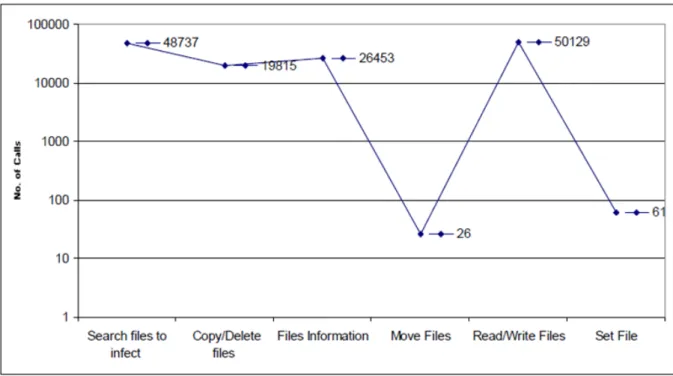
API calls have significant influence in order to model program behavior because it reflect the behavior of code. In this paper, the author analyze the most common malware behavior patterns and to classify program executables as malicious or benign. From extracted data, we come up with six main categories of suspicious behavior of API call features as shown in figure 3.1. We can see that one among most popular API used by malware is APIs which related to file manipulation.
Figure 3.1: Six main categories of suspicious behavior of API call features
3.1.2 Toward Automated Dynamic Malware Analysis using CWSandbox
Carsten Willems et al. introduce CWSandbox [20], an automated dynamic malware analysis sys- tem. CWSandbox executes malware in a simulated environment, monitors all system calls, and automatically generates a detailed report to simplify and automate the malware analyst’s task. The critical point of method which is used by CWSandbox to monitor malware’s behavior is DLL in- jection and API hooking. Every program which run in Windows environment need to import some important Windows library such as kernel32.dll, ntdll.dll, user32.dll in order to communication with operating system and function correctly. By manipulate DLL import process and overwrite imported function with their own DLL, CWSandbox can intercept API call to redirect all system call to their hook library and logs all information before return it to normal flow without invoke
malware awareness. CWSandbox is able to record the following information:
• the files the malware sample created or modified;
• the changes the malware sample performed on the Windows registry;
• which DLLs the malware loaded before execution;
• which virtual memory areas it accessed;
• the processes that it created;
• the network connections it opened and the information it sent;
• and other information, such as the malware’s access to protected storage areas, installed services, or kernel drivers.
3.1.3 Process Monitor
Process Monitor [14] is an advanced monitoring tool for Windows created by Mark Russinovich and Bryce Cogswell, two researcher from Microsoft. Use Process Monitor, we can show real- time file system, Registry and process/thread activity. As the combination of two popular legacy Sysinternals utilities, Filemon and Regmon, Process Monitor not only have rich-features set but also adds an extensive list of enhancements including rich and non-destructive filtering, comprehensive event properties such session IDs and user names, reliable process information. Moreover, it also includes full thread stacks with integrated symbol support for each operation, simultaneous logging to a file, and much more. Because of that, Process Monitor is must-have tools for malware analyzers.
Figure 3.2: Proccess Monitor Screenshot
3.2 Malware Detection Related Works
This section will present system and related works which concentrate on malware detection.
3.2.1 Malware Detection Focusing on Behaviors of Process and its Implemen- tation
Malware Detection Focusing on Behaviors of Process and its Implementation [8] is a research leaded by Yoshiro Fukushima for Graduate School of Information Science and Electrical Engineering from Kyushu University. In this research, the author proposed a dynamic malware detection system based on evaluation of suspicious process behaviors. To be able to infect and spread itself in the wild, malware need to modify file system, registry, therefore, by comparison its behavior with normal program, we can use those information to detect malware.
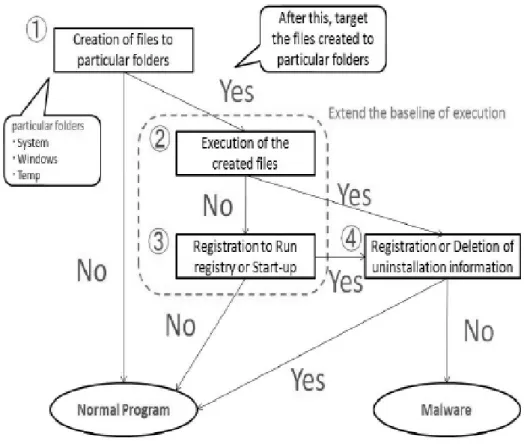
In this paper, the author consider an event of creating file to operating system and temporary folders as a malicious behavior. Moreover, an event of executing the created file also considered as a malicious behavior. On the contrary, if process register uninstall information to Windows registry,
it will be considered as benign program. In summary, the author proposed a 4 steps algorithm to detect malware as shown in Figure 3.3. By using proposed algorithm, proposed system got an accuracy about 60% and especially, 0% false positive rate.
Figure 3.3: Malware Detection Mechanism
3.2.2 Malware Detection using Windows API Sequence and Machine Learning
In this paper [12], the author proposed malware detection system using the Windows API call sequence. By using IAT hooking technique, this system is able to extract API call sequence from malware binary. From those extracted data, a 3rd order Markov chain (i.e. 4-grams) is used to model the API calls and generate classification rules. Association mining based classification is used because it yields higher detection accuracy than previous data mining based detection systems which employed Naive Bayes, Support Vector Machine and Decision Tree techniques. The key novelty of the proposed malware detection system is the iterative learning process combined with the run-time monitoring of program execution behavior which makes this a dynamic malware detection system. The accuracy of the system is evaluated and the result shown that system can
detect 90% of malware in testing set.
3.3 Summary
In this chapter, we present some related works which make use of both native and DLL hooking to extract malware behavior, use API call sequences to come up malware’s suspicious behavior classification. We also took a look at malware detection method based on malware file activities log. Some data and experiment results are also shown. However, almost related works focus on analysis malware behavior based on API calls. Other factors such as file event is ignored. DLL injection isn’t a new technique and already be countered by malware author and native hooking also decrease system performance. Therefore, there is a need for a dynamics analysis system which focus on malware’s file system activities.
Chapter 4
Malware Detection Using File System Filter Driver
4.1 Malware Analysis Focus On File Activity
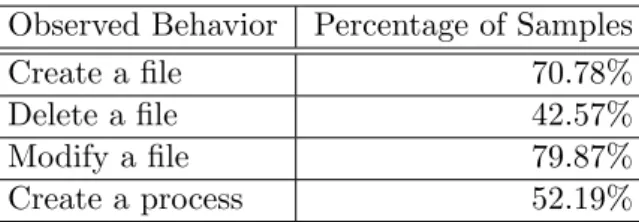
In previous sections, we discussed about methods used to analysis and detect malware. We also see that malware implement many anti reversing technique to prevent from being debugged by user. This thesis focuses on analysis malware file activity because in order to infect and spread itself in the system, malware have to make change to file system by creating new file, downloading payload, modifying exist file, deleting log or trace file. In a paper [2] by Bayer et al. about behavior of malware samples, they analysed samples which is submitted to Anubis [9], an online malware analysis system, from 2nd Jully 2007 to 31th December 2008. Part of the results is shown in Table 4.1 proved that around 70% of malware samples create file, half of them create new process. And furthermore, the paper [1] that we discussed in previous chapter also shown that the most used API by malware is file manipulation related API as described in Figure 3.1. Therefore, we can detect malware by deeply analysis file activity of malware and compare them with benign program.
Observed Behavior Percentage of Samples
Create a file 70.78%
Delete a file 42.57%
Modify a file 79.87%
Create a process 52.19%
Table 4.1: Behavior of malware samples
In this chapter, we define our logging method by using file system filter driver, one type of window
filter driver to monitor malware’s file activity. File system filter driver is suffered from detection by malware and also isn’t affected by malware’s anti-debug or anti-reversing technique. It allows us to intercept I/O request at lower level, hence more information.
4.2 Windows Filter Driver
4.2.1 Overview of Windows Driver
Driver is a software component that tells the operation system and other software how to commu- nicate with a device that is attached to a computer. Driver acts as translator between a hardware device and the application. For example, suppose an application needs to read some data from the hard disk. The application calls an API provided by the system and after that system calls the function implemented by the driver to retrieve requested data. Driver will communicate with the device, get the data, return it to system and finally, to the application. Programmer can write the higher-level application code independently of whatever specific hardware the end-user is using.
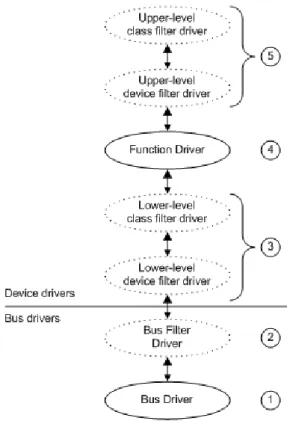
To allow driver developers to write device drivers that are source-code compatible across all Microsoft Windows operating systems, the Windows Driver Model (WDM) was introduced. WDM drivers are layered in a complex hierarchy and communicate with each other via I/O request packets (IRPs). The Windows Driver Model was introduced from Windows 98 and Windows 2000 and has been the dominant framework for driver development since then. There are three kinds of WDM drivers:
• Bus drivers : which drive an individual I/O bus device and provide per-slot functionality that is device-independent. Bus drivers also detect and report child devices that are connected to the bus.
• Function drivers : function driver is the main driver for a device. It provides the operational interface for its device.
• Filter drivers : which filter I/O requests for a device, a class of devices, or a bus.
Figure 4.1: Diagram illustrating possible driver layer 4.2.2 Windows Filter Driver
A filter driver is a Microsoft Windows driver that adds value to or modify the behavior of a device.
It is a driver/program/module that is inserted into the existing driver stack to perform some specific functions. Filter drivers can be categorized to Bus Filter Driver, Lower-Level Filter Driver, Upper- Level Filter Driver, depending on its position in the driver layers. A lower-level filter driver monitor and/or modifies I/O requests to a particular device, on the other hand, upper-level filter driver add values for a particular device such as addition translations or addition security checks. Each device will have a single required function driver and zero or more filters driver. Filter driver can be written either by Microsoft or the vendor of the hardware and any number of filter drivers can be added to Windows.
A filter driver can be installed for a specific device or device class. Every hardware device has a device name and belong to a Windows device class. The Table 4.2 shows some examples of device class.
CDROM DVD/CD-ROM drives DiskDrive Disk drives
Display Display adapters Keyboard Keyboards
MEDIA Sound, video and game controllers Mouse Mice and other pointing devices Net Network adapters
Table 4.2: Windows Device Class
4.3 File System Filter Driver
4.3.1 Overview of File System Filter Driver
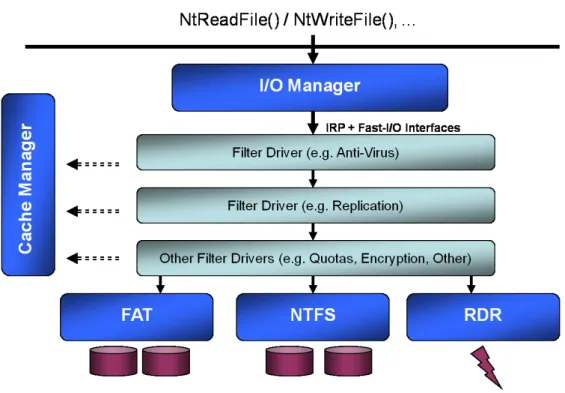
A file system filter driver intercepts requests targeted at a file system or another file system filter driver. By intercepting the request before it reaches its intended target, the filter driver can extend or replace functionality provided by the original target of the request. File System Filter Driver is widely used in many fields and products such as anti-virus filters, backup agents, and encryption products.
Figure 4.2: Overview of file system filter drivers stack
4.3.2 I/O Request Packet
I/O request packets (IRPs) are kernel mode structures that are used by Windows Driver Model to communicate with each other and with the operating system. The data structure encapsulating the IRP not only describes an I/O request but also maintains information about the status of the request as it passes through the drivers that handle it. The IRP data structure is described as following :
t y p e d e f s t r u c t _ I R P {
P M D L M d l A d d r e s s ; U L O N G F l a g s ; u n i o n {
s t r u c t _ I R P * M a s t e r I r p ; P V O I D S y s t e m B u f f e r ; } A s s o c i a t e d I r p ;
I O _ S T A T U S _ B L O C K I o S t a t u s ;
K P R O C E S S O R _ M O D E R e q u e s t o r M o d e ; B O O L E A N P e n d i n g R e t u r n e d ;
B O O L E A N C a n c e l ; K I R Q L C a n c e l I r q l ;
P D R I V E R _ C A N C E L C a n c e l R o u t i n e ; P V O I D U s e r B u f f e r ;
u n i o n { s t r u c t { u n i o n {
K D E V I C E _ Q U E U E _ E N T R Y D e v i c e Q u e u e E n t r y ; s t r u c t {
P V O I D D r i v e r C o n t e x t [ 4 ] ; };
};
P E T H R E A D T h r e a d ;
L I S T _ E N T R Y L i s t E n t r y ;
} O v e r l a y ; } T a i l ;
} IRP , * P I R P ;
Some important members of the IRP structure:
• IOStatus : Contains the IO STATUS BLOCK structure in which a driver stores status and information before calling IoCompleteRequest.
• UserBuffer : Contains the address of an output buffer.
• Flags : Contains system-defined flag bits describing more information about processing IRP.
4.3.3 Filter Manager
Stack based IRP processing draws a lot of issues to develop driver. Driver writer need to handle complex IRP and complex code make development and maintenance process difficult. Moreover, developer need to revise with each OS version and service packs and only one error in your code will cause deadlock or system crash. Microsoft developed a framework called Filter Manager which provides a framework for developing File Systems and File System Filter Drivers without having to manage all the complexities of file I/O. The Filter Manager simplifies the development of third-party filter drivers and solves many of the problems with the existing legacy filter driver model.
4.4 Process’s File Activity Monitoring by File System MiniFilter Driver
4.4.1 How to monitor process’s file activity
We will briefly describe the process of installation and then filter I/O activity by using file system minifilter driver. At first, in DriverEntry() routine which is must-have routine of every driver, minifilter call to FltRegisterFilter() routine which takes a FLT REGISTRATION structure as a parameter to define its own callback function for each type of operation its want to filter.
At the time correspondent I/O request is processed, first, minifilter’s pre-operation callback will be called, give minifilter a chance to examine the request and do some initialization. The parameters of pre-operation callback routine include a pointer to FL CALLBACK DATA (will be descried later) which hold information such as type of operation, file object, flags. And finally, after the operation done, the post-operation callback will be called, allows minifilter to intercept the result, the final status of the operation.
4.4.2 MiniFilter Callback Data
The callback data structure is the new I/O packet descriptor for the Filter Manager, and it is equivalent to the IRP in the legacy model. Minifilters talk to Filter Manager and each other via this structure. Unlike an IRP, minifilter pass does not manage stack locations but instead of that it indicates how the callback data should be managed via well-defined Filter Manager interfaces and return status values to the Filter Manager. The FLT CALLBACK DATA type describes all the information provided to a minifilter to describe an I/O. This structure is described as following.
t y p e d e f s t r u c t _ F L T _ C A L L B A C K _ D A T A { F L T _ C A L L B A C K _ D A T A _ F L A G S F l a g s ; c o n s t P E T H R E A D T h r e a d ; c o n s t P F L T _ I O _ P A R A M E T E R _ B L O C K I o p b ; I O _ S T A T U S _ B L O C K I o S t a t u s ; s t r u c t _ F L T _ T A G _ D A T A _ B U F F E R * T a g D a t a ; u n i o n {
s t r u c t {
L I S T _ E N T R Y Q u e u e L i n k s ;
P V O I D Q u e u e C o n t e x t [ 2 ] ; };
P V O I D F i l t e r C o n t e x t [ 4 ] ; };
K P R O C E S S O R _ M O D E R e q u e s t o r M o d e ; } F L T _ C A L L B A C K _ D A T A , * P F L T _ C A L L B A C K _ D A T A ;
We will explain some important fields in this structure which contain critical information in monitoring file activity.
• Flags : Provides information about this operation, such as type of the IRP: IRP or FAST IO or FsFilter operation.
• IoStatus : The IO STATUS BLOCK which will receive the final status for this operation.
The IO STATUS BLOCK is defined as below : t y p e d e f s t r u c t _ I O _ S T A T U S _ B L O C K {
u n i o n {
N T S T A T U S S t a t u s ; P V O I D P o i n t e r ; };
U L O N G _ P T R I n f o r m a t i o n ;
} I O _ S T A T U S _ B L O C K , * P I O _ S T A T U S _ B L O C K ;
Status is the field which indicates the completion status of the operation. It can be either STA- TUS SUCCESS if the requested operation was completed successfully or an informational, warning, or error status. Information field contains extra information about the requested operation. For example, with the IRP MJ CREATE request, the file system sets the Infor- mation member of this structure to one of the following values:
– FILE CREATED
– FILE DOES NOT EXIST – FILE EXISTS
– FILE OPENED
– FILE OVERWRITTEN – FILE SUPERSEDED
• Iopb : Pointer to the changeable parameters structure for the I/O operation. Minifilter accesses this structure to retrieve I/O parameters. Some important fields of this structure are described as following :
– MajorFunction : The IRP MJ function which describes the operation. Each request from application with be translated to an I/O Request Packet with correspondent Ma- jorFunction codes. There are a lot of major function but in our system, we focus on those major functions which related to file manipulation. Those major function codes
and operations are described in this table.
IRP Major Function Codes Operation
IRP MJ CLEANUP Close the file object handle
IRP MJ CLOSE Indicates that the handle of the file object has been closed and released
IRP MJ CREATE Open a handle to a file object or device object.
This request is sent when a driver calls Create- File() routine.
IRP MJ FILE SYSTEM CONTROL Sent when I/O Manager or kernel-mode driver want, for example, mount a volume or verify a volume
IRP MJ QUERY INFORMATION Sent when a user-mode application call GetFile- InformationHandle() routine to retrieve infor- mation such as : access mask, file name, file attribute...
IRP MJ READ Sent when a user-mode application has called ReadFile routine
IRP MJ SET INFORMATION Sent when a user-mode application has called GetSecurityInfo() routine
IRP MJ DIRECTORY CONTROL Sent when a user-mode application has called ReadDirectoryChangeW() routine to request for notification of changes to the directory or to query for directory information
IRP MJ WRITE Sent when a user-mode application has called WriteFile() routine
IRP MJ ACQUIRE FOR SECTION SYNC
Sent when a use-mode application want to map that file to memory fore read, write or execute.
– MinorFunction : The IRP MN function which describes operation. Along with Major- Function, MinorFunction codes give more detail information about processing IRP. For example, the following MinorFunction is correspondent with MajorFunction IRP MJ WRITE:
∗ IRP MN COMPLETE
∗ IRP MN COMPLETE MDL
∗ IRP MN COMPLETE MDL DPC
∗ IRP MN COMPRESSED
∗ IRP MN DPC
∗ IRP MN MDL
∗ IRP MN MDL DPC
∗ IRP MN NORMAL
– TargetFileObject : The file object which this operation affects. By using FltGetFile- NameInformation() routine, we can retrieve more information such as file name about about this target file object.
4.4.3 Summary
In this section, we introduce the method that uses file system minifilter driver to intercept I/O requests. By registering to the system type of operation that we want to filter, and by examining operation via pre and post-operation callback, we can retrieve information about file activity of the process which is monitored. Those informations will be written to a log file and will be used as input data for log analysis module.
4.5 Proccess’s File Activity Behavior
4.5.1 Definition of File Activities Related Terms
At first, we’ll define some terms that we used in our support vector’s features:
• System Folder : This is place where all the Windows OS’s file is installed. It usually is C:\Windowsand an inner folder,C:\Windows\System32in case we installed OS on driver C:.
This folder is included in Windows’s PATH environment variable, so all executable file in this directory can be directly executed from Windows Command Prompt without input its full path. That is merit to put executable file in this folder.
• Critical Files : These files and processes is used by OS in various situation such as boot system up, automated run at system boot up. Some example of those files is listed as below : – cmd.exe, command.com : Windows Command Prompt. It is used to receive command
from user and run .bat (Batch Processing) file.
– Svchost.exe : a generic host process name for services that run from dynamic-link li- braries (DLLs)
– win32k.sys : this file handles system services that called by Windows NT/2K graphics systems (GDI32, DDRAW) and window manager (USER32)
– user32.dll, ntdll.dll, kernel32.dll, etc : Those files is common DLL files that is loaded by almost processes in the system.
– kernel.exe : core kernel file of Windows.
• Temp Folder : a directory used to hold temporary files. Its content is deleted at bootup or at regular intervals. Its path is define by Windows’s TEMP environment variable. Originally, the default was C:\Temp, then %Windows%\Temp. or Local Settings\Temp. This folder can be accessed directly by program from %temp%variable.
• Internet Temporary Folder : the default temporary folder for Internet Explorer. It hold some important file such as index.dat, a file stores information such as web URLs, search queries and recently opened files, and other download files.
• System Drivers Folder : This folder holds almost Windows’s drivers which is loaded when windows bootup.
4.5.2 Different In Manipulate File System Between Benign and Malicious Pro- gram
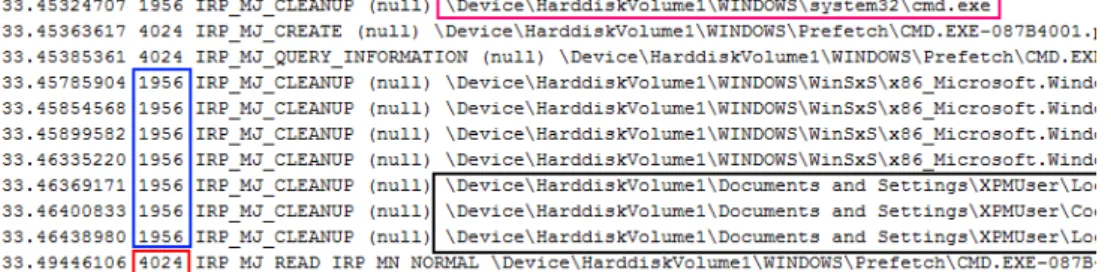
By running malware in isolated environment and monitor its behavior, we receive a log contain : timestamp, PID, IRP MajorFunction codes, IRP MinorFunction codes, FileName and final I/O Status. An example of log is shown in Figure 4.3.
Figure 4.3: Malware Behavior Log Sample
Malware and benign programs act differently in creating, modifying, deleting file system. Some of those different is listed bellow :
• File Extension : Normal program create not only executable file (.exe) but also another types of file such as data file. On the contrary, malware need to deploy its payload and another modules such as driver (.sys), injection DLL (.dll), batch script (.bat)
• File Name : In order to maintain program through different versions and make it easy to remember and understand, mostly normal program set related file name to meaningful name.
However, to evasion detection by anti-virus vendor, malware tends to use short or meaningless name, or try to generate random name every running times.
• File Path : Almost normal program uses installed folder as working folder and something it uses system’s temporary folder. On the other hand, malware copies or creates its file in Windows system folder.
• Create Process : Benign program uses only one process as the main program and creates threads to do another functions of the program. Malware, however, needs to create another processes or run batch script to, for example, delete itself or consistently monitor system.
• Execute of created file : Except for installer, one type of program that used to install another program, which run installed program after done it jobs, almost malware execute created file immediately or register a registry to schedule to run at next boot up.
• Query directory and files information : Malware have to query information of files, as special critical file, and directories in order to find files to inject, place to setup payload files.
• Modify Internet Temporary Folder : By monitoring system’s internet Temporary Folder, we can detect whether malware is trying to access internet or not.
• Delete itself : After executed, install all the payload and set up registry to ensure its payload will be executed in next boot up, malware tend to delete binary file to erase its trace.
As we mentioned above, we listed some differences in file manipulation between malware and benign program. By comparing and detecting those information from log behavior, one can tell that monitored process have malicious behavior or not.
4.6 Support Vector Machine As Detection Module
4.6.1 The Advantages of Support Vector Machine
There are a lot of supervised machine learning methods that is used widely in classification problem such as Decision Tree, Linear Regression, Neutral Network, Support Vector Machine (SVM), etc but we chosen SVM as our training and detection module for our system because of its fit to malware detection problem. SVM takes a set if input data We summarize all the reasons that make SVM our choice for detection module.
• Designed for binary classification : From a set of training examples with each marked as belonging to one of two categories, then an SVM builds a model that assigns new examples from test data into one category or the other. As same as malware detection problem, given a process or binary file, analysis system must judge that file or process is malware or not.
• Over-fitting avoidance : In our experiment, number of samples, both malware and benign program is large, in comparison with number of features in each support vector. However, SVM is able to avoid over-fitting, the problem that occurred we try to fit the model to data too carefully make our system performances poorly on unseen data, even with small size of samples.
• Homogeneity of data : The feature vectors include features of similar kinds (Boolean,Integer, Float) which is numerical and can be easily scaled to similar ranges to work with SVM. On the other hand, Decision Tree easily handles heterogeneous data.
• Unique solution : SVMs deliver a unique solution, since the optimality problem is convex.
This is an advantage compared to Neural Networks, which have multiple solutions associated with local minima and for this reason may not be robust over different samples.
• Online learning : SVM is able to learn incrementally that is given an SVM model, it is possible to incorporate new training data without having to recalculate on all previous data.
There is still exists another machine learning method that is appropriate but we decided to use SVM for its high accuracy, robust and it can work well with different types of data.
4.6.2 Support Vector Machine As Detection Module
Explain all the theories behind Support Vector Machine (SVM) is long and out of scope of this thesis. The details about SVM can be found in this Wikipedia page [19] and other papers [3] [6].
Therefore, we only briefly explain the basics of SVM and explain the way we use SVM in our system.
Assume that we have a training set that consists of a set of n point of the form (xi, yi) where xi ∈Rn and yi is either 1 or -1, indicating the class to which the point Xi belongs. Each Xi is a n dimensional real vector. In this case, SVM find the hyperplane that divides the points having yi= 1 from those points havingyi =−1.
There is a lot type of SVM such as C-SVC, nu-SVC, eplison-SVR, etc. We use C-SVC (C-Support Vector Classification) for our system. C-SVC (Boser et al., 1992 [3]; Cortes and Vapnik, 1995 [6]) require the solution of the following optimization problem:
minw,b,ξ
1
2wTw+C
∑n i=1
ξi
subject to yi(wTϕ(xi) +b)≥1−ξi, ξi≥0
Here training vector xi are mapped into a higher (maybe infinite) dimensional space by the function ϕ. SVM find a liner separating hyperplane with the maximal margin in this higher dimensional space. This is called kernel trick. According to Wikipedia [18] ”the kernel trick is a way of mapping observations from a general set S into an inner product space V (equipped with its natural norm), without ever having to compute the mapping explicitly, in the hope that the observations will gain meaningful linear structure in V”. Therefore, by mapping to higher dimensional space, we hope that nonlinearly separable data will be transformed to linear separable data. C >0 is the penalty parameter of the error term in the case the data isn’t clearly separable.
Furthermore,K(xi, xj)≡ϕ(xi)Tϕ(xj) is call the kernel function. There is a lot of kernel functions that is proposed and our system uses Gaussian radial basis function as kernel function which is described as below :
k(xi, xj) =exp(−γ∥xi−xj∥2)
forγ >0. Those two 2 parameters C and γ is set by run tunning process on the train data. This
process can be done manually or by program from libSVM. In our system, we run the tunning program and getC = 2.0,γ = 0.5 as best parameters for our train data.
After extracting behavior of malware from log, we change it to an feature of support vector. As we mentioned above, by deeply and carefully analyze behavior log file, we is able to calculate value of each pre-defined features in support vector for each process. We already define some type of feature in previous section and in this section, we summarized all features that are described in previous section and used in our support vector in Table 4.3. After set value for each feature, we get some data as following, as input for our machine learning.
x1= (
1 2 0 · · · 1 ) x2=
(
0 2 0 · · · 1 )
x3= (
1 1 1 · · · 1 )
· · · xn=
(
1 2 10 · · · 0 )
Features Type Notes
Query Critical File Boolean get information such as : path, file size,.. of explained critical file
Create New Process Boolean Access Network Temp Folder Boolean Create Executable File Boolean
Loaded DLL Integer Number of DLLs which pro-
cess has loaded
Create Process Time Float time from process start up to time it execute new process Create File Temp Folder Boolean
Create File Same Folder Boolean
Create .dll File Boolean
Create .sys File Boolean
Create file in System Folder Boolean Modify Window Hive file Boolean
Delete Itself Boolean
Install Driver Boolean
Table 4.3: Features of Support Vector
4.7 Summary
In this chapter, we described our approach toward malware detection by using file system minifilter malware to monitor process’s file activity and analysis behavior log. We mentioned some important structures which involved in monitor process behavior and shown that how we can retrieve file information and operation status from those structures. We also discussed the difference between malware and benign program in file manipulation and method to use those data to detect malware by using support vector machine. In next chapter, we will express the execution environment and implementation of our system.
Chapter 5
Implementation
In previous chapter, we described the method which use file system filter driver to monitor process’s file activity and how to analysis its log behavior to detect mal- ware. We implemented a system to detect malware which make use of mentioned method and will define each component of system in detail in this chapter.
5.1 Enviroment and Tools
The enviroment and tools that used to implement proposed system is represented in the Table 5.1.
Programing Language
Assembly C, C++
Python
Compiler Visual C++ Compiler (VC)
Tools/SDK
Windows Driver Development Kit Installable File System Kit
Windows SDK
libSVM (Support Vector Machine Library) Virtual Box
OS Windows 7 SP1 32-bit (Host)
Windows XP SP2 32-bit (Virtual Machine) Table 5.1: Implement environments and Tools
5.2 System Overview
This section will give a brief overview of the system. Basically, system consists of three modules : logging module, log analysis module and training and detection module. The more detail about
each module will be described in next section.
Figure 5.1: System Overview
5.3 Behavior Logging Module
Behavior Logging Module performs a task to continuously log behavior of malwares. The process of logging is executed as the following order. First, a snapshot of a clean install Windows XP SP2 is created and saved. From that point, a manager python script from host OS will automatically start up the virtual machine (VM). Second, from inside the VM, another python script is invoked.
This Python script communicates with host machine’s Python script about the state of the VM, start the filter driver, start logging program and finally, execute the malware. The malware is started and executed for about 1 minute. Because almost file activity of a process is performed at load time, about 3-5 seconds, and after that, process will mostly query for directory information or do its function, therefore 1 minute is enough time to monitor almost process’s file activity. On the other hand, the VM also has a network driver, however, to prevent possible damage from VM to the host machine cause by malware, this network driver is disabled but we still be able to detect if process try to access to the Internet. After finished, the log file will be shared between host machine and the VM via shared folder and then, the VM is restored to clean installed snapshot
and ready to logging next malware.
Figure 5.2: Proccess of logging malware’s file activities
5.4 Log Analysis Module
Log Analysis Module does a task which can be split in two main parts: The first part excludes unnecessary information from the log, the second part analyses malicious behavior from the log and converts those informations to format of libSVM.
The raw log data from malware contains all file activity information of the malware from the time malware is executed to the end of logging period. Therefore, beside activities which is characteristic of malware, this log also include all the file activities of a general process such as DLL loading and memory mapping, system environment checking and configure, file configuration reading. For example, to load a DLL to the process memory, firstly, the process needs to issue a IRP with IRP MJ CREATE code to open a file object handle to the binary file of the DLL. Next, it will send a IRP MJ ACCQUIRE FOR SECTION SYNC to request the DLL for memory mapping. Finally, it sends a IRP MJ CLEAUP to close the handle. An other example is that, every process that
run in the system needs to load at least 2 DLL: ntdll.dll and system32.dll. It can also load other common DLL files such as: user32.dll, uxtheme.dll, etc, so we will exclude those less important informations from the log.
The next part which is an other Python script, analyses malicious behaviors from the log. For each line in log file, we record the IRP code, major function code and file path and store it in a record. By read IRP code, one can tell what malware do with that file. On the other hand, by looking at PID of current action, we can check if malware spawned a new process. An other IRP such as IRP MJ DIRECTORY CONTROL is useful to check if malware search for system file or not. We focus on informations that are described in the Chapter 4. Finally we store those informations in the format that libSVM works with. The figure shows the format of a libSVM data file.
[ l a b e l ] [ i n d e x 1 ]:[ v a l u e 1 ] [ i n d e x 2 ]:[ v a l u e 2 ] [ i n d e x 3 ]:[ v a l u e 3 ] ...
[ l a b e l ] [ i n d e x 1 ]:[ v a l u e 1 ] [ i n d e x 2 ]:[ v a l u e 2 ] [ i n d e x 3 ]:[ v a l u e 3 ] ...
[ l a b e l ] [ i n d e x 1 ]:[ v a l u e 1 ] [ i n d e x 2 ]:[ v a l u e 2 ] [ i n d e x 3 ]:[ v a l u e 3 ] ...
Each field of the file is described as following:
• label : or class which is the class (or set) of your classification. We set label to -1 for malware and 1 for benign program.
• index : Ordered indexes for our support vector. We set those values to continuous integers.
• value : The data for training. We set it to 0/1 according to Yes/No for a specific malicious behavior of malware such as is malware create new process and etc. for other features of vector such as Number of Loaded DLL, Execution Time, Time Start New Process, we set this field to its value.
5.5 Training and Detection Module
Training and Detection Module’s function is getting all the formatted input data and use SVM to train and detect malwware. The library that we used for this module is libSVM [5] by Chih- Chung Chang and Chih-Jen Lin from Department of Computer Science & Information Engineering, National Taiwan University. This library is popular used in many research papers that we can’t list all of them in here. The reason for its popular is it is implemented for users from other fields can easily use SVM as a tool and can use it effectively. Details of the implementation can be found
here [4]. By using interfaces given by libSVM, we created a Python script to automated all the processes from getting train data, scaling train data and test data, doing optimization, selecting parameters and doing prediction.
5.6 Summary
In this chapter, we presented all the tools and environments which are used to implement the proposed system along with this thesis. This system has ability to continuously run and log malicious file activity from malwares and automatically not only analyses log files but also trains and detects malware. We also explained how to implement all the modules in the system , Behavior Logging Module, Log Analysis Module, Training and Detection Module and express in detail all the task and function of each module. In the next chapter we will set up the experiment and evaluate experiment results of this system.
Chapter 6
Experiment and Evaluation
In this chapter, we express method and set up experiment environments, which was used to evaluate the accuracy and effectiveness of implemented system. Through- out this chapter, we will describe each of evaluation items, and how the experi- ments is set up. After showing the result of each experiment, we will have some discussions about those results and some aspects that influence the performance of the system.
6.1 Evaluation Overview
As we mentioned in Chapter 1, this thesis is about implementation a system which make use of file system filter driver to log malware behavior and use it to test if we can use those data to distinguish malware from normal program. Therefore, in order to accurately evaluation we need to collect log from both malware and normal process. We also check if file activity is sufficient to be able to detect malware.
To sum up, we will evaluation the following items:
• How accuracy our system is: Because the purpose of our system is to detect malware, we will train proposed system with real log file. We will compare performance of system in two case: the first one is when train data contain only log from malware and the second one is when it consists of both malware and normal process. By compare these two test cases side by side, we can clearly look at accuracy of the system and check for other aspect that affects our system performance.
• How effective that we use file activity log of process to detect if a process is malware or not.
Beside of file activity, there is another aspect of process behavior such as registry activity, thread activity and network activity. Depending on each kind of malware, one activities may be used more than these others activity. for example, virus may express mostly file system activity meanwhile adware’s most noticeable activity is network. We need to check that, by deeply analysing of process’s file activities log, how good we can distinguish malware from normal process.
In next sections, we will explain in details how to set up each experiment and finally, we show the results of experiments, give evaluation about those results.
6.2 Experiment 1: Accuracy
6.2.1 Experiment Setup
As we mentioned in previous section, in this section, we describe the way we set up experiment to test how accuracy our system is. In this experiment, we split it into two case for accuracy comparison. Table 6.1 show the environment of test case 1.
Type Environment Detail
OS Windows 7 SP1 Host Machine (32-bit) OS Windows XP SP2 Virtual Machine (32-bit)
Train Data 2000 Samples Collected from mcat group and internet
Test Data 701 Samples Samples which doesn’t include in previous group
Table 6.1: Environment of test case 1
All the malware samples is run in the VM for around 1 minutes. Log file is created and analysis process is run on the same host machine. Malware samples is collected from mcat group and from MalwareTips Forum, Malware Archive Threat.
To compare the accuracy of the model with the previous test case , we set up another experiment the same way as test case 1 but this time, train data contains not only malware but also normal program and so do the test data. The details about number of samples is given in Table 6.2.
6.2.2 Experimental Results
The proposed malware detection system is evaluated by calculating accuracy of the malware de- tection system. Accuracy is defined as the ratio of sum of number of malicious process rightly
Data Type Number Detail
Train Data Malware 300 Samples Collected from mcat group and internet
Benign 300 Samples Executable file included in Windows and free software Test Data Malware 200 Samples Samples which doesn’t include in previous group
Benign 127 Samples Samples which doesn’t include in previous group Table 6.2: Environment of Experiment 2
classified as malicious and number of benign process rightly classified as benign to total number of process classified.
Accuracy = A+B
C+D∗100%
Where,
• A is the number of malicious process rightly classified as malicious
• B is the number of benign process rightly classified as benign
• C is the total number of malicious process classified
• D is the total number of benign process classified
We ran both two test case and then analyze behavior of malwares and normal programs. In test case 1, Table 6.3 shows the details of some most signification of samples’s behavior that we previously explained in Section 4.5.1 and Table 4.3. The result of the experiment is shown in Table 6.4. With test data contain of 701 samples, by using libSVM one-class classification, system correctly classified 500 samples, hence 71.32 % of total malwares.
Behavior Malware Samples (Total = 2700)
Query critical file 1401 (51.88%)
Create new process 1480 (54.81%)
Access network temp folder 883 (32.70%) Create executable file 2041 (75.59%) Create file temp folder 1265 (46.85%) Create file same folder 906 (33.55%)
Create .sys file 720 (26.66%)
Create .dll file 1817 (67.29%)
Create file in Sytem folder 2122 (78.59%) Modify Windows Hive file 2291 (84.85%) Table 6.3: Behavior of samples in Test case 1
Total Malware Samples 701 Classified as Malware 500
Accuracy 71.32 %
Table 6.4: Classification result of Test case 1
In test case 2, at first, we train our system with train data and then do a 10-fold cross validation.
The cross validation test gave an accuracy about 81.16%.After that, we test our system with test data consists of 200 malware and 127 benign executables. Result of the test case is shown in Table 6.6. Table 6.5 shows the behavior that we previously discussed in Section 4.5.2 of both malwares and benign programs. In total of 200 malware samples, system correctly classified 162 samples, equivalent to 81%. On the other hand, number of benign program which is recognized as normal program is 112 executables, which is about 88.18%. Therefore, the accuracy of the system is this test case is:
Accuracy= 162 + 112
200 + 127 ∗100 = 83.79%
Behavior Malware Samples (Total = 500) Normal Programs (Total = 427)
Query critical file 333 (66.6%) 134 (31.38%)
Create new process 271 (54.2%) 60 (14.05%)
Access network temp folder 160 (32.0%) 25 (5.854%)
Create executable file 381 (76.2%) 138 (32.31%)
Create file temp folder 231 (46.2%) 77 (18.03%)
Create file same folder 115 (23.0%) 0 (0.0%)
Create .sys file 142 (28.4%) 46 (10.77%)
Create .dll file 288 (57.6%) 117 (27.40%)
Create file in System folder 39 (7.8%) 72 (16.86%)
Modify Windows Hive file 420 (84.0%) 213 (49.88%)
Table 6.5: Behavior of samples of Test case 2
Malware Samples Benign Program
Total 200 127
Classified as Malware 162 15
Classified as Benign 38 112
Table 6.6: Classification result of Test case 2
Another factor that reflect system performance is false negative rate, which is ratio between number of malwares which is wrongly classified as benign program per total malware processed.