volume 21 page range 79‑100
year 2010‑11
URL http://id.nii.ac.jp/1092/00000499/
Mobile Reading Materials
Philip Murphy
Abstract
The last decade has seen an explosion in the mobile computing market. Not only has technology become smaller, cheaper, faster and more powerful, but the once basic phone has now been transformed into a self-contained, portable and multi-functioned multimedia recording studio. Of all the possibilities afforded by these modern-day advances, an area receiving much attention is the use of mobile technology for educational purposes (Kukulska-Hulme &
Traxler, 2005). Focusing on reading proficiency specifically, this current paper details the development of a web-based reading comprehension exercise for first-year EFL majors at Kanda University of International Studies (KUIS) in Japan. With the overarching goal being the creation of a version of the exercise for use in mobile study environments (be it laptops or smart phones), the format of the exercise has undergone continual revision in order to reap the benefits of new mobile technology as it has become available. To summarise the research conducted to date, this paper comprises (a) a description of how the exercise has developed according to the stages identified in Harmon and Jones’ (1999) continuum of web-based use in courses, (b) a description of the current state of the web-based reading comprehension exercise and (c) a selection of ideas for the future development of the exercise.
1. Introduction
The last decade has seen an explosion in the mobile computing market. Not only has technology become smaller, cheaper, faster and more powerful, but the once basic phone has now been transformed into a self-contained, portable and
multi-functioned multimedia recording studio. With functions allowing users to play, record and edit both audio and video files, and with the ability to take and edit photographs on the spot, mobile phones now also fulfill the roles of quality digital cameras and sophisticated music systems. Add to this the ability to access the Internet through 3G or wireless connections, and owners now literally have Internet access readily available at their fingertips 24 hours a day. With such portability, flexibility and connectivity, users now also have instant access to email, Global Positioning Systems (GPSs) offering map/navigation capability, Internet-based telephony, gaming, social-networking websites and a multitude of applications. However, of all the possibilities afforded by these modern-day advances, an area receiving much attention is the use of mobile technology for educational purposes (Kukulska-Hulme & Traxler, 2005). Focusing on reading proficiency specifically, this current paper details the development of a web-based reading comprehension exercise. With the overarching goal being the creation of a version of the exercise for use in mobile study environments (be it laptops or smart phones), the format of the exercise has undergone continual revision in order to reap the benefits of new mobile technology as it has become available. To summarise the research conducted to date, this paper comprises (a) a description of how the exercise has developed according to the stages identified in Harmon and Jones’ (1999) continuum of web-based use in courses, (b) a description of the current state of the web-based reading comprehension exercise and (c) a selection of ideas for the future development of the exercise.
2. Background
With the arrival of new computer facilities and then wireless Internet connectivity
at KUIS after 2000, offering students access to web-based materials in and out of the classroom became possible. No longer were students simply confined to textbooks and paper-based materials, but the Internet afforded students the opportunity to search for, find, access, critique and use seemingly limitless amounts of online materials to complement their studies. In effect, students were provided with increased opportunity to control their learning through the extra choices available. With the creation of Internet-based materials, students were provided with not just a choice of reading exercises, but they were also provided with a choice of mode of study when accessing materials (paper-based and/or web-based). With a focus on learner autonomy (Benson, 2001; Benson & Voller, 1997) predominant at this university, offering students extra choice in this way was a desirable addition to the course.
The materials development undertaken for this project resulted in the creation of a web-based version of a reading course for first-year EFL majors. The course comprises an episodic story and numerous exercises from which the students are able to choose. Although the course offers both flexibility and choice in terms of the types of exercises available and the manner of study possible (individual, pair or group work), reading the texts and completing the comprehension exercises is compulsory; students must answer comprehension questions to an episode before being permitted to complete other exercises also associated with the same episode. In this respect, completion of the reading comprehension exercises determines whether students can progress to the next episode on not. Therefore, ensuring that students have adequate access to the course materials, especially the compulsory exercises, to progress through the course within the allotted
time is crucial.
It was due to the issue of better accessibility that an alternative web-based version of the course was desirable in order to provide students with unlimited access to course materials both on and off campus. Initially, all web pages were static and simply displayed exercises; students were only able to print off their selected exercises and then write their answers on the papers. Despite the lack of interactivity, students were, nevertheless, provided with 24-hour-a-day access to the materials wherever there was an Internet connection.
With the initial version of the web-based replication of the reading course in use, attention focused on the comprehension exercises for two main reasons (a) as mentioned above, comprehension exercises were compulsory, and, therefore, guaranteed the maximum number of students selecting these exercises (all first-year students in the English Department, approximately 400 each year) and (b) given that a large number of students might attempt these exercises outside the classroom and in the absence of a teacher, work started on investigating ways to support students in their studies when using the online materials.
3. Materials development
Murphy (2005) discusses materials development in detail; however, certain points are particularly relevant again here. As noted above, one of the reasons for creating a web-based reading comprehension exercise was to provide students with access to the materials outside of class and in the absence of a teacher.
Therefore, the need to create materials to perform certain functions of a teacher
(guiding, motivating, intriguing, expounding, explaining, provoking, reminding, asking questions, discussing alternative answers, appraising each learner’s progress and giving appropriate remedial or enrichment help) as recommended by Rowntree (1990) is paramount (Bonk et al., 2000; Dickinson, 1987).
Additionally, feedback on student learning, reviewing and re-teaching when necessary are further functions of a teacher which are highlighted by Richards (1997). Focusing on feedback, Clark and Dwyer (1998), explain how having verified the correctness of a response, feedback can be provided to elaborate on any incorrect answers, thereby providing the basis for selecting a new answer.
In this way, students are guided to self-correction, they are placed in control, and they are afforded further language practice (Robinson, 1992). Based upon these pedagogically sound reasons, changes were made to the web-based exercise so that feedback could be provided. The following section addresses the issue of what kind of feedback should be provided.
3.1 Types of feedback and faults
Based upon the classification of faults in second language acquisition (Corder, 1967; James, 1998 & Ros I Solé & Truman, 2005), a similar rationale has been applied throughout this research to classify the different potential reasons for incorrect answers on a multiple-choice reading comprehension exercise.
For example, listed in increasing order of severity, James (1998, p.83) uses the terms “slips”, “mistakes” and “errors” to describe a continuum of faults which are relevant to language learning. In response to these kinds of faults, Ros I Solé &
Truman (2005, p. 80) describe three possible approaches which can be used to help students develop their self-correction strategies. Listed in increasing order of the
extent to which remediation is necessary, the terms are “feedback”, “correction”
and “remediation”. Therefore, to cater for different kinds of faults, and in order to provide appropriate remediation in the form of computer-mediated feedback, the web-based reading comprehension was developed so that it became possible to provide different types of feedback using the methodologies detailed below.
Focusing on the type of computer-mediated feedback that can be provided, the following two basic forms are typically used (a) Knowledge of Response (KR) feedback, which indicates whether students’ answers are right or wrong and (b) Knowledge of Correct Response (KCR) feedback, which simply provides the correct answers after students respond to questions. In contrast, less attention has been given to feedback designed to help improve the degree of comprehension of texts, for example, through the generation of elaborative forms of feedback (Brandl, 1995; Clark & Dwyer, 1998; Mory, 1994; Nagata, 1996; Van der Linden, 1993). Despite the fact that elaborative feedback has been found to be beneficial in promoting strategies such as rereading, pair reading (Eldredge, 1990; Eldredge &
Butterfield, 1986; Gorsuch & Taguchi, 2008; Koskienen & Blum, 1986; Nes, 2003) and interaction with peers (González-Lloret, 2002; Loschky, 1994; Pica, Doughty & Young, 1986; Polio & Gass, 1998; Uribe, Klein & Sullivan, 2003), high development costs (in terms of time and money) are associated with the creation and adoption of this form of feedback.
Focusing on the idea of providing appropriate support and/or remediation in response to any incorrect answers of varying degrees of severity, Murphy (2007, 2010) conducted research into the affordances of the following two different kinds
of computer-mediated feedback (a) KCR feedback, which represents typically used paper-based answer sheets: students answer the questions and then receive the correct answers and (b) elaborative feedback, which can be designed to elicit alternatives to wrong answers before KCR feedback is provided; in other words, students can be encouraged to self correct their work through the provision of feedback comprising hints and elaboration. While the decision to actually utilize any feedback that is provided ultimately remains with the students themselves, the key difference between the aforementioned types of feedback is the timing. With a methodology employing KCR feedback, students only have one chance to answer the questions before they are provided with the correct answers. Feedback, therefore, typically signifies the end of the exercise, and subsequent reflection on any incorrect responses, or any attempt to reengage with the reading materials would generally be done after the exercise at the discretion of the students.
However, with the combination of elaborative forms of feedback and a multiple-try methodology, students can be given the opportunity to reflect, reengage with materials, self correct and learn from their mistakes as an integral and inherent part of the exercise. Therefore, it was hypothesised that elaborative feedback would be more pedagogically beneficial for promoting comprehension of a reading text, reading strategies and quality interaction (if working with a peer) than KCR feedback. This hypothesis was subsequently investigated in the following two studies, Murphy (2007) and Murphy (2010). Results are summarized below.
3.2 Considerations for online materials development
The main considerations for online materials development have been concerned with the following areas: computer programming languages, website design, and technological issues related to computers and mobile phones. These areas are discussed here in more detail.
3.2.1 Computer programming languages
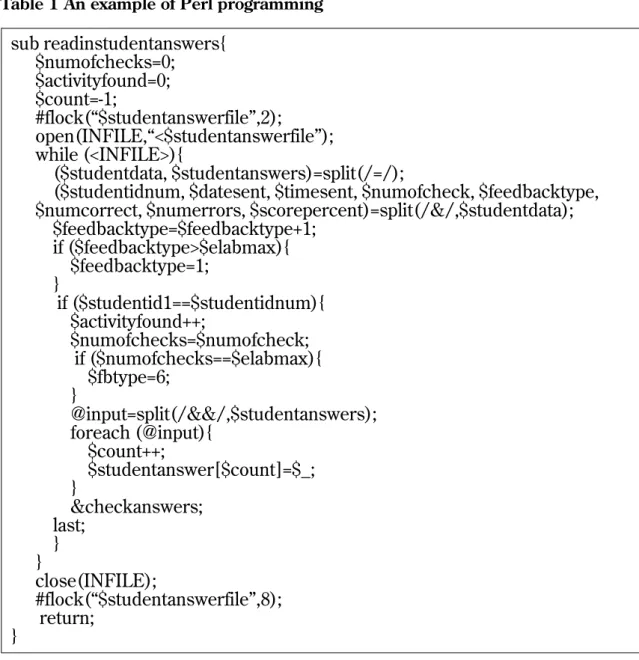
The reading comprehension exercise comprises two main types of programming languages: non-interactive static pages were designed with the commonly used hypertext markup language (HTML) and the more complex interactive pages were written in a language called Perl (Castro, 2001; Deitel, H., Deitel, P., Nieto, T.
& McPhie, D., 2001; Holzer, S., 2001) (see Table 1 for an example of a subroutine written in Perl; the subroutine reads in data from an external file). All programming was custom designed and hand written by the researcher.
3.2.2 Website design
Laptop computers used in the early part of this ongoing project were not fitted with wide screens; therefore, including (a) the reading text, (b) the compre- hension exercise and (c) the textbox for chat on the screen at the same time was unrealistic. To overcome the challenge of limited screen width, the reading text and comprehension questions were displayed on two separate overlapping web pages. Students were able to click on one page for the reading text and comprehension exercise, and the second page for the chat screen. Although students seemed to navigate between the two pages with little trouble, the design was cumbersome. However, as technology has improved over the course of this
sub readinstudentanswers{
$numofchecks=0;
$activityfound=0;
$count=-1;
#flock(“$studentanswerfile”,2);
open(INFILE,“<$studentanswerfile”);
while (<INFILE>){
($studentdata, $studentanswers)=split(/=/);
($studentidnum, $datesent, $timesent, $numofcheck, $feedbacktype,
$numcorrect, $numerrors, $scorepercent)=split(/&/,$studentdata);
$feedbacktype=$feedbacktype+1;
if ($feedbacktype>$elabmax){
$feedbacktype=1;
}
if ($studentid1==$studentidnum){
$activityfound++;
$numofchecks=$numofcheck;
if ($numofchecks==$elabmax){
$fbtype=6;
}
@input=split(/&&/,$studentanswers);
foreach (@input){
$count++;
$studentanswer[$count]=$_;
}
&checkanswers;
last;
} }
close(INFILE);
#flock(“$studentanswerfile”,8);
return;
}
Table 1 An example of Perl programming
3.2.3 Technology available: issues related to computers and mobile phones Mobile technology from four major companies has been used throughout this pro- project, wide-screened laptops have become the norm, and displaying the three aforementioned components together on one page at the same time is now possible.
Docomo (N904i)
Softbank (X02HT)
EMOBILE (S11HT)
iPhone 3
· Good availability
· Cheap to buy phone
· Good Internet speed
· 5 pages can be opened at once
· Popular with students
· Reasonable fees
· Limited availability at first
· Good Internet speed
· QWERTY keyboard
· Very easy typing with practice
· Mobile Office
· Limited availability at first
· Good Internet speed
· QWERTY keyboard
· Easy typing with practice
· Mobile Office
· Good availability
· Good Internet speed
· QWERTY keyboard
· Good screen size
· 8 pages can be opened at once
· Interactive touch screen
· Sophisticated functions and applications
· Reasonable fees
· Popular with students
ject. The following section comprises an overview of the advantages and disadvantages of each type of phone from the researcher’s point of view as a result of customizing the reading comprehension exercise to function on the different technology. The key points for the researcher are highlighted in Figure 1 below (For a detailed look at mobile technologies and systems for learning purposes, the reader is referred to Trinder (2005)).
· Small screen
· No QWERTY keyboard
· Difficult typing in English
· Basic functions
· No mobile Office
· Fairly small screen
· Only 1 page can be opened at once
· Basic functions
· Expensive to buy
· Expensive fees
· Not popular with students
· Fairly small screen
· Only 1 page can be opened at once
· Basic functions
· Expensive to buy
· Expensive fees
· Not popular with students
· No mobile Office
· Expensive to buy
· Typing somewhat difficult Fig. 1 Advantages and disadvantages experienced with mobile technology
Phone Advantage Disadvantage
The N904i phone from Docomo represents the most common type of phone used across Japan. Numerous companies make this shape of phone; however, the packages offered with regard to functions and costs vary greatly. While this kind of keyboard works well for typing in Japanese, the lack of a full keyboard is the big downfall for typing in English. Furthermore, despite the advantage of being able to open multiple web pages simultaneously, the small screen size limits what can be displayed with regard to reading comprehension exercises. While a short multiple-choice exercise would be quite possible, any extended reading would be problematic. Fees for this kind of phone are generally reasonable.
Using Softbank’s X02HT smartphone is a different experience to the regular style of phone. The bigger screen and the full keyboard result in both easy typing and web surfing. Mobile office is pre-installed thereby allowing the use of Word, Excel and PowerPoint. Despite the larger screen, it is still relatively small. Therefore, without the facility to open multiple web pages simultaneously, displaying reading texts and reading comprehension exercises remains problematic. Add to this that the high purchasing costs, the high fees and the problematic availability, and it is understandable why this type of phone soon lost popularity.
Another short-lived phone which gained popularity was the S11HT from EMOBILE. Like the Softbank model, the fairly small screen and inability to open multiple pages simultaneously were drawbacks. Also, high purchasing costs and monthly fees in comparison to the standard type of mobile phone meant it was not popular among students even though mobile office was installed. Word, Excel and PowerPoint could be used. The keyboard also made typing very easy.
The launch of the iPhone has been very successful with its plethora of multimedia applications and functions. In addition to its good availability and reasonable fees, one of the iPhone’s major advantages for displaying web pages is the interactive screen. With the greatest of ease, the user can zoom in or out at will thereby personally finding the optimum way to display information. Add to this that up to eight web pages can be opened simultaneously, and it is understandable why the versatile iPhone is an extremely popular piece of technology. The iPhone is quickly gaining popularity among students.
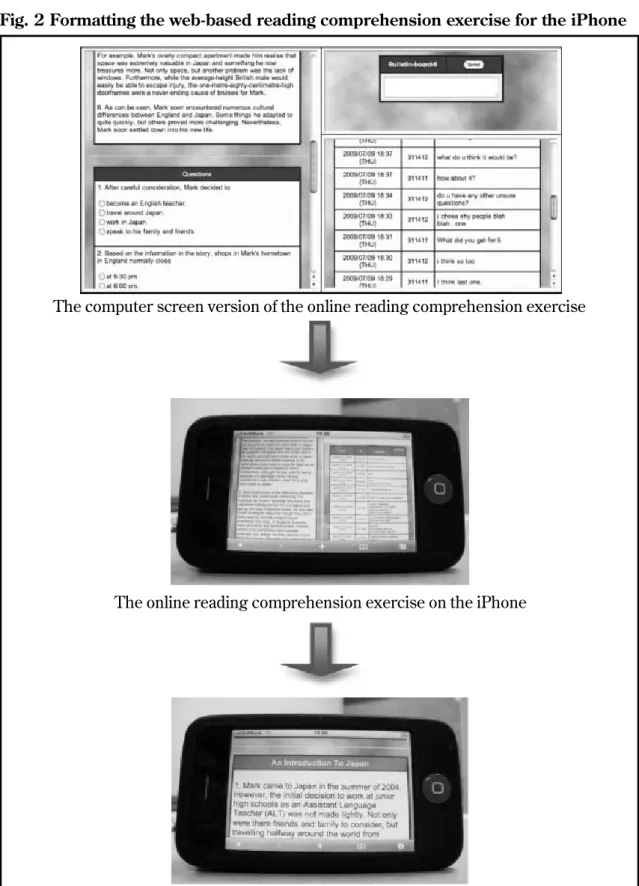
For language learning purposes, the ability to easily download the application SKYPE and then use Internet-mediated telephony is an exciting prospect. Also, with the latest version of the iPhone 4 containing suitably built-in cameras, mobile and video-based telephony has become a reality. Another advantage for students is that the web-based version of the reading comprehension exercise for both computer screens and iPhones is essentially the same thereby maximizing the usability factor of the software despite the different technology; in other words, students do not have to learn how to use two software systems (see Figure 2 to see how the computer version of the web-based reading comprehension has been adapted for the iPhone).
4. Discussion: the development of the web-based reading comprehension exercise Despite the fact that the original version of the reading programe was paper-based with no use of the Internet required at all, initial web use was identified as Level 1
Fig. 2 Formatting the web-based reading comprehension exercise for the iPhone
The computer screen version of the online reading comprehension exercise
Zooming in on the reading text
The online reading comprehension exercise on the iPhone
in Harmon and Jones’ (1999) continuum of web-based use in courses (see Table 2 below), because course information was available on the university’s main website.
Table 2 Level of Web Use
No Web use Level 1 Informational
Level 2 Supplemental
Level 3 Essential Level 4 Communal
Level 5 Immersive
The default level. Implies no Web use at all.
Providing relatively stable information to the student typically consisting of instructor placed items such as the syllabus, course schedules, and contact information. This sort of information is easily created by the instructor or an assistant, requires little or no daily maintenance, and takes up minimal space and bandwidth.
Provides course content information for the learner. May consist of the instructor placed course notes and other handouts. A typical example would be a PowerPoint presentation saved as an HTML document and placed on the Web for students to review later.
The students cannot be a productive member of the class without regular Web access to the course. At this level the student obtains most, if not all of the written course content information from the Web.
Classes meet both face-to-face and online. Course content may be provided in an on-line environment or in a traditional classroom environment. Ideally, students generate much of the course content themselves.
All of the course content and course interactions occur online. Does not refer to the more traditional idea of distance learning. Instead, this level should be seen as a sophisticated, constructivistic virtual learning community.
Level of Web Use Description
Later, however, with the introduction of a web-based version of the course, use of the Internet subsequently became a necessity in order to access the course materials online. Therefore, rather than functioning as supplementary web-based materials typical of Level 2, web use at this stage was essential and, therefore, reached Level 3. As Murphy and Imrie (2003) explain
Harmon and Jones (1999)
… the initial online replication of the BRSP was introduced at Level 3 (Essential) as it was used as a resource through which students obtained most of the writ- ten course content information. This new mode of delivery provides students with greater choice and flexibility with regards to time and place of study. (p.
127)
Murphy (2007) describes the research that was conducted on the comprehension exercise at this time. Following an interactionist view of SLA (Lightbown & Spada, 1999; Pica, 1994, 1996; van Lier, 1996), the study comprises an investigation into the effects of manner of study (individual or pair work - face to face at a single computer), level of English proficiency (higher or lower) and type of feedback on the comprehension of a reading text as measured by an online multiple-choice reading comprehension exercise. Two types of computer-mediated feedback were compared during the first comprehension exercise (a) elaborative feedback (hints are supplied for incorrect answers encouraging self-correction) and (b) Knowledge of Correct Response (KCR) feedback (the correct answers are supplied, thereby replicating traditional paper answer sheets). Students then individually completed a second multiple-choice comprehension exercise during which only KCR feedback was offered. With regard to significant results, a quantitative analysis of scores achieved on this follow-up exercise shows that the main effect of type of feedback was not statistically significant. However, level of English proficiency was found to be statistically significant; students with a higher proficiency level of English scored significantly higher than students with a lower level. The interaction between type of feedback and manner of study was also found to be statistically significant; students performed best having worked in pairs and
having been provided with computer-mediated elaborative feedback. A qualitative analysis of transcribed interactions also shows that elaborative feedback was conducive to quality interaction. The conclusion is that the combination of computer-mediated elaborative feedback during pair work is highly desirable.
Furthermore, due to the fact that scores for students studying alone with elaborative feedback were not as high as those studying alone with KCR feedback, the study concludes with a call for further research to find more effective ways for individuals to benefit from the combination of student-student interaction and elaborative feedback. Finding ways to connect isolated students in remote locations is also recommended.
Taking up the issue of isolated individuals, development of the web-based reading comprehension exercise has been ongoing. Murphy (2010) explains how students completed an online multiple-choice reading comprehension exercise in pairs and in a location within the classroom remote to their anonymous partner.
Students interacted via synchronous CMC using chat, and dyads received either computer-mediated elaborative feedback or KCR feedback. Students then individually completed a second multiple-choice comprehension exercise during which only KCR feedback was offered. Results from a qualitative analysis of the messages typed by students suggest that CMC is suitable for generating quality interaction, and results from a quantitative analysis of the individual scores on the follow-up comprehension exercise indicate that those who received computer-mediated elaborative feedback scored significantly higher. The study concludes by encouraging students to work in pairs to produce quality interaction, either by communicating face to face with a partner or via CMC.
With the development of the web-based reading comprehension exercise ongoing, the level of web use has surpassed Level 3 and is approaching Level 4, because now there is the possibility for students to meet online. The level of web use is not at Level 5, because not all of the course content is online. Instead, the reading comprehension exercise is immersive in that interactions occur online, but the rest of the exercises in the reading course have not reached this level at this present time. However, rather than achieving Level 5, a greater and more immediate challenge has been how the web-based reading comprehension exercise can be developed for the mobile platform. Research is particularly needed in order to answer the following questions:
• How do students use the web-based reading comprehension exercise outside of lessons?
• Given the option to study outside of lessons, where do students study? In other words, where are they when they use the web-based reading comprehension exercise?
• When do students study outside of class and why do they study at these times?
• Who do students study with, or who would they like to be able to study with?
• How do students rate the support they receive outside class, for example: how good is the computer-mediated feedback or peer support they receive? How could this support be improved?
• What kinds of technology are the students using outside of class?
With answers to the questions above, better informed decisions can be made about further developing the website and the web-based reading comprehension exercise.
5. Conclusions
As Murphy (2010) notes, time-efficiency considerations exist when students communicate in non-face-to-face modes of study especially when communication is achieved through typed CMC. The concern is that students will most likely complete less in a given amount of time than they would do if speaking face to face with a partner. Despite this concern, it must be remembered that CMC may be the only viable option for bringing individuals together to allow them to participate and interact with other students in collaborative exercises. This situation may well be true for students living in remote locations, but it is also true for a whole range of students at some time in their study career. For instance, both students who live at a distance to any schoolmates and also those who have long daily commutes to school could potentially benefit from mobile technology to give them the option and means for contacting a partner. In the former, students would be able to participate in collaborative work during weekends and holidays, and, in the latter, students would be able to study while, for example, travelling on the train.
Furthermore, with the increasing amount of CMC taking place around the world, it is desirable for the students’ futures that they acquire the necessary skills, etiquette and experience associated with this mode of interaction using a variety of technology. So, by offering the web-based reading comprehension exercise in formats suitable for both computers and mobile technology, students are provided with the following choices in the way that they study (a) paper-based and/or online exercises, (b) face to face and/or computer-mediated communication, and (c) computer and/or mobile technology.
The imminent release of potential competitors to the iPhone from various
companies has resulted in an exciting time for advances in mobile language learning. Therefore, not only students, but instructors also need to be aware of the affordances that this mode of study can offer. With technology seemingly changing for the better by the hour, and with new opportunities to promote language learning constantly arising, it is clear that ongoing research is necessary to reap any benefits as and when they arise.
References
Benson, P. (2001). Teaching and researching autonomy in language learning.
London: Longman.
Benson, P., & Voller, P. (1997). Autonomy and independence in language learning.
London: Longman.
Bonk, C, J., Cummings, J. A., Hara, N., Fischler, R. B., & Lee, S. M. (2000). A ten level web integration continuum for higher education: New resources, activities, partners, courses, and markets. In B. Abbey, Instructional and cognitive impacts of Web-based education (pp. 56-77). London: Idea group publishing.
Brandl, K. K. (1995). Strong and weak students’ preferences for error feedback options and responses. The Modern Language Journal, 79(2), 194-211.
Castro, E. (2001). Perl and CGI for the World Wide Web. Berkeley, California:
Peachpit press.
Clark, K., & Dwyer, F. (1998). Effect of different types of computer-assisted feedback strategies on achievement and response confidence. International Journal of Instructional Media, wntr, 25(1), 55.
Corder, S. P. (1967). The significance of learner’s errors. International Review of Applied Linguistics. 5(4), 161-170.
Deitel, H. M., Deitel, P. J., Nieto, T. R. and McPhie, D. C. (2001). Perl How to
Program.Upper saddle river, New Jersey: Prentice Hall.
Dickinson, L. (1987). Self-instruction in language learning.Cambridge: Cambridge University Press.
Eldredge, J. L. (1990). Increasing the performance of poor readers in the third grade with a group assisted strategy. Journal of Educational Research, 84, 69–77.
Eldredge, L. J., & Butterfield, D. (1986). Alternatives to traditional reading instruction, The Reading Teacher, 40,32-36.
González-Lloret, M. (2002). Designing task-based CALL to promote interaction:
En busca de esmeraldas. Language Learning & Technology, (7)1, 86-104.
Retrieved September 28, 2007, from http://llt.msu.edu/vol7num1/gonzalez/
Gorsuch, G., & Taguchi, E. (2008). Repeated reading for developing reading fluency and reading comprehension: The case of EFL learners in Vietnam.
System, 36,253-278.
Harmon, S. W. & Jones, M. G. (1999). The five levels of web use in education:
Factors to consider in planning an online course. Educational Technology, 36(6), 28-32.
Holzer, S. (2001). Perl Black Book. Arizona, America: Paraglyph Press.
James, C. (1998). Errors in language learning and use: Exploring error analysis.
Harlow, Essex: Pearson education limited.
Kukulska-Hulme, A. & Traxler, J. (eds.) 2005. Mobile learning. A handbook for educators and trainers. Open and flexible learning series. London:
Routledge.
Koskinen, P. S., & Blum, I. H. (1986). Paired repeated reading: A classroom strategy for developing fluent reading. The Reading Teacher, 40,70-75.
Lightbown, P., & Spada, N. (1999). How languages are learned. Oxford: Oxford University Press.
Loschky, L. (1994). Comprehensible input and second language acquisition.
Studies in Second Language Acquisition, 16(3), 303-323.
Mory, E. H. (1994). Adaptive feedback in computer-based instruction: Effects of response certitude on performance, feedback-study time, and efficiency. J.
Educational Computing Research, 11(3), 263-290.
Murphy, P., & Imrie, A. (2003). Implementing computers in a reading classroom.
Research Institute of Language Studies and Language Education Kanda University of International Studies, 14,123-166.
Murphy, P. (2005). Interactivity, usability and flexibility in an online reading course. Studies in Linguistics and Language Education of the Research Institute of Language Studies and Language Education, Kanda University of International Studies, 16,383-433.
Murphy, P. (2007). Reading comprehension exercises online: The effects of feedback, proficiency and interaction. Language Learning & Technology, 11(3), 107-129. Retrieved November 28, 2007, from
http://llt.msu.edu/vol11num3/murphy/default.html
Murphy, P. (2010). Web-based collaborative reading exercises for learners in remote locations: The effects of computer-mediated feedback and inter- action via computer mediated communication. ReCALL, 22(2), 112-134.
Nagata, N. (1996). Computer vs. workshop instruction in second language acquisition. CALICO Journal, 14(1), 53-75.
Nes, S. L. (2003). Using paired reading to enhance the fluency skills of less-skilled readers. Reading Improvement, 40(4), 179-192.
Pica, T. (1994). Research on negotiation: What does it reveal about second- language learning conditions, processes and outcomes? Language Learning, 44, 493-527.
Pica, T. (1996). Do second language learners need negotiation? International Review of Applied Linguistics, 34(1), 1-19.
Pica, T., Doughty, C., & Young, R. (1986). The impact of interaction on comprehension: Do interactional modifications help? International Review of Applied Linguistics, 72,1-25.
Polio, C., & Gass, S. (1998). The role of interaction in native speaker comprehen- sion of nonnative speaker speech. Modern Language Journal, 82,308-319.
Richards, J. C. (1997). Preparing language teachers for tomorrow’s language classrooms. In Jacobs, G. M. (ed.), Language classrooms of tomorrow: Issues and responses, 38,195-208. Singapore: SEAMEO Regional Language Center.
Robinson, G. L. (1992). Effective feedback strategies in CALL: Learning theory and empirical research. In P. Dunkel (ed.), Computer-assisted language learning and testing: Research issues and practice (pp. 155-167). New York:
Newbury House.
Ros I Solé, C., & Truman, M. (2005). Feedback in distance language learning:
Current practices and new directions. In B. Holmberg, M. A. Shelley, & C. J.
White (Eds.), Languages and distance education: Evolution and change(pp.
72-91). Clevedon, UK: Multilingual Matters.
Rowntree, D. (1990). Teaching through self-instruction: How to develop open learn- ing materials.London: Kogan Page.
Trinder, J. (2005). Mobile technologies and systems. In A. Kukulska-Hulme & J.
Traxler (Eds.), Mobile learning: A handbook for educators and trainers (pp. 7-24). London: Routledge Falmer.
Uribe, D., Klein, J. D., & Sullivan, H. (2003). The effects of computer-mediated collaborative learning on solving ill-defined problems. Educational Technology Research and Development, 51(1), 5-19.
Van der Linden, E. (1993). Does feedback enhance computer-assisted language- learning? Computers and Education, 21,61-65.
van Lier, L. (1996). Interaction in the language curriculum: Awareness, autonomy &
authenticity.Harlow, UK: Longman.