Japan Advanced Institute of Science and Technology
JAIST Repository
https://dspace.jaist.ac.jp/Title Web-based Interactive Document Editor System for Academic Knowledge Management
Author(s) Muhammad Nasir, Muhammad Dzulqarnain; Matsuo, Tokuro; Fujimoto, Takayuki
Citation
Issue Date 2007-11
Type Conference Paper
Text version publisher
URL http://hdl.handle.net/10119/4093
Rights
Description
The original publication is available at JAIST Press http://www.jaist.ac.jp/library/jaist-press/index.html, KICSS 2007 : The Second International Conference on Knowledge, Information and Creativity Support Systems : PROCEEDINGS OF THE CONFERENCE, November 5-7, 2007, [Ishikawa High-Tech Conference Center, Nomi, Ishikawa, JAPAN]
Web-based Interactive Document Editor System
for Academic Knowledge Management
Muhammad Dzulqarnain Muhammad Nasir†, Tokuro Matsuo‡, Takayuki Fujimoto*
†‡ Department of Informatics, Faculty of Engineering, Yamagata University, 4-3-16, Jonan, Yonezawa, Yamagata, 992-8510, Japan.
†[email protected] ‡[email protected]
* Department of Future Design, Sonoda Women’s University, 7-29-1, Minami-tsukaguchi, Amagasaki, Hyogo, 661-8520, Japan.
Abstract
Computer-based knowledge management systems have become a major part of today’s communication system and with the Internet as a medium; distance is no longer the barrier. In line with this development, we propose an interactive web-based multi-user document editing system in which users can cooperatively create and edit documents. The goal of this study is not only to develop the system, but also to create an environment in which scholars can cooperatively write research/report papers even if they are not at the same vicinity.
Users can not only create and store valuable information, but also be able to collaborate in real-time with other users using our system. This is known as direct knowledge
communication and collaboration. Additionally, information stored by past users can be reused in new documents if found relevant. This is known as indirect knowledge communication and collaboration. These methods are based on the knowledge reuse and integration concept suggested in [3]
Keywords: cooperative document creation, online editor, knowledge communication and collaboration, knowledge reuse and
integration. 1. Introduction
In this paper, we propose an interactive web-based multi-user document editor to be used for cooperative research/report paper creation. We call it the Interactive Editor Web System, or Ie-Web.
Similar existing systems such as the web-log, web-diary, web-board, and the Wiki may provide the function to create documents and such but has very limited editing and revision capabilities. For example, web-logs and web-diaries only allow document creation and editing for single users.
The main purpose of the Ie-Web system is to create an environment in which multiple users can interact and create documents cooperatively. It is often better to have more heads when
writing important documents such as research/report papers. Using our system, the document can be checked and verified by co-researchers, college professors, and other experts of the particular field.
Users can use the edit feature to modify the sentences of a particular paragraph, as well as modify the order in which the paragraph is written in. All this is achieved through discussion amongst users.
In most cases, scholars who are writing their research/report papers use e-mail and the postal service to keep in touch with their colleagues, in which case they never write the paper based on direct discussions. If they could write the paper through direct discussions, they would have a better understanding of the subject and in turn be able to write better. Similarly, the other people can also keep an eye on the paper’s progress and be able to help should one of them run into problems.
The following part of this paper consists of a brief explanation of the system architecture, an explanation of the system interface, a list of advantages justifying the system’s relevance, and concluding remarks.
2. System Architecture
The Ie-Web system works in most server environments provided it is capable of handling PHP documents. The system also requires a database server, preferably a MySQL server. As for the client-side functions, this system requires a JavaScript-capable browser since it relies heavily on JavaScript. In addition, we are recommending PHP5.0+ and MySQL 5.0+ to be used as standards with this system.
The system uses Ajax, which is short for
Asynchronous JavaScript and XMLHttpRequest, for client-server data interaction. Using Ajax, the data transfers will be seamless as all data transfers and data processing is done in the background and in real-time. All user input is captured and then sent via JavaScript to the server, where the server-side data processing is done. After that, all output gets sent back to the client to be handled by JavaScript and then is presented to the user.
Ajax will also play a major role in how the system graphical user interface will look and function as all menus and display functions are defined by HTML and CSS through JavaScript.
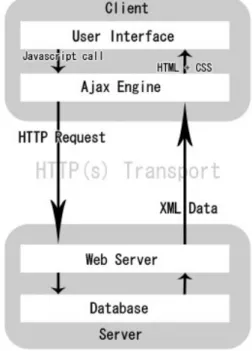
Figure 1: Basic system data flow concept
Figure 1 shows the basic data flow concept of our system. When the main page is loaded, only the required data that make up the main page and the Ajax engine are loaded. Based on
user input, the Ajax engine will send data back to the server to be processed. All processed data will then be transported back to the client and be presented to the user via the Ajax engine.
The traditional web model (CGI, PHP, etc) has no module to act as a middleman in processing data asynchronously and thus is dependent on user input for data transfers. Every action or data transaction will require the server to resend the HTML codes of the whole page, and this increases loading time and reduce interactivity. While the server is processing data the user could only but wait before being able to proceed to the next step. This is not so in an Ajax model.
When the user opens up the menu for content editing, the engine will call up all the necessary information for that function. If there is a need to get data from the server, a JavaScript call to the engine will send a HTTP request to the server asking for the required data. Unless there is a need to process data stored inside the server, no excess data transmission is performed. This is to ensure maximum efficiency and performance as only the required data is called up and not the whole HTML code for the particular page.
The most important part of the database is the data table. This is where all the contents and information on where it will appear on the page are stored. There is also a table called the “file information table”, where information such as document title and creation date is stored.
3. System Interface
Upon page load, the user will have an option to either start a new project or continue with an
existing one. Both actions will open a new window in which the new document or an existing one will be displayed. This is to make it simpler should there be a need to open multiple documents.
Figure 2: The Ie-Web main page
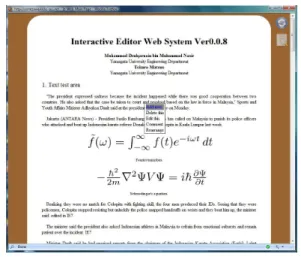
A simple mouse click on any paragraph will open up a context menu, as demonstrated in Figure 4, where the user is presented with the option to add and delete paragraphs, edit existing ones, modify the order in which the paragraphs appear in and so on.
Figure 3: Basic context menu
The following subsections will explain some of the key features of the Ie-Web system.
3.1 Add Function
The add function features several function which will be explained below. To access it, the user has to select “Add New” from the context menu that appears upon right click.
3.1.1 Add new paragraph
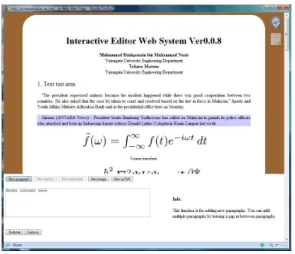
Using this feature, the user can add a new paragraph below the target paragraph.
The add paragraph feature works by first getting all the required fields from the form area and then checking the MySQL database to see if any data with similar parameters exist. If present, the parameters for that data will be modified to move the paragraph down a level and make way for the new content. If more than one paragraph is entered, the system will separate the paragraphs and insert them into the database as individual entries. At the same time, all affected paragraphs will be moved down.
Figure 4: Add new paragraph box 3.1.2 Delete a paragraph
This function will delete the targeted paragraph. Should a section title or subsection title be the target, this function will delete all paragraphs within the targeted range.
Similar to the add paragraph function, when the user deletes a certain paragraph, all the paragraphs below that particular paragraph will be moved up a level to fill in the empty space left by the deleted paragraph. However, before the data is deleted, a confirmation box will pop up to ask the user to confirm the deletion.
This feature works by first deleting the intended paragraph, and then checking the database to see if there are any other paragraphs below the deleted one and moving them up if present.
3.1.3 Add image
Figure 5: Add new image box
This function will enable the user to insert images into the document. When tries to add a new image, the system will check the image file to see whether it is valid or otherwise, and then it will check its file size and image size. Finally, if the image is larger than the allowed image size, the system will automatically resize the image so that it can be used in the document.
This function works similarly to the add new paragraph function, but this time the system
will insert HTML codes instead of normal text. The HTML codes consist of all the required information including the image source and image size so that it can be properly displayed on the document.
3.1.4 Add new LaTeX
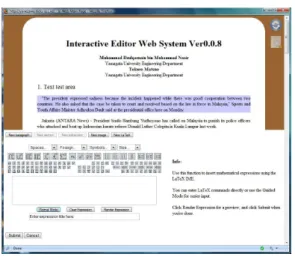
For people who work with formulas and mathematical expressions, this function will prove useful to them, as it allows them to input mathematical expressions with little to no knowledge of LaTeX.
Figure 6: Add new LaTeX
LaTeX is a document markup language and document preparation system for the TeX typesetting program. It is widely used by mathematicians, scientists, philosophers, engineers, scholars in academia and the commercial world, and other professionals. It enables them to display mathematical expressions in their documents the way they intend them to be displayed. Using our system, this can be achieved without the trouble of learning the LaTeX language.
When the user initializes this function, they will be presented with a box similar to the one in the add new paragraph function. This is for
people who have experience in LaTeX. For those who know nothing of LaTeX, they can click the button labeled as “Guided Mode” and a board with regularly used expressions will appear as displayed in Figure 6.
The user can click on the expressions they need, add a label for the formula and click the “Render Expression” button to convert it into a LaTeX formula. Once the user is satisfied with the formula, clicking the “Submit” button will upload everything into the database, and the formula will be displayed on the document. This function uses the LaTeX engine available in most Unix systems, as well as its DVI to PS convertor to convert the LaTeX script into the printable output, where an imaging program will convert the output into an image file, which is then used in the document. This is explained in Figure 7.
Figure 7: LaTeX convertor explanation 3.2 Edit Paragraph Content Function
Using this feature, the user can edit the content of an existing paragraph.
This function is initialized via the context menu, or simply by double clicking the target paragraph. After the user is done editing, he/she can click the “Save” button and the edited content will be saved onto the server database.
Clicking the “Cancel” button during the editing process will cancel the editing process and all changes will be discarded. Old data will be saved into the archive table just in case the user needs to undo any changes done.
Figure 8: Content editing box
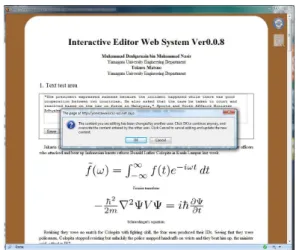
Since this is a multi-user application, there will be times when two or more users edit the same content at the same time. To prevent problems with this, the system will verify the timestamp of the data being edited with the one on the server. If the timestamps do not match, the user will be informed and asked what course of action should be taken regarding the matter; either continue editing, and overwrite the content edited by the other user, or cancel the edit process and download the new data from the server.
If the user chooses to continue editing and tries to overwrite the data edited by the other user, a second confirmation screen will appear. This time it will display the data on the server and compare it to the data that the current user is about to overwrite it with.
Figure 6: Content edit confirmation
The user can see what the other user has updated and decide whether it needs to be overwritten or otherwise.
Figure 10: Compare edited content 3.3 Edit Paragraph Order Function
Using this feature, the user can edit the order in which the paragraphs appear.
In some cases, we may find the order in which the paragraphs are displayed in a document to be unsatisfying. Instead of having to copy and paste, the user can use the edit paragraph order feature to move the intended paragraph to the desired location. Similarly, this feature also works with editing the order in which sections and subsections appear in.
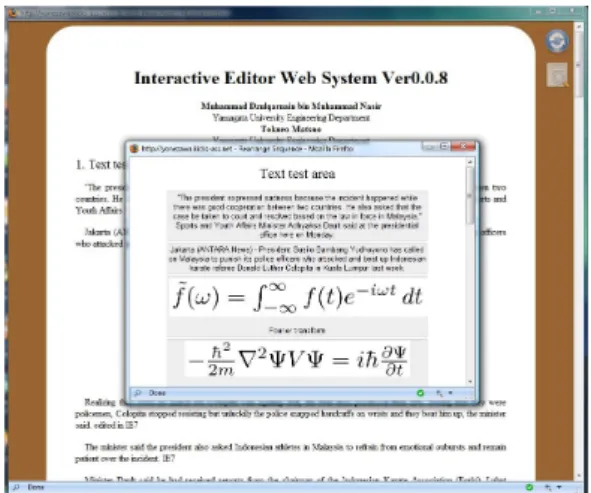
Figure 11: Rearrange paragraph order
This function can be initialized via the context menu. When the user clicks on this function, a new window will appear with all the paragraphs in the section of the targeted paragraph. The user can then rearrange the paragraphs by dragging and dropping them into the intended order.
After the user is done rearranging the paragraph order, clicking the “Save” button located at the bottom of the list will save it onto the server database.
3.4 Comment Feature
The comment feature gives users the ability to communicate with other users regarding the document at hand, and using this feature the document can be better written due to the fact that it was written through direct discussions.
Selecting the comment feature from the menu will open a comment box below the paragraph in which the menu was initiated. This means that the user will be commenting on that particular paragraph. Previously posted comments will be displayed below their respective paragraphs to be viewed by other users. Users can also comment on the document
as a whole.
Figure 12: Comment function 3.5 Preview Feature
Using this feature, the user can view the
document as a whole without all the menus and comments. All unrelated contents such as the comments will not be shown in the preview window.
Figure 13: The preview function
This feature will also enable to user to save the document into a printable version to be printed for submission.
3.6 Auto Update Function
To keep the document changes real-time, the system utilizes a real-time document update
system which checks the document for changes at regular intervals. If the document has been modified, the system will automatically update the document. However, in order to enable the user to continue editing even in the event the document has been modified, the update function will be disabled when any of the editing functions are called. Instead, the user will be informed using a graphical alert that tells them that the document has been changed, and that clicking the reload button will enable them to have the most recent copy. Cancelling any add, edit or rearrange functions will re-enable the update mechanism which will update the document automatically.
4. Advantages of the Ie-Web System
Computer-based knowledge management systems has become a major part of today’s communication scene and with the internet as a medium, distance is no longer the barrier. Our system takes advantage of this fact to create an environment where scholars can write reports with their colleagues even if they are not in the same room. Users can communicate and collaborate by using valuable and useful knowledge reused and integrated by our system. The system enables users to perform communicate both directly and directly.
Table 1: Comparison between Ie-Web and existing web services
Figure 14: Knowledge communication and collaboration
5. Conclusion
In this paper, we have explained about how the Ie-Web system works, and how it can help students write better papers through direct discussion. Our system supports knowledge communication and collaboration with both directly and indirectly. In our system, users’ knowledge are stored and they are reused and integrated to enhance for subsequent users. Our future goals include developing the system further for better efficiency, and further improving the system interface for better usability.
References
[1] Tokuro Matsuo and Takayuki Fujimoto, A New Cooperative Communication System in Distance Education, CIEC, Vol.19 p.110-115, 2005.
[2] http://www.wiki.org
[3] Takayuki Fujimoto, "From Image to Imagination-History of Image / Imagination-" GendaiSugaku-Sha, 2005