本書はいつでも取り出せる場所に大切に保管してください 製品をご使用になる前に必ず本書をお読みください 本製品の移設の際は必ず本書も一緒にしてください
Keep this manual handy for reference.
Be sure to read the manual before starting to use the product.
When relocating the product, be sure to keep the manual in a designated place.
N8160-85
外付
DVD-ROM/External DVD-ROM
ユーザーズガイド/
User's Guide
安全上のご注意 ~ 必ずお読みください ~
Safety Precautions – Read carefully –
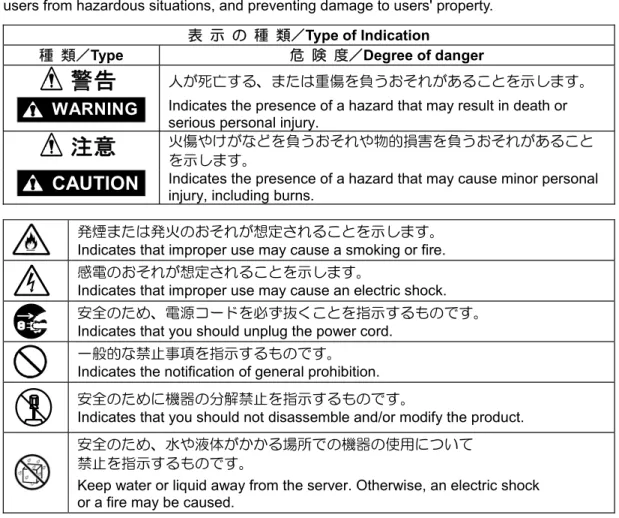
本製品を安全に正しくお使いいただき、お客様への危害や財産への損害を未然に防止するため に次の絵表示を使用しています。
The following alert signals are used for handling the product safely and correctly, protecting users from hazardous situations, and preventing damage to users' property.
表 示 の 種 類/Type of Indication
種 類/Type 危 険 度/Degree of danger
警告
人が死亡する、または重傷を負うおそれがあることを示します。WARNING
Indicates the presence of a hazard that may result in death or serious personal injury.注意
火傷やけがなどを負うおそれや物的損害を負うおそれがあることを示します。
CAUTION
Indicates the presence of a hazard that may cause minor personal injury, including burns.発煙または発火のおそれが想定されることを示します。 Indicates that improper use may cause a smoking or fire. 感電のおそれが想定されることを示します。
Indicates that improper use may cause an electric shock. 安全のため、電源コードを必ず抜くことを指示するものです。 Indicates that you should unplug the power cord.
一般的な禁止事項を指示するものです。 Indicates the notification of general prohibition. 安全のために機器の分解禁止を指示するものです。
Indicates that you should not disassemble and/or modify the product. 安全のため、水や液体がかかる場所での機器の使用について
禁止を指示するものです。
警告事項
Warnings
警告
/
WARNING
人命に関わる業務や高度な信頼性を必要とする業務には使用しない 本製品は、医療機器・原子力設備や機器、航空宇宙機器・輸送設備や機器など、 人命に関わる設備や機器および高度な信頼性を必要とする設備や機器などへの 組み込みやこれらの機器の制御などを目的とした使用は意図されておりません。 これら設備や機器、制御システムなどに本製品を使用した結果、人身事故、財産 損害などが生じても弊社はいかなる責任も負いかねます。Do not use the equipment for services where critical high availability may directly affect human lives.
This product is not intended to be used with or control facilities or devices concerning human lives, including medical devices, nuclear facilities and devices, aeronautics and space devices, transportation facilities and devices; and facilities and devices requiring high reliability. NEC assumes no liability for any accident resulting in personal injury, death, or property damage if the equipment has been used in the above conditions.
煙や異臭、異音がしたまま使用しない
万一、煙、異臭、異音などが生じた場合は、ただちに本体装置の電源をOFFにし て電源プラグをコンセントから抜いてください。その後、お買い求めの販売店ま たは保守サービス会社にご連絡ください。
そのまま使用すると火災の原因となります。
Do not use this product if any smoke, odor, or noise is present. If smoke, odor, or noise is present, immediately turn off the server and disconnect the power plug from the AC outlet, then contact your sales representative.
Using the equipment in such conditions may cause a fire. 分解・修理・改造はしない
絶対に分解したり、修理・改造を行ったりしないでください。
本製品が正常に動作しなくなるばかりでなく、感電や火災の危険があります。 Do not disassemble, repair this product.
Never attempt to disassemble, repair, or alter the server on any occasion. Failure to follow this instruction may cause an electric shock or fire as well as
malfunctions of the server. 針金や金属片を差し込まない
本製品のすきまから金属片や針金などの異物を差し込まないでください。 感電の危険があります。
Keep needles or metal objects away from this product. Do not insert needles or metal objects into the product.
注意事項
Cautions
設置・接続に関する注意事項
Notes on Installation and Connection
注意 /
CAUTION
指定以外の場所に設置・保管しない 本製品を次に示すような場所に置かないでください。火災の原因となるおそれが あります。 z ほこりの多い場所。 z 給湯器のそばなど湿気の多い場所。 z 直射日光が当たる場所。Do not install this product in any place other than specified. Do not install this product in the following places or any place other than specified in this manual. Failure to follow this instruction may cause a fire.
a dusty place
a humid place such as near a boiler
a place exposed to direct sunlight
腐食性ガスの存在する環境で使用または保管しない 腐食性ガス(二酸化硫黄、硫化水素、二酸化窒素、塩素、アンモニア、オゾンな ど)の存在する環境に設置し、使用しないでください。 また、ほこりや空気中に腐食を促進する成分(塩化ナトリウムや硫黄など)や導 電性の金属などが含まれている環境へも設置しないでください。 装置内部のプリント板が腐食し、故障および発煙・発火の原因となるおそれがあ ります。もしご使用の環境で上記の疑いがある場合は、販売店または保守サービ ス会社にご相談ください。
Do not use or store the product in the place where corrosive gases exist. Make sure not to locate or use the server in the place where corrosive gases (sulfur dioxide, hydrogen sulfide, nitrogen dioxide, chlorine, ammonia, ozone, etc) exist.
Also, do not install it in the environment where the air (or dust) includes components accelerating corrosion (ex. sulfur, sodium chloride) or conductive metals. There is a risk of a fire due to corrosion and shorts of an internal printed board.
Consult with your service representative for the location appropriate to the server. 指定以外のインタフェースケーブルを使用しない
本製品に使用されているインタフェースケーブル以外のコードを使わないでく ださい。指定以外のケーブルを使用したり、接続先を誤ったりすると、ショート により火災を起こすことがあります。
Do not use any unauthorized interface cable. Use only interface cable that comes with this product.
運用中に関する注意事項
Notes during Operation
注意 /
CAUTION
ペットを近づけない
本製品にペットなどの生き物を近づけないでください。排泄物や体毛が装置 内部に入って火災や感電の原因となります。
Keep animals away from this product.
Failure to follow this warning may cause a fire or an electric shock.
保守・点検に関する注意事項
Notes on Maintenance and Inspection
注意 /
CAUTION
本製品の点検・修理は、販売店または最寄りの保守サービス会社へご依頼く ださい。オプション機器などで指定された部分以外を触れたり、分解したり すると感電の原因となります。
Ask your sales representative or your service representative to inspect/repair this product. Do not touch or disassemble any components other than specified components for optional equipment. Doing so causes an electric shock.
目次
安全上のご注意 ~ 必ずお読みください ~ ... 1
警告事項 ... 2
注意事項 ... 3
設置・接続に関する注意事項... 3 運用中に関する注意事項... 4 保守・点検に関する注意事項... 41.
構成品 ... 8
2.
各部の名称と機能... 9
3. 取り扱い上の注意 ...10
4. ディスクのセット・取り出し ...12
5.
仕様...15
Contents
Safety Precautions – Read carefully –... 1
Warnings ... 2
Cautions ... 3
Notes on Installation and Connection ... 3
Notes during Operation ... 4
Notes on Maintenance and Inspection ... 4
1. Components ...17
2. Components and Functions ...18
3. FOR PROPER OPERATION...19
まえがき
この度は、本製品をお買い上げいただきまして誠にありがとうございます。 本製品をご使用になる前に、必ず本書をお読みください。 N8160-85外付DVD-ROMはExpress5800シリーズのUSBインタフェースに接続する 光ディスクドライブです。VCCIについて
この装置は、クラスB情報技術装置です。この装置は、家庭環境で使用することを目的として いますが、この装置がラジオやテレビジョン受信機に近接して使用されると、受信障害を引き 起こすことがあります。取扱説明書にしたがって正しい取り扱いをしてください。 VCCI-Bレーザー安全基準について
本製品は、レーザーに関する安全基準(JIS C 6802, IEC 60825-1)クラス1に適合しています。商標について
Microsoft、Windows、Windows Serverは、米国Microsoft Corporationの米国およびその他の 国における商標または登録商標です。
オペレーティングシステムの表記について
Windows Server 2008は、Microsoft® Windows Server® 2008 Standard operating systemおよび
Windows Server® 2008 Enterprise operating systemの略です。
Windows Server 2003は、Microsoft® Windows Server® 2003 R2 Standard Edition operating system
およびMicrosoft® Windows Server® 2003 R2 Enterprise Edition operating systemまたは、Microsoft® Windows Server® 2003 Standard Edition operating systemおよびMicrosoft® Windows Server® 2003
Enterprise Edition operating systemの略です。
Windows Server 2003 x64 Editionsは、Microsoft® Windows Server® 2003 R2, Standard x64 Edition operating systemおよびMicrosoft® Windows Server® 2003 R2, Enterprise x64 Edition operating
systemまたは、Microsoft® Windows Server® 2003, Standard x64 Edition operating systemおよび
Microsoft® Windows Server® 2003, Enterprise x64 Edition operating systemの略です。
第三者への譲渡について
本製品または、本製品に添付されているものを第三者に譲渡(または売却)するときは、 本書を一緒にお渡しください。本製品の廃棄について
本製品の廃棄については、各地方自治体の廃棄ルールにしたがってください。 詳しくは、各地方自治体にお問い合わせください。1. 構成品
本製品の構成品は以下の通りです。確認してください。 項番 品 名 数量 備考 1 外付DVD-ROM 1 2 保証書 1 3 ユーザーズガイド 1 本書2. 各部の名称と機能
1 トップカバー ディスクをセットまたは取り出すときに開きます。 2 POWER/BUSYランプ 電源が入っているときに次のように点灯または点滅する。 動作状態 状態 電源ON 点灯 読み取り中 点灯または点滅(1秒間隔) イジェクトコマンド受信 点滅(0.4秒間隔) トップカバーを開くと点滅は停止します。 3 イジェクトボタン トップカバーを開けるときにスライドさせます。 4 USBコネクタ 本体装置のUSBコネクタへ接続します。 USB コネクタ イジェクトボタン POWER/BUSY ランプ トップカバー3. 取り扱い上の注意
● 本製品は水平に設置してください。 ● 本製品は本体装置の USB コネクタへ直接接続してください。USB ハブを経由しての動作は 保証しません。 ※本製品が接続可能な本体装置は、システムガイドに記載されております。 ● 本製品に光ディスクをセットしたまま移動させないでください。 ● 本製品にレンズクリーナ(クリーニングディスク)を使用しないでください。 光ディスクドライブの取り扱いについて ①トップカバーを開けたまま放置しないでください。ほこり等が付着して故障の原因となります。 ②ディスクを装着したまま放置しないでください。ほこり等が付着して故障の原因となります。 ③定期的にトレーをクリーニングしてください。ただし、クリーニングの際にレンズに触れないよう注意してください。 ディスクの取り扱い 本製品にセットするディスクは次の点に注意して取り扱ってください。 z 本製品は、CD/DVD 規格に準拠しない「コピーガード付き CD/DVD」などのディスクにつきましては、 CD/DVD 再生機器における再生の保証はいたしかねます。 z ディスクを落とさないでください。 z ディスクの上にものを置いたり、曲げたりしないでください。 z ディスクにラベルなどを貼らないでください。 z 信号面(文字などが印刷されていない面)に手を触れないでください。 z 文字の書かれている面を上にして、トレーにていねいに置いてください。 z キズをつけたり、鉛筆やボールペンで文字などを直接ディスクに書き込まないでください。 z たばこの煙の当たるところには置かないでください。 z 直射日光の当たる場所や暖房器具の近くなど温度の高くなる場所には置かないでください。 z 指紋やほこりがついたときは、乾いた柔らかい布で、内側から外側に向けてゆっくり、ていねいにふいて ください。 z 清掃の際は、各ディスク専用のクリーナをお使いください。クリーナ、ベンジン、シンナーなどは使わないで ください。 z 使用後は、専用の収納ケースに保管してください。 トレーディスクの読み込みエラーに対するトラブルシューティング ディスクにほこりがついていたりするとデータを正しく読み込めないことがあります。 ディスクにアクセスできない場合、次のことを確認してください。 □ ディスクの表裏を間違えてセットしていませんか? → 本製品からディスクを取り出し、ディスクの文字などが印刷されている面を上にして、セットし直してください。 □ ディスクに汚れやキズがありませんか? → ディスクの表面に指紋などの汚れやキズがないことを確認してください。 汚れがある場合は、ディスクの表面をクリーニングしてください。それでも読み込みができない場合は、 アクセスが可能だった別のディスクに入れ替えて、再度、読み込みが できるかどうか確認してください。 重要: ディスクは、中心から外側に向けてふいてください。 クリーナをお使いになるときは、各ディスク専用のクリーナであることをお確かめください。 レコード用のスプレー、クリーナ、ベンジン、シンナーを使用すると、ディスクの内容が読めなく なったり、本製品にそのディスクをセットした結果、故障したりするおそれがあります。 読み込み時間の変動について 本製品は、セットしたディスクの状態を検出し、最適な読み込み速度に調整する機能を有しているためディスクの 状態により読み込みが完了するまでの時間が異なる場合があります。 近くで携帯電話やPHS、ポケットベルを使わない 本製品のそばでは携帯電話やPHS、ポケットベルの電源を OFF にしておいてください。 電波による誤動作の原因となります。
4. ディスクのセット・取り出し
ディスクのセット
1 正面のイジェクトボタンを右にスライドするとトップカバーが少し開きます。 そのまま、ゆっくりと手でトップカバーが停止する位置まで引き上げます。 2 ラベル面を上にした状態で、ディスクの穴を中心に合わせて、しっかりとはめ込んでください。 ・ディスクのセットが不完全だった場合、ディスクが外れてデータ面にキズがつく恐れがあります。 3 トップカバーの前面中心部をゆっくりと押し下げ、「カチッ」と音がするまでしっかり閉じてください。 ・トップカバーの端を押して閉めた場合、ロックしないことがあります。 4 トップカバーが完全に閉じると、ディスクの読み込みがスタートし、トップカバーのPOWER/BUSYランプが点滅します。 POWER/BUSY ランプ イジェクトボタンディスクの取り出し
1 本製品のディスクで使用している内容を表示しているファイルやフォルダをすべて閉じます。 2 正面のイジェクトノブを右にスライドするとトップカバーが少し開きます。 ディスク回転中であっても、イジェクトボタンを操作するとトップカバーが開きます。 ディスクの回転が完全に止まるまでディスクに手を触れないでください。 ディスクの回転が完全に止まってから、ゆっくりと手でトップカバーが停止する位置まで引き上げます。 3 中央の部分を軽く押さえながら、本体の端にある切り欠き部分からディスクをゆっくり持ち上げ、取り外します。 4 ディスクを取り出した後、トップカバーの前面中央部をゆっくりと押し下げ、「カチッ」と音がするまでしっかり 閉じてください。本製品の取り外しについて
本製品を本体装置から取り外すときは、本製品にディスクがセットされていないことを 確認してから、取り外してください。
Windo ws Server 2003 または W indo ws Server 2003 x64 Editions および Windows Server 2008 動作中は、必ず OS 上で取り外し操作を実施してから、取り外して ください。
Windo ws Server 2003 または W indo ws Server 2003 x64 Editions および Windows Server 2008 動作中に本製品の取り外し操作を実施するためには、タスクバー 上に表示される下記の名称のアイコンで行います。
Windows Server 2003 または Windows Server 2003 x64 Editions および Windows Server 2008
5. 仕様
機能 DVD-ROM/DVD-R/DVD-RW/CD-ROM/CD-R/ CD-RW(読み込み) 接続可能インタフェース USB2.0およびUSB1.1 リードスピード 最大8倍速(DVD-ROM) 最大24倍速(CD-ROM) ケーブル線長 約38cm(コネクタ部含む) 外形寸法 132.8 mm(幅)x146 mm(奥行き)x15 mm(高さ) 重量 約250 g 消費電流 800mA 消費電力 4W 電源 USBバスパワー 環境条件(動作時) 温度10℃~35℃ 湿度20%~80%(結露なきこと)Preface
Thank you very much for purchasing our product.Be sure to read the manual before starting to use the product.
N8160-85 External DVD-ROM is a optical disk drive having the USB interface for NEC Express5800 server.
FCC Information
This equipment has been tested and found to comply with the limits for a Class B digital device, pursuant to Part 15 of the FCC Rules. These limits are designed to provide the reasonable protection against harmful interference in a residential installation. This equipment generates, uses and can radiate radio frequency energy and, if not installed and used in accordance with the instructions, may cause harmful interference to radio communications.
However, there is no guarantee that interference will not occur in a particular installation. If this equipment does cause harmful interference to radio or television reception, which can be determined by turning the equipment off and on, the user is encouraged to try to correct the interference by one or more of the following measures.
Reorient or relocate the receiving antenna.
Increase the separation between the equipment and receiver.
Connect the equipment to an outlet on a circuit different from the one to which the receiver is connected. Use a shielded and properly grounded I/O cable to ensure compliance of this unit to the specified limits of the rules.
Laser Safety Statements
This product is classified as a CLASS 1 LASER PRODUCT and conforms to IEC 60825-1 and EN60825-1.
Trademarks
Microsoft, Windows, and Windows Server are trademarks or registered trademarks of Microsoft Corporation in the United States and other countries.
Windows Server 2003 stands for Microsoft® Windows Server® 2003 R2, Standard Edition operating
system and Microsoft® Windows Server® 2003 R2, Enterprise Edition operating system, or Microsoft®
Windows Server® 2003, Standard Edition operating system and Microsoft® Windows Server® 2003,
Enterprise Edition operating system.
Transfer to Third Party
To transfer or sell the product or the accessories that come with the product to a third party, make sure to provide this User's Guide together with the product or the accessories to a third party.
Disposal
Dispose of the floppy disk drive as required by local regulations. Ask your local government for details.
1. Components
Check if the packing box contains all the items listed below.
No. Product name Q'ty Remarks
1 External DVD-ROM 1
2. Components and Functions
1 Top cover
Open this top cover to eject a disk into or from this product. 2 POWER/BUSY lamp
The POWER/BUSY lamp operates as shown in the table below under the power-on status Operation status Indication
Power on Light
Reading Light or blinking (every 1 second.) Eject command received Blinking (every 0.4 second.)
Blinking stops when open the top cover. 3 Eject button
Slide this button to insert or eject a disk into this product. 4 USB Connector
Connect the USB connector to the server. POWER/BUSY lamp
USB connector
Eject button
3. FOR PROPER OPERATION
Use of the Disc
Keep the following notes in mind to use the disc for this product:
For the disk which does not conform to the CD standard, the playback of such a disk with the CD drive is not guaranteed.
Do not drop the disc.
Do not place anything on the disc or bend the disc. Do not attach any label onto the disc.
Do not touch the signal side (nothing is printed on this side) with your hand. Place the disc with its printed side upward and gently put it on the tray.
Do not scratch the disc or write anything directly on it with a pencil or ball-point pen. Keep the disc away from cigarette smoke.
Do not leave the disc in a high-temperature place (e.g., place exposed to direct sunlight or close to a heater).
When dust or fingerprints are attached on the disc, wipe the disc from its center to edge with a dry soft cloth slowly and gently.
Use the CD cleaner to clean the disc. Do not use record spray/cleaner, benzene, or thinner. Keep the disc in a disc case when not in use.
If the disc emits large noise in the optical disk drive, remove the disc and insert it back again.
Do not use a cellular phone or pager around this product.
4. Specifications
Function DVD-ROM/DVD-R/DVD-RW/CD-ROM/CD-R/
CD-RW(read)
Compatible interface USB2.0 and USB 1.1
Read speed 8 x speed or less (DVD-ROM)
24 x speed or less (CD-ROM)
USB cable length Approx. 38cm(Including connector)
Outside dimensions 132.8 (width)x146 (depth)x15 (height) mm
Weight Approx. 250 g
Current consumption 800mA
Power consumption 4W
Power supply (rating) USB bus power
Temperature: 10 to 35ºC Operating environment
本書の内容については万全を期して作成いたしましたが、万一ご不審な点や誤り、記載もれな どお気付きのことがありましたら、お買い上げになった販売店または最寄りの当社指定のサー ビス窓口へご連絡下さい。 落丁、乱丁本はお取り替えいたします。
All efforts have been made to ensure the accuracy of all information in this User’s Guide. If you notice any part unclear, incorrect, or omitted in this manual, contact your dealer where you purchased this product. Also, if you find any missing pages or pages out of order in this manual, please contact your dealer for a replacement.
N8160-85 外付DVD-ROM/ N8160-85 External DVD-ROM ユーザーズガイド/User's Guide 2009年 11月 初版 1st Edition, November 2009 本書の内容は予告なく変更することがあります。
The contents of this User's Guide may be revised without prior notice.
本書は再生紙を使用しています。
This User's Guide is printed on recycled paper.