SCADA Software
GLOBAL IMPACT OF
MITSUBISHI ELECTRIC
We bring together the best minds to create the best technologies. At Mitsubishi Electric, we understand that technology is the driving force of change in our lives. By bringing great-er comfort to daily life, maximising the efficiency of businesses and keeping things running across society, we integrate technology and innovation to bring changes for the better.
Mitsubishi Electric is involved in many areas including the following
Energy and Electric Systems
A wide range of power and electrical products from generators to large-scale displays.
Electronic Devices
A wide portfolio of cutting-edge semiconductor devices for systems and products.
Home Appliance
Dependable consumer products like air conditioners and home entertain-ment systems.
Information and Communication Systems
Commercial and consumer-centric equipment, products and systems.
Industrial Automation Systems
Maximising productivity and efficiency with cutting-edge automation
Visualizing social infrastructure Controlling social infrastructure Connecting social infrastructure Measuring social infrastructure Managing social infrastructure
MELSEC iQ-F PLC
Driving social infrastructure Information link CC-Link partners ERP MES Ethernet MES interface module MDU breaker Air-conditioning controller Indoor/outdoor device Electronic multi-measuring instrument EcoMonitorLight
Energy measuring unit
MELSEC-Q Energy measuring
module
AnyWire DB A20 master unit
CC-Link IE, CC-Link CC-Link/LT, CC-Link Safety SSCNET Partner product GOT 2000(HMI) MES interface IT
Energy-saving Data Collection Server EcoWebserver III Motion controller MELSEC Safety safety PLC EcoMonitorPro Energy measuring unit
MELSEC iQ-R Series process CPU/ redundant system MELSEC-Q PLC
High-speed data logger module
Modbus® FL-net PROFIBUS-DP DeviceNet Other network MELSEC-L PLC MELSERVO AC Servo MELSEC-F PLC
FREQROL inverter Safety remoteI/O module C Controller
MELSEC iQ-R PLC
iQ PlantSuite integrates the high-performance SCADA
into the factory automation products Mitsubishi
Electric proudly presents to the world. Mitsubishi
Electric proposes iQ PlantSuite, the process
automation (PA) integration solution for monitoring and
control.
Mitsubishi Electric PA integrated solution
OVERVIEW
What is MC Works64?
���������������������������������������������������������������������
4
Constructing a display
��������������������������������������������������������������������
8
Constructing a system
������������������������������������������������������������������
14
Advanced functions
���������������������������������������������������������������������
19
Options
������������������������������������������������������������������������������������
24
Solutions
����������������������������������������������������������������������������������
26
Product List
�������������������������������������������������������������������������������
34
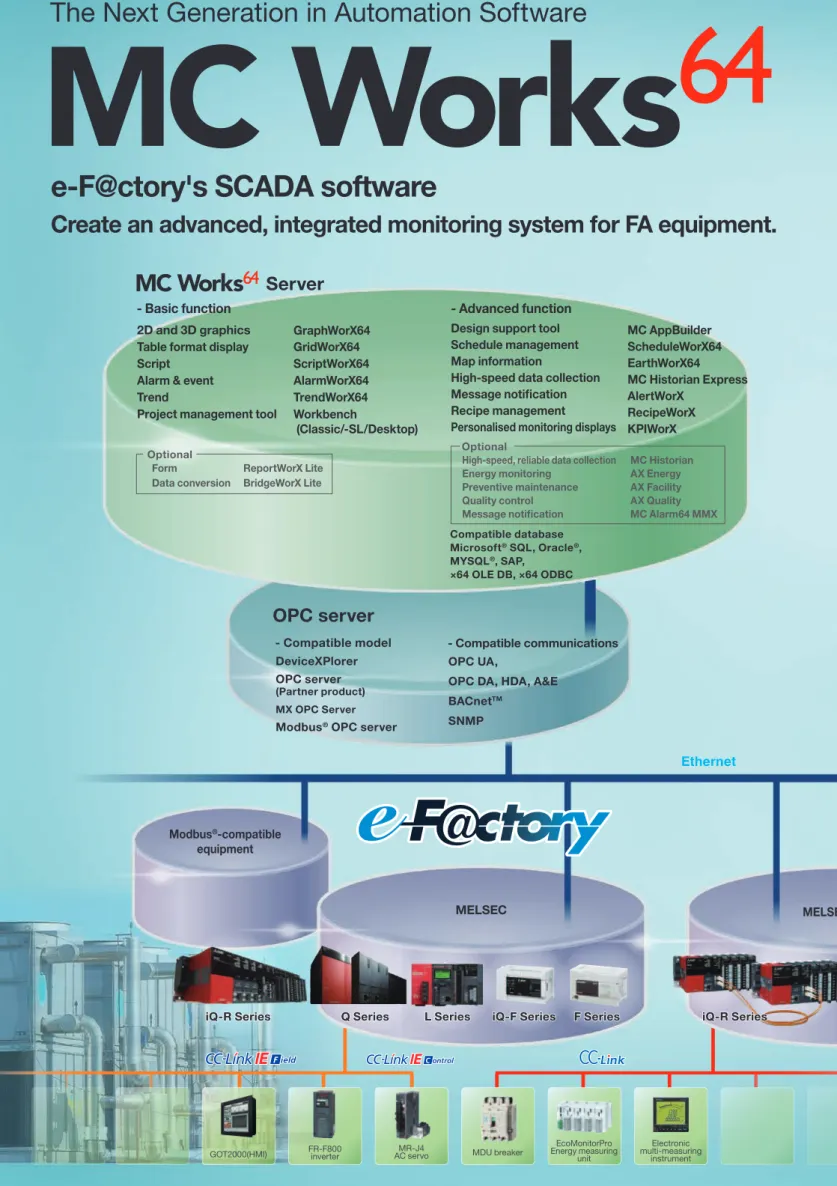
e-F@ctory's SCADA software
Create an advanced, integrated monitoring system for FA equipment.
The Next Generation in Automation Software
Modbus®-compatible equipment
MELSEC MELSEC re
Server
- Basic function2D and 3D graphics
Table format display GridWorX64 GraphWorX64
Script ScriptWorX64
Alarm & event AlarmWorX64
Trend TrendWorX64
Project management tool
Form
Data conversion
ReportWorX Lite BridgeWorX Lite
- Advanced function Design support tool Schedule management Map information
High-speed data collection Message notification Recipe management
Personalised monitoring displays
MC AppBuilder ScheduleWorX64 EarthWorX64 MC Historian Express AlertWorX
RecipeWorX KPIWorX
High-speed, reliable data collection Energy monitoring
Preventive maintenance Quality control
Message notification
MC Historian AX Energy AX Facility AX Quality MC Alarm64 MMX
Compatible database Microsoft® SQL, Oracle®,
MYSQL®, SAP,
×64 OLE DB, ×64 ODBC
OPC server
- Compatible model
DeviceXPlorer OPC server
(Partner product)
MX OPC Server
Modbus® OPC server
- Compatible communications OPC UA,
OPC DA, HDA, A&E
BACnetTM
SNMP Workbench
(Classic/-SL/Desktop)
64
Ethernet
Internet/ intranet
Q Series Q Series redundant system
BACnetTM-compatible equipment Message notification
Message notification
3G/4G
Client
- Web monitoring
WebHMI Client*
AX Portal*
Client
- Mobile monitoring
MC Mobile*
*
: This function is installed on a server. OptionalOptional
Constructing a system
Advanced functions
Options
Pr
oduct list
Mitsubishi SCADA MC Works64 provides a highly-functional monitoring control system together with rich factory
automation products.
MC Works64 provides the solutions for a variety of the needs in monitoring control.
Enhancement of visibility and operability
Enhancement of reliability
Reducing engineering labor
Improve the aesthetics and usability of your monitoring control
Construct a highly reliable system that continues operation even during problematic times
Make eicient use of preset equipment lists to construct graphics or programs
It may be diicult to efectively represent equipment monitoring
using only 2D graphics. On the other hand, 3D graphics can
enhance the visibility with its stereoscopic displays.
3D graphics allow you to have monitor views from various angles.
This enables you to know the condition of equipment quickly and
accurately, have instinctive monitoring views and make intuitive
control.
MC Works64 enables you to construct redundant server systems
and server-and-client systems.
It is possible to utilize two servers, a control server and a standby
server, to enhance the reliability of the system and to reduce the
communication load on the network.
It is possible to embody a coniguration suitable for the system
size, from a stand-alone system to a large-scale system.
Various equipment lists are available to automatically generate
graphics, programs, and OPC tag settings. The design support tool
prevents incorrect tag settings, thus enhancing the design quality.
Ethernet Alarm
printer MC Works64
Standby server OPC server MC Works64 Client
MC Works64 Control server OPC server
Form printer
Tracking cable Tracking cable
Preventive maintenance
Use the collected equipment data to provide preventative maintenance
By monitoring energy consumption, energy use can be reduced
over time.
Energy consumption can be visualized through the integration
of Mitsubishi Electric's energy measurement equipment and AX
Energy; an energy analysis and visualization tool.
The lineup of Mitsubishi Electric's energy-saving equipment, that
includes the inverter with enhanced motor control, will reduce
energy consumption at your plant.
Mitsubishi Electric's MES interface module can be used to collect
information on production control. AX Facility can then display and analyze the diagnosis and equipment failure information.
These products automatically collect the information on the
condition of equipment from a large amount of data, using it for
the improvement of: the availability factor, preventive maintenance,
You can monitor the video images from CCTV on a screen. As you monitor graphics at the same time, the system operation will be secure and safe.
This view satisies the needs for simultaneous monitoring of
multiple types of data and pictures brought by a highly functional system.
This multi-monitor display shows graphics, alarms, trends, camera views, and more over several monitors, enabling simultaneous monitoring. (You can use six monitors at the maximum.)
In the multi-view screen display, you can use one monitor to view
Constructing a display
(Compatible with 3D graphics)
Enhancing the monitoring function
Video monitoring GraphWorX64 Enhancing the visibility
Multi-monitoring and multi-view screen display
Multi-monitor screen display
Multi-view screen display
Zooming in to the problem area when
an alarm occurs
Constructing a system Advanced functions Options Pr oduct list Solutions
You can create high deinition 2D and 3D graphics. It may be diicult to efectively represent equipment monitoring using only 2D
graphics. On the other hand, 3D graphics can enhance the visibility with their stereoscopic displays. You can control enlargement, reduction, rotation, and parallel movement of 3D graphics to monitor anything; from the facility as a whole to individual device details. When an alarm occurs, you can zoom in to the problematic part of the device. Thus, you do not need to move around from a screen display to another screen display, monitoring the facility without any interruption thanks to the parallel movement. You can use 2D graphics for a real-time screen display to view the condition of a device, operation and measurement data. You can import 2D and 3D CAD data etc. to create graphics.
A set of pre-made symbols are available, known as the Symbol Library, which can reduce time spent on creating graphics.
Custom symbols can be created and registered to the Symbol Library. The Symbol Library has more than one thousand types of high
deinition 2D and 3D symbols which cover a variety of industries
including water treatment, building management, food, chemicals, and more.
An animation function is also included. You can register a tag to a symbol to change colors and display numbers, reducing the labor for creating a script.
■Speciications of GraphWorX64 Screen
Size/resolution Unlimited Support
Layer Zoom
Declutter with zooming
Window [Menu on/off, scroll bar, option, move, resize]
2D shapes
2D drawing Straight line, curve, arc, multiple straight lines, rectangle, ellipse, polygon, text, label
2D image
Expansion JPG, JPE, JPEG, PNG, GIF, TIF, TIFF, JFX, BMP, ICO, WMF, EMF, SVG, SVGZ, DWG, DXF
Reference JPG, JPE, JPEG, PNG, GIF, TIF, TIFF, JFX, BMP, ICO, WMF, EMF, SVG, SVGZ, DWG, DXF 2D advancement Shared keyword for updating symbols on multiple screens 2D symbol 1,500 or more
3D shapes
3D drawing Cube, sphere, surface, polygon, torus, cone, column, terrain, pipe, comment
3D import AutoCAD® Binary (.dwg), XAML (.xaml), 3D Studio (.3ds), COLLADA (.dae), OBJ (.obj)
3D advancement Polygonal reduce - 3D symbol mesh size reduce 3D symbol 300 or more
Color
Fill RGB, Gradients, image tile Line RGB, Gradients, image tile
Effect/format
General Opacity, inclination, drop shadow, brilliance, blur Object Line format, linewidth, line vertex, line joint Rectangle Roundness (X, Y)
Ellipse Radius (X, Y) Polygon Vertex control
Dynamics
Text Process point, data input, time/date Button Button, check box, radio button, display button Dimension Size, position, rotation
Color Object fill color, object line color, disable, hide, text background color, text foreground color, text border color Selection State, range
Selection control
Window [Close a window.] Navigation [Show in rear, show in front]
Screen [Refresh display, popup menu, object display setting, view setting]
Aliasing [Global alias setting, language setting, local alias setting] Value [Write value, toggle value]
Application [Start application] Script [Start script]
Other Database upload, start form (ReportWorX), start transaction (BridgeWorX) Security Login/logout dialog
.NET Controls
Module GraphWorX64, GridWorX64, AlarmWorX64, TrendWorX64, EarthWorX64, AX Energy Design Pipe, scale, smart tile
Video
Static protocol (WMV, AVI, MPEG, MOV, MP4)
Streaming protocol (HTTP, HTTPS, MS-WMSP (MMS and RTSP)) GEO-SCADA Smart pin, push pin (EarthWorX64)
Enhancing visibility
2D and 3D graphics GraphWorX64
Enhancing visibility/reducing symbol design time
Symbol Library GraphWorX64
3D 2D
Button Motor Utility Pipe Instrument
You can use 2D and 3D preset objects to quickly create displays and reduce engineering time.
You can import AutoCAD® data and other existing data to construct
a screen display.
When you monitor a large amount of data, it may be efective to organize the values on a grid in the spreadsheet format. You can use GridWorX64 to realize the visualization of data by customizing
data sets and using a large-size grid. During design, you can easily set data sources in a grid, reducing the scripting for illustration.
During runtime, an operator can sort, group, and ilter data in real time for monitoring. As a result of sorting, an operator may ind
some critical data. By grouping data, an operator can quickly
organize the data for improved visualization.
This is a server application to execute VBA (Visual Basic® for Applications) scripts. You can set time triggers, data triggers, and other various conditions to execute scripts. Watchdog monitoring, an automatic recovery function and an execution queue function are available. These enable easy implementation of complicated periodical processes and event-dependent processes.
■Speciications of GridWorX64
Refresh
Manual Automatic Maximum value
Row [Unlimited (One million rows or less recommended)] Column [Unlimited (One hundred columns or less recommended)] Variable format Background, Foreground, Font Size, Font Weight, Font Family, Font
Style
Data format Boolean value, character string, time and date, 16-bit integer, 32-bit integer, 64-bit integer, double unsigned 16-bit integer, unsigned 32-bit integer, unsigned 64-32-bit integer, OPC UA status code Support
Filter Grouping Sort
Read out [Readable point only] Write in [Writable point only] Enhancing visibility/reducing the labor for illustration
CAD compatible GraphWorX64
Enhancing visibility/reducing the labor for illustration
Table format displays GridWorX64
Reducing the labor for illustration
Script ScriptWorX64
Batch processing ScriptWorX64
Periodical execution flag
An example of the process to store production achievement data
AutoCAD®
MC Works64 Import the AutoCAD®
file directly
Import
Retouch the file on MC Works64
AutoCAD®
Constructing a system Advanced functions Options Pr oduct list Solutions
Quickly attend to any situation by monitoring alarm tag data and issuing alarm notices.
In addition, the software collects alarm information from the alarm server and stores it in a database; logging it in the alarm history. Alarm controls can be used to display data real-time and historical
alarm information on the graphics. An operator can ilter alarm
information during operation to view only necessary data. By altering the conditions to match the user's needs (e.g. sort and
combine alarm charts) alarms can be analyzed eiciently.
It is also possible to view real-time and historical trend data. Real-time data is collected directly from the OPC server and is shown as a real-time trend. On the other hand, historical data is stored in the database and logged as a trend history. The logged data will be shown as a historical trend. You can add trend graphs to graphic displays to supply trend data to operators alongside other important data.
You can view multiple data items in one trend display and can split or overlap a view/s. In addition, you can pause a trend display, add display data, and change a display scale.
■Speciications of AlarmWorX64 OPC connection
OPC UA Client [A/E]
OPC Classic Server [A/E], Client [A/E]
AlarmWorX64 Server
Basic alarm type Limit, digital, deviation, rate of change Advanced alarm type Rate limit/trigger limit
Support Alarm area Alarm template Relevant value Online change AlarmWorX64 Logger
Logger type Database Logger setting Reservation type Support
Multi-setting Redundancy
Database table management Printer logging
Conversion logging
AlarmWorX64 Viewer
Data type Real-time, history, event (A/E, log alarm and event) Integration GraphWorX64 Support Multi-grid Multi-tab Custom format Filter Grouping Sort MC Alarm64 MMX
(Optional Package) E-mail Notifications for alarms
■Speciications of TrendWorX64 OPC connection
OPC UA Client [DA, HDA] OPC Classic Client [DA, HDA]
TrendWorX64 Logger
Logger type Database Logger setting Tag
Max. capacity 5,000 tags (recommended) Support
Multi-logging group Multi-database group Save and transfer Start/stop status Database table management
TrendWorX64 Viewer
Data type Real-time, history (DA, HDA) Integration GraphWorX64
Trend count 250 or more (25 or less recommended for reliability)
Time and rate Trend time, summary period, data collection rate, display refreshing rate, history refreshing rate
Time and date UTC, Local
Time format [None, Long, Short, Custom (h, H, m, s, t)] Date format [None, Long, Short, Custom (M, d, y)] Plot type
Line [Time, Time spline, Step time, XY] Area [Time area, Time spline area, Time step area] Other [Bar, Histogram, Circle, Pie, SPC management chart] Pen type
Line [Solid line, Broken line, Dotted line, Dotted-broken line, Custom]
Marker [None, Circle, Square, Triangle]
Value format [Currency, Decimal, Exponent, Fixed decimal, General, Number, Percent, Hexadecimal]
Range [Automatic, Automatic scale, Fixed (Min., Max.)] Support
Bad Quality marker Multi-grid Multi-tab Multi-chart Custom format Trend stop Alarm line Ideal pen
Enhancing visibility/a variety of screen display formats
Alarm & event AlarmWorX64
Enhancing visibility/a variety of screen display formats
Workbench (Classic/-SL/Desktop) is a project management tool that allows a user to organize all of MC Works64's related products from a
single location. These include a variety of applications including GraphWorX64, AlarmWorX64 and MC Historian.
Workbench-SL is a management tool based upon Microsoft® Silverlight®. As this environment utilizes a web browser, it is possible to
create displays and organize a project on machines that do not have MC Works64 installed.
※ A separate development license for the client is required.
Workbench Desktop is the latest addition to the MC Works64 project management family. It boasts ease of use through an easy to navigate project tree and drag-and-drop functionality. This allows for the intuitive, visual construction of an MC Works64 project.
By supporting both local and remote access, the Workbench series of applications provide a high amount of freedom for developing systems and displays.
Enhancing maintenance performance
Project management tool Workbench (Classic/-SL/Desktop)
lSwitching display language
During runtime it is possible to change the current display language.
This global function supports a wide variety of languages including: English, Japanese, Chinese, Spanish etc.
lLanguage Pack
The default language for the Workbench (Classic / -SL/Desktop) environment is English.
However, after installing an additional language pack
it is possible to view the coniguration environment in
Japanese or Chinese.
Enhancing visibility/global application
Multi-language display Workbench (Classic/-SL/Desktop) Workbench Desktop
It is possible to develop a project using intuitive operations; such as drag-and-drop
Workbench-SL
Constructing a system
Advanced functions
Options
Pr
oduct list
Solutions
Data from databases can be extracted and used to create various types of reports including: daily, weekly, monthly and yearly reports. This software can create a form in the Microsoft® Excel® format and can also save iles in HTML and PDF formats. In addition, you can register multiple form format templates. MC Works64 includes a simpliied version of this software called ReportWorX Express that supports OPC, TrendWorX64 Logger Database, MC Historian, AlarmWorX64 Logger Database, Energy Star and AX Quality. Among them, ReportWorX Lite (optional package) is recommended. ReportWorX Lite can create forms in Japanese, but its menu environment supports English only.
RecipeWorX is a tool that allows for the easy management of ingredients and recipe lists.
You can specify multiple parameters at once in a recipe list including; deining the ingredients, mixing time, processing time etc.
New parameter values can be downloaded to the device to update a working recipe or current values can be uploaded from the device and displayed on screen.
By combining this with ScheduleWorX64 (see P21), it is also possible to create schedules that change the current recipe automatically.
Function linkage
Form ReportWorX Lite (optional package)
Recipe management RecipeWorX
Setting screen
An example of forms
Mixer
MELSEC MC Works64
Raw material
Edit Recipe
Recipe of drink Sugar Water Soda
Constructing a system
MC Works64 supports server and client systems and redundancy.
You can use two servers to conigure a control server and a
standby server, enhancing the reliability of a system and reducing the communication load on a network.
MC Works64 can be conigured to suitably match the needs of the
system; be it a standalone or large scale system.
WebHMI uses your MC Works64 server as a web server. This allows operators to monitor and manipulate data over the Internet or Intranets. Almost all of the functions available in MC Works64 can be used in any client type.
Enhancement of reliability
Server & client
Compatibility with Internet environments
Web monitoring WebHMI (optional package)
Ethernet
Alarm printer MC Works64
Standby server OPC server MC Works64 Client
MC Works64 Control server OPC server
Form printer
Constructing a system
Advanced functions
Options
Pr
oduct list
Solutions
MC Mobile is the mobile software that monitors important applications of a building or a plant. It is easy to set up and use MC Mobile eiciently.
The user can have access to, and monitor, important data anytime, anywhere and from any terminal. The manager, the engineer, the maintenance
worker and the operator can: access and monitor data in real-time, view data on alarms, trends, energy, quality, production information etc.
MC Works64 supports server and client systems and redundancy. MC Mobile is compatible with mobile terminals using the following technologies; Microsoft® Windows Phone® and Surface®, Apple®
iPhone® and iPad®, Android® phones and tablets, or HTML5.
MC Works64 is compatible with SQL, SAP, MySQL®, OLE DB, ODBC and other databases. MC Works64 is bundled with SQL Server® 2014
Express (English version).
MELSOFT MC Mobile (application)
MC Mobile is a client application for use with mobile devices. This dedicated application optimizes the displays to match the device that is being used.
Available for compatible OS versions of iOS®, Android®, Windows® and
can be downloaded and installed from the App Store®, Google Play® or
the Windows Store.
Supported versions : Android® 4.0 or higher, iOS® 7.0 or later, iPhone®, iPad®,
iPod Touch®, Windows Phone® 8.1, Windows® 8.1, 10 and 10Mobile.
Inter-functional linkage
Database
Compatibility with Internet environments
Mobile monitoring MC Mobile (optional package)
App Store®/ Google Play®
Download
Access
Centralized integration management
You can use McAfee® ePolicy Orchestrator (ePO) to optimize and
simplify management processes. ePO enables you to use a sole centralized management console to monitor and control all security functions.
Inquiry
McAfee Embedded Solution Sales Division E-mail: [email protected]
BridgeWorX integrates information from diferent data sources and can transfer data to diferent target systems. BridgeWorX realizes
the data transfer between the programmable controller on a production site and the SQL server in an MES system and the data
transfer among ERP applications. BridgeWorX has a transaction
diagram that enables you to set up data transfer. You do not need any knowledge about programming to set up the transaction diagram, simply drag-and-drop and use the help of a wizard to supply the necessary information.
Transaction diagram Trigger
End
Perfect protection from unfavorable applications
Application Control expands the applicable scope to Java®, ActiveX® Controls, scripts, batch iles and dedicated codes, enhancing the
controllability of application components.
A sure protection of integrated systems and legacy systems
Application Control has such compact designing that it is applied to kiosk terminals, POS terminals, and other dedicated devices,
operating with a RAM less than 10 MB and a minimum CPU. Its unique
protection layer is expanded to Microsoft® Windows NT®, Windows®
2000 system and other legacy systems.
Simplifying patch application processes that can be troublesome
McAfee® Application Control enables you to temporarily delay a patch
application until a regular patch application cycle. Even in a case where you worry about some vulnerabilities that do not have correction patches released, white listing can block such programs that make use of those vulnerabilities, thus allowing you can cope with them.
Inter-functional linkage
Anti-virus software Partner product Inter-functional linkage
Data conversion BridgeWorx Lite (optional)
McAfee® Application Control
Constructing a system
Advanced functions
Options
Pr
oduct list
Solutions
Compatible models
MELSEC iQ-R Series, iQ-F Series, Q Series, L Series, QnA Series, A Series, FX Series, GOT, Mitsubishi CNC, EcoWebServer III,
E-Energy, EcoMonitor, M5CM
Compatible networks
Ethernet, serial, CC-Link, CC-Link IE, MELSECNET/H
Supported regions
Japan, China, Asia (other than Japan and China), Europe, North America, South and Central America, Africa
Takebishi Corporation
Inquiry
29, Mameda-cho, Nishi-kyogoku, Ukyo-ku, Kyoto 615-8501, Japan TEL: +81-75-325-2171
E-mail: [email protected] URL: http://www.faweb.net/
OPC server connection
MC Works64 supports the connection for equipment including programmable controllers via OPC servers and other networks.
MC Works64 can connect to the OPC servers that are compatible with OPC UA and OPC Classic (DA, HDA, A/E). An OPC server connects
to a programmable controller by way of several types of network. It is recommended that a DeviceXPlorer OPC server (partner product) is
applied.
In addition, when a programmable controller is connected by way of an MES interface, it is possible to directly connect to an SQL server with MC Works64 to read or write data.
Enhancing connectivity
Connection to a PLC and other equipment
MX OPC Server
Software that is able to communicate with the MELSEC PLC.
MX OPC UA Server
Supports OPC UA functionality.
Add MX OPC UA Server
lMonitor and operate the equipment with OPC UA
lSupport the auto-generation for the Setting of OPC UA Server in MC AppBuilder
DNP3.0 Support
Support for the DNP3.0 protocol in MX OPC Server lMonitor and operate the equipment for DNP3.0
[DNP3.0/Open communication protocol that is used in power and water supply facilities]
MELSEC iQ-R Series Process CPU, MELSEC iQ-F Series
Enhancement of Support H/W in MX OPC Server
Partner product
DeviceXPlorer OPC Server
DeviceXPlorer OPC Server is the communication software that is compatible with MELSEC-Q Series, C Controller, Motion Controller,
and GOT (HMI).
This software can use Ethernet, CC-Link and a variety of types of network to access production information.
MX OPC UA Server
MELSEC
OPC UA
MX OPC Server
BACnetTM and SNMP are both supported.
You can use BACnetTM to connect a BACnetTM-compatible device
and utilize it in an MC Works64 server.
Connection to the MES interface module Connection to other networks
BACnet™ Monitoring
screen
Illumination
controller Air-conditioning controller
CC-Link IE
SSCNET III
CC-Link IE
B/NET
SQL
• Production plan control
• Parts inventory control
• Product inventory control MES
database server
Ethernet
You do not need a gateway or a communication program for a direct connection between a programmable controller and MES.
● To store and control a variety of information in a plant involving
production plans, quality, energy, and more on a seamless network
● To use a ield network to collect detailed information up to end
terminals
─ Monitoring screen ─
─ OPC tag setting ─
─ PLC sub-project ─
Symbol
Function block Face plate
Design support /
GX Works2 / GX Works3 linkage
MC AppBuilder
What is MC AppBuilder?
A tree format for the managing the system configuration
Using templates* to reduce the labor for designing
Automatically generating a monitoring screen, a PLC project and setting tags
MC AppBuilder is an engineering support tool that enables you to easily construct a plant system where MC Works64 and a Mitsubishi programmable controllers are used. MC AppBuilder is bundled with MC Works64 as standard.
You can import an equipment list (in CSV format) that is created with CAD
or Microsoft® Visio® to construct a system tree showing the equipment coniguration of a plant. This intuitive tree format enables you to take management of the equipment coniguration of a plant.
You can gather the common design details for each type of equipment
into a template that can be saved into the Symbol Library. You can
assign an applicable template to a piece of equipment in the system
tree, thus reducing design labor time.
Templates are not only provided by the manufacturer but also registered, and reused, by the customers from their own know-how. MC AppBuilder automatically generates a monitoring screen (including
symbol parts and face plate parts), OPC tag settings (including alarms and trend settings) and a PLC project (including PLC programs and label
deinitions). This automatic generation makes your designing easy, reducing
the labor for the registration of tag settings. In addition, this function
enhances the ainity with Mitsubishi Electric's automation equipment.
*: Templates include symbols, face plates, and other graphic parts information as well as function blocks and other program information and each type of interface information (alarms and trend settings).
The tree format for the management of a system configuration
Easy renewal of a system
Simplifying the monitoring of energy measurement equipment
Easy creation of GOT(HMI) screen displays
It is easy to add and remove equipment from a system. When
renewing a system, this reduces design labor.
In MC AppBuilder you can import measurement point information created by the EcoWebServer III setting tool, Mitsubishi Electric's energy-saving data collection server, thus automatically generating a monitoring screen and OPC tag settings.This link with the
EcoWebServer III setting tool reduces the labor required to create these
settings.
Symbols and face plates are integrated for creating GOT, contributing to the reduction of the labor for creating GOT screen displays. See the list of template libraries (see P20) for the GOT screen displays integrated with MC Works64.
MC AppBuilder
Standard template list Integrated with a standard template
GOT screen display
Symbol
Constructing a display
Constructing a system
Advanced functions
Options
Pr
oduct list
List of template libraries
Name Description
Component Compatibility with GOT
screen display*1
Symbol Face plate Function block
Sensor
Displays the input status from a connected sensor. Specify any of Status, Warning, and Alarm as a type of notiication of an input status.
●
●
●
●
Fan Controls ON/OFF switching of a fan.*2
●
●
●
●
Motor Controls ON/OFF switching of a motor.*2
●
●
●
●
Pump Controls ON/OFF switching of a pump.*2
●
●
●
●
Valve Controls Open/Close switching of a valve.*3
●
●
●
●
Damper Controls Open/Close switching of a damper.*3
●
●
●
●
FanVSD Speciies a fan speed to control ON/OFF switching.
●
●
●
●
MotorVSD Speciies a motor speed to control ON/OFF switching.
●
●
●
●
PumpVSD Speciies a pump speed to control ON/OFF switching.
●
●
●
●
FanVSD WithCCLink
Uses CC-Link to specify a fan speed to control ON/OFF switching.
Shows the power consumption of an inverter.
●
●
●
●
MotorVSD WithCCLink
Uses CC-Link to specify a motor speed to control ON/OFF switching.
Shows the power consumption of an inverter.
●
●
●
●
PumpVSD WithCCLink
Uses CC-Link to specify a pump speed to control ON/OFF switching.
Shows the power consumption of an inverter.
●
●
●
●
ControlValve
Controls OPEN/CLOSE switching of a valve that can have the open/ close status speciied in the range from 0 to 100%.
●
●
●
●
ControlDamper
Controls OPEN/CLOSE switching of a damper that can have the open/close status speciied in the range from 0 to 100%.
●
●
●
●
Measurement With4threshold
Shows the status of a measured value depending on the predeined range from HH/H/L/LL.
An alarm is issued with HH or higher or LL or lower. A warning is issued with H or higher or L or lower.
●
●
●
●
Measurement With8threshold
Shows the status of a measured value depending on the predeined range from HH/H/H2/ H1/L1/L2/L/LL.
An alarm is issued with HH or higher or LL or lower. A warning is issued with H or higher or L or lower. A status is issued with H1 or higher or L1 or lower.
●
●
●
●
Light Controller Control ON/OFF switching of lights with a light controller.
●
●
─ ─Air Conditioning Controller
Control ON/OFF switching of air conditioners with an conditioning
controller.
●
●
─ ─Energy Measuring Module
Shows measurement values from an energy measuring module (QE81WH, QE81WH4W, QE84WH, QE83WH4W).
●
●
●
●
Insulation Monitor Module Shows measurement values from an insulation monitor module
(QE82LG).
●
●
●
●
PID Controls PID.*4
●
●
●
●
Converter
ToEngineeringValue Executes a scale conversion of a value input from an analog module to output an engineering value.
●
●
●
●
Converter ToEVForHighResolution Name Description Component Compatibility with GOT screen display*1Symbol Face plate Function block
Converter
FromEngineeringValue Executes a scale conversion of an input engineering value to output a value to an analog module.
●
●
●
●
Converter FromEVForHighResolution
HARTMonitor
Collects, and shows, an analog value from equipment supporting
the HART communication.
●
●
●
●
EnergyMeasurement WithCCLink
Shows a measurement value of a measurement module supporting CC-Link (an electronic multi-measuring instrument).
●
●
●
●
Q68ADV
MELSEC-Q Series Analog input module (voltage
input) ─ ─
●
─Q62AD_DGH Q66AD_DG Q68ADI
MELSEC-Q Series Analog input module (current
input) ─ ─
●
─Q64AD Q64ADH Q64AD_GH Q68AD_G
MELSEC-Q Series Analog input module (voltage/
current input) ─ ─
●
─Q68DAVN MELSEC-Q SeriesAnalog output module (voltage
output) ─ ─
●
─Q68DAIN MELSEC-Q SeriesAnalog output module (current
output) ─ ─
●
─Q62DAN Q62DA_FG Q64DAN Q64DAH Q66DA_G MELSEC-Q Series Analog output module (voltage/
current output) ─ ─
●
─Q64AD2DA
MELSEC-Q Series Analog input/output module
(voltage/current input/output) ─ ─
●
─Q68CT MELSEC-Q SeriesCT input module ─ ─
●
─Q64RD Q64RD_G Q68RD3_G
MELSEC-Q Series Temperature input module
(resistance temperature detector) ─ ─
●
─ Q64TDQ64TDV_GH Q68TD_G_H01 Q68TD_G_H02
MELSEC-Q Series Temperature input module
(thermocouple) ─ ─
●
─L60AD4 L60AD4_2GH
MELSEC-L Series Analog input module (voltage/
current input) ─ ─
●
─L60DA4
MELSEC-L Series Analog output module (voltage/
current output) ─ ─
●
─L60AD2DA2 MELSEC-L SeriesAnalog input/output module
(voltage/current output) ─ ─
●
─Measuring PointMonitor
Collects, and shows, the current value of a measurement point of EcoWebServer III via an OPC server.
●
─ ─ ─*1: A GOT screen provides symbols and face plates and does not support automatic generation.
*2: Speed is not controlled.
*3: There is no function to specify the open/close status.
*4: The PIDCONT instruction is supported.
Example: Control Valve
1. Face plate 2. Symbol 3. Function block
Schedule management
ScheduleWorX64
Wide area monitoring
EarthWorX64
You can follow a schedule to automatically change building lighting,
air-conditioning, plant facility and so forth. By referring to a schedule you can set up tag values for daily, weekly, and monthly schedule management.
You can use Bing Maps and other map systems via the Internet to display
geographical information for wide area monitoring. You can monitor business bases and plants distributed around the world on a single map. In addition, when you use a pin, you can view detailed information and alarm statuses. You can also use GPS data for monitoring.
■ Speciication of ScheduleWorX64 Schedule type
Periodical General, weekly, holidays, seasonal One time Override, exceptional
View Day, week, month, timeline Support
Outlook® format
Remote setting Live monitor mode Security Manual override
■ Speciications of EarthWorX64 Map
Bing® Road (Shade, No Shade), Hybrid, Aerial
Esri® Imagery, World Boundaries, Streets, Topographic, Canvas,
National Geographic, Oceans Google® Roadmap, Satellite, Terrain, Hybrid
OGC WMS Custom
EarthWorX64 Viewer
Zoom
Level 1-16
Region A scope is specifiable. Layer
Opacity Available
Visibility Available–dynamics allocation available (initial value: show) Capacity information
Bing® Bing Maps Key
Esri® Username, Password, Root URL
OGC WMS Provider Address, Additional Parameters
Smart pin
Allocation GraphWorX64 object, latitude/longitude Setting Dialog
Size [Add/delete row/column] Color [In smart icon] Data collection
[OPC, OPC UA, Global Aliasing, Language Aliasing, simulation, expression, Local Aliasing]
Tool tip [Settable, data accepted]
Pushpin
Allocation GraphWorX64 object, latitude/longitude Setting Fill, zoom, shadow
Constructing a system
Advanced functions
Options
Pr
oduct list
Cloud
Microsoft Azure
®[Partner product]
Microsoft Azure®, the Cloud service by Microsoft®, is supported. You can store data and server applications on the Cloud to construct a lexible system.
1. How to use Microsoft Azure® as a communication route
Merit You can monitor a subject easily and safely.
2. How to have a server application on Microsoft Azure®
Merit You can save the labor for the management of a server personal computer.
High-speed data collection
MC Historian Express
MC Historian Express is a simpliied version of the optional data collection tool MC Historian (see P24). Using its own data storage format means that a commercial database engine is not required and it provides fast data
collection.This Express version is available as part of the standard MC Works64 license.
*:MC Historian Express will use MC Works64 license tags for logging.
*:The maximum number of possible logging tags are 5000.
Configuration screen Client personal computer
Azure Cloud Service Azure SQL database
Setting information
Office network
Client personal computer MC Works64
Microsoft Azure®
Azure Cloud Connector
Plant network
Server personal computer MC Works64 runtime
OPC server
Office network
Azure Cloud Service Azure VM
Azure SQL database
Plant network Microsoft Azure®
Web browser
Server personal computer MC Works64 runtime
OPC server MC Mobile/WebHMI server
Windows Server 2012 Azure Cloud Connector
Personalized monitoring
displays
KPIWorX
Message notiication
AlertWorX &
MC Alarm64 MMX
(optional)These applications link alarms with email and SMS notiications.
Users can receive messages containing information such as: the date and time that the alarm occurred, the type of alarm and the alarm name.
Using AlertWorX, a standard feature of MC Works64, it is possible to notify a single user via a simple coniguration.
Additionally, the optional package MC Alarm64 MMX allows for much more advanced settings. For example, depending on the type of alarm that occurs a diferent group of users can be notiied; such as the operators or the engineers. Within that, the operators that are notiied can be changed depending on the current work shift. It is possible to automatically change the notiications destination at the time the alarm occurs.
MX OPC Server
Receive a notification message with information such as: alarm occurrence date and time, alarm name and alarm type.
Alarm Occurs
Email Server
During runtime mode, it is possible to create a personalized monitoring display. There are a variety of widgets available (device symbols, alarms, trends etc.) that can be arranged on the screen as desired in order to display the necessary data. After creating these displays it is possible to save them and reload them at a later time; either for viewing or further customization.
2. Assign a tag to the symbol It is possible to customize various settings, such the symbol's colour.
1.Select an object from the symbol library and place it into the display.
Also supported in MC Mobile
Constructing a system
Advanced functions
Options
Pr
oduct list
High-speed,
reliable data collection
MC Historian
A high performance and high reliability data logger that can collect 100,000 points per second*
(by comparison, the collection performance of the TrendWorX64 is 20,000 points per second*).
It is also possible to log the result of a calculation based upon a user-deined formula. Long term logging is possible thanks to a high-compression logging feature. High reliability can be ensured through redundancy and distributed processing. Depending on the target application there are 3 available versions; standard (SD), enterprise (ET)
and redundant (RT).
A simpliied version of MC Historian is freely available in both MC Works64 and MC Mobile packages called MC Historian Express.
Energy monitoring
AX Energy
Real-time production history information collection package with 64-bit environment compatible high-performance, solid, scalable and safe operations
Energy consumption rate visualization and analysis tool for system and device levels
Options
*:Depends on the system coniguration.
Featues/Speciications MC Historian SD/ET/R (Optional packages) MC Historian Express (MC Works64 Standard Package)
High-speed Logging
●
●
Performance Calculations
●
—Powerful Compression Filtering
●
—Save data into an HDD ile
(TrendWorX data is saved into an SQL database)
●
●
Redundant
●
* —Distributed Architecture
●
* —Maximum Tag Count No Limit 5000
Tag Counting Method Counted as MC Historian Tags Counted as MC Works64 Tags
Web monitoring
AX Portal
You can use a web browser to monitor screens created in MC Works64, AX Energy, AX Facility and AX Quality.
You can divide a screen for the integral view of these functions.
Preventive maintenance
AX Facility
It is possible to use prior knowledge on equipment faults to create a resource that improves recovery times. It is possible to analyze the causes of facility troubles together with their frequency to know their trends, providing aid for preventive maintenance. You can use Microsoft® Excel® to create a form in the format of
your choice from the result of analysis.
Quality control
AX Quality
AX Quality creates management charts for the analysis of quality control and process capacity, reducing the labor of onsite operators and managers. AX Quality provides SQC/SPC data analysis, SQC charts, reports, and SPC rule-based alarms.
Device fault detection and analysis tool
A complete quality analysis solution providing SQC/ SPC data analysis
Web analysis screen programming support tool
Constructing a system
Advanced functions
Options
Solutions
Pr
Mitsubishi Electric FA integrated solution
e-F@ctory is the Mitsubishi Electric solution for improving the
performance of any manufacturing
enterprise by enhancing productivity, and reducing the
maintenance and operations costs together with
seamless information low throughout the plant.
Controller network MELSEC iQ-R Motion CPU MR-J4-B AC Servo MES Interface MELQIC data collection analyzer High-speed Data LoggerC Controller
MES Interface products
MELSEC iQ-F
PLC MR-J4-GFAC Servo CC-Link CC-Link IE Partner product Safety remote I/O module
Field network MELSEC-L
PLC FR-E700EX/ MM-GKR Sensor Solution INVERTER+ IPM motor
Energy conservation support devices B/NET Electricity equipment controller network Information network Energy-saving Data Collection Server EcoWebServer Ⅲ
GOT2000 (HMI) Ethernet Numerical controller Numerical controller Laser
processordischarge machineElectrical
MELSEC iQ-R PLC Energy measuring module MELSEC-Q PLC Wireless network Safety field
network Servo network
MELSEC-QS Safety PLC mapping sensor MELSEC-F PLC MELFA Robot FR-A800 INVERTER Geared motor transformer MDU breaker Power measurement module EcoMonitorPro Energy measuring unit Electric multi-component indicator Information network Ethernet
IT System
FA-IT
Information Interface
Products
Production
equipment
Production planning, cost management, stock management, progress management, schedule management, quality control, etc. ERPMES
A u t o m o t i v e I n d u s t r y
MC Works64 can be applied at every process in an automotive plant to create a complete monitoring control system.
For production control, the yield and facility information based on each process is stored on a database server in MC Works64 via the integrated programmable controller and the MES interface.
Ⅲ
Safety field
Solutions
Pr
oduct list
Constructing a system
Advanced functions
Options
Control Ethernet
Information Ethernet
MES interface module
010 051 244 Comprehensive management control Wide screen monitor
Line monitor
server
Process PLC Process PLC Process PLC Process PLC
Network camera
Process PLC Process PLC
Progress control board Device
monitoring
MC Works64 client Error display System configuration (with an MES interface module)
Network camera
Pre-process Electrodeposition Sealing Intermediate coating Final coating Inspection
Information Ethernet Wide monitoring screen
server
Process PLC Process PLC Process PLC Process PLC
MC Works64 client Inspection terminal
Process PLC Process PLC
System configuration (with CC-Link IE)
E l e c t r i c a l / E l e c t r o n i c s
I n d u s t r y
MC Works64 can be applied for the monitoring control of an assembly plant of electrical machinery and electronics. The programmable controller of each process uses the 2D codes inscribed on work to collect the product ID. Each process' yield is stored in the MC Works64 database using the MES interface which manages each unit of work. Based upon recipe data, production information and quality information in the database, it is possible to create various forms (such as assembly yields and quality records) to secure traceability.
MES (production execution system)
Ethernet
MES interface module
Assembly yield Quality record
System configuration
Recipe Production information
Quality information
We recommend MC Works64 for the monitoring control of building and plant air-conditioning and facilities.
This provides a variety of solutions: monitoring control linked to an air-conditioning controller, the visualization of energy with EcoWebServer III and energy measurement equipment. It also provides an energy-saving solution linked to a high-eiciency inverter and a building's wire-saving network.
A i r - c o n d i t i o n i n g /
F a c i l i t y
Air-conditioning/ illumination control Device monitoring
and control
Monitoring/operation room (energy monitoring)
Solutions
Pr
oduct list
Constructing a system
Advanced functions
Options
Ethernet
Redundant CPU Air-conditioning controller
EcoWebServer III
CC-Link AnyWire DB A20 (Utility)
Energy measurement
unit MDU breaker Electronic multi-measuring
instrument
[Illumination monitoring]
[Energy monitoring] [Air-conditioning/heat source] Inverter
Inverter
F o o d a n d B e v e r a g e
We propose MC Works64 for the monitoring control of production processes of a food/beverage plant ranging from the upstream
processes (the PA control of compound processes etc.) to the downstream processes (the factory automation control of packing, transport, etc.) as well as for the monitoring control of utilities.
The monitoring control by MC Works64 involves server redundant and server and client coniguration to construct a system where the load distribution is enabled in a highly reliable network. In addition, you can use a CC-Link IE Control network to connect a programmable controller for integration and, furthermore, you can use a MELSECNET/H remote I/O network to distribute and connect I/Os, thus realizing the coniguration of a hierarchical network system.
Preparing process
Utility
Power reception, boiler, freezing machine, compressor, water reception, drainage, etc.
Fermentation/preservation process Filtering process
MC Works64 Client
MC Works64
Control server MC Works64Standby server System configuration
We propose MC Works64 for the monitoring control of each process and utility at a steel plant.
Redundant CPUs enables you to construct a highly reliable system. A CC-Link IE Control network connects a programmable controller for integration. Moreover, you can use a MELSECNET/H remote I/O network to connect distributed I/Os for the construction of a hierarchical network system.
S t e e l I n d u s t r y
System configuration
Drive Drive Drive Drive
Casting Strand Instrumentation Backbone
CC-Link IE Field
network CC-Link IE Field network CC-Link IE Field network CC-Link IE Field network
Water treatment
Auxiliary Auxiliary
Calculator
Ethernet
MC Works64 MC Works64 MC Works64
Tracking cable Tracking cable Tracking cable Tracking cable
Ladle
turret
Operation room
Mold Tundish
Pinch roll
Torch
Crane
Solutions
Pr
oduct list
Constructing a system
Advanced functions
The use of MC Works64 can provide a total solution. This includes process and utility monitoring control and production
control for a plant producing industrial chemicals, high-functional materials and medical products.
C h e m i c a l I n d u s t r y
Ethernet
Tracking cable Tracking cable
System configuration
MC Works64
GOT GOT
SSCNETⅢ SSCNETⅢ CC-Link IE Field network CC-Link IE Field
network
Manufacturing Automated warehouse
I n c i n e r a t i o n P o w e r P l a n t
Ethernet
MC Works64 Printer
Temperature sensor, flow rate sensor, pressure sensor, inverter, control valve, etc.
GOT GOT
System configuration
CC-Link IE Field network Tracking cable CC-Link IE Field
network Tracking cable
Fuel tank Constant
feeder Dewatering
cake
Flue
Industrial water
Drainage Air preheating fan
Incineration air blower Cooling reactor
Slag Incinerator
Cyclone
Boiler
Combustion air preheater
Turbine power generator
Dust collector
Flue gas treatment tower Incinerated ash
Induced draft fan Self-explosion prevention
air preheater
MC Works64 can be applied to an incineration power plant for monitoring and controlling: the incinerator, the boiler, utilities, gas treatment, and power generation processes.
Redundant CPUs, a CC-Link IE Control network and redundant MC Works64 servers can construct a high reliability system. Mitsubishi Electric proposes a total solution ranging from the process monitoring control with redundant CPUs to the visualization of generated energy with MC Works64.
Solutions
Pr
oduct list
Constructing a system
Advanced functions
■Basic products
Product name Model Tag Description
MC Works64 DV SW3DND-MCWDV-ET 75, 150, 500, 1500, 5k, 15k, 50k, 100k, 250k Graphic/alarm/trend (development version)
MC Works64 RT SW3DND-MCWRT-ET 75, 150, 500, 1500, 5k, 15k, 50k, 100k, 250k Graphic/alarm/trend (runtime/dynamic tag count version (see p. 35)). MC Works64 LT SW3DND-MCWLT-ET 75, 150, 500, 1500, 5k Graphic/alarm/trend (runtime/static tag count version (see p. 35)). MC Graph64 DV SW3DND-MCGDV-ET 75, 150, 500, 1500, 5k, 15k, 50k, 100k, 250k Graphic (development version)
MC Graph64 RT SW3DND-MCGRT-ET 75, 150, 500, 1500, 5k, 15k, 50k, 100k, 250k Graphic (runtime version) MC Alarm64 DV SW3DND-MCADV-ET 75, 150, 500, 1500, 5k, 15k, 50k, 100k, 250k Alarm (development version) MC Alarm64 RT SW3DND-MCART-ET 75, 150, 500, 1500, 5k, 15k, 50k, 100k, 250k Alarm (runtime version) MC Historian SD SW3DND-MCHSD-ET 75, 150, 500, 1500, 5k, 15k, 50k, 100k, 250k, 500k, 1M High-speed data collection
MC Historian ET SW3DND-MCHET-ET 75, 150, 500, 1500, 5k, 15k, 50k, 100k, 250k, 500k, 1M High-speed data collection (redundant collection function version) MC Historian R SW3DND-MCHR-ET 75, 150, 500, 1500, 5k, 15k, 50k, 100k, 250k, 500k, 1M Redundant configuration MC Historian (2 licenses of MC Historian ET)
MC Historian C SW3DND-MCHC-E —
MC Historian R remote collector license
(to add a distributed collection server to MC Historian ET) (The remote collector is compatible only with the expansion version.)
MC Historian CR SW3DND-MCHCR-E — MC Historian R remote collector license
(to add a distributed collection server to redundant MC Historian ET) MC Works64 CL RT SW3DND-MCWCLRT-EK — Additional 1, 5, 25, 100, 500 client licenses
MC Works64 CL DV SW3DND-MCWCLDV-EK — Additional 1, 5, 25 development version client licenses MC Works64 CL R SW3DND-MCWCLR-EK — 1, 5, 25 Additional client licenses for a redundant configuration MC Works64 CL LT SW3DND-MCWCLLT-EK — 1, 5, 25, 100, 500 Additional Web browser client licenses MC Works64 RO RTSW3DND-MCWRORT-EK — 1, 5, 25, 100, 500 Additional read-only client licenses
MC Works64 RO R SW3DND-MCWROR-EK — 1, 5, 25 Additional read-only client licenses for a redundant configuration MC Works64 RO LT SW3DND-MCWROLT-EK — 1, 5, 25, 100, 500 Additional read-only client licenses for a Web browser
MC Mobile SV SW3DND-MCMSV-E —
Remote monitoring/operation from a mobile/tablet terminal +2MC Mobile CL (including 2 client licenses) (MC Works64 license needs to be purchased separately.)
MC Mobile LT SW3DND-MCMLT-E —
Remote monitoring/operation from a mobile/tablet terminal +MC Works64 DV (including 75 tags)
+MC Mobile CL (including 2 client licenses)
MC Mobile SD SW3DND-MCMSD-E —
Remote monitoring/operation from mobile/tablet terminal +MC Works64 DV (including 5k tags)
+MC Mobile CL (including 25 client licenses)
MC Mobile ET SW3DND-MCMET-E —
Remote monitoring/operation from mobile/tablet terminal +MC Works64 DV (including 100k tags)
+MC Mobile CL (including 500 client licenses) MC Mobile CL SW3DND-MCMCL-EK — Additional 1, 5, 25, 100, 500 client licenses
MC Mobile RO SW3DND-MCMRO-EK — Additional read-only client license (MC Mobile license needs to be purchased separately.)
MC Works USB Key NZ2HK-IPS — USB license key
MC Works64
Language Pack SW3DND-MCWLG-M — MC Works64 Japanese-language and Chinese-language version package products
MC Alarm64 MMX LT SW3DND-MCAMMLT-E — E-Mail Notifications for Alarms
BridgeWorX Lite SW2DND-BWLT-E — 5 transactions
ReportWorX Lite SW2DND-RWLT-E — 5 reports
*: MX OPC Server does not support Japanese.
Purchase DeviceXPlorer OPC Server for Japanese-language support. ■Function list
Product name Configuration MC AppBuilder [Design support tool] GraphWorX64 View Client [Graphics (runtime)] AlarmWorX64 View Client [Alarm monitoring] TrendWorX64 View Client [Trend monitoring] GraphWorX64 Development Option [Graphics generation] AlarmWorX64 Development Option [Alarm collection/ logger setting] TrendWorX64 Development Option [Trend monitoring/ logger setting] ReportWorX Express [Simpliied-version form tool] BACnetTM [BACnetTM connection] SNMP [SNMP connection] GridWorX64 [Table-format data display]
MC Works64 DV
●
●
●
●
●
●
●
●
●
●
●
MC Works64 RT
●
●
●
●
— — —●
●
●
●
MC Works64 LT
●
●
●
●
— — —●
— — —MC Graph64 DV
●
●
— —●
— —●
— —●
MC Graph64 RT
●
●
— — — — —●
— —●
MC Alarm64 DV
●
—●
— —●
—●
— — —MC Alarm64 RT
●
—●
— — — —●
— — —MC Historian SD — — —
●
— —●
●
●
●
—MC Historian ET — — —
●
— —●
●
●
●
—*: ReportWorX Express is an on-demand form tool that runs with 32/64 bit Microsoft® Excel®.
Purchase ReportWorX Lite for the outputs in HTML, PDF, or other formats and for automatic daily/monthly form outputs.
Product name Configuration ScheduleWorX64 [Scheduling] ScriptWorX64 [Script generation/ runtime] UDM Tag Restricted [Tag restriction]
MC Historian Server [High-speed data
collection]
MX OPC Server
[OPC server]
EarthWorX64
[Wide area monitoring screen]
Workbench64 [Development tool
environment]
Modbus® OPC
Server [Modbus® OPC server]
WebHMI64 Server [Web publication
function]
MC Works64 DV
●
●
— —●
●
●
●
●
MC Works64 RT
●
●
— —●
●
●
●
●
MC Works64 LT —
●
●
—●
—●
●
●
MC Graph64 DV —
●
— —●
●
●
●
●
MC Graph64 RT —
●
— —●
●
●
●
●
MC Alarm64 DV —
●
— —●
—●
●
●
MC Alarm64 RT —
●
— —●
—●
●
●
MC Historian SD —
●
—●
●
—●
●
●
MC Historian ET —