CoCoA: A Communicative Correction Assisting System
for Composition Studies
Hiroaki Ogata*, Yoneo Yano*, Riko Wakita**
*Faculty of Engineering, Tokushima University, Japan
**Faculty of Education, Fukui University, Japan
E-mail: [email protected]
URL: http://www-yano.is.tokushima-u.ac.jp/
Abstract
This paper describes a computer mediated language learning environment called CoCoA (Commutative Collection Assisting System) that supports students and teachers to exchange marked-up documents via Internet. Its environment is very similar to a real one in which people use paper an pen. CoCoA allows teachers not only to correct the compositions sent from foreigners by E-mail, but also learners to see where and why the teacher corrected them. CoCoA improves the opportunities that foreigners have for writing Japanese compositions and for receiving instructions from teachers. In order to record and exchange corrected compositions with some marks and some comments, this paper also proposes CCML (Communicative Correction Mark-up Language), which is based on SGML (Standard Generalized Mark-up Language). We have developed CoCoA and used it for verifying its effectiveness.
Keyword
Computer Mediated Language Learning (CMLL), Composition studies, Correction of compositions, Cooperative learning, SGML
1.Introduction
Recently, researchers in educational systems attempt to provide technological support for cooperative and collaborative learning advocated by educational theories (O’Malley, 1994). The explosive growth of networking, in particular, raises the possibility of widespread collaborative and open-ended learning activities (Harasim, et al., 1995). We have investigated on technological support for open-ended and collaborative learning activities (Ogata, et al.,1996; 1997). In composition studies, coupled with the shift in writing pedagogy toward an open-ended and learner-centered approach, the theoretical view of learning has created a surge of interest in cooperative learning in such way as to prize conversation and interaction among students and among students and teachers.
In computer-based classrooms, writing teachers and students use various software tools to substantiate theories of writing. Computer support for composition studies are divided as follows:
(1) Real-time systems sharing a monitor and keyboards: e.g., online chat programs; (2) Asynchronous systems using email or bulletin boards.
In writing classrooms, teachers individually give instructions to all the students at the same time using pen and paper based on the way of proofreading (Sato, et al.,1994). Therefore, real-time system could make the burden too heavy for writing teachers, because the teachers have to deal with several students in the same class. In asynchronous systems, however, teachers can have enough time to instruct learners about composition. Moreover, students can also have opportunities to make composition and to take lessons from the teacher.
Writing compositions includes various sub-processes such as planning, transcribing, and revising, which do not need to occur in any fixed order (Scardamalia & Bereiter, 1986). Hence, it is very important for students to receive the instruction through the review. There are some asynchronous editing systems that support teachers to review and correct the students’ drafts with online mark-up. Farkas & Poltrock (1995) classified the mark-up models as the following:
(1) Silent editing model: The editor works on the author’s draft using the normal features of a word processor. This is the simplest model and it requires no special techniques. However, it is very difficult for the author to check the editor’s work. This model is destructive because the editor cannot readily recover the original words once he/she has changed it.
(2) Comment model: This model employs pop-up notes, temporary footnotes, hidden text, and special symbols
placed within the text. The set of special symbols must be created out of ASCII characters. This model can work for special groups and ad-hoc situations. A system called Mark-up was proposed with this model. (3) Edit trace model: In this model, the editor works in the manner of an author, deleting, adding, and moving
text as usual. However, the computer can compare the editor’s new version with the original text, and allows the author to view the draft that contains the editor’s changes. For example, Microsoft Word for Windows accepts this model.
(4) Traditional mark-up model: This adapts the traditional paper mark-up model to the computer screen. The symbols are both familiar and intuitive for editors and authors; for example, deletion, insertion, and move. For instance, Red Pencil allows the editor to apply a complete set of traditional editing symbols directly to a document. Red Pencil was never designed to deal with other text formats. Another implementation, called HandWriter has such an advanced technologies that let the computer recognize human handwriting symbols. The editor uses “digital ink” to mark a traditional editing symbol along with the words. Moreover, MATE (Hardock, Kurtecbach, & Buxton, 1993) allows the editors to use both digital ink and voice command toward pen and voice computing. In this model, authors and editors can interpret the editor’s markings much more readily than in the edit trace model.
Although there are many systems that employ mark-up which allow multiple users to mark-up an electronic document as if they were marking up a printed copy of the document, the systems do not provide a generalized format for exchanging the documents using Internet. Therefore, such systems do not globally come into practical and wide use in composition writing classes.
This paper propose CoCoA (Communicative Collection Assisting System) that supports foreigners and teachers to exchange marked-up documents via Internet. Its environment is very similar to a real one in which people use paper and pen. CoCoA allows teachers not only to correct the compositions sent from foreigners by E-mail, but also foreigners to see where and why the teacher had corrected them. CoCoA improves the opportunities that foreigners have for writing Japanese compositions and for receiving instructions from teachers. This paper also proposes CCML (Communicative Correction Mark-up Language) based on SGML (Standard Generalized Mark-up Language) (Herwijnen, 1990).
We have been investigating about technological support for Japanese language learning among foreign students. For example, CAI systems called Kanji Laboratory (Hayashi & Yano, 1994), JUGAME (Yano, et al., 1993), and JULLIET (Ochi, et al; 1996) were developed to assist Kanji learning. Moreover, intelligent agents based on CSCL environment called GRACILE (Ayala & Yano, 1995) which supports collaborative writing focusing on Japanese composition conjugation. However, a digital mark-up supporting system for Japanese language learning has not been proposed. Therefore, we have designed and implemented CoCoA for Japanese writing class.
This paper is organized as the following. First, section 2 presents the experimental results of correcting Japanese compositions written by foreigners using paper and pen. Based on the consideration of the results, we describe CCML in section 3. Section 4 illustrates the design and its implementation of CoCoA. Finally, the concluding remarks are given in section 5.
2.Considerations about correcting Japanese compositions using pen and paper
In order to determine the facilities of CoCoA, we investigated how to correct Japanese compositions that foreigners wrote on paper.
2.1.Participants and tasks
In the experiment, we used 18 compositions written by 18 foreigner respectively. They were beginners in Japanese and they came to Japan from various countries; e.g., China, Malaysia, Guinea, and so forth. Then, we chose 13 master course students of Japanese and one teacher of Japanese education as reviewers of the foreigners’ compositions, who can write Japanese precisely. The teacher has four years of teaching experience, including one year of computer programming experience. They reviewed three compositions that have 713 words. The reviewers found and corrected 53 errors in the documents during 90 minutes.
2.2.Experimental results
The experimental results are summarized as the following:
(1) The Japanese compositions written by foreigners contained some compound errors (see figure 1). Hence, it is very difficult for the reviewers to understand what they meant and how to correct the compositions. Editors cannot expect the support of computerised text analysis programs (Brock, 1995) to correct the documents automatically.
(2) The respective reviewers used various kinds of marks for the proofreading. (3) The importance of marks was varied in the document.
(4) Annotations of the reviewer are very important to give effective instruction to the student. Based on these results, we analyzed the marks, the importance of corrections, and the annotations.
Insert a space. I don't know what do you mean. What do you want to write? 返事が遅くなってごめんなさい.先週は怪奇でした.ジンズさんと 困ったことがありました. シュオーツさんの友達が結婚しました.結婚式を臨むためにラス・ することになり に参加する ヴェガスへ行きました.ジンズさんは飛行機の切符を買っておいて 木曜日の
くれましたが,木曜日によやくしました.生憎金曜日は日本語の授 あいにく,私は に
業とアルバイトがあるので,よやくを土曜日に変えなければなりま 予約
せんでした.
Figure 1: Example of correction of Japanese composition by a teacher.
2.3.Classification of correction marks
Japanese Industrial Standard (JIS) defines 20 marks and 18 sub-marks as the marks for proofreading (Shimano, 1986). A mark shows the spot of correction, e.g., text insertion. All the marks are not required in our situation because documents are inputted with a computer. Based on this standardization, six marks were used in our experiment. Table 1 shows the six marks and figure 2 shows the result in detail. In one sentence,
“insert,” “replace,” and “delete” marks were used, while “join,” “separate,” and “move” marks were used over two sentences. According to this result, we determine to adopt the marks as shown in table 1 into our system.
Table 1: Marks which are used to correct Japanese compositions.
Correction Mark Example
1. Insert
2. Replace 3. Delete 4. Separate paragraph 5. Join paragraph
6. Move
歌の勉強しています. を
寒かった.今は 写真はありがとう 大学のクラスメードも
クラスメイト
をしています. 私の仕事は,楽しい
運賃を加えます.人数で 計算します.
[
子供は大 人の半額です.]
1 1 id
id
Single sentenceMultiple sentences
0 50 100 150 200 250
121
246 99
14 31 15
31 Insert
Replace Delete
Join Separate
Move Annotate
Figure 2: The frequency of marks used by the editors.
2.4.Classification of the importance of corrections
We found that the marks do not have the same level of importance. We identify the following levels: (1) Level 1: This is a mark which the learner do not need to revise in the document.
(2) Level 2: This is a mark which the learner had better to correct the document. (3) Level 3: This is a mark which the learner should correct in the document.
The highest level is three, that denotes the most important mark to review. Using the importance level that the teacher had entered, the system provides the learner the marks which he/she wants to see. Therefore, the learner can avoid the information overload from the reviewed documents.
2.5.Classification of annotations
It is very important for a teacher to annotate the marked text for instructing in composition. For example, PREP Editor (Neuwirth & Wojahn, 1996) is a word processor that allows writers and reviewers to create electronic margins, or columns, in which they can write and communicate through their annotations. We identify the following different kinds of annotations:
(1) Explanation: This is used for explaining the reason of a correction.
(2) Question: This is used for asking the learner a question; e.g., what do you want to write? (3) Comment: This shows the educational view of the teacher with respect to the document.
3.CCML
According to the experimental results, we propose CCML for exchanging marked-up documents.
3.1.SGML
SGML is an ISO standard (ISO 8879:1986) which supplies a formal notation for the definition of generalized mark-up languages. SGML are device-independent, and system-independent methods of representing texts in electronic form. We mean a set of mark-up conventions used together for encoding texts. A mark-up language must specify what mark-up is allowed, what mark-up is required, how mark-up is to be distinguished from text and what the mark-up means.
3.2.CCML structure
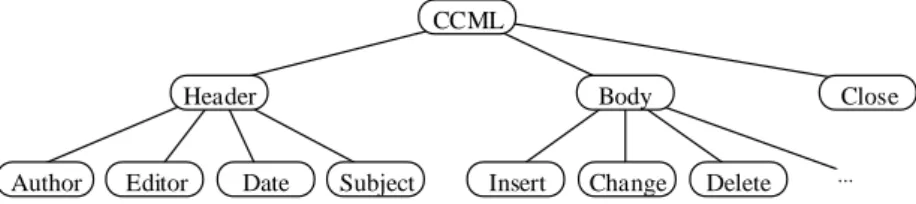
As shown in figure 4, CCML document consists of three parts: header, body and close. “close” shows the editor’s comments. Based on table 1 we determine the CCML tags in the “body”, as shows in table 2. The seven tags consists of the six marks in table 1 and the annotations. Every tag in table 2 has an attribute “level” that a teacher gives a number from one to three. Its default is two.
CCML
Author Editor Date
Body
Insert Change
Header Close
Subject Delete ...
Figure 4: The tree structure of CCML documents.
Table 2: CCML tags in its body.
<Insert string="text"> 1. Insert
<Replace string="text"> text </Replace> 2. Replace
<Delete> text </Delete> 3. Delete
<Separate> 4. Separate
<Join> 5. Join
<MoveFrom refid="ID">
<MoveTo id="ID"> text </MoveTo> 6. Move
Correction Tag
7. Annotate <Annotate type="Question" |
"Explanation" string="text">
3.3.Features of CCML
The main characteristics of CCML are:
(1) CCML presents seven marks with their respective level of correction. (2) A text without all of the mark-ups from a CCML document is an original text (3) A document applied the CCML mark-ups is a revised text.
(4) Because CCML documents are text-format, it is easy to send them by email. (5) CCML is independent of both devices and systems.
(6) It is easy to reuse CCML documents as a full-text databases.
The first feature was derived from our experiment. Because of the second and third features, learners can track the changes in the texts from their CCML documents. The other features are the same as those of SGML. Appendix A shows the CCML document of figure 1.
4.CoCoA
CoCoA consists of CoCoA_Editor and CoCoA_Viewer. A teacher corrects the document of foreigners with CoCoA_Editor and the system saves the marked document in CCML format. CoCoA_Viewer interprets the CCML document, and shows the learner the marked document. While CoCoA_Viewer corresponds to a WWW browser like Netscape Navigator, CoCoA_Editor has the same features of a HTML editor.
4.1.Learning processes using CoCoA
By using CoCoA, a learner receives the instruction about Japanese composition from a teacher with the following processes:
(1) The learner writes an original text with his/her familiar editor.
(2) The learner sends the document to his/her teacher with his/her email tool.
(3) Using CoCoA_Editor, the teacher corrects the document with marks and annotations. The system makes the documents double-spaced and it allows the teacher to set the importance level to the marks in the document.
(4) After CoCoA_Editor saves the marked text as a CCML document, the teacher sends it to the learner with his/her email tool.
(5) CoCoA_Viewer provides the learner the marked text after interpreting its CCML document. Then, the system allows the learner to select the important level to see the important part of the marked text.
(6) CoCoA_Viewer automatically generates both the original text and the revised one from the CCML document. After editing the revised text, the learner can send it again to the teacher and continue refining the text.
4.2.System configuration
Figure 5 depicts the learning environment of CoCoA.
(1) Marked text display module: This module analyzes CCML documents with the CCML parser after reading them through the file management module. Then, it provides the results of correction according to the level of importance of marks.
(2) Correction module: This module inserts CCML tags into the learner’s document, according to the correction of the teacher. After saving the marked text, the learner sends the learner it with an e-mail tool. (3) Original text display module: This module generates the original text from the CCML by deleting tags. (4) Revised text display module: This module generates the revised text from by the application of tags.
(5) File management module: This module manages the document files.
Text editor
E-mail tool - CCML parser
- Important level display Marked text display module
- CCML parser - Deletion of CCML tags Original text display module
- CCML parser
- Application of CCML tags Revised text display module
User interface module File management module
- CCML parser - Important level display Marked text display module
- CCML parser - Deletion of CCML tags Original text display module
- CCML parser
- Application of CCML tags Revised text display module
User interface module File management module
- Insertion of CCML tags - Setting level of importance Correction module
E-mail tool CoCoA_Viewer
CoCoA_Editor
Student Teacher
Figure 5: System configuration of CoCoA.
4.3.Example
Figure 6 shows the interface of CoCoA. By selecting a mark from the mark palette shown in the window (A), a teacher can correct learners’ documents. Moreover, the teacher can annotate in the document using the annotation palette, and he/she classifies the marks using a window which looks like (B). The “undo” button erases corrections. In figure 6, after the teacher substitutes “を臨む” with “に参加する” which means
“attend”, he/she determines the important level of the correction is three.
On the other hand, a learner obtains a marked text in a window (C). In this case, CoCoA_Viewer provides only the marks over the level two of importance. “?” denotes a question and “*” shows a explanation from the teacher. The system displays the contents of the annotation after clicking the mark. As shown in the message window, the learner can reply to the message and send it after revising the document.
Figure 6: Screen snapshots of CoCoA_Viewer and CoCoA_Editor. 4.4.Experimental Results
To inquire into the effectiveness of both CoCoA and CCML, we evaluated them using a simple questionnaire.
The users of the system were the same members whom we described in section 2 and we chose the same quantity of documents. While the users corrected document with paper in the former experiment, now they did it with computers. Users gave a number between one to five to each one of three questions which results are shown in Table 3. These results prove clearly that the learning environment of CoCoA is enough to correct the documents.
Table 3: The result of the questionnaire.
Question Ave.
(A) Are the seven marks enough for correcting? (B) Does CoCoA facilitate to correct documents? (C) Is it easy to understand the marked texts?
4.9 4.7 4.6
5.Conclusions
In this paper, we proposed a computer mediated language learning system called CoCoA and CCML for exchanging electronic marked documents. Although we tried to use CoCoA in Japanese language learning in this paper, CoCoA is independent of the domain of language. If W3C (World Wide Web consortium ) publish XML that is the extension of SGML, it is easy to adopt CCML into Web browsers: for instance, Microsoft Internet Explorer. Therefore, CoCoA will be able to be used for learning any language. In our future research, we will investigate how to support teachers to classify students’ bugs, and how to assist real-time collaborative correction between teachers and students.
We have implemented CoCoA in Tcl/Tk on both Microsoft Windows 95 and Sun workstations. A Japanese version of this software is distributed to other researchers and developers for demonstration. For further information, our home page (http://www-yano.is.tokushima-u.ac.jp/research/cocoa/cocoa.html) is available.
Acknowledgment
This research was supported in part by the Grant for Scientific Research (A) No.07308016 from the Ministry of Education in Japan.
References
Ayala, G. & Yano, Y. (1995). “GRACILE: A framework for collaborative intelligent learning environments”, Journal of the Japanese Society of Artificial Intelligence, vol.10. no. 6. pp.156-170.
Brock, N. M. (1995). “Computerised text analysis: Roots and research,” Computer Assisted Language Learning, Vol.8, No.2-3, pp.227-258.
Farkas K. D., & Poltrock, E. S. (1995). “Online editing mark-up models, and the workspace lives of editors and writers,” IEEE Trans. in Professional Communication, 38(2), pp. 110-117.
Hardock, G., Kurtecbach, G., & Buxton, W. (1993). “A marking based interface for collaborative writing,” Proc. of the ACM Symposium on User Interface Software Techonogy, pp.259-266.
Herwijnen, E. (1990). Practical SGML, Kluwer Academic Publishers.
Harasim, L., Hiltz, R. S., Teles, L., & Turoff, M. (1995). Learning Networks -A filed guide to teaching and learning online-, The MIT Press.
Hayashi, T., & Yano, Y. (1994). “Kanji Laboratory: An environmental ICAI system for Kanji learning,” IEICE Trans. on Information and Systems, E77-D(1), pp.80-88.
Neuwirth, M. C., & Wojahn, G. P. (1996). “Learning to write: Computer support for a cooperative process,” CSCL: Theory and practice of an emerging paradigm, Koshmann, T. (Ed.), Lawrence Erlbaum Associates, Publishers, pp.147-170.
Ochi, Y., Yano, Y., & Hayashi, T. (1996). “JULLIET: Interactive learning environment for Kanji compounds learning,” Proc. of ED-Media ’96, pp.539-544.
Ogata, H., Matsuura, K. & Yano, Y. (1996). Knowledge awareness: Bridging between shared knowledge space and collaboration in Sharlok, Proc. of Educational Telecommunications 96, 232-237, Boston, MA, USA. Ogata, H., & Yano, Y. (1997). “Active knowledge awareness filtering toward efficient collaborative learning,”
Proc. of AI-ED 97, Kobe, Japan. (in press)
O’Malley, C. (1994). Computer supported collaborative learning, NATO ASI Series, F: Computer & Systems Sciences, Vol. 128.
Sato, M., Kano, C., Tanabe, K., & Nishimura, Y. (1994). Practical Japanese Compositions, Bonjin-sya, in Japanese.
Scardamalia, M., & Bereiter, C. (1986). “Research on written composition,” M. Wittrock (Ed.), Handbook of research on teaching (third ed.), Macmilian, pp.778-801.
Shimano, H. (1986). Handbook of proofreading, Miki Publishers, Japan, in Japanese.
Yano, Y., Miyoshi, K., & Hayashi, T. (1993). “Development of a game style environmental ICAI system for Kanji idiom learning,” Proc. of ICCE ’93, pp.411-413.
Appendix A: CCML document of the marked-up text in figure 1.
<CCML>
<Header>
<Author> [email protected]
<Editor> [email protected] ...
</Header>
<Body>
<Insert string=” “> 返 事 が 遅 く な っ て ご め ん さ な さ い . 先 週 は ,<Annotate type=”question” string=”It is difficult to understand [怪奇]. What do you want to write?”> <Replace level=3 string=”困ったことがありまし た.”> 怪奇でした.</Replace>
...
<Replace string=”あ い に く , 私 は ,”> 生 憎 </Replace> 金 曜 日 <Replace level=1 string=”に”> は
</Replace> 日本語の授業とアルバイトがあるので,<Replace string=”予約”> よやく </Replace> を土曜日に 変えなければなりませんでした.
</Body>
<Close> It is difficult to read your composition. You had better use more familiar words.
</CCML>