Video Processing Flow
Atsutomo Kobayashi, Buntarou Shizuki and Jiro Tanaka, Department of Computer Science, University of Tsukuba,
1-1-1 Tennodai, Tsukuba, Ibaraki 305-8573, Japan
{atsutomo,shizuki,jiro}@iplab.cs.tsukuba.ac.jp
Abstract. ImproV is a video compositing system for live video. It uses a dataflow diagram to represent the video processing flow and allows performers to edit the diagrams even while the video is running. Traditional live video is limited to video editing, but ImproV allows users to construct video processing flows on the fly. We present the design of ImproV and report on some actual live video performances using ImproV as preliminary evaluation in this paper.
Keywords: live performance, visual music, visual performance, visual jockey, VJ, improvisation, dataflow, visual programming, video authoring, video compositing.
1 Introduction
In live video performances, such as those at musical events or fashion shows, the video performer selects videos and switches between them according to the event’s atmosphere, the occasion, and the type of music used at the event. Therefore, while showing a video to the audience, the performer must select video and optionally adjust the cue point, playing speed, and effects parameters among others. Although each performer has their own style and method, their performance includes some improvisational attributes. We have developed a video compositing system for live video performances called ImproV.
In Sec. 2, a standard live video performance and its requirements are explained. In Sec. 3, systems similar to ImproV and live video performance related researches are discussed. In Sec. 4, we report on our preliminary evaluation and results of this system. Our conclusion is given in Sec. 5.
2 Video creation workflow
We describe the ordinary off-time, non-live, video creation work flow in this section to illustrate the workflow of a live video performance. Typical video creation includes the following three steps:
1. Prepare raw video footage.
2. Composite the raw video footage to video compositions.
3. Edit video compositions along time axis.
In the step 1, the video creators create 2D/3D animation or shoot with a video camera. The animation can be character animation or moving abstract graphics, which are called motion graphics. The footage can be real world scenes or live-action. Then, in step 2, the video creators process the raw video footage. They correct the colors, apply some video effects, layer multiple video footage and many other things.
Common video compositing software applications, e.g. Adobe After Effects, uses a layer model to represent the video processing flow. In step 3, the video compositions are arranged along a time axis. Editing software applications, e.g. Adobe Premier, use a timeline representation in contrast to what a layer model uses.
For live video performances, switching videos corresponds to step 3 in video creation. The live video performers finish steps 1 and 2 before the live video performance is held. This means it is impossible for the live video performers to change the effect parameters and video processing flow of the compositions. Wires are used to connect the hardware devices necessary to construct a video processing flow when using a video mixer, such as a Roland V-4. The live video performer can find it very hard to change the video processing flow. Even with the proper software applications, most being modeled after a video mixer, the video processing flow is fixed such that typically two video sources are mixed using a two-channel video mixer with optional effectors.
We thought this fixing of video processing flow limits the performer's improvisational possibility and believe a performance is more expressive with the improvisational construction of the video processing flow.
2.1 Design requirement: Background compositing
One of the most common methods used by a performer during a live video performance is to prepare another video in the background of the current video the audience is watching, and then switch them. Live video performers use hardware video mixers or software applications based on a video mixer. M. Lew analyzed the method of editing video on the fly using a video mixer [1]. In the analysis, the following three steps are used.
STEP 1: Media retrieval
STEP 2: Preview and adjustment STEP 3: Live manipulation
A performer browses the video clips and selects the next one (STEP 1). Then, the performer adjusts the cue point or playing speed of the video clip, applies any necessary effects, and adjusts the effect parameters by previewing them using a monitor display (STEP 2). Finally, the performer starts to switch the current video
clip to the next video clip by manipulating the video mixer and optionally animates the effect parameters by directly manipulating the effectors (STEP 3).
With traditional live video performances, STEP 2 is merely controlling the parameters and optionally selecting an effect. We think this severely limits expressiveness in traditional live video performances. To solve this problem, we thought that STEP 2 should include the constructing and changing of the video processing flow. That is to say, a performer can repeatedly use trial and error to create videos till they are satisfied. To prevent unintended videos from being shown to the audience, previewing is important in this method. We call this method background compositing.
2.2 Representation of video processing flow
Video creators mix several video materials in video compositing. The video mixer and video mixer representation in the software are not powerful enough to treat three or more videos concurrently.
The systems with layer representation such as Adobe After Effects provide more flexible video processing flow than systems with a mixer. The systems with layers can overlay an arbitrary number of images. However, while showing a video, the user can't make and mix/switch to another video composed of a different processing flow from the one being shown. As mentioned above, the background compositing and previewing features are necessary for video compositing during live video performances. Moreover, a layer representation works only when all the videos are simply overlaid. However, when the video processing flow is complex such as when using a mask, in which a mask video is correlated to another video and overlaid with yet another video, the user carefully checks each layer, and sometimes opens or pulls down the layer property to see which layers are correlated to each other. Moreover, the applied effects are hidden in the layer representation. Most of these software feature an extra window and show only the effects applied to a selected layer. These modal interfaces force the user to search inside the video processing flow. During a live performance, glancability and accessibility should be preceded since it’s a real- time situation. For all the above-mentioned reasons, we decided to use a dataflow diagram to represent the video processing flow.
3 Related Work
There are many systems that use a dataflow diagram to represent the video processing flow. Jitter [2] is one of most standard dataflow systems for videos in the fields of art and entertainment, but it only supports a workflow that separates the construction and execution of a dataflow. On the other hand, systems like vvvv [3] and Quartz Composer [4] support the dynamic construction of a dataflow. However, these systems, including Jitter, are designed as programming environments and the abstraction level of dataflow diagrams are too low to be used by video creators and live video performers. A similar dataflow system that is not for programmers but for
end-users to ImproV is FindFlow [5], which aims at interactive retrieval from mass data.
Some studies have been conducted on live video performances. EffecTV [6] is a real-time video effects framework and is aimed at live video performances. Novel controllers, such as SPATIAL POEM [7], Rhythmism [8] and video-organ [9], are used for controlling the visual attributes of live video performances. However, these controllers assume that the system settings or video processing flow are already set and fixed before the live video performance is started.
Soundium [10] by Mueller et al. started from a similar concept to that we used for ImproV, which was to use impromptu video creation to create a dynamic image to improve the expressiveness of a live video performance. Their challenges were the technical issues of real-time media processing. In contrast to these researches, we worked on the exploration of the user interface designs for the interactive construction of video processing flows.
4 ImproV
We have developed ImproV, a real-time video compositing system. To increase a performer's improvisational availability, we designed ImproV to allow a performer to construct a video processing flow on the fly. To this end, we decided to use a dataflow diagram to represent the video processing flow. Several nodes are connected to each other with the edges in the dataflow diagram. In the dataflow diagram in ImproV, each node represents a video source (e.g., a video file or a camera), an effector (e.g., a blur effector or a mixer), or an output screen. The video processing flow is constructed by connecting these nodes.
4.1 Understandability for live video performers
A performer can easily understand the concept of connecting nodes in the dataflow, because they are used to connecting video processing devices such as video tape players, video effectors, and video mixers. We carefully designed the nodes of ImproV so that the performer can use their knowledge about video processing devices. In the other words, we simplified the design barriers part of the six learning barriers of programming systems [11].
4.2 Dataflow diagram of ImproV
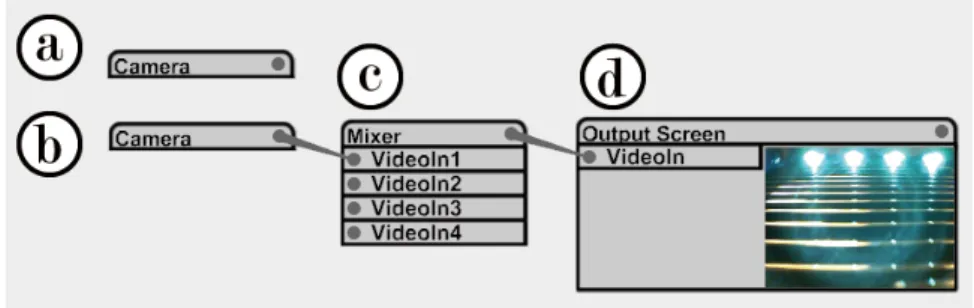
Figure 1 shows the dataflow diagram of ImproV. The most basic node is shown as part a “Camera” in Fig. 1, which has a label to show the type of node and has an output port at the right. Many of the nodes have some input ports listed under the name label, as shown as part c “Mixer” in Fig. 1. The user uses the menu to create these nodes and connects the nodes by dragging and dropping from the output port of a node to the input port of another node. Figure 1 part b is the same node “Camera” as
in part a, but it is connected to the “Mixer”. Some nodes have original user interfaces.
Figure 1 part d “Output Screen” this type of user interface to show a preview of the output.
Fig. 1. a: a node that has no input, b: same node as a that is connected to another node, c: a node which has four inputs, and d: a node that has an input and custom user interface.
There are two data types, video image and floating point number, for controlling the effect parameters, in an ImproV dataflow diagram. In Fig. 2, the video image is distorted by “Distortion”. The degree of distortion is decided by the value input to
“Value” input port. The “Slider” outputs a floating point value of about 3.0 in Fig. 2.
Fig. 2. Dataflow diagram with two data of types.
In Fig. 3, two videos, one is an image of a flower and the other is particle animation, are overlaid with additional blending. The video with the image of a flower is applied and gradated using a “Blur” effect. The degree of blur is decided by the “Slider”. This video processing flow is similar to traditional live video performance systems.
Fig. 3. Dataflow diagram mixes two videos.
4.3 Supporting c
focus on mixing/switching well- s are simply made. For example,
4.4 Supporting bac
results, we designed gure 5 illustrates how
consists of a video file and an effector
“Transparency”.
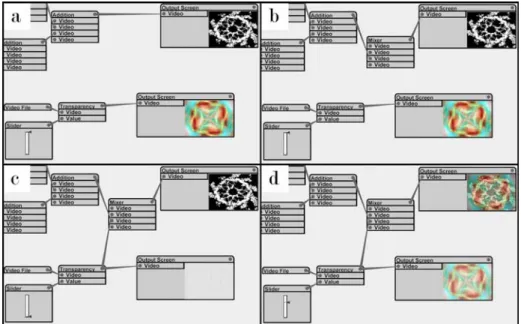
• Fig. 5 (b): The performer inserts a mixer before the output screen.
omplex video processing flow Traditional live video performance systems mainly preprocessed videos, and their video processing flow
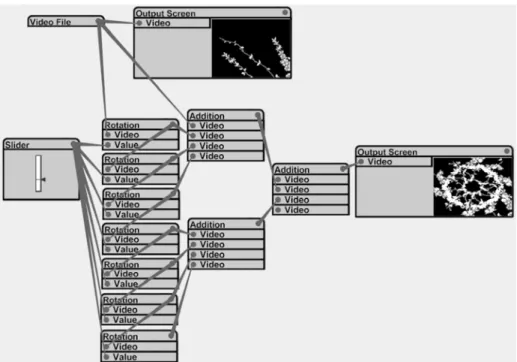
one may want to copy a video to make eight, rotate them 45 degrees, and mix them with additional blending (this will result in a kaleidoscope-like effect). These systems do not support this idea without preprogrammed effects.
In ImproV, the performer can create several edges from one output. Branching edges from one output is treated as copying the value from the output. Therefore, the performer can construct the video processing flow of this example on the fly. Figure 4 shows the video processing flow of this example in ImproV.
Fig. 4. Video copied, rotated, and overlaid.
kground compositing and previewing Since constructing a video processing flow can cause unintended ImproV to support background compositing and previewing. Fi to mix two video processing flows.
• Fig. 5 (a): After the example above, the performer makes a new video of another video processing flow, which
• Fig. 5 (c): The performer makes the new video transparent by using the effector
“Transparency”, and then overlays the new video over the old one by connecting the effector and the mixer.
the new video
Note that we treat two video processing flows, the old complex one and the new simple video file, equally. ImproV allows users to edit video processing flow
arbitrarily. The result i video processing flow
from the current main output, which the audience is watching.
s the previewing from thr
• Fig. 5 (d): The performer remakes the transparency, resulting in fading-in.
Fig. 5. Mixing two video processing flows
s s that users can independently create a
As mentioned above, previewing images is important for the background compositing method. A user can connect any nodes on the dataflow to output screens because of the nature of a dataflow diagram. Therefore, the user can preview videos at arbitrary points in the video processing flow. Figure 6 (b) show
ee points in the video processing flow in Fig. 6 (a).
Fig. 6. Performer can preview any points in video processing flow.
5 Preliminary Evaluation
The first author recorded a live video performance of a musical event for use as a preliminary evaluation. Several bands played jazz music at the event. The live video performance covered two hours of the whole event. Figure 7 shows the band and the display of the computer running ImproV at the event. We used a USB camera and some pre-rendered video clips. The projection was directed toward the screen behind the bands through the bands themselves. The computer running ImproV and the first author were behind the audience.
From a stability aspect, ImproV worked continuously without any problems for two hours. In addition, the first author could keep the video playing by using background compositing for the entire two hours. At the most complex situation, there were over 20 nodes on the display. We confirmed that novel expression is practicable using ImproV. Figure 4 shows images that are the same as the ones of the video processing flows made in this evaluation. The first author tried to make videos expressing a different feeling for each song. We found that a video processing flow with 10-20 nodes could be made in 3-5 minutes. This is reasonable span of time to create video expressing different feelings for each song, which normally take around five minutes. Moreover, we found that a 17-inch display enabled the performer to edit
a video processing flow with around 30 nodes. However, we also realized that the edge connecting operation is perplexing.
Fig. 7. Actual live video performance using ImproV.
6 Conclusion
We described ImproV, which is a system focused on the improvisational construction of video processing using a dataflow diagram. ImproV allows a live video performer to make novel improvisational video compositing. ImproV supports background compositing and previewing to protect from showing an unexpected video to the audience.
We tested ImproV in an actual live video performance environment and confirmed its capability. We also found the edge connecting operation problem while conducting this evaluation. We are planning to work on this problem and conduct a more formal evaluation.
7 References
1. vvvv group: vvvv.
2. Apple Inc.: Quartz Composer.
3. Cycling '74: Jitter.
4. Choi, J., Hong, H.: SPATIAL POEM: A New Type of Experimental Visual Interaction in 3D Virtual Environment. In : the 8th Asia-Pacific conference on Computer-Human Interaction, pp.167-174 (2008)
5. Bongers, B., Harris, Y.: A structured instrument design approach: the video- organ. In : the 2002 conference on New interfaces for musical expression, pp.1 - 6 (2002)
6. Fukuchi, K., Sam, M., Ed, T.: EffecTV: a real-time software video effect processor for entertainment. In : the international conference on entertainment computing, pp.602-605 (2004)
7. Hansaki, T., Shizuki, B., Misue, K., Tanaka, J.: FindFlow: visual interface for information search based on intermediate results. In : the 2006 Asia-Pacific Symposium on Information Visualisation, pp.147-152 (2006)
8. Ko, A., Myers, B., Aung, H.: Six Learning Barriers in End-User Programming Systems. In : 2004 IEEE Symposium on Visual Languages - Human Centric Computing, pp.199-206 (2004)
9. Lew, M.: Live Cinema: designing an instrument for cinema editing as a live performance. In : International Conference on Computer Graphics and Interactive Techniques, pp.144-149 (2004)
10 .
Mueller, P., Arisona, S., Schubiger-Banz, S., Specht, M.: Interactive media and design editing for live visuals applications. In : International Conference on Computer Graphics Theory and Applications, p.232–242 (2006)
11 .
Tokuhisa, S., Iwata, Y., Inakage, M.: Rhythmism: a VJ performance system with maracas based devices. In : international conference on Advances in computer entertainment technology, pp.204-207 (2007)