• 検索結果がありません。

Chang Peng (

N/A
N/A
Protected

Academic year: 2021

シェア "Chang Peng ("

Copied!
48
0
0

読み込み中.... (全文を見る)

全文

(1)

Interaction techniques for large scale display by using facial motion with speech assist

March 2013

Chang Peng

(Master’s Program in Computer Science)

Advised by Jiro Tanaka

Submitted to the Graduate School of Systems and Information Engineering in Partial Fulfillment of the Requirements

for the Degree of Master of Engineering at the

University of Tsukuba

(2)

Abstract

In recent years, large scale display which over 50 inches has been widely used in many information sharing facilities such as hospital, university, or company. Large scale display provides user with high definition and contents sharing with a group of people.

Large scale display has many advantages, but existing device or gesture based unimodal

interaction approaches are insufficient and lack of feedback. It is particularly difficult to

take multi-task concurrently. To solve interaction problem and provide user with an

intuitive interaction approach, we have proposed a facial motion with speech assist

(FMWSA) method, which utilized marker-less face tracking and voice recognition

techniques to improve operability with large scale display. Our multimodal method

enables user to perform manipulations in the large scale display with the combination of

slight facial movement and pre-defined voice commands. Also, user can obtain intuitional

feedback by both acoustic and optic way. Furthermore, we implemented a “location and

selection” based gallery exhibition interface and a “navigation” based video player

interface to identify the applicability of proposed interaction method. Finally, to evaluate

our system, we conducted a multi-task experiment and got feedback and comments from

users.

(3)

Contents

Chapter 1 Introduction ... 1

1.1 Large Scale Display ...1

1.2 Unimodal Interaction Method and Problem ...1

1.3 Purpose and Approach ...2

1.4 Organization ...3

Chapter 2 Related Work ... 4

2.1 Multimodal Interaction for Large Scale Display ...4

2.2 Multimodal Feedback ...5

Chapter 3 Facial Motion with Speech Assist ... 6

3.1 Overview ...6

3.2 FMWSA Design Principle ...7

3.3 FMWSA Definition ...7

3.3.1 Facial Motion Units ...7

3.3.2 Speech Assist Types...8

3.3.3 Sequential Interaction ...9

3.3.4 Simultaneous Interaction...10

3.3.5 Feedback ... 11

3.3.6 Gallery Exhibition Interface ... 11

3.3.7 Video Player Interface ...14

Chapter 4 System Implementation ... 18

4.1 System Composition ...18

4.2 Hardware Description ...19

4.3 Software Description ...20

4.4 Facial Motion Recognition ...21

4.5 Speech Recognition ...25

4.6 Application Implementation ...26

4.6.1 Gallery Exhibition Interface ...26

4.6.2 Video Player Interface ...30

Chapter 5 Evaluation Experiment ... 34

5.1 Experiment Purpose ...34

5.2 Experiment Environment and Participants ...34

5.3 Questionnaire...34

5.4 Preliminary Experiment ...35

5.5 Preliminary Experiment Result ...35

5.6 Multi-Task Experiment ...36

5.7 Multi-Task Experiment Result ...36

5.8 Analysis ...37

Chapter 6 Conclusion and Future Work ... 38

Acknowledgements ... 39

(4)

List of Figures

Figure 3.1 Outline of FMWSA method ... 6

Figure 3.2 Constitution of Facial Motion Units ... 8

Figure 3.3 Sequential Interaction ... 9

Figure 3.4 Simultaneous Interaction ... 10

Figure 3.5 Manipulation Process of Gallery Exhibition Interface ... 13

Figure 3.6 Scenario Scene of Gallery Exhibition Interface ... 14

Figure 3.7 Manipulation Process of “Act As You” Video Player Interface ... 15

Figure 3.8 Process Example for Precise Manipulation ... 16

Figure 3.9 Scenario Scene of “Act As You” Video Player Interface ... 17

Figure 4.1 System Composition ... 18

Figure 4.2 Multimodal System Architecture ... 21

Figure 4.3 Frame Images and Coordinate System ... 22

Figure 4.4 Head Movement Recognition ... 23

Figure 4.5 Facial Expression Recognition ... 25

Figure 4.6 Speech Recognition Flow... 26

Figure 4.7 Gallery Exhibition Interface ... 27

Figure 4.8 UI Level 1 Selection Process Flow ... 28

Figure 4.9 UI Level 2 Manipulation Process Flow ... 29

Figure 4.10 UI Level 3 Manipulation Process Flow ... 30

Figure 4.11 “Act as You” Video Player Interface ... 31

Figure 4.12 Process Flow of Basic Function ... 32

Figure 4.13 Process Flow of Precious Function ... 33

Figure 5.1 User Conditions of The Evaluation Experiment ... 34

Figure 5.2 Questionnaire Results (Q5 – Q8) ... 36

Figure 5.3 Questionnaire Results (Q9 – Q11) ... 37

(5)

List of Tables

Table 3.1 Types and Effect of Speech Assist ... 8

Table 4.1 Device Specifications of Kinect ... 19

Table 4.2 Device specifications of Dispose and Expression Parts ... 20

Table 4.3 Interactive actions of Gallery Exhibition Interface ... 28

Table 4.4 Manipulate Method of “Act as You” Video Player Interface ... 32

(6)

Chapter 1 Introduction

1.1 Large Scale Display

Large scale display has been put to use in many public facilities like shopping malls, cinema, railway station and so on. With the rapid development of liquid crystal screen technology in recent years, the cost of large scale display has significantly dropped down, therefore it becomes available and affordable to more people for personal or group use.

The large scale display which between 50 inches and 70 inches has been widely used in many small information sharing facilities such as hospital, university, or company. Large scale display provides better information visualization with increased physical size and high resolution[1]. People can retrieve more information contents and shared resources at a time comparing to a normal size display, so that increase user productivity and improve cognitive ability[2]. Because of these advantages, large scale display is especially suited to the multi-task works, complex tasks, and cooperative works.

Czerwinski et al.[3] shows that large scale display has the usability that provide more productive and satisfied when performing complex and multiple tasks.

1.2 Unimodal Interaction Method and Problem

 Device based interaction

Currently, user still adopt the desktop-oriented ways in most cases. But the traditional mouse or keyboard based interaction methods are insufficient in a large display environment. Some basic usability issues with large scale display have been discussed[4]:

like losing the track of the mouse cursor, consuming more time to access contents like icons, windows or the start menu, hard to manage task, having problem with configuration operation. Also, there may even not have a desktop surface while manipulating in a ubiquitous environment.

Wearable device may enhance the flexibility and convenience in a daily task which

require the detection of user’s action in a long period. However, user just needs a

short-term operation with large scale display, and the wearable devices will obviously

increase the physical burden and possibility of misrecognition.

(7)

 Hand gesture based interaction

Recently, many researches are investigating effects on utilizing natural interaction method to solve the interaction problem that how to access the contents on the large scale display with a certain distance quickly and accurately, and perform continuous manipulation effectively. Hand gesture based interaction shows good feasibility to take the operation with large scale display.

Hand gesture is a very decent method to represent user’s desire by semantically meaningful interaction, but it still has some obvious limitations like physical burden will be added to user while using hand gesture. Currently, most dynamic or static hand gesture require user to keep a toilsome posture that one arm and hand held out by the side of the body without support, it definitely inconvenient and fatigue to take an operation[4]. While the operate time is increasing, the physical burden will become manifest[5], especially with a requirement of long distance physical movement in a large scale display situation. Also, some hand gestures are lack of hence user needs a long process of study to grasp.

 Summary

As the unimodal interaction method, it may require a fixed desk surface to operate by mouse or keyboard and user may lose focus while manipulating because of insufficient response. Also, the extra physical burden could be increased while using a wearable device or hand gesture. Especially, it may cause barrier in a multi-task situation, since user has to break off the sequence of interaction flow, which disperse the user’s attention from the current task or operation.

1.3 Purpose and Approach

In this thesis, we focus on solving the interaction problem of fatigue and providing a natural manipulation experience to user while utilizing large scale display in a ubiquitous environment. Meanwhile, we provide a hands-free ability which enables user to take another task simultaneously. To realize the proposal, we proposed a multimodal approach which utilizing marker-less face tracking and voice recognition techniques. We defined a set of voice commands and facial motion units which can be used either in a sequential or simultaneous way. Furthermore, we implemented a “location and selection”

based gallery exhibition interface and a “navigation” based video player interface with

proposed method. Finally, we took an evaluation experiment to identify the applicability

of our system and get feedback from users.

(8)

1.4 Organization

This thesis is organized as follows. In Chapter 2 we introduce the related works from

three research fields. In Chapter 3 we introduce the proposed interaction methods and

user interfaces. In Chapter 4, we describe the details about the techniques about the

facial motion with speech, and implementation about the applications which are

mentioned in the Chapter 3. In Chapter 5, we take an evaluation experiment for the

proposed interaction method, and discuss the result. Finally, we make the conclusion and

future work in the Chapter 6.

(9)

Chapter 2 Related Work

2.1 Multimodal Interaction for Large Scale Display

Richard A. Bolt[6] discussed the feasibility to use a multimodal input method to interact with large display at early stage. Multimodal techniques for the human-display interaction have been widely discussed during recent years.

N. Krahnstoever et al.[7] have developed a robust real-time framework that adopting natural gestures and spoken command as input for a large scale display. Through their evaluation, users showed favorable increase in interaction proficiency and little or no difficulties in understanding the operational approach of multimodal interaction.

D.M.Krum et al.[8] have implemented a multimodal navigation interface for a earth 3D visualization environment. They have proved the multimodal interface is easy to learn and effective in a navigation task. Also, the multimodal interface can increase expressiveness, flexibility and user freedom.

A. Bellucci et al.[9] have proposed a touchless system which enables user to gain and promote digital information in a large display. In their system, user can examine digital maps and manage information by controlling a Wiimote device. Through the device, user can realize three possible interaction modalities as tactile, audio, and visual.

M.R. Morris[10] has explored appropriate gesture and speech interactions for enabling users to control a web browser on their large display surface like television. The author has found that a multimodal elicitation study offers a related benefit of creating multimodal synonyms, which can support users’ expressed desires to access the same functionality with different modalities in different circumstances.

These researches show several advantages of multimodal system to interact with large

display. But most of them still require user to use hand. Our work has proposed a “facial

motion with speech” multimodal interaction technique. It offers user with a hands-free

ability hence they may take the advantage to do multiple tasks concurrently. Additionally,

we utilize the multimodal input simultaneously in some cases rather than using

sequential or alternate combination merely.

(10)

2.2 Multimodal Feedback

J.H.Lee et al.[11] have just proposed an experiment to evaluate the multimodal feedback performance in a demanding dual-task situation. They compare visual unimodal feedback with multifarious multimodal feedback. As a result, the presentation of multimodal feedback shows enhanced performance and more pronounced benefits as the intensity of the feedback signals presented to the different modalities is increased.

G.Kim et al.[12] have discussed the effect of multimodal feedback to improve the performance while taking multi-task. They evaluated the user performance through interaction effort, concurrency, fairness and output quality. The result showed that effective multimodal feedback was more effective than unimodal feedback or redundant multimodality for tasks with reasonable difficulty.

V.K.Emery et al.[13] have examined the performance of older adults by taking a “drag and drop” computer task with multimodal feedback. As a result, they have found that all the user groups benefited from some form of multimodal feedback. Also, more experience users performed better with multimodal feedback compared to limited or no experience users.

Instead of providing multimodal feedback merely, our work mainly focus on utilizing the combination of facial motion and speech to realize the "location and selection"

manipulation and "navigation" manipulation for the large scale display.

(11)

Chapter 3 Facial Motion with Speech Assist

3.1 Overview

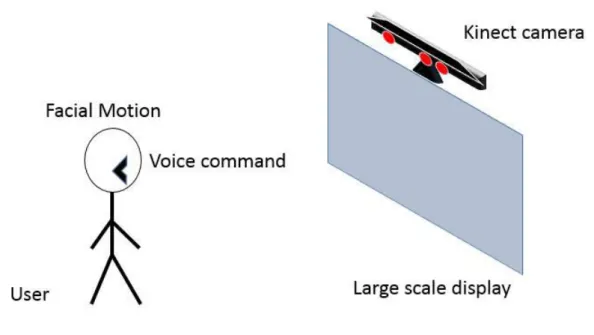
Unimodel interaction method like device or hand gesture is inconvenient because the usage limitation in space and may cause user to feel tired. Also, the simplex feedback may insufficient while utilizing a large scale display. To solve these interaction problems, this research has proposed an intuitional multimodal interaction method (Figure 3.1) which enable user to adopt the integration of simple facial motion and a set of pre-defined speech commands to take operation with large scale display. Through this method, user can realize multiple operations (e.g., “location and selection”, “navigation”) through the combination with facial motion and speech. Meanwhile, we provided multimodal feedback through both auditory and visual way so that user can get a good response rapidly and accurately. Finally, we provided the hands-free ability which enables user to utilize hands to take on a sub task while operating large display.

Figure 3.1 Outline of FMWSA Method

(12)

3.2 FMWSA Design Principle

Through proposed method, we indicated to provide a more effective and intuitive experience to user. We utilized facial motion with speech as our input method instead of mouse, keyboard or hand gesture.

The design principle can be descripted as follow:

 Conversional experience while manipulation

 Enable user to take manipulation with natural pose

 Response user’s instruction through both auditory and visual feedback

 Reduce the manipulation steps

 Provide the usability of hands hence user can take a sub task

3.3 FMWSA Definition

We defined 7 facial motion units and a set of voice commands as our input method. We considered to utilize facial motion and speech in a sequential way to realize a typical

“locate and select” task. Also, we used them simultaneously to realize a “navigation” task hence enhanced the operational confidence level in a noisy relative environment like playing video.

3.3.1 Facial Motion Units

Considering the ease to perform and learn, we decided to use slight Head Movement and Facial Expression as our facial motion units (Figure 3.2). Facial Expression includes Mouth Opening, Eyebrows Raising, and Eyebrows falling. The definition can be related to a sub-set of FACS rules[14], which are defined as basic building blocks of facial expression.

Head Movement includes Rolling (Right/Left) and Pitching (Up/Down). Vertical and horizontal head movements are simply to perform regardless of sitting or standing while user’s operation.

 Rolling

User takes a slight movement with head to the left or right position, and quickly moves head back to the standard position.

 Pitching

User takes a slight movement with head to the up or down position, and quickly

moves head back to the standard position.

(13)

Figure 3.2 Constitution of Facial Motion Units

3.3.2 Speech Assist Types

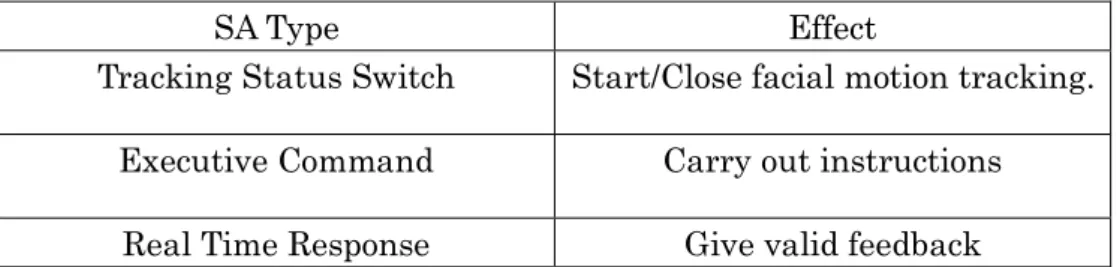
Speech provides a natural way for users to communicate with the system[15]. Especially in the case of multimodal interaction, speech frees up hands hence it can be adopted from a distance[16]. In Table 1, we defined the Speech Assist (SA) as three types: Tracking Status Switch, Executive Command, and Real Time Response.

Tracking Status Switch can avoid misrecognition while user doesn’t want to track facial motion. We defined a Boolean variable IsTrack, which in turn to determine whether the facial motion is tracked.

Executive Command provides user with verbally interact to execute common instructions (e.g., “Close Application”) and functional instructions (e.g., “Volume”, “Seek”) hence simplify the manipulation with large scale display.

Real Time Response provides user with a feeling of satisfaction through synthetic voice or transient sound.

SA Type Effect

Tracking Status Switch Start/Close facial motion tracking.

Executive Command Carry out instructions Real Time Response Give valid feedback

Table 3.1 Types and Effect of Speech Assist

(14)

3.3.3 Sequential Interaction

Figure3.3 describes a possible form of sequential interaction. User can directly use pre-defined voice commands to set the operator like cursor to a specified position, hence user can concentrate on the operation itself and do not have to notice the current cursor position. Also, user can use facial motion to achieve some precise operations which can hardly be descripted by voice command, like “move cursor to a specified position”.

Additionally, user can realize some continuous manipulations like “Copy” through a sequential usage with facial motion and voice command.

(a) Initial State (b) Speak State

(c) Head movement State (d) Facial expression State

Figure 3.3 Sequential Interaction

(15)

3.3.4 Simultaneous Interaction

Figure 3.4 describes a possible form of simultaneous interaction. We proposed to use facial motion and speech simultaneously hence reduce the tedious process while taking the navigate operation. Such as adjust the volume level or change the screen size while playing a video. Also, it can increase the operational confidence especially in a noisy environment. Through the synchronous way, we could send a functional signal directly and accurately. Furthermore, it can increase the usability of the pre-defined facial motion units with the combination of different voice commands.

(a) Initial State (b) Head movement with speak State

(c) Facial motion with speak State

Figure 3.4 Simultaneous Interaction

(16)

3.3.5 Feedback

We want to enhance user’s operational feeling while manipulating with large scale display, both vocal and visual feedback have been considered.

 Acoustic feedback

In human-human communication, voice is an essential tool to response with the request. While user send an instruction by voice command, the system can provide a vocal response directly to enhance the operational feeling. Also, system can provide the additional prompt to the next step in interaction process like “Where you want to move this content”, hence user can be aware of the next manipulation clearly through a context aware vocal communication.

 Optic feedback

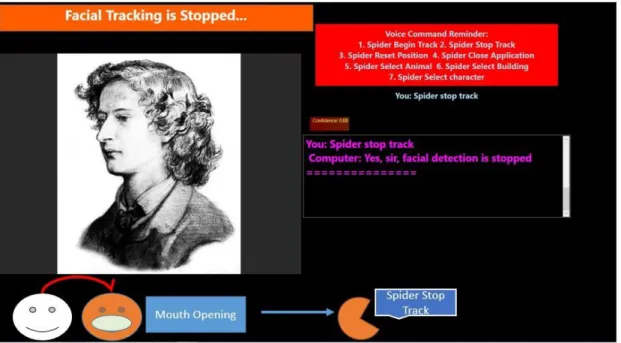
Thanks to the increased size of large scale display, user can utilize more space to put the contents or functional menu. But the static configuration interface may cause confusion with different types of menu. We want to adopt a dynamic menu with “Pop In” and “Pop Out”. “Pop In” means the functional menu will be automatically displayed while user carries out the operation. “Pop Out” means the functional menu will disappear after the operation has been finished. Also we want to add some UI elements like “Facial Tracking Bar”, “Voice Command Reminder”, “Color Video Reminder”, etc… User will get a real-time visual feedback through these elements.

3.3.6 Gallery Exhibition Interface

Use may have a requirement to do a handy work while utilizing large scale display. We

proposed to develop a gallery exhibition interface which enables user to choose various

types of sketch through FMWSA method. The manipulation process can be descripted as

Figure 3.5. Through a sequential interaction with both optic and acoustic feedback, user

can maintain the state of drawing and feel at ease while browsing and choosing a gallery

picture. This interface can be adopted to a sketch or sculpture class, hence user can

smoothly switch the tasks between large scale display and handy work.

(17)

(a) Select Gallery Category

(b) Locate Target Picture

(18)

(c) Select and Fix Target Picture

Figure 3.5 Manipulation Process of Gallery Exhibition Interface

We considered a possible scenario (Figure 3.6) for this interface as below.

Student A and student B from arts department have just finished a sketch lesson and are about to draw a gallery picture for their homework. They have their pencils and sketch board on their hands hence require a hands-free manipulation with the display. Through our interface, A uses voice command to start facial motion tracking and pick a “Character Type” gallery which required by teacher. A and B decide to choose the third picture in second row after a discussion. A uses voice command to locate the cursor to the first picture in the first row. Then he uses head movement to move the cursor to the pointing position of the target picture. Finally, opens mouth to take the selection and uses voice command to stop facial motion tracking and concentrate to draw the picture with B.

(19)

Figure 3.6 Scenario Scene of Gallery Exhibition Interface

3.3.7 Video Player Interface

With the increase of screen size and resolution, people can obtain a good audio-visual

experience through video in a large display. User may have a requirement to eat some

food, drinks, or even take a physical exercise while playing video. We proposed to use the

voice commands and simultaneous interaction to realize the basic and precise

manipulations of a video player. “Play”, “Pause” or “Stop” can directly be performed by

voice commands (Figure3.7). “Fast Forward”, “Rewind” or “Volume” can be performed by

the combination of head movement and voice commands. “Video Size” can be adjusted by

the combination of eyebrows action and voice commands. The operation bar will be

represented to user dynamically hence provide an intuitional feedback to user. The

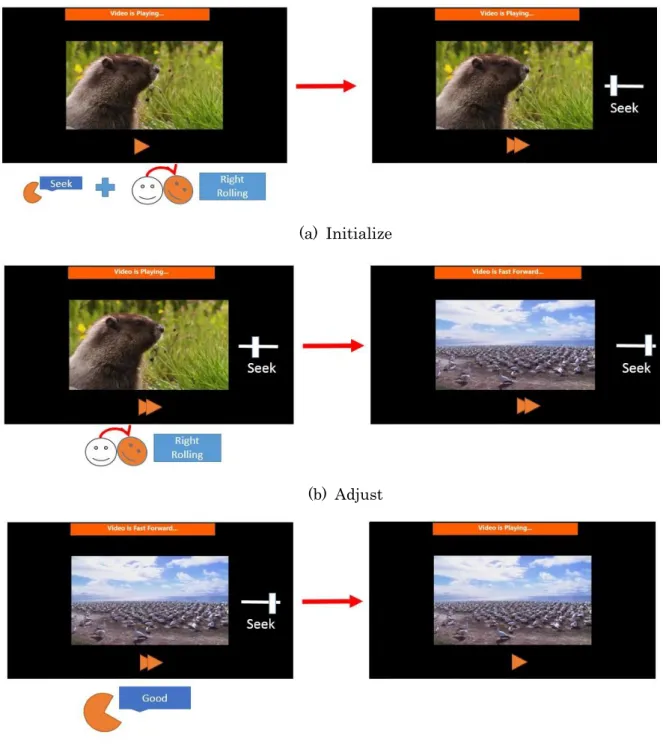
example process of precious manipulation can be descripted as Figure3.8.

(20)

(a) “Play” Manipulation

(b) “Pause”, “Stop” Manipulation

Figure 3.7 Manipulation Process of “Act As You” Video Player Interface

(21)

(a) Initialize

(b) Adjust

(c) Confirm

Figure 3.8 Example for Precise Manipulation Process

We considered a possible scenario (Figure3.9) with this interface as follow.

Student A wants to study tennis. He gets a tuition video for tennis beginner from his

friend Student B. A plays the video in the large display by utilizing our system. He holds

a tennis racket and adjusts the volume and video size to a comfortable value by facial

motion and speech. He plays forward to watch the basic eastern forehand, and takes an

(22)

Figure 3.9 Scenario Scene of “Act As You” Video Player Interface

(23)

Chapter 4 System Implementation

4.1 System Composition

For the purpose to implement a robust system that can be quickly set up, we used a few of hardware equipment as one note pc, one sensor camera, and one 50 inches large display. Figure4.1 shows the overview of the proposed system. We fixed the camera in the center of the display hence got an extensive detection area and user can clearly confirm the operational area while either sitting or standing in the front of the display. The notebook computer is used to process body segment information and audio streaming which retrieve from the camera. Also, an in-built loudspeaker in the computer will be used to provide auditory feedback to user. The large scale display is used to represent the interactive contents and applications in a human-computer interaction. User can get visual feedback through dynamic menu elements.

Figure 4.1 System Composition

(24)

4.2 Hardware Description

 Kinect sensor camera with multi-array microphone

To detect the facial motion actuation and capture voice, we adopted to use a single Kinect camera which included 3D depth sensors, RGB camera and a microphone array. The device specifications of Kinect can be descripted as Table4.1. Kinect can be easily worked with an external power source and connect with a personal computer with USB port. It has the capabilities with full-body 3D motion capture, facial recognition and voice recognition. It is suitable to develop a multimodal system with these dramatic characters.

Physical Specifications

Size Length × Width × Height:

280mm × 65mm × 70mm

Weight 600g

Field of View Horizontal field of view: 57 degrees Vertical field of view: 43 degrees Physical tilt range: ± 27 degrees Technical Specifications

Color VGA Motion Camera Provides 640 × 480 32-bit color images with 30 frames per seconds

3D Depth Camera Provides 320 × 240 16-bit depth images with 30 frames per seconds

Microphone Has an array of 4 microphones to support single speaker voice recognition with 16-bit and 16 kHz audio rate

Table 4.1 Device Specifications of Kinect

 Affiliated hardware equipment

As the dispose and expression parts for the system, we used a 50 inches high resolution

large scale display and a notebook computer with an embedded loudspeaker. The

specifications can be descripted as Table4.2.

(25)

Affiliated Hardware Specifications

Notebook Computer

Model: Panasonic Let’s note F10 CF-F10AYCDR

CPU: Inter core i5-580M, 2.66GHz Smart Cache: 3 MB

Memory: 4 GB

Graphics Accelerator: Intel® HD Graphics Hard Disk: 500GB

Loudspeaker: PCM Sound Source(24 Bit), Stereo Speaker

Operation System:

Windows Professional 7, 64 Bit

Large Scale Display Model: Panasonic Hi-Vision Plasma Display Panel

Display Size: 50 Inches

Display Resolution: 1920 × 1080 Pixel Aspect Ratio: 16 : 9

Table 4.2 Device Specifications of Dispose and Expression parts

4.3 Software Description

To realize the real-time facial tracking, we utilized the Kinect for Windows Software

Development Kit version 1.6 and Microsoft Face Tracking Software Development Kit for

Kinect for Windows[17]. Also, Microsoft Speech Platform SDK 11[18] was used to

recognize the voice commands. We established a multi-modality architecture (Figure4.2)

through the combination of facial motion and speech recognition. We implemented the

graphic user interfaces and applications by using C# language to create WPF programs

in Visual Studio 2012.

(26)

Figure 4.2 Multimodal System Architecture

The details about the facial motion, speech and multimodal fusion will be introduced in the following parts of this chapter.

4.4 Facial Motion Recognition

To realize the facial motion recognition, we must create an instance of a face tracker in the beginning. The initialize parameters require both video and depth camera configurations. Through the use of both two cameras can enhance the face tracking accuracy. We set the video frame to 640 × 480 and depth frame to 320 × 240 hence get a smooth performance with the system. The frame images can be descripted as Firgure4.3.

After the initialization, the face tracking can be started by calling method. If the camera

frame is normal, we can initialize 6 animation units (AUs) to track facial parts which

based on a Candide3 model. The value of AUs represents the movement range of the

facial parts, and the numeric weight between -1 and +1. Also, a 3D head pose can be

utilized to detect head movement. We try to recognize the facial motion continuously

through comparing the segment variations from the recent two frames (Frame T and

Frame T + 1

th

) of the system.

(27)

(a) 640 × 480 Pixel Color Image Frame (b) 320 × 240 Pixel Depth Image Frame

Figure 4.3 Frame Images and Coordinate System

 Head movement

To define the recognition of head horizontal movement (Rolling), we retrieve the rotation angle of head in Z-axis with each frame. The direction of Z-axis is towards to user so that we can get an obvious variations either head is moving to left or right. The initial angle value is 0 while the head position is in the just middle position. As the Case (1, 2) shows, we compare the variations ( ∆R ) of Current Roll Angle ( C

z

) and Previous Roll Angle ( P

z

) with a defined positive threshold value. The threshold is based on multiple tests to ensure a slight movement and easy detection for our system. Also, we try to detect a unidirectional movement and avoid the misrecognition with other facial motion by confirming the other Boolean variables were keeping false. If it is greater or smaller than the threshold, isLroll or isRoll will be set to true value, hence a Rolling Left or Rolling Right handle event will be called. The head vertical movement (Pitching) can be defined as the Case (3, 4), we obtain the rotation angle of head in X-axis with each frame, and calculate the pitching angle variation ( ∆P ) of Current Pitch Angle ( C

p

) and Previous Pitch Angle ( P

p

), if it is greater or smaller than the defined thresholds without triggering other facial motion detections, Boolean variable isUpitch or isDpitch will be set to true.

Consequently, a Pitching Up or Pitching Down handle event will be called.

(28)

Figure 4.4 Head Movement Recognition

(29)

 Facial Expression

Consider the convenience for user to perform and detection efficiency, we utilize the

eyebrows and mouth parts to define the facial expression. To define the recognition for

the Eyebrows Raising , we adopted to use AU5 which represent the behavior of the outer

parts of the eyebrows. As the case 5 shows, we calculate the variable quantity of AU5 and

compare it with the defined threshold. Through the test, we have found that the Pitching

movement may also cause the change of AUs in eyebrows parts. To avoid the

misrecognition, we have to ensure Boolean variables isUpitch and isDpitch are keeping

false. Through the similar method, we define the Eyebrows Downing by case 6. The AU3

which represent the behavior of the lower parts of the eyebrows. Finally, we use AU1 that

on behalf of the jaw lower part to define the Mouth Opening. The judgement method can

be descripted as the case 7. Because of the Mouth Opening behavior has an obvious

variation, we just need to compare it with the defined threshold. If it is greater than the

threshold, isMouth will be set to true and call the corresponding handle event.

(30)

Figure 4.5 Facial Expression Recognition

4.5 Speech Recognition

Speech recognition technique has been improved during recent years, and it shows good applicability in multimodal environment. In our system, we adopt to use a number of pre-defined voice commands which collaborate with facial motion to manipulate the large display. To realize the recognition of voice commands, we utilize Microsoft Speech API.

The recognition flow can be descripted as Figure4.6. To get a robust system which can be applied to multifarious situations, we have also consider the specifications about the voice commands. First, the voice commands are limited to 1~3 words and followed by a unitive grammar form hence they will be easy for user to remember. Second, we add the initial word like “Spider” before some voice commands in common use like “close application”. Also, we set a high speech recognition rate which over 0.8(Value area: 0 ~ 1).

Due to these definitions, we can reduce the possibility of misrecognition especially in a

noisy circumstance like watching a video. Finally, we use “Text to Speech” method to

convert text message to voice message, hence provide vocal feedback to user.

(31)

Figure 4.6 Speech Recognition Flow

4.6 Application Implementation

We adopt the proposed interaction method to design and implement the possible applications. The implement details about gallery exhibition interface and video player interface will be descripted as follows.

4.6.1 Gallery Exhibition Interface

The basic user interface is designed as Figure 4.7. We consider mainly to use 6 UI Elements[19][20] to provide visual feedback while browsing pictures. The facial tracking status or tracked facial motion will be displayed dynamically in the Facial Tracking Status Bar . UI View is used to display the pictures that available for user to choose. It contains 3 level of view. In the level 1, UI View will be initialized as the basic categories of sketch. In the level 2, UI View will expand one category which be selected in the level 1.

In level 3, user can select the target picture and expand it to the whole UI View area.

Speech Assist Reminder provide the available voice commands in the system. User can

see the context-aware dialog text with voice response in the Real time Response . Finally,

(32)

user can watch self-performance through 640 × 480 Color Stream Image and 320 × 240 Depth Stream Image while manipulating the pictures. As the part of auditory feedback, we utilize the “Text to Speech” method to convert the pre-defined response dialog to a synthetic female voice. The response will be provided to user through a loudspeaker while the corresponding voice commands is be recognized.

Figure 4.7 Gallery Exhibition Interface

This interface are based on two fundamental actions which commonly involved in human-computer interaction experience:

 Location: Move the pointer to the position of target object from a set of equally available objects which represent in the UI View .

 Selection: Select the target in the current level of UI View , and move forward to the next level.

Table 4.3 illustrates the manipulate functions in this system. Location and Selection actions are divided by UI View Level . In level 1, there is a few number of picture categories, user can select one category of pictures directly by speaking the name like

“Animal”, “Architecture” or “Character”. In level 2, user can see numerous pictures of the

selected category from level 1. User can use Pitching (UP/Down) or Rolling (Left/Right)

head movement to realize a vertical or horizontal movement of cursor hence point to

elements as locating by column or row. Through the coordination of head movement, user

can locate the cursor position to point at target picture quickly. As a second level selection,

user can use “ Mouth Opening ” facial expression to expand the picture in the final level of

view. As a rolling back action, user can use “ Eyebrows Raising ” facial expression to go

(33)

back to previous level of UI View . Finally, user can start or stop facial tracking or even close the application by voice command.

Action UI view

Location Selection Back

Level 1 Speech

Level 2 Head Movement Facial Expression Facial Expression

Level 3 Facial Expression

Table 4.3 Interactive Actions of Gallery Exhibition Interface

 UI Level 1 Selection Implementation

As Figure4.8 shows, the system will start to detect user’s speech after initialization. If user’s command is matched with one of voice commands for level 1 selection. System will give a voice response through Text-To-Speech method. Then, we expand the pictures from selected subfolder and set the visibility of other subfolders to hidden. Each picture is loaded as thumbnail image. To keep the aspect ratio of the original picture, we only set the decode pixel height to 100 pixel. The layout of pictures is arranged form left to right as line-by-line.

Figure 4.8 UI Level 1 Selection Process Flow

 UI Level 2 Manipulation Implementation

As Figure4.9 shows, the system will start to track user’s facial motion while the facial

tracking command is matched after a synthetic voice response. Also, a cursor will appear

and pointed to the first picture. We associate the horizontal and vertical movement of the

cursor with Head Movement . Cursor will take a continuous movement (15pixel/Frame)

in one of four directions (Up, Down, Left, Right) while related Head Movement is

detected. If the cursor is located in the range of one picture and Mouth Opening is

detected, the picture will be reloaded in full scale and expand to the full height range of

(34)

Figure 4.9 UI Level 2 Manipulation Process Flow

 UI Level 3 Manipulation Implementation

As Figure 4.10 shows, the system will stop track user’s facial motion and fix the selected

picture after the related voice command is matched. On the other hand, if eyebrows

raising is detected, the system will reload and reappear the thumbnail pictures in

previous UI Level .

(35)

Figure 4.10 UI Level 2 Manipulation Process Flow

4.6.2 Video Player Interface

Figure 4.9 shows the basic interface of proposed video player. To provide a user with an immersive experience, we set the background color as black. There are mainly 6 UI elements in this WPF application [19][20]. As the visual feedback, the Title Bar is used to display the current manipulation status to user. The text contents will changed dynamically to coordinate with the user action. The Video Interface is used to represent the video to be played. The video contents will be automatically loaded and played from an absolute folder path. We set the initial display size as 800 × 600 pixel. User may adjust the display size through the proposed interaction method. The Volume Adjusting Bar and Seek Adjusting Bar are used to show the variable changes of video volume and seek. These functional menu bars are convenient, but they also may let user feel confused and occupied the display space while playing a video. To provide user with a much cleaner interface, we consider to add the dynamic features to these two bars. Through a

“Pop Out” and “Pop Off” method which has been mentioned before, the bars will

dynamically appear while user performs a related action. Also, the bars will disappear

after user executes a confirm operation. As same as the last application, user can see

his/her own self while perform the manipulation through Color Stream Image and Depth

Stream Image . We also consider to provide aural feedback to give user an intuitional

response while manipulating. But the synthesized speech based response may cause

distraction and interruption while video sound is speaking simultaneously. To solve this

problem, we used a transient sound after a proposed action is detected. User can get a

rapid and accurate response hence increase the operational feeling and sense of

accomplishment while utilizing our system.

(36)

Figure 4.11 “Act as You” Video Player Interface

The operating functions and actions can be descripted as Table 4.3. The basic actions like

“Play”, “Pause” or “Stop” can directly be executed by corresponding Voice Command . Also, the detailed manipulation like “Volume”, “Seek” or “Size” can be activated by the simultaneous interaction like Head movement and Speech or Facial Expression and Speech . Then, user can adjust the function values to a satisfying condition. Finally, user can use a confirm voice command to finish the operation.

Function Action

Play Voice Command “Play”

Pause Voice Command “Pause”

Stop Voice Command “Stop”

Volume

Start: Rolling Head Movement(Left/Right) + Voice Command “Volume”

Adjust: Volume Up = Rolling Right

Volume Down = Rolling Left

Confirm: Voice Command “Good”

(37)

Seek

Start: Rolling Head Movement(Left/Right) + Voice Command “Seek”

Adjust: Fast Forward = Rolling Right Fast Backward = Rolling Left Confirm: Voice Command “Good”

Size

Start: Eyebrows Raising/Downing Facial Expression + Voice Command “Size”

Adjust: Size Increase = Eyebrows Raising Size Decrease = Eyebrows Downing Confirm: Voice Command “Good”

Table 4.4 Manipulate Method of “Act as You” Video Player Interface

 Basic functions Implementation

As Figure4.12 shows, the system will start to track user's speech after initialization. We utilize a media element and bind the basic functions of video player ("Play", "Pause",

"Stop") with related voice commands. One function will be laughed if the related commands is matched. Meanwhile, graphical icon and brief sound will be prompted.

Figure 4.12 Process Flow of Basic Function

 Precise functions Implementation

As Figure4.13 shows, the system will start one functional adjustment of video player

after the related voice command and facial motion are detected in a same time frame. If

the previous manipulation is recognized correctly, A adjusting bar (e.g., volume bar) will

be set to visible. The bar value is binded with one attribute of media element (e.g.,

volume). The bar value will increase/decrease by facial motion (e.g., head movement)

continuously. Finally, all the Boolean monitor variables (e.g., isVolume ) will be reset after

the confirm commands is detected, and the visibility of the adjusting bar will be set to

hidden.

(38)

Figure 4.13 Process Flow of Precious Function

(39)

Chapter 5 Evaluation Experiment

5.1 Experiment Purpose

We tried to evaluate the usability of proposed manipulation method through “Act As You”

video player in an indoor environment. There were two experiments: First one was a preliminary experiment that let user be familiar with the manipulation of the system.

Second one was asked user to do a related task with the video in large display.

5.2 Experiment Environment and Participants

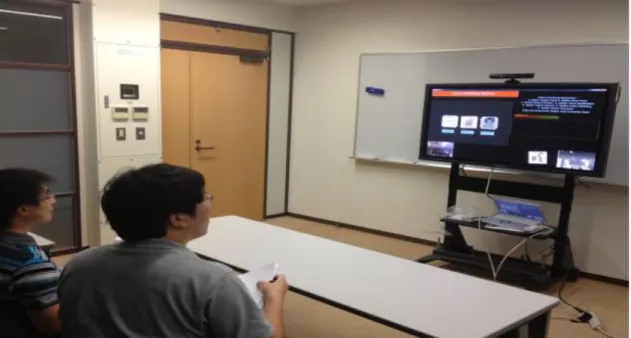
There were 5 participants joined the experiment, 4 male and 1 female, ages ranges from 24 to 30 years old, they had a good education background and were familiar with computer operation. We set up the experiment environment with one desktop computer, one loudspeaker box, one Kinect camera and one 50 inches large scale display in a meeting room. As Figure5.1 shows, user can either sit or stand in front of the large display while manipulating the video player.

(a) Sit Pose in front of large display (b) Stand Pose in front of large display Figure 5.1 User Conditions of The Evaluation Experiment

5.3 Questionnaire

We required participants to fill the questionnaire after finishing the experiment. The detail clauses can be descripted as follow. Q1-Q3 were used to count personal information and user experience about large display. Q4 was used to count the intelligibility of the proposed method. Q5-Q8 were used to count the system characteristics by a five grade evaluation after the preliminary experiment. Q9-Q11 were used to count the system applicability while handling related task with large display by a five grade evaluation.

Finally, Q12 was used to get the comments from users to improve our system.

(40)

Q1. Please introduce the personal information about yourself Q2. Do you have the experience to use large scale display

Q3. Do you agree large scale display can be a good media platform to play video

Q4. Do you think it is easy to understand the operation method of “Act As You” video player after a brief explanation and demonstration

Q5. How do you think of the ease by using “Act As You” video player Q6. How do you think of the accuracy by using “Act As You” video player Q7. How do you think of the feedback from “Act As You” video player Q8. How do you think of the intuition by using “Act As You” video player

Q9. How do you think of the usability for doing related task with large display by “Act As You” video player

Q10. How do you think of the performance for doing related task with large display by using “Act As You” video player

Q11. How do you think of the satisfaction for doing related task with large display by using “Act As You” video player

Q12. If you have any comments or suggestions to improve our system, please write below

5.4 Preliminary Experiment

First, we were making a brief explanation and demonstration about the manipulation method to users. Then, we required them to perform the basic manipulation (“Play”,

“Pause” and “Stop”) and precise manipulation (“Volume Adjustment”, “Seek Adjustment”,

“Size Adjustment”) at least 3 times during a 4 minutes video. Finally, we asked them to fill the questionnaire from Q1 to Q8, hence got their subjective views about the system.

5.5 Preliminary Experiment Result

Through the experiment, we found that all the users had the experience of using large scale display and agreed that large scale display could be a good platform to play video.

Also, most of them (4/5) felt easy to understand the manipulation method. The subjective

view about the system characteristics can be descripted as Figure 5.2. The system

showed good results especially in “Intuition” (4.2/5) and “Ease of Use” (4/5).

(41)

Figure 5.2 Questionnaire Results (Q5 – Q8)

5.6 Multi-Task Experiment

In this experiment, we required users to do a sub task while manipulating the video player interface. We asked users to learn how to tie a full windsor knot tie by imitating the tuition video. Users can play and pause the video with several times, or adjust the video seek to concentrate viewing the complex part. Also, they can expand the video size hence get a better visual effect to learn the process. Finally, we asked users to fill the questionnaire from Q9 to Q12, hence got their experiences about the ability of the system handling multi-task.

5.7 Multi-Task Experiment Result

As Figure 5.3 shows, our system revealed good result in “usability” (4/5), “performance”

(4/5) and satisfaction (4.4/5) for doing related task. From the observation, we found all the users could not finished the task with playing the video only once. They had the requirement to check and compare with the model action with several times.

“Play-Pause-Play” and “Rewind” were the most frequently used manipulations. Through our system, user could keep the action form and operate the video simultaneously.

(42)

Figure 5.3 Questionnaire Results (Q9 – Q11)

5.8 Analysis

Through the experiment, we found that users can easily understand the manipulation method through brief explanation. Also, users got intuitional experience and felt at ease while manipulating the system. Especially, Users were satisfied with the system feature for doing related task with large display. Users had benefited a lot from the multimodal system. But at the same time, we also found some problems. First, one user mentioned that the voice commands were not recognized very well. User may feel agitated if system did not response. Second, two users had pointed out that feedback should be enhanced while performing basic manipulations like "Play", "Pause" and "Stop". Third, one user felt tried to perform eyebrows actions although the combination with facial motion and speech was performed smoothly.

In conclusion, we should improve the recognition accuracy and compatibility for voice

commands. (e.g., lock recognition area, use user-defined commands) Also, we should

make a more rapid and obvious response to user. Furthermore, more efficient and easy

facial motion should be considered. (e.g., eye blinking)

(43)

Chapter 6 Conclusion and Future Work

In this thesis, we presented an intuitional interaction technique for large scale display with the combination of facial motion and speech. We proposed to use these two input methods either in a sequential or simultaneous way. Also, we provided both visual and audio feedback to enhance the response to user.

Our work implemented a “location and selection” based gallery exhibition interface and a

“navigation” based video player interface to identify the applicability of proposed interaction method. Also, we conducted an evaluation experiment and got good results in intuition and ease of use with our system. Finally, users showed satisfaction and good performance while handling related task with large scale display.

In the future work, we will try to define a more intuitive facial motion and improve the speech performance through multimodal approaches. Also, we want to support cooperative work through multi-user involved interaction. Furthermore, we will make a formal comparison with speech-only, gesture-only, device-only interface with our system.

(44)

Acknowledgements

First of all, I will give heartfelt thanks to my thesis advisor Prof. Jiro Tanaka, for his valuable comments and patient guidance during my study.

Furthermore, I also thanks to Dr. Shin Takahashi, Dr. Misue Kazuo, Dr. Buntaro Shizuki and Dr. Simona Vasilache for their significant comments and constructive suggestions.

In addition, I am grateful to all the members from NERF team, especially Shaowei Chu, Yexin Han, Xiaomeng Liu, Unseok Lee, Haokan Cheng and Davaasuren Enkhbat, for their precious help from both research and my personal life.

Finally, I will thanks my parents and my dear friends in Chengdu, even I am far from

you, I can still obtain the courage and determination from your unconditional love and

support.

(45)

Reference

[1] T. Ni, G.S. Schmidt, O.G. Staadt, M.A. Livingston, R. Ball and R. May. “A Survey of Large High-Resolution Display Technologies, Techniques, and Applications”. Proceeding VR '06 Proceedings of the IEEE conference on Virtual Reality, pp. 223-236. (2006)

[2] T. Ni, D.A. Bowman and J. Chen. “Increased display size and resolution improve task performance in Information-Rich Virtual Environments”. Proceeding GI '06 Proceedings of Graphics Interface 2006, pp. 139-146. (2006)

[3] M. Czerwinski, G. Smith, T. Regan, B. Meyers, G. Robertson and G. Starkweather.

“Toward characterizing the productivity benefits of very large displays”. In Proceedings of Interact 2003, pp. 9-16. (2003)

[4] M. Czerwinski, G. Robertson, B. Meyers, G. Smith, D. Robbins and D. Tan, “Large display research overview”. CHI '06 extended abstracts on Human factors in computing systems, pp. 69-72. (2006)

[5] M.R. Morris, J.O. Wobbrock, and A.D. Wilson, “Understanding Users’ Preferences for Surface Gestures”. Proceeding GI '10 Proceedings of Graphics Interface 2010, pp.

261-268. (2010)

[6] Richard A. Bolt. “Put-that-there”. SIGGRAPH 80, pp.262-270. (1980)

[7] N. Krahnstoever, S. Kettebekov, M. Yeasin and R. Sharma, “A Real-Time Framework for Natural Multimodal Interaction with Large Screen Displays”. Proceeding ICMI '02 Proceedings of the 4th IEEE International Conference on Multimodal Interfaces, pp. 349.

(2002)

[8] D.M. Krum, O. Omoteso, W. Ribarsky, T. Starner and L.F. Hodges, “Speech and gesture multimodal control of a whole Earth 3D visualization environment”. Proceeding VISSYM '02 Proceedings of the symposium on Data Visualisation, pp. 195-200. (2002) [9] A. Bellucci, A. Malizia, P. Diaz, and I. Aedo, “Don't touch me: multi-user annotations on a map in large display environments”. Proceeding AVI '10 Proceedings of the International Conference on Advanced Visual Interfaces, pp. 391-392 (2010)

[10] M.R. Morris. “Web on the wall: insights from a multimodal interaction elicitation

study”. Proceeding ITS '12 Proceedings of the 2012 ACM international conference on

Interactive tabletops and surfaces, pp. 95-104 (2012)

(46)

[11] J.H. Lee and C. Spence, “Assessing the benefits of multimodal feedback on dual-task performance under demanding conditions”. Proceeding BCS-HCI '08 Proceedings of the 22nd British HCI Group Annual Conference on People and Computers: Culture, Creativity, Interaction - Volume 1, pp. 185-192. (2008)

[12] G.Kim and H.Kim, “Designing of multimodal feedback for enhanced multitasking performance”. Proceeding CHI '11 Proceedings of the SIGCHI Conference on Human Factors in Computing Systems, pp. 3113-3122. (2011)

[13] V.K. Emery, P.J. Edwards, J.A. Jacko, K.P. Moloney, L.Barnard, T.Kongnakorn, F.Sainfort and I.U. Scott, “Toward achieving universal usability for older adults through multimodal feedback”. Proceeding CUU '03 Proceedings of the 2003 conference on Universal usability, pp. 46-53. (2003)

[14] P.Ekman, W.V.Friesen and J.C.Hager, “Facial Action Coding System: The Manual on CD ROM”. Research Nexus Division of Network Information Research Corporation.

(2002)

[15] T.W. Schneider and O. Balci, “VTQuest: a voice-based multimodal web-based software system for maps and directions”. Proceeding ACM-SE 44 Proceedings of the 44th annual Southeast regional conference, pp. 300-305. (2006)

[16] M.A. Grasso, D.S. Ebert and T.W. Finin, “The integrality of speech in multimodal interfaces”. Journal ACM Transactions on Computer-Human Interaction (TOCHI) Volume 5 Issue 4, pp. 303-325. (1998)

[17] Kinect For Windows SDK 1.6, http://www.microsoft.com/en-us/kinectforwindows/

[18] Microsoft Speech Platform SDK, http://msdn.microsoft.com/en-us/library/dd266409/

[19] Introduction to WPF, http://msdn.microsoft.com/en-us/library/aa970268/

[20] C. Peng, U. Lee, S. Iwabuchi, S. Masuko, and J.Tanaka, “Coordinated Shopping:

Virtual Fitting Multi-User Interface.” 4th Rakuten R&D Symposium 2011, pp.1-4. (2011)

(47)

Questionnaire

Q1. Please introduce the personal information about yourself.

1. Age: 2. Sex: 3. Education Status:

Q2. Do you have the experience to use large scale display?

1. Yes 2. No

Q3. Do you agree large scale display can be a good media platform to play video?

1. Yes 2. No

Q4. Do you think it is easy to understand the operation method of “Act As You” video player after a brief explanation and demonstration?

1. Yes 2. No

Q5. How do you think of the ease by using “Act As You” video player?

1. Very Difficult 2. Difficult 3. Normal 4. Easy 5. Very Easy Q6. How do you think of the accuracy by using “Act As You” video player?

1. Very Inaccuracy 2. Inaccuracy 3. Normal 4. Accuracy 5. Very Accuracy Q7. How do you think of the feedback from “Act As You” video player?

1. Very Little 2. Little 3. Normal 4. Strong 5. Very Strong Q8. How do you think of the intuition by using “Act As You” video player?

1. Very Little 2. Little 3. Normal 4. Strong 5. Very Strong

Q9. How do you think of the usability for doing related task with large display by “Act As You” video player?

1. Not Useful 2. Little Useful 3. Normal 4. Useful 5. Very Useful

(48)

Q10. How do you think of the performance for doing related task with large display by using “Act As You” video player?

1. Very Bad 2. Bad 3. Normal 4. Good 5. Very Good

Q11. How do you think of the satisfaction for doing related task with large display by using “Act As You” video player?

1. Very Bad 2. Bad 3. Normal 4. Good 5. Very Good

Q12. If you have any comments or suggestions to improve our system, please write

below.

Figure 3.1 Outline of FMWSA Method
Table 3.1 Types and Effect of Speech Assist
Figure 3.3 Sequential Interaction
Figure  3.4  describes  a  possible  form  of  simultaneous  interaction.  We  proposed  to  use  facial motion and speech simultaneously hence reduce the tedious process while taking  the navigate operation
+7

参照

関連したドキュメント

And then we present a compensatory approach to solve Multiobjective Linear Transportation Problem with fuzzy cost coefficients by using Werner’s μ and operator.. Our approach

Zaslavski, Generic existence of solutions of minimization problems with an increas- ing cost function, to appear in Nonlinear

In [10, 12], it was established the generic existence of solutions of problem (1.2) for certain classes of increasing lower semicontinuous functions f.. Note that the

S.; On the Solvability of Boundary Value Problems with a Nonlocal Boundary Condition of Integral Form for Multidimentional Hyperbolic Equations, Differential Equations, 2006, vol..

Infinite systems of stochastic differential equations for randomly perturbed particle systems in with pairwise interacting are considered.. For gradient systems these equations are

More precisely, suppose that we want to solve a certain optimization problem, for example, minimization of a convex function under constraints (for an approach which considers

In this work, we present an asymptotic analysis of a coupled sys- tem of two advection-diffusion-reaction equations with Danckwerts boundary conditions, which models the

GENERAL p-CURL SYSTEMS AND DUALITY MAPPINGS ON SOBOLEV SPACES FOR MAXWELL EQUATIONS..