個人用パソコンの準備について
(2022 年学部入学者用)
東北大学では、履修する授業科目の登録手続きや成績の確認、授業計画(シラバス)の閲覧、
講義資料の配付、課題レポートの作成と提出、その他各種連絡など、日常的な学習活動において パソコンを利用しています。
教員から授業においてパソコンを利用する旨の指示があった際には、パソコンを持参できるよ うに準備をお願いします。
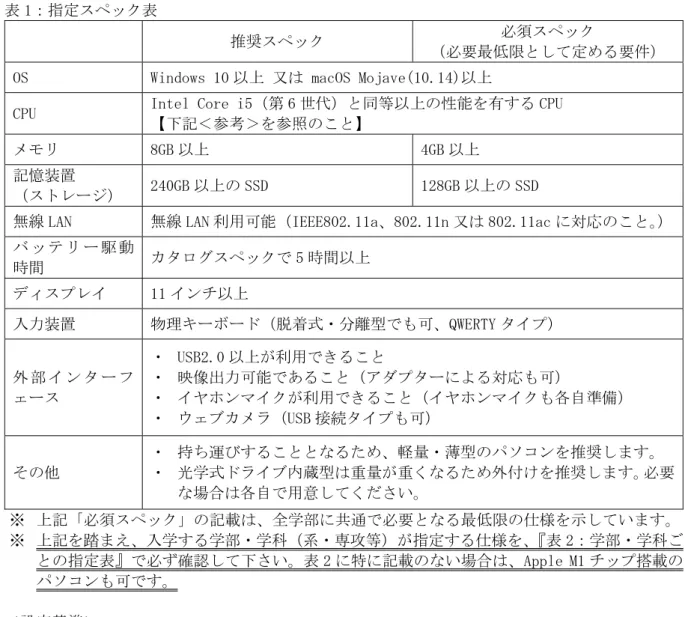
・ 準備いただくパソコンの仕様(スペック)は、『表 1:指定スペック表』に記載のとおりです。
※ 入学する学部・学科(系・専攻等)の指定を、『表 2:学部・学科ごとの指定表』で必ず確 認して下さい。
・ 経済的な事情等によりパソコンの準備が困難な方には長期貸出制度を用意します。
※ 詳細は、下記「学生の持ち込みパソコンの教育活用について」より、ご参照ください。
【OS(オペレーティングシステム)について】
パソコンの OS は、Windows10 以上 又は mac OS Mojave(10.14)以上を必須とします。
※ 入学後の学部・学科で OS を指定する場合があります。詳しくは『表 2』で確認してくだ さい。
【ウィルス対策ソフトの購入について】
ウィルス対策ソフト「Computer Protection(エフセキュア社製。以下、エフセキュアという。)」 を、入学後に東北大学が所有するキャンパスライセンスを利用し、無料でインストールできま す。なお、エフセキュアは必須ではなく、市販のウィルス対策ソフトまたは、Windows 10 以上 の場合は標準ソフトの Windows Defender でも構いません。
【Office 製品(ワープロソフト、表計算ソフト、プレゼンテーションソフト)の購入について】
東北大学では日本マイクロソフト株式会社との包括契約に基づき、全ての学生の皆さんは在 学中, 最新の WindowsOS および Office ソフトウェアを無償で利用することができます。
利用できる内容の詳細や設定方法等は、「学生の持ち込みパソコンの教育活用について」より、
ご参照ください。
【自宅等のインターネット利用環境の準備について】
在学中はキャンパス Wi-Fi を利用できますが、自宅でオンライン授業を受講することも想定 し、インターネットの接続環境を準備いただくことをお勧めします。
<参考> 学生の持ち込みパソコンの教育活用について
http://www2.he.tohoku.ac.jp/zengaku/zengaku_byod.html
(東北大学→教育・学生支援→全学教育→その他)
令和 3 年 10 月 東北大学
表 1:指定スペック表
推奨スペック 必須スペック
(必要最低限として定める要件)
OS Windows 10 以上 又は macOS Mojave(10.14)以上
CPU Intel Core i5(第 6 世代)と同等以上の性能を有する CPU
【下記<参考>を参照のこと】
メモリ 8GB 以上 4GB 以上
記憶装置
(ストレージ) 240GB 以上の SSD 128GB 以上の SSD
無線 LAN 無線 LAN 利用可能(IEEE802.11a、802.11n 又は 802.11ac に対応のこと。) バ ッ テ リ ー 駆 動
時間 カタログスペックで 5 時間以上 ディスプレイ 11 インチ以上
入力装置 物理キーボード(脱着式・分離型でも可、QWERTY タイプ)
外 部 イ ン タ ー フ ェース
・ USB2.0 以上が利用できること
・ 映像出力可能であること(アダプターによる対応も可)
・ イヤホンマイクが利用できること(イヤホンマイクも各自準備)
・ ウェブカメラ(USB 接続タイプも可)
その他
・ 持ち運びすることとなるため、軽量・薄型のパソコンを推奨します。
・ 光学式ドライブ内蔵型は重量が重くなるため外付けを推奨します。必要 な場合は各自で用意してください。
※ 上記「必須スペック」の記載は、全学部に共通で必要となる最低限の仕様を示しています。
※ 上記を踏まえ、入学する学部・学科(系・専攻等)が指定する仕様を、『表 2:学部・学科ご との指定表』で必ず確認して下さい。表 2 に特に記載のない場合は、Apple M1 チップ搭載の パソコンも可です。
<設定基準>
授業における以下の利用を前提に、必須スペックを設定しています。
・ インターネットを経由して指定サーバ上の参考資料(動画含む)を参照すること
・ Office などを用いて文書編集(プレゼン資料・レポート作成など)を行うこと
・ 各自の発話状況をビデオ収録してレポートとして提出すること(動画編集は含めず)
・ クラウドサーバ上で簡単なプログラミングと演算処理を行うこと
<参考>
・ “Intel Core i5(第 6 世代)と同等以上の性能”には、Intel Core i3(第 7 世代)以降の CPU も 含みます。
・ Intel 社の CPU 表記について(記載例:Core i5 7020U)
型番表記 メーカー名 ブランド名 グレード 型番 記号 Intel Core i 5 7020 U 補足説明
「Core i」シリ ーズと呼ばれ ています。
5 以外には、
M,3,7,9 など あります。
冒頭の数字が 世代を示しま す。
CPU 特 性 を 示 します。
補足説明2 ・ 一般的に「グレード」、「型番(世代)」が大きいほど、CPU 演算処理能力が高 くなっています。
※ 東北大学生活協同組合(新生活サポートセンター)でも、上記「推奨スペック」
の要件を満たすパソコンを取り扱っていますので、参考にしてください。
https://newlife.u-coop.or.jp/tohoku/
表 2:学部・学科ごとの指定表
学部・学科 準備する PC の指定・学部等からのメッセージ 文学部 (表 1 の必須スペックを満たしていること。)
教育学部 (表 1 の必須スペックを満たしていること。)
法学部 (表 1 の必須スペックを満たしていること。)
経済学部
表 1 の『推奨スペック』を満たしていること。
なお OS が Windows 10 以上の PC が望ましい。
Apple 社製 PC を必ずしも否定するわけではないが、基本的に授業 では Windows 搭載 PC を前提とするため、Apple 社製 PC を購入す る場合は、OS や CPU の種類によっては動作しないソフトウェアが 存在することを予め理解、承知しておくこと。
理 学 部
数学系 (表 1 の必須スペックを満たしていること。)
物理系
CPU は「Intel Core i5 または i7 の第 8 世代(超省電力版を 除く)または第 9 世代以降、または AMD Ryzen 5 以上」、それ 以外は表 1 の必須スペックを満たしていること。
化学系 (表 1 の必須スペックを満たしていること。)
地球科学系 (表 1 の必須スペックを満たしていること。)
生物系 2 度購入することは無駄になるため、「CPU Core i7 以上/メモリ 8GB 以上/256GB 以上-SSD」の PC 購入をお勧めします。
医 学 部
医学科
【必須スペック】 CPU Core i5/メモリ 8GB/ SSD 256GB
【推奨スペック】 CPU Core i7/メモリ 16GB 以上/SSD 256GB 以 上
保 健 学 科
看護学専攻
【必須スペック】 CPU Core i5/メモリ 8GB/ SSD 256GB
【推奨スペック】 CPU Core i7/メモリ 16GB 以上/SSD 256GB 以 上
放 射 線 技 術 科 学 専 攻
表 1 の必須スペックを満たしていることとするが、メモリは 8GB 以上を推奨する。
検査技術科学専攻 (表 1 の必須スペックを満たしていること。)
歯学部 (表 1 の必須スペックを満たしていること。)
堅牢さとサポートを重視して購入してください。
薬学部 (表 1 の必須スペックを満たしていること。)
工 学 部
機械知能・航空工学科
3 セメスター以降の実習科目で必要となりますので、表 1 の『推 奨スペック』を満たし Windows (64 ビット) が動作するものを準 備してください。高年次に CAD の授業を履修する場合は、可能で あればメモリ 16GB 以上を推奨します。
電気情報物理工学科
表 1 の『推奨スペック』を満たしていること。
また、2 年次以降も買い替えずに利用する場合、メモリ 16 GB 以 上、SSD 500 GB 以上を推奨します。
化学・バイオ工学科 表 1 の『推奨スペック』を満たしていること。
材料科学総合学科 表 1 の『推奨スペック』を満たしていること。
建築・社会環境工学科
(表 1 の必須スペックを満たしていること。)
一部の授業・演習では Windows PC でしか動作しないソフトウェ アを使用することがあります。
農学部 (表 1 の必須スペックを満たしていること。)
Obtaining your own Laptop Computer (For undergraduate students entering in 2022)
At Tohoku University, personal computers are used for many everyday academic activities, such as registering for classes, checking grades, viewing class syllabuses, obtaining class materials, preparing and submitting reports, and general communication.
Please be ready to bring a computer to class if the instructor asks you to do so.
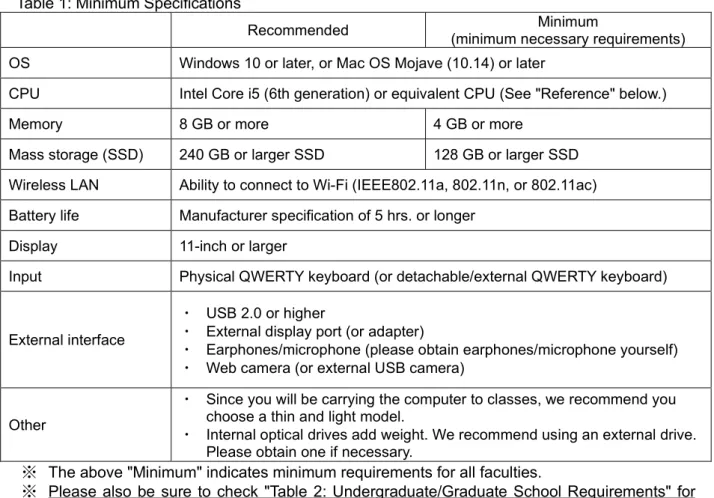
・ Computer requirements are shown in "Table 1: Minimum Specifications."
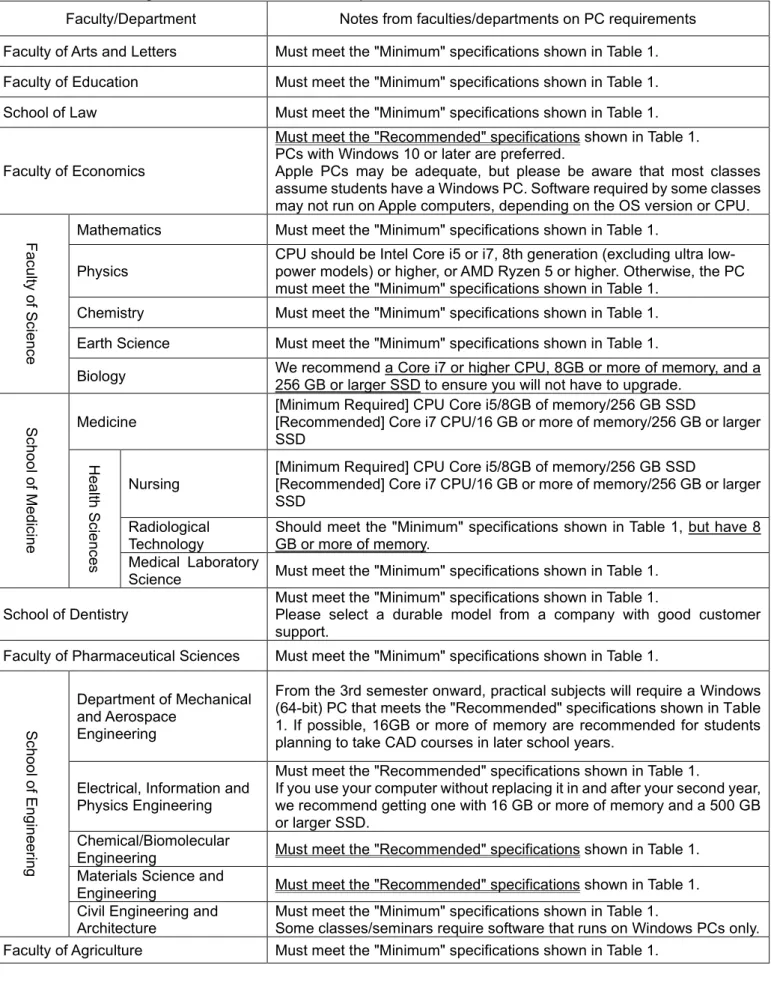
※ Please also be sure to check "Table 2: Undergraduate/Graduate School Requirements" for requirements for your specific undergraduate/graduate school (department/major etc.).
・ If you are unable to purchase a computer for financial reasons, the university has a long-term loan program.
※ For details, please see the link to "Using Student-owned Computers for Educational Activities" below.
OS (operating system)
Your computer's OS must be Windows 10 or later, or Mac OS Mojave (10.14) or later.
※ Your undergraduate/graduate school may have other OS requirements. See Table 2.
Anti-virus software
After enrolling, all students are entitled to use Computer Protection (from F-Secure) for free under Tohoku University's campus-wide license. However, use of F-Secure's software is not mandatory. Another commercial anti-virus product, or Windows 10 (or later's) built-in Windows Defender may be used instead.
Office software (word-processing, spreadsheet, and presentation software)
All enrolled students are entitled to use the latest versions of Microsoft Windows and Office for free under Tohoku University's license agreement with Microsoft Japan.
For details, please see the link to "Using Student-owned Computers for Educational Activities"
below.
Preparing your home Internet connection
Although you can use the campus Wi-Fi while enrolled at Tohoku University, we recommend that you arrange a home Internet connection for online classes.
Reference: Using Student-owned Computers for Educational Activities (the website is in Japanese; PDFs are bilingual Japanese/English)
http://www2.he.tohoku.ac.jp/zengaku/zengaku_byod.html
(or, from the Tohoku University website (Japanese), click → 教育・学生 支援 → 全学教育 → 学生への情報 → その他)
October 2021 Tohoku University
Table 1: Minimum Specifications
Recommended Minimum
(minimum necessary requirements) OS Windows 10 or later, or Mac OS Mojave (10.14) or later
CPU Intel Core i5 (6th generation) or equivalent CPU (See "Reference" below.)
Memory 8 GB or more 4 GB or more
Mass storage (SSD) 240 GB or larger SSD 128 GB or larger SSD Wireless LAN Ability to connect to Wi-Fi (IEEE802.11a, 802.11n, or 802.11ac) Battery life Manufacturer specification of 5 hrs. or longer
Display 11-inch or larger
Input Physical QWERTY keyboard (or detachable/external QWERTY keyboard)
External interface
・ USB 2.0 or higher
・ External display port (or adapter)
・ Earphones/microphone (please obtain earphones/microphone yourself)
・ Web camera (or external USB camera)
Other
・ Since you will be carrying the computer to classes, we recommend you choose a thin and light model.
・ Internal optical drives add weight. We recommend using an external drive.
Please obtain one if necessary.
※ The above "Minimum" indicates minimum requirements for all faculties.
※ Please also be sure to check "Table 2: Undergraduate/Graduate School Requirements" for your specific undergraduate/graduate school's (department/major etc.) requirements. PCs with Apple M1 CPUs can be used unless otherwise noted in Table 2.
Criteria
The minimum specifications are based on the below anticipated use cases.
・ Viewing online reference materials (including videos) hosted on specified servers
・ Using office software to edit documents (presentation materials, reports, etc.)
・ Recording and submitting reports in video form (excluding video editing)
・ Performing basic programming and computation on cloud servers Reference
・ "Intel Core i5 (6th generation) or equivalent" includes Intel Core i3 (7th generation) or better CPUs.
・ Intel CPU labeling conventions (Example: Core i5 7020U)
Label Maker Brand Grade Model Number Suffix
Intel Core i 5 7020 U
Notes This is referred
to as the "Core i" series.
Besides i5, models include M, i3, i7, and i9.
The first number
is the generation. Indicates other CPU characteristics.
Comments ・ In general the higher the Grade and Model (generation) numbers, the higher the CPU's performance will be.
※ The Tohoku Univ. Co-op. (New Life Support Center) sells computers that meet the recommended system specifications.
https://newlife.u-coop.or.jp/tohoku/
Table 2: Undergraduate/Graduate School Requirements
Faculty/Department Notes from faculties/departments on PC requirements Faculty of Arts and Letters Must meet the "Minimum" specifications shown in Table 1.
Faculty of Education Must meet the "Minimum" specifications shown in Table 1.
School of Law Must meet the "Minimum" specifications shown in Table 1.
Faculty of Economics
Must meet the "Recommended" specifications shown in Table 1.
PCs with Windows 10 or later are preferred.
Apple PCs may be adequate, but please be aware that most classes assume students have a Windows PC. Software required by some classes may not run on Apple computers, depending on the OS version or CPU.
Faculty of Science
Mathematics Must meet the "Minimum" specifications shown in Table 1.
Physics CPU should be Intel Core i5 or i7, 8th generation (excluding ultra low- power models) or higher, or AMD Ryzen 5 or higher. Otherwise, the PC must meet the "Minimum" specifications shown in Table 1.
Chemistry Must meet the "Minimum" specifications shown in Table 1.
Earth Science Must meet the "Minimum" specifications shown in Table 1.
Biology We recommend a Core i7 or higher CPU, 8GB or more of memory, and a 256 GB or larger SSD to ensure you will not have to upgrade.
School of Medicine
Medicine [Minimum Required] CPU Core i5/8GB of memory/256 GB SSD
[Recommended] Core i7 CPU/16 GB or more of memory/256 GB or larger SSD
Health Sciences
Nursing [Minimum Required] CPU Core i5/8GB of memory/256 GB SSD
[Recommended] Core i7 CPU/16 GB or more of memory/256 GB or larger SSD
Radiological
Technology Should meet the "Minimum" specifications shown in Table 1, but have 8 GB or more of memory.
Medical Laboratory
Science Must meet the "Minimum" specifications shown in Table 1.
School of Dentistry Must meet the "Minimum" specifications shown in Table 1.
Please select a durable model from a company with good customer support.
Faculty of Pharmaceutical Sciences Must meet the "Minimum" specifications shown in Table 1.
School of Engineering
Department of Mechanical and Aerospace
Engineering
From the 3rd semester onward, practical subjects will require a Windows (64-bit) PC that meets the "Recommended" specifications shown in Table 1. If possible, 16GB or more of memory are recommended for students planning to take CAD courses in later school years.
Electrical, Information and Physics Engineering
Must meet the "Recommended" specifications shown in Table 1.
If you use your computer without replacing it in and after your second year, we recommend getting one with 16 GB or more of memory and a 500 GB or larger SSD.
Chemical/Biomolecular
Engineering Must meet the "Recommended" specifications shown in Table 1.
Materials Science and
Engineering Must meet the "Recommended" specifications shown in Table 1.
Civil Engineering and
Architecture Must meet the "Minimum" specifications shown in Table 1.
Some classes/seminars require software that runs on Windows PCs only.
Faculty of Agriculture Must meet the "Minimum" specifications shown in Table 1.