publication title
volume 21
page range 21‑37
year 2010‑11
URL http://id.nii.ac.jp/1092/00000497/
The perception of the influence of technology in education among learners and teachers
Craig Langdon
Abstract
The role of technology in language learning continues to evolve and expand at a rapid pace. This research investigates whether the needs of students and teachers are being met and their abilities utilized in a university context. The research attempts to determine the current abilities and future needs of students throughout their time at university. With an additional focus on the abilities and expectations of teachers in the same environment, a comparison is drawn between the two groups.
Introduction
It is hard to imagine a language class in the future which is not in some way affected by the influence of technology. Due to the pivotal position of technology in modern societies, the role it plays in education will continue to expand and develop throughout the 21
stcentury.
This influence in the classroom may be a deliberate act on the part of the teacher
to include a subject such as Information and Communications Technology (ICT)
into the curriculum. ICT is defined as the combination of informatics technology
with other related technologies, specifically communication technology. Many
institutes and organizations have taken the view that ICT will be used, applied, and
integrated in activities of working and learning in the future (Anderson, 2002).
From this standpoint, technology is a separate subject in its own right and should therefore be studied as an independent content based course. For proponents of this viewpoint in applied linguistics, the study of ICT will enable students to better learn language through their expertise with technology.
Bax (2003) argues for the need for technology to be ‘embedded in everyday practice and hence ‘normalised’.’ He states that computers need to be invisible and as commonplace as a pen in order for them to be used by teachers and students
‘without fear or inhibition, and equally without an exaggerated respect for what they can do.’ From this perspective, technology supports the learner but does not become a subject in its own right.
In the arena of second language instruction, computers can enable learners to interact with others and become engaged in lessons in what may be new and meaningful ways (Warschauer, 2006). By making use of computers, teachers are able to provide the opportunity for learners to communicate in ways which are simply not possible without the assistance of technology. An example would be the use of Skype, a software application that allows users to make voice calls over the Internet. While this software has not been designed for language learners, it has been used to enable learners to communicate in ways which would not be possible without both the software (Skype) and the hardware (computer, microphone, internet access, etc.).
De Szendeffy points out that many language-learning software programs are
marketed as tools for learning a new language which can stand alone (2005).
While these programs may claim to create a ‘syllabus of dreams’, the unfortunate reality is that they often fail to live up to the manufacturer’s claims (M. Kershaw, personal communication, November 18, 2010). While many software packages may contain good self-access material to help learners practice on their own, they do not always encourage students to interact either with each other or with the instructor in the target language and are therefore unlikely to fit well into a course’s curriculum (Swain & Lapkin, 1998).
The integration of technology into education will require a focus on human needs, strategies, perceptions and experiences while communicating and collaborating in both cyber-learning environments as well as more traditional classroom environments (Wang, 2001). This does not mean that the choice of a particular type of hardware or software will not have a significant effect on the success or failure of the integration of technology in education. What it does mean is that the technical specifications of hardware or software will not provide enough information for decisions to be made on their purchase, integration into the curriculum, and successful use by teachers and learners.
At Kanda University of International Studies (KUIS) there are 10 blended learning
spaces (BLSs) in which teachers have the most control over the amount of
time spent with the computers in use. These classrooms can help teachers ‘blend
technology into their everyday pedagogy’ (English Language Institute Handbook,
2009).
Oliver and Trigwell (2005) provide a critical analysis of the term ‘blended learning’
and state that there is ‘little merit in keeping the term’. They claim this is because it is either inconsistently applied or redundant because it ‘attributes to learning something that, in terms of what we know, only applies to teaching or instruction’.
They suggest that the emphasis should shift ‘from teacher to learner, from content to experience and from naively conceptualised technologies to pedagogy’ (Oliver
& Trigwell, 2005).
Researchers at KUIS have been looking at the integration of technology into the curriculum for some time now. Murphy and Imrie (2003) looked at the implementation of computers in a reading classroom at KUIS. They stated that ‘if a course is to reflect the ‘real world’, it should presumably include a certain degree of computer mediated reading.’ They concluded that attempts to incorporate technology into the classroom need to be ‘well-planned and methodical’. This study set out to explore the issue of whether the current environment at KUIS was effective for meeting the needs of teachers and students in terms of technology.
Methodology
An initial study of student use of software was undertaken to identify important
factors which may determine whether the software was utilised outside of class
requirements. The 52 participants in the study were 1
styear students in the
English department at KUIS. One of the most valuable aspects of incorporating
technology into a curriculum is that it can encourage autonomy by providing
students with a range of options from which to study. Technology which had a
positive effect from a pedagogical standpoint would empower students to use it for
their own purposes and in their own time. The study sought to explore whether software which the teacher felt was valuable and which was demonstrated and explained in detail would be used by students beyond the initial introduction phase.
In the study, students were given instructions on how to use an item of vocabulary learning software, Smart FM. The lesson took place at the beginning of the semester. The instructions were given in English although participants were made aware of the option of switching to a Japanese language interface. A video explaining the pedagogical principles behind the software was available in both languages (http://smart.fm/tour/video). Class time was taken to demonstrate the software and participants were given the opportunity to practice using it.
After analysing the results of the initial study, a further study was then made of 6 students’ individual interactions with technology over the period of a week.
Instructions and training were given to the participants. Participants were then asked to keep a ‘trial diary’ for two days to determine if they were recording the correct information. The researcher and the participants then met and discussed any issues which arose from the diaries. During the following week, the participants recorded their interactions with technology in a diary on a daily basis (See Appendix A).
In the study, participants were told to record their interactions in either Japanese
or English. The majority of data was recorded in English although some sections
were translated from Japanese to English. Three of the students were in their
1
styear and three were in their 2
ndyear at KUIS.
In order to gain a broader understanding of the use of technology across the four years that students spend at KUIS, surveys were also given to the researcher’s content based class entitled ‘Computers, English & You’. In this one semester course students attended 90 minute classes twice a week and the focus was on improving computer skills by using a variety of software with an English operating system (Microsoft Windows XP) and an English interface (i.e. Microsoft Office PowerPoint). The surveys were piloted; appropriate revisions were made and they were then given to four classes. Students in these classes were in their 3
rdand 4
thyear at KUIS.
Results
In the first part of the research, participants were given a survey which sought to discover if they felt they would continue to use the software after the class (See Table 1). Participants were also asked if they planned to continue to use the program. 94% (n=49) responded positively while only 6% (n=3) said they would no longer use the program.
Class A Class B
Yes, I would like to do this at home and at KUIS. (n=7) 29% (n=10) 36%
Yes, I would like to do this at home. (n=10) 42% (n=14) 50%
Yes, I would like to do this at KUIS. (n=2) 8% (n=2) 7%
I’m not sure. (n=5) 21%
No, I don’t think it was useful for me.
No, I don’t think it was interesting.
No, I didn’t try it at all. (n=2) 7%
TABLE 1: Smart FM Usage: Prediction
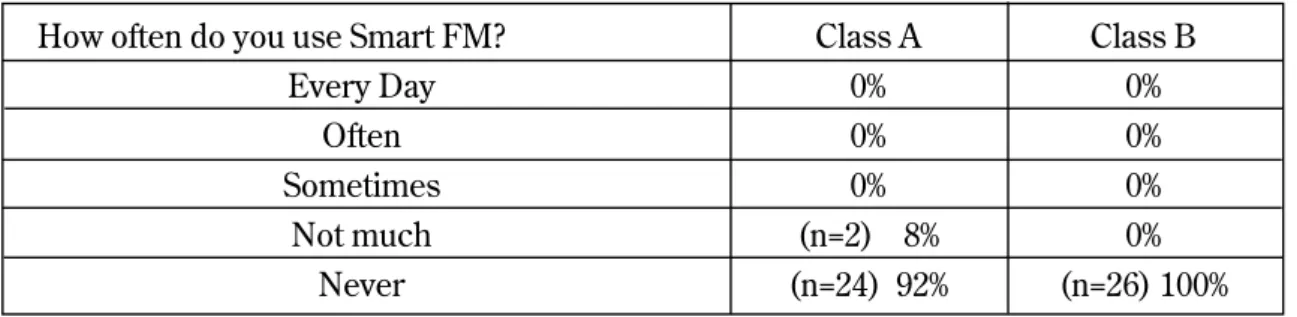
In a follow up survey at the end of the semester, participants were asked to what extent they had continued to make use of the software (See Table 2). 96% (n=50) responded that they did not use the software at all and 8% (n=2) said they didn’t use the software much.
TABLE 2: Smart FM Usage: End of the semester
How often do you use Smart FM? Class A Class B
Every Day 0% 0%
Often 0% 0%
Sometimes 0% 0%
Not much (n=2) 8% 0%
Never (n=24) 92% (n=26) 100%
The amount of data gathered in the second part of the research, when participants kept a diary over the course of a week, varied greatly between individual partici- pants. The data gathered from two participants clearly illustrates this difference.
For Student A, technology was an integral part of his life. He recorded extensive interactions on a variety of devices including his cell-phone, a computer at home, and a computer in the Self Access Learning Centre in KUIS (SALC). He reported using technology to do a wide range of tasks (See Table 3).
1. Listened to podcasts 2. Used Mixi
3. Played games 4. Read news 5. Listened to music 6. Checked email
9. Looked at bulletin board 10. Used Skype
11. Researched topic for younger sister 12. Watched TV programs
13. Checked movie schedule
14. Used Smart FM (only 2 times)
TABLE 3: Technology tasks completed by Student A
7. Downloaded MP3 for class activity 8. Bought concert tickets
Student B only reported using a computer at home to listen to music, write an essay, send email, and watch a DVD. She made a number of negative comments toward technology such as “My computer is so slow” and “While I hear the class, I always play a game called “Hear”. It’s kind of card game because the class system is too slow”.
In the comments section of the journals, students recorded their feelings about their interactions. For Student A, a second year student, using technology was a very positive experience. He made such comments as “Using PC is needed to get up and turn on and wait few minutes. But, as it’s named, mobile phone, I don’t have to move my body, just using my hand. It’s very convenient when I’m sick and being in bed” and “Mobile phone is so convenient tool human beings invented.”
For Student B, a first year student, the case was much different. She was concerned about a variety of issues with technology including overuse (“I usually don’t use cellerphone at home and school because I don’t want to addict to using it.”) and advertising (“When I use computer, pop-up advertising and installation advertisement appeared. It usually interrupts me to use fluentry. It's annoy.”).
For Student C, a second year student, the results were mixed. On the one hand she reported some negative effects of using the internet (“It’s still hard work for me to searching good website and writing essay for writing class. To find useful website,
15. Checked restaurant opening times
16. Read a blog
I need so long time”) but on the other showed that with experience the result was different (“I searched Japan Times. I sometimes use that recently so it is not so difficult thing to do.”).
For Student D, a first year, a clear distinction was made between the use of Japanese and English on the internet. She stated that “Checking email use Japanese, so no problem” but on the other hand “Using English site is hard for me.
Reading English sources takes much time” and “I couldn’t find the good resources in English. Japanese, easy to find.”
For Student E, a first year student, the main interaction was with a social network- ing service, Mixi. She made a number of comments about her interaction (“In my freetime, almost I use mixi.”, “Mixi is fun because there are somegames and so on.”, “It’s my habit to access the mixi every morning” and “Today I can’t look at mixi, so I looked many news or blogs.”).
The results of the survey given to four classes (n=84) over a two year period at KUIS in the researcher’s own course, (‘Computers, English & You’) also indicated a vari- ety of student ability and attitude in terms of technology.
The first question in the survey was “how did you learn how to use a computer?”
Responses ranged from studying from an early age (“I was belong to computer club
in elementary school.”) to studying throughout different periods of education (“I
learned at Junior high school and Kuis.”). Some students stated that their
education began in high school (“When I was a high school student.”) while
others described a more autonomous approach (“I learned in elementaly school, and I taught myself more (ex; about making website)”). For many students, their fathers were responsible for their introduction to technology (“My father taught me at first. Then I learned at junior and high school.”). One student initially responded “I have never learned any computer skills” but immediately qualified the comment by saying “actually I just forgot them. I learned at junior high school.”
The second part of the survey asked participants “how many hours a week do you use a computer at home?” Participant responses ranged from “1 or 2 hours a day”,
“4 hours probably.”, “5 or 6 hours.”, “about 7-10 hours” through to “more than 10 hours a week” and in some cases “more than 20 hours”. This was evidence of a wide range of time spent interacting with technology for both educational and personal use between individual students.
The third question asked participants “what do you use a computer for at home?”
Student responses ranged from using the Microsoft Office suite (“For using
internet , word and excel”, “I use internet, word, itunes,powerpoint.”) through to
conducting research for assignments (“reserch about lately news for class”). Some
students reported using a computer for more functional purposes (“Reservation
and study for a driving school.”) while others reported a variety of uses (“Internet,
Word, Excel, Paint, Skype,”). For many students, the use of a computer at home
was for a wide range of activities (“for doing assignments, serching job about
employment, watching movies on the youtube” or “Do homework, surch for
report, make report, watch YOUTUBE.”)
The fourth question was “how many hours a week do you use a computer at KUIS?”
Participant responses ranged from the bare minimum “just in this class” to a slightly higher rate of “less than 1 hour”. Participants reported a range of use of computers at the university from “2 hours per week. I like use it at my home than at KUIS” to “about 5 hours”, “about 6 or 8 hours a week”, through to “about 10 hours”.
The fifth question was “what do you use a computer for at KUIS?”. Participants responded with a wide variety of uses from searching for “something for homework, to watch YouTube etc...” through to “printing some papers ,news...etc”,
“Usually for my homeworks.”, “I check my grace mail, and write report”, “for doing assignments, watching movies” and the succinct “For study.”
A final question asked students if they felt “technology should be used more in KUIS classrooms”. They were also asked to explain their response. The responses ranged from very positive comments such as “Computer skill is very important these days” and “Yes, because I want to have a chance to touch new technology.” Other participants reported that they “would like to get more high skills about information technology” and that they wanted to “register my class by using internet. it annoys me to go to school during holiday to do that.”
However, not all students responded as positively. One participant said “not in
classrooms, but outside of class, for example at yellow sofa or cafeteria, WiFi
should be available so that students can use either their computers ir iphone”. Other
participants were more direct and stated “I do not. The technologies which are been
using at Kuis are enough. We do not need more” or “I don’t think so because we can use it by ourselves outside classrooms and we have to learn language in KUIS so we shouldn’t face computer so much”. Some participants felt strongly enough about this to state categorically that they did not feel technology had an important role at KUIS i.e. “I dont think its necessary for student if they are not interested in technology” and “no, becuse i don’t like to use them.”
A number of participants had mixed feelings about the issue and responded by saying “using computers and other hardwares can be very useful to learn something. However I don’t think they must be used. It according to the situation.”
A study by Mackenzie et. al. conducted at KUIS in 2009 aimed to investigate patterns of Blended Learning Space (BLS) by teachers in the English Language Institute (ELI) at the university. When the study was conducted, the ELI consisted of 51 full-time teachers and 8 full-time learning advisors. As part of the research, a survey of teachers was made which was ‘designed to get a broad snapshot of BLS use across the ELI’ (Mackenzie et.al., 2009).
The results of this survey indicated that in 2009, over half (55.3%) of the teachers
who responded (n=38) had never studied CALL. Having completed an MA in
TESOL in 2005 at Victoria University in Wellington, New Zealand, the author
can attest to the absence of any requirement for CALL to be integrated as a
compulsory element of postgraduate study in applied linguistics.
The study also asked if teachers had used CALL prior to employment at KUIS.
Once again over half (52.6%) answered in the negative. A remarkable 68.4% of teachers stated that they had never used CALL as language learners themselves.
Conclusion
One conclusion that can be drawn from this research is that within both the stu- dent and teacher population at KUIS there is a wide range of both technological ability and the amount which technology is used both within and outside the class- room.
Despite the best intentions of teachers who are attempting to introduce some form of new technology into the curriculum, students may not feel that it has a place in their studies. Conversely, for some students, technology may provide motivation to use their target language in new and innovative ways. For these students, teachers who have never used CALL to study language may not be able to advise and assist them in accordance with the student’s particular needs and requirements.
In their introduction to ‘Teacher Education in CALL’ , Hubbard & Levy (2006) note
that as well as the critical role of the teacher in CALL education, the learner and
the learning environment are ‘crucial considerations for the competent
practitioner, researcher, developer and trainer’. It is only when the teacher, the
learner and the learning environment are clear about their roles, convinced of the
value of technology in education, and mutually supportive that technology will
have a positive impact on language learning.
In order to achieve this, it will be necessary to ‘constantly monitor the language-learning environment, and to evaluate whether the objectives are being met’ (Levy & Stockwell, 2006). The results of this research suggest that while there is evidence of objectives being met for some learners, other learners do not feel that their progress towards their goals is being enhanced through the use of technology. Many teachers have not had training in CALL nor have they had personal experience in using it to study a language. They too may feel that CALL does not provide anything which could not be done with traditional classroom methods.
It is also important to keep in mind that student’s language proficiency does not necessarily parallel their familiarity or proficiency with technology (Kelly et.
al, 2009). However, technology is integrated in today’s working, communal and personal spaces. If technology can also become integrated in learning environments, learning experiences will be more authentic and there will be a higher rate of skills transfer experienced by students.
The quality of language learning opportunities which arise due to the application
of technology in education will continue to fluctuate while the abilities and
requirements of teachers and learners are not mutually supportive. Warschauer
(2006) notes that despite suggestions on the part of educational reformers that ‘the
advent of new technologies will radically transform what people learn, how they
learn and where they learn’, studies of a range of learners’ use of new media ‘cast
doubt on the speed and extent of change’. Time must be given for training, practice and acceptance of new technology and great care must be taken to ensure that the technology offers something which cannot be achieved in an equally efficient or effective way with current practices.
References
Anderson, J., & van Weert, T. (Eds.). (2002). Information and Communication Technology in Education: A Curriculum for Schools and Programme of Teacher Development. UNESCO, Paris.
Bax, S. (2003). CALL–past, present and future. System, Volume 31, Issue 1 (pp. 13-28).
Dreyfus, H. (2001). On the Internet (Thinking in Action). London: Routledge.
English Language Institute. (2009). The ELI handbook 2009-2010. Chiba: Kanda University of International Studies.
Hubbard, P., & Levy, M. (Eds.). (2006). Teacher Education in CALL. Amsterdam:
John Benjamins.
Kelly, M., Kennell, T., McBride, R., & Sturm, M. (2009). The pedagogical Implications of web 2.0. In M. Thomas (Ed.), Handbook of research on Web 2.0 and second language learning (pp.337 – 338). Hershey, PA. IGI Global.
Levy, M. & Stockwell, G. (2006). CALL Dimensions: Options and Issues in Computer Assisted Language Learning. Mahwah, NJ: Lawrence Erlbaum Associates.
MacKenzie, D., Promnitz-Hayashi, L., Jenks, D., Geluso, J., Delgado, R., &
Castellano, J. (2010). Blended learning spaces: Patterns of use. In A. M.
Stoke (Ed.), JALT 2009 Conference Proceedings. Tokyo: JALT.
Murphy, P., & Imrie, A., (2003). Implementing computers in a reading classroom.
Kanda University of International Studies Research Institute of Language
Studies and Language Education, 14, 123-166
Oliver, M. Trigwell, K. (2005). Can ‘Blended Learning’ be redeened?, E-Learning and Digital Media, 2(1), 17-26.
Salaberry, M. (2001). The use of technology for second language learning and teaching: A retrospective. The Modern Language Journal, 85(1), 41-56.
Swain, M., & Lapkin, S. (1998). Interaction and second language learning: Two ado- lescent French immersion students working together. The Modern Language Journal, 83(3), 320-337.
Szendeffy, J. de (2005), A Practical Guide to Using Computers in Language Teaching, Ann Arbor, University of Michigan Press.
Warschauer, M. (2006). Laptops and literacy: Learning in the wireless classroom.
New York: Teachers College Press.
Wang, C.Y.J. (2001). Handshakes in cyberspace: Bridging the cultural differences
through effective intercultural communication and collaboration. In Annual
proceedings of Selected Research and Development Papers Presented at the
National Convention of the Association for Educational Communications and
Technology. Atlanta, GA, November 8-12, 2001.
When? Where? O/S? What for? Reaction?日本語 OK
Writing Introduction for essay in XXXXXXX class. Doing research for presentation in XXXXXX class.
Checking email.
Look at music websites.
Writing Class.
Writing conclusions for essay.
Writing was OK. I know how to use Microsoft Word well.
Doing research was frustrating. I couldn’t find anything useful on the internet. The internet was slow when I checked my email.
I use these websites a lot so it is easy for me to find informa- tion.
We spent a lot of time talking and not much time using the computer. I think it would be better to use the computer outside of class. My friend showed me how to change font size.
Eng./
日本語/
携帯
日本語