Introducing Web-Based English Learning Applications in the Japanese University Classroom
日本人大学生を対象にした英語学習ウエブアプリケーションの導入
次世代教育学部こども発達学科 ロバート・オレクサ OLEXA, Robert Department of Child Development Faculty of Education for Future Generations
Abstract:This case study examines the introduction of web-based apps to Japanese university
students for skill-based English learning. The focus is on 32 students from the International Studies and Education departments at a private Japanese university. The course was an elective English course titled, “Current Events English.” In class, activities consisted of analog speaking activities from the textbook. However, web-based applications were introduced to support class preparation, the midterm, and the final project. The Memrise app for vocab learning was optional for class preparation. Use of Google Classroom was required for accessing the initial class documents, and Cambridge Write & Improve was required or the final project. Data was collected from the applications as well as from student surveys. The findings provide insight into the efficacy of web- based applications for language learning in Japan. It also contributes to the body of knowledge regarding the reticence of Japanese university students to adopt digital modes of language learning.
要旨:本事例研究では日本人大学生を対象にした英語学習のためのウエブアプリケーション(WA)
の適用可能性を明らかにする。対象は国際教育学科と教育経営学科の学生32人である。時事英語(選 択教科コース)では主に教科書からのアナログ・スピーキング・アクティビティーを行ったが,授 業の事前準備,中間発表,およびファイナルプロジェクトために三つのWAを導入した。学生主体の 事前準備のためにMemriseの語彙学習アプリを使用し,授業のシラバスおよびプリントを手に入れる ためにグーグル・クラスルームを必要とした。ファイナルプロジェクトのためにCambridge Write &
Improveも必要とした。WAと学生アンケートからデータを収集して分析した。本研究の結果は,日 本人学生が言語学習にWAを使用することに控えめであるにもかかわらず,WAが語学学習には有効 であるという知識体系を得られた。
Keywords: Web Application, Educational Technology, EFL Writing, Computer Assisted Language
Learning, e-learning, SRS, Vocab learning
1.Introduction
The results of the 2017 Communication Usage Trends Survey released by the Ministry of Internal Affairs and Communications (MIC, 2018) show that over 90% of Japanese people between the ages of 13 and 59 use the internet. Among university- aged students, the number rises to 98.7 percent. In contrast, the Ministry of Education Culture Sports and Technology (MEXT, 2017) report on the state of
improvement and reform of educational content in 2015. The report shows that only 44% of universities offered classes that had e-learning or blended learning components. While internet use is ubiquitous in Japan, learning via the internet at the university level is not.
Why have Japanese university teachers and students been slow to adopt the use of technology in the classroom? Some researchers have pointed
論 文
to factors such as a lack of internet literacy or e-readiness (Mehran, Alizadeh, Koguchi, &
Takemura, 2017) (Suzuki, 2009). Others have pointed to cultural expectations that place importance on traditional face to face learning in Japan (Nakayama & Santiago, 2004). There are also student expectations that everything that needs to be learned will be taught in class (Aoki, 2010). Despite the low level of implementation of e-learning in Japan, countrywide surveys show a slight increase in use each year (MEXT, 2018). The slow growth in educational technology gives impetus to understand the context for which e-learning is being used successfully.
This case study offers evidence regarding the experiences and performances of students who have been introduced to web-applications that supplement classroom learning. The results interpreted through the broader literature on e-learning in Japan offer some insight into the cultural, technological, and institutional barriers that may slow the adoption of tools that assist in the development of English skills.
2.Literature Review
When introducing new educational technology to students, there are numerous hardware, human, and software factors to consider.
The term e-learning is used to describe a variety of technological and pedagogical practices in which Information Communication Technology (ICT) Tis utilized for the function of teaching and learning.
Examination of the expert use of the term has shown that descriptions of e-learning tend to be more pedagogically or technologically driven based on the background of the author (Sangrà, Vlachopoulos, and Cabrera, 2012). Also, Technology; the hardware and software surrounding e-learning has been continually changing. As a result, there are many subcategories to describe the methods of delivery and types of learning.
Though the term has come to mean much more,
e-learning has often been used synonymously with distance learning (Holsapple and Lee-Post, 2006). In Japan, educational courses have been conducted by mail since the 1950s and then later by radio and television. Throughout advances in technology, the use of distance learning as a mode of information transmission remained the same (Aoki, 2010).
Learning Management Systems (LMS) represent a step towards more collaborative e-learning.
Depending on the available features of LMS, teachers, and students can customize their experiences based on perceived needs (Abazi-Bexheti, Kadriu, Apostolova-Trpskovka, Jajaga, Abazi-Alili, 2018).
The efficacy of LMS is limited by student expectation and engagement. In the case of Google Classroom (GC), one study noted students might feel their responsibilities have ended once they download and login to the app (Iftakahar, 2016). If a teacher wants students to continue using GC, they must ensure students thoroughly understand how to use the software and the extent of their responsibility as users. The potential remains for an LMS to be implemented as a mode of one-way content delivery.
However, the design adaptation represents the possibility for e-learning to be delivered on a scale for which learning can be more self-regulated on the student user end or more teacher regulated.
Pedagogical approaches have emerged that encourage teachers to exploit opportunities to enhance learning with technology. Blended learning describes the combination of face to face teaching supplemented with an online component (Garrison &
Kanuka, 2004). The flipped classroom is a more specific type of blended learning, where students are meant to do active work in school and passive work using their devices outside of school (Bergmann &
Sams, 2012). The success of blended learning in
higher education is still subject to instructional
and learner factors, such as motivation, a learner’s
previous experience, and relevance to a learner’s
future job (Lim & Morris, 2009). Also, we still do not
know much about the effectiveness of these proposed
pedagogies as they remain under-researched and
unevidenced (Abeysekera & Dawson, 2015).
Differences between computer-assisted language learning (CALL) and mobile assisted language learning (MALL) (Viberg, & Grönlund, 2012) begin to dissipate as computing, on the whole, becomes more mobile. In 2017 in Japan household ownership of smartphones (75.1%) has surpassed personal computers (72.5%) (MIC, 2017). Trends show a slight but steady decrease in PC ownership with a sharp and rapid increase of smartphone adoption since 2010. However, the succession of the smartphone does not indicate that the PC is being wholly replaced. Although convergence is primarily used to describe media, we can use it to understand the flow of learning across different platforms as well.
As Jenkins (2006) points out, “Old media are not being displaced. Rather, their functions and status are shifted by the introduction of new technologies.”
There are still many language learning tasks that are not well facilitated by smartphones, namely writing.
The effects of types of hardware on learning should not be underestimated. Some studies have found that even the presence of smartphones may reduce cognitive capacity when focusing on a task (Ward, Duke, Gneezy, & Bos, 2017). Holden-Bache (as cited in Penwarden, 2014) found that 70% of surveyed mobile users admitted to immediately deleting emails that did not render correctly on their mobile device.
Research into the difference between tests completed with a keyboard and those written by hand showed a difference in intellectual process as well (Mogey, Sarab, Haywood, Van Heyningen, Dewhurst, Hounsell, and Neilson 2008).
Web-based Language learning applications are usable across a variety of platforms and offer flexibility across multiple platforms. However, there is a need for research regarding individual web applications and the contexts of situated use.
2.1 Web-Based Language Learning Applications
Responsive web design (Baturay and Birtane, 2013) allows for the creation of scalable web applications.
This development has assisted in overcoming the previous lack of compatibility, contributing to the restrictions of mLearning described by some researchers (Shudong and Higgins, 2006). While a native application is often bound and contained by the operating system and app store that it was downloaded from, web applications are defined by their compatibility and accessibility across various devices and platforms. The remote storage of data and the provision of updates often facilitates the dynamic nature of web apps. However, this can also be a potential drawback as it limits the control for which end users have over the applications. By example, part language learner social network and part web-based application “Lang 8” (Cho, 2013) suddenly stopped accepting new users in 2017 to encourage an alternative commercial service. Many apps have begun to give advance notices in case of these changes. However, the lack of teacher agency raises concerns over the use of commercial web apps in the university setting. A significant update or modification in an app mid-semester could potentially derail a course, causing problems such as students having to redo work or a teacher to have to rework their entire syllabus.
Progressive Web Applications (PWA) is a term used to define the current ideal for web applications.
Described by Google Chrome engineer Alex Russel (2015) they should be responsive, connectivity independent, provide app-like interactions, and be fresh, safe, discoverable, re-engageable, installable, and linkable. Continuing to imagine and define design standards such as these helps to minimize the drawbacks of using web applications in educational settings.
In this case study, three web-based applications
were introduced to students: Google Classroom,
Memrise, and Cambridge Write and Improve.
Google Classroom
GC provides the basic features of an LMS with the ability to customize learner experiences through peripheral Google apps such as Google docs and forms. Students can access GC via an installable app or web browser. The GC interface allows users to log in as a teacher or student. Users can also mail the teacher and post comments. They can receive notifications and assignments that have been designated by the teacher. Teachers can grade assignments, monitor student progress, and provide multimedia content through direct uploads or external links.
GC has restraints in that it may not be accessible to users outside of an educational institution. This barriers to access can lessen participation if students do not regularly use their university email to access content (Iftakahar, 2016).
Although GC is intuitive and easy to use, some educators refer to its lack of standard LMS features such as a grade book, lesson builder, and calendar (Fenton, 2017). The lack of features can discourage the use of the system at a university-wide level. It is possible to compensate for the lack of these features via other free google apps, for instance using forms as a grade book. However, the features are currently far from integrated. Despite the stated lack of features, GC has been referred to as a solution for financial constraints that may prevent higher education institutions from implementing or using an LMS to enhance courses (Abazi-Bexheti, Kadriu, Apostolova- Trpkovska, Jajaga, & Abazi-Alili, 2018)
Memrise
Memrise is an online vocabulary learning software that is accessible by a web browser or an installable app. Teachers can create and post custom vocabulary modules online and add image or audio files to target vocabulary items.
Memrise works using a spaced repetition system
(SRS). An accumulative body of work in the fields of cognitive and educational psychology have shown positive effects for spaced repetition, especially on memory (Kang, 2016). The basic spaced repetition process quizzes users on set vocabulary list showing the item and the definition. If the user reports knowing both the word and definition, then the vocabulary item is scheduled for review at a later date. If the user indicates they do not know, then the item is repeatedly shown to the user. The unknown item appears at spaced intervals with more frequency than the known items until the user reports to the system that it has been learned. While SRS can be created using analog flashcards, the digitization of SRS allows for the experimentation of different SLS algorithms towards optimization. Ono (2017) shows that Memrise differs from basic SRS in that a recognition activity follows the exposition of the word and definition. If the user gets the word incorrect, they are given feedback through an error review. This error review is followed by spaced repetition.
Memrise also includes built-in gamified features such as a leaderboard that shows user weekly, monthly, and all-time progress. User progress is displayed using plants as metaphors for strengthening neural connections and water as a metaphor for practice.
The essential features of Memrise are free, but a paid service is also offered that offers video lessons and more in-depth analytics for learners.
Cambridge Write & Improve
While the other two web applications introduced in the study both offer native apps, Write & Improve is currently only accessible via web browser on a device with an internet connection. It is an English language writing assessment tool that uses algorithms that draw from language learner corpora to give users instantaneous feedback.
Teachers can create and post writing tasks
that require a minimum word count. When users submit their writing assignments, they receive almost instantaneous feedback in three categories;
summative, formative, and indirect semi-corrective feedback (Harrison, 2017). Summative feedback is delivered based on the scoring system of the assigned writing task. At the time the app was introduced to the students, the only available scoring system was the Common European Frame of Reference (CEFR) score. Since then, the International English Language Testing System (IELTS) and B2 first formerly known as Cambridge English First (FCE) have been added as scoring systems. Formative feedback is provided at the word level. Implicit feedback is given using symbols next to possible spelling or grammar errors.
For instance, a star next to a word identifies it as “suspicious.” The marker is accompanied with indirect semi-corrective feedback, a closed question such as “is this the correct word?” Additional features include a Likert scale that gives a number between one and five as an assessment of how well the given topic was addressed. There are elements of gamification that encourage student motivation;
students receive medals as they complete more tasks.
There is also a timer if students want to work on improving writing for tests.
The service is free for students to use. While the basic features of creating assignments and managing student progress are available to teachers for free, the more advanced features such as viewing, managing, and correcting student’s actual work are costly for teachers. Prices start at £25 a month for ten students with additional rates at £2 per student becoming progressively less expensive with 10 or more students.
3.The Case Study
The study focuses on 32 students were from the International Studies, and Education departments enrolled in the content-based elective English course titled, “Current Events English.” In class, activities consisted mainly of analog speaking activities from the textbook. However, web-based applications were
introduced to support class preparation, the midterm, and the final project. The Memrise app for vocab learning was optional for class preparation, use of Google Classroom was required for receiving some of the class documents, and Cambridge Write &
Improve was required or the final project. The class was scored based on 20% participation, 20% weekly vocabulary quizzes 30% midterm presentation, and 30% Final Project (writing exercises).
Distribution
While Google Classroom provides the ability for students to interact with their peers and teachers, in this study, it was primarily used as a content delivery system. The course syllabus and rules were posted on GC as well as links and instructions to both Memrise and Cambridge Write and improve.
Figure 1: Distribution of web apps to the students
Cambridge Write and Improve uses the Common European Framework of Reference (CEFR). It was assumed that Japanese students are more familiar with the TOEIC test. Therefore, the conversion system provided by Educational Testing Services (ETS) was posted on Google Classroom. Cambridge also has videos available online to explain the meaning of CEFR and CEFR scores. Also, the videos were shown in class. Links to actual job postings that listed required CEFR levels were also made available on google classroom. Explanations of all the web apps were given in the introductory class.
The introduction was supplemented by videos which
were later posted to GC. Because Memrise was
presented as optional, it was also incentivized. The top 3 point totals received Netflix and iTunes gift cards.
Data Collection
Students were given two separate surveys, one to assess their experience with the course and another to evaluate their experience with the technology.
Also, data from each application was collected and used to determine students’ progress.
Figure 2: QR Code for Student Survey.
The QR code to access the survey is provided in figure two. It is available in word document form for other researchers or teachers that may want to use it for similar experiments.
Students were given 20 minutes to complete the survey. There was a quiz question embedded within the survey that was meant to test the student retention of vocabulary learned within the class.
Students were not informed ahead of time that this would be on the quiz. However, students were told just before being handed the survey. The intention was to assess the students recall in an informal setting.
4.Findings
Student survey responses and observations from the study reveal a student hesitation to use the apps.
However, the students who used the Memrise app regularly were able to recall more of the vocabulary at the end of the course than those that did not.
Students who used Cambridge Write & Improve also gained an awareness of their current writing ability concerning the Common European Framework of Reference (CEFR). Overall, the students who used the apps seemed to perceive the apps as beneficial for their improvement in English. When students were asked if their English improved due because of this class, 81% of students answered “yes” while 19%
answered “no.”
Students who took the course listed the following three reasons for taking the course: 1) to improve expertise, 2) it matched my interests 3) interest in the lesson content / fulfilled requirements for graduation.
The use of web apps was not explicitly stated before students registered for the course. Therefore, we can assume that students did not register because they were interested in learning about or using educational technology.
Reported usage of electronic devices
Students were asked what devices they owned.
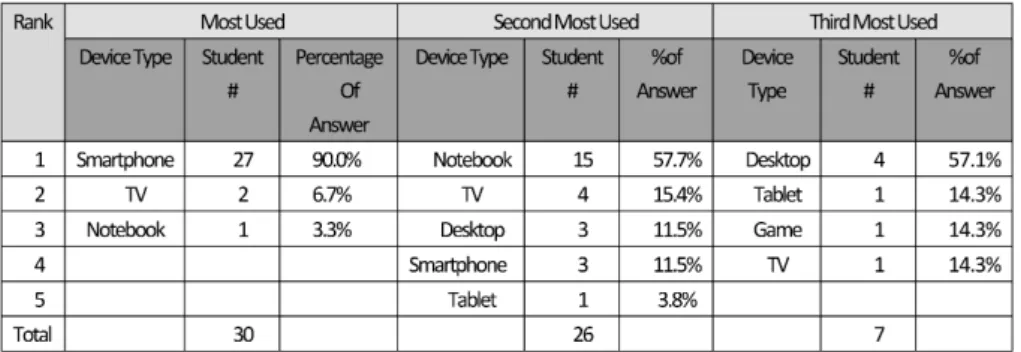
They were then asked to rank them in terms of most used to least used (See Figure 3). While seven students chose not to answer this question, it is clear that students in the class use their smartphones more than any other device. While less than half the class
Figure 3: Self-Reported frequency of use of electronic devices
reported, they use their notebook computers. The answers also lead us to infer that the students rely on their smartphones as a primary electronic device.
Indicated by the number of students who listed multiple device use decreases for second and third most used.
Students were also asked to report on the number of hours they used devices each week. The average reported for Smartphone use was 10 hours per week.
Notebooks followed this at 3.4 hours per week, then tablets at 3 hours, TV at 2.1 hours, Desktop at 1.4 hours, and lastly gaming for 30 minutes a week.
Experience with Google Classroom
Google Classroom was the second most frequently used application in the course. However, this was likely because the app was required for accessing some of the course documents. Students reported a total use of 16.92 hours per week (an average of 0.96 hours per student). However, after receiving the initial class documents, many students reportedly did not use Google Classroom at all. The result follows the observations of Iftakahar (2016) who stressed the importance of being explicit about student responsibilities with the software. Links were posted each week regarding the course assignments which created some confusion about where to submit the assignments. Although students were told to submit assignments via the Write & Improve application, one student expressed frustration. The student explained that because the tasks were posted on Google Classroom, they thought that they were to be submitted there too. Ten students reported that they planned to continue using Google Classroom after the course finished.
Experiences with Memrise
Because use of the Memrise application was optional for the course, only nine students opted to use it. The use of the app was incentivized by offering the students with the top 3 point scores gift cards with a value of 5,000, 3,000, and 1,500 Japanese
Yen. A vocabulary module was created by the teacher, including all 187 target vocabulary words from the textbook. The words were given Japanese translations, and the students were asked to match the English words to their Japanese translations.
One student wrote 「英語を覚えるために日本語訳の 追加をすると英文にたいする意味が理解しやすくな るため,早く英語を覚えることができるようになる と 思 い ま し た。」,“The added Japanese translation made it easier to understand the English meanings of the words, and I think that was why I was able to remember them.”
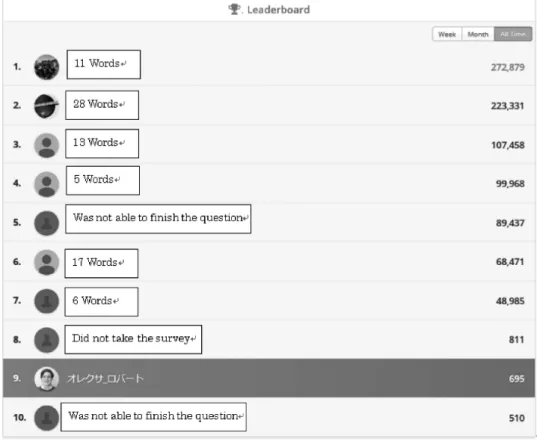
The Memrise app awards students a maximum of 150 points for each word correctly identified, then gives bonus points for speed and accuracy. If a word is missed during a study session, then students will receive points if they can guess the meaning correctly. When the prizes were awarded at the end of the course, the results can be viewed. A screenshot of students’ total scores is shown in Figure 4.
Identifying properties have been removed to uphold standards of protecting student privacy.
All nine students who participated in Memrise said that they would continue to use the app after the class ended. However, revisiting their profiles, one year after the class ended, only 5 of the students’
profiles showed evidence that they had decided to continue using the service. Also, those whose profiles showed evidence of continuation showed nowhere near as much use as they had shown when the app was incentivized for the classroom. The students who continued showed an average point increase of 7,400 points per student with the lowest point increase of 2,000 points and highest being 20,000.
Also, the students did not necessarily earn those point through studying English. As the student with the highest point increase over the year had added a course, suggesting they had also been using the application for studying Italian.
Students were given 12 quizzes during the
current events English course that covered the 187
target words. The first question on the survey used
to collect data for this case study asks students to write down all of the vocabulary words that they remember from those quizzes. Only 18 of the students were able to answer this question.
The maximum word recall was 28 words, and the minimum was one word. Of the nine students who opted to use Memrise, the average recall was 13.33 words while the average from those who did not use Memrise was only 4.25 words. The individual words recalled by each participant is shown next to their ranking in Figure 4.
Students who used the app showed the ability to recall more words in a short period than those who did not use the app. However, the number of words each student was able to remember was not necessarily related to their point totals. For instance, both the third and sixth highest-ranked users were able to recall more words than the student with the highest point total. If point totals represent time spent using the app, these users recalled more words, spending an estimated 50-75% less time with the app.
Experiences with Cambridge Write & Improve
Students spent the most time with Cambridge Write and Improve, reporting a collective 36.33 hours of use (1.4 hours per week on average). Because Write and Improve was necessary for the final project, the time spent was likely due to the importance of the final project in passing the class.
Writing was not explicitly taught during class time.
Students were expected to learn how to improve their second language writing solely through the use of the app. The teacher was available via Google Classroom and also for in-person consultation when students had issues with writing. Although the intention was for students to reflect on the content and to use the vocab words in the writing prompts, it became clear that students would have benefited from more instruction and writing practice given in class.
Many of the students reported in person that they found the Write & Improve assignments to be difficult and not only because of a lack of writing skill.
Figure 4: Screenshot showing the students final Memrise score
Students’ general comments could be summarized in the following feedback from one student. 「私は機械
(スマートフォン)を使うのが苦手なので,最初の方,
Write & Improveの自分のサイトまでたどり着くこと さえ難しかったです。そして,毎回Write & Improve のサイトを開いて,いつもはやらないスマホで英語を 打つという作業はとても大変で,時間がとてもかか りました。なので,私は課題がスマホで提出するの ではなく,紙媒体で提出するやり方が良かったと思 います」。Translated from Japanese into English, “I am not good at using machines (smartphones), so it was difficult even to access Write & Improve at first.
Also, every time I opened the Write & Improve site, the task of typing in English with a smartphone was arduous, and it took so much time to do. So, I think that it is better to submit tasks using a paper medium rather than submit them with a smartphone”.
Students were mostly required to complete the assignments outside of class. As was indicated by student report of desktop and notebook use, students were not in the habit of using desktop or notebook PCs as much as smartphones. The Write & Improve web app may have been better received by students if everyone was in the habit of using notebooks and computers. Another overlooked, and unexpected matter arose from student feedback.
There are two main input methods for inputting Japanese characters on smartphones — one for Kana input and the other for Romanized input.
Many students use the 「9マス」“kyu-masu” input interface. When students press on a specific Japanese kana, corresponding kana appear in vertical or horizontal boxes. The user swipes left or right to
select the desired character. The available characters are shown on a 12 button keyboard. Phones with a spell check feature will even suggest English words based on Kana selections. Using kyu-masu, students can write in English using a familiar method.
However, the input can be quite tedious, and students forego learning how to spell vocabulary words.
Students who chose to use the Romanized input may not have been used to it. Therefore, they needed to learn a different method of texting, creating a significant learning curve and restraint for students to complete the assignments.
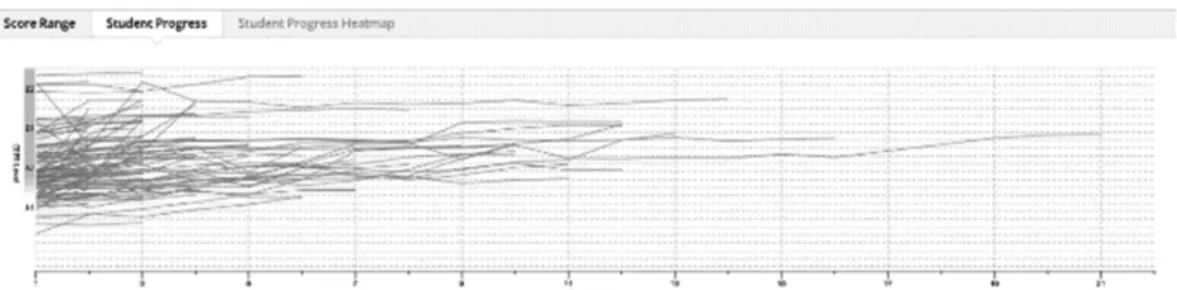
One positive outcome of the use of Write and Improve was that students seem to have become aware of their current CEFR levels when for English writing. Figure 5 is a screenshot from the Write &
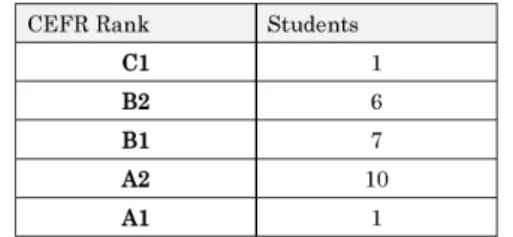
Improve app that shows student progress. Figure 6 shows students’ self-reported CEFR levels. Students were not able to access their smartphones during the survey. So, it is most likely that they were recalling their CEFR level from memory based on experience with the Write & Improve web application.
Thirteen students reported they would continue using the app, but it could not be confirmed at the time of writing if they had or not.
The left side of the graph in Figure 5 shows CEFR score range beginning with A1 at the bottom and ascending to C1 at the top. The bottom line on the graph indicates the number of times a student tried to improve their writing based on feedback. As can be seen from the graph, the concentration of student writing primarily reflects writing at an A2/B1 level.
Figure 5: Screenshot of the graph representing student scores from the Write & Improve
However, the graph does not support the students who gave themselves a B2/C1 rating, as shown in figure 6.
Figure 6: Students self-reported CEFR score 5.Conclusion
Terms like “thumb culture” and “digital natives”
have been used to describe Japanese youth attuned to using their smartphones (Takahashi, 2011). As students in this case study reported, they used smartphones the most and for more extended amounts of time than any other digital hardware.
However, these same students were not as open to accepting web applications for learning English into their lives on these devices.
Although students largely succeeded in using the apps, there were several unexpected constraints.
First of all, for the Write and Improve application, students had to relearn how to text in English on their phones for writing. Then, less than half of the students in the course listed notebook computers as their second most used digital hardware. Based on these self-reports, even if the students decided to use stationary computers for writing, the majority were not in the habit of doing so. This likely caused another barrier to entry leading a few students to report that they preferred paper submissions to digital ones.
The results of this study support the claim that the Memrise application is beneficial for vocabulary acquisition and recall. However, the students who reported to understand the benefits did not continue to use the app after the class ended. For future studies, it would be beneficial to compare groups in which the app was incentivized with those where it was not. The incentivization of Memrise may have
also affected the outcome and efficacy of use.
All too often, teachers decide to introduce new educational technology to students before we understand how they will react to it. Sometimes this can result in what tech guru John Carmack has called
“poisoning the well” (David, 2015). In other words, students’ negative experiences with technology will hinder consecutive experiences. A major takeaway from this study was the need to pre-assess student access to hardware as well as their familiarity with using web-apps. Many of the student hang-ups with the apps could have been anticipated and avoided if this was done.
The student numbers from this case study are too small to generalize to other groups of Japanese University students. However, the findings provide information regarding the potential benefits and drawbacks when introducing web apps. Above all, regardless of the features that web apps offer, the teacher still needs to play an active role in making sure students know how to use the hardware and the software. Assessing the human factors, such as expected engagement and benefits students will receive from meeting the task can help to ensure a more effective introduction of web-applications for learning English in Japan.
References