SURVEY PAPER
A Survey on Thai Input Methods on Smartphones
Cholwich NATTEE†a),Member
SUMMARY Smartphones have become vital devices in the current on- the-go Thai culture. Typically, virtual keyboards serve as tools for text input on smartphones. Due to the limited screen area and the large number of Thai characters, the size of each button on the keyboard is quite small.
This leads to character mistyping and low typing speed. In this paper, we present a typical framework of a Thai Input Method on smartphones which includes four processes; Character Candidate Generation, Word Candidate Generation, Word Candidate Display, and Model Update. This framework not only works with Thai, it works with other letter-based languages as well. We also review virtual keyboards and techniques currently used and available for Thai text input.
key words: Thai input method, virtual keyboard, smartphones, android keyboard, iOS keyboard, Ketmanee layout, Thai keyboard, mobile keyboard
1. Introduction
Recently, smartphones have, undoubtedly, become popular among mobile phone users. This is because of their func- tionality and computing power. Unfortunately, most of the smartphones available on the market have not been equipped with physical keyboards. Text input on smartphones is typ- ically performed via a virtual keyboard, which is a software component displaying a group of key buttons arranged in the similar way to the commonly-used keyboard. A char- acter can be input by touching on the button corresponding to the particular character. However, the small size of the touchscreen makes the size of each button small. It is gen- erally smaller than the size of most users’ finger tip. This then causes difficulty in choosing characters, and typically results in errors or typos. Moreover, the virtuality of the keyboard does not provide users the feeling of touch. This is also another cause of errors or typos.
Various techniques have been proposed to improve the performance of the virtual keyboards in term of usability, accuracy, and typing speed. Word completiontechniques andnext word predictiontechniques are among those. Word completion techniques use typically a list of known words and the approximate string matching algorithm to generate a list of word candidates from the string input. Users can then choose their preferred words from the list. This helps reduce the number of input keystrokes and correct some mistyped characters. The next word prediction techniques generally utilize the word usage statistics and some language models
Manuscript received December 17, 2013.
Manuscript revised March 28, 2014.
†The author is with Sirindhorn International Institute of Tech- nology, Thammasat University, Thailand.
a) E-mail: [email protected] DOI: 10.1587/transinf.2013EDR0008
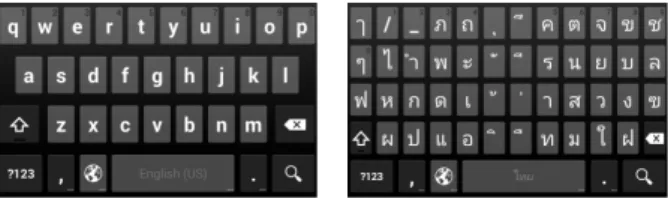
Fig. 1 English and Thai virtual keyboards.
to generate a list of the possible next words. This similarly improves the performance in terms of typing speed and us- ability.
The Thai writing system forms words by using 44 con- sonants (aka consonant letters in some literatures), 21 vow- els (aka vowel letters), and a number of punctuation marks.
Thai text can be input via a physical keyboard in a similar manner to inputting English text. However, two letters are assigned to a button in the keyboard due to the larger num- ber of letters. Thus, using virtual keyboards without addi- tional converter software, as in Japanese or Chinese, is the common technique to input Thai text on smartphones. In fact, virtual keyboards in the Thai language are used in the same manner as in physical keyboards. Each button, which can be thought of as group of pixels, is assigned to specific letters. Once a user presses on a particular button, a smart- phone will recognize it as a certain character without addi- tional processes. Nonetheless, using virtual keyboards for inputting Thai text still results in mistyped characters and is not very user-friendly. This, in large part, is due to the nature of the Thai language. As previously mentioned, the number of Thai characters is more than double of those in the English language. This causes more buttons on the key- board layout, in comparison to a standard English virtual keyboard. Consequently, this results in the smaller buttons which makes it less convenient for users to input Thai text.
Figure 1 shows the virtual keyboard for inputting English and Thai text. A significant difference in terms of the num- ber and size of buttons can easily be seen here.
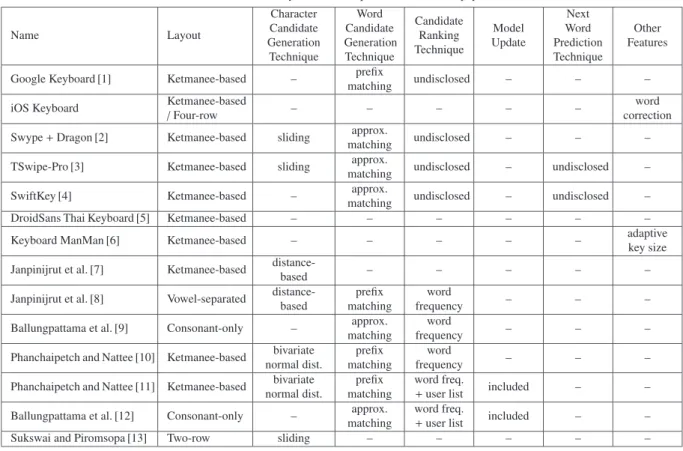
Recently, a number of techniques have been proposed to improve the performance of Thai virtual keyboards and their input methods. Some of the techniques are designed to fit the characteristics of the Thai writing system. Table 1 summarizes Thai virtual keyboards currently available as well as input methods. We compare them according to their features and techniques used to improve the text inputting performance. Some of them are proprietary software where the techniques are not revealed. We thus mark their features Copyright c2014 The Institute of Electronics, Information and Communication Engineers
Table 1 Summary of the techniques reviewed in this paper.
Name Layout
Character Candidate Generation Technique
Word Candidate Generation Technique
Candidate Ranking Technique
Model Update
Next Word Prediction Technique
Other Features
Google Keyboard [1] Ketmanee-based – prefix
matching undisclosed – – –
iOS Keyboard Ketmanee-based
/Four-row – – – – – word
correction Swype+Dragon [2] Ketmanee-based sliding approx.
matching undisclosed – – –
TSwipe-Pro [3] Ketmanee-based sliding approx.
matching undisclosed – undisclosed –
SwiftKey [4] Ketmanee-based – approx.
matching undisclosed – undisclosed –
DroidSans Thai Keyboard [5] Ketmanee-based – – – – – –
Keyboard ManMan [6] Ketmanee-based – – – – – adaptive
key size Janpinijrut et al. [7] Ketmanee-based distance-
based – – – – –
Janpinijrut et al. [8] Vowel-separated distance- based
prefix matching
word
frequency – – –
Ballungpattama et al. [9] Consonant-only – approx.
matching
word
frequency – – –
Phanchaipetch and Nattee [10] Ketmanee-based bivariate normal dist.
prefix matching
word
frequency – – –
Phanchaipetch and Nattee [11] Ketmanee-based bivariate normal dist.
prefix matching
word freq.
+user list included – –
Ballungpattama et al. [12] Consonant-only – approx.
matching
word freq.
+user list included – –
Sukswai and Piromsopa [13] Two-row sliding – – – – –
based on our observations. In this paper, we will review a number of Thai input methods on smartphones. This in- cludes the keyboard layouts for Thai characters, as well as the techniques to improve performance.
2. Thai Keyboard Layouts on Smartphones
We first review a number of keyboard layouts used for Thai input methods on smartphones. Typically, we can catego- rize the layouts into two categories, i.e. the Ketmanee-based layout and the other layout.
2.1 Ketmanee-Based Layouts
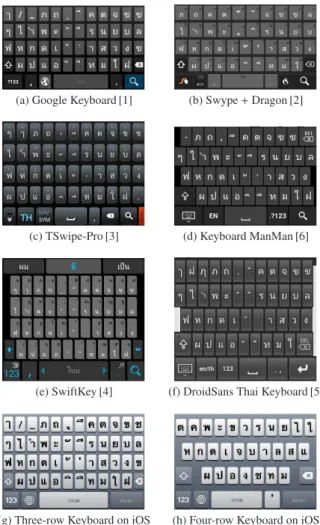
The Ketmanee keyboard layout is the standard Thai layout for computers announced by the Thai Industrial Standard In- stitute (TISI) [14]. All the physical keyboards sold in Thai- land are based on this layout. Most Thai input methods on smartphones are designed based on this layout since it sig- nificantly reduces the period of time required by the users to get familiar with the layout. Some input methods use variants of the Ketmanee layout to improve their usabilities by removing some rarely-used buttons. Figure 2 shows the Thai input methods using the variants of Ketmanee as their keyboard layouts. The input methods shown in subfigures (a) – (f) are designed for Android OS. The one in subfigure (g) is the standard keyboard provided by Apple iOS.
Here are the issues that we can observe from Ketmanee-based layouts:
1. All the layouts arrange the keys into five rows based on the original Ketmanee layout. This is different from the Qwerty layouts for English characters where the alpha- bet characters can be fit in four rows, and the top row is dedicated for the numeric and punctuation keys. Ac- cording to this reason, Thai keyboard layouts require more space of the screen to display the keys. Some layout designers handle this problem by decreasing the height of the keys to make them fit in the same height as the Qwerty layout. This has resulted in smaller key buttons. Some designers decide to add an additional row to the Qwerty layout and place the numeric and punctuation keys in this row.
2. Most of the layouts place the ‘backspace’ key at the fourth row of the layout. This is different from the original Ketmanee layout where the ‘backspace’ key is placed in the first row. The main reason behind this change is the width of the keys. The original Ketma- nee layout was designed to place the largest number of keys in the first row. This results in the smaller width of each key. To relax this problem, the designers of many layouts move the ‘backspace’ key to the fourth row where the number of keys is fewer.
2.2 Other Layouts
Since the Ketmanee layout was originally designed for me- chanical typewriters, many limitations of virtual keyboard
(a) Google Keyboard [1] (b) Swype+Dragon [2]
(c) TSwipe-Pro [3] (d) Keyboard ManMan [6]
(e) SwiftKey [4] (f) DroidSans Thai Keyboard [5]
(g) Three-row Keyboard on iOS (h) Four-row Keyboard on iOS Fig. 2 Thai input methods based on the Ketmanee layout.
were not considered at the time of the creation of Ketmanee.
A number of Thai keyboard layouts have been proposed for smartphones to improve the performance in various aspects.
However, users may not be familiar with the newly-designed keyboard layouts. It may take some time for users to remem- ber the positions of the characters and utilize the new layout effectively.
Four-row Thai Keyboard on iOSwas designed to make Thai characters arranged in four rows, similar to the Qw- erty layout for English, as shown in Fig. 2 (h). It is done by removing a number of vowels and punctuation marks from the layout. They are grouped together and represented by one key on the layout. A user can choose those vowels and punctuation marks by pressing on the key. The keyboard will show a dialog box that allows the user to choose a char- acter. Moreover, a number of infrequently-used letters are moved from the main layout to the shifted layout to reduce the number of buttons.
Conslideis a Thai input method proposed by Sukswai and Piromsopa [13]. It is designed to allocate less space on the touchscreen by providing two types of buttons, i.e., presskey and slidekey. A presskey acts the same as an ordi- nary button as in the other virtual keyboards. A slidekey dis- plays up to 6 characters on the button. As hinted by its name,
Fig. 3 Conslide keyboard main layout (Source: [13]).
Fig. 4 Sliding directions for inputting a character in Conslide.
Fig. 5 An example of Thai phrases where the characters in gray are con- sonants and the rest are vowels.
Fig. 6 Vowel-separated keyboard (Source: [8]).
the user can choose to input a character on the slidekey by sliding. The direction is detected by Conslide and a charac- ter is selected according to the direction. Therefore, the lay- out for Conslide requires only two rows of buttons as shown in Figs. 3 and 4.
Conslide has introduced a number of new ideas to im- prove Thai input methods. However, its performance in terms of typing speed may not be the best, compared to the others. Conslide provides a layout that is completely differ- ent from the existing Thai layout. Users may need a period of time to get used to the unique layout.
Vowel-separated Thai keyboard layout is a Thai key- board layout and input method proposed by Janpinijrut et al. [8]. The layout was designed based on the character- istics of the Thai writing system. Figure 5 shows a Thai phrase where the consonants are shown in gray, the vow- els and punctuation marks are in black. It can be seen that the vowels and punctuation marks can appear on the left of, the right of, above, or below a consonant. The layout then arranges those vowels and punctuation marks based on their relative positions to the consonant. The consonants are arranged in the central part of the layout according to the Ketmanee layout. Figure 6 shows the layout of this virtual
keyboard. Separating the consonants from the vowels and punctuation marks improves the usability and convenience of the keyboard, as all the Thai native speakers know where to find the vowels and punctuation marks. Originally, this keyboard layout was designed for people with disabilities.
From their experiments, the movement of fingers required is decreased, compared to Ketmanee layout keyboards. How- ever, users may need a short period of time to get familiar with it.
Consonant-only Thai keyboard layoutwas proposed by Ballungpattama et al. [9], [12]. This layout consists of only the Thai consonants. This drastically reduces the number of keys on the layout. It results in bigger button size and
Fig. 7 Consonant-only Thai keyboard (Source: [12]).
Fig. 8 The framework of Thai input method on smartphones.
more convenience for users, to select the preferred charac- ters. However, the layout cannot be used to input new words since any vowels are not included in the layout. A technique to generate a list of candidate words has been proposed to- gether with the layout. We will review the technique in the next section. Figure 7 shows the consonant-only Thai key- board layout.
3. Techniques for Improving Thai Text Input Methods Several techniques have been proposed to improve the per- formance of the Thai keyboard in various aspects. Combin- ing these techniques with the Thai virtual keyboard, we can consider each Thai virtual keyboard as an input method.
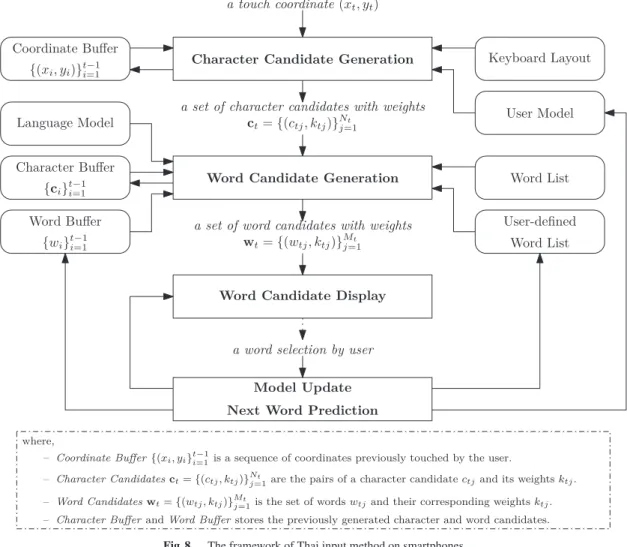
Before reviewing available techniques, we need to un- derstand the overall framework for an input method. Fig- ure 8 shows the framework of Thai input methods on smart- phones. This framework conforms to the multi-channel ar- chitecture for sokgraph recognition proposed by Kristensson and Zhai [15]. With this framework, we can review available techniques and identify where in the framework a particular technique is located. Hopefully this will help with the fu- ture development of the virtual keyboards and input method.
Note here that this framework also works with English and other letter-based languages as well.
The Framework of Thai Input Methods
Here are the descriptions of the processes in the framework in the order that they are used.
Character Candidate Generationtransforms the coor- dinate of a touch point into a character based on the key- board layout. This can be easily done by checking the boundaries of buttons on the layout. Then, a character can be generated by comparing the touch point and the bound- aries. A number of techniques have been proposed to gen- erate a set of character candidates instead of one character candidate from a touch point. They improve the flexibility and accuracy of the input method.
Word Candidate Generation generates a list of words from the predefined word list and the sequence of character candidates. These word candidates will allow users to save a number of keystrokes. Instead of touching all the characters in the word, the users can input a number of characters and choose one word from the word candidate list. The tech- nique is typically called “word completion”.
Word Candidate Displayranks the generated word can- didates using a number of criteria, and displays them to the user. A user interface is needed to make it convenient for the user to select his/her preferred word. The criteria used in the candidate ranking typically combine the user’s behav- iors and the word candidate’s features.
Model Updateadjusts the weighting factors and param- eters in the user model to reflect the characteristics and the behaviors of the users. This process improves the perfor- mance of the input method in terms of prediction accuracy since the model is geared to the particular user. This update can be done in all the processes in the input method. This process may include the “next word prediction” that gen- erates a list of word candidates from the previously input words.
4. Character Candidate Generation Techniques The character candidate generation is a process that trans- forms an (x, y) coordinate of the touch point on the keyboard layout to a character. It can be written in form of a function as:
CharCandidateGen:P → C (1)
wherePis a set of touch points, andCis a set of characters.
However, the size of buttons typically prevents a user from effectively selecting the preferred character. It is com- paratively small because of the screen size and the num- ber of characters. To improve the performance, a number of techniques have been proposed to efficiently transform a given touch point into a character candidate. We will review them in this section.
Button Size Adjustment is the technique proposed in Keyboard ManMan [6]. This technique adjusts the size of
buttons based on the statistics related to the characters. The buttons with a high chance to be the next characters are ad- justed to be larger than the other keys. This makes it easier for a user to select those characters. The size of the but- tons can be adjusted based on a statistical language model, such as the character n-gram model. However, this tech- nique may cause a negative effect when the user intends to type a character different from the language model, for ex- ample, inputting a proper noun.
Distance-based Candidate Generationis the technique used in Janpinijrut et al. [7]. Instead of generating a charac- ter from a given touch point, this technique generates a set of character candidates for the given touch point. Thus, the above function for character candidate generation should be rewritten as:
CharCandidateGen:P →2C (2)
whereCis a set of character candidates, and 2Cdenotes the power set of C. A set of character candidates is based on the distance between the touch point and the buttons around the touch point. A button with the distance to the touch point less than a predefined radius is selected as a character candidate. Then, the generated set of character candidates can be used to construct a list of word candidates.
A number of experiments were conducted to get an ap- propriate distance value as well as the center of each button.
The results showed that users tended to touch lower from the center of the buttons so that they can see the button la- bels before touching. Nevertheless, the technique models that the touch points are distributed as a circle of the prede- fined radius around the center of the button. This may not match the actual behaviors of users.
Bivariate Normal Distribution-based Candidate Gen- erationis used in Phanchaipetch and Nattee [10]. The tech- nique applies the bivariate normal distribution to model the (x, y) coordinates for each individual button. Thus, each but- ton on the keyboard layout can be represented as five param- eters of the bivariate distribution i.e.μx, μy, σx, σy,andσxy. From a given touch coordinate, the probability that the co- ordinate belongs to a particular button can be calculated. A number of character candidates can, then, be generated by ranking the probability values:
P(c|p)= 1
(2π)2|Σ|exp
−1
2(p−µ)TΣ−1(p−µ)
(3)
wherecis a character candidate,p=[xy]T is a touch point vector,µ=[μxμy]T is a mean vector of the coordinates on xandyaxes, andΣis covariance matrix of the coordinates i.e.:
Σ=
σ2x ρσxσy ρσxσy σ2y
Here,ρrepresents a correlation betweenxandy. We also haveσx>0 andσy>0.
A number of experiments have been conducted based
on the usage data collected from real-world users. The re- sults showed that the candidate generation based on bivari- ate normal distribution performed more accurately than the technique based on distance. This is because the bivariate normal distribution is more flexible and capable of captur- ing the behaviors of the users.
Candidate Generation using sliding input is a tech- nique used in a number of Thai input methods including Swype [2] and TSwipe-Pro [3]. They allow a user to input Thai text by sliding a finger on the Ketmanee layout to form a word. Both methods are commercial and proprietary soft- ware. Thus, the techniques used by them are not disclosed.
We can only observe their advantages and disadvantages by observing their functions and behaviors. From our obser- vations, the sliding technique improves the text input speed since the user can move his/her finger through a sequence of intended characters. Then, a list of word candidates can be built from the sliding trail using the pre-collected word list.
Discussion
TheButton Size Adjustment, used in Keyboard ManMan [6], technique provides a positive effect in terms of convenience when it predicts a high probability for the character the user intends to input. It may become a negative effect when the user wants to input an uncommon or unknown word.
The presented Distance-based Candidate Generation and Bivariate Normal Distribution- based Candidate Genera- tion, presented in [7] and [10], techniques generate multiple character candidates from a touch point. They increase the chance that the intended character is chosen as one of the candidates. However, too many candidates may confuse the user. The models for generating character candidates require more detailed study to provide a higher accuracy.
The candidate generation using sliding input, used in Swype [2] and TSwipe-Pro [3], allows faster word input since it does not require up and down movements. More- over, one input method can be developed to support both sliding and touch inputs. This sliding input technique is a promising method for future development as suggested in [16].
5. Word Candidate Generation
Word candidate generation is a process that generates a list of word candidates from a number of character candidates.
It can be defined in form of a function as:
WordCandidateGen:S →2W (4)
whereSis a set of character sequences, andWis a set of known words.
A list of word candidates can be generated by matching the character sequence in the character buffer against words in the known word list, or applying a language model to construct a list of possible words. The retrieved words are ranked based on a ranking technique before showing to the user. Here are the techniques proposed for constructing a
Fig. 9 Word candidate generation in [10].
word list in Thai input methods.
Generating word candidates based on character n- gram modelis a technique used in [10]. A word candidate is formed in this technique by connecting the character can- didates in the Character Buffer. Figure 9 shows how the word candidates are constructed. Here,xt, ytdenotes thetth touch coordinate,ctiis theith character candidate from the tth coordinate. A word candidate is generated from select- ing one character candidate from each touch coordinate in the buffer. These word candidates are evaluated and filtered by the charactern-gram model. For example, a character tri- gram model can be used to evaluate a word candidate, i.e.:
P(c1c2. . .cn)=
n
i=1
P(ci|ci−2ci−1) (5) wherec1c2. . .cnrepresents a word candidate forming from a sequence of characters,ciis theith character in the word candidate, andP(ci|ci−2ci−1) is the trigram probability of the ith character.
Generating word candidates based on known word list is an approach that generates a list of candidates from a se- quence of character candidates and a list of known words.
This approach is performed by applying an approximate string matching algorithm [17] to select a list of words sim- ilar to the input sequence of characters.
This approach has been applied in various Thai input methods since it helps reduce the number of keystrokes to input a word. Janpinijrut et al. [8] applied this approach with the vowel-separated keyboard layout by using a sequence of character candidates as a prefix to match the words in the known word list. The experimental results have suggested that the approach is able to reduce the number of keystrokes required to input a word.
Generating word candidates from only consonantsis a technique proposed by Ballungpattama et al [9], [12] for a consonant-only Thai input method. This technique aims to generate a list of words from a sequence of Thai consonants without any vowels. It is done by applying the Boolean re- trieval technique. The known word list is kept in the system using a pair of consonants as the index. Each pair is com- posed of a consonant from the first consonant in a word, and
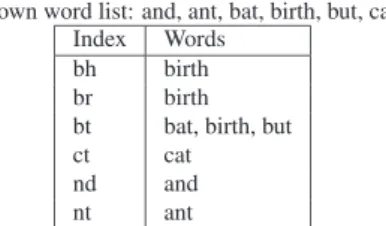
Known word list: and, ant, bat, birth, but, cat Index Words
bh birth
br birth
bt bat, birth, but
ct cat
nd and
nt ant
Fig. 10 Example of the data structure used in consonant-only keyboard.
a consonant in that word. Figure 10 shows an example of a small word list.
Given a sequence of consonants, a list of word candi- dates can be retrieved by (1) forming a set of indexes from the input sequence, (2) retrieving lists of words from the set of indexes, and, (3) intersecting the retrieved lists.
The technique is able to generate a list of word candi- dates from a sequence of consonants. The input sequence needs to start with the first consonant in the intended word, and is followed by a number of consonants in the word in any order. The technique allows users to input words in the form of acronyms/abbreviations since the users may decide to omit some consonants. However, unknown words can- not be handled by the technique since the keyboard does not provide all the available Thai characters.
Discussion
Generating word candidates using a word list, used in [8], [9], is able to construct a list of meaningful words for users.
It reduces the number of touchs required to complete a word.
However, this technique cannot deal well with unknown words such as proper names. Generating word candidates from consonant only[9], [12] reduces the number of buttons on the layout. The technique has a severe disadvantage that the user cannot input any unknown word.Generating word candidates using a statistical language model (e.g. n-gram model)[10] provides an advantage on generating unknown word candidates. Nevertheless, the candidates may not be meaningful words. Combining both techniques will utilize the advantages from both of them. Moreover, a language model of meaningful unknown words should be studied in the future in order to generate more appropriate word can- didates. This can be done by analyzing the structure of Thai proper nouns.
6. Word Candidate Ranking
After the word candidate generation process, a list of word candidates is constructed. This list will then be shown to a user to select the preferred word. However, due to the num- ber of candidates and the limited space on the touch screen, the candidates must be ranked so that the most probable can- didates are displayed to the user. Here are the criteria used to rank the word candidates:
Word frequency from standard corpusis a basic feature of word candidates that can be obtained from a corpus. A word that is frequently used in the corpus is assumed to be
used frequently in the smartphones. Thus, the word candi- dates with high frequency are highly ranked. This criteria is used in various input methods [8]–[10]. However, the cri- terion has a disadvantage on dealing with unknown words since they cannot be found in the standard corpus.
Weighted word frequency from user word list[12] im- proves the disadvantage of the word frequency from the cor- pus by collecting all the words inputted by the user. Then, the word frequency from the standard corpus and the fre- quency from the user word list are combined and used as a ranking criterion. Thus, the weighted word frequency fw can be computed as:
fw(w)=αfc(w)+(1−α)fu(w) (6) wherewrepresents a word candidate,αis a weighting factor with 0.0≤α≤1.0, fcand fuare the word frequency in the standard corpus and the user-defined word list, respectively.
Edit distancerepresents the difference between the in- put string and a word candidate. By using this criterion, the word candidate that is more similar to the input string is highly ranked. This criterion is helpful for input methods that do not require the user to input the exact string e.g. [12].
Discussion
Ranking word candidates usingword frequency from stan- dard corpus, used in [8]–[10], has a disadvantage that it is unable to deal with unknown words. Utilizingweighted word frequency from user word list, used in [12], provides an advantage on dealing with both known and unknown words since the user is allowed to define his/her own words. Edit distance[12] can also be applied with the other two tech- niques in order to emphasize inputting the exact string.
To improve the performance of the candidate ranking, the statistical data should reflect the actual word usage on smartphones. However, all the Thai standard corpora are now collected from written documents. The statistics ob- tained those corpora may not be a good representation of the conversational language typically used in smartphones.
A corpus from informal language usage is necessary to im- prove the candidate ranking.
7. Model Update and Personalization
To improve the performance of the input methods, a number of input methods use feedback from the user to update the candidate generation model, as well as to shape the param- eters in the model to fit the characteristics and behaviors of the user. In this section, we will review a technique proposed to provide the personalization.
Phanchaipetch and Nattee [11] have proposed the adap- tive bivariate normal distribution technique to personalize the character candidate generation. In this technique, the character candidates are initially generated from the bi- variate normal distributions using the pre-collected data as shown in Eq. 3. Each distribution can be represented by a
mean vectorµ, and a covariance matrixΣ. A word candi- date is generated from matching the combination of char- acter candidates with the prefix of words in the word list.
When the user inputs a number of characters and selects a word candidate, the prefix of the selected word is consid- ered the sequence of characters the user intended to input.
We can then match each character in the prefix with a touch coordinate. This feedback can be used to recalculate the pa- rameters of the bivariate normal distribution. This results in parameters that more fit the behavior of the user. Thus, a more accurate set of character candidates can be generated.
Discussion
The adaptive bivariate normal distribution technique[11]
adjusts the bivariate parameters when the user selects one of the candidates. Utilizing feedback from the user will al- low an input method to adjust the models to suit the user’s characteristics. However, the process needs to be done with- out disturbing the usability of the input method. Moreover, it should be able to efficiently handle errors that may cause from the user, for example, updating the models when the user chose an unintended word from the candidates. This is still a challenge in the user interface design.
8. Conclusion
We have reviewed a number of Thai input methods and vir- tual keyboards and located them in the framework for a Thai Input Method on Smartphones. However, the number of techniques proposed is still low, there is more room for im- provement for researchers and developers. We hope that our work will serve as a tool for future development of Thai in- put methods and virtual keyboards.
Acknowledgements
This research has been supported by Thammasat University Research Fund. The author would also like to thank Dr.
Nirattaya Khamsemanan for her support and many helpful suggestions. Lastly the author would like to thank the re- viewers for all the useful suggestions.
References
[1] Google Inc., “Google Keyboard,” July 2013.
http://www.google.com/mobile/android/
[2] Nuance Communications Inc., “Swype: Type Fast, Swype Faster,”
July 2013. http://www.swype.com
[3] K. Charoenpoldee, “TSwipe-Pro: The First Thailand Swipe On- Screen Keyboard,” July 2013. http://www.tswipe.com/
[4] TouchType Ltd., “SwiftKey,” July 2013. http://www.swiftkey.net/en/ [5] DroidSans.com, “Droid sans thai keyboard (in Thai),” July 2013.
http://droidsans.com/droidsans-thai-keyboard-1.1.0 [6] N. Piyapramote, “Keyboard ManMan (in Thai),” July 2013.
http://nattster.siamdev.net/2011/01/keyboard-manman/
[7] S. Janpinijrut, C. Nattee, and P. Kayasith, “An approach for improv- ing Thai text entry on touch screen mobile phones based on distance and statistical language model,” Proc. 5th International Conference
on Knowledge, Information and Creativity Support Systems (KICSS 2010), pp.44–55, Chiang Mai, Thailand, Nov. 2010.
[8] S. Janpinijrut, P. Kayasith, C. Nattee, and M. Okumura, “Vowel- separated layout: A Thai touchscreen keyboard for people with hand movement disability,” Proc. 5th International Conference on Rehabilitation Engineering & Assistive Technology, pp.10:1–10:4, Bangkok, Thailand, 2011.
[9] P. Ballungpattama, C. Nattee, and T. Theeramunkong, “A consonant- only Thai input method,” Proc. 6th International Conference on Knowledge, Information and Creativity Support Systems (KICSS 2011), pp.97–103, Beijing, China, Oct. 2011.
[10] T. Phanchaipetch and C. Nattee, “An approach for improving Thai text entry on touch screen mobile devices based on bivariate nor- mal distribution and probabilistic language model,” Proc. 4th Asian Conference on Intelligent Information and Data Systems, pp.187–
196, Kaohsiung, Taiwan, March 2012.
[11] T. Phanchaipetch and C. Nattee, “An approach for improving Thai text entry on touch screen mobile devices based on adaptive bivari- ate normal distribution and probabilistic language model,” Proc. 3th International Conference on Information and Communication Tech- nology for Embedded System (ICICTES2012), Bangkok, Thailand, March 2012. [CDROM].
[12] P. Ballungpattama, P. Tungthamthiti, and C. Nattee, “A personalized Thai consonant-only input method for smartphones,” Proc. 26th An- nual Conference of the Japanese Society for Artificial Intelligence, Yamaguchi, Japan, June 2012.
[13] S. Sukswai and K. Piromsopa, “Conslide: A Thai soft keyboard for mobile text input,” Proc. 8th International Joint Conference on Computer Science and Software Engineering (JCSSE), pp.193–198, Nakhon Pathom, Thailand, May 2011.
[14] T. Koanantakool, “The Keyboard Layouts and Input Method of the Thai Language,” Proc. Symposium on Natural Language Process- ing, Thailand, 1993. http://www.nectec.or.th/it-standards/
keyboard layout/thai-key.html
[15] P.O. Kristensson and S. Zhai, “SHARK2: A Large Vocabulary Shorthand Writing System for Pen-based Computers,” Proceedings of the 17th Annual ACM Symposium on User Interface Software and Technology (UIST ’04), New Mexico, USA, Oct. 2004.
[16] S. Zhai and P.O. Kristensson, “The word-gesture keyboard: Reimag- ining keyboard interaction,” Commun. ACM, vol.55, no.9, pp.91–
101, Sept. 2012.
[17] G. Navarro, “A guided tour to approximate string matching,” ACM Computing Surveys, vol.33, pp.31–88, 2001.
Cholwich Nattee graduated BEng in Com- puter Engineering from Chulalongkorn Univer- sity, Thailand. He received both MEng and DEng in Computer Science from Tokyo Institute of Technology, Japan. Currently, he is an Assis- tant Professor at Sirindhorn International Insti- tute of Techcnology (SIIT), Thammasat Univer- sity.
![Fig. 9 Word candidate generation in [10].](https://thumb-ap.123doks.com/thumbv2/123deta/5631435.1501107/6.892.545.739.110.323/fig-word-candidate-generation-in.webp)