
JAIST Repository: 時間的制約を考慮したプレゼンテーションにおけるコメント収集支援システムの提案
51
0
0
全文
(2) Presentation Support System Providing the Function of Promoting Comment Collection in Limited Time Hui CHENG Department of Knowledge Science School of Knowledge Science Japan Advanced Institute of Science and Technology March 2011 Keywords: presentation support system, meeting support with limited time, comment collection, human interaction. Abstraction In recent years, the use of presentations as an efficient method for communication has been proven to play a significant role in professional research activities, especially in the aspect of education and business in enterprises. In these scenarios, this method is intended to clearly convey information from the presenter to the audience in a limited time, and to garner active feedback from the audience members by means of human interaction. However, for the majority of presentations, it is difficult to stimulate the audiences to comment and discuss the topic, as well as to receive sufficient comments in a limited time. Because of these reasons, we have attempted to devise a system. This system can collect maximum possible comments in limited time by utilizing the simplicity and clarity of the memos. Hence, in this study, we attempted to create a system. In this system, the presenters can handle the audience members' understanding situation. Meanwhile, both the presenters and audiences can be reminded the pace of the presentation. Also, we conducted three experiments to prove that the approach used in our system is effective. From the comparative experiment, we got the result that collecting maximum possible comments in limited time by utilizing the simplicity and clarity of the memos is effective. Moreover, in the other two experiments, from the data analysis and questionnaire survey, we reconfirmed the effectiveness of our system. 1.
(3) 時間的制約を考慮したプレゼンテーション におけるコメント収集支援システムの提案 Hui CHENG 北陸先端科学技術大学院大学 知識科学研究科知識科学専攻 2011 年3月 キーワード:プレゼンテーション支援、コメント収集支援、時間制約、ヒューマンイ ンタフェース 近年、プレゼンテーションは情報伝達に効率的な方法として、教育現場や研究発表 や企業の商品開発会議など、多くの場で利用されてきた。そのような場では多くの場 合、限りのある時間でより効率的に情報を伝えることが求められ、そして聴衆からの 積極的なフィードバックが活発なプレゼンテーションとして望まれている。しかし、 聴衆がプレゼンテーションを聞きながら、情報伝達として聴衆同士のコミュニケーシ ョンを同時並行に続けることは、聴衆にとって負荷が高くなる。そのため、プレゼン テーションの制約時間内で多数の聴衆に対し、積極性を引き出し、発言に結び付ける ことが難しく、また限りある時間の中で聴衆からすべての意見を得ることも難しくな る。 本研究では、プレゼンテーション中に聴衆がコメントできるような環境に、その時 間制約内で多くのコメント収集を可能にするシステムの開発を目的とし、実施した。 我々はプレゼンテーションの場に「メモでアイディアを記録」することに着目し、メ モの簡潔性を利用し、効率的にプレゼンテーションにコメントの収集支援システムを 提案した。この提案システムは、「発表者が聴衆のプレゼンテーションへの意識へ常 に把握できること」及び「発表者と聴衆が常に発表ペースへ意識させる」ために、聴 衆側が書いていたメモの数と内容の内容を表示する機能を備えている。そして、スラ イドのページ数とタイマーの組みわせる表示により、発表者はプレゼンテーションの ペースを把握でき、聴衆が疑問を持つ内容に対して説明しながら、時間制約内にバラ 2.
(4) ンスよく発表を終わらせるような仕組みで発表者と聴衆が常には発表ペースを気付 くことができる。 我々は提案システムの有効性を確認するために、評価実験を行った。メモ機能の有 効性に対して、時間制約条件を強調されていないプレゼンテーションにおけるチャッ トシステムを付与したシステムと比較実験を行った。比較では収集したコメントの数 を計り、コメントに含まれたキーポイント(聴衆が関心が持つワード)を抽出してお いた。結果として、時間制約の条件で、チャットシステムでコメントが多く得られて 量的に優位があるが、メモの簡潔性を利用したプレゼンテーションにおけるコメント 収集システムより、プレゼンテーションの内容に対して示したキーポイントがより少 ないことが分かった。また、メモ機能を通して、聴衆者がプレゼンテーションの内容 に対して聴き落としがより少なくなり、発表者に対して、より多くのフィールドバッ クが得られることが確認された。 また、本提案システムにおける「発表者が聴衆のプレゼンテーションへの意識へ常 に把握できること」及び「発表者と聴衆が常に発表ペースへ意識させる」機能を評価 するために、評価実験を行った。まず発表者と聴衆に発表ペースを気づかせる機能に ついて、発表者が制約時間と近づくうちに終わらせることから確認された。そして、 アンケート調査で、発表ベースの表示は発表者に対して有効であるデータが得られた。 また、発表者が聴衆のプレゼンテーションへの理解状況を意識しながらに、プレゼン テーションの時間制約内にバランスよく発表を終わらせる機能に対して、アンケート 調査と時間軸配布分析を行った。インタラクションを加えた実験にコメントの量が少 なく投稿されたが、発表中の簡易な記述を可能にするメモが多く投稿された。それに よって、聴衆がプレゼンテーションのリアルタイムに、スライドの切り替えや発表者 がコメント答えの間に集中的に投稿ができた。. 3.
(5) Acknowledgment I would like to express my deepest gratitude to my principle advisor Professor Susumu Kunifuji of School of Knowledge Science, Japan Advanced Institute of Science and Technology for his guidance and support during my Master course studies. During this time, Professor Susumu Kunifuji has provided me with many valuable opportunities to participate in international and domestic conferences to communicate and discuss with leading persons in my research field concerning my research topic. Also I would like to thank Assistant Professor Tessai Hayama. During my college school, I studied on Liberal Art, I never thought I would make so much progress on Science and Technology, even get awards in international conference of The Fifth International Conference of Knowledge, Information and Creativity Support Systems (KICSS 2010). Without their support and help, it would be an impossible task for me to complete my studies, and all of my honors won’t be happen. I would like to appreciate Professor Kazushi Nishimoto, Professor Yoji Koda, Associate Professor Tsutomu Fujinami, and Associate Professor Takaya Yuizono as well for their valuable reviews and comments to improve this study. I want to thank colleagues who have been helping me a lot on my paper, especially to the members of Kunifuji laboratory. And I would like to present my thanks to my friends for making me stay in JAIST w wonderful experience. Many many thanks to my families for their love, support and encouragement. Their spiritual encouragement has enabled me to complete my Master course studies in JAIST. I want to thank all of them and deeply appreciate their contributions. I will keep working hard and making greater progress in the future.. 4.
(6) Contents Abstraction……………………………………………………………………1 Abstraction(in Japanese)…….……………………………………………...2 Acknowledgment……………………………………………………………..4 Chapter 1……………………………………………………………………...10 1.1 Presentation………………………………………………………………10 1.2 The Development of Researches on Presentation………………………..11 1.3 Objective of Our Research……………………………………………….12 1.4 Structure of this paper……………………………………………………13. Chapter 2……………………………………………………………………...14 2.1 Object presentation of this study…………………………………………14 2.2 Target Configuration of Presentation…………………………………….18 2.3 Approaches……………………………………………………………….19. Chapter 3……………………………………………………………………...24 3.1 System Description………………………………………………….……24 3.2 System Configuration……………………………………………….……30 5.
(7) Chapter 4……………………………………………………………………….31 4.1 Purpose and Procedure…………………………………………………...31 4.2 Results and Discussion…………………………………………………...36 Chapter 5……………………………………………………………………….46 5.1 Conclusions……………………………………………………………….46 5.2 Future Research…………………………………………………………...47 Publication, Award and Activities……………………………………………...48 References ……………………………………………………………………..49. 6.
(8) List of Figures. Figure 1 Target presentation environment.……………..………………………18 Figure 2 Approach…………………………………………...…………………21 Figure 3 Functions……...………………………………………………………23 Figure 4 Memo number editing bar for presenter…...…………………………25 Figure 5 Interface for presenter………………………...………………………25 Figure 6 Interface for audience…………………………………………………26 Figure 7 System construction.……………………………….…………………30 Figure 8 Interface for presenter in comparative experiment…...………………32 Figure 9 Interface for audience in comparative experiment..…..………………32 Figure 10 Spent time and limited time…………………………………………36 Figure 11 Questionnaire survey:Did you feel stressed at the time-limitation?...37 Figure 12 Questionnaire survey:How did you understand the presentation?.…37 Figure 13 Questionnaire survey:Did you think the comment-written time is not enough?……………………………….………………………..……38 Figure 14 Questionnaire survey: Did you think you have point-missing-listening?……………………………………………..38 7.
(9) Figure 15 Comment, memo and slide shift in the time-line of experiment A.…43 Figure 16 Comment, memo and slide shift in the time-line of experiment B.…43. 8.
(10) List of Tables. Table 1 Types of presentation …………………………...……………………..16 Table 2 Differences between memo and comment.……….……………………20 Table 3 Function in details…………………………………..…………………27 Table 4 Questionnaire example in comparative experiment…………………...33 Table 5 Questionnaire example in experiment A and B………………………..35 Table 6 Examples of presentation content, memos and comments, and focusing keywords...……………………………………………..………………40 Table 7 The numbers of focusing keywords in Comparative experiment and Experiment…………………………………….……………………...41 Table 8 Average value on focusing keywords per capita……………………… 41 Table 9 Number of comments, memos and audiences, and presentation spent time in experiment A and B…………………………………...………42 Table 10 Investigation of timing on comment submission.………………….…44 Table 11 Investigation of timing on comment submission…………………..…44. 9.
(11) Chapter 1 Introduction This study focuses on the discussion of a presentation support system which increases the possibility of generating more comments in limited time. In this chapter, we will first introduce the development of presentation and the current situation of researches on presentation as well. And then will make clear the objective of this study.. 1.1 Presentation In recent years, presentations have been used in every aspect of life as a method of efficient communication. They have been proven to play a significant role in professional research activities, especially from the standpoint of education and business in enterprises. In these scenarios, a method for clearly conveying the information from the presenter to the audience in a limited time is needed. In addition, this method must be designed to elicit active feedback from the audience. However, for the majority of presentations, it is difficult to stimulate audiences to comment and discuss the topic, as well as to receive sufficient comments in a limited time. Sometimes audiences intend to communicate and comment with each other while watching the same content, however, they may miss presenter’s message if discuss during the time-limited presentation. Therefore, how to cope with this issue is the subject in this paper.. 10.
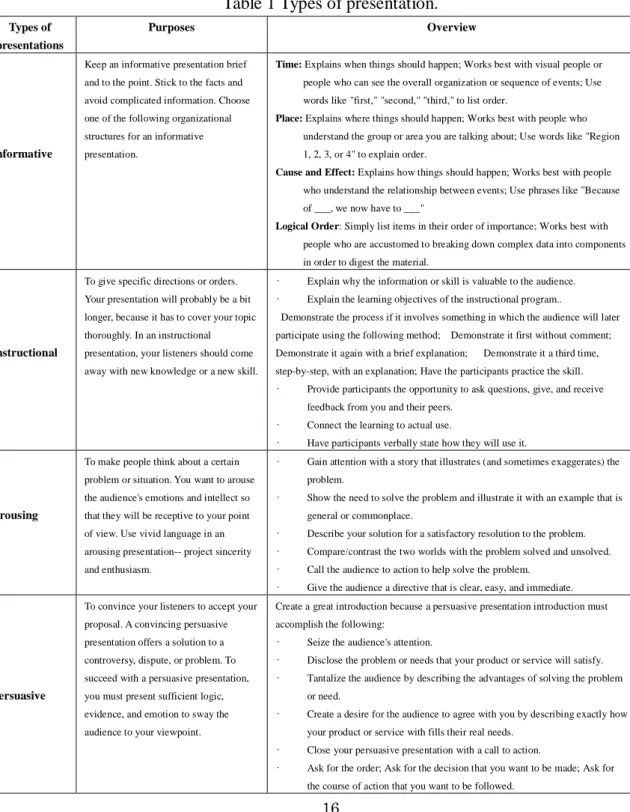
(12) 1.2 The Development of Researches on Presentation Since the significance of obtaining information and comments from presentation, lots of researchers are devoted to presentation supporting work. In Japan, there is a workshop named “WISS”, one aim of this workshop is researching on-line chat system in presentation for promoting discussion from 1997 and produced many excellent researches. For example, Miura and his partners developed AirTransNote which conducted a practical environment of realizing augmented classroom with wireless digital pens[1] and Presentaiton Sensei which is a presentation training system using speech and image processing[2].In recent years, the majority of research studies on presentation methods in the groupware field have changed to concentrate on increasing the quantity of comments to promote discussion by using available media, such as mobile phones and papers. Such as Kobayashi and Nishimoto’s system, which is an enhanced chat system crossing media[3]. Yet another example is from Doi, who designed a lecture supporting system[4] on the basis of the annotation system CollabSticky[5] to collect comments using various media. In this study, more available media, such as mobile phones and papers, are utilized. In an anonymous environment, audiences feel more comfortable in participating in the presentation. Davison's system[6], for example, provides a presentation support system for collecting comments in a convenient input form by using parallel, non-oral communication channels. This type of design can prevent strong personalities from dominating the discussion in an anonymous environment. Another example is Nishida's system[7], considering the disadvantage of an anonymous environment which has a high possibility of producing irresponsible statements in conversations, Nishida developed a tool that can convert from an anonymous to a non-anonymous environment with the agreement of the other group members. Compared with Davison, Nishida's system has performed well in terms of collecting comments and promoting discussion in a practical scenario. As time-limited factor, researches on facilitating communication while watching real-time content are proposed, such as Nishida’s “On-Air Forum”[8]. Altogether, until now, through the approach of reducing an audience's psychological burden and providing more media to stimulate the audience to join the 11.
(13) discussion, the research studies on presentation support systems have had a good effect. Nonetheless, problems remain, such as improving an audience's understanding and responding to the desire of audience members to immediately write down their opinions on the presentation. More importantly, time limitation of presentation has been neglected in previous research studies, particularly in seminars on educational themes and product-development meetings. Therefore, it is essential to carry out presentation research to increase the number of comments in a limited time.. 1.3 Objective of Our Research In this study, we focus on the motivation of an audience to contribute comments in a limited time and the development of a presentation support system that increases the number of comments in a limited time. In this system, in order to create an environment in which audiences can express opinions in a limited time, we have come up with the following two specific approaches for obtaining the target:. 1) the presenter handles the situation of fielding comments from the audience 2) both the presenter and the audience are aware of the presentation process. Through these approaches, we attempt to achieve the effect in which the presenter can manage the audience's commenting time to ensure that they have enough time to raise comments. As a result, we have tested the system and it has reached a good effect on achieving understand in presentation by the reflected consciousness and contributing comments by using airtime.. 12.
(14) 1.4 Structure of this paper This paper consists of 5 chapters. Chapter 1(this chapter) is describing introduction. We introduced the development of both presentation and researches on presentation, and made clear our objectives. Chapter 2 that is “System to Collect Maximum Possible Comments in Limited Time” describes our approaches in detail. Chapter 3 that is “System Implementation” explains the system details about this study basis on our approaches. Chapter 4 that is “Experiment” describes the purpose and procedure, also the results of the experiment in order to evaluate our system is effective. Chapter 5 that is “Conclusion and Limitation” is conclusion of this paper and point out the future direction of this research.. 13.
(15) Chapter 2 System to Collect Maximum Possible Comments in Limited Time We attempt to create a system that is able to collect the maximum possible comments in a time-limited presentation. In this section, we introduce the concept of system environment and then describe the design principles for a time-limited comment collection system.. 2.1 Object presentation of this study Presentations can be divided into five groups on the basis of the different purposes of presentation proposed by Whately[9], which are Informative presentation, Instructional presentation, Arousing presentation, Persuasive presentation and Decision-making presentation(see Table 1). In this study, our target object is included into the Decision-making presentation. Decision-making presentation is to make the audience members to take the presenter’s suggested action. A decision-making presentation offers ideas, suggestions, and arguments strongly enough to persuade the audience to carry out presenter’s requests. In this kind of presentation, presenter must tell the audience what to do and how to do, and should also let the audiences know what will happen if they don’t follow the presenter’s methods. In academic Decision-making presentation, except these basic characteristics, there are some other features. In academic research, presenter gains attention with the advancement of 14.
(16) relevant science and technology that illustrates an academic problem. By describing the solution to solve the problem and comparing the result with the problem unsolved, the presenter calls the audience to action to help solve the problem and give them a way to be part of the solution. That is to say, in academic decision-making presentation, according to the presentation, the presenter expect their audiences to know-It-Alls and to comment what they think immediately when they don’t understand, but not just focus at the screen and keep silence. Most of the research presentations are in limited time. In a word, our target object in this study is the academic Decision-making presentation in limited time.. 15.
(17) Table 1 Types of presentation. Types of. Purposes. Overview. presentations Keep an informative presentation brief. Time: Explains when things should happen; Works best with visual people or people who can see the overall organization or sequence of events; Use. and to the point. Stick to the facts and. words like "first," "second," "third," to list order.. avoid complicated information. Choose one of the following organizational. Informative. Place: Explains where things should happen; Works best with people who. structures for an informative. understand the group or area you are talking about; Use words like "Region. presentation.. 1, 2, 3, or 4" to explain order. Cause and Effect: Explains how things should happen; Works best with people who understand the relationship between events; Use phrases like "Because of ___, we now have to ___" Logical Order: Simply list items in their order of importance; Works best with people who are accustomed to breaking down complex data into components in order to digest the material.. To give specific directions or orders.. •. Your presentation will probably be a bit. •. Explain the learning objectives of the instructional program.. Demonstrate the process if it involves something in which the audience will later. longer, because it has to cover your topic. Instructional. Explain why the information or skill is valuable to the audience.. thoroughly. In an instructional. participate using the following method; Demonstrate it first without comment;. presentation, your listeners should come. Demonstrate it again with a brief explanation;. away with new knowledge or a new skill.. step-by-step, with an explanation; Have the participants practice the skill. •. Demonstrate it a third time,. Provide participants the opportunity to ask questions, give, and receive feedback from you and their peers.. •. To make people think about a certain. Have participants verbally state how they will use it.. •. Gain attention with a story that illustrates (and sometimes exaggerates) the. •. Show the need to solve the problem and illustrate it with an example that is. problem.. problem or situation. You want to arouse the audience's emotions and intellect so. Arousing. general or commonplace.. that they will be receptive to your point of view. Use vivid language in an. •. Describe your solution for a satisfactory resolution to the problem.. arousing presentation-- project sincerity. •. Compare/contrast the two worlds with the problem solved and unsolved.. and enthusiasm.. Persuasive. Connect the learning to actual use.. •. •. Call the audience to action to help solve the problem.. •. Give the audience a directive that is clear, easy, and immediate.. To convince your listeners to accept your. Create a great introduction because a persuasive presentation introduction must. proposal. A convincing persuasive. accomplish the following:. presentation offers a solution to a. •. controversy, dispute, or problem. To. •. Disclose the problem or needs that your product or service will satisfy.. succeed with a persuasive presentation,. •. Tantalize the audience by describing the advantages of solving the problem. •. Create a desire for the audience to agree with you by describing exactly how. •. Close your persuasive presentation with a call to action.. or need.. you must present sufficient logic, evidence, and emotion to sway the. Seize the audience's attention.. your product or service with fills their real needs.. audience to your viewpoint. •. Ask for the order; Ask for the decision that you want to be made; Ask for the course of action that you want to be followed.. 16.
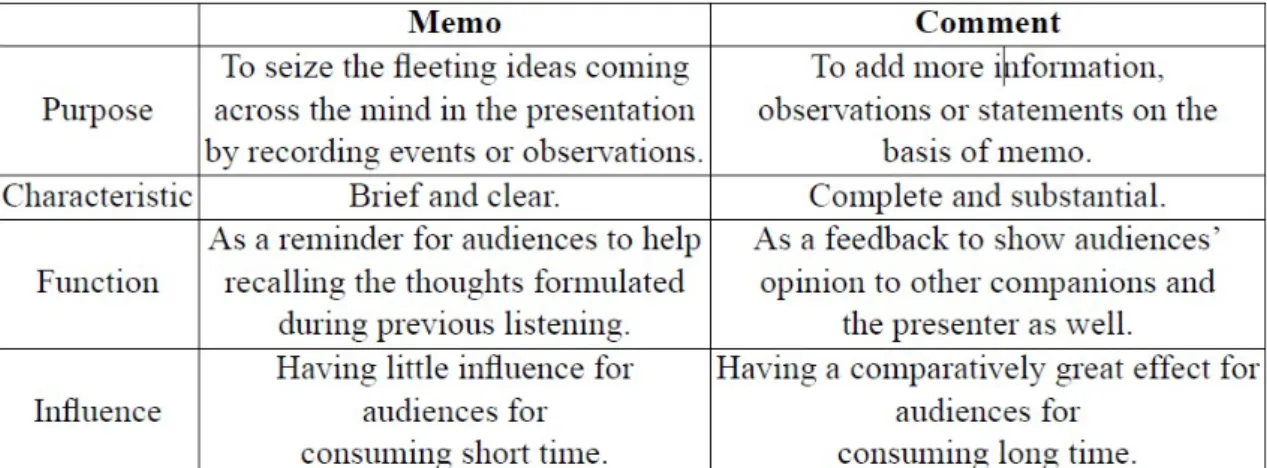
(18) To move your audience to take your suggested action. A decision-making. •. Gain attention with a story that illustrates the problem. presentation presents ideas, suggestions,. •. Show the need to solve the problem and illustrate it with an example that is. •. Describe your solution to bring a satisfactory resolution to the problem. general or commonplace. and arguments strongly enough to. Decision-. persuade an audience to carry out your. making. requests. In a decision-making. •. Compare/contrast the two worlds with the problem solved and unsolved. presentation, you must tell the audience. •. Call the audience to action to help solve the problem and give them a way to. what to do and how to do it. You should. be part of the solution. also let them know what will happen if the don't do what you ask.. 17.
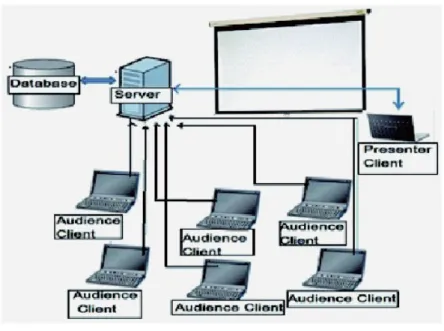
(19) 2.2 Target Configuration of Presentation The target presentation environment for this research is displayed as follows: 1) the presenter uses a PC and projects a magnified slide image on a large screen. 2) every audience member uses a PC. 3) each PC is connected to the network. 4) it is possible for the audience members to send their comments to the screen at any time during the presentation, as shown in Figure 1.. Figure 1 Target presentation environment. 18.
(20) An environment setting such as this is generally used in related research studies as Hatanaka’s system [10] Kobayashi’s system[11] and so on. Also this kind of presentation has been frequently put into practical use in academic conferences, educational scenarios and business in enterprises in recent years. Besides presentation support, education support is also considered to be another target of this research field.. 2.3 Approaches We observe that, in a real presentation situation, audience members write down some simple keywords. These keywords are helpful in capturing intriguing ideas that suddenly enter the audience member's mind while listening. Meanwhile, during the question time which is the last part of a presentation, audience members refer to these keywords as a reminder for formulating their final comments and formal questions. Then, in the limited question time, usually only five minutes, only few audiences have the choice to ask or to comment during a presentation. It means, the presenter will lose most of the audiences’ comments, including questions and suggestions. This crucial information is helpful for the presenter in controlling the whole presentation, and is helpful for the audience members in better understanding of the academic research. Therefore, given the comments or ideas from audience needed to be dealt with in the time-limited condition, we try to develop a presentation support system to increase the possibility for the audience members in submitting their ideas or comment in time-limited presentation. In a common presentation scenario, from the field observation in time-limited presentation, we found that the audiences wrote down some memos on a piece of paper or their PC quickly during the presentation.. 19.
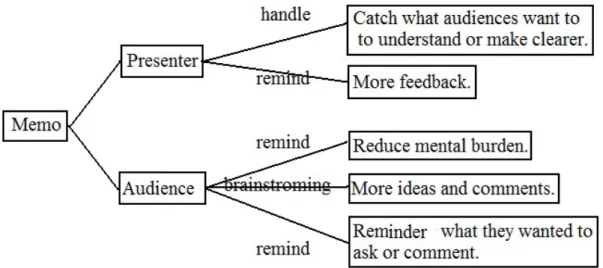
(21) Table 2 Differences between memo and comment.. As shown in Table 2 and as mentioned above, in a common presentation scenario, we take advantage of the simplicity of memos in order to develop a presentation support system. The distinctive features of memos, such as clarity, brevity and time-saving, help audiences capturing their original ideas. These memos, functioning as a reminder for the audience members, recall their thoughts and formulate their final comments. Hence, our approaches for comment collection in a time-limited presentation are as follows: 1) The function of the presenter of handling the audience situation: a) Providing a possibility of handling a number of potential comments from the audience. b) Providing a possibility of handling the most interesting contents in the presentation. For the function of the presenter of handling the audience situation, memos written by the audience members are captured and counted in a memo column. Viewing the count in the memo column helps the presenter handle the audience situation. Based on this number, the 20.
(22) presenter can attempt to wait for the audience members to edit comments. In addition, the memo column can also help the presenter capture the most interesting contents in the presentation and make any necessary adjustments. 2) The function of reminding both the presenter and the audience of the pace of the presentation: a) Showing a timer and the page number of the current slide. b) Showing the quantity of potential comments. For the function of reminding both the presenter and the audience of the pace of the presentation, our design includes a timer, slide numbers and the content of the memos in order to assist the presenter in handling the balance of the presentation effectively.. Figure 2 Approach.. 21.
(23) From the functions above, we also expect to achieve three effects(see Figure 3): 1) Reduce the mental burden of audience members during the time-limited presentation. All of the memos will be submitted anonymously, so the audience numbers can write down their ideas into words as a reminder of potential comments at anytime during the whole presentation. Also, audience can find companions who have similar opinions into the presentation. So, audiences have much more courage to express themselves on discussion with other opinions. 2) Stimulate brainstorming during and after the time-limited presentation. For example, you are listening something in real time, if you don’t understand some content or some words from the very beginning of a presentation, it will affect your understanding of the whole topic. On the contrary, when some audiences are irresolute at some point, some memos are effective to solute this kind of non-understood. Furthermore, the memos may provide a possible for the audience members to get a deeper understanding. 3) Hold the memos as potential comment to provide a possible for a more overall after-discussion. For the advantage of the simplicity of memos, there will be more memos submitted. These memos may conclude more point on the presentation. As a result, the audience can keep all their ideas to take the discussion after the presentation, avoid missing any one of their ideas generated during the presentation.. 22.
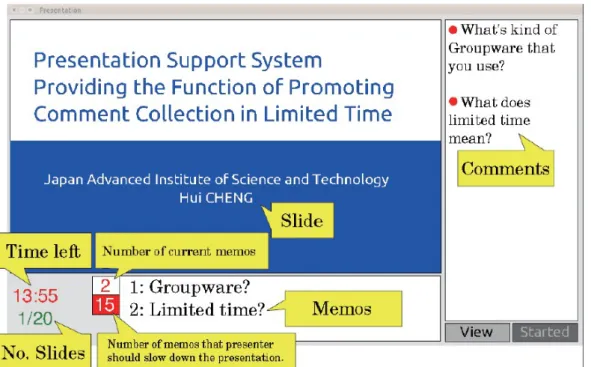
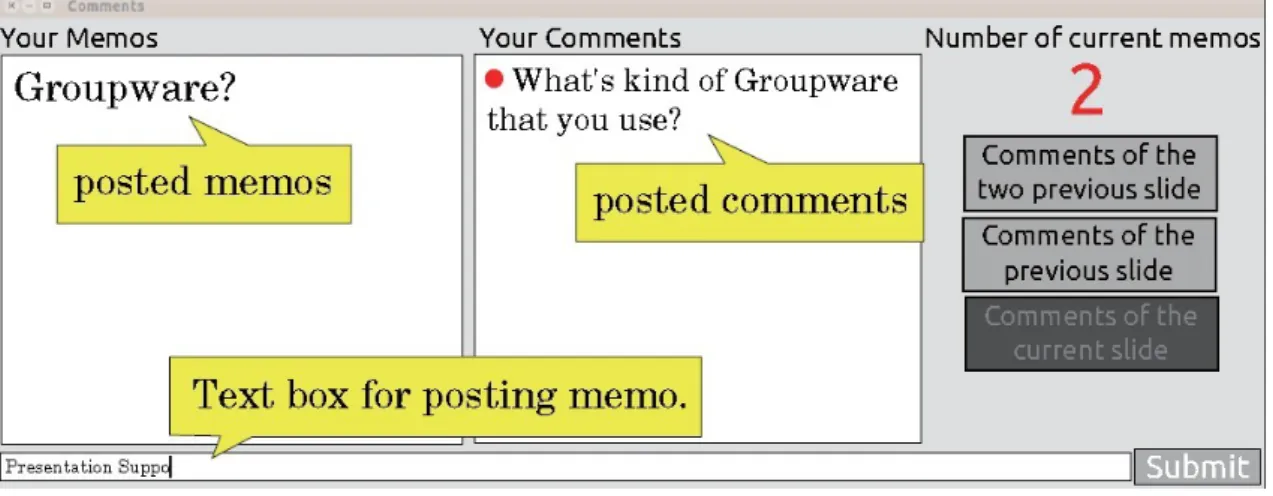
(24) Figure 3 Functions.. 23.
(25) Chapter 3 System Implementation This chapter explains the system details about this study basis on our approaches.. 3.1 System Description In this system, by utilizing the simplicity and clarity of the memos, we designed a presentation environment that provides the number of contributions and facilitates the collection of memos. We added some figure boxes that display on the presenter's screen in order to facilitate communication and reach a consensus regarding the degree of understanding between the presenter and the audience. These figure boxes include the number and content of the audience members' memo contributions, and a time distribution showing a timer and the state of the slideshow.. 24.
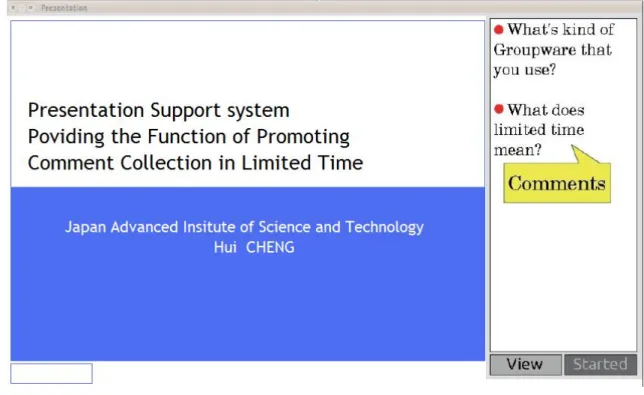
(26) Figure 4 Memo number editing bar for presenter.. Figure 5 Interface for presenter. 25.
(27) Figure 6 Interface for audience.. As Figures 5 and 6 show, this system consists of two kinds of separate interfaces, for the presenter and the audience, which are constituted of a data management section and a server section. Here, we introduce the system separately based on the viewpoints of the presenter and the audience, respectively(see Table 3).. 26.
(28) Table 3 Function in details. Blanks of the interface for audience Text box for posting memo. Audience can write down what they are thinking about quickly as a memo.. Your Memos (posted memos). The memo submitted already will be reserved here. All of these memos function as a reminder of comments when the audience members catch the timing to submit their comment during the presentation and the after-discussion.. Your Comments (posted comments). When the presenter is slowing down his or her speaking or explaining on some questions, the audience members can edit their comment here by consulting the reserved memos. Blanks of the interface for presenter. Memos. Comments Number of current memos:. The newest submitting memos will be showed here. When the same word is continuously showed here, it means this point is more attention-focusing. The submitted comment will be showed here. The current number of submitted memos will be showed here.. Number of memos That presenters should slow down the presentation. A basic standard that the presenter have set before the presentation. It will reminder the presenter the timing he or she should to give to the audience members to edit and submit their comment by slowing down their speaking or explaining on some more attention-focusing memos or comment.. Time left and No. Slides. Both the presenter and the audience members can be provided a hint here on the pace of the presentation. Within the limited time, the presenter can slow down his or her speaking or explain some questions. 27.
(29) For the presenter, we designed two interfaces, as shown in Figures 4 and 5. Before beginning the presentation, the presenter must upload the slide with the presentation environment by using the view button (see Figure 5). We use extraction programming to achieve an inset construction between ordinary PowerPoint software and this presentation commenting system. In real usage, the presenter is required to set a number as shown in Figure 4. This number reminds the presenter of the number of memos that have arrived, then he or she will attempt to wait for the audience members to submit comments by slowing down the presentation pace or by consciously putting the points he or she intends to stress after the audience members' submissions, and also provide hints to the audience of the time for submitting comments. This number can be set according to the number of audience members or the number of slides, as desired by the presenter.. During a presentation, through the use of the timer and the state of the slideshow progress, the time-distribution function provides a hint to the presenter. In the meantime, the number of current memos implies the number of potential comments. This number is displayed together with the content of the memos, with the intention of signaling the potential need to slow down the presentation. Here, we emphasize that the memos which are sent by the audience members can be easily understood because they consist of simple words. The number of current memos is revised when new memos arrive. Also, when the number of current memos reaches a multiple of the number which is set before the beginning of the presentation by the presenter, the background color changes from yellow to red, in order to gain the attention of both the presenter and the audience members, and to remind the audience members that it is time to submit comments. For the audience members, we designed the memo column on the basis of the scenario that the audience members record their ideas or questions on paper as usual. In this way, any short content that they think of about the presentation can be written down in the memo column. In addition, the memos which the audience members write down are sent to both the Reserved Memos column of the audience interface and the Call For Wait column of the presenter 28.
(30) interface. When the number of memos becomes a multiple of the number being set, together with the change in the background color, it reminds the audience of the timing of comment editing. At that time, the audience members can edit the comment and send it to the Comments column by consulting the memos accumulated in the left column. According to the above design, the presenter uploads the slide before the beginning of the presentation. When he or she clicks the Start button, the presentation starts. Meanwhile, as the slides progress, the audience members contribute comments to the relevant slide. In particular, the audiences can contribute their comments to the current slide or to the last or next-to-last slide. By means of this design, we intend to provide the audience members with the possibility of contributing comments to any slide. All comments are displayed in the Comment column as Anonymous. On the other hand, as the presenter proceeds with his or her slides using the presentation environment, he or she can be reminded of the state of progress of the presentation. Therefore, the presenter can carry out a balanced presentation that does not exceed the allotted time. By means of the design introduced above, we intend that this presentation support system can collect comments in a limited time and that it functions according to the following three aspects: 1) By skimming over the memos (i.e. the contents of the memos), the presenter can grasp the nature of comments from the audience members. 2) By skimming over the progress state which includes the timer and the progression of slides, the presenter can manage the speed of his or her presentation, so as not to exceed the allotted time. 3) By skimming over the numbers which are shown, the audience members can contribute comments in a gathering time. 29.
(31) 3.2 System Configuration As shown in Figure 7, our system configuration consists of two kinds of clients and a server. The interface section is implemented by Java GUI, the communication section between the clients and the server by Java RMI and the database section by MySQL. All data is controlled by the server. In the logging section, the input user ID and password are sent to the server. After the ID and password are authenticated by the database of the server, the interfaces appear separately, as shown in Figures 4 and 6. The audience members edit memos and contribute comments as shown in Figure 6, and all the memos and comments are sent to the server. Then, along with the time and user data, new memos and comments are recorded in the database. Meanwhile, as new data, the new memos and comments are sent to the presenter's client system. After receiving the data, the new memos and comments are shown in relevant columns. Furthermore, by utilizing Microsoft PowerPoint in this system environment, we use image-extraction programming to convert the slide file into a JPG file. From the above, we obtain a system configuration which enables the audience members to send memos and comments, and which shows them the interface of the presenter client.. Figure 7 System construction. 30.
(32) Chapter 4 Experiment This chapter describes the purpose and procedure, also the results of the experiment in order to evaluate our system.. 4.1 Purpose and Procedure The whole experiment is divided into two parts. In part 1, in order to prove our ideas that utilizing the simplicity and clarity of the memos to collect maximum possible comments in limited time is effective, we design a simple comparison experiments to prove the memo function is effective at first. As Figure 8 and Figure 9 showing, we embedded the Comment column and Slide Column into an application. In the comparison experiment of time-limited presentation, the audience members can contribute their comments. But, we did not provide any related functions of memo. Moreover, we cancelled the time column and progress column as showing in Figure 5 and Figure 6. When the experimenter clicked Start Button, the clock started but the timing did not show on the screen. When the experimenter finished the presentation and clicks Finish Button, the timing shown on the screen. In fact, under no time limitation, this kind of chat system is proven effectively, such as mentioned in chapter 2. But under time limitation, expecting to collect more comment is conflict to the fact that we expect the audience concentrate to the presentation. 31.
(33) Figure 8 Interface for presenter in comparative experiment.. Figure 9 Interface for audience in comparative experiment. 32.
(34) In the comparative experiment, we have invited a master student who has an experience of academic congress as a presenter, and 10 master students as the audiences, who also have the experience in academic congress. In addition, the time limit was 10 minutes as in the real academic conference that he or she had experienced. We set a clock at obvious position and prompt the time to the presenter twice like a real congress, to make the presenter as far as possible to finish the presentation in the limited time. Besides, we compared the questionnaire survey data and analyzed the number of focusing keywords which was included in the comments and memos. We predicted that the number of the contributed comments in the chat system would be more than the number of the comments in our system, but less than the number of the memos. While, the number of the focusing keywords would be more than the number in our system. And we had also made the questionnaire survey, as Table 4.. Table 4 Questionnaire example in comparative experiment. Contents. very. plenty. ordinary. a few. never. Did you feel stressed at the time-limitation?. 5. 4. 3. 2. 1. How did you understand about the presentation?. 5. 4. 3. 2. 1. 5. 4. 3. 2. 1. Did you think you have point-missing-listening?. 5. 4. 3. 2. 1. Did you often notice the submitted comment?. 5. 4. 3. 2. 1. Did you think it is not enough about the comment-written time?. 33.
(35) In part 2 of the experiment, we use the presentation support system, as introduced in Chapter 3, to enable audience members to easily comment during the presentation. We also conducted this part of the experiment to prove the approach of our system is effective. Hereinafter, we summarized the approaches of our experiment as: 1) Whether the presenter can finish the presentation in the limited time. 2) Whether the audience can contribute comments by using the memo function during the presentation time. 3) Whether the presentation time can be managed properly by means of reminders of the number of memos submitted. We tested the first experimental approach by comparing the actual time that the presenter spent in the limited time. Through analyzing the history of the timing of both the memos and comments, we attempted to check the feasibility of the second experimental approach. As for the third approach, we investigated the relationship between the time distribution of comments and the progression of each slide during the entire presentation. In this part of the experiment,We carried out the experimental procedure twice. For experimenters, we invited the same master student in comparative experiment who had experience as a presenter in academic conferences, and some other master students who have experience as audience members in academic conferences. In all of the three experiments, the presenter was required to use the same slides which he or she had used in his or her academic conference experience. The time limit was 10 minutes as in the real academic conference that he or she had experienced. At the same time, we invited 17 audience members for the first experiment (experiment A) and another 10 members for the second one (experiment B). In addition, in order to emphasize the test effects, the function of handling the understanding of the audience members by the presenter, before experiment B, we explained not only the instructions for using the system but also some tips for promoting interaction, such as:. 34.
(36) For the presenter, it is desirable to: 1) Finish the presentation in 10 minutes. 2) Provide some time for the audience members to contribute comments. 3) Discuss the contributed comments while the audience members are editing. For the audience members, it is desirable to: 1) Contribute memos or comments of their thoughts during the presentation. 2) Contribute the meaning of comments clearly to make sure that other audience members understand what they want to express. 3) Contribute as many comments as they can. 4) Contribute comments when the presenter is talking about the contributed comments, and edit memos at any time. In addition, we conducted a questionnaire survey after the presentation to gather data from the experimenter to check the usability of this system.. Table 5 Questionnaire example in experiment A and B. Contents. very. plenty. ordinary. a few. never. Did you feel stressed at the time-limitation?. 5. 4. 3. 2. 1. How did you understand about the presentation?. 5. 4. 3. 2. 1. Did you think the commentwritten time is not enough?. 5. 4. 3. 2. 1. Did you think you have point-missing-listening?. 1. 2. 3. 4. 5. 35.
(37) 4.2 Results and Discussion In comparative experiment, the presenter finished the experiment in 10 minutes and 33 seconds, exceeding the limited time 33 seconds (see figure 10). And the questionnaire survey indicated that all of the 11 experimentalists felt the pressure at the time-limited in their presentation experiences (see figure 11).. Figure 10 Spent time and limited time.. 36.
(38) 100% 80% 60%. Experiment B. 40% 20%. Comparative experiment. 0%. Figure 11 Questionnaire survey: Did you feel stressed at the time-limitation?. How did you understand the presentation? Experiment B. 3.6. Experiment A. 3.3. Comparative experiment. 3.8 0. 0.5. 1. 1.5. 2. 2.5. 3. 3.5. 4. Figure 12 Questionnaire survey: How did you understand the presentation?. 37.
(39) Did you think the commentwritten time is not enough? Experiment B. 3.4. Experiment A. 3.3. Comparative experiment. 3.5 0. 1. 2. 3. 4. Figure 13 Questionnaire survey: Did you think the comment-written time is not enough?. Did you think you have pointmissing-listening? Experiment B Experiment A Comparative experiment 0. 1. 2. 3. 4. Figure 14 Questionnaire survey: Did you think you have point-missing-listening? 38.
(40) According to the questionaire surveys, the audience members thought they have understood more clearly about the presentation contents(see Figure 12) in comparative experiment, while they lost more key point from the persenter’s words or the content of the slide (see Figure 14)than in experiment A and experiment B. Furthermore, basing the feedback from the audience members and the presenter, the memo function indeed provide them more feedback for after-disscusion. That is same as the approach in this study. Moreover, in comparative experiment, comments were submitted by 10 audience members. By contrast, in experiment B the number of audience members is 10, which is equal in the comparative experiment, and there are 56 memos and 25 comments were submitted. Comparing with the number of the submitted comments in the second part of the experiment, we knew that in comparative experiment, an ordinary chat system, more comments were collected. However, comparing the focusing keywords in the two experiments (see Table 6), we knew that there were more keywords included in the time-limited presentation support system. That means the audience members have less missing-catch-content. Thus, they can pay more attention to the presenter and get better understanding. Through the comparative experiment, we got the result that collecting memo with the aim of providing possibility to collect maximum comment is effective.. 39.
(41) Table 6 Examples of presentation content, memos and comments, and focusing keywords. For e-book reader, turning over the pages is achieved by button operation at the present time. Physical paging operation which is performed by paper medium in reading sentences is not equipped. This system perceive the reader's paging operation and synchronize with visual paging expression by sticking transparent sheet and magnetism sensor on existing ebook reader. As a result, reading from e-book reader is expected to be easier. (a)Content of the experimental presentation Memo examples. Comment examples. Plastic?. How to fix the plastic sheet on the touch panel?. Magnetic sensor?. Why using magnetic sensor?. Different?. Compare with other book-leader, what is different?. Physical operation?. What’s Physical operation?. (b)Memo contributions and comment contributions Comment. Focusing keyword. The magnetic sensor can be Influenced by other magnetic objects.. Magnetic sensor. Does the scroll device affect the portability of e-book? How to fix the plastic sheet on the touch panel? Why using magnetic sensor?. Portability Plastic sheet Magnetic sensor. Compare with other book-leader, what is different? What’s Physical operation?. Different Physical operation. Memo. Focusing keyword. Plastic?. Plastic sheet. Magnetic sensor?. Sensor. Physical operation?. Physical operation (c) Focusing keyword example 40.
(42) Table 7 The numbers of focusing keywords in Comparative experiment and Experiment B. Experiments. The number of Comments. The number of memos. The number of audiences. The number of focusing keywords. Comparative Experiment. 40. ―――. 10. 23. Experiment B. 25. 56. 10. 34. Table 8 Average value on focusing keywords per capita. Experiments. The number of audiences. Average Value. Comparative experiment. 10. 4.81. Experiment B. 10. 2.54. In this part of experiment, the first presentation was completed in 9 minutes and 54 seconds, and the second one was completed in 9 minutes and 56 seconds. Both these timings were close to the limit of 10 minutes (see Table 9). In addition, according to the results of the questionnaire survey, we understood that the presenter could control the pace of the presentation by reminders from the timer and the progress of slides. It is observed that the function of displaying the timer and the presentation pace helps in supporting the presenter complete the presentation in a limited time.. 41.
(43) Table 9 Number of comments, memos and audiences, and presentation spent time in experiment A and B. Experiment. Number of comments. Number of memos. Number of audiences. Presentation spent time. A. 52. 44. 17. 9:54. B. 25. 56. 10. 9:56. In both of the experiments, for the presentations which dealt with the development of a convenient page-turning tool for e-book(see Table 6), we received both the memo contributions (e.g. 'plastic') and the comment contributions (e.g. 'How to fix the plastic sheet on the touch panel?').. 42.
(44) Figure 15 Comment, memo and slide shift in the time-line of experiment A.. Figure 16 Comment, memo and slide shift in the time-line of experiment B.. As shown in Figures 15 and 16, the audiences submitted memos during the entire presentation, while comments were contributed always around the time when the slides were changed. Comparing the two experiments, experiment A and experiment B, we observed that the comments contributed by the audience members gathered around the presentation time in 43.
(45) experiment B. Furthermore, we compared the average number of comments per audience and observed that the audience members contributed more memos in experiment A than in experiment B, the approach of which was stepped up. However, from the average number of memos (2.59 in A and 5.6 in B), a large margin was observed between A and B because the comments were contributed around the presentation time and because more memos were submitted in experiment B. Although we understood that there was not sufficient time for the audience members to contribute comments, on the contrary, to a certain extent this proved that experiment B provided a possibility to make the audience pay more attention when listening to the presentation; we plan to continue to conduct experiments to prove this point. Based on the above analysis, we have come to the conclusion that the memo function provides a possibility of intensively contributing comments using the presentation time during page turning.. Table 10 Investigation of timing on comment submission. Experiment. Comment of the current slide. Comments of the comments. Comments of the two previous slide. A. 37. 9. 6. B. 14. 3. 8. Table 11 Investigation of timing on comment submission. Experiment. Rate of comments. A. 0.71. B. 0.56. 44.
(46) As is shown in Table 11, by analyzing the timing of comment submission, we understood that the proportion of the comments to the current slide in A is 71% and that in B is 56%. These results prove that this system is effective in collecting real-time comments. In both experiments A and B, which use the same presenter and the same slides, there are six slides which keep a margin on more than two comments being submitted. Also, on five pages in the six slides, the presenter spent 17.6 seconds on average which was perceived to be quite long. The above analysis proved that the presenter can handle the pace of presentation consciously by means of reminders related to the condition of comment submission of the audience members.. 45.
(47) Chapter 5 Conclusion and Limitation This chapter is the conclusion of this paper and point out the future direction of this research.. 5.1 Conclusion The purpose of our paper is to collect more comments in limited time and to determine the way of enhancing effective communication in a realistic presentation scenario. In order to achieve this aim, we focus on enhancing the motivation of audience members to contribute their comments in a limited time period. We develop a presentation support system which collects comments in a time-limited way through memo contribution and collection. In order to achieving enhancing effective communication between the presenter and the audience members, through the presentation observation, we create this system to collect comments in limited time by utilizing the simplicity and clarity of the memos. In order to achieve those approaches, we design the function that the presenter can handle the audience members’ understanding situation, and that both the presenter and the audience can be reminded the pace of the presentation. To be specifically, through the comparative experiment, we knew that collecting as many as memos to provide a possible to collect maximum comment is effective. Moreover, we conduct experiments to confirm that in time limited presentation, the two functions above are effective. In order to prove the feasibility of this system, we conduct an experiment. From the 46.
(48) experiment, we know that, under time-limited conditions, both the presenter and the audience members can understand the progress of the presentation. This system is also feasible to remind the pace of presentation to both the presenter and the audience. Therefore, this presentation supporting system effectively provides the possibility of submitting comments on the presentation in a time-limited way. In this paper, we emphasize on the way of increasing the quantity of comments.. 5.2 Suggestions for future research Firstly, in our future work, we will shift our focus from increasing the number of memos to improving the effectiveness of the memo to increase the number of effective comments. Furthermore, we will also pay more attention to improve the quality of comments in order to gather more useful feedback. Secondly, in this research, we focus on the academic research presentation type. In the future work, we are going to improve our research in order to let it can be used in the product development style presentation in business scene.. 47.
(49) Publication, Award and Activate PUBLICATION Hui CHENG, Tessai HAYAMA, Susumu KUNIFUJI: “Presentation Support System Providing the Function of Promoting Comment Collection in Limited Time”, The Fifth International Conference on Knowledge, Information and Creativity Support Systems( KICSS 2010), Springer LNCS, in printing, 2011.. AWARD Honorable Mention: The Fifth International Conference of KICSS(Knowledge, Information and Creativity Support Systems)(2010) Title: Presentation Support System Providing the Function of Promoting Comment Collection in Limited Time. ACTIVITIES Student Member of the Institute of Electronics, Information and Communication Engineers (IEICE). 48.
(50) References [1]. M. Miuray, S.Kunifuji and Y.Sakamoto, "Practical Environment for Realizing Augmented Classroom with Wireless Digital Pens", Lecture Notes in Computer Science 4694/2007, 777-785, 2007. [2]. K.Kurihara, M.Goto, J.Ogata, Y.Matsusaka and T.Igarashi, "Presentation Sensei: A Presentation Training System using Speech and Image Processing", Proc.of ACM ICMI International Conference on Multimodal Interfaces,pp.358-365, 2007. [3]. T.Kobayashi and K.Nishimot, "An Enhanced Chat System That Allows Cross-Media References", WISS2009,pp.101-106,2009. [4]. K. Doi, D. Hirashima, M. Takagi, M. Mochizuki and Y. Teshigawara, "Development of a Lecture Supporting System to Collect Comments using Various Media", WBE2009, pp. 294--300, Mar. 2009. [5]. K. Doi, M. Inoue, M. Tasaka, D. Hiroshima and Y. Teshigawara, "A proposal of an Annotation System CollabSticky Focused on Collecting Comments in Presentation", DICOMO2007, pp. 159--164, Jul. 2007. [6]. R. Davison and R. Briggs, "GSS for presentation support", Commun. ACM, vol. 43, no. 9, pp. 91--97, Sept. 1993. [7]. T. Nishida and T. Igarashi, "Bringing Round-Robin Signature to Computer-Mediated Communication", ECSCW'07, pp. 219--230, Sept. 2007. 49.
(51) [8]. K.Nishida, K.Kurihara and M.Goto, "On-Air Forum: A System for Facilitating Communication While Watching Real-time Content". WISS2009,pp.95-100,2009. [9]. Whatley and Randall P, "Types of Presentations", Complete campaigns. Com, 25thJuly.2006. <http://www.completecampaigns.com/article.asp?articleid=5>. [10]. H.Akihiro, Y.Madoka,T.Hiroyuki and K.Yahiko, "Experimental Chat Sessions to Encourage Active Communication in Lectures",IEIC Technical Report,Vol.100,No.91,pp.7-12,2000. [11]. T.Kobayashi and K.Nishimot, "Temporal Relations between Text Messages and Spoken Utterances in A Face-To-Face Communication with A Text Chat",IPSJ,Vol.2006,No.123,2006-HI-121(10), pp.67-74, 2006.. 50.
(52)
図


+7

関連したドキュメント
She reviews the status of a number of interrelated problems on diameters of graphs, including: (i) degree/diameter problem, (ii) order/degree problem, (iii) given n, D, D 0 ,
We show that a discrete fixed point theorem of Eilenberg is equivalent to the restriction of the contraction principle to the class of non-Archimedean bounded metric spaces.. We
Reynolds, “Sharp conditions for boundedness in linear discrete Volterra equations,” Journal of Difference Equations and Applications, vol.. Kolmanovskii, “Asymptotic properties of
Keywords: continuous time random walk, Brownian motion, collision time, skew Young tableaux, tandem queue.. AMS 2000 Subject Classification: Primary:
In [9] a free energy encoding marked length spectra of closed geodesics was introduced, thus our objective is to analyze facts of the free energy of herein comparing with the
It turns out that the symbol which is defined in a probabilistic way coincides with the analytic (in the sense of pseudo-differential operators) symbol for the class of Feller
Then it follows immediately from a suitable version of “Hensel’s Lemma” [cf., e.g., the argument of [4], Lemma 2.1] that S may be obtained, as the notation suggests, as the m A
We give a Dehn–Nielsen type theorem for the homology cobordism group of homol- ogy cylinders by considering its action on the acyclic closure, which was defined by Levine in [12]
