• 検索結果がありません。

Functional Enhancement of Multiaxis Vibration Evaluating System and Outline of Overall System

N/A
N/A
Protected

Academic year: 2021

シェア "Functional Enhancement of Multiaxis Vibration Evaluating System and Outline of Overall System"

Copied!
48
0
0

読み込み中.... (全文を見る)

全文

(1)

JAXA Research and Development Memorandum

Functional Enhancement of Multiaxis Vibration Evaluating System and Outline of Overall System

Atsushi KANDA and Kiyoshi SAMATA

September 2014

Japan Aerospace Expoloration Agency

JAXA-RM-14-002E JAXA Research and Development Memorandum

(2)

1. Introduction ... 1

2. Outline of System ... 2

2.1. Outline of MaVES ... 2

2.1.1. Configuration of system ... 2

2.1.2. Mechanism of measurement ... 3

2.2. Outline of MaVES-c ... 4

3. Details of MaVES ... 5

3.1. 3D scanning vibrometer ... 5

3.1.1. Configuration of vibrometer ... 5

3.1.2. Specifications of vibrometer ... 6

3.1.3. Measurement functions ... 6

3.1.4. Optical system ... 7

3.1.5. Vibration velocity detection performance ... 8

3.1.6. Functions of PSV software ... 8

3.2. Sensor positioning control robot ... 10

3.2.1. Configuration of robot ... 10

3.2.2. Specifications of robot ... 11

3.2.3. Coordinate system of robot ... 12

3.2.4. Functions of robot ... 12

3.3. Integrated software ... 12

3.3.1. Role of software ... 12

3.3.2. Functions of integrated software ... 13

3.4. Modal analysis software ... 13

3.4.1. Configuration of software ... 13

3.4.2. Functions of modal analysis software ... 13

3.5. Others ... 14

3.5.1. Safety light barrier ... 14

3.5.2. Scanning head installation jig ... 16

3.5.3. Robot stand ... 16

3.5.4. PC and network ... 17

3.5.5. Laser vibrometer ... 17

3.5.6. Surface plate ... 18

4. Details of MaVES-c ... 19

4.1. 1D scanning vibrometer ... 19

4.1.1. Configuration of vibrometer ... 19

4.1.2. Specifications of vibrometer ... 20

(3)

4.1.6. Functions of PSV software ... 21

4.2. Sensor positioning control robot ... 21

4.2.1. Configuration of robot ... 21

4.2.2. Specifications of robot ... 22

4.3. Others ... 22

4.3.1. Safety fence ... 22

4.3.2. Installation of scanning head ... 23

4.3.3. Robot stand ... 23

4.3.4. Surface plate ... 23

5. Measurement Methods ... 25

5.1. Flow of measurement ... 25

5.2. Measurement preparations ... 25

5.2.1. Installation of test piece and measurement equipment ... 25

5.2.2. Switching of system ... 25

5.2.3. Startup of MaVES ... 25

5.3. Setting of optical system ... 25

5.3.1. Preference settings of PSV ... 25

5.3.2. Setting of 2D alignment ... 26

5.3.3. Setting of 3D alignment ... 26

5.3.4. Calibration of BASE coordinate system ... 26

5.4. Teaching of robot position ... 27

5.5. Setting of measurement points ... 28

5.6. Analysis of measurement points ... 29

5.7. Setting of measurement conditions ... 32

5.8. Execution of automated measurements ... 32

5.9. Processing of measurement results ... 32

6. Measurement Examples ... 33

6.1. Natural mode measurements ... 33

6.1.1. Test piece ... 33

6.1.2. Setting of measurements ... 34

6.1.3. Robot position ... 34

6.1.4. Geometries ... 34

6.1.5. Measurement conditions ... 35

6.1.6. Operational analysis ... 35

6.1.7. Modal analysis ... 36

(4)

6.2.3. Geometries ... 39

6.2.4. Measurement conditions ... 39

6.2.5. Ultrasonic elastic wave transmission ... 41

7. Special Training ... 42

8. Conclusion ... 43

References ... 43

(5)

Atsushi KANDA

*1

and Kiyoshi SAMATA

*2

Abstract

The Multiaxis Vibration Evaluating System (MaVES) can automatically measure the three-directional vibration characteristics of objects in a non-contact mode, and analyze modal characteristics and operating deflection shapes. This system consists of three laser Doppler sensors, a six-axis robot, and control software. The MaVES was originally developed in 2010 and was later enhanced in the area of sampling frequency, accuracy of measurement point geometry, and analysis function. In 2013, the MaVES was moved to a new area and secured with safety light barriers during measurements. Additionally, the MaVES-c was developed as a portable version of the MaVES. This paper describes the entire system specifications, functions, measurement procedures, and examples of the MaVES and MaVES-c.

Keywords: robot, laser, vibrometer, modal characteristics, MaVES, MaVES-c

Outline

The multiaxis vibration evaluating system (MaVES) is capable of conducting non-contact and automated measurements of vibrations of an object in three axis directions, using laser Doppler-type sensors and a six-axial robot. The system can also perform modal and operating deflection shape analyses. Since its development in 2010, functional enhancements such as (a) increase in sampling frequencies, (b) improvement of positional accuracy for measurement points, and (c) additional analysis functions have been implemented in the system. Furthermore, a new measurement area was established and improved, and a safety light barrier was added. The MaVES was relocated to the new area in 2013, and the prototype MaVES-c, a compact, automated, non-

contact multiaxial vibration measurement system was developed with the aim of improving the portability of the MaVES. This paper outlines the specifications and methods of measurement of the MaVES and MaVES-c systems after their functional enhancements, and also provides examples of the measurement methods such as natural mode and ultrasonic elastic wave transmission measurements.

1. Introduction

The Japan Aerospace Exploration Agency developed the automated, non-contact, multiaxial vibration measurement system (MaVES) in March 2010

1)

. The MaVES is capable of conducting automated, non-contact, three-dimensional (3D)

* 11 June 2014 received

*1: Structures Research Group, Institute of Aeronautical Technology

*2: Airframe Group, System Engineering Office, Engineering Department, JAL Engineering Co., Ltd.

(6)

vibrational measurements of objects and automatically obtaining the vibrational characteristics of entire objects by moving laser sensors using a six-axial arm- type robot. A variety of vibrational measurements have been conducted both within and outside the agency since the development of the MaVES and implementation of its functional enhancements (such as the increase in its sampling frequencies, improvement of the positional accuracy of its measurement points, and addition of analysis functions), in response to the increasing demand for measurement over the years. In March 2013, further large-scale expansions were made, with the establishment of a new measurement area and the relocation of the MaVES. A safety light barrier was added to the MaVES (Fig. 1.1) and the prototype compact, automated, non-contact multiaxial vibration measurement system (MaVES-c) (Fig. 1.2) was developed with an aim of improving the portability of the MaVES.

This paper provides an overall outline of the MaVES and MaVES-c systems, including their functional enhancements, specifications, functions, and measurement methods along with measurement examples such as the natural mode and ultrasonic elastic wave transmission measurements.

2. Outline of System

This section provides the outline of MaVES and the MaVES-c.

2.1. Outline of MaVES

2.1.1. ConFiguration of system

The MaVES is comprised of a 3D scanning vibrometer, a sensor positioning control robot, integrated software for synchronizing them, modal analysis software, and a safety light barrier (Fig. 2.1), for performing a series of tasks ranging from the measurement of vibration characteristics to analysis.

The 3D scanning vibrometer, sensor positioning control robot, and modal analysis software are general-purpose items that can be used independently.

The 3D scanning vibrometer is at the core of the system and is capable of conducting vibration measurements (out-of-plane or in-plane) using lasers in the three axis directions within a timeframe or frequency range. It also comprises built-in PSV software that features pre- and post-process functions that can be used to set measurement points, display measurement data and results of operational analysis, or as a function for performing laser scans over a specified area by controlling the mirror in the sensor section.

Fig.1.1 Multiaxis Vibration Evaluating System (MaVES)

Fig.1.2 Compact Multiaxis Vibration Evaluating

System (MaVES-c)

(7)

The sensor positioning control robot is an arm- type, six-axial, articulated robot used for determining the position of the sensor of the 3D scanning vibrometer. The sensor can be easily set to a desired position without having to set it up on a tripod or frame, unlike conventional systems.

The integrated software is intended for enabling the automated measurement of vibrations over a broad range of measurement points, by synchronizing the operations of the 3D scanning vibrometer and robot.

The modal analysis software is intended for performing modal analysis using the vibration characteristics data obtained from the 3D scanning vibrometer (along with the sensor positioning control robot and integrated software).

2.1.2. Mechanism of measurement

The vibrometer detects the vibration velocity of the vibrating test piece in the axial direction of lasers using the laser Doppler effect. The MaVES mechanism derives the vibration velocity at the

intersection of the X, Y, and Z axes by calculating the vibration velocity component in each of the three directions using such an arrangement of the three laser sensor units wherein the units are never coaxial with each other.

The vibration velocity can be measured in three axial directions at an arbitrary point using a single measurement. However, measurement at multiple points is possible only by using the scanning function of the laser for sequentially scanning the multiple measurement points and conducting measurements.

Laser scanning is actuated by operating the galvanometer mirror built into the sensor. Vibration measurements can be conducted only using the 3D scanning vibrometer and without using the robot and the integrated software for synchronization, provided the target area is located within the operating range of the mirror. Measurements over wider ranges are conducted by operating the robot on which sensors are mounted. Automated measurements at multiple measurement points located across a broad range are possible owing to the existence of the mechanism for Fig.2.1 Configuration of MaVES

'VFDQQLQJYLEURPHWHU

0RGDODQDO\VLVVRIWZDUH

6DIHW\OLJKWEDUULHU

6FDQQLQJYLEURPHWHUFRQWUROOHU DQGLQWHJUDWHGVRIWZDUH 6HQVRUSRVLWLRQLQJFRQWUROURERWFRQWUROOHU

6HQVRUSRVLWLRQLQJFRQWUROURERW

6DIHW\OLJKWEDUULHUFRQWUROSDQHO

(8)

synchronizing the operations of the robot, scanning (using the sensors), and capturing of data.

Furthermore, the measurement points can be set on the screen by displaying their video images using a PC, as a CCD camera is built into each laser sensor.

The coordinates of the measurement points can be calculated by (a) measuring the distance from each sensor to the measurement point using the geometry scan unit built into the sensors and (b) using the positional coordinates of the sensors, in turn, calculated from those of the robot.

2.2. Outline of MaVES-c

The MaVES-c is a compact version of the MaVES created for the purpose of enhancing portability. It comprises a one-dimensional (1D) scanning vibrometer, sensor positioning control robot, and safety fence (Fig. 2.2). The 1D scanning vibrometer and sensor positioning control robot are general purpose items and can, therefore, be used independently.

The 1D scanning vibrometer can conduct

vibration measurements using lasers in a single axis direction within a timeframe or frequency range.

It also comprises the built-in PSV software that features pre- and post-process functions that can be used for setting the measurement points, displaying measurement data and results of operational analysis, or as a function for performing laser scans over a specified area by controlling the mirror in the sensor section. A CCD camera is built into each laser sensor, which allows the setting of measurement points on the screen by displaying their video images using a PC. The geometry scan unit, similarly built into the sensors, can be used to measure the distances from the sensors to the measurement points.

The sensor positioning control robot is an arm- type, six-axial, articulated robot used for determining the positions of the sensors of the 1D scanning vibrometer. The sensors can be easily set to a desired position without having to mount them on a tripod or frame, unlike conventional systems.

The current MaVES-c, incidentally, is a prototype that is in the process of development and does not

Fig.2.2 Configuration of MaVES-c 6DIHW\IHQFH

6HQVRUSRVLWLRQLQJFRQWUROURERW

6HQVRUSRVLWLRQLQJFRQWUROURERWFRQWUROOHU

6FDQQLQJYLEURPHWHU

6FDQQLQJYLEURPHWHU FRQWUROOHU

DQGLQWHJUDWHGVRIWZDUH

(9)

support automated measurements using a vibrometer and robot as it is not equipped with integrated software for synchronizing the operations of the scanning vibrometer and the robot (this support is being planned for the future). It can, however, measure using automated scanning within a specified area by means of the scanning functions of the vibrometer, provided the robot is manually manipulated to set the vibrometer to an arbitrary position.

The vibration characteristics data derived from the measurements conducted by the MaVES-c can be analyzed using the modal analysis software incorporated in the MaVES.

3. Details of MaVES

The hardware and software of the MaVES are described in detail in this chapter.

3.1. 3D scanning vibrometer 3.1.1. ConFiguration of vibrometer

The 3D scanning vibrometer (PSV-400- 3D; manufactured by Polytec) shown in Fig. 3.1 comprises three scanning head units (PSV-I-400), three controllers (OFV-5000), junction boxes (PSV- 401-3D and PSV-E-408), and a data management system (PSV-W-400-3D; indicated as PC in Figures other than Fig. 3.1). All devices other than the scanning heads are housed in a rack (Fig. 3.2).

The three scanning heads (top, right, and left) are mounted at the tips of the arms of the sensor positioning control robot (Fig. 3.3) and they perform the projection and reception of the laser beams. A CCD-type video camera is built into each scanning head. Furthermore, a geometry scan unit (PSV-A-420) is mounted on the top of the scanning head. A trihedral Figure of the scanning head is shown in Fig. 3.4, for reference.

The junction boxes input and output the analog and digital signals. The PSV-401-3D handles four inputs and four outputs, and has been expanded to handle four additional inputs with the addition of the PSV-E-408, resulting in a combination of eight inputs and four outputs.

Fig.3.1 Configuration of 3D scaninng vibrometer

Fig.3.2 Configuration of 3D scanning vibrometer (rack)

(10)

The data management system comprises a PC and PSV software to receive and transmit data from the junction boxes, as well as process the measurement data.

3.1.2. Specifications of vibrometer

The laser unit mounted on the scanning head, which is the laser diode-type geometry scan unit, is classified as a Class 2 laser according to the

EN60825-1 safety standard for laser beams, as its frequency is in the range 400–700 nm and its visible radiation output is under 1 mW. At this level, even if the light source is projected directly into the eye, safety can be maintained through aversive reactions such as blinking.

Furthermore, the MaVES integrates two types of systems with different vibration velocity detection performances as well as input and output channels (PSV-3D-400-H and PSV-3D-400-M, referred to as the H system and M system, respectively) that can be switched.

3.1.3. Measurement functions

The vibration velocity of the test piece can be detected using a laser beam projected from the scanning head. However, as the Doppler effect is used, it can be detected in the optical axis direction of the laser. It is also possible to measure the vibration velocity components in the three directions, namely, X, Y, and Z using the three scanning head units and projecting the three laser beams to a single point and thereafter, resolving them into components of orthogonal directions. Furthermore, the individual scanning heads are equipped with a mechanism that enables them to scan the optical axis of the laser with a galvanometer mirror (+20° in two directions), making the measurement of a specified area possible (which, for reference, would be 400–500 mm on all sides for a distance of 700 mm between the scanning head and the intended object) without moving the scanning head.

The measurement points can be set on the PC using the video images provided by the CCD-type video camera built into the scanning head. Although a video camera is built into each scanning head, only that which was mounted on the top of the scanning head was used for this purpose.

Fig.3.3 Scanning head

Fig.3.4 Trihedral figure of scanning head

(11)

The positional coordinates of the measurement points can also be derived using a mechanism by which the positions and angles of the scanning heads are derived based on the positional coordinates of the robot and the distance between the test piece and scanning head (measured by the geometry scan unit mounted on the top of the scanning head). The light source was obtained from the laser for velocity measurement whereas the same scanning mirrors were used for ranging.

3.1.4. Optical system

A corrected Mach-Zehnder interferometer is built into the scanning head, and the conFiguration of its optical system is shown in Fig. 3.5. A He-Ne laser with a carrier frequency of 40 MHz was used. The deflection laser beam projected by the light source was split into the object beam and reference beam by the BS1 splitter, from which the object beam was projected onto the test piece via the BS2 splitter and the λ/4 plate. The object beam reflected off the test

piece and the reference beam came together in the BS3 splitter, the interference of which was measured using the detector. The Bragg Cell modulator offset the frequency for detecting the reverse-direction vibration velocity.

When the multimode type of laser is used, interference exists between the modes and the level of signal of the reflected light varies with the distance.

The relationship between the distance and the signal level is shown in Fig. 3.6. The optimum value L (mm) for the stand-off distance between the scanning head and the intended object is given by

L = 99 + n * (204 ± 1)

Here, n is an integer (0,1,2···). Two types of front lenses are available on the scanning head, namely, long-range (LR) and mid-range (MR). The LR lens was adopted for the MaVES. Both lenses have different minimum stand-off distances, namely 350 and 40 mm for the LR and MR, respectively).

Fig.3.5 Configuration of optical system

(12)

3.1.5. Vibration velocity detection performance The mechanism used involved switching between the two types of systems (PSV-3D-400-H and PSV- 3D-400-M) with varying vibration velocity detection performances, according to the intended use.

Two types of data acquisition boards (PCI-4462 and PCI-6110; manufactured by National Instruments) are built into the PC. PCI-4462 was used with PSV- 3D-400-H to enable vibration measurements of up to 80 kHz (at a maximum sampling frequency of 204.8 kHz) with 24-bit resolution. PCI-6110 was used with PSV-3D-400-M to enable vibration measurements of up to 1 MHz (at a maximum sampling frequency of 2.56 MHz) with 16-bit resolution.

The vibration velocity detection performance depends on the decoder built into the controller.

Two types of decoders were installed, namely, VD- 08 and VD-09. VD-08 can be set to eight ranges and is capable of measuring up to 0.5 m/s of vibration velocity at a sampling frequency of 0.2–25 kHz. The sensitivity of VD-08 was optimized by adapting it to a relatively low frequency. VD-09 can also be set to eight ranges and is capable of measuring up to 10 m/s velocity at a sampling frequency of 0.1–2.5 MHz.

3.1.6. Functions of PSV software

The PSV software is used for operating basically all the controls and settings of the 3D scanning vibrometer. The control and setting items are described below.

(1) Setting of optical system

・ Control of hardware: Positioning of the laser beam, focus adjustments, ON/OFF settings, and zoom and focus adjustments for the video camera.

・ Image settings of live video images: Settings of contrast, brightness, and color saturation.

・ Execution of 2D alignment: Alignment of laser position made to define the measurement points by moving the laser to an arbitrary position on the video camera image using a mouse.

・ Execution of 3D alignment: Setting of the origin and coordinate axes, which form the basis of the coordinates of the measurement points.

(2) Setting of measurement points

Measurement points were set on the video camera

images displayed by the PC. Two types of modes

(standard and point) were available for setting

whereas the transition from the currently set mode

Fig.3.6 Relationship between distance and signal level

(13)

was available only from the standard to the point modes and the specification did not allow a transition in the reverse direction.

・ Measurement point setting in standard mode:

Drawing and editing the respective geometrical shapes of lines, rectangles, ellipses, and polygons, as well as the arrangement of the measurement points on such geometries.

・ Measurement point setting in point mode: Setting and fine adjustment of individual measurement points, as well as the definition and editing of line connections between them.

・ Setting of video triangulation: Settings for performing triangulation measurements using the video images.

・ Execution of geometry scan: The coordinates of the prepared measurement points were calculated and the coordinate values were assigned.

・ Assignment of focus values: Assignment of focus values for the laser to the respective measurement points.

(3) Setting of measurement conditions

The following types of settings are available for the measurement conditions relating to the interruption of measurement data.

• General (general settings): Settings for the measurement modes (FFT, Fast Scan, Time), types of averaging (Off; Amplitude: Averaging of amplitude only when no reference signal is available; Complex: Averaging of both amplitude and phase; Peak Hold: Maximum value; Time), the number of times averaging is performed, ON/OFF setting for automated re-measurements (refer to the section on SE below), and multi- input multi-output (MIMO) measurements using principal component analysis.

• Channels (setting of measurement channels):

Settings for making enable/disable selections of channels, ranges, coupling, measurement directions, physical quantities, calibration values, and units.

• Filter (setting of digital filter for input signals):

Settings for band width restrictions, types of filters (such as differentiation or integration filters), and parameters for filters.

• Frequency (setting of frequency for FFT measurements): Settings for bandwidth range, frequency range, and the number of FFT lines.

The maximum number of FFT lines is 816,200.

• Window (setting of window functions for input signals): Settings for the window functions (Rectangular, Hanning, Hamming, Blackman Harris, Bartlett, Flat Top, and Exponential).

• Trigger (setting of trigger): Settings for the triggering of channels and trigger conditions (rise and fall of signals, threshold values, and pre- triggers).

• SE (expansion settings for signals): Settings for re-measurements to improve the signal-to-noise ratio by increasing the number of times averaging is performed automatically when the sensitivity declines due to problems such as the reflectance of the laser. For such instances, the ON/OFF setting is also available for spectral tracking, which is used to conduct measurements by gradually shifting the position of laser projection (by about 50 μm when the measurement range is 1 m).

• Vibrometer (setting of decoder): Settings for the types and ranges of decoders used.

• Generator (setting of function generator): Settings

for excitation waveforms (sinusoidal, rectangular,

triangular, ramp, sweep, cyclical chirp, simulated

random, burst chirp, burst random, and user-

defined), settings for the extension of time until

the steady state is reached, and amplitude and

(14)

offset of signals.

• FastScan (setting of the FastScan measurement mode): Settings for performing high-speed scans at frequencies based on regression calculations using the least-square method in the time range.

Frequencies and bandwidths are set.

• Time (setting of the time measurement mode):

Settings for sampling frequencies and the number of samples for the measurement mode. Up to 64 mega samples (67,108,864) can be set.

(4) Execution of measurements

Two types of measurements are available, namely, single point measurement (measurement conducted for only one point) and scan measurement (measurements conducted sequentially for multiple points). The scan progression status can be verified on the screen during scan measurement.

(5) Display of data

Measurement data (Time, Power Spectral, FRF (H1 and H2), coherence, PSD, ESD, principal inputs, etc.) can be displayed. Furthermore, spectrum and operating animation for selected frequencies can be displayed for the data measured in the FFT mode.

Operating animation for the time range can be displayed for the data measured in the time mode.

(6) Export of data

Various data such as spectrum and geometry can be exported to the ASCII, ME’Scope, or universal file formats.

3.2. Sensor positioning control robot 3.2.1. ConFiguration of robot

The sensor positioning control robot (KR-150- 2; manufactured by KUKA) comprises a six-axial articulated robot main body, robot control device, and teach pendant, KCP. A photograph of the robot

control device and KCP is shown in Fig. 3.7. The teach pendant is a device intended for teaching and programming the robot, equipped with a display, keyboard, and a space mouse (Fig. 3.8).

Fig.3.7 Robot control device and teach pendant KCP

Fig.3.8 Teach pendant KCP

(15)

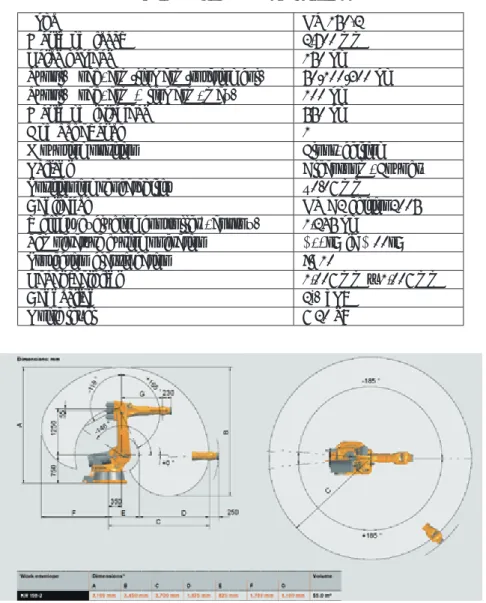
Type KR 150-2

Maximum reach 2,700 mm

Rated payload 150 kg

Suppl. Load, arm/link arm/rotating col. 50/100/300 kg Suppl. Load, arm + link arm, max. 100 kg

Maximum total load 550 kg

Number of axes 6

Mounting position Floor, ceiling

Variant Cleanroom, Foundry

Positioning repeatability ±0.06 mm

Controller KR C2 edition2005

Weight (excluding controller), approx. 1,245 kg Temperature during operation +10°C to + 55°C Protection classification IP 65

Robot footprint 1,006 mm × 1,006 mm

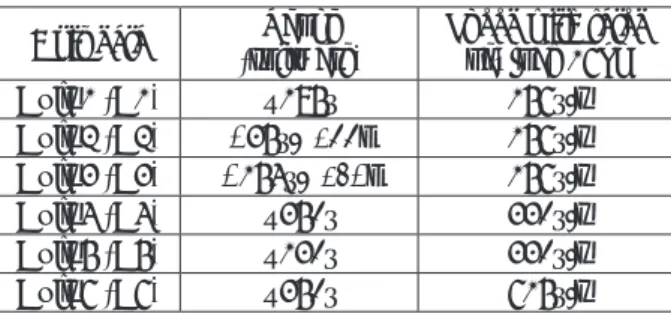
Connection 7.3 kVA

Noise level < 75 dB

Table 3.1 KR150-2 specifications

Fig.3.9 Range of robot movement

Fig.3.10 Axes of robot

Axis data Range

(software) Speed with rated payload 150kg

Axis 1 (A1) ±185° 110°/s

Axis 2 (A2) 0°/−146° 110°/s

Axis 3 (A3) +155°/−119° 100°/s

Axis 4 (A4) ±350° 170°/s

Axis 5 (A5) ±125° 170°/s

Axis 6 (A6) ±350° 238°/s

Table 3.2 KR150-2 ranges of movement and velocity 3.2.2. Specifications of robot

The specifications of the robot are listed in Table 3.1. The range of the movement of the entire robot is shown in Fig. 3.9. Furthermore, the rotating

directions of the respective axes of the robot are

shown in Fig. 3.10 whereas the ranges of the

movement and velocities of the respective axes are

listed in Table 3.2.

(16)

3.2.3. Coordinate system of robot

The following four types of coordinate systems form the basis for the robot’s operations, with the respective coordinate systems set appropriately for its applications, to operate it in an efficient manner.

・ WORLD coordinate system: The Cartesian coordinate system fixed to the tip of the foot of the robot.

・ ROBROOT coordinate system: This is identical to the WORLD coordinate system at default. The ROBROOT coordinate system is set by defining the offset from the WORLD coordinate system.

・ BASE coordinate system: A coordinate system based on the intended object.

・ TOOL coordinate system: A coordinate system based on the tool mounted on the tip of the robot.

The images of the respective coordinate systems of the robot are shown in Fig. 3.11.

3.2.4. Functions of robot

The robot is equipped with a manual mode (T1:

Manual low-speed mode; T2: Manual high-speed mode) and an automatic mode (AUT: Automatic mode;

AUT EXT: External automatic system mode). The manual operation and programming (teaching) of the

robot are performed in the manual mode. The automatic operation of the program is performed in the automatic mode. The T2 mode is disabled in the MaVES owing to the restriction of the maximum transition velocity of the robot to 250 mm/s to protect the scanning head of the 3D scanning vibrometer. The AUT EXT mode is an automatic mode that synchronizes with the external system but not used with the MaVES.

(1) Manual operation

The robot is controlled by manipulating the space mouse or the keyboard of the teach pendant. Manual operations are performed either by controlling the respective axes of the respective coordinate systems (WORLD, BASE, or TOOL), namely X, Y, Z, A (rotation about the Z-axis), B (rotation about the Y-axis), and C (rotation about the X-axis), or by directly controlling the joint shaft of the robot.

(2) Programming

The advanced language KRL was used to program the robot to perform automatic motions. The programmable motions are described below.

・ PTP motion (point-to-point motion): A motion that takes the path of the quickest route.

・ LIN motion (linear motion): A motion that moves along a linear path.

・ CIRC motion (circular motion): A motion that moves along a specified circle.

・ SPLINE motion (spline motion): A motion that connects specified points in a smooth manner.

Other than the above, it is also possible to program the robot using control commands (such as LOOP, IF, SWITCH, WHILE, REPEAT, and FOR) and functions (such as WAIT).

3.3. Integrated software 3.3.1. Role of software

The integrated software (RoboVIB; made by

Fig.3.11 Coodinate system of robot

(17)

Polytec) is a software application for managing the control and PSV software of the sensor positioning control robot so as to synchronize the movements of the robot with the measurements. This software is essential for automated measurements and is installed in the PC of the data management system.

3.3.2. Functions of integrated software The main functions of the integrated software are given below.

(1) Acquisition of positional coordinates of robot The positional coordinates for the measurement points can be determined using the PSV software by acquiring the positional coordinates of the robot.

(2) Allocation of measurement points corresponding to positions taught to the robot

The measurement points for which accurate measurements can be made are allocated with respect to the already-taught robot positions. The possibility of measurement can be determined based on various conditions such as the maximum measurement range, angle of laser with respect to the test piece, the existence of the measurement point in the shadow of the test piece, etc. From this, the existence of any point where measurement is not possible can be determined.

(3) Synchronization of robot and measurement The robot program and measurement using the PSV software are synchronized to enable automated measurements.

3.4. Modal analysis software

The modal analysis software (Test.Lab; made by LMS) can be used for preparing the geometry, conducting vibration measurements, and performing operational and modal analyses. The software can be used independently or in conjunction with the

MaVES, and is primarily used for performing modal analysis by importing the vibration characteristics data (in universal file format) obtained from the PSV software to the Test.Lab.

3.4.1. ConFiguration of software

The software is comprised of multiple modules, as described below.

・ Test.Lab Desktop - Advanced

・ Test.Lab Frontend Driver (8-channel)

・ Test.Lab Impact Testing

・ Test.Lab Spectral Testing

・ Test.Lab Geometry Workbook

・ Test.Lab Modal Analysis

・ Test.Lab Time Data Signal Calculator

・ Test.Lab Source Control

・ Test.Lab Time Recording Add-In

・ Test.Lab PolyMAX

・ Test.Lab Automatic Modal Parameter Selection

・ Test.Lab Signature Throughput Processing

・ Test.Lab Operational Deflection Shapes & Time Animation Workbook

・ Test.Lab Operational Modal Analysis

3.4.2. Functions of modal analysis software The modal analysis software is equipped with the following functions.

(1) Preparation of geometries

The software is capable of preparing 3D geometrical models relating to the measurement points. The models prepared in this fashion are used for 3D animations, based on the measurement and analysis data.

(2) Measurement of data

After adjusting the settings for the measurement

channels, sensors, trigger conditions, window functions,

excitation signal, etc., the data (Time, Octave,

(18)

Spectrum, Autopower, Crosspower, FRF, Coherence) was measured by hammering or exciting with a shaker.

(3) Modal analysis

This analysis is used for setting the analysis frequency ranges, preparing the stabilization diagrams, selecting a pole (manual selection or automatic selection), and calculating synthesized FRFs (by curve fitting), mode shapes, modal assurance criterion (MAC) values, etc. Two types of methods, namely, the least squares complex exponential time-domain (LSCE) and the least squares complex frequency-domain (PolyMAX) methods, may be selected as the curve fitting method.

Animated display of mode shapes and synthesized FRF is possible from the results of the modal analysis.

(4) Operational analysis

This analysis further comprises steady-state and tracking analyses. Operational animation of the analysis results with respect to the frequency and time axes can be displayed.

(5) Operational mode analysis

It is possible to perform estimation analysis for natural modes by using operational data.

3.5. Others

3.5.1. Safety light barrier

The safety light barrier is a safety device that brings a robot in automatic operation to an emergency stop when the laser is shielded, by arranging the sets of the M4000 standard light projector and light receptor (developed by SICK) into a single unit at the four corners to surround the four sides with laser. The trihedral Figure of the safety light barrier is shown in Fig. 3.12 and its specifications are listed in Table 3.3. The overall view of the safety light barrier 3.13 and its control panel are shown in Figs. 3.13 and 3.14, respectively. The control panel is installed on the top plate of the robot control device. The power of the light curtain is turned on and the reset button is pressed to turn on the illumination lamps of the light curtains 1 through 4 (corresponding to the four sides) to green, for turning on the operation of the safety device. If the laser is shielded anywhere along the four sides, the corresponding illumination lamp turns off and the robot is brought to an emergency stop.

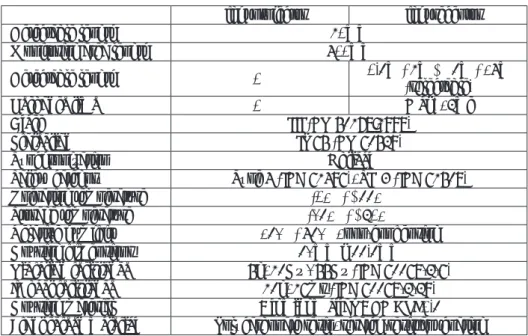
Table 3.3 Specifications of safety light barrier

Light projector Light receptor

Detectable length 60mm

Monitoring area length 900mm

Detectable length - 0.5m - 6m / 5m - 19m

(selectable)

Response time - Max. 17ms

Class III (EN 50178:1998)

Protection IP 65 (EN 60529)

Synchronization Optical

Safety category Type 4 (IEC 61496), SIL3 (IEC 61508)

Operating temperature -0℃ - +55℃

Storage temperature -25℃ - +70℃

Relative humidity 15% - 95% , non-condensing

Housing dimensions 52mm x 55.5mm

Vibration resistance 5g, 10Hz - 55Hz (IEC 60068-2-6)

Impact resistance 10g, 16ms (IEC 60068-2-29)

Housing material Aluminum alloy ALMGSI 0.5

Front screen material Polycarbonate resin, scratch-resistant coating

(19)

Fig.3.12 Trihedral figure of safety light barrier

Fig.3.13 Overall view of safety light barrier

Fig.3.14 Control panel of safety light barrier

(20)

3.5.2. Scanning head installation jig

The scanning head of the 3D scanning vibrometer was installed on the tip of the robot arm via an installation jig (Fig. 3.15). The installation jig is shown in Fig. 3.16.

3.5.3. Robot stand

The robot was installed on a special stand (Fig.

3.17) secured on the floor with four anchor bolts. The robot can be relocated while still being installed on the stand, by removing the anchor bolts and mounting the stand on a pallet truck.

Fig.3.15 Robot and scanning head Fig.3.16 Installation jig of scanning head

Fig.3.17 Trihedral figure of robot stand

(21)

3.5.4. PC and network

The following three units of PCs and NAS were used with the MaVES, which were linked via a local network. Microsoft Windows 7 was installed in the PC used for the 3D scanning vibrometer and Microsoft Windows XP was installed in the other PCs. The name of the work group was “MAVES- NET.”

・ PC for 3D scanning vibrometer (computer name:

PSV400; IP: 192.168.100.1)

・ PC for sensor positioning control robot (computer name: KR150; IP: 192.168.100.11)

・ PC for modal analysis software (computer name:

MAVES; IP: 192.168.100.2)

・ NAS for data storage (computer name:

MAVESNAS; IP: 192.168.0.4)

3.5.5. Laser vibrometer

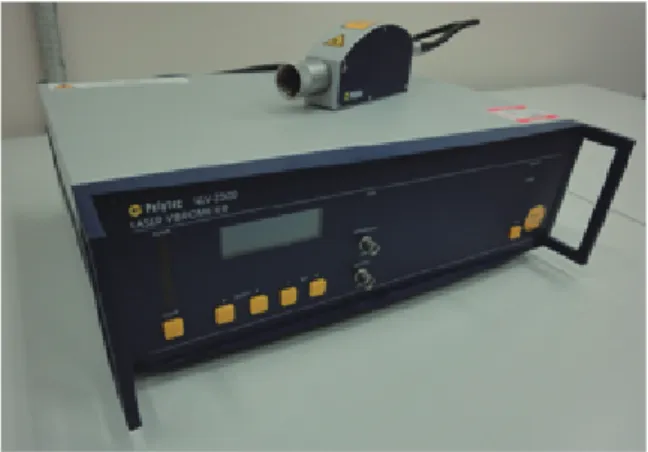
Other than the 3D scanning vibrometer, the system is equipped with another laser vibrometer, the NLV-2500, manufactured by Polytec (Fig. 3.18).

This laser vibrometer is comprised of a sensor head and a controller (NLV-2500-5). The controller is equipped with a velocity decoder that enables the setting of eight types of ranges, covering up to 10 m/

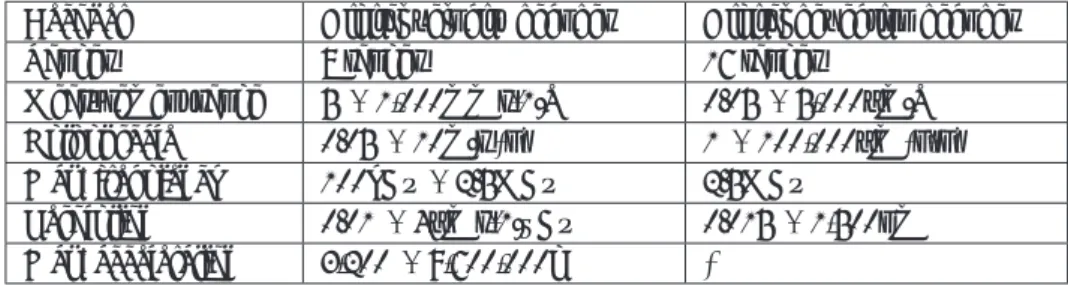
s and 2.5 MHz. The range settings can be controlled using the PSV software, by connecting the PC of the 3D scanning vibrometer with an RS-232C cable. The applied criteria for the laser are listed in Table 3.4 and an outline of the system is listed in Table 3.5. The specifications of the sensor head and vibrometer controller are listed in Tables 3.6 and 3.7, respectively. Furthermore, the range diagrams for the velocities and displacements are shown in Fig. 3.19.

Fig.3.18 Laser vibrometer (NLV-2500)

Specification

Laser safety IEC/EN 60825-1

(CFR 1040.10, CFR 1040.11)

Electrical safety IEC/EN 61010-1

EMC IEC/EN 61326

Table 3.4 NLV-2500 laser vibrometer (applied criteria)

Table 3.5 NLV-2500 laser vibrometer (Outline )

Device Controller Sensor head

Dimensions [L × W × H] 450mm × 355mm × 150mm 201mm × 38mm × 71mm

Weight 11kg 800g

Protection class I (protective grounding) IP64

Mains voltage 100 - 240VAC ±10%, 50/60Hz, Maximum 75W

Operating temperature +5 - +40°C

Storage temperature −10°C - +65°C

Relative humidity Maximum 80%, non-condensing

Optical fiber cable length 3m (between controller and sensor head)

Output voltage ±10V

Interfaces RS-232, Max.115kBd, Serial Port

Filters High pass filter: 100Hz / off

Low pass filter: 5kHz / 20kHz / 100kHz / off

Tracking filter: slow / fast / off

(22)

3.5.6. Surface plate

An optical surface plate (h-HOS-2412LA;

manufactured by Sigma Koki; Fig. 3.20) is available for installing the test piece and the optical system.

The top plate measures 2,400 mm × 1,200 mm and tap holes of M6 size (depth of 5 mm) are machined

on the entire surface at intervals of 25 mm. Air can be supplied using an air pump, as required, to facilitate vibration absorption by means of an air spring. The gross weight of the plate is 866 kg and the loadable weight is approximately 400 kg.

Optical specifications

Laser type He-Ne

Laser class Class 2, <1 mW, visible light souce

Wavelength 633nm, red laser

Measurement length 200mm (without optical accessory) - infinity

Minimum spot diameter 1.5μm(VIB-A-20xLENS)

Coherence 287mm + n · 204mm; n=0; 1; 2; ...

Table 3.6 NLV-2500 laser vibrometer (NLV-2500 sensor head)

Table 3.7 NLV-2500 laser vibrometer (NLV-2500-5 controller) Decoder Digital velocity decoder Digital deflection decoder

Ranges 8 ranges 16 ranges

Measurement range 5 - 1,000mm s-1/V 0.05 - 5,000μm/V

Output scale 0.05 - 10m/s (p) 1 - 100,000μm (p-p)

Max. frequiency 100kHz - 2.5MHz 2.5MHz

Resolution 0.01 - 4μm s-1/√Hz 0.015 - 1,500nm

Max. acceleration 3,200 - 9,600,000g -

Fig.3.19 Range diagram of velocity and displacement

9HORFLW\ UDQJHGLDJUDP 'LVSODFHPHQWUDQJHGLDJUDP

(23)

4. Details of MaVES-c

The respective hardware and software of the MaVES-c are described in detail in this chapter.

4.1. 1D scanning vibrometer 4.1.1. ConFiguration of vibrometer

The 1D scanning vibrometer (PSV-500-M;

manufactured by Polytec) is comprised of a scanning head unit (PSV-I-500), front-end unit (PSV-F-500-M), and data management system (PSV-W-500-M4;

indicated simply as a PC in Fig. 4.1). The scanning head is mounted on the tip of the arm of the sensor positioning control robot described in Section 4.2, and all devices are housed in a rack (Fig. 4.2).

The scanning head is connected to the front-end unit and performs the projection and reception of the laser. Furthermore, a CMOS-type video camera, geometry scan unit (PSV-G-500), and coherence optimizer (PSV-A-560) are installed on the scanning head, which is shown in Fig. 4.3. The trihedral Figure of the scanning head is shown in Fig. 4.4.

The front-end unit receives the measurement signals from the scanning head digitally, and transmits the analog signals to the data management system after converting them from digital to analog. It is also capable of handling the input and output of analog signals and processing three input and one output signals.

The data management system is comprised of a PC and PSV software to perform the reception and transmission of data with the front-end unit, as well as the processing of measurement data.

Fig.3.20 Optical surface plate

Fig.4.1 Configuration of 1D scanning vibrometer

(24)

4.1.2. Specifications of vibrometer

The laser units mounted on the scanning head, which is the laser diode-type geometry scan unit, is classified under Class 2 laser by the EN60825- 1 safety standard for laser beams, as its frequency is in the range 400–700 nm and the output of visible radiation is under 1 mW. At this level, even if the light source is projected directly into the eye, safety can be maintained through aversive reactions such as blinking.

4.1.3. Measurement functions

The vibration velocity of the test piece can be detected using the laser projected from the scanning head. However, as the Doppler effect is used, it can be detected in the optical axis direction of the laser. Furthermore, the scanning head is equipped with a mechanism that enables it to scan the optical axis of the laser with a galvanometer mirror (+25°

to the horizontal direction and +20° to the vertical

direction of the scanning head), making it possible to conduct measurements of a specified area (which, for reference, would be 500–600 mm on all sides for a distance of 700 mm between the scanning head and the intended object) without moving the scanning head.

The measurement points can be set on the PC using the video images provided by the CMOS-type video camera built into the scanning head.

It is also possible to derive the positional coordinates of the measurement points using a mechanism based on the distance between the test piece and the scanning head, and the angle of the mirrors, using the geometry scan unit of the scanning head. The light source can be switched from the laser for velocity measurement to the laser for ranging using the same scanning mirrors.

The coherence optimizer built into the scanning head stabilizes the wavelength of the laser.

Fig.4.3 Scanning Head

Fig.4.4 Trihedral figure of scanning head

Fig.4.2 Configuration of 1D scanning vibrometer (rack)

(25)

4.1.4. Optical system

Refer to Section 3.1.4 for details on the optical system.

4.1.5. Vibration velocity detection performance A data acquisition board (PCI-6110; manufactured by National Instruments) is built into the PC, facilitating measurements of vibrations up to 1 MHz (at a maximum sampling frequency of 2.56 MHz).

The detection performance for vibration velocity depends on the decoder built into the controller. The installed DV-04 decoder unit can be set to 13 types of ranges and is capable of conducting measurements of up to 10 m/s of vibration velocity at a maximum sampling frequency of 2.56 MHz.

4.1.6. Functions of PSV software

The PSV software is used for adjusting basically all the controls and settings of the 1D scanning vibrometer. The control and setting items are similar to those of the PSV software of the MaVES.

4.2. Sensor positioning control robot 4.2.1. ConFiguration of robot

The sensor positioning control robot (KR-16- 3; manufactured by KUKA) is comprised of a six- axial articulated robot main body, robot control device, and smartPAD. A photograph of the robot control device and the smartPAD is shown in Fig.

4.5. The smartPAD is a device intended for teaching and programming the robot, equipped with a touch display and space mouse (Fig. 4.6).

Fig.4.5 Robot control device and smartPAD

Fig.4.6 smartPAD

(26)

4.2.2. Specifications of robot

The specifications of the robot are listed in Table 4.1. The range of movement of the entire robot is shown in Fig. 4.7. Furthermore, the rotating directions of the respective axes of the robot are shown in Fig.

4.8 whereas the ranges of movement and velocities of the respective axes are listed in Table 4.2.

4.3. Others

4.3.1. Safety fence

Safety fences are installed around the system with doors at two locations (one being a sliding door and the other, a pair of double doors), along with a mechanism to automatically stop the robot when the door is opened during an automated measurement step. The trihedral Figure of the safety fence is shown in Fig. 4.9.

Fig.4.7 Range of robot movement

(27)

Type KR 16-3

Maximum reach 1,611 mm

Rated payload 16 kg

Suppl. Load, arm/link arm/rotating col. 10/variable/20 kg Suppl. Load, arm + link arm, max. Variable

Maximum total load 46 kg

Number of axes 6

Mounting position Floor, wall, ceiling

Variant Cleanroom, Foundry, Explosion-Proof

Positioning repeatability ±0.05 mm

Controller KR C4

Weight (excluding controller), approx. 235 kg

Temperature during operation +5°C to + 55°C Protection classification IP 65

Robot footprint 500 mm × 500 mm

Connection 7.3 kVA

Noise level < 75 dB

Table 4.1 Specifications of robot

Fig.4.8 Axes of robot

Table 4.2 KR16-3ranges of movement and velocty

Axis data Range

(software) Speed with rated payload 16kg

Axis 1 (A1) ±185° 156°/s

Axis 2 (A2) +35°/−155° 156°/s Axis 3 (A3) +154°/ − 130° 156°/s

Axis 4 (A4) ±350° 330°/s

Axis 5 (A5) ±130° 330°/s

Axis 6 (A6) ±350° 615°/s

4.3.2. Installation of scanning head

The scanning head of the 1D scanning vibrometer is installed on the tip of the robot arm via an installation jig.

4.3.3. Robot stand

The robot is installed on a special stand (Fig.

4.10), which is secured on the floor with four anchor bolts. The robot can be relocated while still being

installed on the stand by removing the anchor bolts and mounting the stand on a pallet truck.

4.3.4. Surface plate

A surface plate identical to the optical surface plate (h-HOS-2412LA; manufactured by Sigma Koki;

Fig. 3.20) described in Section 3.5.6 was installed

separately for the MaVES-c.

(28)

Fig.4.10 Trihedral figure of robot stand

Fig.4.9 Trihedral figure of safety fence

(29)

5. Measurement Methods

A number of preparations and settings must be performed to conduct automated measurements.

The series of procedures to be conducted from the preparation of measurement to the processing of its results is described below, taking the MaVES as an example.

5.1. Flow of measurement

Prior to conducting automated measurements, it is necessary to perform the operations of the PSV software RoboVib, robot, and the respective settings.

5.2. Measurement preparations

5.2.1. Installation of test piece and measure- ment equipment

Install the test piece and measurement equipment.

Obtain the range of movement of the robot under consideration when installing the test piece.

5.2.2. Switching of system

Select the system to be used (either PSV-3D- 400-H or PSV-3D-400-M) and connect the acquisition board (used for the system in use) located on the rear surface of the PC and the junction box with a cable.

5.2.3. Startup of MaVES

・ Startup of robot: Turn the power of the robot control device to ON state to revert the system to the condition it was in prior to turning it off the previous time.

・ Startup of 3D scanning vibrometer: Turn ON the power of the left and right controllers (for obtaining 3D measurements; not required for 1D measurement) and subsequently, turn ON the power of the junction box (integrated with the controller at the top). Finally, turn ON the power of the PC. Once all these devices are turned ON,

the PSV and RoboVib software programs can be started in Windows.

・ The Acquisition Board Selection window is displayed when the PSV software is started.

Select the “National Instruments PCI-446x” and

“National Instruments PCI-611x” choices for using the PSV-3D-400-H and PSV-3D-400-M, respectively.

5.3. Setting of optical system

Setting of the optical system involves the setting of the Preference, 2D alignment, 3D alignment, and calibration of the BASE coordinate system. Alignment data that presumes that the test piece is 700 mm vertically away from the center-of-gravity position of the triangle that links the tips of the three laser sensor units were available for the MaVES. Settings for the 2D and 3D alignments are unnecessary if the relative positions of the test piece and sensors are properly set. The calibration of the BASE coordinate system is also generally unnecessary. It is also possible to set arbitrary sensor positions other than the 700 mm condition, by resetting the 3D alignment.

5.3.1. Preference settings of PSV

Preference settings are made using the PSV software (Setup > Preference). Subsequently, the number of scanning head units used is set in the manner described below.

・ PSV-E-401-3D: three units (Top, Right, and Left) used.

・ PSV-E-401-3D (1D): three units started but only Top used.

・ PSV-E-401-1D: Only Top used.

Settings for the channels used to control the

vibrometer were made using the Channels tab. The

detailed settings related to the scanning head were

made using the Scanning Head tab. For setting

(30)

the head angle, the three scanning head units were mounted with fixed angles on the MaVES and set as Top: 0°, Left: 270°, and Right: 90°. Settings for the calculation of recommended values of the hidden points, and those for the automated calculations for the focus values were made using the Geometry tab.

Settings for the standard of the dB were made using the dB Reference tab, and those for displayed system messages were made using the Messages tab.

5.3.2. Setting of 2D alignment

This setting is made to align the position of the laser in the video image to that on the actual measurement plane (Setup > 2D alignment). Using the middle button of the mouse, move the laser to an arbitrary position on the test piece on the video image displaying it and specify the point to which the laser has to be projected. Specify at least six such points for each of the lasers at the top, left, and right, to perform the 2D alignment. Upon completion, the three lasers are projected onto the point on the video image clicked using the mouse. The manual setting described in this section is not necessary when using a robot as the alignment data already set using the RoboVib software will be used.

5.3.3. Setting of 3D alignment

Settings of the coordinate system for the measurement range was performed manually (Setup >

3D alignment). While converging the projection of the three lasers at a single point on the actual test piece, specify the origin, a point on the X-axis, and a point in the positive side in the Y-axis direction to determine the coordinate system. The settings performed manually as described in this section are not necessary when using a robot as the alignment data already set using the RoboVib software will be used.

5.3.4. Calibration of BASE coordinate system The calibration of the BASE coordinate system was made to set that of the robot. The calibration of the BASE coordinate system offers a significant advantage when the test piece, the measurement point of which has already been set (based on the BASE coordinate system), is moved in relation to the robot as in this case, the settings from a past measurement point can be used simply by redefining the BASE coordinate system with a calibration.

Except for cases in which settings from a past measurement point are used, it is not necessary to perform the calibration of the BASE coordinate system described in this section.

(1) Setting of calibration points

・ Set the calibration points at four points on the test piece, which are not aligned on a single straight line.

・ Determine the coordinate values for the respective calibration points.

(2) Move the laser to the origin.

・ Enter into the 3D Alignment step in the acquisition mode of the PSV software.

・ Execute the Select and Check Point options.

・ Click on the very first alignment point in the list and move the laser to the origin.

(3) Preparation of robot program

・ Open the new robot program (Fig. 5.1). All programs are described between the START_

PSV_MOVEMENTS and the PTP HOME lines during teaching.

・ Move the robot so that the three lasers are pointed

at the first calibration point and teach the system

about the robot position. The operating method for

this instance shall be the PTP motion. The name

of the robot position set in the second column in

the PTP inline form (that pops up in the program)

(31)

shall be B1. Leave the third column empty and leave the fourth and fifth columns in their default settings (Fig. 5.2).

・ Repeat the teaching with the remaining three calibration points, with the name entered in the second column in the inline form being B2, B3, and B4, respectively.

・ Save the robot program.

(4) Execution of BASE calibration

・ Enter the program path for the robot program for which teaching has been completed in the Preferences menu of the RoboVib software.

・ Select Setup > BASE Calibration and open the BASE Calibration window.

・ Enter the coordinates for the four calibration points. The coordinate system will be calculated

and transferred to the robot controller. BASE [1], which is a BASE coordinate system of the robot, is now updated.

5.4. Teaching of robot position

If the robot needs to be moved during automated measurements, it is necessary to prepare a robot program by teaching the system about the robot position in advance. The robot position is set in such a way that the test piece is located 700 mm away vertically from the center-of-gravity of the triangle that connects the tips of the three laser sensor units (3D alignment data is set at 700 mm away as standard, to maintain a balance between the signal-to- noise ratio and the range of scanning). The positional relationship between the laser sensors and the test piece is shown in Fig. 5.3.

Fig.5.1 Robot program

Fig.5.2 PTP inline form

(32)

(1) Preparation of new robot program

A new robot program is prepared using the teach pendant (refer to Fig. 5.1). The program is entirely described between the START_PSV_MOVEMENTS and the PTP HOME lines during teaching.

Furthermore, the program is divided into a number of subprograms and it is also possible to create a program to call the subprograms from the main program.

(2) Teaching of robot position

Teaching the robot position is done using the teach pendant. The operation used in this instance shall be the PTP movement and the name of the robot position set in the second column on the PTP inline form shall be, in sequence, M1, M2, etc. The third column shall be left blank whereas the Tool coordinate system in the fourth column shall be Tool [1], with the BASE coordinate system on the fifth column being BASE [0]. There are cases in which dummy robot positions are set for which no measurements are made, for the purpose of preventing collision between the robot and the test piece. The operation in such an instance shall also be PTP motion and in the inline form, the

names of the robot positions shall be P1, P2, etc. The CONT is specified in the third column (which is a specification indicating to the system not to stop at the target points). The coordinate system shall be Tool [1] for the Tool coordinate system and BASE [0] for the Base coordinate system, as described above.

It is possible to do the teaching of the robot position while verifying the rough range in which measurements can be performed, during the actual scanning with lasers.

This is performed by executing the macro program of the PSV software, ShowScanRangeAndZeroPos (Examples\Macros\ShowScanRanges.bas). Lasers are constantly scanned during the execution of this program and the condition will be such that the projection range of the laser can be verified.

(3) Save the robot program.

5.5. Setting of measurement points

Set the points to be actually measured and prepare the geometry (a group of measurement points).

Optimize the focus of the laser for the respective measurement points.

(1) Relocation of robot position

Move the robot arm to the position saved during teaching.

(2) Setting of 3D alignment

Set the 3D alignment (including the 2D alignment) for the new robot position by executing the following:

・ Open the System Control window of the RoboVib software (Setup > System Control).

・ Load the current robot position by clicking on Read Position (the loaded and displayed robot position coordinates are the coordinates of the Tool [1] and BASE [1] coordinate systems).

・ Set the 3D alignment by clicking on Set 3D Alignment.

Fig.5.3 Positional relationship between laser

sonseros and test piece

(33)

(3) Preparation of geometries

Using the PSV software, prepare the measurement points on the image of the CCD camera. After preparing, execute the Geometry Scan (Scan >

Geometry Scan) to conduct measurements of coordinates for the respective measurement points and complete the geometry.

If there are other robot positions that have been saved by teaching, then the following steps shall be executed and thereafter, steps (1) to (3) shall be repeated.

・ Select all the prepared geometries and then select Menu > Change Indices on one of these points with a right click to apply an offset to ensure that this does not overlap with a measurement point number on other geometries.

・ Export the geometry as a universal file.

Once the preparation of all geometries has been completed, complete the geometry by importing all universal files using the Import Geometry command.

(4) Setting of focus

・ Select all measurement points and then select Menu > Recalculate Focus Values on one of these points with a right click.

・ Verify that all measurement points are labeled as Calculated under the Laser Focus Status.

・ Check Scan > Focus during Scan (enable the calculated focus).

(5) Setting of video triangulation

・ Select Standard or Fast in the Triangulation menu during Scan under Scan > Video, to accurately converge the three points of lasers to a single point by using triangulation on the video image.

・ The Standard command rewrites the geometry after the three points are matched. The Fast command, on the other hand, matches the three points but

does not rewrite the geometry.

・ Furthermore, executing the video triangulation increases the measurement time.

(6) Saving of setup file

5.6. Analysis of measurement points

Analyze the measurement points and assign the prepared measurement points to robot positions saved by teaching. All measurement points are also screened to determine whether or not obtaining measurements is possible.

(1) Setting of analysis conditions

Analysis conditions are set using the RoboVib software (Setup > Preference). The settings are made in the Preference window, which features the General and the System 1 tabs. The following settings are performed under the General tab.

・ Scan Point Definition File: The setup file that defines the measurement points is specified.

・ Quality Control Folder: The folder for saving the files used for quality control is specified.

・ Maximum Angle of Incidence: The maximum angle of the laser projected on the surface of the test piece (the angle between the direction of the normal line from the surface of the test piece and the laser beam) is specified (Fig. 5.4). If the actual angle exceeds this value, it is determined to be immeasurable.

・ Maximum Measurement Distance: The setting for the maximum distance that can be measured (Fig.

5.5) is specified. If the actual distance exceeds this value, it is determined to be immeasurable.

・ Calculate Hidden Points: Turning the checkbox ON causes the RoboVib software to calculate the measurement points that are hidden by the shape of the geometry.

・ Tolerance for Calculating Hidden Points: The

(34)

tolerance value used for the determination of the Hidden Points is entered. The measurement points located at distances shorter than the tolerance value are determined as Hidden Points (Fig. 5.6).

The tolerance value calculated in the Geometry tab of the setup window of Preference in the PSV software is generally entered as is (refer to Section 5.3.1).

・ Calculate 3D Edges: This is checked while performing a calculation to understand which measurement point is on the 3D edge. The points on which the laser projection potentially does not reach the test piece when the measurement point is missed are determined as 3D edge points.

Examples of the points that are determined and not determined as 3D edge points are shown in Fig. 5.7.

Fig.5.4 Angle of Incidence Fig.5.5 Measurement Distance

Fig.5.6 Hidden Point

(35)

Fig.5.7 3D edge

・ Robot Settling Time before Scan: The time margin, from the time the robot is moved to the position saved by teaching until the measurement starts, is set. This is used when the relocation of the robot triggers the excitation to vibrate the sensor to delay the start of measurement until the vibration settles down.

The following settings are performed in the System1 tab.

・ 3D Alignment File: The setup data file of the settings for the 3D alignment is specified.

Generally, this is left with default settings and no changes to the settings are required.

・ Robot Positions File: The robot program prepared during teaching is specified.

(2) Execution of analysis

The measurement points are analyzed based on the set analysis conditions (Action > Prepare Measurement Settings). Once the analysis is completed, all

measurement points are assigned to a single or multiple geometry components (a group of measurement points) and a setup file is prepared in the Quality Control Folder and the Measurement Settings Folder.

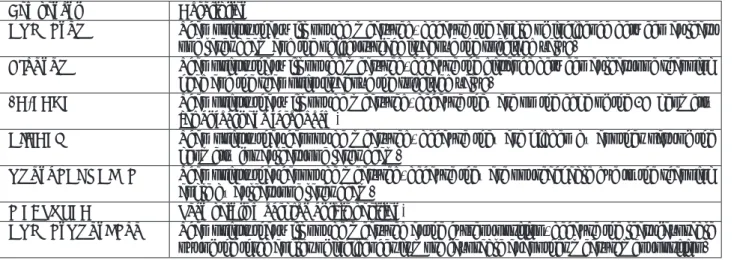
The results of the assignments for all measurement points can be verified with the setup file prepared in the Quality Control Folder, MPOS_ALL.set. The measurement points determined as measurable by correlating against the set analysis conditions are assigned to the geometry components having the same names as those of the corresponding robot positions (M1, M2, etc.). Those measurement points determined as immeasurable are assigned to the existing geometry component (Table 5.1). The correction of measurement points, change of analysis conditions, etc. are performed as required.

The automated measurement is finally performed

according to the setup file prepared for each geometry

component in the Measurement Settings Folder.

Table 3.1  KR150-2 specifications
Table 3.3  Specifications of safety light barrier
Table 3.4  NLV-2500 laser vibrometer (applied criteria)
Table 3.7  NLV-2500 laser vibrometer (NLV-2500-5 controller) Decoder Digital velocity decoder Digital deflection decoder
+5

参照

関連したドキュメント

Standard domino tableaux have already been considered by many authors [33], [6], [34], [8], [1], but, to the best of our knowledge, the expression of the

Moreover, to obtain the time-decay rate in L q norm of solutions in Theorem 1.1, we first find the Green’s matrix for the linear system using the Fourier transform and then obtain

H ernández , Positive and free boundary solutions to singular nonlinear elliptic problems with absorption; An overview and open problems, in: Proceedings of the Variational

The only thing left to observe that (−) ∨ is a functor from the ordinary category of cartesian (respectively, cocartesian) fibrations to the ordinary category of cocartesian

Eskandani, “Stability of a mixed additive and cubic functional equation in quasi- Banach spaces,” Journal of Mathematical Analysis and Applications, vol.. Eshaghi Gordji, “Stability

An easy-to-use procedure is presented for improving the ε-constraint method for computing the efficient frontier of the portfolio selection problem endowed with additional cardinality

Keywords: Convex order ; Fréchet distribution ; Median ; Mittag-Leffler distribution ; Mittag- Leffler function ; Stable distribution ; Stochastic order.. AMS MSC 2010: Primary 60E05

In this paper, we focus on the existence and some properties of disease-free and endemic equilibrium points of a SVEIRS model subject to an eventual constant regular vaccination