Japan Advanced Institute of Science and Technology
JAIST Repository
https://dspace.jaist.ac.jp/Title A Study on Importance of Web Accessibility and Development of a Browser for Senior Citizens Author(s) ABE, Junichi; MINAZUKI, Akinori; KOSUMI, Yasushi Citation
Issue Date 2007-11
Type Conference Paper
Text version publisher
URL http://hdl.handle.net/10119/4076
Rights
Description
The original publication is available at JAIST Press http://www.jaist.ac.jp/library/jaist-press/index.html, KICSS 2007 : The Second International Conference on Knowledge, Information and Creativity Support Systems : PROCEEDINGS OF THE CONFERENCE, November 5-7, 2007, [Ishikawa High-Tech Conference Center, Nomi, Ishikawa, JAPAN]
A Study on Importance of Web Accessibility and Development of a Browser
for Senior Citizens
Junichi ABE † Akinori MINAZUKI†† Yasushi KOSUMI†††
†Kushiro Public University, School of Economics
[email protected]
††Kushiro Public University, School of Business Management
[email protected]
†††JFE Systems Inc.
[email protected]
Abstract
Currently, most of senior citizens utilize actively the Internet. The internet crosses barriers of time and space because it enables effective access to various information. However, senior citizens confront issues that include deficiency of computer skills and ignorance of peculiar com-puter concepts. I detected the following in order to solve those problems: (1) Issues and solutions of senior citizens from the viewpoint of Web accessibility, (2) The development concept of a cellular phone for senior citizens and opinions of users. And this paper reports on the development process of a browser for senior citizens on the basis of knowledge that I obtain form them.
Keywords: Internet, KJ method, Senior Citizens,
Web Accessibility, Senior Citizens Society
1
INTRODUCTIONAt the moment, Japan is a rapidly aging society with a falling birthrate. In fact, the population of senior citizens over 65 years old as of 2006 in Japan is a record-high 25.6 million: 20.04% the total population. This year, it exceeded 20% for the first time. In addition, Japan is rapidly pro-gressing toward an information-oriented society; the internet user population of 2004 is estimated as 79.48 million.
Use of the internet supports social participation of senior citizens, for whom opportunities have been limited considerably. Internet use by senior citizens can deepen inter-generational acquaint-ances and society can share experiences and wisdom that they have cultivated until now. However, senior citizens confront issues that
include deficiency of computer skills and igno-rance of peculiar computer concepts. It is a fact that they are not as capable of accessing the internet as younger people are. This study is in-tended to develop a browser that will contribute to bridging the digital divide that affects senior citizens.
The plan of this paper is as follows. The relation between senior citizens and the internet is de-scribed first. Second, reference points of Web accessibility are detected and a cellular phone for senior citizens is presented. Third, knowledge obtained from senior citizens using KJ method is introduced. Finally, I describe the developed browser and present conclusions.
Senior Citizens KJ method Cellular Phone
Web accessibility
Developed Browser
Figure 0. Design Process
2
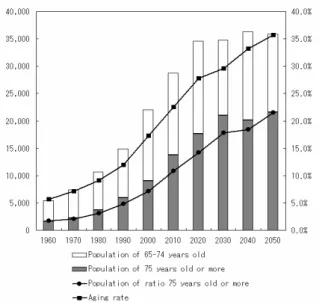
STATUS OF SENIOR CITIZEN SOCIETYThe population of senior citizens over 65 years old in Japan is a record-high 25.6 million, as stated above. It is estimated that elderly people will continue to increase rapidly until 2020 and stabilize thereafter. On the other hand, although the total population is beginning to decrease, the percentage of elderly people is estimated to con-tinue increasing, and to reach 26.0% in 2015 and 35.7% in 2050.[1]
Figure 1. The change of aging and future esti-mation
3
STATUS OF THE INTERNET IN JAPANIn Japan, internet technology has spread and communication infrastructure has developed to create an information-oriented society.[2] The internet user population of the end of 2004 was estimated as 79.48 million, with year-on-year increases of 2.8%. The population diffusion rate is 62.3%, increased by 1.7 points over the end of 2003. Compared to the end of the year preceding the launch of the e-Japan strategy, the internet use population has increased by about 32 million, and the population diffusion rate has increased by 25.2 points, which indicates that internet use by individuals has progressed steadily during these four years.
Figure 2. Transitions in the Internet User Popu-lation and Penetration Rate
The broadband charge per 100 kbps of DSL and
CATV in Japan is 0.06 dollar; it is the cheapest in the world. These low-cost broadband connections further expand internet use.
Figure 3. International comparison of the broad-band charge
4
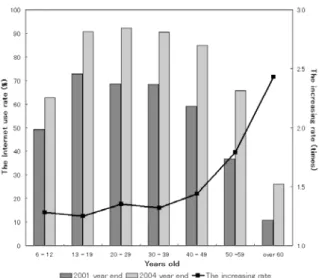
THE INTERNET USE SITUATION OF SENIOR CITIZENSThe internet use rate among young people and elderly people differs a great deal. Compared to other generations, with rates greater than 60.0%, elderly internet users are only 26.0% of all people of that age group. However, compared with other generations, the increase of elderly users during 2001–2004 is considerably high: a factor of 2.43. According to an internet use trend survey of senior citizens (ages 50–79), the percentage using the internet for more than five years is 30% and the percentage using the internet every day is 90%.[3] This result is about the same as that for 40-year-olds and younger users: the internet is an important part of daily life for senior citizens. Regarding utilization, the use of communication is high. The percentage communicating with family and friends on the internet is 46%. On the other hand, the percentage making friends with similar interests and hobbies is only 15%. In other words, the internet is used more for com-munication with people who share a relationship than it is for communication with online strangers. Other usage situations are listed below. Results of this survey show that the utilization factor of services delivered online is high.
▪ Information retrieval – 89% ▪ Internet shopping – 51% ▪ Web banking – 25%
Figure 4. The Internet use rate and the increasing rate according to generations
Convenient points of internet use were revealed by this investigation.
▪ They can get information easily. ▪ They can get information quickly.
▪ They can make contact with acquaintances casually.
▪ They can get goods and services without going out.
The internet crosses barriers of time and space because it enables effective access to various information and rich communication. Internet use supports social participation for senior citizens, who have heretofore had only limited opportuni-ties. Moreover, it is conducive to change in older people’s lives. In addition, the internet use of senior citizens can deepen acquaintances among generations and society can share experience and wisdom that has been cultivated until now. The salient points of the discussion above em-phasize that the internet and communications infrastructure confer benefits on senior citizens.
5
ON THE WEB ACCESSIBILITY[4]The goal of obtaining certain information from the internet might present many obstacles. The effort to reduce such obstructions as much as possible serves the goal of ‘Web Accessibility.’ Not only young persons receive knowledge using the internet. Web contents are accessed according to disparate concepts and to fulfill various needs: visually impaired people, people with hearing
difficulties, people of advanced age, and nonna-tive readers of Japanese language. Through web access, technical aspects such as the guidelines of WCAG and JIS X 8341-3 are apt to attract some attention. However, it is important to increase availability to persons who cannot access web contents, and to consider the needs of users who fall into the digital divide.
According to a usability investigation of senior citizens by Mr. Jakob Nielsen, a normalized us-ability index with the score of senior citizens as 100% implies the usability of non-senior citizens as 222%.[5] In other words, non-senior citizens are superior by two times to senior citizens. In addition, relations between success rates on tasks and subjective satiability of this site are very high, with r = 0.78. In short, senior citizens tend to prefer easy-to-use Web contents.
6
PROBLEMS OF SENIOR CITIZENSWhen attaining a ripe old age, human bodily functions tend to fail: problems of eyesight, de-mentia senility, slow learning, and easy exhaus-tion are common problems among older people. In addition, older people are apt to resist new words and concepts. They have trouble in fast movements and detailed work, and recollection becomes slow. Regarding Web contents, long-term use of materials is difficult because of optical liability, the click speed is slow, and older people might not be able to click small areas.
Senior citizens only rarely use software to enlarge the view on the screen, and to assist other user impairments. Therefore, ease-of-use is nec-essary as a default configuration. The considera-tions for senior citizens from the standpoint of Web accessibility are as follows.
▪ Give consideration to the image size and char-acters, and alleviate burdens on eyes.
▪ Give consideration to the color scheme and contrast.
▪ For objects with changes such as blinking and scrolling, consider the blinking speed.
▪ For moving objects, consider their speed. ▪ Reduce words borrowed from foreign lan-guages and describe simple phrases.
7
ANALYSIS OF THE PRODUCT FOR SENIOR CITIZENSThis section describes a mobile telephone that was released as ‘TU-KA S’ for senior citizens. The development concept was to thoroughly eliminate functions for which an explanation was necessary. As a result, only the function for calling remained and a mobile telephone without a display was completed. It cannot confirm even a phone number that the user has called. However, questionnaire results showed that many users feel insecurity when the Kanji characters and the alphabet are displayed. The device uses a ring tone and vibration when getting a call. The ring tone is only one kind; there is no silent mode. Fundamentally, there is no concept of settings in the ‘TU-KA S’.
The concept was controversial, but continued questionnaire surveys showed the results. Two weeks after its release, it was at the top of the sales ranking among models in the TU-KA group: there was actual demand.
Figure 5. A photograph of ‘TU-KA S’
8
REFERENCE POINTS OF ‘TU-KA S’The reason to cite this case is that its intended users accord with this study. In this early study, an unfussy browser was planned. There is no general idea of settings because the function was limited with the cellular phone of this example. In other words, users cannot customize it. Such a point engenders user dissatisfaction. However, more than 70% of senior citizens highly value
simple functionality.[6]
In other words, the developers consider senior citizens’ use; it is important that they mount functions to solve senior citizens’ original prob-lems. We might well be able to complete a browser designed for senior citizens if We clearly present necessary functions for senior citizens and add the idea of web accessibility.
[Senior investigation for ‘TU-KA S’] ▪ Valuing it – 80%
The manual is unnecessary. ▪ Not Valuing it – 10%
The address book function is necessary.
The subjects of this investigation are 300 internet users who were 60 years old and older.
9
APPLICATION Of KJ METHODWeb accessibility and the development concept of a cellular phone designed for senior citizens were discussed earlier. Using that knowledge and experience, the author undertook development of a browser designed for senior citizens. In this study, We used KJ method to choose functions to load into a browser designed for senior citizens. KJ method is an approach to read a meaning and structure with human intuition power. KJ method is executed in the following procedure.[7] 1. Theme decision
2. Data collection 3. Label making
I fill in a card with provided data using concise expressions.
4. Group editing
I spread a label to a desk and make a group with the label that an impression resembles. 5. To turn labels into a figure
I connect a group and a card in a line, and surround it.
Figure 6 reports information using the KJ method. It shows that I resolved issues of senior citizens using a guideline of Web accessibility and an example of ‘TU-KA S’. I detect functions that are necessary for a browser designed for senior citizens. This browser has the functions described below.
▪ A Homepage printing function ▪ An Interface of big Button control
▪ A Function to change of font size of Web con-tents
▪ A Function to change character encoding ▪ A Simple bookmark function
Figure 6. Arrangement of knowledge by KJ method
10
DEVELOPMENT OF A BROWSERIn this study, We use Visual Studio .NET 2003 which is an integrated development environment. The execution test was done with two computers: the writers’ and an intramural computer that We installed .NET Framework in.
The browser to develop uses the Web browser Control of Visual Basic .NET. This provides an application to make the functions the same as IE. A basic browser can be made quickly. An ordi-nary browser has the functions described below. ▪ A Web client function
▪ A Parser function
▪ A Lettering engine function
Figure 7. Internet Explorer Architecture. The Shdocvw.dll supplies the functionality associated with navigation, in-place linking, favorites and history management, and PICS support. This DLL component is more frequently referred to as the Web Browser Control.
In addition to these, there are browser functions such as a Java script engine, Java execution ap-plets, and Adobe Flash displays. We can make a browser quickly using an Internet Explorer component rather than producing a new browser from scratch. A browser tends to use Main Menu
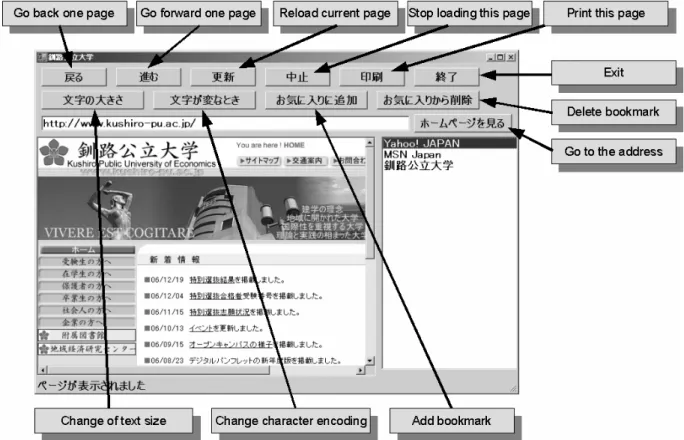
controls because developers think that the display area of Web contents is the most important. In this article, the big Button control constitutes an inter-fence of this browser to use all functions in one click from the situation of a senior citizen.
Figure 8. The screen shot of a browser designed for senior citizens
11
A BEHAVIOR OF MAIN FUNCTIONSA. About the change of font size function
In Web browser control, the font size can be set to five kinds of 0 (minimum) – 4 (maximum). In this browser, I narrow down the choices to two: 3 (large) – 4 (maximum). Users can change the font size with one click.
B. About the character encoding change function
Currently, it is rare that Web contents turn into garbled characters after upgrading a browser. However, even when Web contents become gar-bled, a function to easily change character en-coding is necessary. The cause of the garbling is that assignments of bit strings to Japanese char-acters are not unified.[8] In this browser, I make a
function to change to two character encoding schemes (Shift_JIS and EUC-JP), which are used in Japanese Web contents.
C. A simple bookmark function
The simple cellular phone was received by senior citizens, as described in the example of ‘TU-KA S’. However, many users wanted a memory function to register a telephone number. Actually, a follow-on model (A101K) was re-leased by the cellular phone business brand ‘au’; the bolted-on functions from ‘TU-KA S’ are the address book function and the silent mode func-tion.[9] In this browser, We arranged a ListBox control beside the Web browser control; users can navigate the internet to registered URLs in one click. On coding, this browser manages URLs and Location Names using a
two-dimensional array variable. Figure 9 presents the structure of this variable and its relation to each process.
Figure 9. (A) Structure of BookmarkArr (B) Re-lation to each process
12 Conclusion
For this study, We used Visual Basic .NET and Web browser control to develop a browser de-signed for senior citizens. In addition, We actu-ally produced Web contents that are accessible to various people, thereby recognizing the impor-tance and difficulty of Web accessibility. The Web contents explain the functions and usage of a browser designed for senior citizens: anyone can download it freely. In addition, We compiled knowledge of a precedent study using KJ method, and regarded them as demand analysis necessary for Software Development.
Most importantly, when we make goods, we must always think about a user. It is a matter of common sense, but systems, software, and re-lated contents are goods, too. Currently, it is often said that we live in an information-oriented so-ciety, but few systems, software, and contents were developed consideration of users. In a complicated society, various people fall afoul of obstacles that form the digital divide. To clear away these obstacles, consideration on the part of developers is necessary.
Regarding technical subjects, the acquisition of the Web content’s Location Name by Web browser control is not stable. In some situations, the Location Name becomes congruent with the URL, and there is the problem that the bookmark function is tricky to use. A computer is not
crashed by this bug. However, from the point of view of Web accessibility, it must be improved immediately. Two improvement methods exist: auxiliary coding to the event handler of the Web browser control, and a shift to the Visual Basic 2005 .NET development environment. Subse-quently, We will compare these two improve-ment methods, and plan a version upgrade of this browser immediately.
One limitation of this study is that the browser has not been tested with general users. This software began as a prototype. Then Version 1.1.1.0 was made available on the internet; Ver-sion 1.1.3.0 is under development. Under normal circumstances, various people and senior citizens would use this software. We have to ask about their original impressions. This software is ex-hibited in two website: the download site ‘vector’ and the Web contents that We made for this study. We will continue this project, and seek next to test it for general users at a point in time that solved the bugs.
Figure 10. The site that present a browser de-signed for senior citizens
References
[1] Cabinet Office Japan, Annual Report on the Aging Society (2006) [Online]. Available: http://www8.cao.go.jp/kourei/whitepaper/index-w.html
[2] Cabinet Office Japan, Information and Communications in Japan White Paper (2006) [Online].Available:
http://www.johotsusintokei.soumu.go.jp/
[3] Rakuten research Co., Ltd, The Internet use trend survey of senior citizens (1st edition) [Online].Available:
http://research.rakuten.co.jp/report/20021201/ [4] H. Hamada, N.Sakakibara, S.Ogawa, and T.Sekine, Kokokara hajimaru Web accessibility. Tokyo: Gyosei Inc, 2004, pp. 9-154
[5] IID Inc, Jakob Nielsen’s Alert box, [Online]. Available: http://www.usability.gr.jp/
[6] IT media Inc., The review TU-KA S, [Online]. Available:
http://plusd.itmedia.co.jp/mobile/articles/0412/0 3/news092.html
[7] J. Kawakida, The idea method – for crea-tiveness development. Tokyo:TyuouKouron-Sya, 1967.
[8] IT media Inc., Why do web contents turn into garbled characters?, [Online]. Available: http://itpro.nikkeibp.co.jp/members/NNW/NETP OINT/20020219/1/
[9] KYOCERA Co., Ltd, The product informa-tion(A101K),[Online].Available:
http://www.kyocera.co.jp/prdct/telecom/consum er/a101k/index.html