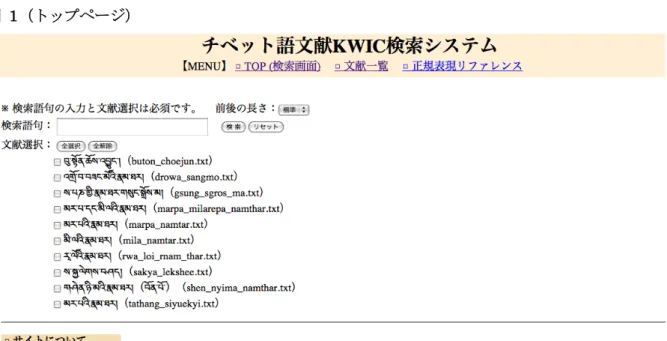
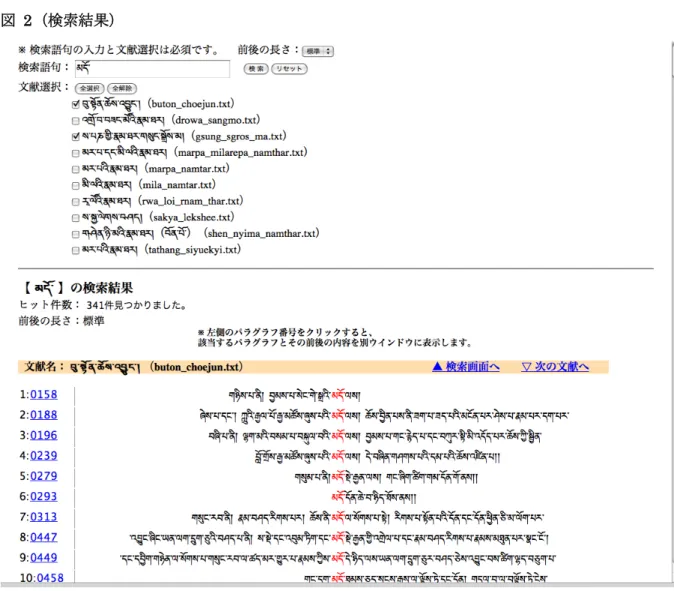
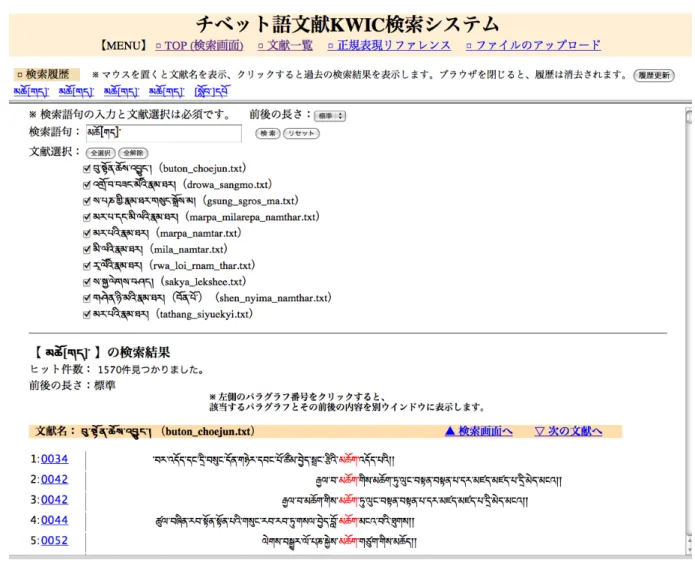
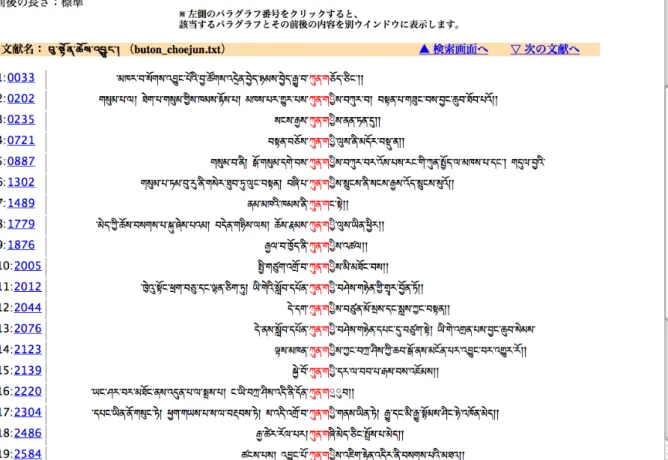
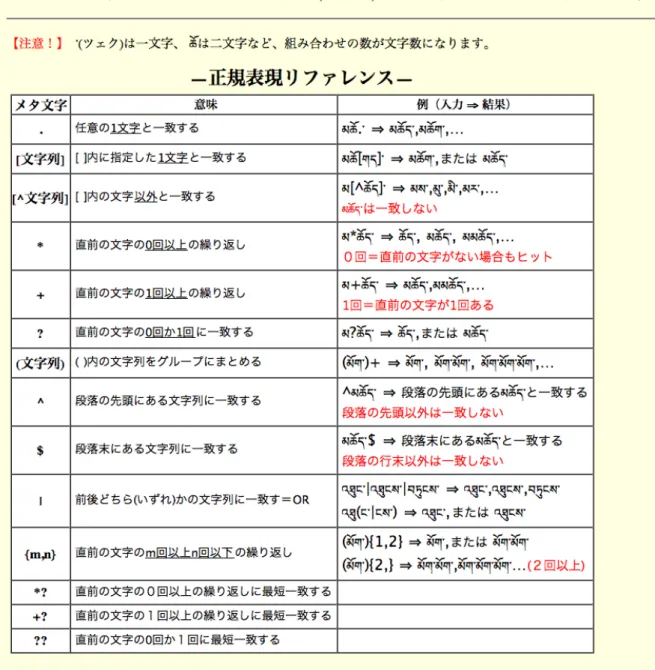
図 2(検索結果)
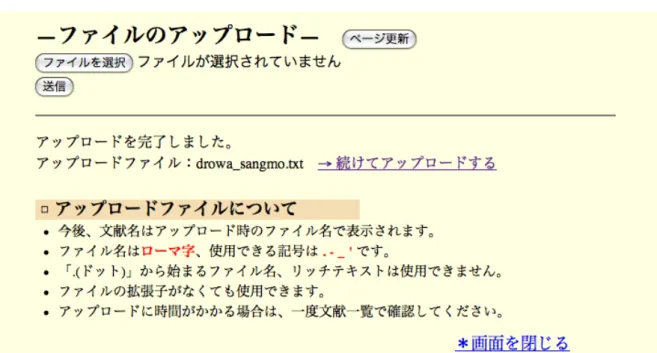
図 4(アップロード機能)
図 7(エラー表示1)
図 9(有足字̶改善前)
図 12(header.cgi):ヘッダー 1. #!/usr/bin/env python 2. # -*- coding:utf-8 -*-
3. import cgi, cgitb, re,sys,os,Cookie,tempfile 4. from settings import UPLOAD_DIR, UPLOAD 5. cgitb.enable()
6. print "Content-Type: text/html; charset=UTF-8" 7. print
8. print '''
9. <!DOCTYPE html pubic "-//W3C/DTD HTML 4.01 Transitional//EN" 10. "html://www.w3.org/TR/html4/loose.dtd">
11. <html><head>
12. <meta HTTP-EQUIV="Content-type" CONTENT="text/html;CHARSET=UTF-8"> 13. <meta HTTP-EQUIV="Content-script-type" CONTENT="text/javascript">
14. <link rel="stylesheet" type="text/css" href="style.css" title=default> 15. <title>チベット語文献 KWIC 検索システム</title>
16. <script type="text/javascript"> 17. <!-- 18. function openwin() { 19. window.open( "seiki.cgi", "", "width=800,height=800,status=yes,resizable=yes,scrollbars=yes"); 20. } 21. function openwindow() { 22. window.open(
"tempfile.cgi", "", "width=750,height=420, status=yes, location=yes,scrollbars=yes"); 23. } 24. // --> 25. </script> 26. </head> 27. <body> 28. <div id="header"> 29. <h1>チベット語文献 KWIC 検索システム</h1> 30. </div> 31. <div id="menu">
32. <p class="menu">【MENU】 <a href="main.cgi" target="sita">□ TOP (検索画面)</a> 33. <a href="itiran.cgi" target="sita">□ 文献一覧</a>
34. <a href="javascript:openwin();">□ 正規表現リファレンス</a> 35. '''
36. if UPLOAD:
37. print ' <a href="javascript:openwindow();">□ ファイルのアップロード</a>' 38. print ''' 39. </p> 40. </div></body></html> 41. ''' 図 13(index.cgi):トップページ(フレーム) 1. #!/usr/bin/env python 2. # -*- coding:utf-8 -*- 3. import cgi, cgitb, re,sys,os
4. from settings import UPLOAD_DIR, UPLOAD, RIREKI 5. cgitb.enable()
6. print "Content-Type: text/html¥n¥n" 7. print '''
8. <!DOCTYPE html pubic "-//W3C/DTD HTML 4.01 Transitional//EN" 9. "html://www.w3.org/TR/html4/loose.dtd">
10. <html><head>
11. <meta HTTP-EQUIV="Content-type" CONTENT="text/html;CHARSET=UTF-8"> 12. <meta HTTP-EQUIV="Content-Style-Type" CONTENT="text/css">
13. <meta HTTP-EQUIV="Content-script-type" CONTENT="text/javascript"> 14. <link rel="stylesheet" type="text/css" href="style.css" title=default>
15. <title>チベット語文献 KWIC 検索システム</title> 16. </head>
17. '''
18. if RIREKI:
19. print '<frameset rows="10%,8%,*">'
20. print'<frame src="header.cgi" name="ue" scrolling="no" border="0" frameborder="0" framespacing="0" marginwidth="0" marginheight="0">'
21. print '<frame src="rireki.cgi" name="rireki" scrolling="auto" overflow-x="hidden" border="0" frameborder="0" framespacing="0" marginwidth="0" marginheight="0">'
22. print '<frame src="main.cgi" name="sita" scrolling="auto" frameborder="1" framespacing="0">'
23. print '</frameset>' 24. else:
25. print '<frameset rows="10%,*" frameborder="0">' 26. print'<frame src="header.cgi" name="ue">'
28. print '</frameset>' 29. print ''' 30. </html> 31. ''' 図 14(main.cgi):トップページのメイン 1. #!/usr/bin/env python 2. # -*- coding:utf-8 -*- 3. import cgi, cgitb, re,sys,os
4. from settings import UPLOAD_DIR, UPLOAD 5. cgitb.enable()
6. print "Content-Type: text/html¥n¥n" 7. print '''
8. <!DOCTYPE html pubic "-//W3C/DTD HTML 4.01 Transitional//EN" 9. "html://www.w3.org/TR/html4/loose.dtd">
10. <html> 11. <head>
12. <meta HTTP-EQUIV="Content-type" CONTENT="text/html;CHARSET=UTF-8"> 13. <meta HTTP-EQUIV="Content-Style-Type" CONTENT="text/css">
14. <meta HTTP-EQUIV="Content-script-type" CONTENT="text/javascript"> 15. <link rel="stylesheet" type="text/css" href="style.css" title=default>
16. <title>チベット文献 KWIC 検索システム</title> 17. <script type="text/javascript">
18. <!--
19. function allcheck( tf ) {
20. var ElementsCount = document.sampleform.elements.length; // チェックボックスの数 21. for( i=0 ; i<ElementsCount ; i++ ) {
22. document.sampleform.elements[i].checked = tf; // ON・OFF を切り替え 23. } 24. } 25. function openwin() { 26. window.open( "seiki.cgi", "", "width=800,height=800,status=yes,resizable=yes,scrollbars=yes"); 27. } 28. // --> 29. </script> 30. </head><body> 31. <div id="main">
32. '''
33. # 検索入力フォーム
34. print '<form name="sampleform" action="kensaku.cgi" method="POST">' 35. print '<p>※ 検索語句の入力と文献選択は必須です。'
36. print ' 前後の長さ:<select name="nagasa">'
37. print '<option value="40"> 短 い </option><option value="60" selected> 標 準 </option><option value="80">長い</option></select></p>'
38. print '<p>検索語句: <input class="tibetan" type="text" name="kensaku" value="" width="5">' 39. print ' <input type="submit" value="検 索"> <input type="reset" value="リセット"></p>'
40. print '<p>文献選択: <input type="button" value="全選択" onclick="allcheck(true);" /> <input type="button" value="全解除" onclick="allcheck(false);" /></p>'
41. print '<p class="bunken">' 42. files = os.listdir("./datafile") 43. for file in files:
44. if file[0] != ".":
45. print '<input type="checkbox" name="filename" value="%s"/> <label for="%s">%s</label><br />' %(file,file,file)
46. print '</p></form>' 47. print ''' 48. <hr /> 49. <h4>□ サイトについて</h4> 50. <p class="imi">KWIC(KeyWord In Context)とは、検索キーワードを中心に、その前後の文脈を同 時に表示する索引手法です。</p> 51. <p class="imi">特定のキーワードがテキスト中のどのような文脈で用いられているかを知ることがで きます。</p> 52. <p class="imi">ここでは、チベット文字が登録されているテキストでどのような文脈で用いられてい るかを調べることができます。</p> 53. <h4>□ 検索方法と見方</h4> 54. <ul>
55. <li class="setumei">必ず検索語句は<span class="key1">チベット文字</span>で入力し、 56. 検索対象となる<span class="key1">文献を選択</span>して検索ボタンを押してください。</li> 57. <li class="setumei">検索には、<span class="key1">正規表現</span>が使えます。
58. →(<a href="javascript:openwin();" title="使用できる正規表現リファレンス一覧">参照:正規表現と は/正規表現リファレンス</a>)</li>
59. <li class="setumei">検索結果・詳細等の<span class="key1">左側の数字</span>は、<span class="key1">パラグラフ番号</span>です。</li>
60. <li class="setumei">検索結果のパラグラフ番号をクリックすると、
61. <span class="key1">詳細</span>(該当するパラグラフとその前後の内容)が別ウインドウに表示さ れます。</li>
62. <li class="setumei">検索結果はより正確な検索数にするために、<span class="key1">ページ番号等を 省いて</span>検索、表示しています。</li>
63. <li class="setumei">詳細は、<span class="key1">ページ番号等を含めて</span>表示されます。 </li></ul> 64. </div></body></html> 65. ''' 図 15(kensaku.cgi):検索結果 1. #!/usr/bin/env python 2. # -*- coding:utf-8 -*- 3. import cgi, cgitb, re, sys,os
4. from settings import UPLOAD_DIR, UPLOAD, RIREKI 5. cgitb.enable() 6. form_data = cgi.FieldStorage() 7. kensaku = form_data.getfirst("kensaku","") 8. if form_data.getfirst("nagasa", ""): 9. nagasa = int(form_data.getfirst("nagasa", "")) 10. else: 11. nagasa = 60 12. cmd = form_data.getfirst("cmd", "") 13. if form_data.getfirst('cmd',''): 14. file_names = form_data.getfirst("filename","") 15. file_names = file_names.split(",") 16. else: 17. file_names = form_data.getlist('filename') 18. u_kensaku = unicode(kensaku, "utf-8") 19. re_tibetan = re.compile(u"[¥u0F40-¥u0F68]")
20. re_mae_mojibake = re.compile(u'^[ ¥u0F40-¥u0FBC]+') 21. re_ato_mojibake = re.compile(u'[ ¥u0F40-¥u0FBC]+$')
22. re_pagesu = re.compile(u" ?¥[[¥w ¥*¥.¥,¥:¥-¥;]+¥]|¥([¥w ¥*¥.¥,¥:¥-¥;]+¥)|¥{[¥w ¥*¥.¥,¥:¥-¥;]+¥} ?")
23. re_yusoku = re.compile(u"^[¥u0F71-¥u0F81¥u0F90-¥u0FBC]") 24. print "Content-Type: text/html¥n¥n"
25. print '''
26. <!DOCTYPE html pubic "-//W3C/DTD HTML 4.01 Transitional//EN" 27. "html://www.w3.org/TR/html4/loose.dtd">
28. <html><head>
29. <meta HTTP-EQUIV="Content-type" CONTENT="text/html;CHARSET=UTF-8"> 30. <meta HTTP-EQUIV="Content-Style-Type" CONTENT="text/css">
31. <meta HTTP-EQUIV="Content-script-type" CONTENT="text/javascript"> 32. <link rel="stylesheet" type="text/css" href="style.css" title=default>
33. <title>チベット文献 KWIC 検索システム</title> 34. <script type="text/javascript">
35. <!--
36. function allcheck( tf ) {
37. var ElementsCount = document.sampleform.elements.length; // チェックボックスの数 38. for( i=0 ; i<ElementsCount ; i++ ) {
39. document.sampleform.elements[i].checked = tf; // ON・OFF を切り替え 40. } 41. } 42. function print_match_count(mc) { 43. document.kekkaform.match.value= "" + mc + "件見つかりました。"; 44. } 45. // --> 46. </script> 47. </head><body> 48. <div id="main"> 49. <a name="up"></a>
50. <form name="sampleform" action="kensaku.cgi" method="POST"> 51. <p>※ 検索語句の入力と文献選択は必須です。
52. '''
53. if nagasa == 40:
54. print ' 前後の長さ:<select name="nagasa"><option value="40" selected>短い</option>' 55. print ' <option value="60">標準</option>'
56. print ' <option value="80">長い</option>' 57. print '</select></p>'
58. elif nagasa == 60:
59. print ' 前後の長さ:<select name="nagasa"><option value="40">短い</option>' 60. print ' <option value="60" selected>標準</option>'
61. print ' <option value="80">長い</option>' 62. print '</select></p>'
63. else:
64. print ' 前後の長さ:<select name="nagasa"><option value="40">短い</option>' 65. print ' <option value="60">標準</option>'
66. print ' <option value="80" selected>長い</option>' 67. print '</select></p>'
68. <p>検索語句: <input class="tibetan" type="text" name="kensaku" value="%s" width="5"> 69. <input type="submit" value="検 索"> <input type="reset" value="リセット"></p>
70. ''' %(kensaku) 71. print '''
72. <p>文献選択: <input type="button" value="全選択" onclick="allcheck(true);"> 73. <input type="button" value="全解除" onclick="allcheck(false);"></p>
74. <p class="bunken">''' 75. files = os.listdir("./datafile") 76. for file in files:
77. if file[0] != ".":
78. if file in file_names:
79. print '<input type="checkbox" name="filename" value="%s" checked> <label for="%s">%s</label><br>' % (file,file,file)
80. else:
81. print '<input type="checkbox" name="filename" value="%s"> <label for="%s">%s</label><br>' % (file,file,file) 82. print '''</p></form> 83. <hr>''' 84. # 履歴機能が ON の場合、検索語句と文献名を履歴ファイルに書き込む 85. if RIREKI: 86. kensaku = "%s" %(kensaku) 87. filename = "%s" %(file_names) 88. list = kensaku + '¥t' + filename + "¥n" 89. file = open("rireki.txt","a+") 90. file.write(list) 91. file.close() 92. # 例外処理 93. try: 94. re_kensaku = re.compile(u_kensaku) 95. except: 96. print "<p><form>【エラー】正規表現に誤りがあります。もう一度入力してください。<input type='button' value='戻る' onclick='history.back()'></form></p>"
97. print "</body>" 98. print "</html>" 99. sys.exit() 100. try:
101. os.chdir("./datafile")
102. for file_name in file_names:
103. data_file = open(file_name, "rU") 104. except:
105. print "<p><form>【エラー】文献が選択されていないか、存在しない文献が選択されています。
文献を選択し直してください。”
106. print “<input type='button' value='戻る' onclick='history.back()'></form></p>" 107. sys.exit()
108. try:
109. for line in file_name: 110. line = unicode(line, "utf-8") 111. except:
112. print "<form>【エラー】文献が選択されていないか、検索できない文献が選択されています。文
献を選択し直してください。”
113. print “<input type='button' value='戻る' onclick='history.back()'></form>" 114. sys.exit()
115. # 入力語句はチベット文字であるかを判断 116. if not re_tibetan.search(u_kensaku):
117. print "<p><form>【エラー】チベット文字を入力してください。<input type='button' value='戻 る' onclick='history.back()'></form></p>"
118. elif kensaku == "^" or kensaku == "$" or kensaku == "{" or kensaku == "}" or kensaku == "{}": 119. print "<p><form>【エラー】正規表現に誤りがあります。もう一度入力してください。<input
type='button' value='戻る' onclick='history.back()'></form></p>" 120. else: # 問題がない場合、一致語句の検索開始
121. print "<h3>【 %s 】の検索結果</h3>"% (kensaku) 122. print '<p><form name="kekkaform" method="POST">'
123. print 'ヒット件数: <input type="text" style="border-style:none;font-size:16px" name="match" readonly value=""></form></p>' 124. if nagasa == 40: 125. nagasa1 = "短い" 126. elif nagasa == 60: 127. nagasa1 = "標準" 128. else: 129. nagasa1 = "長い" 130. print "前後の長さ:%s" %(nagasa1) 131. print "<h5 class='lright'>※ 左側のパラグラフ番号をクリックすると、<br />該当するパラグラフ とその前後の内容を別ウインドウに表示します。</h5>" 132. gokei = 0 133. nagasa = int(nagasa) 134. expand_length = nagasa 135. file_count = 0 136. match_count = 0
137. for file_name in file_names: 138. print "<table>"
139. data_file = open(file_name, "rU") 140. file_count += 1
142. line_count = 0
143. print "<p class='back'>文献名: %s <span class='lright'><a href='#up' title='検索画面へ'>▲ 検 索 画 面 へ </a> <a href='#next?%d' title=' 次 の 文 献 へ '> ▽ 次 の 文 献 へ </a></span></p>" %(file_name,nextfile)
144. for line in data_file:
145. line = unicode(line, "utf-8") 146. line = re_pagesu.sub(u"", line) 147. line_len = len(line) 148. line_count += 1 149. for m in re_kensaku.finditer(line): 150. if m.start() <= expand_length: 151. start = 0 152. else:
153. start = m.start() - expand_length 154. if line_len - m.end() <= expand_length: 155. end = -1
156. else:
157. end = m.end() + expand_length 158. mae = line[start:m.start()]
159. if start > 0:
160. mae = re_mae_mojibake.sub('', mae) 161. ato = line[m.end():end]
162. if ato > 0:
163. ato = re_ato_mojibake.sub('', ato) 164. sw = m.group()
165. if not re_yusoku.search(ato): 166. line_suu = line_count 167. match_count += 1
168. ux_kensaku = u_kensaku.replace(u"+", u"+")
169. all = u'<tr><td class="para">%d: <a href="shosai.cgi?line_num=%d& <a href="shosai.cgi?line_num=%d&kensaku=%s&file_name=%s" target="_blank" title="詳細を 表示">%04d</a>' %(match_count, line_suu,ux_kensaku,file_name,line_suu)
170. all +=u'</td><td class="migi">%s</td><td class="hidari"><span class= "key">%s</span>%s</td></tr>' %(mae, sw, ato)
171. print all.encode("utf-8") 172. data_file.close()
173. print "</table>"
174. print "<a name='next?%d'></a>" %(nextfile) 175. print '''
177. document.kekkaform.match.value= "" + %d + "件見つかりました。"; 178. print_match_count(%d);
179. </script>
180. ''' % (match_count, match_count) 181. print '''
182. <p class="close"><a href="#up" title="上へ">△ 上へ</a></p> 183. </div></body></html>
184. '''
図 16(shosai.cgi):詳細
1. #!/usr/bin/env python 2. # -*- coding:utf-8 -*- 3. import cgi, cgitb, re,os
4. from settings import UPLOAD_DIR, UPLOAD 5. cgitb.enable()
6. form_data = cgi.FieldStorage()
7. kensaku = form_data.getfirst("kensaku","") 8. kensaku = kensaku.replace("+", "+") 9. u_kensaku = unicode(kensaku, "utf-8") 10. re_kensaku = re.compile(u_kensaku) 11. file_name = form_data.getfirst('file_name') 12. line_num = int(form_data.getfirst('line_num')) 13. print "Content-Type: text/html¥n¥n"
14. print '''
15. <!DOCTYPE html pubic "-//W3C/DTD HTML 4.01 Transitional//EN" 16. "html://www.w3.org/TR/html4/loose.dtd">
17. <html> 18. <head>
19. <meta HTTP-EQUIV="Content-type" CONTENT="text/html;CHARSET=UTF-8"> 20. <meta HTTP-EQUIV="Content-script-type" CONTENT="text/javascript">
21. <link rel="stylesheet" type="text/css" href="style.css" title=default> 22. <title>チベット文献 KWIC 検索システム</title>
23. </head><body> 24. <div id="header">
25. <h1>チベット文献 KWIC 検索システム</h1> 26. </div>
28. '''
29. os.chdir('./datafile')
30. print '<p>文 献: %s <br />' %(file_name) 31. line_count = 0
32. print '検索語句: <span class="key">%s</span></p>' %(kensaku)
33. print "<p class='key1'>【注意!】一致した語句がページ番号を挟んでいる場合は、赤字で表示されま せん。</p>" 34. # 3パラグラフ分を表示 35. prev_line = u"" 36. next_line = False 37. all = u""
38. for line in file(file_name, 'rU'): 39. line = unicode(line, "utf-8") 40. line_count += 1
41. if line_count == line_num - 1: 42. if line == u"¥n":
43. line = re_kensaku.sub(u'<span class="key">¥g<0></span>', line)
44. all += u'<tr><td class="para" valign="top">%d</td><td class="itiran">%s</td>' % (line_count - 1, prev_line)
45. all += u'<tr><td class="para" valign="top">%d</td><td class="itiran"></td>' % (line_count)
46. else:
47. line = re_kensaku.sub(u'<span class="key">¥g<0></span>', line)
48. all += u'<tr><td class="para" valign="top">%d</td><td class="itiran">%s</td>' % (line_count, line)
49. elif line_count == line_num:
50. line = re_kensaku.sub(u'<span class="key">¥g<0></span>', line)
51. all += u'<tr><td class="para" valign="top">%d</td><td class="itiran">%s</td>' % (line_count, line)
52. elif line_count == line_num + 1: 53. if line == u"¥n":
54. all += u'<tr><td class="para" valign="top">%d</td><td class="itiran"></td>' %(line_count)
55. next_line = True 56. else:
57. line = re_kensaku.sub(u'<span class="key">¥g<0></span>', line)
58. all += u'<tr><td class="para" valign="top">%d</td><td class="itiran">%s</td>' % (line_count, line)
59. break 60. elif next_line == True:
61. line = re_kensaku.sub(u'<span class="key">¥g<0></span>', line)
62. all += u'<tr><td class="para" valign="top">%d</td><td class="itiran">%s</td>' % (line_count, line)
63. next_line = False 64. break
65. prev_line = line
66. print "<table class='shosai'>" 67. print all.encode("utf-8") 68. print "</table>" 69. print '''
70. <p class="close"><a href="#" onclick="window.close()">*画面を閉じる</a></p> 71. </div></body></html>
72. '''
図 17(itiran.cgi):登録文献一覧
1. #!/usr/bin/env python 2. # -*- coding:utf-8 -*- 3. import cgi, cgitb, re, sys, os
4. from settings import UPLOAD_DIR, UPLOAD 5. cgitb.enable()
6. form_data = cgi.FieldStorage() 7. print "Content-Type: text/html¥n¥n" 8. print '''
9. <!DOCTYPE html pubic "-//W3C/DTD HTML 4.01 Transitional//EN" 10. "html://www.w3.org/TR/html4/loose.dtd">
11. <html><head>
12. <meta HTTP-EQUIV="Content-type" CONTENT="text/html;CHARSET=UTF-8"> 13. <meta HTTP-EQUIV="Content-script-type" CONTENT="text/javascript">
14. <link rel="stylesheet" type="text/css" href="style.css" title=default> 15. <title>チベット文献 KWIC 検索システム</title>
16. </head> 17. <body> 18. <div id="main"> 19. <h4>□ 文献一覧</h4> 20. ''' 21. files = os.listdir("./datafile") 22. print '<ul>'
24. if file[0] != ".":
25. print '<li class="setumei1"><a href="print_tibetan.cgi?fn=%s">%s</a></li>' %(file,file) 26. print '</ul>' 27. print ''' 28. </div></body></html> 29. ''' 図 18(print_tibetan.cgi):文献の中身を表示 1. #!/usr/bin/env python 2. # -*- coding:utf-8 -*- 3. import cgi, cgitb, re,os,sys
4. from settings import UPLOAD_DIR, UPLOAD 5. cgitb.enable()
6. form_data = cgi.FieldStorage() 7. fn = form_data.getfirst("fn")
8. print "Content-Type: text/html¥n¥n" 9. print '''
10. <!DOCTYPE html pubic "-//W3C/DTD HTML 4.01 Transitional//EN" 11. "html://www.w3.org/TR/html4/loose.dtd">
12. <html><head>
13. <meta HTTP-EQUIV="Content-type" CONTENT="text/html;CHARSET=UTF-8"> 14. <meta HTTP-EQUIV="Content-script-type" CONTENT="text/javascript">
15. <link rel="stylesheet" type="text/css" href="style.css" title=default> 16. <title>チベット文献 KWIC 検索システム</title>
17. </head><body> 18. <div id="main"> 19. '''
20. print '<a name="up"></a>'
21. print '<p class="close"><a href="#down" title="下へ">▽ 下へ</a></p>' 22. print '<p >文 献:%s </p>' %(fn)
23. try:
24. os.chdir('./datafile') 25. f = open(fn,'rU') 26. except:
27. print "<p><form>【エラー】選択された文献が存在しません。<input type='button' value='戻る' onclick='history.back()'></form></p>"
29. try:
30. for line in fn:
31. line = unicode(line, "utf-8") 32. except:
33. print "【エラー】テキストが読み込めません。" 34. sys.exit()
35. line_count = 0
36. print "<table class='shosai'>" 37. for line in f:
38. line = unicode(line, "utf-8") 39. line_count += 1
40. all = u'<tr><td class="para" valign="top">%d</td><td class="itiran">%s</td></tr>' % (line_count,line)
41. print all.encode("utf-8") 42. f.close()
43. print "</table>"
44. print "<p class='close'><a href='#up' title='上へ'>△ 上へ</a></p><a name='down'></a>" 45. print ''' 46. </div></body></html> 47. ''' 図 19(tempfile.cgi):ファイルのアップロード 1. #!/usr/bin/env python 2. # -*- coding:utf-8 -*-
3. import cgi, sys, time,os,re,cgitb 4. cgitb.enable()
5. form = cgi.FieldStorage()
6. UPLOAD_DIR = "./datafile" #最初に作っておきます 7. print "Content-Type: text/html; charset=UTF-8" 8. print '''
9. <!DOCTYPE html pubic "-//W3C/DTD HTML 4.01 Transitional//EN" 10. "html://www.w3.org/TR/html4/loose.dtd">
11. <html><head>
12. <meta HTTP-EQUIV="Content-type" CONTENT="text/html;CHARSET=UTF-8"> 13. <meta HTTP-EQUIV="Content-script-type" CONTENT="text/javascript">
14. <link rel="stylesheet" type="text/css" href="style.css" title=default> 15. <title>チベット文献 KWIC 検索システム</title>
16. <body>
17. <div id="upload"> 18. # ファイル選択フォーム
19. <form><h2> フ ァ イ ル の ア ッ プ ロ ー ド <input type="button" value=" ペ ー ジ 更 新 " style="font-size:16px;" onclick="location.reload()"></h2></form>
20. <p class="sonota"><FORM ACTION="tempfile.cgi" METHOD="POST" ENCTYPE="multipart/form-data">
21. <INPUT NAME="file" TYPE="file" style="font-size:16px;"></p>
22. <p><INPUT NAME="submit" TYPE="submit" style="font-size:16px;"></FORM></p> 23. '''
24. # アップロード開始 25. result = ''
26. if form.has_key('file') and form['file'].filename: 27. item = form['file'] 28. fname = os.path.basename(item.filename) 29. if item.file: 30. fout = file(os.path.join(UPLOAD_DIR,item.filename), 'wb') 31. while 1: 32. chunk = item.file.read(100000) 33. if not chunk: 34. break 35. fout.write(chunk) 36. fout.close() 37. print "<hr / >"
38. print '<p calss="key" >アップロードを完了しました。</p><p>アップロードファイル:%s<a href="tempfile.cgi"><u>→ 続けてアップロードする</u></a></p>' %(fname)
39. print '''
40. <h3 class="tyuui">□ アップロードファイルについて</h3> 41. <ul>
42. <li class="setumei">今後、文献名はアップロード時のファイル名で表示されます。</li>
43. <li class="setumei">ファイル名は<strong class='key'>ローマ字</strong>、使用できる記号は <strong class='key'>. - _ </strong> です。</li>
44. <li class="setumei"> .(ドット)から始まるファイル名、リッチテキストは使用できません。</li> 45. <li class="setumei">ファイルの拡張子がなくても使用できます。</li>
46. <li class="setumei">アップロードに時間がかかる場合は、一度文献一覧で確認してください。 </li></ul>
47. <p class="close"><a href="#" onclick="window.close()">*画面を閉じる</a></p> 48. </div></body></html>
図 20(rireki.cgi):検索履歴 1. #!/usr/bin/env python 2. # -*- coding:utf-8 -*-
3. import cgi, cgitb, re,sys,os,Cookie,tempfile
4. from settings import UPLOAD_DIR, UPLOAD,RIREKI 5. cgitb.enable()
6. from Cookie import SimpleCookie 7. # Cookie の内容を得る 8. cookie = SimpleCookie(os.environ.get('HTTP_COOKIE', '')) 9. try: 10. count = int(cookie['count'].value) 11. except: 12. count = 0 13. count += 1 14. cookie['count'] = str(count)
15. print "Content-Type: text/html; charset=UTF-8" 16. print cookie.output()
17. print 18. print '''
19. <!DOCTYPE html pubic "-//W3C/DTD HTML 4.01 Transitional//EN" 20. "html://www.w3.org/TR/html4/loose.dtd">
21. <html><head>
22. <meta HTTP-EQUIV="Content-type" CONTENT="text/html;CHARSET=UTF-8"> 23. <meta HTTP-EQUIV="Content-script-type" CONTENT="text/javascript">
24. <link rel="stylesheet" type="text/css" href="style.css" title=default> 25. <title>チベット文献 KWIC 検索システム</title>
26. <style type="text/css">
27. my_link { color:blue; text-decoration:underline; font-size:18px;} 28. my_link:hover { cursor:pointer;}
29. my_link:active { color:red;}</style> 30. <script type="text/javascript">
31. <!--
32. function getsw(its, file_list) 33. {
34. s = its.text;
35. with (document.swlist) { 36. kensaku.value=s; 37. filename.value=file_list;
38. submit(); 39. } 40. return false; 41. } 42. --> 43. </script>
44. <META http-equiv="refresh" content="60"> 45. </head><body> 46. <div id="rireki"> 47. ''' 48. # 例外処理 49. try: 50. file = open('rireki.txt').readlines() 51. except: 52. f = open("rireki.txt","w") 53. f.write("ここに履歴を追加します。¥n") 54. sys.exit() 55. # 訪問一回目の場合、履歴ファイルの中身を消去する 56. if count == 1: 57. f = open("rireki.txt","w") 58. f.write("ここに履歴を追加します。¥n") 59. # 履歴表示
60. print "<form><span class='rireki'> □ 検索履歴 </span>"
61. print " ※ マウスを置くと文献名を表示、クリックすると過去の検索結果を表示します。ブラウザを
閉じると、履歴は消去されます。"
62. print '<input type="button" value="履歴更新" style="font-size:15pt" onclick="location.reload()" ></form>'
63. print '<p><form action="kensaku.cgi" method="POST" name="swlist" target="sita" >' 64. print '<input type="hidden" name="kensaku" value="">'
65. print '<input type="hidden" name="cmd" value="rireki">' 66. print '<input type="hidden" name="filename" value="">' 67. file = open('rireki.txt').readlines()
68. file.reverse() 69. all ="" 70. for line in file:
71. if '¥t' in line: #タブを含むラインのみ表示する 72. line = unicode(line,"utf-8")
74. all += u'<a class="my_link" name="kensaku" title="%s" onclick="return getsw(this, %s);">%s</a> ' % (filename,filename,kensaku) 75. all += "</form>" 76. print all.encode("utf-8") 77. print "</p>" 78. print ''' 79. </div></body></html> 80. ''' 図 21(style.css):スタイルシート 1. *{ margin:0px; padding:0px;}
2. body { width:100%; height:100%; font-family: 'ヒラギノ明朝 Pro W3.otf';}
3. #header { height:40px; text-align: center; background-color:#FFEFD5; padding-top:5px;} 4. #menu {padding:2px 0px; background-color: #FFEFD5;}
5. p.menu {font-size:19px; text-align: center;}
6. #seikihyogen{padding:10px 20px; background-color:#FFFFE0;} 7. #upload{padding:10px 50px 100px 50px; background-color:#FFFFE0;} 8. hr {margin: 20px 0px; border:1px solid gray;}
9. #main {margin-top:20px; margin-left:15px; padding:10px 30px; font-size:18px;} 10. .t-setumei{margin:2px 5px; width:750px; background-color:#FFFFFF;} 11. .setumei{margin:5px 25px; font-size:15px;}
12. .setumei1{margin:5px 25px;} 13. p{ margin-bottom:5px;} 14. .bunken{ margin-left:90px;} 15. table.shosai{ width:92%;}
16. table { width:90%; margin-top:20px;} 17. th {font-size:17px;}
18. .imi {font-size:15px; padding-left:5px;}
19. td {padding:3px 0px; font-family: 'Kailasa','Microsoft Himalaya'; font-size:20px;} 20. td.para { width:4%; padding-right:6px;border-right: thin solid gray; font-size:18px;} 21. td.migi { width:45%; text-align: right; padding-left:10px; white-space: nowrap;} 22. .key {color: red;}
23. .key1{color:purple;}
24. .key2{font-size:19px; padding-left:5px; font-family: 'Kailasa','Microsoft Himalaya';} 25. .key3{color:red; font-size:16px;}
26. .key4{color:black; font-size:16px;}
27. td.hidari { padding-right:5px; white-space: nowrap;} 28. h2 {margin:5px 0px;}
30. .back {background-color: navajowhite; margin-top:20px; padding-left:10px; width:92%; font-weight:bold;}
31. h4 {width: 200px; margin-top: 20px; margin-bottom:10px; padding-left:5px; background-color:wheat;}
32. h3.tyuui {width: 350px; margin-top: 30px; padding-left:5px; background-color:wheat;} 33. .close{text-align:right; padding:10px 50px; font-size:18px;}
34. .close1{text-align:left; padding-top:30px; font-size:18px;} 35. #rireki {padding: 0px 0px 0px 20px;}
36. .rireki {width: 200px; padding-left:5px; background-color:wheat; font-size:18px;} 37. .rireki2 {font-size:15px;}
38. .lright{padding-left:300px;}
39. .itiran { font-family: 'Kailasa','Microsoft Himalaya'; font-size:20px; padding-left:10px;} 40. .tibetan{ font-family: 'Kailasa','Microsoft Himalaya'; font-size:20px;}
目 次