Supporting Mobile Language Learning outside Classrooms
Hiroaki Ogata, Chengjiu Yin, Rosa G. Paredes
J., Nobuji A. Saito, and Yoneo Yano
Dept. of Information Science and Intelligent
Systems, Tokushima University
[email protected]u.ac.jp
Yasuko Oishi and Takahito Ueda
International Students Center,
Tokushima University
[email protected]u.ac.jp
[email protected]u.ac.jp
Abstract
The continuous development of wireless and mobile technologies has allowed the creation of an additional platform for supporting learning, one that can be embedded in the same physical space in which the learning is taking place. This paper describes a computer supported ubiquitous learning environment for language learning, called LOCH (Language learning Outside the Classroom with Handhelds). In the environment, the teacher assigns field activities to the students, who go around the town to fulfill them and share their individual experiences. The main aim of this project, called One Day Trip with PDA, was to integrate the knowledge acquired in the classroom and the real needs of the students in their daily life.
1. Introduction
Ubiquitous computing [1,3,4] will help in the organization and mediation of social interactions wherever and whenever these situations might occur [9]. Its evolution has been accelerated by continuous technological improvements, and with those newly available technologies an individual learning environment can now be embedded in daily real life [13]. Mobile devices have become broadly available, opening an additional platform for supporting learning. More specifically, wireless mobile learning devices offer stunning technical capabilities for the development of new systems, because of their portability and low cost [14, 15].
Computer supported mobile learning (CSML) provides a fine platform for promoting different learning theories, like handson or mindson learning, situated and authentic learning [11, 12], which praise the importance of actual firsthand experience with the objects and/or situations to be learned and define the learner as a “cognitive apprentice” [3]. According to Ann Carlson, the process of authentic learning is
learner centered, active and takes place around real world situations (situated) [6]. Other authors have underlined that when language is contextualized, speech is used productively, background knowledge is exploited, and the language thinking pattern is assimilated [8]. Notice for example, the vocabulary teaching experiment by Milder and Gildea [10], in which they describe how children acquire vocabulary faster with the method used outside the school, by relating words to ordinary conversation, than with the traditional method based upon abstract definitions and sentences taken from external contexts.
This paper presents our efforts to integrate mobile computing technologies and devices, in order to create a language learning environment based on field tasks. The application domain, design, implementation, targeted users and preliminary evaluation of the system are described in the following sections of this paper.
2. LOCH system
LOCH (Languagelearning Outside the Classroom with Handhelds) was conceived to assist overseas students to learn Japanese while involved in real life situations. Using the provided interfaces, the teacher assigns tasks to the students to go around the town, interact with native speakers and bring back their findings and/or questions.
(1) Overseas students sometimes get lost in the town and it takes much time to find them to come back to the University. Therefore it is necessary for teachers to understand where the students are. (2) It is very difficult for overseas students to tell
others where they are, because there is only a few street sign in Japan and most of the street signs and the name of landmarks are written in Japanese only. Therefore, GPS is very available to show the location of the student without any input.
(3) Normally, most of foreign students have to take an intensive Japaneselanguage course for 6 months before entering the University. However, it is no enough to apply all kind of knowledge in their daily life. In addition, there are a lot of dialects. Therefore, these kinds of activities are very valuable and practically useful for overseas students to communicate with Japanese people in the daily life in Tokushima in order to survive. Teachers give overseas students the following tasks: (1) Interview with a person: Students go to an office
and make an interview with a person in Japanese for ten minutes or so. The mission is recording the interview and taking a picture of the person with PDA. For example, a student goes to the dean’s office and interview with him
(2) Gather information: The mission is going to the specific location and getting information. For example, student goes to the bicycleparking space at the station, and asks the staff about the fee, business hours, the number of the parking lots, etc.
(3) Buy something local: For example, student goes to the super market, buy “fish sausage” and asks how to make it.
(4) Have an experience: For example, the mission was going to the University health center and take blood pressure.
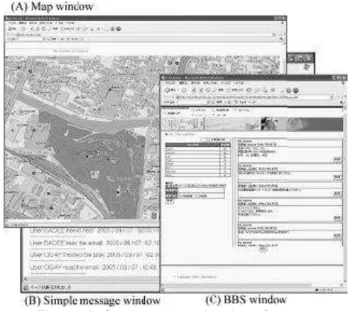
By carrying out those tasks, we expect overseas students to enhancing the communication skill in Japanese, and to perceive the local culture such as foods, activities, etc. Students can make use of their PDAs for writing down annotations, recording questions, taking pictures and reporting back to the teacher. At anytime, the teacher is monitoring the position of the students and can establish communication with them, either through instant messaging or BBS (bulletin board system), both preinstalled on the PDA (figure 1). The teacher guides the students through the task activities, giving suggestions or hints (such as “Ask somebody how to get there” or “You have to find the post office first”).
After all the students conclude their tasks, they meet together at the classroom, which is equipped with a smart board and where the teacher has being following their advances. All the gathered information is displayed and discussed, and each student explains his/her strategies to the rest of the group. Similar situations are identified, and their solutions are shared under the guidance of the teacher.
Certainly, this approach contributes with a better insight of the foreign students during their daily life in Japan. There are a myriad of expressions that students
are unfamiliar with, and the purpose of the teacher is to give them the tools to respond and behave according to the situation. Furthermore, students are encouraged to go around because the usage of mobile devices seems new and interesting, and they have the assurance that the teacher can be immediately reached in case something goes wrong.
Figure 1: Students location interface 2.1 Design and implementation
We have designed the system as a central server, with two user interfaces (one for the teacher and one for the students) that grant access to their respective functionalities (Figure 2).
Figure 2: Architecture of the system The central server has a repository of the student’s information, tasks provided by other teachers, and
data gathered outside the classroom. The user interfaces are webbased because of the flexibility that this implies, any mobile device can access the system as long as it counts with internet connectivity and a web browser with basic capabilities. The information is exchanged between modules using XML (Extensible Markup Language), because is a flexible text format that has been widely accepted as a standard for the exchange of data [2]. In addition, we use SOAP (Simple Object Access Protocol) as communication protocol [7].
The system was implemented using Java programming language and following the J2EE (Java 2 Platform, Enterprise Edition) specification, which supports the development of reusable components as well as the integrated data exchange using XMLbased open standards and protocols. The restrictions of the currently available Java virtual machines for mobile devices, however, compelled us to implement the module for delivering the position of the student, from the PDA to the server, with Embedded Visual C++ 3.0.
PHS GPS PDA
Bluetooth GPS PDA
Figure 3: PDA, GPS and PHS technology The prototype system was developed for PDA (Fujitsu Pocket LOOX v70) with Pocket PC 2003 second edition, which has a builtin 1.3 mega pixels camera, SD and CompactFlash expansion card slots. Bluetooth GPS (Global Positioning System) and PHS (Personal Handy System) were attached (see figure 3). We chose to use PHS technology due to the availability of a one year unlimited service program, that has the same cost regardless the amount of time that the devices are connected to the internet, or the size of the packages sent and received. This will give us enough time for experimenting with the system
several times. Likewise, the PHS has a faster connection speed (128 Kbps) and a much lower battery consumption than WiFi connections (around 10 Kbps). Cellular phones were not used for this research, due to the fact that the resulting usage fees can not be absorbed by the University, which would imply that the students have to pay for their own expenses.
3. Experimentation
Two classes were taken place with this system in different two semesters, where 13 users (3 women and 10 men, between 20 and 35 years old), all of them overseas students enrolled in the Japanese language intensive course at the University of Tokushima. The students (from Korea, Bangladesh, Bhutan, China, Egypt, Peru, Malaysia, Philippines and Thailand) had different levels of expertise in the use of computer devices. Besides the students, 2 teachers of this course were directly involved during the development and experimentation phases of the project.
(2) The foreign student is asking the direction to a Japanese woman on the campus.
(1) At the beginning of the class, teachers are giving some tasks to overseas students.
(3) The student is asking the direction for
the destination at a convenience store. (4) The student arrived at the final destination and carries out the task
by interview.
(5) During the trip, the teacher gets the location of each student and gives an instruction.
(6) After the trip, the teachers reflect on their results and learn lessons.
Figure 4: Scene of experimentation Since the students were not familiar with the use of PDAs, we organized a handson session one week
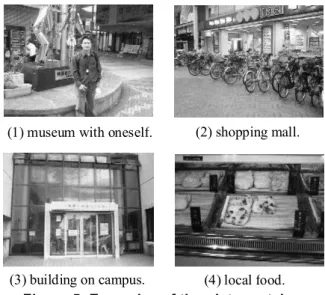
before the one day trip, and distributed the devices and the usage manuals for them to get acquainted with. Subsequently the teachers scheduled the tasks for the students, which include such activities as: “Go to the touristic information stand in Tokushima JR Station, and enquire about the places you can visit in just one day and the price. Record the answer of the stand attendant and send it back” (figure 4), or “Go to the Awaodori Kaikan, and enquire about the price and schedule of the rope way. Bring back the schedule and send the recording of the characteristic music of the Awaodori, continuously playing inside this building, and a picture of the souvenirs displayed in the shop” (figure 5).
Figure 5: Examples of the pictures taken The day of the experimentation the students gathered at the classroom with the teachers, picked up their PDAs and received instructions for completing the first task, subsequent tasks were provided by the teacher when they successfully achieved the expected results.
3.1 Results
After the experimentation, the students answered a questionnaire, assigning a number between one and five to each one of six questions (where one was the lowest and 5 the highest score) and writing down the advantages and disadvantages of the system, as well as their personal comments about the experience. Average results of the questionnaire and the standard deviation for each set of answers are shown in table 1.
According to question 1 (Q1), Q5 and Q6, the students enjoyed the experience and would like to use
the system again. Opinions were divided when asked about the time allowed to complete the tasks, as illustrated by Q2. Similarly, some students found the PDA and the system easier to use than others (Q3); this is partly related to their level of expertise using computational devices, and to the fact that the operative system was in Japanese. In addition, the students had to change the buttery during the trip but they didn’t know well how to change it. Therefore, more training for using PDA will be needed. Finally, they found the PDA to be helpful when confronted with situations that aroused doubts or questions to bring back to the classroom, or were uncertain about the goals of their task (Q4).
Among the comments there were some complains about the text input method of the PDAs, and the difficulties of using the software for GPS. Many students asked for more time to practice before the trip, especially those that were using mobile devices for the first time. Nonetheless, they found the system useful for learning local expressions, and practicing what they have learned in class.
The teachers where interviewed and their response to the system was positive, although they had some suggestions to improve it for the next time. Amid other comments, the teachers found the system to be useful for the students to practice Japanese in a real social context, and reported that their confidence for speaking increased after the experiment. Regarding the PDAs capabilities, they would like to have more choices, such as builtin cameras in all the devices, to broaden the options of the tasks. As for the instant messaging, they agreed with the students that more practice was needed before the experiment.
Table 1: Results of the questionnaire
No. Question Ave.
Q1 Do you think that the one day trip with
PDA was exciting? 4.9
Q2 Do you think the time allowed for completing the tasks was enough? 3.2 Q3 Do you think the PDA was easy to use? 3.4 Q4 Was the PDA helpful when you found
some troubles completing the tasks? 4.9 Q5 Do you think the system was
interesting? 4.2
Q6 Would you like to use the system again? 5.0
5. Findings of interest
Unlike other language learning systems not related to context, where the student is regarded only as a (1) museum with oneself. (2) shopping mall.
(3) building on campus. (4) local food.
oneway knowledge consumer, LOCH takes advantage of technology to take the learning environment outside the classroom, where real life situations are taking place. In this way, the student has an active participation, recording events and taking pictures, and there is a twoway flow of knowledge, where the student is regarded as a knowledge provider as well.
The usage of a smart board for displaying the student’s information ignited discussion, and the identification of different task solving strategies fostered constructive learning.
We found a work around for the GPS problem by using a Bluetooth GPS, the position of the student is now automatically sent to the server, without his/her intervention. Text input, however, is still intrinsically related to the available devices, and meanwhile we will have to modify the interfaces to reduce it as possible.
6. Conclusions
This paper focused on the design, implementation and evaluation of a languagelearning support system for overseas students in Japan; the project was called One Day Trip with PDA. The LOCH system provides the tools for the teachers to design diverse tasks, and the students to go around, carrying their PDAs, collect appropriate information and report back to the teacher. Moreover, the system is aware of the actual position of the students; hence the teacher can monitor their movement on his/her screen.
Students and teacher found it interesting, valuable, and were not only willing to try it again but excited about it. As for the future work, we would like to enhance the presentation of the students’ location map to the teacher, adding ‘postit’ like messages over the locations highlighting the problems encountered. In the students interface, these problems and the solutions found by other students will be displayed as they approach the place. Another improvement would be to study the guidance messages sent to the students, and send them automatically next time. Moreover, we are trying to enable overseas students to use LOCH not only in the classroom but also in their daily life. In this way, they would not stay at home all day long and could overcome the language barrier.
Acknowledgements
This work was partly supported by the GrantinAid for Scientific Research No.15700516 from the Ministry of Education, Science, Sports, and Culture in
Japan, and Hewlett Packard’s grant for mobile technologies in education.
References
[1] Abowd, G.D., and Mynatt, E.D.: Charting Past, Present, and Future Research in Ubiquitous Computing, ACM Transaction on ComputerHuman Interaction, Vol.7, No.1, pp.2958, 2000.
[2] Bray, T., Paoli, J., SperbergMcQueen, C.M., Maler, E. and Yergeau, F.: Extensible Markup Language (XML) 1.0 (Third edition) http://www.w3.org/TR/RECxml/ [3] Brown, J. S., Collins, A., and Duguid, P.: Situated
Cognition and the Culture of Learning. Educational Researcher, (Jan.Feb.), pp.3242, 1989.
[4] Chen, Y.S., Kao, T.C., Sheu, J.P., and Chiang, C.Y.: A Mobile ScaffoldingAidBased Bird Watching Learning System, Proc. of WMTE'02, pp.1522, IEEE Computer Society Press, 2002.
[5] Curtis, M., Luchini, K., Bobrowsky, W., Quintana, C., and Soloway, E.: Handheld Use in K12: A Descriptive Account, Proc. of WMTE'02), pp.2330, IEEE Computer Society Press, 2002.
[6] Galarneau, L.: Authentic learning experiences through play: Games, simulations and the construction of knowledge, Paper presented at DIGRA2005, Simon Fraser University, Burnaby, BC, Canada, 2005.
[7] Gudgin, M., Hadley, M., Mendelsohn, N., Moreau, J. & Nielsen, H.: SOAP version 1.2 part1: Messaging framework. Retrieved November 8, 2004 http://www.w3.org/TR/soap12part1/
[8] LaPointe, D. and Barrett, A.: Language learning in a virtual classroom: Synchronous methods, cultural exchanges, Proceedings of Computer Supported Collaborative Learning 2005, pp.368372, 2005. [9] Lyytinen, K. and Yoo, Y.: Issues and Challenges in
Ubiquitous Computing, Communications of ACM, Vol.45, No.12, pp.6365, 2002.
[10]Miller, G. A., and Gildea, P.M.: How children learn words. Scientific American, No.257, pp.94– 99, 1987.
[11] Ogata, H., and Yano, Y.: How ubiquitous computing can support language learning, Proc. of KEST 2003, pp.16, 2003.
[12] Ogata, H., and Yano, Y.: Supporting knowledge awareness for a ubiquitous CSCL, Proc. of ELearn 2003, pp.23622369, 2003.
[13] Ogata, H., and Yano, Y.: Knowledge awareness map for computer supported ubiquitous language – learning, Proc. of WMTE'04, pp.1926, IEEE Computer Society Press, 2004.
[14] Ogata, H., Sharples, M., Kisnhuk, and Yano, Y. (eds.) Proc. of WMTE2005, IEEE Computer Society Press, 2005.
[15] Roschelle, J.: Unlocking the learning value of wireless mobile devices, Journal of Computer Assisted Learning, vol. 19, pp.260271, 2003.