Volume6, Number12, December2012 pp. 3061–3067
A POTENTIAL EXPLORATION OF FINGER-SPECIFIC INTERACTION
Yu Suzuki
1, Kazuo Misue
2and Jiro Tanaka
21Faculty of Computer Science and Engineering Kyoto Sangyo University
Motoyama, Kamigamo, Kita-ku, Kyoto 603-8555, Japan [email protected]
2Faculty of Engineering, Information and Systems University of Tsukuba
1-1-1 Tennodai, Tsukuba 305-8573, Japan {misue; jiro}@cs.tsukuba.ac.jp
Received July 2012; accepted October 2012
Abstract. We propose Finger-Specific Interaction (FSI) as a potential interaction tech- nique for interactive surfaces. FSI treats each finger as completely independent, as one input primitive. This paper discusses the advantages and drawbacks of adopting FSI for use on interactive surfaces. The advantages include an increase of input primitives, en- abling eyes-free interaction and the ability to differentiate between users. The drawbacks include the need for users to memorize the variety of operations for input assignments.
We devised solutions to solve these drawbacks, and then developed some applications us- ing them. We also developed other applications that utilize the compatibility with mobile devices.
Keywords: Interactive surface, Mobile device, Eyes-free interaction
1. Introduction. Interactive surfaces allow users to conduct operations with only the use of their hands and without the necessity of extra devices. Unlike the mouse, however, multiple input methods are not possible. To make up for the lack of input methods, a variety of approaches have been proposed, such as gestures and multi-touch techniques [11, 15].
We have focused on an approach that differentiates each finger. While several re- searchers have explored the potential to use a combination of fingers [10], or a certain number of fingers when interacting with surfaces [1], there still remains much room for discussion. For instance, these researches were directed to a particular application such as a menu operation, and rarely summarized the feature of the finger differentiation. We propose Finger-Specific Interaction (FSI) as an interaction technique that differentiates each finger. FSI treats each finger as completely independent as one input primitive.
FSI interprets touch information not only on an x-y axis, but also each individual finger as additional information. In other words, FSI gives different meaning to touches. For instance, FSI allows systems to completely differentiate between all five fingers when one hand is used to interact with a surface. Furthermore, it has the capability of differentiating between different hands and different users.
In this paper, we discuss the operation of a system enabling FSI on an interactive surface and outline the advantages and drawbacks of FSI. Our main contribution is not the proposition of FSI, but to analyze the advantages and drawbacks of FSI and present a vision of interaction techniques for interactive surfaces.
3061
2. Related Work. There are a variety of techniques that give additional information to touch points. DiamondTouch [4], for instance, can distinguish between different input types and users. Other research has specialized in the use of the hand itself [3] or a hand posture [6]. They distinguish the hand or the hand posture using an image processing based technique with bare hands or Microsoft Surface
1.
Finger differentiation has also been explored to some depth. Marquardt et al. [12]
developed a glove which enables the distinction of many parts of a hand (fingertips, knuckles, palms, sides, backs of hands). Sugiura and Koseki [14] distinguishes fingers by their unique fingerprints through an interface that assigns bookmarks of a web browser to each finger. FingeRing [7] is a device that uses rings attached to accelerometers. The rings are put on each finger and each finger is distinguished by its acceleration, contributing to the development of virtual keyboards that can be used anywhere. In terms of research on interactive surfaces, Bailly et al. [1] developed a technique using finger-count and radical- strokes. Lepinski et al. [10] developed a menu interface that recognizes a combination of chording and gestures. A technique of finger differentiation using the combination of an interactive surface and EMG muscle sensing [2] has also been developed.
As seen above, researchers in the Human-Computer Interaction (HCI) field have en- deavored extensively to enhance the capability of interactive surfaces, yet further research is still paramount to advancing this field, especially in terms of finger differentiation. Ex- isting researchers have attempted to assign commands to fingers or chording inputs, but there are still some hurdles to be tackled before finger differentiation can achieve its full potential. Therefore, we investigate the available interactions, and the advantages and drawbacks when completely differentiating fingers.
3. Finger-Specific Interaction.
3.1. Concept. FSI is an interaction technique that treats each finger as completely in- dependent as one input primitive. Current interactive surfaces receive input information solely through touch coordinates. FSI increases the interaction bandwidth of interactive surfaces because it gives additional information (i.e., one of fingers: thumb, index, middle, fourth or fifth finger) to each touch point. In current interactive surfaces, for instances, the touches of the index and middle fingers are interpreted in the same manner. On the other hand, for interactive surfaces with FSI, both touches by the index and middle fingers provide different commands to the system.
Some researchers have proposed similar interaction techniques to FSI [2, 10, 14]. How- ever, we describe the concept of completely differentiating five fingers and provide a discussion of the advantages and drawbacks of FSI.
3.2. Advantages. There are two potential issues faced when using interactive surfaces:
the lack of input methods and the difficulty of eyes-free interaction. The introduction of FSI into interactive surfaces tackles these two issues. In addition, finger differentiation enables interactive surfaces to differentiate between multiple users.
Increase of input primitives. An input primitive is the minimum unit of input information fed into a system. Examples include the right or left click of a mouse, or the pressing of each key on a keyboard. The combination of these input primitives is called input vocabulary. When using three input primitives, such as the right click of the mouse, control key, and shift key, the number of combinations (i.e., input vocabulary) is seven.
In current touch interaction, the position where a finger touches a surface and the variation with time of the position of the touch are used as input information. Current interaction surfaces treat every finger as the same input because they are not capable of differentiation between fingers. Thus, the number of input primitives is only one. In
1Microsoft Surface http://www.microsoft.com/surface/
contrast, an interactive surface with FSI can treat each finger as a completely independent input making the number of input primitives equal to the number of fingers used for when performing operations. In a multi-touch environment, it is thus possible to use a combination of multiple fingers. The number of input vocabularies, therefore, is the combination of n fingers (i.e., 2
n− 1). Take for example, a two-point multiple touch performed with the thumb and index finger, and the index finger and middle finger. An interactive surface with FSI would treat these combinations as completely different inputs while the current systems being used would treat them as the same input.
FSI has high compatibility with mobile devices with small screens, such as personal digital assistants (PDAs) and smart phones. Such mobile devices are often equipped with a multi-touch screen to increase the amount of input vocabulary. However, multi-touch interaction on a small screen is not always comfortable. Introducing FSI onto mobile devices allows users to conduct various operations with only a single touch. Therefore, we expect that the introduction of FSI would improve the usability of mobile devices.
Enabling eyes-free interaction. Current interactive surfaces cannot provide physical feed- back because objects utilized when conducting operations are displayed on a flat screen making it difficult for users to interact without using their eyes. Users must keep their eyes on the screen in order to interact and operate the object.
An interactive surface with FSI treats touch by individual fingers as separate input commands to a computer because each touch point is considered unique. An illustration of this can be seen when considering the selection of a menu icon. In current interactive surfaces, a user has to touch the menu icon exactly over the icon on the screen. However, for interactive surfaces using FSI, all the user needs to do is touch the screen, thus making eyes-free interaction possible. It is not necessary for the user to keep their eyes on the screen. In a sense, FSI is an interface that directly connects human motor output to command selections.
When a user operates a mobile device with a touch screen such as digital audio players (DAPs), s/he must look at the screen. The introduction of FSI allows the user to operate it even while it is in their pocket or bag, out of the sight of the user. This feature can enhance the usability of mobile devices with small screens. The aspect of eyes-free interaction also indicates that FSI has high compatibility with mobile devices with a small screen.
User differentiation. Finger differentiation, like that used with DiamondTouch [4] allows users to distinguish between multiple users. This feature is very useful, especially when multiple users are using the same interface, such as in computer-supported cooperative work (CSCW). Yet unlike DiamonTouch, FSI can provide priority or authority to not only every user but to also every finger as it distinguishes between users in finer granularity than DiamondTouch.
3.3. Drawbacks.
The difficulty of memorizing mapped operations. The amount of combinations available (or input vocabulary) of n fingers is 2
n− 1. For FSI, this is not only a major advantage, but can be a drawback because it is difficult for users to memorize a mapping between fingers and functions for every application they use.
One solution is to make use of the meaning of fingers. The different fingers on the hand often have different cultural meanings, though varying from cultural context, country to country, and region to region. In Japan, each finger carries multiple meanings. For instance, starting from the thumb, the thumb means father, index finger means mother, brother is the middle finger, sister would be represented by the ring finger, and baby is represented by the pinky. The fourth finger is also frequently used when applying a cream.
The combination of the index finger and middle finger represents scissors or victory. In
daily life, people use their thumbs and index fingers when picking things up, and use both index fingers when extending something. Tapping into the cultural meanings of different fingers can lead us in the right direction to finding a solution of the issue of memorizing mapped operations.
In addition, there is one more solution that uses this drawback as an underhanded way.
In other words, this solution utilizes the large number of the combination of fingers. For instance, this is useful for a task that is intended to be complicated. As will be described in detail hereinafter, we also incorporated this solution into an application for FSI.
Negative motility characteristic. Some combinations of fingers are difficult to execute be- cause of the limitations of the motility of fingers. For instance, it is difficult for a person to make all fingers touch minus the fourth finger. It is also challenging for a person to make their middle finger and fifth fingers touch each other [10]. Therefore, it is important to take into consideration the negative motility of fingers when practically applying FSI.
However, we can use the negative motility of fingers as an advantage. A combination of fingers that exhibited negative motility characteristics can be used for operations where the user must be careful. If a relatively easy to perform combination of fingers is used for deleting or shutting down, there is the potential for the user to do these things by mistake, which could be catastrophic. Therefore, the solution is to use a difficult to perform combination for these types of operations. Mapping a combination of fingers that exhibit a negative motility characteristic for specific tasks reduces the possibility of human error by the use of an uncommonly utilized human characteristic.
4. Prototype System. We have developed a 450×300mm-sized tabletop interface (left of Figure 1) as a prototype system. In order to implement FSI, the interface needs to detect touch coordinates and fingers corresponding to each coordinate. This system integrates touch coordinates and corresponding fingers after individually detecting them.
We adopted FTIR (Frustrated Total Internal Reflection) [8] as the touch detection technique. We used a camera, color markers, and polarizing filters to detect fingers. The camera is placed above the table not to cause an obstruction. The color markers are 8 mm diameter and pasted on fingertips for accurate finger detection. We pasted different
Figure 1. [Left] Appearance of prototype system. Two cameras for FTIR
and finger detection are placed across the screen. [Upper right] The camera
captures both the markers and the screen. [Lower right] The screen is
removed from the image the camera captures.
color markers on each nail. The system detects and differentiates fingers by capturing the markers with the camera. Finger detection with color marks has also been used in the past by other researchers [13]. One issue our system faced at first was that the high incidence of false color detection between the projected image and marker because the camera captures both the markers and the screen as illustrated in upper right of Figure 1.
We solved this problem with two polarizing filters, similar to the solution proposed in the past [5]. We installed a screen-sized polarizing filter on the interaction surface and a small polarizing filter on the camera in an orthogonal direction. Thanks to filtering, the camera becomes available to capture the fine details of the user’s fingers because the project image from the screen is removed from the image the camera captures as illustrated in lower right of Figure 1. The system uses relative positions of touches and finger coordinates to integrate the information, thereby successfully distinguishing between eight separate fingers simultaneously being used in real time. In trial studies, the system had a 90%
accuracy rate in distinguishing between fingers.
The system itself is not necessarily novel because it utilizes common techniques in the field for interactive surfaces, but what makes our system unique is that we enhance the usability of such systems by introducing FSI. We developed this device solely as a base of FSI applications.
5. Application. We present two applications of FSI. One is an application for mobile devices that have a high compatibility with FSI. The other is an application that uses a drawback of FSI as an underhanded way.
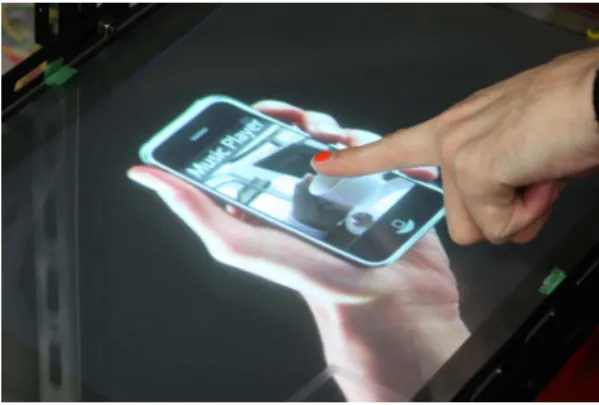
5.1. Mobile audio player. The use of mobile devices with only a small-sized touch screen as input interfaces, such as smartphones and DAPs has increased. Since there is no physical feedback, like what one would receive by using a keyboard or mouse, a user must keep their eyes on the screen in order to use these devices. This makes it impossible for the devices to be used while, for instance, in the user’s pocket or bag. In addition, multi-touch operation is not always comfortable because it is difficult to use a small screen.
The application we propose simulates a mobile device for playing music with a small- sized touch screen, like DAPs. We designed this device so that it can be operated with the use of only one hand, similar to mobile devices which are held in one hand and then operated by the other. We assigned main function, i.e., play (Figure 2(a)), stop, change track, and volume control (Figure 2(b)) to the index finger, middle finger, fourth finger, and thumb respectively. The former two functions can be invoked simply with the touch of a finger because they are toggle operations. The latter two functions can be invoked by sliding a finger on the screen because these functions need continuous value input. With all of the functions separated by finger, the user can operate the device eyes-free, without looking at the screen.
5.2. Authentication inhibiting shoulder surfing. Authentication of users poses an- other challenge for interactive surfaces. Since interactive surfaces can be seen by people nearby, the input of a pass phrase, something that the user usually wants to keep hidden, can be seen by nonusers (i.e., shoulder surfers). However, hiding authentication actions sometimes signal explicit mistrust to others. Therefore, such actions are not easy to perform in certain cases [9]. The input of a Personal Identification Number (PIN) is a common authentication method for interactive surfaces, but shoulder surfers can easily learn the password if a user is not careful.
To overcome this issue, we developed an FSI-PIN which uses not only digits (0-9) as in the usual PIN, but also recognizes the finger that is being used to enter the PIN (Figure 3). Therefore, the user must enter the correct PIN with the correct finger.
This inhibits shoulder surfers from learning a user’s pin in two ways. Firstly, a potential
PIN thief must not only learn the PIN number but also the sequence of fingers used when
(a) Play function is invoked by touching an in- dex finger on the screen.
(b) Volume control function is invoked by sliding a thumb on the screen.
Figure 2. Simulator of mobile music player with FSI
Figure 3. FSI-PIN. The user has to enter the correct PIN with the correct finger.
entering the PIN. Ten fingers and n-digit numbers are used for FSI-PIN so the number for pass phrases becomes 10
ntimes greater than that of a traditional PIN, making it extremely difficult for a thief to memorize the FSI-PIN. In addition, shoulder surfing can further be prevented when the user inputs a PIN with several fingers, at this time, their hands naturally covers the entire input panel. FSI-PIN requires that both hands are used, so the screen ends up being covered by both hands. Therefore, hiding a screen can be done with general ease and without forethought. FSI-PIN is an application that utilizes the drawback of FSI that is difficult to memorize the large number of the combination of fingers.
6. Conclusions and Future Work. In this paper, we have discussed an interaction
technique that differentiates fingers including existing research, and have discussed the
advantages and drawbacks of FSI. The advantages include a higher number of input
primitives, the ability to operate a system eyes-free, and the capability to differentiate
between multiple users. These advantages indicated the effectiveness and the compati-
bility with mobile devices. The drawbacks include the difficulty of memorizing mapped
operations and the inherent negative mobility of a user’s hands. They are serious chal-
lenges for further research of FSI. We discussed the solutions of each drawback, and then
developed workarounds into applications. Today, multi-touch or gesture interfaces are
the mainstream of interactive surfaces. In this paper, we indicated the potential and the
possibility of finger differentiation.
The drawback is not completely solved in this paper. FSI includes room for further discussion. In particular, utilizing the cultural meaning of fingers is a foremost task.
The possibility of more practical implementations of FSI for mobile devices is an area of ongoing research.
REFERENCES
[1] G. Bailly, E. Lecolinet and Y. Guiard, Finger-count & radial-stroke shortcuts: Two techniques for augmenting linear menus on multi-touch surfaces, Proc. of the 28th International Conference on Human Factors in Computing Systems (CHI’10), pp.591-594, 2010.
[2] H. Benko, T. S. Saponas, D. Morris and D. Tan, Enhancing input on and above the interactive surface with muscle sensing, Proc. of the ACM International Conference on Interactive Tabletops and Surfaces (ITS’09), pp.93-100, 2009.
[3] C. T. Dang, M. Straub and E. Andr´e, Hand distinction for multi-touch tabletop interaction,Proc.
of the ACM International Conference on Interactive Tabletops and Surfaces (ITS’09), pp.101-108, 2009.
[4] P. Dietz and D. Leigh, Diamondtouch: A multi-user touch technologys, Proc. of the 14th Annual ACM Symposium on User Interface Software and Technology (UIST’01), pp.219-226, 2001.
[5] K. C. Dohse, T. Dohse, J. D. Still and D. J. Parkhurst, Enhancing multi-user interaction with multi- touch tabletop displays using hand tracking,Proc. of the 1st International Conference on Advances in Computer-Human Interaction (ACHI’08), pp.297-302, 2008.
[6] D. Freeman, H. Benko, M. R. Morris and D. Wigdor, Shadowguides: Visualizations for in-situ learning of multi-touch and whole-hand gestures, Proc. of the ACM International Conference on Interactive Tabletops and Surfaces (ITS’09), pp.165-172, 2009.
[7] M. Fukumoto and Y. Suenaga, “fingering”: A full-time wearable interface, Proc. of the SIGCHI Conference on Human Factors in Computing Systems (CHI’94), pp.81-82, 1994.
[8] J. Y. Han, Low-cost multi-touch sensing through frustrated total internal reflection, Proc. of the 18th Annual ACM Symposium on User Interface Software and Technology (UIST’05), pp.115-118, 2005.
[9] D. Kim, P. Dunphy, P. Briggs, J. Hook, J. Nicholson, J. Nicholson and P. Olivier, Multi-touch authen- tication on tabletops, Proc. of the 28th International Conference on Human Factors in Computing Systems (CHI’10), pp.1093-1102, 2010.
[10] G. J. Lepinski, T. Grossman and G. Fitzmaurice, The design and evaluation of multitouch mark- ing menus, Proc. of the 28th International Conference on Human Factors in Computing Systems (CHI’10), pp.2233-2242, 2010.
[11] S. Malik, A. Ranjan and R. Balakrishnan, Interacting with large displays from a distance with vision- tracked multi-finger gestural input. Proc. of the 18th Annual ACM Symposium on User Interface Software and Technology (UIST’05), pp.43-52, 2005.
[12] N. Marquardt, J. Kiemer and S. Greenberg, What caused that touch? Expressive interaction with a surface through fiduciary-tagged gloves,Proc. of the ACM International Conference on Interactive Tabletops and Surfaces (ITS’10), pp.139-142, 2010.
[13] P. Mistry, P. Maes and L. Chang, Wuw – Wear ur world – A wearable gestural interface,Proc. of the 27th International Conference on Human Factors in Computing Systems (CHI’09), pp.4111-4116, 2009.
[14] A. Sugiura and Y. Koseki, A user interface using fingerprint recognition – Holding commands and data objects on fingers –,Proc. of the 11th Annual ACM Symposium on User Interface Software and Technology (UIST’98), pp.71-79, 1998.
[15] M. Wu and R. Balakrishnan, Multi-finger and whole hand gestural interaction techniques for multi- user tabletop displays,Proc. of the 16th Annual ACM Symposium on User Interface Software and Technology (UIST’03), pp.193-202, 2003.
![Figure 1. [Left] Appearance of prototype system. Two cameras for FTIR and finger detection are placed across the screen](https://thumb-ap.123doks.com/thumbv2/123deta/6093270.2082526/4.892.274.618.762.1092/figure-appearance-prototype-cameras-finger-detection-placed-screen.webp)