Simulated Virtual Market Place
By Using voiscape Communication Medium
Yasusi Kanada
Central Research Laboratory, Hitachi, Ltd.
Higashi-Koigakubo 1-280, Kokubunji, Tokyo 185-8601, Japan [email protected]
ABSTRACT
We are developing a new voice communication medium called voiscape. Voiscape enables natural and seamless bi-directional voice communication by using sound to create a virtual sound room. In a sound room, people can feel others’ direction and dis- tance expressed by spatial sounds with reverberations, and they can move freely by using a map of the room. Voiscape enables multi- voice-conversations. In a virtual market place that will be realized by voiscape, people can not only buy goods or information but also enjoy talking with merchants and people there. In this demo, a voiscape prototype called VPII is used for realizing such an envi- ronment. Unfortunately, because prerecorded voices are used in this demo, the participants cannot talk with merchants. However, the participants can talk each other with small end-to-end latency (less than 200 ms) and will feel the atmosphere of the virtual mar- ket place. Prerecorded people and merchants talk each other in English, Japanese and Chinese in parallel and with crossovers, and participants can virtually walk among them and can selectively listen one voice or hear multiple voices at once.
Categories and Subject Descriptors
C.2.4 [Computer-Communication Networks]: Distributed Sys- tems – Distributed applications.
General Terms
Design, Experimentation.
Keywords
Voice communication, Spatial audio, Early reflection, Session Initiation Protocol (SIP), SIMPLE, Auditory virtual reality.
1. INTRODUCTION
In face-to-face situations, people communicates mainly by using voices. There are variety of patterns in voice communication. For example, in a face-to-face conversation among three or more peo- ple, two or more persons often intentionally talk or happen to talk at once. A person can selectively listen to one of the voices or hear multiple voices at once. In addition, in situations such as a cocktail party or a market place, there are usually two or more parallel con- versations. Such multi-voice-conversations even occur in meetings and conferences, in which there is only one main context but there may be multiple sub-contexts (i.e., local conversations). Such con- versations may be separate or may cross over; i.e., a person can join two or more parallel conversations. However, such situations cannot or are difficult to be realized by conventional voice com- munication media, such as telephone and conferencing systems, because they do not have ability to realize multi-voice- conversations. Some conference systems use sidebars or side con- versations [Ber 95] to solve this problem; a sidebar is a small con- ference within a conference. However, creating sidebars is not an
intuitive method for local conversations, and it does not allow crossovers.
A more natural and powerful method, one that incorporates fea- tures of face-to-face meetings and that solves both problems, com- bines spatial audio technologies [Beg 00] and virtual reality.
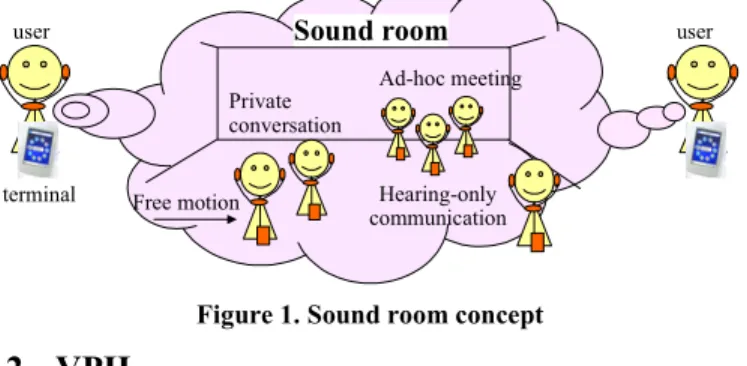
People enter a space, which is shared among the people, to com- municate with each other. If a person moves close to another per- son, a local conversation can be naturally initiated. This voice communication medium is called voiscape [Kan 04]. A virtual sound room, in which each user is represented by a spatially lo- cated sound with early reflections (reverberations) that enable out- of-head localization and distance perception, is created (See Fig- ure 1), and the people in the room can move freely. OnLive Travelor [DiP 02] and its successor called Digital Space Traveler created virtual bi-directional communication spaces with spatial sounds, but no reverberations were used nor multi-voice- conversations were focused.
A voiscape prototype called VPII (Voiscape Prototype II) [Kan 05] was developed. Headsets are used in VPII. VPII enabled an immersive communication-and-sound environment in which people can talk each other and hear streaming sounds such as speech or music. There can be not only multiple voices or conver- sations but also multiple speech or music sources. Speech and mu- sic sources can coexist with conversations.
Private conversation
Ad-hoc meeting
Hearing-only communication
user user
terminal Free motion
Sound room
Figure 1. Sound room concept
2. VPII
2.1 Architecture
There are three major components in this architecture. Figure 2 shows the protocols used between them and the message flows.
•
User Agent (UA): Each user terminal contains a UA, imple- mented in software. UA sends a voice stream to the 3-D voice server and receives one back. It exchanges session control and presence-related messages with the room management server.Currently, the sampling rate is 8 kHz, and the codec is ITU-T G.711. So the sound has telephone quality.
•
Management Servers: There are three management servers: a room manager (RM), a room list manager (RLM), and a SIP reg- istrar. SIP and the presence event notification mechanism [Roa 02][Ros 04] called SIMPLE are used by these servers. A user selects a room from the room list distributed by the RLM.Copyright is held by the author/owner(s).
MM’05, November 6–11, 2005, Singapore.
ACM 1-59593-044-2/05/0011.
When the user enters a room, the UA sends an INVITE message to the RM. The RM collects users’ presence information, includ- ing their location and direction of movement, manages it, and distributes it to the users.
•
3-D Voice Server (3VS): All the voice streams are mediated by the 3VS. It spatializes the voices and mixes the results. It re- ceives control information from the RMS through a CLI (com- mand-line interface) and communicates and processes voices according to the control information.User Agent
(UA)
Registrar
Room List Manager
(RLM)
Room Manager
(RM)
3D Voice Server (3VS)
REGISTER
200 OK GET_LIST
room list INVITE 200 OK SUBSCRIBE
200 OK PUBLISH
200 OK
RTP
REGISTER
200 OK GET_LIST
room list INVITE 200 OK SUBSCRIBE
200 OK NOTIFY 200 OK
RTP CLI
User Agent
(UA)
Figure 2. Architecture of VPII 2.2 User interface
The user interface of a UA is illustrated in Figure 3. The user first selects a room to enter from the room list, shown on the left. The UA then displays a map of the sound room, shown on the right.
The walls are displayed in gray. The scale of the map can be changed using a radio buttons. A unique icon can be used for each user. The orientation of the other users are displayed by arrows.
A user moves one-foot forward by pushing the forward (arrow) key and one-foot backward by pushing the backward key. The user turns left (18-degrees) by pushing the left (arrow) key and right by pushing the right key. The user’s icon is always displayed immedi- ately below the screen center, and its orientation remains fixed.
In the prototype, Sharp Zauruses or PCs with Microsoft Win- dows or Linux is used as the terminals. Qt middleware developed by TrollTech was used to provide a light-weight window system and some additional functions such as XML parsing.
2.3 Features
VPII has three key features.
•
Low-delay motion-tracking spatial audio: For each user, the sounds from the other users are spatialized based on their rela-tive locations and directions. The latency caused by spatializa- tion is minimized because it is used for bidirectional conversation. The end-to-end latency is less than 200 ms in a LAN. The sounds are attenuated based on the relative distance and filtered by an HRTF (head-related transfer function). Reflec- tions caused by the room walls are added because they improve distance perception and prevent in-head localization. User mo- tions are reflected in the sound in real time. Because motions are discrete, several interpolation algorithms are used to avoid click noises and to make the motions smooth.
•
Virtual-place-based selective communication: A user turns and moves around the room to select which 3-D sound sources, which represent persons or objects, to talk to or to listen to. Sta- tionary objects, or “landmarks”, such as tables, are added to help the users distinguish locations in the room.•
SIMPLE-based sound room management: Each user chooses his or her location and direction. This information, plus other user attributes and information objects in the room, must be managed and propagated. SIMPLE is used for both room and room list management.3. DEMO CONTENTS
In this demo, three or more laptop PCs (including servers), wire- less headphones and wired headsets are used. Participants enter a simulated virtual market place by wearing a headset or headphone.
In a virtual market place that will be built in future, merchants sell goods and music (files) and listeners can buy them in a similar method as in e-commerse, but they can talk with merchants and people in the market place. They can ask about the goods and en- joy talking. This process can be quite different from telephone conversation or shopping in current e-commerse markets. Because it is difficult to open a real virtual market place in the MM confer- ence and it is difficult to show the various communication patterns in a market place, prerecorded voices are used. So the participants cannot talk with merchants nor can buy goods from them. How- ever, the participants can talk each other and feel the atmosphere of a market place. Prerecorded people and merchants talk each other in English, Japanese, and Chinese in parallel and with crossovers, and participants virtually walk among them and can selectively listen one voice or hear multiple voices at once.
REFERENCES
[Beg 00] Begault, D. R., “3-D Sound for Virtual Reality and Mul- timedia”, NASA/TM-2000-XXXX, NASA Ames Research Center, April 2000, http://human-factors.arc.nasa.gov/ihh/- spatial/papers/pdfs_db/Begault_2000_3d_Sound_- Multimedia.pdf
[Ber 95] Berc, L., Gajewska, H., and Manasse, M., “Pssst: Side Conversations in the Argo Telecollaboration System“, UIST 95, pp. 155–156, November 1995.
[DiP 02] DiPaola, S. and Collins, D., “A 3D Virtual Environment for Social Telepresence”, Western Computer Graphics Sympo- sium, 2002.
[Kan 04] Kanada, Y., “Multi-Context Voice Communication Controlled by using an Auditory Virtual Space”, 2nd Int’l Con- ference on Communication and Computer Networks (CCN 2004), pp. 467–472, 2004.
[Kan 05] Kanada, Y.: Multi-Context Voice Communication In A SIP/SIMPLE-Based Shared Virtual Sound Room With Early Reflections, NOSSDAV 2005, pp. 45–50, June 2005.
[Roa 02] Roach, A. B., “Session Initiation Protocol (SIP)- Specific Event Notification”, RFC 2543, IETF, June 2002.
[Ros 04] Rosenberg, J., “A Presence Event Package for the Ses- sion Initiation Protocol (SIP)”, RFC 3856, IETF, August 2004.
Local user
Remote users
Figure 3. User interface of VPII