† 愛知工業大学 基礎教育センター (豊田市)
英会話授業での効率的なテクノロジー使用
Effectively Using Technology in the English Conversation Class
Charles Kelly, Larry Kelly, Mark Offner, Bruce Vorland †
C.ケリー,L.ケリー, M.オフナー,B.ボーランドAbstract: Teachers of freshman English conversation classes at Aichi Institute of Technology have been using technology and online resources to augment English conversation classes for many years. The use of technology and 24-hour access to the online systems that we have provided allows students to continue to stay connected to English by working independently to develop their English language competency outside the classroom
1.0 Introduction
The students in freshman English conversation classes can utilize various technologies to improve their English skills. Students have easy access to personal computers, school computers, hand-held mobile devices and cell phones. Students can use the Internet, online electronic dictionaries, online videos, and a multitude of evolving technologies. The freshman student today brings to the classroom a much more profound familiarity with digital learning devices than students five years ago. Our students are digital natives whose lives are intertwined with technology.
2.0 Technology in the Classroom
The classrooms that we use for English conversation classes have wireless access and are equipped with OHPs, large projection screens, speakers, DVD players, and multimedia consoles. Students bring a variety of their own technological devices such as cell phones, iPods, iPads, laptop computers, gaming devices, digital cameras, and electronic dictionaries.
All English conversation teachers at our university are comfortable using technology in the classroom.
Teachers help students with their questions to guide them in their choices of studying using available technologies.
Teachers use iPads, iPods, iPhones and laptop computers to display information to students on the projection screen. These devices are also used for testing by connecting them to the multimedia consoles in the classroom and playing the audio portion of the quizzes through the classroom speakers. Having a wireless connection allows access to our Moodle courses, our personal pages, and other internet resources to provide visual information and explanations to the students. Students are encouraged to use electronic dictionaries or use their portable wireless devices to access online dictionaries and encyclopedias during conversation practice. Devices used in this way are especially suited to large classes because they allow students to work more independently. With quick access to the information they need, students don’t have to rely too heavily on the teacher or interrupt their conversations too often to ask for help.
Due to the fact that we are at a technological university, our students need to keep in touch with new technology to help with their education. Our English
classes use current technologies not only to help the students improve their English skills, but also to teach them about technology that can help them when they join the workforce. An English conversation start-up page <www.manythings.org/ait> links the students, teachers, and technology. Teachers’ homepages, Moodle (an online course management system) links, and other useful links can be found here. There are also English as a Second Language websites maintained by the teachers for student use.
3.0 Historical Background
An early use of technology in our classes began with the use of cassette tapes. Students recorded their voices on cassette tapes by reading assigned sections from the textbook and responding to pre-assigned questions. The teacher would collect the tapes periodically to check pronunciation and content. We stopped doing this when students ceased to have cassette tape recorders.
In 2000, as computers became more popular, we began web-based homework assignments for our students. We set up a system where students would write their assignments and email it to their teacher to check.
In 2006, we started using Moodle on a web server in Charles Kelly’s office. With the help of the Computer Center, we were able to use the web address <study.aitech.ac.jp> and began using this site to make English study materials accessible to our students and to provide them with the opportunity to study outside the classroom.
In 2008, our university set up a Moodle server at <cms.aitech.ac.jp>, and we began making extensive use of this site for an online component of our courses. 4.0 Moodle in the English Conversation Course
In addition to using a textbook, we use Moodle to create lessons for students to do as homework each week. The weekly Moodle assignments are an integral part of our course providing our students with easy access to English study materials and a greater depth of study by using images, audio, and video as well as links to online materials outside of our Moodle course. They also allow students to work at their own pace from any place with an Internet connection.
This online course helps the students with various English language skills. Pronunciation and hearing is very easily practiced with a computer by accessing the
many web pages and pronunciation exercises we have provided. We have also created various exercises and activities teaching grammar, vocabulary, and phrases to engage the students. Written communication is used as a means to prepare students for in-class oral communication. Using Moodle, students can study at their own leisure, by choosing the time, place, and the pace at which they will study.
4.1 Moodle Blogs and Forums
Blogs and forums are useful for creating a community in which students write and read each other's writings. This prepares them for subsequent oral interaction in the classroom.
We use the Moodle blogging system during the first semester of each year because it is a more secure environment for the students to work in. Moodle blogs do not allow writing comments and therefore students are not exposed to negative feedback on their writings from other students. Moodle blogs also allow editing at any time, so students can easily correct any mistakes that they discover on their own or learn about from fellow students or from one of the teachers.
In the second semester, we use Moodle forums. Moodle forums allow online feedback from other students. This means that two-way online communication can take place. Students can edit their entries for only thirty minutes after making a forum post requiring them to be more careful and to put more thought into their writing. We have various forum categories that allow students to participate in topics that are of personal interest.
Since all students in our English conversation course have access to the Moodle course, they are able to freely communicate with any student without being limited to just the students in the same classroom. However, if a topic is specific to a particular class or a lesson that a teacher wishes to emphasize or provide more specialized practice in, we do have the option to limit access to designated groups.
4.2 Quizzes
In the 2010-2011 school year, we assigned about 100 Moodle quizzes over the first and second semesters. We mainly used multiple choice, matching, and type-in questions organized into 10-question (10 point) quizzes. During the first semester the students were assigned four vocabulary-building matching type quizzes (nouns,
adjectives, verbs, adverbs) and, on average, one other quiz where students wereasked, for example, to choose the correct form of a word for a sentence or choose the best word or phrase to complete a sentence. During the second semester we had more quizzes that complemented the textbook lessons and a majority of them used audio.
For most of our quizzes we allowed the student to take the quiz an unlimited number of times during the week. This may seem to make it too easy for the student but the quiz questions and the answers within each question were shuffled each time and that encouraged the student to learn the material to get a better score. Many of our quizzes used audio and the students benefited from repeated listening. Moodle quizzes are not used only for testing, but as a way to provide the students with a stress-free, efficient learning experience and to reward their persistence. The Moodle quizzes complement the in-class testing that limits the student to a single chance in a timed environment.
One of our uses of Moodle quizzes is to reinforce what the students have been taught in the classroom or through the textbook. Following a restaurant lesson, we assign a quiz (fig.1) asking what they should do or say in various restaurant situations.
Figure 1: Restaurant Quiz
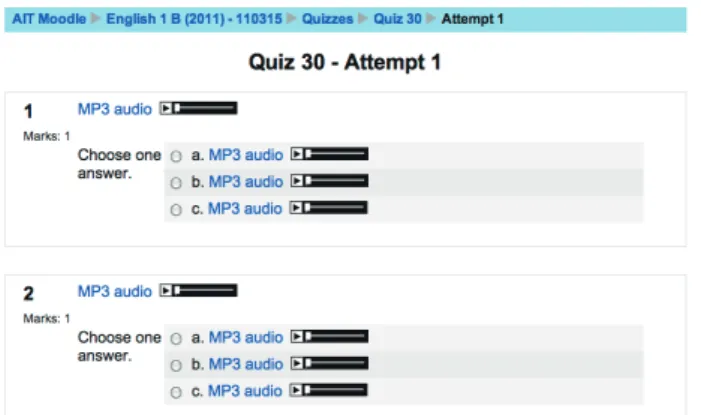
The lesson is further effectively reinforced by assigning another quiz (fig. 2) on the same topic, but this time using only audio for the questions and the answers.
Figure 2: Audio Restaurant Quiz
After completing a lesson-based quiz students get immediate feedback and will know if they have sufficiently understood the material presented in the lesson. Students will also be able to keep tabs on their total quiz scores.
Another use of the Moodle quizzes is to reduce test anxiety by giving the students a preview of an approaching in-class test. (fig. 3) Before an in-class test we sometimes give a longer-than-usual quiz with a sampling of the various kinds of questions that will appear on the test. The students get an idea of what kind of test questions to expect giving them the chance and motivation to prepare.
Figure 3: Test Preview Quiz
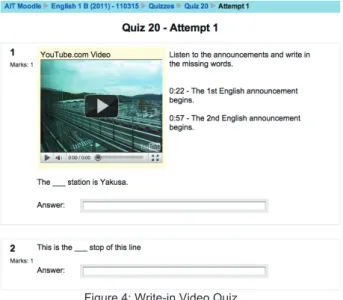
We also use the Moodle quizzes to introduce non-textbook material. One example is a video quiz (fig. 4) of a ride on the Linimo with background announcements in English and Japanese. The students watch the video and are asked to fill in the missing words from the announcement.
Figure 4: Write-in Video Quiz
Another example is a quiz (fig. 5) where students are asked to listen to a singer on YouTube and fill in the missing words of the lyrics.
Figure 5: Multiple Choice Video Quiz
These types of quizzes not only work on developing listening skills and comprehension, but use real-world content that is practical and interesting.
One problem we used to have with the quizzes was that students would procrastinate doing them and then rush to do a large number at one sitting. Some students were getting so far behind that they could no longer finish or they would get discouraged and give up. To avoid these problems, and for the students to learn and get important feedback from the quizzes, we felt it was critical to get the students into the habit of logging on to Moodle weekly. Now, with the exception of the first few weeks of the first semester, we set the opening and closing dates for the quizzes so they are open only
during the week in which they are assigned. Quizzes that can be taken repeatedly but have a one-week limitation provide the impetus for students to consistently access their Moodle course.
4.3 Moodle for Lesson Review
An advantage of using Moodle is that students are exposed to spoken English more times during the week. Some students begin our classes having had less exposure to English in high school and need extra help. Other students are more motivated to improve their English and are willing to spend more time studying. All students can benefit from reviewing their in-class lessons outside the classroom.
We encourage our students to go to the Many Things Textbook Support meta course (a type of sub course) which is linked to our main Moodle 1A and 1B courses. There they can do several different things. For example, they can check the answers to their previous week’s homework. (fig. 6)
Figure 6: Previous Week’s Homework Answers
The answers are in audio form to discourage students from simply copying answers before attempting to do the work themselves. Another benefit of having the answers in audio is that the students are exposed to spoken English and learning continues even when they are correcting their answers.
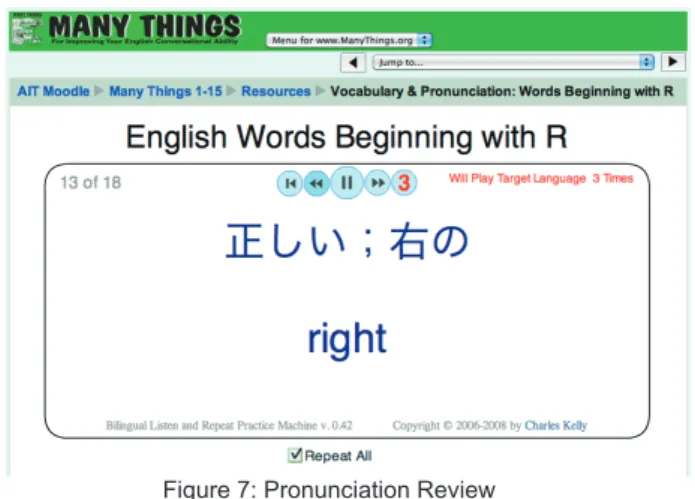
Students can review the in-class pronunciation practice for each lesson in audio-quiz format (Fig. 7).
Figure 7: Pronunciation Review
Students can practice their pronunciation using the Listen and Repeat Practice Machine (Fig. 8).
Figure 8: Pronunciation Practice
Students can listen to MP3 audio files of most of the textbook pages that were covered in the lesson. These MP3 files have been recorded by various teachers to expose the students to different accents and intonations (Fig. 9).
Figure 9: Moodle’s MP3 Player
To ensure that the students can utilize the various features of this course, the first lesson includes explanatory screencasts. To further encourage use, the MP3 audio files are available for download for students who are interested in listening on their mobile devices.
4.4 Introducing Useful English Websites Using Moodle
One of our primary goals is to encourage students to make use of the English language outside the classroom. In Moodle we introduce students to popular English websites that they can make use of in their everyday lives. These websites can be quite intimidating to first-time users because of their size and numerous features so it is crucial to introduce the sites and their features properly. Moodle is an ideal tool for this.
Using the Lesson Module in Moodle, a student’s path through the website that is being introduced can be controlled with pop-up windows and screencasts. Site features can be explained one by one and questions can be added to pages to ascertain whether a student has understood that portion of the explanation or not. The student can then be directed to different pages depending on the answer. A correct answer leads to the explanation of new features whereas an incorrect answer takes the student back to the original explanation. With multiple branches within a lesson, students can choose to learn about the specific features of a site that they are most interested in or are most likely to use.
One example of a website introductory lesson is our Internet Movie Database (IMDb) lesson. This lesson starts by asking if the student is familiar with the site. A student who is not familiar with the IMDb site will be sent to an introductory page but a student who is familiar with the site will be sent directly to a later page.
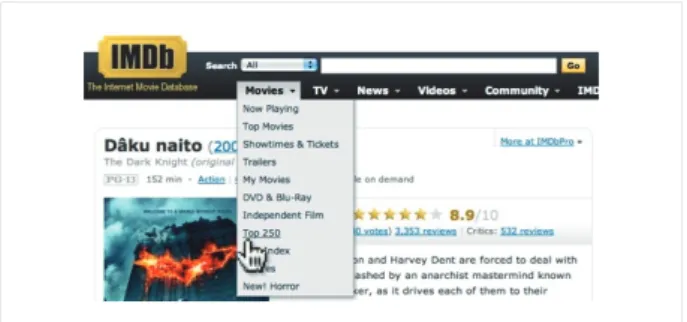
The lesson shows students how to navigate the IMDb site. This site contains information about movies from many countries.
Figure 11: Learning Navigation in IMDb
The lesson consists of 15 pages of simple navigation instruction and 10 question pages to check the students’ understanding.
Figure 12: IMDb Quiz Question
The lesson walks the students through a search for a specific movie and then shows how to check ratings and find user comments. It shows students how to find information about their favorite actors and what other movies those actors have acted in. Students also learn how to list an actor’s or a director’s works by release date or by popularity. Students who complete this lesson have the skills to return to IMDb and navigate it on their own.
4.5 Moodle Questionnaires
For teachers’ professional development we have conducted questionnaires to elicit feedback from students in our classes. We first began using questionnaires over 15 years ago using a paper sheet. We have since put feedback questions on the Moodle site to help us better understand our students’ needs.
Based on the feedback from our students we are able to revise our teaching methods to address the areas our
students are finding difficult and adjust our lessons to better help with their learning. For example, this feedback process proved especially useful when we first began using Moodle extensively in our classes. By reviewing the feedback from students we were able to determine which parts of the Moodle lessons were difficult for the students to comprehend. The feedback also helped us understand where students were having problems with navigating through the lessons and as a result we were able to make adjustments accordingly to ensure the lessons were easier to use and more effective. We have also adjusted our syllabus based on feedback to include more, and sometimes less, of specific types of exercises and activities to better suit our students’ learning abilities and styles. Learning more about our students’ learning styles and fine-tuning our lessons to address their needs has helped us to continue to develop professionally as we search for and incorporate new approaches and teaching methods.
4.6 Using Moodle for a Uniform Curriculum
Technology has enabled us to easily coordinate with other teachers who teach the same course to ensure that we have a uniform curriculum for our English conversation classes. This is made relatively easy with the use of the Forum available through Moodle. By posting new techniques on using the textbook in class and adding new teaching ideas to the Moodle Forum we can ensure that all teachers have access to pertinent information as we collaborate to use similar educational material.
One way that we facilitate this is by maintaining a database of quizzes and supplemental material to which each individual teacher is able to make modifications to better suit our classes for a specific school year. All teachers can easily and clearly see any changes, and once an acceptable form has been reached it can be incorporated into the classes as teachers have immediate access to the material.
We also upload screencasts to the Moodle site that clearly explain and visually demonstrate how to work through difficult procedures including everything from how to access student scores and determine averages and percentages on Moodle quizzes to inputting semester grades on the university server. This technology is especially useful for coordinating with all the English conversation teachers as we are on different campuses on different days and at different times.
5.0 Teachers’ Websites
The English conversation teachers have created web sites as a way to stay connected with students and provide them with independent study opportunities. These sites offer a variety of exercises, activities and general information to promote English learning. By using the websites and the Internet, students are able to connect with real-world, relevant, and useful information that motivates them to study English.
A few of the largest websites are <iteslj.org>, <a4esl.org>, and <www.manythings.org>, created by Charles Kelly and Larry Kelly. The first site was put up in 1995 providing study material such as quizzes, puzzles, pronunciation practice, and reading comprehension. A Japanese navigation menu <www.manythings.org/j> helps students find English study pages quickly in their native language.
Another site that provides useful links for students studying English is at <aitech.ac.jp/~vorland/>. A special feature of this site, created by Bruce Vorland, is the use of Web Guides to provide students not only with the opportunity to study and learn English, but to give them practical skills for navigating web pages in English.
Yet another site for English conversation practice is at <aitech.ac.jp/~offner/> created by Mark Offner. This site offers a variety of lessons that teachers can use in their classes. Students may also use the lessons to study and prepare for their conversation class.
6.0 What’s Next
The introduction of tablet computers such as the iPad has opened even more possibilities for conducting interesting and effective lessons in the conversation class. Students may visit one of the many web sites that we have constructed and make use of the exercises and conversational activities described there. This is especially useful for bringing real-world information, songs, pictures, and other meaningful and relevant material directly into the classroom to provide the interest and incentive for lively conversations.
We will continue to experiment with Moodle and incorporate more features that will encourage our students to study and learn English. One possibility under consideration is to have students record an original monologue on a topic and submit it via Moodle. Students may also be assigned conversations to conduct
with a partner to record and submit. As internet connections become faster, we may begin to use video conferencing to provide students with more face-to-face time for conversing in English outside the classroom. 7.0 Conclusion
Advancements in technology will continue to produce portable, convenient, highly versatile devices that will change the face of education. The line between what constitutes a physical brick and mortar classroom and the long distance “cyber” classroom of video and conferencing will become increasingly blurred with the use of the newest technological improvements. These technologies can give teachers effective tools for improving their language teaching and motivating students to study English.
Appendix Mentioned URLs
<a4esl.org>
Activities for ESL Students <aitech.ac.jp/~offner/> Mark Offner’s Home Page <aitech.ac.jp/~vorland/> Bruce Vorland’s Home Page <cms.aitech.ac.jp>
Moodle Site at Aichi Institute of Technology <iteslj.org>
The Internet TESL Journal <study.aitech.ac.jp>
First Moodle Site at Aichi Institute of Technology <www.manythings.org>
Interesting Things for ESL Students <www.manythings.org/ait>
English Study for AIT Students <www.manythings.org/j>
ケリー兄弟のインターネット上の英語教材 (受理 平成 23 年 3 月 19 日)