* 愛知工業大学 基礎教育センター(豊田市)
ムードルのためのウェブサイト・ガイド
ESL Web Site Guides for Moodle
Bruce Vorland * ブルース ボーランド
Abstract: The author and his colleagues have, over the years, used authentic materials such as maps, menus, and newspaper inserts to expose ESL students to real-life English and culture in the classroom. Difficulties in collecting and maintaining a multiple-copy collection of authentic materials for the classroom and the proliferation of the Internet led to the addition of online lessons that used the Internet as a source of authentic materials. These lessons, each based on a popular and useful English Internet site, both introduced the site and taught site navigation. Now, using a Course Management System, these online lessons can be easily used in tandem with quizzes, checking the student’s understanding of the lesson along the way. This article will explain authentic-materials lessons that have been adapted to Moodle using the Web Page and Quiz modules.
1. Introduction
The use of authentic materials (materials that have not been changed in any way for ESL students) adds the important element of real-life to ESL students’ learning experience. Students can be encouraged to get the general idea of what is being shown or explained in the authentic materials and to glean only important or necessary information while disregarding the unimportant and unnecessary. The goal can be to ‘use’ the materials and not necessarily to ‘study, learn, or memorize’ them; to use English as an information-gathering tool. In the classroom, authentic materials accompanied by handouts of carefully worded questions can guide a student through the material and also gauge if the student is successful in getting the gist of the information.
Maintaining a well-rounded collection of authentic materials to use in ESL classes is not an easy task. Multiple copies of identical materials have to be procured and these materials have to be regularly replaced both because of wear and tear and because they become outdated. To avoid some of these
problems the author created online lessons that use English Internet sites (Amazon, Internet Movie Database, MapQuest, etc.) as authentic materials. The lessons both introduced the sites and taught site navigation. Using the Internet as a source of authentic materials ensured that the authentic materials would always be up to date and allowed the lessons to be used as homework or supplementary work for any ESL class. Along with advantages, though, came some disadvantages. Because students did the work out of the sight and reach of the teacher, it was more difficult to measure the students’ understanding of the materials. Also, unlike printed maps or menus, successful Internet sites can change overnight and without warning, making sudden the teacher-prepared guides and questions useless until updated.
Using a Course Management System such as Moodle, <moodle.org> the teacher can avoid some of these disadvantages by controlling when and for how long students can see a lesson and by using the quiz activity to test the students’ comprehension. This article will show examples of how Internet-based authentic material lessons can be used in a Moodle course.
2. Internet-based Authentic Materials in Moodle 2.1 Choosing an Internet Site for a Lesson.
An Internet site on which to base a lesson should be chosen for its clear organization and ease of navigation and, whenever possible, potential usefulness to the students. The Internet Movie Database <imdb.com> is a huge site that fits this criteria; it has information on tens of tens of thousands of movies from many different countries. To give one example, the main IMDb page for the 2008 movie, The Dark Knight, gives only basic information about the movie; the names of the director, writer and actors, as well as plot information, a user rating and user comments. However, there are over one hundred links on the page, most of which lead to more pages within the site with more information on The Dark Knight. To an ESL student this could be a very intimidating page and, without guidance, very difficult to use.
2.2 The Objective of the IMDb Lesson
The aim of an Internet-based authentic-materials lesson on the Internet Movie Database should be to guide ESL students through the site without overwhelming them; to show enough of the site so they can learn basic navigation and appreciate the usefulness of the site but not in such detail that they will become discouraged.
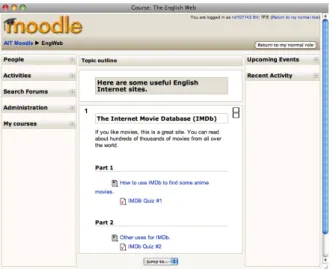
Figure 1: Internet Movie Database lesson
The IMDb lesson (fig.1) is divided into two parts to be completed over a two-week period. Each part has a guide to teach navigation and a quiz to test the skills learned in the guide.
2.3 Part 1 of the IMDb Lesson
Figure 2: IMDb lesson, part 1 guide
The guide (fig.2) is created using Compose a web
page from the Add a resource menu in the Moodle
course. The aim of the guide is to demonstrate simple site navigation: finding specific movie pages and information about the director and the actors. The guide begins with a link that opens the IMDb homepage in a new browser window outside of Moodle so that students can view the Moodle window and the IMDb window simultaneously. Each of the steps in the guide is accompanied by a screenshot that shows students what they should be looking for on the IMDb page. If a student is successful in following the instructions, s/he will arrive at the target page. There is a shortcut link to the target page at the end of each section for students who have trouble.
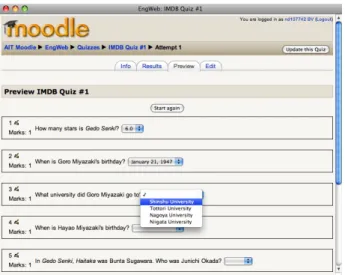
Following the guide is a quiz (fig.3) created using
Quiz with Embedded Answers (Cloze) type questions
from the Add an activity menu in the Moodle course. As in the guide, students look for answers to the quiz questions by navigating their way through the IMDb site in a separate browser window. The quiz is set to show scores immediately and students who do not get a satisfactory score are encouraged to repeat the guide and then attempt the quiz again.
Figure 3: IMDb lesson, part 1 quiz
2.4 Part 2 of the IMDb Lesson
Part 2 of the IMDb lesson (fig.4) teaches more advanced navigation. The guide helps the students to understand the movie-rating system and walks them through the tasks of finding the 250 most highly rated movies on the site and finding a director’s or actor’s works listed by ratings. Both of these tasks were chosen because they are potentially useful to ESL students.
Figure 4: IMDb lesson, part 2 guide
As in part 1, a quiz (fig.5) follows and tests the students’ understanding of the guide.
Figure 5: IMDb lesson, part 2 quiz
3. Other Authentic-Materials Lessons
There are a plethora of sites to choose from when making an authentic-materials lesson. In the case of the IMDb lesson, most ESL students go to the IMDb site for the first time. However, YouTube and Google Maps are two sites that are ideal for authentic lessons even though most ESL students are well acquainted with them. Since it can be assumed that the students have been to the sites before, the approach in the lesson need not be as navigation-oriented. The objective of the lessons can be, rather, to have the student experience a familiar site using English instead of their native language, expose students to parts of the site that they are unlikely to have been to, and demonstrate site features that a casual visitor to the site may not be aware of.
3.1 YouTube Lesson
In lessons for a large and relatively unstructured site such as YouTube, it might be easiest to have a topic-centered lesson. In the example, YouTube lesson (fig.6), music was chosen as the topic and consists of three sections: a navigation guide, a page introducing music videos, and a quiz.
Figure 6: YouTube lesson
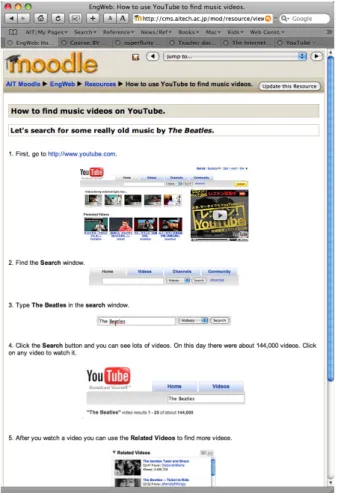
Students are likely to be familiar with the YouTube site so the navigation guide (fig.7) can be brief, showing mainly the Search and the Related Videos functions.
Figure 7: YouTube guide
Videos representing music of varying genres were chosen and listed on a Moodle page (fig.8). Students could be made to visit all of the links on the page by adding a quiz with questions concerning the content of each of the videos.
Figure 8: YouTube music video page
Figure 9: YouTube quiz
The final section of the YouTube lesson is the quiz (fig.9). In the example, the quiz tests the ability of the students to hear the missing lyrics of the song Time After Time. The quiz has most of the lyrics to the song written out but with some of the lyrics missing. (In this example the lyrics to the entire song are considered to be one question with 12 part answers.) The missing words are Embedded Answers (Cloze) type. When any of the spaces with missing lyrics are
clicked, four possible answers appear in a drop-down menu for students to choose from.
To begin the quiz, students click on a link at the top of the page that opens up a new browser window with a YouTube video of Eva Cassidy singing Time After Time. With the quiz and the music video both on the computer screen, students can play, pause, or repeat the video as many times as they wish. Moodle quiz settings allow for both time limits to take the quiz and for restrictions on the number of times that each student can re-take the test. In this example lesson, the quizzes were set so that the students would see their scores immediately and, depending on their scores, were congratulated or encouraged to re-take the quiz for a better score.
3.2 Google Maps Lesson
The example Google Maps lesson (fig.9) consists of two parts with each part having a navigation guide and a quiz. The students are likely to be familiar with this type of site so the navigation guide should focus on features that average students may not be familiar with.
Figure 9: Google Maps lesson
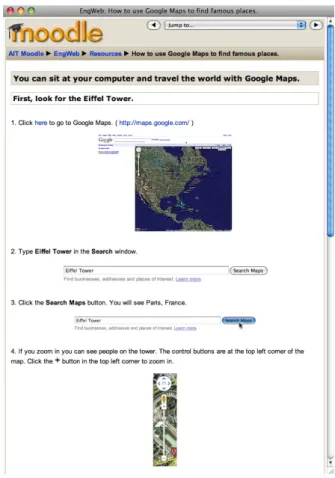
The guide (fig.10) introduces basic navigation: how to use the search bar to find maps of various areas and how to use the controls to zoom and pan. Each of the steps has screenshots to help students understand the explanation and each section has a shortcut link to the target page for students who may run into trouble.
The guide is followed by a quiz (fig.11). The quiz tests the students’ ability to use the navigation by asking them for information about famous places.
Figure 10: Google Maps lesson, part 1 guide
Figure 11: Google Maps lesson, part 1 quiz
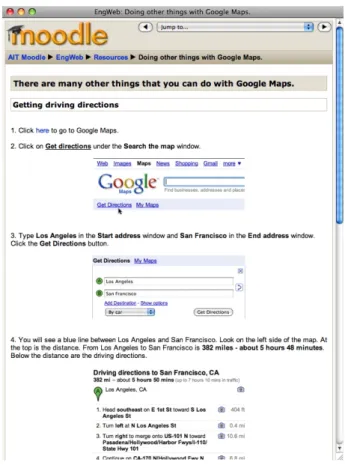
The guide in part 2 (fig.12) introduces the more difficult Get directions function for car, public transit,
or walking and shows the student how to find distances and estimated travel times.
Figure 12: Google Maps lesson, part 2 guide
The guide in part 2 is also followed by a quiz testing the students on what they have just learned.
Figure 13: Google Maps lesson, part 2 quiz
4. Conclusion
Internet-based authentic material lessons are based on web sites that might change without notice and at any time, making it necessary for teachers to update guides and quizzes. Web sites should be chosen carefully, and guides and quizzes should be constructed and worded in such a way that minor web site changes will not affect them.
In the examples given here, Moodle brings several advantages to the authentic lessons. Moodle quizzes allow teachers to easily keep an eye on and grade students’ progress in the lessons. Quizzes can be set to show scores or comments on answers and to instruct the student to re-take the quiz, depending on their scores. Moodle also allows teachers to set when lessons are available to the student. A lesson can be ‘turned on’ once the teachers have checked the lessons and links and they can be set to ‘turn off’ at a specified time. The need to check for website changes and to update lessons and quizzes cannot be avoided but, in most cases, assigning students a ‘broken’ authentic-material lesson can be.
Using Internet-based authentic materials may require teachers to update their lessons more but the extra effort is worth it. Students will be exposed to and learn how to use up-to-date English web sites that they will be able to access and use time and time again in the future.