Development of KUMA System for Rapid e-Learning
Mamoru Suemitsu*, Yuuki Akitomi*, Tsuyoshi Kiyan*, Yasuhiro Ohshima*, Kazutake Kozono**, Seiichi Kamaga* and Hidenori Akiyama*
*Kumamoto University, Kumamoto, Japan
**Prefectural University of Kumamoto, Kumamoto, Japan
Abstract—A web-based authoring system for rapid e- Learning has been developed. This system not only converts PowerPoint with voice into an e-Learning content using multimedia technology, but also publishes an e-Learning content.
Using this system, even a researcher who is not familiar with the Information Technology can easily create an e-Learning content.
This system named as Kumamoto Universal and Multipurpose Authoring system is helpful to spread rapid e-Learning.
Keywords— Authoring system, Rapid e-Learning, Streaming Technology, PowerPoint, Higher Education,
I. I
NTRODUCTIONOver the past decade, the promotion for e-Learning at higher education has been conducted such as the development of Course Management System (CMS) [1-3], the development of authoring software [4. 5] and the standardization of e-Learning content [6]. However, there are many issues for spreading e- Learning using information and communication technology (ICT) [7] because of the lack of professional staff to create e- Learning content and maintain a system. Particularly, for creating an educational content it becomes larger problem for researchers who are not familiar with the information technology.
When you create effective teaching materials including such as animation, narration and text, you will spend much time and need technical skills [7]. In order to create efficient e-Learning content, many authoring software were developed by researchers and vendors. Such type of authoring software is possible to create a dynamic e-Learning content including multimedia technology. However, many researchers hesitate to create e-Learning content for the complicatedness of the usage.
Recently, rapid e-Learning has been growing up as an attractive method for spreading e-Learning at higher education [8]. The purpose of rapid e-Learning is to perform quickly a series of enforcement from creating a content of e-learning to distribution. From the viewpoint of rapid e-Learning, a researcher is easily able to create e-Learning content by using Kumamoto Universal and Multipurpose Authoring (KUMA) system.
In this paper, a web-based authoring system in which anyone can easily create e-Learning content is reported. This system is called the KUMA system, which not only creates e-Learning content from PowerPoint [9] with voice but also publishes e-
Learning content with PDF format without installing any other software. Accordingly, this system can reduce researcher's burden. The KUMA system will be contributing the spread of e-Learning in higher education in the future.
II.
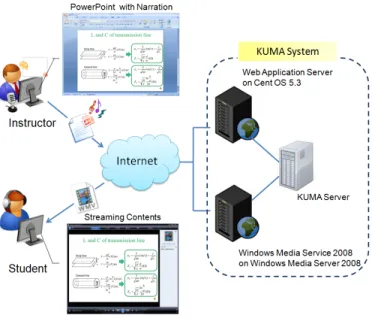
SYSTEM CONFIGURATIONFigure 1 shows the conception diagram including the KUMA system configuration. The KUMA system consists of three servers: Web application server on Cent OS 5.4, KUMA server on Windows Server 2008 and Windows Media service on Windows Server 2008.
Figure 1. The KUMA system configuration
The role of the web application server is to navigate researchers and students in the KUMA system. There are mainly two functions for researchers and students. One of them is to manage e-Learning contents via "MYPAGE" for researchers. Another is to access e-Learning content via web application server toward students. The KUMA server is to convert PowerPoint with voice into a streaming content automatically. The Windows Media Server is to delivery an e- Learning content generated by the KUMA server. KUMA
978-1-4244-5792-210/$26.00 ©2010 IEEE 136
system are divided three parts in consideration of extendibility, functional distribution, maintainability, the load distribution of CPU, network load.
A. Web Application Server on Cent OS 5.4
The web application server is configured by Cent operation software version 5.4 as an operating system. The function of web services and the interface program among each server are constructed by Apache 2.2, Samba and Practical Extraction and Report language (Perl) 5.8.
The web application server provides several services which contain “Registration” and “MYPAGE” for researchers and
“Supply e-Learning content” for students.
Mainly, there are several steps for creating e-Learning contents. First of all, a researcher needs the registration via web application server in order to make “MYPAGE”. After login to
“MYPAGE”, a researcher can be uploading prepared educational materials which consist of PowerPoint with voice.
After uploading PowerPoint with voice, it is converted to streaming contents by KUMA server as shown in figure 2. And also, a researcher not only discloses or deletes own contents but also edits comment via “MYPAGE”.
It is very useful to use a PowerPoint because more than 80 percent of higher education institutions use a presentation tool in order to create educational materials.
B. KUMA Server on Windows Server 2008
The KUMA server is configured by Windows Server 2008 Standard edition as an operating system. Microsoft PowerPoint 2007 and Windows Media Encoder 9 run in the background are controlled by management program for a kernel of KUMA.
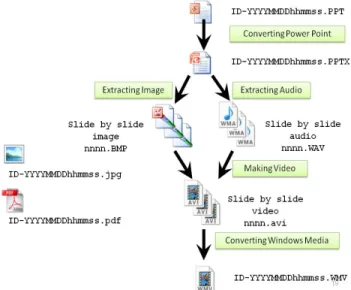
The KUMA server has an important role in KUMA system that is relative to convert PowerPoint with voice into Windows Media Video (WMV). The figure 2 shows the whole process of converting PowerPoint with voice into streaming content.
We selected Open XML adopted by latest Microsoft Office2007 (extension: PPTX) as a basic format of PowerPoint received in the KUMA server in the light of shifting to the latest file format in the future. Therefore, when the KUMA server receives old format of PowerPoint, it converts into Open XML format related ZIP format using PowerPoint 2007. After converting to Open XML format, it can be divided in some images and audio. After arranging each extracted materials, it is recombined each other as an AVI format. Then, Windows Media Encoder controlled by KUMA integrates each AVI contents into a Windows Media Video. As a result, the KUMA server can convert PowerPoint with voice into Windows Media Video as shown figure 2.
The kernel of KUMA controls several modules as shown figure 3. These modules are classified as “distinction parts”,
“extraction parts”, “generation parts”, “conversion parts” and
“other parts”. Distinction parts consist of from 1 to 4 as shown in figure 3. Similarly, extraction parts consist of 5 and 6.
Generation and conversion parts are composed of 7and 8, respectively. And also other parts are related to 9 and 10. A classified module is independent of each other.
PowerPoint 2007 with extended library is controlled by the module of distinction parts. In other words, the module of distinction parts not only creates a thumbnail but also Portable Document Format (PDF) of streaming content. Additionally,
the module of extraction parts is respectively extracting images in Bitmap format and audio in the WAV format and saves as the form of file name “0001.BMP” and “0001.WAV” in number order.
Figure 2. Flow chart of conversion
①
⑩ Management Program
Extracting Image
Work Folder (ID-YYYYMMDDHHMMSS)
Extracting Audio
Making Video
Converting Windows Media
Delete Work Folder
BMP WAV AVI
WAV BMP
WMV AVI
⑤ ⑥ ⑦ ⑧
Application Server Get PowerPoint Responding Result
Streaming Server
Discriminating Power Point Converting Power Point Making Work Folder
②
⑨
Uploading Windows Media
⑨
③ ④
Figure 3. Schematic diagram of conversion program
The figure 4 shows a file structure of Open XML for Power Point 2007. That is to say, the constitution of PowerPoint 2007 format is equal to ZIP formats. So, we can get components of PowerPoint using the module of extract parts.
TestPPTX.zip
ppt docProps _rels
[Content_Types].xml
slides notesSlides media
_rels slide1.xml slide2.xml slide3.xml
slide1.xml.rels
…
notesSlide1.xml notesSlide2.xml
audio1.wav Folder
File
Slide contents
File information to link with each slide
Note information
…
Audio File
Figure 4. File structure of Open XML for Power Point 2007
137
As an illustration, an identifying of the place on which an audio file was located such as “/ppt / medium / audio1.wav” is obtained from analysis of the hierarchy of slide1.xml.rels.
Additionally, the module of generation parts is generating video in the AVI format and saves as the form of file name
“0001.AVI” in number order. Then, each contents generated by the module of generation parts are recombined by the module of conversion parts. Finally, the recombined media, PDF format of streaming content and a thumbnail are transferred to the streaming server by the module of other parts, and completion notice is sent to the application server.
C. Windows Media Service on Windows Server 2008
The Windows Media Service with the Microsoft Media Services (MMS) protocol is configured by Windows Server 2008 Standard edition as an operating system.
Students can access to e-Learning contents via Windows Media Video Redirector (WVX) describing the location of the WMV using the Windows Media Player as shown in figure 5.
The Windows Media Service delivers e-Learning contents by the proper bit-rate according to student’s communication band.
The advantage of typical streaming server is as follows: 1) the protection of e-Learning contents is achieved by the Windows Media Service with MMS protocol. 2) The Windows Media player can perform reproduction of the streaming media, even if the streaming media is not completely downloading.
Figure 5. Snapshot of The Windows Media Player
III.
APPLICATION OF THE KUMA SYSTEMThe KUMA system is applied to streaming video lectures named “Streaming Book on Pulsed Power Engineering”
produced by eminent researchers in the field of pulsed power engineering.
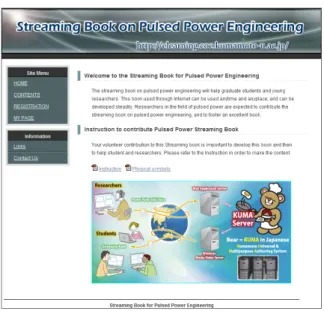
Figure 6 shows snapshot of the “Streaming Book on Pulsed Power Engineering”. The “Streaming Book” used through Internet can be used anytime and anyplace, and have good extensibility. The aim of this website is to help understanding pulsed power engineering for graduate students and young researchers. To introduce this system to experts of pulsed power, we have announced KUMA system in 17th IEEE International Pulsed Power Conference. By using this system, quality of e-Learning contents will be fostered by researchers in the forefront of pulsed power research.
Figure 6. Streaming book for Pulsed Power Engineering
Figure 7. Snapshot of “Contents”
Figure 8. Snapshot of “My Page”
138
Figure 9. Snapshot of “Edit Summary”
Figure 7 shows a snapshot of “e-Learning contents”.
Students choose an e-Learning content which they want to learn by clicking the thumbnail image. Researchers can easily create an e-Learning content. As the above mention, a researcher needs a registration on the website. After registered, a researcher receives an e-mail with user-id and password.
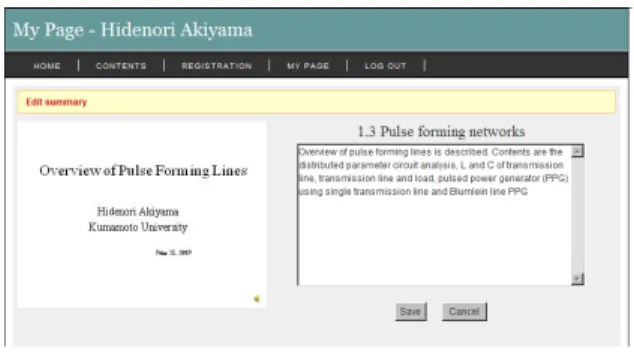
Then, a researcher can login to "MYPAGE" as shown in Figure 9. A PowerPoint with voice is uploaded by a researcher via “MYPAGE”, and after converted by KUMA server, a researcher receives completion notice from web server. The figure 9 shows snapshot of “Edit Summary” on “MYPAGE”.
“Edit Summary” can edit the comment for the e-Learning content.
IV.
CONCLUTIONA web-based authoring system for rapid e-Learning has been developed for higher education. The system can convert PowerPoint with voice into an e-Learning content. Researchers can easily create e-Learning contents, and publish e-Learning contents via the KUMA system. A created e-Learning content is delivering to students through the Internet.
Researchers need not install the special software except the PowerPoint and need not have professional skill, because the
developed authoring software is operated by the server side.
Therefore, this system will be able to reduce researcher’s burden. This system will increase a number of e-Learning at higher education.
R
EFERENCES[1] Lesta A. Burgess, “WebCT as an E-Learning Tool: A Study of Technology Students’ Perceptions”, Journal of Technology Education, Vol. 15 No. 1, Fall (2003) pp.6-15
[2] June Lu, Chun-Sheng Yu, Chang Liu, “Learning style, learning patterns, and learning performance in a WebCT-based MIS course”, Information
& Management 40 (2003) pp.497–507
[3] Y. Vovides, S. Sanchez-Alonso, V. Mitropoulou, G. Nickmans, “The use of e-learning course management systems to supportlearning strategies and to improve self-regulated learning”, Educational Research Review Vol. 2 (2007) pp.64-74.
[4] E. Reyes-Garcia and I. Saleh, “HyperTectol: an assistant and authoring tool for using Multimedia in Learning Objects creation”, Fifth International Conference on Information Technology Based Higher Education and Training, (2004), CD-ROM folder 190
[5] Kazutake Kozono, Akemi Teramoto and Hidenori Akiyama,
“Development of Efficient Authoring Software for e-Learning Contents”, The transactions of the Institute of Electrical Engineers of Japan. A, A publication of Fundamentals and Materials Society 125(8), (2005) pp.675-682.
[6] Kiyoshi Nakabayashi, “Technology Standardization and Open Movement in e-Learning”, Japan journal of educational technology Vol.
31(3) (2007) pp.285-295
[7] National Institute of Multimedia Education, “Report on education using ICT including e-Learning, 2006”, (2006), p.25
[8] ANDREW, M.(2009)INTRODUCTION OF RAPID E-LEARNING DEVELOPMENT WITHIN AN INTERNATIONAL GEOSPATIAL COMPANY. Joint ISPRS Workshop, E-Learning Tools, Techniques and Applications.
[9] Microsoft PowerPoint, http://office.microsoft.com/powerpoint
139