Abstract
Information and communication technologies (ICT) should be available not only for normal users but also for users with disabilities. We still need gap control especially for users with disabilities in developing countries. In this paper, we present font development, keyboard mapping and software keyboard prototype for Myanmar language fingerspelling characters. Moreover, we discuss the usability of our approach based on the user study results with current fingerspelling software keyboard prototype.
The evaluation was made in terms of typing speed CPM (characters per minute) and feedbacks from three types of users (hearing-impaired users, general users and desktop publishing staff). We believe that the outcome of this research is useful for designing Myanmar fingerspelling keyboard layout, creation of fingerspelling educational contents and communication between hearing-impaired and general users.
1
IntroductionMyanmar fingerspelling is the representation of Myanmar characters and numbers with hands in Myanmar sign language. It is a necessary communication method for hearing-impaired or deaf people, and is used especially for signing names, city names and words, which do not exist in sign language. The motivation for this research is the present state that hand drawn pictures are used in sign language textbooks because there is no fingerspelling font or keyboard layout for Myanmar fingerspelling. In this paper, we propose a keyboard layout for Myanmar fingerspelling using our developed TrueType font for Myanmar fingerspelling text input. It is a keyboard mapping of fingerspelling characters based on current Myanmar PC keyboard layouts and is called Direct Keyboard Mapping (DKM). User studies are conducted with software keyboard prototype to evaluate DKM fingerspelling keyboard layout. We mainly focus on user- friendliness of DKM and user interface of fingerspelling
software keyboard (i.e. labeled by Myanmar character or labeled by fingerspelling, which is better?). The evaluation was made based on typing speed CPM and feedbacks from hearing-impaired users, general users and desktop publishing staff. The results show that the mentioned layout is highly accepted not only by hearing-impaired users but also by general users and desktop publishing staff, and provides appropriate typing speed.
2
Myanmar FingerspellingFor all we know, there are two different fingerspelling character sets for Myanmar language; one is used in northern Myanmar (e.g. used at “Mandalay School for the Deaf”, Mandalay city) and the other is used in southern Myanmar (e.g. used at “Mary Chapman School for the Deaf”, Yangon city). The latter was invented by Dr.
Maliwan Tammasaeng in collaboration with Myanmar sign language teachers and students in 1987 [1]. The mentioned two are similar in consonant but mainly different in vowel, medial and symbols. Myanmar fingerspelling consonants are based on the American Manual Alphabet such as “a” for
“
အ
” (အ), “b” for “ဘ
” (ဘ), “d” for “ဒ
” (ဒ), “z” for “ဇ
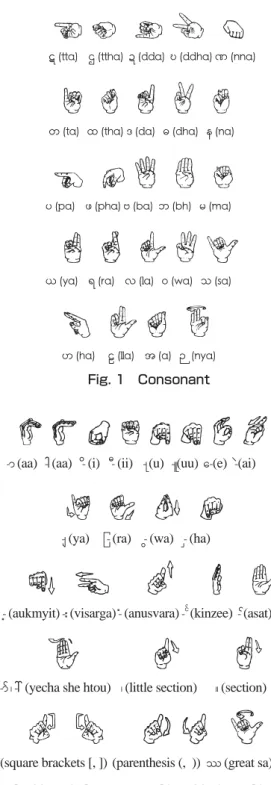
” (ဇ) [1], [2]. In this paper, we use fingerspelling characters set for font development from a Myanmar sign language dictionary book published by Department of Social Welfare, Ministry of Social Welfare, Relief and Resettlement [3], because the fingerspelling character set mentioned in this book was recognized as a standard in 2007. Myanmar fingerspelling characters used in this research are as follows:က ခ ဂ ဃ င
က (ka) ခ (kha) ဂ (ga) ဃ (gha) င(nga)
စ ဆ ဇ ဈ ည
စ(ca) ဆ(cha) ဇ (ja) ဈ(jha)ည (nnya)
Direct Keyboard Mapping (DKM) Layout for Myanmar Fingerspelling Text Input
─ Study with Developed Fingerspelling Font mmFingerspelling.ttf ─
Ye Kyaw Thu
†, Sai Aung Win Maung
‡and Yoshiyori Urano
†† Global Information and Telecommunication Institute, Waseda University
‡ Graviton Interaction Lab
3-1
査読論文Refereed Papers
The presentation order of fingerspelling is the same as Myanmar language handwriting order. The main difference is that glyph and writing position of fingerspelling characters never change according to what it surrounds
unlike, for example, the width of Myanmar character medial - (ra), which changes to ေကာက္ (fear) and ေခာက္
(frighten), using only the glyph
ြ
in fingerspelling.3
Related WorkBritish fingerspelling font namely “BDA (British Deaf Association) Fingerspelling” and American Sign Language (ASL) fingerspelling font namely “Gallaudet TrueType Fingerspelling” already exist, and they enable typing with QWERTY and Dvorak keyboard layouts [4][5]. Although the predominant spoken language of United Kingdom and United States is English, BDA fingerspelling and ASL fingerspelling are quite different from each other. BDA fingerspelling express with two handed except alphabet “C (c)”, and ASL fingerspelling use one handed manual alphabet (see Table I). As far as we know, there is no such font development for Myanmar fingerspelling yet.
Alphabet Fingerspelling
A (a) B (b) C (c) D (d) E (e)
BDA
a b c d e
ASL
a b c d e
Table I
BDA and ASL Fingerspelling Alphabets “A (a)” to “E (e)”
SignWriting is a system of writing sign languages using a combination of iconic symbols or abstract pictures for handshapes, facial expressions, body locations, contacts and movements etc. [6]. It was developed in 1974 by dancer Valerie Sutton and already applied to BDA and ASL fingerspelling [7] (see Table II). We used “Sutton UK” and
“Sutton US” fonts for typing test of SignWriting alphabets, and learned that SignWriting alphabets of BDA and ASL can be typed with QWERTY or Dvorak keyboard like BDA and ASL fingerspelling.
English
Alphabet A (a) B (b) C (c) D (d) E (e) Sutton UK
(BDA)
a b c d e
Sutton US
(ASL)
a b c d e
Table II
SignWriting for BDA and ASL Fingerspelling Alphabets “A (a)”
to “E (e)”
Currently SignWriting is not used in Myanmar deaf education, and a special word processor needs to be developed for SignWriting typing. In this research, we focus only on text input method of fingerspelling characters
ဋ ဌ ဍ ဎ ဏ
ဋ (tta) ဌ(ttha) ဍ(dda)ဎ(ddha)ဏ(nna)
တ ထ ဒ ဓ န
တ (ta) ထ(tha)ဒ (da) ဓ(dha) န(na)
ပ ဖ ဗ ဘ မ
ပ (pa) ဖ (pha)ဗ(ba)ဘ (bh) မ(ma)
ယ ရ လ ဝ သ
ယ (ya) ရ(ra) လ(la) ဝ(wa) သ(sa)
ဟ ဠ အ ဉ
ဟ (ha) ဠ(lla) အ(a) ဉ (nya) Fig. 1 Consonant
ာ ါ ိ ီ ု ူ ေ ဲ
-ာ(aa) -(aa) -ိ(i)š -ီ(ii) -(u) -(uu)ေ-(e) -ဲ(ai)
ျ ြ ွ ှ
-(ya)š -(ra) -(wa) -(ha)
့ း ံ ၐ ်
-့(aukmyit)-း(visarga)-ံ(anusvara)-င္(kinzee) -္(asat)
ၑ ၊ ။
-ာ္ ၊- (yecha she htou) ၊(little section)šš။(section)šš
ၒ ၓ ၔ ၕ ၖ
(square brackets [, ]) (parenthesis (, )) (great sa)
Fig. 2 Vowel, Consonant Sign, Various Sign and Symbol
ဣ ဤ ဥ ဧ ဩ
ဣ(i) ဤ(ii) ဥ(u) ဧ(uu) ဩ(o)
၏ ၍ ၌ ၎
၏(i) ၍(yae) ၌(nhaik) ၎(le gaung) Fig. 3 Independent Vowel and Symbol
and not on whole Myanmar sign language. And thus, we take into consideration the design of BDA and ASL fingerspelling fonts and their keyboard mappings.
Finger-Chat system is an instant messaging system designed to support teaching of fingerspelling alphabets, and it covers BDA fingerspelling, SignWriting fingerspelling and English typing [8]. To design our software keyboard prototype, we also studied Finger-Chat system.
4
Direct Keyboard MappingDirect Keyboard Mapping is a method to map Myanmar fingerspelling characters based on the current Myanmar PC keyboard layouts. We assume that it is easier and short learning curve for users who are already familiar with Myanmar keyboard layout. Basically, it is one to one mapping and simple process compared to designing a new keyboard layout, but the main challenge is selecting one of the Myanmar PC keyboard layouts for DKM. This is because there are many keyboard layouts or key mappings and typing methods for Myanmar language today. Old Myanmar PC keyboard layouts and typing methods are totally based on ASCII encoding, and existing ones are moving to Unicode encoding (although some of which are not fully Unicode standard encoding yet). Old Myanmar keyboard layouts consider various glyphs of the same medial or possible combinations of the medial with other medials (e.g. “ ”, “ ”, “ ”, “ ”and “ ” etc.) and subscript consonants (e.g. “က--”, “ခ-”, “ဂ-”, “စ-”, “--ဌ ”, and “ ” etc.). However, Unicode encoding automatically renders the appropriate glyphs depending on the characters combination, and therefore, keyboard mapping for different glyphs of a character is not necessary in Unicode keyboard layout. Moreover, each fingerspelling character has only one glyph, and thus, glyph changing process and keyboard mapping for different glyphs does not need to be considered. For those reasons, it is possible to use one of the existing Unicode keyboard layouts for fingerspelling characters.
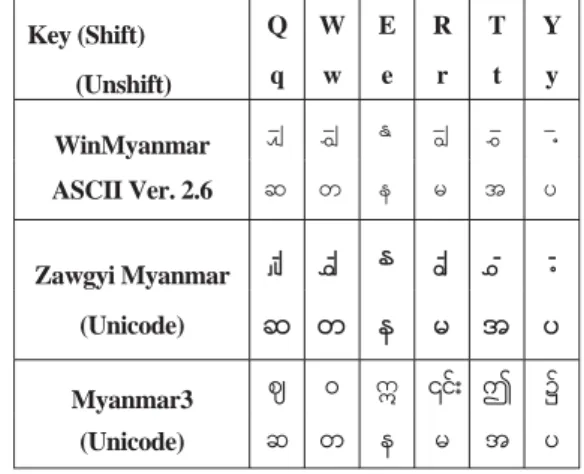
As a first step, we studied existing Myanmar PC and typewriter keyboard layouts. From this study, we can say that almost all Myanmar PC keyboards mappings are based on traditional typewriter and similar keyboard mapping especially for consonants, but some difference mappings exist for vowels, medials and subscript consonants (see Table III) [9]. Following this result, we decided to use
“Myanmar3 keyboard layout” that is one of the existing Myanmar Unicode keyboard layouts developed by Myanmar Unicode and NLP (Natural Language Processing) Research Center [10].
Key (Shift) Q W E R T Y
(Unshift) q w e r t y WinMyanmar
ASCII Ver. 2.6
Zawgyi Myanmar -ွ် -ၽႊ ႏ -ၽြ -ႊ -႔
(Unicode) ဆ တ န မ အ ပ
Myanmar3 ဈ ဝ ဣ ၎ ဤ ၌
(Unicode) ဆ တ န မ အ ပ
Table III
Keyboard mapping of WinMyanmar, Zawgyi Myanmar and Myanmar3 keyboard for ‘q’, ‘w’, ‘e’, ‘r’, ‘t’ and ‘y’ keys
In this paper, we mainly consider keyboard mapping for consonants, vowels and medials because these characters are very important in Myanmar word formation.
All of the fingerspelling consonants are assigned the same as Myanmar 3 keyboard layout. Table IV shows keyboard mapping for Myanmar fingerspelling consonants “
က
” (Ka) to “င
” (Nga). For the keyboard mapping of Myanmar fingerspelling vowels, consonant signs and various signs, there is no need to consider different glyphs of those characters (e.g. different glyph of Medial “Ra” such as “ ”,“ ”, “ ” and “ ”). This is because all of the fingerspelling characters have only one glyph except “ ” (tall aa). Other combined vowels such as “-ာ္” (aa + asat or yecha shae htoo), “ ” (tall aa + asat or yecha shae htoo)”
are defined as a fingerspelling character (see Figure 2). For other Myanmar fingerspelling characters such as independent vowels and symbols, we can follow one of the existing Myanmar keyboard layouts or consider a new keyboard mapping.
Table IV
Direct Keyboard Mapping for Myanmar fingerspelling consonant “က” Ka to “င” Nga
Myanmar
Consonant က ခ ဂ ဃ င
Equivalent
Fingerspelling
က ခ ဂ ဃ င
Key u c Shift 8 Shift c i
5
Prototype DevelopmentHere, we present font developing process for Myanmar fingerspelling and software keyboard prototype for DKM.
Prototype was developed with Microsoft Visual Studio 2005, and Visual Basic programming language was chosen for the prototype implementation, which is simple coding and suitable for rapid development.
5.1 Font Development for Myanmar Fingerspelling
As far as we know, no font had been developed for Myanmar fingerspelling characters. As a first step, we developed a true type font for Myanmar fingerspelling before software keyboard implementation. We decided to develop a TrueType font for Myanmar fingerspelling rather than other font types such as PostScript and OpenType [11].
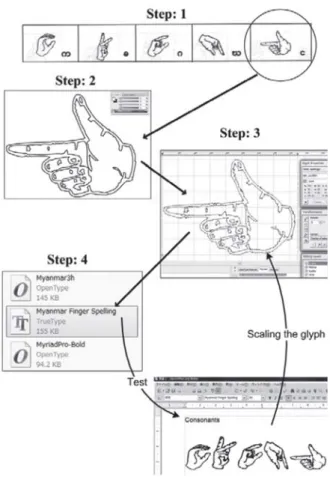
This is because a font that is easy to read and prints well on the monitor screen is enough. Moreover, TrueType fonts worked fine on the Windows as well as Mac. We used a scanner (Sharp UX-MFSOCL), Adobe Illustrator CS3 version 13.0.0 and FontLab Studio version 5, and created fingerspelling font by the following steps:
1. Scan the Myanmar fingerspelling character set with 600 dpi from Myanmar sign language dictionary book 2. Trace each fingerspelling character and then convert to
vector format using Adobe Illustrator CS3
3. Copy the vector image from Adobe Illustrator CS3 and paste it to the FontLab Studio (Here, we have to assign name and/or Unicode code point to each fingerspelling glyph) and then, adjust each fingerspelling character’s path
4. Generate the true type font (mmFingerspelling.ttf) and test all fingerspelling characters
Note: There are many possible ways to develop a font, and among them, the font creation steps above were used for development of Myanmar fingerspelling font (see Figure 4).
To our knowledge, there are several font rendering engines such as Pango, Microsoft’s uniscribe engine, IBM’s ICU (International Components for Unicode), QT and FreeType font engine [11], [12], [13], [14], [15], [16], and among them, we used IBM’s ICU (test with OpenOffice.org Writer) and Microsoft’s uniscribe engine (test with notepad) for measuring and positioning all fingerspelling characters.
In the designing process of fingerspelling font, writing position of each character does not need to be considered.
In Myanmar language, characters are written in three levels (upper, middle and lower) and most characters have their defined positions (e.g. “ေ-” and “ ” should be written as a front vowel, “- ”, “-”, “–”, “–”, “–”, “−”, “−့” etc. should be written as a lower character and “−ိ”, “−ီ”, “−ံ” etc. should be written as an upper vowel and “-ာ”, “–”, “-း” etc. should be written on the right side of consonants). In case of fingerspelling, however, all of the characters including vowels and medials are represented from left to right in one row. Therefore, the step of adjusting each character’s paths of fingerspelling is not so complex compared to that of Myanmar characters. Our developed fingerspelling font (mmFingerspelling.ttf) is used to display Myanmar fingerspelling characters in this paper (see Figure 1, Figure
2, Figure 3 and Figure 4).
Fig. 4 Font developing steps for fingerspelling Nga
(Step:1 Scan fingerspelling “Nga” picture, Step:2 Trace and convert to vector format, Step:3 Copy the vector image and paste it to FontLab, and then, adjust “Nga” character path with other fingerspelling characters, Step:4 Generate true type font and test with OpenOffice.org Writer)
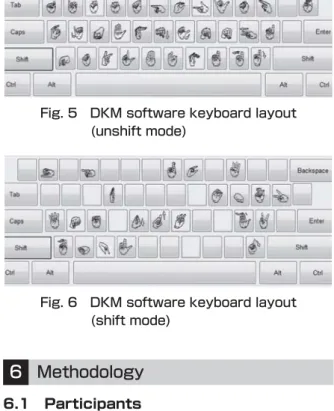
5.2 Software Keyboard Development In this prototype, we focus on Myanmar consonants, vowels, medials and symbols that are defined as a standard fingerspelling character set (see Figure 1, Figure 2 and Figure 3) [3]. Based on the Myanmar3 keyboard layout, we assigned 33 fingerspelling characters (20 consonants, 9 independent and dependent vowels, 2 Medials and 2 Symbols) for the unshift mode and 23 fingerspelling characters (14 consonants, 3 independent and dependent vowels, 2 medials and 4 symbols) for the shift mode (see Figure 5 and Figure 6).
In this software keyboard prototype, we support two typing methods, one is typing with physical keyboard and the other is typing with computer mouse. Keyboard layout can be switched to display fingerspelling or Myanmar characters. The selected keyboard layout options only affect the appearance of the software keyboard keys and do not affect the output text (i.e. the output text always shows fingerspelling characters). Basically, only 1 keystroke is required to type a fingerspelling character with DKM
software keyboard, but the number of keystrokes required to type a Myanmar character is not the same as the one to type an equivalent fingerspelling character. For example, we usually need to press 2 keystrokes for “-ာ္” (“aa” vowel + “asat” vowel called “yecha shae htoo”) in Myanmar PC keyboards, however, only 1 keystroke is required to type with DKM software keyboard. This is because “aa” vowel plus “asat” character is defined as a one fingerspelling character (i.e.
ၑ
) in standard fingerspelling character set.Another important factor for counting number of keystrokes per character is “shift mode”, and another keystroke is required for pressing or clicking shift key. In this prototype, typing fingerspelling characters such as “
ဍ
”, “ဋ
”, “ရ
”,“
ဂ
” and “ဝ
” requires 2 keystrokes. Figure 5 shows DKM software keyboard layout of Myanmar fingerspelling unshift mode, and Figure 6 shows that of shift mode.Fig. 5 DKM software keyboard layout (unshift mode)
Fig. 6 DKM software keyboard layout (shift mode)
6
Methodology 6.1 ParticipantsUser study was held in Yangon city, Myanmar with three types of volunteer users (i.e. hearing-impaired users, general users and desktop publishing staff), i.e. 48 native participants in total.
We recruited 18 hearing-impaired users (9 female and 9 male) ranging in age from 13 to 22 years (mean = 17.1, SD = 2.9) who are students at Mary Chapman School for the Deaf and not familiar with personal computer. General users consist of 16 users (10 female and 6 male) ranging in age from 18 to 33 years (mean = 26.8, SD = 4.0), most of whom are students at KMD Computer Training Center, Yangon city, Myanmar and already familiar with Myanmar keyboard layout (WinMyanmar or Zawgyi). We also recruited 14 desktop publishing (DTP) staff (5 female and 9 male) ranging in age from 16 to 33 years (mean = 25.7, SD
= 4.8) who routinely use one of the exiting Myanmar keyboards at work.
None of them had prior experience with DKM fingerspelling software keyboard.
6.2 Apparatus
DKM software keyboard prototype ran on standard Microsoft Windows 7 notebook with a 2.0 GHz Intel Core2 duo CPU and 4 GB of memory. Another standard Microsoft Windows XP notebook with 1.5 GHz Intel Core duo CPU and 1 GB of memory was also used for user study with general users. Figure 7 shows user study environment with hearing-impaired users at Mary Chapman School for the Deaf.
Fig. 7 User study apparatus used for DKM software keyboard layout
6.3 Procedure
The experiment procedures are as follows:
1. Explaining current Myanmar keyboard Myanmar3 and DKM keyboard layouts (as well as introducing to general users what fingerspelling is and how it is used by hearing-impaired people),
2. Making typing demonstration of DKM software keyboard prototype with both physical keyboard and computer mouse,
3. Allowing users to type a few trial fingerspelling words (maximum 10 minutes of practice time) to get familiar with DKM software keyboard layout,
4. Recording their typing speed of five fingerspelling words for 10 times (including error correction time) and
5. Discussing with them and getting their feedbacks.
6.4 Design
We designed user study method for DKM keyboard layout with three types of users (hearing-impaired users, general users and DTP staff) and three independent factors (typing with physical QWERTY keyboard labeled by
English alphabets (i.e. common keyboards in Myanmar), with software keyboard labeled by fingerspelling characters and with software keyboard labeled by Myanmar characters).
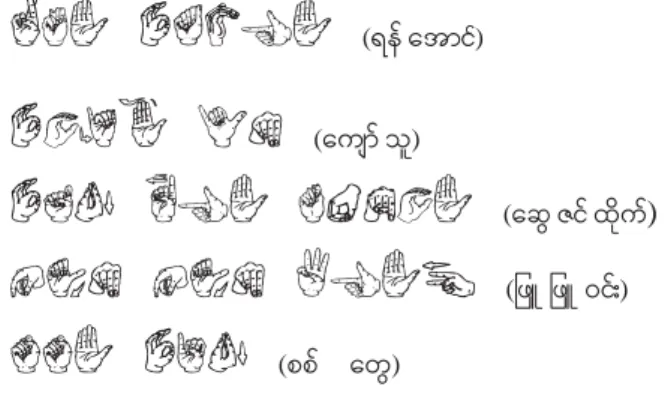
Fingerspelling text for user study contains names of two actors “ရန္ေအာင္” and “ေကာ္သူ”, one actress “ေဆဇင္ထုိက္”, one of common female names “ဖ ဖ ဝင္း” and a city “စစ္ေတ”.
All those names are already familiar to native users and do not contain subscript consonants. We selected the names without subscript consonants because “subscript symbol”
or “subscript consonants” are not defined in the current standardization of Myanmar fingerspelling character set. In practical, hearing-impaired people show subscript characters by moving their fingers downwards.
Fingerspelling text contains 18 consonants, 11 vowels, 4 medials and 8 various signs. The mentioned names cover most combination patterns of vowel(s) and medial with a consonant (see Figure 8).
ရန် ေအာင်
(ရန္ ေအာင
္)ေကျၑ သူ
(သူ
)ေဆွ ဇင် ထိုက်
(ဇင္ ထ က ို ္ ) ဖြူ ဖြူ ဝင်း
(ဖ ဖ ဝင္း
)စစ် ေတွ
(စစ္
)Fig. 8 Five fingerspelling names for user study (Equivalent Myanmar characters are presented with brackets)
We discussed formally and informally with each hearing-impaired user to get his/her comments and suggestions relating to DKM software keyboard prototype.
We also recruited 16 general users and 14 DTP staff in order to get typing speed and feedbacks of the users who are already familiar with existing Myanmar PC keyboard layouts. Moreover, we made an analysis of “software keyboard labeled by fingerspelling characters” and
“software keyboard labeled by Myanmar characters” based on Likert scale evaluation by users.
7
Result and Discussion 7.1 SpeedWe evaluated typing speed with Characters per Minute (CPM) instead of Words per Minute (WPM) [17]. This is because there is no standard definition for a word in Myanmar unlike in English (i.e. common definition of a word = 5 characters, including spaces) [17]. Thus, the formula for computing CPM is as follows:
CPM
= |T|−1 S × 60Here, T is a typed transcribed string entered by users, and |T| is the length of this string. T may contain Myanmar characters, numbers, punctuation spaces etc. but not backspaces. S indicates how many seconds are spent from the entry of the first character to the last.
Although space is put between fingerspelling syllables in Figure 8 for easier reading, we did not instruct users to type a space between syllables, and thus, we don’t need to consider a space for calculating CPM. Our “T” value for CPM calculation is 42 (not 41) because we count fingerspelling character “
ၑ
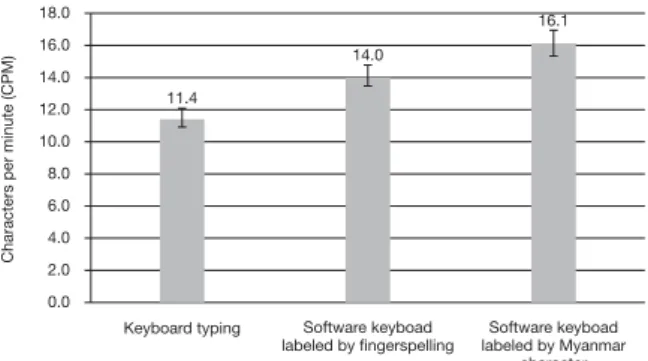
” (“aa” vowel and “asat”) as two.Figure 9 shows average CPM of 10 hearing-impaired users for each user study. CPM of typing with physical keyboard is 11.4, that of typing with software keyboard (labeled by fingerspelling) is 14.0 and that of typing with software keyboard (labeled by Myanmar character) is 16.1 respectively. CPM of typing with software keyboard (labeled by Myanmar character) is the highest speed for hearing-impaired users, and 41% higher than that of typing with physical keyboard and 15% higher than that of typing with software keyboard (labeled by fingerspelling).
Figure 10 shows average CPM of 10 general users for each user study. CPM of typing with physical keyboard is 96.9, that of typing with software keyboard (labeled by fingerspelling) is 21.5 and that of typing with software keyboard (labeled by Myanmar character) is 48.5 respectively. CPM of typing with physical keyboard is the highest speed for general users, and 351% higher than that o f t y p i n g w i t h s o f t w a r e k e y b o a r d ( l a b e l e d b y fingerspelling) and 100% higher than that of typing with software keyboard (labeled by Myanmar character).
Figure 11 shows average CPM of DTP staff for each user study. CPM of typing with physical keyboard is 72.0, that of typing with software keyboard (labeled by fingerspelling) is 18.1 and that of typing with software keyboard (labeled by Myanmar character) is 52.5 respectively. CPM of typing with physical keyboard is the highest speed for DTP staff, and 298% higher than that of typing with software keyboard (labeled by fingerspelling) and 37% higher than that of typing with software keyboard (labeled by Myanmar character).
We found that most hearing-impaired users or students are unfamiliar even with English QWERTY keyboard layout and some of them still have difficulties in controlling mouse. Over 2 hours were spent to introduce how to type fingerspelling characters with DKM software keyboard. It would appear that the lack of computer experience and unfamiliarity with standard fingerspelling characters are the
main difficulties for hearing-impaired users and these facts affect their CPM or typing speed. Based on the average CPM of novice users (hearing-impaired users, general users and DTP staff), we can prove that DKM layout is applicable for Myanmar fingerspelling typing. Moreover, it is also proved that even the users (both general users and DTP staff) who are not familiar with fingerspelling can type fingerspelling characters with appropriate typing speed by using DKM layout. If we compare the average CPM of all users’ typing with software keyboard labeled by fingerspelling and software keyboard labeled by Myanmar
character, we can clearly see that the latter is better user interface to type fingerspelling.
7.2 Questionnaires
Questionnaires were conducted to the participants immediately after the typing experiments. Informal questionnaires were held to hearing-impaired users in order to get their comments and suggestions on our proposed DKM software keyboard. We communicated with hearing- impaired users through sign language teachers’ translation as well as writing messages. The followings are four questions that we made:
1. Is fingerspelling software keyboard necessary for hearing-impaired people?
2. Are you familiar with one of the existing Myanmar PC keyboard layouts?
3. Do you think Direct Keyboard Mapping (DKM) is usable for fingerspelling typing?
4. Do you have any comments or suggestions?
The answers to questions 1, 2 and 3 from 18 hearing- impaired users are summarized as “Yes”, “No” and “Yes”
respectively. As for the question 4, we received very positive answers such as “Although I am the first-time user of DKM software keyboard prototype, I can type fingerspelling characters.”, “I am sure this will be very useful for fingerspelling characters typing.”, “Text input method for fingerspelling is necessary and it will be useful for creation of fingerspelling educational contents.” and
“Please keep making research on fingerspelling text input.”
etc. At the same time, we received an unexpected comment like “Fingerspelling used at Mary Chapman is different from standardized fingerspelling characters (11 differences in consonant characters and complete difference in vowel) and it caused ambiguity to us”. Moreover, we also got a comment of “Some of the fingerspelling characters are similar, and it is difficult to distinguish them, e.g., “
န
” (na)and “
ထ
” (tha), “မ
” (ma) and “စ
” (ca), “ဒ
” (da) and “ယ
” (ya), and thus, bigger software keys might be better for software keyboard with fingerspelling”.We set 4 Likert scales (1 to 5) questions to rate the user-friendliness of DKM software keyboard prototype.
The scales are (1) difficult-easy (2) painful-enjoyable (3) slow-fast and (4) dislike-like. Table V, Table VI and Table VII show the average or arithmetic mean results of Likert scale questions to hearing-impaired users, general users and DTP staff. Here, Likert scales value 1 is the most negative, value 3 is neutral and value 5 is the most positive.
According to the mentioned results, we can generally say that hearing-impaired users, general users and DTP staff are fond of text entering with DKM software keyboard
Keyboard typing
Characters per minute (CPM)
Software keyboad labeled by fingerspelling
Software keyboad labeled by Myanmar
character 120.0
96.9
21.5
48.5 100.0
80.0
60.0
40.0
20.0
0.0
Fig. 10 Average CPM of general users typing with physical keyboard, software keyboard (labeled by fingerspelling) and software keyboard (labeled by Myanmar character)
Keyboard typing
Characters per minute (CPM)
Software keyboad labeled by fingerspelling
Software keyboad labeled by Myanmar
character 80.0
70.0 60.0 50.0 40.0 30.0 20.0 10.0
72.0
18.1
52.5
0.0
Fig. 11 Average CPM of DTP staff s typing with physical keyboard, software keyboard (labeled by fingerspelling) and software keyboard (labeled by Myanmar character)
Keyboard typing
Characters per minute (CPM)
Software keyboad labeled by fingerspelling
Software keyboad labeled by Myanmar
character 18.0
16.0 14.0 12.0 10.0 8.0 6.0 4.0 2.0
11.4
14.0
16.1
0.0
Fig. 9 Average CPM of hearing-impaired users typing with physical keyboard, software keyboard (labeled by fingerspelling) and software keyboard (labeled by Myanmar character)
prototype. To see clearly their evaluation on “software keyboard labeled by fingerspelling” and “software keyboard labeled by Myanmar character”, we calculate average value and produce a comparison graph (see Figure 12).
Table V
Evaluation by hearing-impaired users Likert scales
Software keyboard (labeled by fingerspelling)
Software keyboard (labeled by Myanmar character)
Difficult-Easy 4.3 4.2
Painful-Enjoyable 3.8 4.1
Slow-Fast 3.8 4.4
Dislike-Like 4.5 4.1
Table VI
Evaluation by general users
Likert scales
Software keyboard (labeled by fingerspelling)
Software keyboard (labeled by Myanmar character)
Difficult-Easy 4.8 4.4
Painful-Enjoyable 4.5 4.2
Slow-Fast 4.7 4.3
Dislike-Like 4.8 4.5
Table VII Evaluation by DTP staff Likert scales
Software keyboard (labeled by fingerspelling)
Software keyboard (labeled by Myanmar character)
Difficult-Easy 4.5 4.5
Painful-Enjoyable 4.1 4.1
Slow-Fast 4.6 4.5
Dislike-Like 4.8 4.8
Hearing-impaired users
General users DTP staff
Lilert Scale Value
Software keyboad labeled by fingerspelling Software keyboad labeled by Myanmar character 5
4
3
2
1
4.1 4.2 4.7
4.4 4.5 4.5
0
Fig. 12 Comparison of Likert scale evaluation results for Software keyboard labeled by fingerspelling and Software keyboard labeled by Myanmar character
If we only consider the Likert scale evaluation results, there is no significant user acceptance level difference on two keyboard layouts such as 4.1:4.2 (from hearing- impaired users), 4.7:4.4 (from general users) and 4.5:4.5 (from DTP staff). However, it can be said that most participants prefer software keyboard labeled by Myanmar
character, judging from their typing speed (in terms of CPM), suggestions and comments. Taking their comments, only one of them prefers software keyboard labeled by fingerspelling and the rest of them are comfortable with software keyboard labeled by Myanmar character. As we had expected, most general users and DTP staff did not dare to give strong comments or suggestions relating to fingerspelling text input, and they gave just general positive comments such as “DKM is possible to use” and “this might be useful for hearing-impaired users”. To cover this problem, we added questionnaires in terms of Likert scale evaluation after the typing experiment.
8
ConclusionWe have proposed DKM fingerspelling keyboard layout in this paper. An experiment compared three text input methods (typing with physical QWERTY keyboard, typing with software keyboard labeled by fingerspelling, typing with software keyboard labeled by Myanmar character) with 18 hearing-impaired users, 16 general users and 14 DTP staff. For each text input method, user study was held for 10 users who entered a total of 5 fingerspelling names for 10 times (including error correction process).
From this user study with software keyboard prototype, average CPM values of 48 users are acceptable and we can prove that our proposal is a possible solution for fingerspelling typing. Moreover, based on the users’
comments, suggestions and Likert scale value, it is proved that fingerspelling software keyboard layout labeled by Myanmar character has better user interface for first-time users than the one labeled by fingerspelling. In the near future, we plan to make user study with hearing-impaired users who are already familiar with standardized fingerspelling characters.
Acknowledgement
This paper is a part of the outcome of research performed under a Waseda University Grant for Special Research Projects (Project number: 2009A-901). We would like to thank teacher Daw Nwe Ni, students of Mary Chapman School for the Deaf and all participants for their kind contributions to our text input experiments.
References
[1] Te x t b o o k o f S p e a k i n g a n d M y a n m a r S i g n Communication, Mary Chapman School for the Deaf, 1988
[2] American Manual Alphabet
http://en.wikipedia.org/wiki/American_manual_
alphabet
[3] Myanmar Sign Language Dictionary (Vol:1), Mandalay School for the Deaf, 2007
[4] British Deaf Association (BDA) http://www.bda.org.uk/
[5] American Sign Language (ASL)
http://wiki.medpedia.com/American_Sign_Language [6] Article of SignWriting in Wikipedia
http://en.wikipedia.org/wiki/Sutton_SignWriting [7] Signwriting Site
http://www.signwriting.org/read.html
[8] James Ohene-Djan and Andrew Mould, “Finger-Chat:
A Multi-mode Fingerspelling Chat System”, in Proceedings of the Conference and Workshop on Assistive Technologies for Vision and Hearing Impairment, June 29~July 2, 2004, CDROM
[9] Ye K y a w T h u a n d Yo s h i y o r i U R A N O , “ A Comparison of Myanmar PC Keyboard Layouts”, in Proceedings of the 8th International Symposium on Natural Language Processing, October 20~22, 2009, Bangkok, Thailand, pp. 15-20
[10] Myanmar3 Font and Keyboard Layout http://www.myanmarnlp.net.mm/
[11] Yannis Haralambous (Translated by P. Scott Horne),
“Font & Encodings”, O’Reilly Media, Released:
Spetember 2007 [12] Pango engine http://www.pango.org/
[13] Microsoft’s Uniscribe Engine
http://www.microsoft.com/typography/developers/
uniscribe/intro.htm [14] IBM’s ICU Engine http://site.icu-project.org/
[15] QT framework
http://en.wikipedia.org/wiki/Qt_(framework) [16] FreeType font engine
http://www.ascendercorp.com/services/font-engines/
freetype/
[17] MacKenzie, I. S. and Kumiko Tanaka-Ishii, 2007, Text Entry Systems (Mobility, Accessibility, Universality), Morgan Kaufmann Press.