• 検索結果がありません。

Information Gathering Support Interface by the Overview Presentation of Web Search Results

N/A
N/A
Protected

Academic year: 2021

シェア "Information Gathering Support Interface by the Overview Presentation of Web Search Results"

Copied!
6
0
0

読み込み中.... (全文を見る)

全文

(1)

Information Gathering Support Interface by the Overview Presentation of Web Search Results

Takumi Kobayashi Kazuo Misue Buntarou Shizuki Jiro Tanaka Graduate School of Systems and Information Engineering

University of Tsukuba,

Tennoudai 1-1-1, Tsukuba, Ibaraki, Japan 305-8571

Email: {takumi, misue, shizuki, jiro}@iplab.cs.tsukuba.ac.jp

Abstract

The Internet consists of several billion documents.

Choosing information from such a great number of Web pages is not easy. We do not think that the inter- faces of traditional search engines that divide search results into dozens of pages regardless of genre and display the results as a text-based list are necessarily useful. We propose an interface that helps the user to intuitively understand the entire Web search result and to gather information. Our system analyzes and classifies Web search results and presents the classifi- cation results to the user on one screen.

Keywords: Web search, Information gathering, Clus- tering, Visualization, Interface, Hyperbolic tree 1 Introduction

The Internet is used by people all over the world. As it spreads, the volume of information available and the number of Web pages is increasing rapidly. Accord- ing to Internet Systems Consortium, Inc., the number of hosts connected to the Internet is more than 350 million (Internet Systems Consortium, Inc. 2005).

Having such a huge amount of information, we need to use a search engine to retrieve the informa- tion that is relevant to us. When we conduct a Web search, we can use different kinds of retrievals to ob- tain different kinds of information. We may conduct a Web search that finds one or more Web pages re- lated to a specific topic. One example is a retrieval to obtain information on various topics about Japan.

Andrei Broder calls such a Web search an ”informa- tional Web search”(Broder 2002). When a user con- ducts such a search, (s)he must view a great number of Web search results from various viewpoints and choose from them. A search for information about Japan is abstract and includes information on poli- tics, traffic, tourist spots, and so on. Therefore, the user should not gather information from a specific Web page alone but should gather information from a variety of pages.

A conventional keyword search interface presents various problems when we conduct an informational Web search. These problems make the Web search difficult. Gathering information efficiently is difficult when using a conventional Web search interface that presents search results as a text-based list because such a one-dimensional list consists of various genres of Web pages. In addition, the display method, which

Copyright c°2006, Australian Computer Society, Inc. This pa- per appeared at Asia-Pacific Symposium on Information Visu- alization (APVIS 2006), Tokyo, Japan, February 2006. Confer- ences in Research and Practice in Information Technology, Vol.

60. K. Misue, K. Sugiyama and J. Tanaka, Ed. Reproduction for academic, not-for profit purposes permitted provided this text is included.
divides search results into dozens of pages, does not allow the user to intuitively understand the features of the entire search result. Therefore, the user might overlook profitable information.

We propose a system that classifies Web search results according to the content of the pages. Our system presents the classification results with some labels on one screen.

2 Overview Presentation System

We propose an interface that aids information gather- ing with the following features to solve the problems of conventional Web search interfaces.

1. The interface arranges similar Web pages in neighborhoods in a two-dimensional space.

2. The interface presents classification results to the user on one screen.

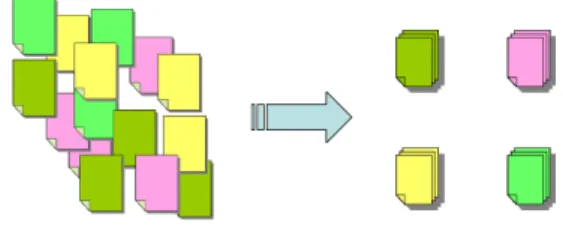
Our system categorizes Web search results into clus- ters according to the content of the Web pages to arrange similar Web pages in neighborhoods. The concept of feature 1 is shown in Figure 1. The user can gather information more efficiently because the system does not scatter various genres of Web pages but arranges them in neighborhoods. Web pages that the user does not want in the search results are ar- ranged in neighborhoods according to their genres.

Thus, the user can avoid looking through distracting scattered Web pages which (s)he does not want.

Our system presents search results in a two- dimensional space. This display method offers the user a retrieval that is more flexible than a one- dimensional presentation interface because the user does not have to sequentially check a one-dimensional list.

Figure 1: Feature 1

Conventional Web search engines visualize search

results as text-based lists. However, one problem with

these search engines is that they return too much in-

formation. The user cannot intuitively understand

the entire search result. In addition, the result list is

divided into small portions, but only 5 to 10 results

can feasibly be viewed on the screen at any one time

without scrolling, which forces the user to click on

(2)

the next button to view the next set of results. Our system presents classification results to the user on one screen. Thus, the user can easily understand the entire Web search result in an intuitive manner rather than having an interface that divides the search re- sults into dozens of pages. The user also can obviate the need to frequently click the next button to view multiple search results.

When our system presents search results, it uses labels and the titles of classified Web pages. The la- bels are composed of several words that represent the features of the cluster. The user can easily find mul- tiple relevant Web pages by referring to the labels.

3 Prototype of the Overview Presentation System

Our overview presentation system consists of two parts: the clustering of the Web search results and the presentation of the clustering result. The compo- sition of our system is shown in Figure 2

Figure 2: 1 °Search query, 2 °GoogleAPI, 3 °Search re- sults, 4 °Analyzes Web pages and conducts clustering, 5

°Clustering result, 6 °Visualization

3.1 The Clustering of Web Search Results To cluster Web search results, multiple Web pages found by a Web search engine are analyzed according to their content and classified into clusters based on the result. When the user enters a search query, our system uses GoogleAPI(Google 2005) to get the rel- evant URLs. Next, the system generates the HTML files corresponding to the URLs and analyzes them.

To analyze the HTML files, the system extracts words that appear in the HTML files using morpho- logical analysis. The system expresses each HTML file with the vector space method, using the tf-idf al- gorithm. An HTML file does not consist of simple sentences but has a tree structure of commands called tags. We think that our system can better extract the features of Web pages by using the structural infor- mation of HTML files.

For example, we think that parts of Web pages modified with TITLE tags, H tags, and STRONG tags contain words that represent the features of Web pages because these parts are highly likely to contain the main points of pages and be words the author of the page wants to emphasize. The words that appear in such parts are given heavier weights by the system than the words that the author does not intend to

emphasize. META tags might contain explanations and features of the page not included directly in the page. Our system can extract information from the words on pages with such structures. Web pages that use FRAME tags or IFRAME tags can be recursively analyzed by obtaining the URLs the tags refer to.

After the system analyzes the HTML tags, it forms clusters based on the document vectors ob- tained using the analysis. We used hierarchical clustering(Everitt 1993). First, our system consid- ers each Web page as one cluster. Next, the system compares the inner products of vectors that repre- sent the features of each Web page. The two clusters with the biggest inner product value are combined and considered a new cluster. The feature vector of the new cluster is a composite of the feature vectors of the two original clusters. The system repeats this combination process until all the Web pages are part of one cluster. Finally, the system makes a tree di- agram in which similar Web pages are arranged in neighborhoods.

When the system combines two clusters, it deter- mines three words that are highly related to both clus- ters. These words represent a common feature of the two clusters. The system obtains them when it cal- culates the inner product value of the two clusters.

They are important words that compose the label of the two clusters in the presentation of the clustering result.

3.2 The Presentation of the Clustering Re- sult

In general, because Web search results are huge, the tree diagram of the clustering is also huge. Our sys- tem uses Hyperbolic Tree to fit such huge tree dia- grams on one screen and present them to the user.

Hyperbolic Tree is a technique proposed by John Lamping for arranging huge tree diagrams on the hy- perbolic plane(Lamping, Rao & Pirolli 1995). Hyper- bolic Tree can visualize and manipulate large hierar- chies. Using Hyperbolic Tree, partial trees near the center of the screen are displayed larger, and those far from the center are displayed smaller. The user can move the focus by moving a partial tree to the center using the mouse. This movement of focus is shown in Figure 3. These features enable more information to fit on one screen than does a usual tree diagram. By moving the focus, the user can focus on relevant por- tions of the hierarchy while still seeing it embedding in the context of the entire hierarchy.

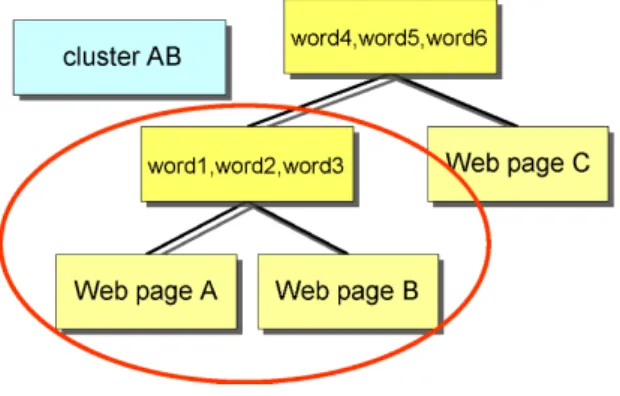
When the user collects information, (s)he cannot obtain the necessary amount of information by only displaying the tree diagram of the clustering result using Hyperbolic Tree. Thus, our system determines three words that strongly show the relationship be- tween the parents nodes of two clusters to help the user gather information. The relationship between Web pages A, B, and C, and words 1-6 is shown in Figure 4.

In Figure 4, Web pages A and B have a strong re- lationship with words 1, 2, and 3. Cluster AB, which consists of Web pages A and B, has a strong rela- tionship with words 4, 5, and 6. The user can gather information more efficiently because the system adds these labels that show the features of the clusters.

The clustering technique we used sometimes com- poses clusters that consist of Web pages that are not so similar. As a result, tree diagrams that look like staircases might be formed. We have improved the display interface to solve this problem. Our sys- tem bring Web pages that cluster in a staircase pat- tern together in one cluster under the label ”Others.”

The system offers an attractive presentation screen

by transforming the tree diagram.

(3)

Figure 3: Movement of focus.

Figure 5: Improved display interface.

(4)

Figure 4: Relationship between clusters and labels.

The left side of Figure 5 shows a cluster in which the Web pages are not so similar. This part has a staircase shape and might confuse the user if dis- played as it is. On the right side of Figure 5, our system has brought the Web pages in the staircase pattern together in an ”Others” node. In this chart, the useless labels in the chart on the left have been eliminated. Thus, the system increases the number of Web pages that can be displayed at a time. The user can intuitively understand the entire Web search result and gather information efficiently using our im- proved display interface.

4 Example Application of Prototype System When the user wants to examine Japanese history from various viewpoints, (s)he can search the Web us- ing the query ”Japan, History.” A conventional search engine sequentially displays the pages that include the words ”Japan” and ”History”. The result is displayed in a one-dimensional text-based list, and the list order depends on the search engine. Thus, the user must sequentially check each item on the list because var- ious genres of Web pages are mixed together. Many of these pages may be irrelevant to the user. In our example, the user wants to find pages about Japanese history, but many pages about fortune-telling (which the user does not intend) are included in the list of the search results. We think that this is annoying for the user and makes information gathering difficult.

Our system’s presentation screen for the search query ”Japan, History” is shown in Figure 6. The sys- tem formed clusters according to the algorithm and presented the results. In Figure 6, the lower right partial tree consists of fortune-telling pages including the words ”Japan” and ”History.” Thus, the user need not check any further because (s)he can understand at a glance that the Web pages in this partial tree are concerned with fortune-telling (which the user does not intend). The Web pages that could not be clus- tered by the algorithm are gathered in the lower left partial tree under the label ”Others.” They can be said to be unique Web pages in the search result.

The partial tree shown in Figure 6 is rather large.

The user can gather information by moving the focus with the mouse while viewing the labels and traces of the partial tree. A snapshot of the partial tree of pages related to the word ”Geography” and in- cluding the words ”Japan” and ”History” is shown in Figure 7. A snapshot of the partial tree of pages re- lated to the word ”Textbook” and including the words

”Japan” and ”History” is shown in Figure 8. When the tree is observed in detail, the user can see that some Web pages are about the problem of military prostitution and textbooks. The partial trees are of various genres, e.g., books about Japanese history,

educational institutions that deal with Japanese his- tory, and academic societies and theses concerning Japanese history.

When using an interface where search results are presented in a one-dimensional text-based list, the user must check each Web page on the list, includ- ing various genres of Web pages. When using our system, only the partial trees composed of similar Web pages must be checked. Thus, when the user needs to gather information from various genres of Web pages, (s)he can efficiently choose relevant infor- mation in each partial tree without changing the idea.

The user can easily understand the whole search re- sult by referring to the partial trees because the result is displayed on one screen.

5 Enhancing the User Interface

In this section, we introduce our intended enhance- ments to the user interface. The user will be able to conduct an informational Web search more efficiently by using these enhancements.

5.1 Using Ranking Information

Our system uses GoogleAPI to acquire Web search results. We plan to reflect the GoogleAPI ranking of search results in the display interface. Google uses Page rank to calculate the importance of a Web page. Page rank automatically calculates the rela- tive importance of Web pages(Page, Brin, Motwani

& Winograd 1998) based on a recursive relationship:

Web pages that many high-quality Web pages have links to are high-quality. Page rank is a brilliant tech- nique for offering the user high-quality Web pages.

Our system allows the user to efficiently retrieve high- quality pages by combining the ranking information provided by Page rank with the search result presen- tation method using Hyperbolic Tree.

Our system presents clustering results by using Hyperbolic Tree. Therefore, our system does not se- quentially display Web pages in the order of page rank from highest to lowest, like the Google interface does.

Instead, our system offers the user the ranking in- formation by shading the nodes. The system colors the nodes of important Web pages with dark colors and those of unimportant Web pages with lighter col- ors. Thus, the user can easily find the important Web pages in a large search result. In addition, the user can more intuitively understand the whole search re- sult by using the shading information.

5.2 Generating Summaries of Web Pages In our system, each node of a hyperbolic tree shows the title of a Web page. However, offering only titles does not necessarily help the user gather enough in- formation because (s)he may find the content of the Web pages difficult to guess. We plan to offer the user some additional text that summarizes the content of Web pages. A summary of a Web page can be ob- tained by using the interface of GoogleAPI. However, because a summary obtained this way is mechanically excerpted text, the user still may have difficulty un- derstanding the content of the Web page. Thus, our system generates comprehensible summaries for the user by using the tag information of Web pages.

For instance, a Meta tag modifie the summary of the Web page that the author of the page gave. H tags modify headings that reflect the content of pages well.

Our system can help the user gather information by

offering a summary that expresses the content of the

Web page remarkably well. The summary is displayed

(5)

Figure 6: Presentation screen of our system for search query, ”Japan, History.”

Figure 7: Partial tree related to ”Geography.”

Figure 8: Partial tree related to ”Textbook.”

(6)

in a pop-up window when the user clicks the node that contains the title of the page.

5.3 Classification based on the User’s Pur- pose

Web pages can be classified using standards other than their content. When we search the Web, we browse many types of Web pages. For instance, we might browse the top page of a certain site, a col- lection of Web links, a page with many characters, a page with many images, a page for shopping, and a Weblog or BBS. This means that Web search results can be classified based on the user’s purpose. We considered a classification method and presentation interface that helps the user to intuitively understand many types of Web pages in the search result based on the user’s purpose. The system uses colors to ap- propriately classify each type of Web page. Thus, the system can help the user gather information by com- bining the colors with the previously mentioned node shading.

6 Discussion and Future Work

Our system generates binary tree diagrams to display search results using our clustering method. When a search result is very large, the grain size of the clusters in the diagram might be too small . In that case, the grain size of the clusters is increased and user’s information gathering might become easy by bringing the certain size of partial tree together in one cluster.

A common feature of multiple Web pages must be extracted and used as a label.

The execution time of the entire system must be considered for practical use. Web searches take a long time if the system analyzes HTML code and clusters for each Web search. To solve this problem, the sys- tem forms clusters by using document vectors with the dimensions compressed. Thus, the computational effort for clustering is reduced, and the calculation time is shortened. In addition, the computational ef- fort when the Web is searched can be reduced if the system collects Web pages and processes them before- hand.

7 Related Work

Periscope is a Web search interface that presents Web search results using a method other than a text-based list(Wiza, Walczak & Cellary 2004). Periscope ar- ranges search results in a three-dimensional space.

When Periscope classifies Web pages, it considers the host names, languages, sizes, etc. of the pages. A system that classifies Web pages by host names and arranges them in a two-dimensional space was devel- oped by Roberts, Boukhelifa, and Rodgers(Roberts, Boukhelifa & Rodgers 2002). These interfaces do not classify Web pages based on their content. Thus, these systems do not offer enough information for the user.

Our system takes advantage of the tag information of Web pages and clusters pages based on their con- tent. It presents classification results on one screen with additional information that represents the fea- tures of the clusters.

8 Conclusion

We considered the problems of informational Web searches using conventional Web search interfaces;

these problems are caused by the rapid increase in

the volume of information on the Internet. We devel- oped an interface that solves these problems. Our sys- tem can classify Web search results according to the content of Web pages by analyzing HTML tree struc- tures. Our system presents the classification results to the user on one screen. The user can efficiently conduct informational Web searches by referring to the labels presented in a hyperbolic tree.

References

Broder, A. (2002), ‘A taxonomy of web search’, SI- GIR Forum 36(2), 3–10.

Everitt, S., B. (1993), Cluster analysis, 3rd edn, Lon- don:E.Arnold.

Google (2005), ‘Google Web APIs’, http://www.

google.co.jp/apis/.

Internet Systems Consortium, Inc. (2005), ‘ISC In- ternet Domain Survey’, http://www.isc.org/

index.pl?/ops/ds/.

Lamping, J., Rao, R. & Pirolli, P. (1995), A fo- cus+context technique based on hyperbolic ge- ometry for visualizing large hierarchies, in ‘CHI

’95: Proceedings of the SIGCHI conference on Human factors in computing systems’, ACM Press/Addison-Wesley Publishing Co., pp. 401–

408.

Page, L., Brin, S., Motwani, R. & Winograd, T.

(1998), The pagerank citation ranking: Bring- ing order to the web, Technical report, Stanford Digital Library Technologies Project.

URL: citeseer.ist.psu.edu/page98pagerank.html Roberts, J., Boukhelifa, N. & Rodgers, P. (2002),

Multiform Glyph Based Web Search Result Vi- sualization, in ‘the Sixth International Con- ference on Information Visualisation (IV ’02)’, IEEE, pp. 549–554.

Wiza, W., Walczak, K. & Cellary, W. (2004),

Periscope: a system for adaptive 3D visualiza-

tion of search results, in ‘Web3D ’04: Proceed-

ings of the ninth international conference on 3D

Web technology’, ACM Press, pp. 29–40.

Figure 1: Feature 1
Figure 2: 1 °Search query, 2 °GoogleAPI, 3 °Search re- re-sults, 4 °Analyzes Web pages and conducts clustering, 5
Figure 5: Improved display interface.
Figure 4: Relationship between clusters and labels.
+2

参照

関連したドキュメント

When we consider using WEKO as a data repository, it is not easy for the users to search the data which they wish because metadata are not well standardized in many academic fields..

The main heuristic component is a search for a stitching parameter and an innovation density function fv that together give rise to a TES process whose autocorrelation

A Tabu search procedure is then used to select a subset of financial ratio variables which best predict bankruptcy from among a larger initial set of 20 variables, and use that

A Tabu search procedure is then used to select a subset of financial ratio variables which best predict bankruptcy from among a larger initial set of 20 variables, and use that

Since the optimizing problem has a two-level hierarchical structure, this risk management algorithm is composed of two types of swarms that search in different levels,

In § 6, we give, by applying the results obtained in the present paper, a complete list of nilpotent/nilpotent admissible/nilpotent ordinary indigenous bundles over a projective

A condition number estimate for the third coarse space applied to scalar diffusion problems can be found in [23] for constant ρ-scaling and in Section 6 for extension scaling...

東京都は他の道府県とは値が離れているように見える。相関係数はこう