Educational Interactive Functions of the Multimedia E-learning System E-Math and its Database-Centered Construction Methods
Yukari Shirota
Today, an increasing number of universities are introducing e-learning systems. These systems enable students to study on their own, anywhere, anytime. However, they also present some problems: (1) E- learning systems may be dull and unhelpful when students study on their own, because the teaching ma- terials are the same for every student, and (2) Custom multimedia e-learning systems are costly to devel- op, even those developed privately by teachers. The main goal of the work described in this paper is to support and encourage students when they are stuck and require teacher assistance, because they do not comprehend the teaching materials offered by the system. Another goal is to reduce the time and cost re- quired for system development. The paper proposes database-centered construction methods for effi- ciently developing a multimedia e-learning system within a limited budget and without spending undo time and effort. It introduces our multimedia e-learning system, e-Math, as the implementation example.
To help students interactively, the e-Math system offers unobtrusive and natural educational support.
The paper also describes the specifications of e-Math's educational support functions: the SOS issuing function, the step-by-step explanation function, and the communication buttons.
Keywords
e-learning, database, SOS signal issuing, communication button, Web-based teaching materials
1 Introduction
An increasing number of universities are introducing e-learning systems. These systems enable stu- dents to study on their own, anywhere, anytime. However, they also present some problems: (1) E-learn- ing systems may be dull and unhelpful when students study on their own, because the teaching materials are the same for every student, and (2) Custom multimedia e-learning systems are costly to develop, even those developed privately by teachers. The main goal of the work described in this paper is to sup-
347 Yukari Shirota: Department of Management, Faculty of Economics Gakushuin University
1-5-1Mejiro, Toshima-ku, Tokyo 171-8588, Japan [email protected]
port and encourage students when they are stuck and require teacher assistance, because they do not comprehend the teaching materials offered by the system. Another goal is to reduce the time and cost re- quired for system development. The paper proposes database-centered construction methods for effi- ciently developing a multimedia e-learning system within a limited budget and without spending undo time and effort. It introduces our multimedia e-learning system, e-Math, as the implementation example.
To help students interactively, the e-Math system offers unobtrusive and natural educational support.
The paper also describes the specifications of the educational support functions: the SOS issuing func- tion, the step-by-step explanation function, and the communication buttons.
This research grew from a personal need to support my own business mathematics course at the uni- versity. Course students are mainly freshmen in the department of management. One problem with the course was that not a few students repeatedly approached me after class with the same kinds of ques- tions. This was an inefficient use of my time. To overcome the problem, I created Web-based teaching materials that focused on frequently asked questions and placed them on a file server. This made it pos- sible for students to view the materials anytime, anywhere. The teaching materials were already multi- media materials, comprised of Acrobat PDF files accompanied by movie files 1. The movies enabled students to repeatedly watch the teacher giving a lecture and writing mathematical expressions on the blackboard. Developing these materials prompted me to research efficient ways of constructing a per- sonalized and effective multimedia e-learning system for the students.
We have two goals in developing the e-learning system. The first goal is well-designed teacher-stu- dent interactions to support students who are stuck. The second is concerned with system construction, specifically developing a highly flexible system at a reasonable cost and within a limited period. To achieve these goals, we will propose database-centered construction methods. Next, we will explain how we used these construction methods to develop our e-Math multimedia e-learning system, whose target is business mathematics. The e-Math system and its Web-based materials are currently published on the Web and available to registered students within the campus network. E-Math has helped students who did not completely understand lectures, and has been useful for review after class. It has been particular- ly helpful for students who missed class.
The next section introduces educational support functions for the e-Math system, along with the SOS issuing function, the step-by-step explanation function, and the communication buttons. Section 3de- scribes the construction method of the e-Math system. Here the database-centered construction method will be proposed and explained. Section 4evaluates the e-Math system regarding development cost, sys- tem flexibility and scalability, and accessibility. The conclusion summarizes the contents of the paper.
2 Educational Support Functions of e-Math
This section explains the educational support functions of the e-Math system that we have developed to teach business mathematics. First, we shall explain the teaching principles that we adopted while de- signing the educational support functions. Second, based on these principles, we shall describe how to design the support functions. In addition, some approaches for more sophisticated and intelligent interac- tions, will be discussed.
348
2.1 Principles for Educational Support
One of the most important goals of the e-learning system is to help students interactively and natural- ly. This goal is, however, difficult to achieve. Even the cleverest teacher requires significant time, prac- tice, devotion, and patience. To develop a system with such interactive support functions, we first need- ed to find some exemplary teaching principles. We thus decided to take the advice of Professor Pólya who made important contributions to mathematical education2,3,4,5. His advice on a mathematics teach- er's exemplary attitude is as follows 5:
(a) Try to read the faces of your students, try to see their expectations and difficulties, put yourself in their place.
(b) Let the students guess the answer before you reveal it.
(c) Suggest the answer, do not force it down their throats.
His advice applies to every teaching interaction, even if the teacher is a computer. His point is that the teacher (in our case, the e-learning system) should wait while the students are trying to find the solution and not tell them too much about the answers. In designing system-student interactions, we have adopted his suggestions as exemplary attitudes (or system specifications) for well-designed interactions.
Students frequently become stuck while interacting with e-learning systems. In such situations, a stu- dent issues an SOS signal for system help. These situations are categorized by level and reason, as fol- lows:
(A) Students can identify the missing term or item necessary to understand the material or solve the problem: The missing information is clear to them.
(B) Students are unclear about how to use the information to solve the problem.
(C) Students cannot even ask a question, because they cannot identify what they do not know6,7: The missing information is unclear to them, because they lack much information.
(D) Their acquired information is incorrect.
In (A), the student can easily ask questions, such as "What is xxx?" Here, the e-learning system can easily answer using a database in which teaching materials for the concept or the term are stored.
In (B), the student has sufficient information, but cannot apply it to solve the problem. For example, a student may be unable to solve a problem despite knowing the necessary formula, because he/she does not understand how to apply that formula. In both (B) and (C), it is difficult for a computer to guess stu- dent difficulties accurately and identify their expectations. Intelligent tutoring systems, called ITS, have been developed8to overcome this problem. An ITS is a sophisticated software system based on cogni- tive science and AI (artificial intelligence) technology. One of the important features of AI systems is that the more sophisticatedly AI techniques are applied from the standpoint of cognitive consideration, the more naturally the systems seem to behave9. However, the application fields and ranges of ITS are limited and it is difficult to apply an ITS to a university business mathematics course.
Let us then consider students stuck in case (B) in detail. We suppose that students understand the fol- 349
lowing: (1) The given or known data, (2) the unknown data, (3) the relationship between the known and the unknown data, and (4) the formula to be used to solve the problem. The e-learning system tries to help such students devise a solution plan, offering some clues, simple examples, and a lower-level piece of knowledge. Problem simplification techniques can be effective here10. These techniques have been acquired by teachers through lengthy experience teaching their subjects and are of the utmost impor- tance. The essence of these techniques should be stored in the database so that they can be shared among many teachers. In targeting students who understand almost nothing, we can also leverage our teaching experience by using the database. The knowledge in these databases is the heart of the e-Math system.
Next, we will consider case (D). How can the system help a student who has acquired incorrect knowledge in a mistaken fashion? Incorrect knowledge has one of two roots: (a) procedural error, or (b) a simple error in misunderstanding a concept or term. The former error is much more difficult to find than the latter. In the mid-1970s, researchers interested in student models focused their attention on pro- cedural "errors" made by students. The student erroneous model was called the "Buggie" Model 11,12,13. The term "bug" came from computer jargon indicating a procedural mistake. The Buggie Model is used to infer how a student made a mistake. However, it is difficult to exactly find out and make the student's Buggie Model, because there are countless possible ways of making procedural errors, many beyond a teacher's imagination. Therefore, we decided not to adopt the Buggie Model in the e-Math system. In- stead the system repeatedly demonstrates various correct ways of solving the problem.
In the next section, we will describe how to implement the education support functions in the e-Math system based on the above-mentioned exemplary teaching principles and some educational techniques.
2.2 Specifications of Educational Support Functions
Here we explain the three educational support functions of the e-Math system: (1) the SOS issuing 350
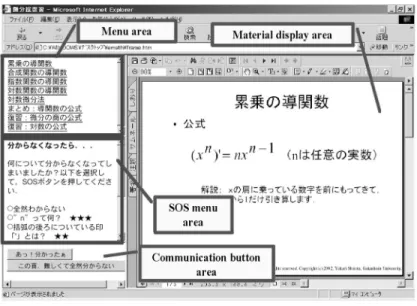
Figure 1: Sample Screen of the e-Math System
function, (2) the step-by-step explanation function, and (3) the communication buttons. Figure 1shows a standard e-Math system screen. Students interact with the system through Web browsers. The screen comprises the following four areas:
・Menu area.
・SOS menu area.
・Communication button area.
・Material display area.
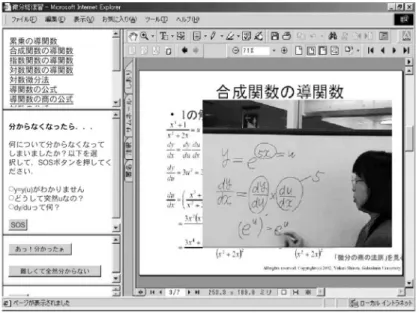
The student first selects a teaching material from the menu area. The corresponding PDF material is then retrieved from the teaching material database and displayed in the large window on the right, called the material display area. Some PDF files contain movie files, as shown in Figure 2. In the movie file, the teacher demonstrates derivatives of exponential functions using a whiteboard.
(1) SOS Issuing Function
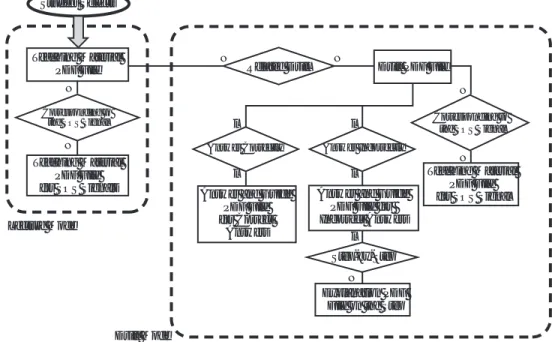
Our SOS issuing function assists students who are stuck. Various SOS menu items correspond to the currently displayed PDF file. The relationship between a PDF file and the SOS menu items is many to many. (See the Entity-Relation diagram of the e-Math system in Figure 3, which illustrates the schema of the e-Math database.) In an Entity-Relationship diagram, entities are represented by rectangles, and relationships linking those entities are represented by diamonds 14. In the e-Math system database, one teaching material PDF file corresponds to multiple teaching material PDF files for SOS signals, via the relationship defined as "corresponding to the SOS signal" (See Figure 3).
Let's look at an example of the listed SOS signals. In Figure 1, the system displays a teaching material that explains the formula of a differential function. The following SOS signal menus correspond to the
351
Figure 2: Movie File Attached to a Teaching Material PDF File
teaching material PDF file:
・What's "n"?
・What's the apostrophe (')?
・Show me examples.
・If "n" is negative.
・If "n" is a fraction.
・The case of the square root?
These questions are frequently asked by students while learning the formula. Students can select these items and issue SOS signals anytime. The system displays the appropriate detailed explanation based on the SOS signal. Various SOS items that correspond to the teaching material PDF file are stored ahead of time in the database. These have been accumulated by teachers through their lengthy experience teach- ing the subject and are of utmost importance.
In the current version of the e-Math system, the student selects an SOS menu item. In the next ver- sion, however, an analysis agent will be implemented as the system functions. The analysis agent will examine the status of the student who is stuck based on the student learning transaction database, and then select the explanation material expected to assist the student. The specifications and architectures are described in the papers15,16.
(2) Step-by-Step Explanation Function
The teacher (or the system) should not give away the whole answer at once. Students must be allowed 352
Student Selects
Related Drill
Figure 3: E-R Diagram of a Database in the e-Math System Drill PDF File
Answer Correctly Answer Incorrectly
Step-by-Step Answer and Guide
PDF File for Incorrect Answers
Corresponding to the SOS Signal
Teaching Material PDF File for SOS Signal
Explanation PDF File on the Step Answer and Guide
PDF File for Correct
Answers Teaching Material
PDF File
Teaching Material PDF File for SOS Signals
Lecture Mode N N
N N
N
N
N l l l
l l
Drill Mode
Corresponding to the SOS Signal
Figure 3: E-R Daigram of a Database in the e-Math System
to guess the answer before the teacher reveals it. Let them think and discover it by themselves to the ex- tent possible. To realize this kind of situation, we have implemented the step-by-step explanation func- tion. The materials in the e-Math system are divided into two modes: lecture mode and drill mode. A drill is a workout to check whether students understand the teaching material offered in the lecture mode. Figure 4(a) shows a sample drill mode screen where the drill for finding derivatives using loga- rithmic transformation has been selected. The student selects one answer using the radio buttons on the left. If the answer is correct, the student proceeds to the next item. If the answer is incorrect, more de- tailed explanations can be made available, as shown in Figure 4(b) where there are three red numbered
"STEP" labels. If the student selects STEP 2, the corresponding explanation PDF file is displayed. The file carefully explains the chain rule of differentiation and derivatives by logarithmic transformation (See Figure 4(c)).
The e-Math system provides detailed explanations in everyday language. Students follow these expla- nations until they completely understand where they failed and why. We call this educational support function the "step-by-step explanation function." We are currently working on a virtual teacher that can speak in place of a real teacher. The dialogs spoken by the virtual teacher are dynamically generated and personalized for the individual student, according to the progress of the particular situation. The virtual teacher can be selected from the virtual characters available in Web browsers. For example, Microsoft
Agent17and TVML characters18,19are available. TVML (TV program Marking Language), proposed by NHK (Japan Broadcasting Corporation) Science and Technical Research Laboratories, is a scripting language for producing entire TV programs. The TVML script is translated into computer graphics ani- mation with synthesized speech, virtual camera movement, and real video. We are currently developing the virtual character module in the e-Math system, using a Microsoft Agent character.
353
Figure 4(a): A Drill for Derivatives
(3) Communication Buttons
For students, the path from understanding a problem to conceiving a problem solving plan may be long and tortuous. However, the solution may come to them in a flash, as a bright idea following many apparently unsuccessful attempts to find it. Mathematical discovery occurs as an unnatural surprise, like a rabbit pulled out of a hat4. To detect when a student has such a flash of inspiration, the system needs to monitor his/her problem solving status. As the computer cannot read a student's face directly, we have incorporated communication buttons into the e-Math system. A student clicks the "I got it!" communica-
354
Figure 4(c): Careful Explanations Corresponding to the STEP Figure 4: Step-by-Step Explanation Function of the e-Math System Figure 4(b): An Answer and Explanations with Three STEP Labels
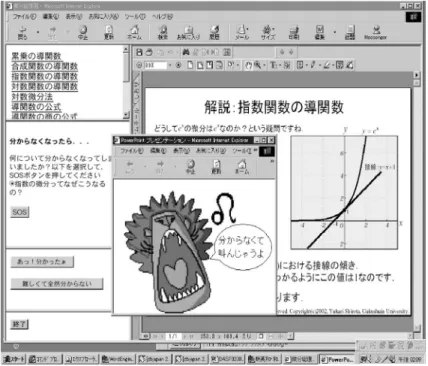
tion button when, after much thought, he/she finally understands. By pushing the button, students are able to express their happiness and experience satisfaction. The animated teacher also appears on the screen to praise them. On the other hand, when students cannot understand at all, they can express their anger and dismay by clicking on another communication button. Figure 5shows an animated lion shout- ing instead of the student after the student has pressed the "Cannot understand" communication button.
These communication buttons help students express their feelings. To my knowledge, this concept has not been used before. Although several studies of educational systems propose concepts about help sig- nals for stuck students20,21,22,23, none proposes a way for students to express feelings, such as joy or dis- may.
Let me explain the background of this research. I conducted research for a next-generation TV educa- tional system to be delivered on a broadcasting system. Communication buttons were first proposed for digital data broadcast TV contents24. Japanese standards for digital TV tuners call for four colored but- tons on the remote control. Let us consider the example of a TV debate program featuring panelists. A TV viewer who agrees with a particular panelist's opinion can push the "AGREE" button using a digital TV remote control. The other three colored buttons on the remote control correspond to the "SOME- WHAT AGREE," "DISAGREE," and "COMPLETELY DISAGREE" buttons displayed on the TV screen. Using these communication buttons, the broadcast station can immediately collect viewer re- sponses to the program. If the broadcast station finds the response to panelist A much more favorable than expected, it can use the response data to improve program content in real time. We applied the idea
355
Figure 5: An Animaled Figure Appears when Student Express Their Feelings by Pushing a Communication Button.
of communication buttons to the e-learning system.
The functions of the communication buttons in the e-learning system are as follows:
1. Student Side: Experience greater satisfaction by being able to express feelings.
2. Teacher Side: Grasp students' state information of mind or degree of understanding.
3. Teacher Side: Can evaluate the quality of the teaching materials developed by the teacher.
The logged transaction information, which includes when and where a student gets stuck, can be used as follows:
・If many students click the "Cannot understand" button, the teacher should improve the teaching materials.
・If many students push the "I got it" button, the teacher should recommend the material to students.
Future work will include the study of how to analyze and use the log data from the communication button responses.
3 Design and Construction of the e-Math System
This section explains the e-Math system architecture and database-centered system construction meth- ods. The e-Math system is a Web and database system. Many such systems have recently come into wide use on the Internet. Table 1lists the software tools we used to construct the e-Math system.
All these software tools are widely used. Apache, MySQL, and PHP are available for both the UNIX and Windows operating systems25. These provide flexibility for the system platform. We selected PHP as the programming language26for the following reasons:
・It makes it is very easy to write the connection modules between a Web server and the database server.
・PHP can be used on various platforms: on both Windows and UNIX operating systems, and on both IIS (Microsoft Internet Information Server)27and Apache.
・PHP is a module of the Web server program: Because PHP programs do not demand the creation of another process, no additional burden is required for the invocation.
・Its scalability is quite high.
・PHP is in wide use and many program examples are available.
In the e-Math system, Microsoft Access 200028is used as the data manipulation tool, especially for the data input by working students. The input data is then exported to MySQL29databases.The main feature of the e-Math system construction is that the system is constructed around a database. We call
356
Table 1: The e-Math System Construction Software Operating System
Web Server Software Database Management System Programming Language Data Manipulation Interface
Windows 2000 Server Apache
MySQL PHP Access 2000
this approach database-centered construction.
Let us explain the module architecture of the e-Math system. The system modules are divided into (1) an HTML module to define the screen frames, (2) a PHP data manipulation module, and (3) a PHP part to code the internal calculations. In the source code of the e-Math system, the module in (2) above is larger than the other two combined. This is because the main part of the system control is data manipula- tion. The size of the HTML module is fixed and small; and the PHP part (3) is very small, compared with that of (2). Section 4evaluates the results achieved with our database-centered construction.
Next, we shall explain the database schema in more detail than in Figure 3. The main system flow of the e-Math system is as follows:
(1) Retrieve the selected teaching materials.
(2) Retrieve the selected drill materials.
(3) Retrieve the corresponding explanation materials for the drill answers and results.
To handle these processes, we defined only one database table, named "material," as shown in Figure 6Let us explain the table attributes. The "category" attribute shows a subject, such as "derivatives" or
"matrix." The "title" attribute is a title string to be listed in a menu area, such as "derivatives of exponen- tial functions" or "What's the apostrophe (')?" The corresponding physical file is shown in the "filename"
attribute. There are two teaching material modes: (1) Lecture mode and (2) Drill mode. To indicate whether or not the currently displayed teaching material PDF is for drill exercises, we prepared the "ex- ercises" attribute, whose data type is BOOLEAN. For the drill teaching materials (the "exercises" at- tribute value is ON), the "totalNo" attribute indicates how many answer choices are displayed. In many cases, three choices are displayed, as shown in Figure 4(a). The correct number is given by the "stepNo"
attribute. The student then chooses the number by clicking the radio button and the submit button. If the number corresponding to the answer is incorrect, the explanation teaching material PDF with step labels, such as "STEP 1" to "STEP 3," is displayed on a screen. The "totalNo" attribute shows how many step labels are attached to the PDF file.
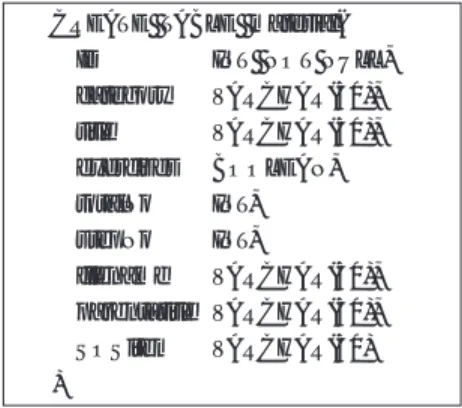
357 CREATE TABLE material(
ID category title exercises totalNo stepNo filename parent_title SOSitem )
INT NOT NULL, VARCHAR(50), VARCHAR(50), BOOLEAN, INT, INT,
VARCHAR(50), VARCHAR(50), VARCHAR(50)
Figure 6: A Table Schema Defined in the e-Math Database
4 Evaluation
We have applied our e-Math system to an actual class since 2002. The following paragraphs describe some insights into system construction. Our evaluation of the educational support functions is based on qualitative comments from students.
4.1 Shorter Development Period and Lower Costs
We start with an evaluation of the development period and the costs for server installation, data defi- nition, and programming. Most of the software tools that we used are freeware, except for the Windows 2000Server operating system. Until now, it has generally been expensive to make a Web server. Today, however, many handbooks are published and sold with CD-ROMs. These handbooks helped us create a Web server and the needed CGI programs. They make it easy for teachers to install server software.
The data definition took me only two hours. We expected the most costly part of construction to be the PHP coding, because we had no experience with PHP. Studying PHP programming from scratch took me two days. After understanding the programming methods, I was able to write a specification for the system programs and assign a graduate student the job of coding, which took about eight days. In all, PHP programming, including learning time, took about 11days. This was faster than expected.
Let us examine the reasons. First, the database-centered construction significantly simplified system flow. Main system flow comprises only the repeated retrieval of data and display of the resultant teach- ing materials. These repetitions are easily coded using PHP. Another reason was that we had unified the data table, which simplified the data schema and program architecture. Simplification resulted, because there was no need to refer to other tables and join operations were avoided. The simple design led to ef- ficient development. As a result, the database-centered design approach made it possible for us to short- en the development period and reduce costs.
4.2 Platform Independence
Let us now look at the platform independence of the e-Math system. The system currently runs on the Windows 2000Server operating system. However, it can be moved to a UNIX environment without modification, because Apache, MySQL, and PHP can also run under the UNIX operating system. We can say, therefore, that the system is platform independent.
Troubles arise on students' personal computers rather than on the system server, owing to the variety of multimedia tools, such as movie players, used in personal computers. The problem is whether or not a student's personal computer supports the movie format we used. A campus network serves a wide vari- ety of personal computers. This makes it hard to use the latest version of a software tool, because the tool must be manually installed on each personal computer. The labor cost is high. Differences between software versions on personal computers sometimes cause problems when an attempt is made to play a movie.
358
4.3 System Flexibility
Next, we consider the flexibility of the e-Math system. The size of the source code is small. There are only 250lines of PHP source code in the e-Math system. This shows how easy it is to understand the code and modify the programs. We can comfortably say, therefore, that system flexibility is high. To demonstrate the readability of the source code, we asked inexperienced programmers to review the source code, including one sophomore and three juniors from the faculty of economics. They had stud- ied BASIC and C programming a little, but had no experience with PHP. The PHP code of the e-Math system is mainly a repetition of data manipulations "retrieve and display." This simple structure made it possible for the evaluators to understand the code after only two hours of explanation.
4.4 System Scalability
In our system environment, one server works as both a Web server and a database server. Hardware is based on a Pentium4/ 2GHz CPU with 1gigabyte of main memory. The system is not designed to be used during class. Rather, it is accessed during private study hours by students from personal computers in our campus network. I first expected accesses to be heaviest on the day before end-of-term exams.
However, we found that it was spread evenly over the week before the examination and everything went smoothly. In the future, if we were to apply the system in a class and have students use the system dur- ing class, the server could crash. To solve this problem, we will have to increase the number of servers.
We should divide the students into groups based on their student ID numbers. If the need arises, the e- Math system can be easily extended, owing to its high system flexibility.
4.5 Improved Learning Efficiency
The e-Math system offers students three educational support functions: (1) the SOS issuing function, (2) the step-by-step explanation function, and (3) the communication buttons. To evaluate the effective- ness of these functions, we have collected students' comments using Web questionnaires. Many students reported that the SOS menu was effective. Students who are stuck require personalized responses. The most effective and popular function for students was the step-by-step explanations. One student com- mented: "The step-by-step explanation was effective, because it clarified where I made a mistake." In the step-by-step explanations, when the student's answer is incorrect, the system asks which step the stu- dent wants to see. The student then thinks about which step is causing the problem. If the system first of- fered detailed explanations without interacting with a student, he/she would not carefully read the expla- nations. I believe that unobtrusive interaction with the system encourages students and helps them to think by themselves.
Now, let's consider the communication buttons. Reading the students' comments, we found that very few noticed that the logged information was used to observe their progress. In the evaluated version of our e-Math system, we have not yet implemented personalized interaction beyond the communication button issue. However, even short animations made students feel as if the system actually sympathized with their feelings (see Figure 5).
359
5 Conclusion
This paper explains how we developed the e-Math multimedia e-learning system without spending much time and effort and within a limited budget. The educational support functions of the e-Math sys- tem are also described: the SOS issuing function, the step-by-step explanation function, and the commu- nication buttons. Student comments reveal that the support functions, in particular the step-by-step ex- planation function, help them significantly. These functions increase interactivity with students and are effective in encouraging them to think for themselves when they are stuck.
The main feature of e-Math system construction is that the system has been constructed around a database. We call this approach database-centered construction. When we develop a multimedia e-learn- ing system, the system should not feature any particular multimedia technology. Dependence on a partic- ular multimedia technology would shorten system lifetime, as today's rapid advances quickly render ex- isting technology obsolete. On the other hand, a database system has a long lifetime, because the pur- pose of the system is to preserve documents for a long time. A multimedia e-learning system should be database-centered and its multimedia-dependent modules, such as the input and output parts, should be limited to the extent possible to make the multimedia modules replaceable.
In this paper, we have evaluated the development period and the costs for server installation, data def- inition, and programming. We had expected the most costly part of construction to be the PHP program- ming, because we had no experience with that language. However, it took only a total of 11working days, including learning time, to develop the PHP programming, This was faster than anyone had ex- pected. The reason was that the database-centered construction simplified the system flow. The main flow of the system is merely the repeated retrieval of data and display of the resultant teaching materials.
With PHP, these data manipulations can be easily coded. Another reason was that we had unified the da- ta table, which simplified the data schema and the program architecture. Simplification resulted, because the system does not need to refer to other tables and join operations are avoided. This simple design led to efficient development. As a result, the database-centered design approach enabled us to shorten the development period and lower costs.
An e-learning system is most effective if it helps students naturally and unobtrusively. The system should analyze the student's learning transaction information, try to understand what is happening in the student's mind, and ask a question or indicate a step to enable the student to discover the solution by himself/herself. To ensure that we meet this goal, we plan to extend our e-Math educational support functions.
Acknowledgements
This research is supported in part by a Grant-in-Aid from Hoso-Bunka Foundation, Inc., and by the Japanese Ministry of Education, Science, Sports, and Culture, under Grant-in-Aid for Scientific Re- search (C) (2)15606014.
360
References
1 Adobe Acrobat Reader: http://www.adobe.co.jp/products/acrobat/readstep2.html.
2 G. Pólya: Induction and Analogy in Mathematics (Mathematics and Plausible Reasoning, Volume 1), Princeton University Press, 1968.
3 G. Pólya: Patterns of Plausible Inference (Mathematics and Plausible Reasoning, Volume 2), Princeton University Press, 1968.
4 G. Pólya: How to solve it (second edition), Penguin Books, 1957.
5 G. Pólya: MATHEMATICAL DISCOVERY on understanding, learning, and teaching problem solving, Volume 1and 2, John Wiley & Sons, N.Y., 1962.
6 N. Miyake and D. A. Norman: To Ask a Question, One Must Know Enough to Know What is not Known, Journal of Verbal Learning and Verbal Behavior, 18, pp.357-364, Academic Press, 1979.
7 A. Flammer: Towards a Theory of Question Asking, Psychological Research, 43, pp.407-420, Springer-Verlag, 1981.
8 Greg Kearsley: Authoring Systems in Computer Based Education, CACM, Vol. 25, No. 7, pp.
429-437, 1982.
9 A. Takeuchi, S. Otsuki: EXPITS: An Experimental Environment on ITS, in C. Frasson, G. Gauthi- er, G. I. McCalla (Eds.): Intelligent Tutoring Systems, Proc. of Second International Conference, ITS '92, Montréal, Canada, June 10-12(Lecture Notes in Computer Science 608Springer 1992), pp. 124-131, 1992.
10T. Hirashima, A. Kashihara, et al.: Toward a learning environment allowing student-directed prob- lem practice - Helping problem solving by using problem simplification, Proc. ITS'96pp.466-474, 1996.
11J. S. Brown and R. R. Burton: Diagnostic models for procedural bugs in basic mathematical skills, Cognitive Science, 2, pp. 155-191, 1978.
12R. R. Burton: Diagnosing bugs in a simple procedural skill, in D. Sleeman and J. S. Brown (Eds.):
Intelligent Tutoring Systems, Academic Press, pp. 157-183, 1982.
13U. Hoppe: Deductive error diagnosis and inductive error generalization for intelligent tutoring sys- tems, Journal of Artificial Intelligence in Education, Vol. 5, pp. 27-49, 1994.
14C. J. Date: An Introduction to Database Systems (Introduction to Database Systems, 8th Ed), Ad- dison-Wesley, 2003.
15Y. Shirota: Data Mining Association Rules for Learning Transaction Databases, IPSJ SIG Techni- cal Report, 2003-DBS-131, July, Abashiri, Japan, pp. 1-8, 2003(in Japanese).
16Y. Shirota: Interaction Agent Functions in the Web-Based Learning System e-Math for Business Mathematics, Proc. of 25th Annual General Meeting of Japan Society of Business Mathematics, June, Tokyo, pp. 38-43, 2003(in Japanese).
17Microsoft Corporation: Microsoft Agent, http://www.microsoft.com/msagent/default.htm.
18M. Hayashi: Image Compositing Based on Virtual Cameras, IEEE MultiMedia, Vol. 5, No. 1, pp.
36-48, 1998.
19NHK: TVML, http://www.strl.nhk.or.jp/TVML/
20K. Yamada, M.Tamaki, et al.: Study experience with individual progress leaning system (MESAI), 361
Proc. of 7th International Conference on Computers in Education, pp.406-409, 1999.
21Y. Yang, J. G. Carbonell, et al.: Learning Approaches for Detecting and Tracking News Events, IEEE Intelligent System, Vol. 14, No. 4, pp. 32-43, July/August, 1999.
22Y. Matsubara, Y. Tsukinari: Virtual learning environment for discovery learning and its applica- tion on operator training, IEICE Trans. Information & System, Vol. E80-D, No. 2, pp.176-188, Feb. 1997.
23D. Sleeman and J. S. Brown (Eds.): Intelligent Tutorial Systems, Academic Press, 1982.
24Y. Shirota: Implementation of Personalized Multimedia Assisted Education System e-Math - A Proposal of Communication Buttons in Data Broadcasting -,Proc. of Multimedia, Distributed, Cooperative and Mobile Symposium(DICOMO2002),IPSJ Symposium Series Vol. 2002, No.
9,July 3-5, Nishi-Izu Toi,pp.185-188, 2002(in Japanese).
25The Apache Software Foundation: Apache, http://www.apache.org/.
26PHP: http://www.php.net/.
27Microsoft Corporation: IIS, http://www.microsoft.com/WindowsServer2003/iis/default.mspx.
28V. Andersen: Access 2000: The Complete Reference, Osborne Publishing, 1999.
29MySQL: http://www.mysql.com/.
362