Abstract
Teaching writing is a fundamental part of teaching English, but it is problematic for teachers in sev- eral ways. Providing feedback to each student is time―consuming, being consistent with feedback is challenging, and knowing what level of feedback to give takes time to learn. This study aims to evalu- ate the effectiveness of Write & Improve, an automatic writing evaluation tool developed by Cam- bridge English. Participants were asked to work through tasks at their own pace. The participants found Write & Improve easy to use, but also frustrating when they felt that the program did not pro- vide them with enough support. The tool also offered consistent feedback at an appropriate level for participants, focusing on basic language features first. Overall, participants found Write & Improve fun to use, but many had reservations about how effective it was for long―term learning. However, with development, the tool could greatly benefit teachers and learners alike.
Introduction
Modern technology has changed how we write, what we write, and for whom we write. The Web 1.0 was viewed as the “information web” with which vast quantities of information could be viewed at the click of a button. By contrast, the Web 2.0 was termed the “social web”, and was seen as a place for all users to upload information and to interact with each other. The ability to write online changed our reasons for writing, introduced new genres of writing, modified the language we use, and provided us with a new audience. For students today, most of their writing outside of the classroom is online and usually through one of the many social media platforms. As a result, their writing is usually with their peers, short in length and informal.
Until recently, teaching resources about second language writing and the Internet led teachers to be- lieve that sharing writing through blogs was how students could to develop their writing in the world
An analysis of the "Write & Improve" writing tool by Cambridge English
Colin MACLEOD
of Web 2.0. Expressing their opinions on different topics or sharing their life experiences would be motivating for learners; suddenly there was an audience, a readership. However, the popularity of the long―form blog medium has dwindled as the age of Twitter, Instagram and YouTube has begun. Writ- ing now tends to be short―form and punctuated with emoji (Evans, 2017). The problem that we face is that writing is not a skill that we are born with, but rather something that we need to learn and hone, both in our own language and any other languages that we speak. For young students today, emails, which were considered informal compared with letters, have become challenging to write as students are unfamiliar with the format and style of this type of writing. As a teacher, I regularly receive emails from students without a subject line, without salutations, and the signature line is also missed out, as this is not required in a social network message.
Clearly, how we teach writing needs to be updated to respond to such changes in student needs. In this article, I will outline a new method of writing instruction which focuses on automatic feedback and grading. This method not only saves time for the teacher, but also provides students with fre- quent and consistent feedback that may help them to learn and make fewer mistakes when writing in the future.
Teaching writing and the problem with feedback
My students are taught to follow the complete writing process. This involves analysing the task, brain- storming and organising ideas, followed by a process of drafting and reviewing before finally submit- ting their work. In reality, it is not possible to know whether the students actually follow this process.
Many students will start writing without planning, or work until the deadline and not have time to ef- fectively review their writing. I want students to understand the importance of the writing process rather than simply hoping that their first draft is acceptable to submit.
For a teacher, the time invested in giving students feedback can be overwhelming, especially when class sizes are large. This means that students are likely to receive infrequent and perhaps incomplete feedback. The problem is, therefore, how to provide students with the frequent and consistent feed- back that they need without spending hours doing so every week. Time is a limited resource, so be- ing able to outsource some of work or streamline the feedback process could be very valuable for both teachers and the students.
Effective feedback
Feedback is a fundamental part of a teacher’s job, but it is not always effective. If done badly, feed- back can be discouraging and confusing for students (Polio, 1998; Fazio, 2001). Teachers may provide incomplete, idiosyncratic, arbitrary, and sometimes even incorrect or misleading feedback. No two teachers will give exactly the same feedback on a piece of writing as they will have different prefer- ences for features such as sentence structure, paragraph flow, and word choice. One teacher might fo- cus heavily on grammar, but another might focus more on the essay content. The effectiveness of feedback depends on whether learners actually pay attention to the feedback that they receive. Stu- dents will usually check their grade and perhaps glance at suggestions or corrections made by their teacher (Hyland, 2013), but it is vital that students are required to correct the mistakes that they have made, otherwise learning will not happen.
Various researchers have identified the features of effective feedback. Focused corrective feedback on specific error types was seen as more valuable than comprehensive correction of all errors (Ellis et al., 2008). Indirect feedback, which calls the error to the learner’s attention but does not correct it is better for long―term improvement compared to when the teacher provides the right form (Ferris, 2006); this requires the student to reflect and solve problems themselves. Feedback explicitly labelled with codes or other explanations may be more valuable than unlabelled feedback, particularly where students have received a lot of formal grammar instruction and can make use of the meta―language (Bitchener, 2008).
Treatable and untreatable errors
A clear distinction should be made between different types of errors. Ferris (1999) proposed the terms treatable and untreatable errors. Treatable errors include grammar errors that follow a well―un- derstood pattern or set of rules; for example, tenses, subject―verb agreement, run―ons, fragments, and articles. On the other hand, untreatable errors include errors with word choice or word order where there is no handbook of rules to reference that would help a learner to avoid making these errors.
Teachers tend to focus on untreatable errors directly, but treatable errors indirectly (and somewhat sporadically). Write & Improve functions in the opposite way, being direct and consistent with treat- able errors, but being more cautious regarding untreatable errors.
Automated Writing Evaluation
Rather than outsourcing feedback to other teachers, for this study I chose to explore automated writ-
ing evaluation software (AWE). Modern systems can analyse texts by comparing them with models to check grammar, vocabulary and even elements such as organization and style (Ware & Kessler, 2013).
Variation in human grading can be considerable; two teachers may assess a piece of work differently, and a single teacher might even grade work differently from one day to another for various reasons.
For these reasons, AWE software may be superior, promising reliable, consistent feedback whilst also saving time for teachers and reducing costs for institutions (Warchaur & Ware, 2006). Students will also benefit from an increased frequency in feedback.
While the automatic grading of multiple choice quizzes has been in use for many years, problems ex- ist when evaluating writing due to what can be effectively identified, categorized and compared. Word count, spelling, and sentence length can be easily measured and some correlation can be seen be- tween these metrics and writing quality. However, newer AWE programs can also evaluate errors re- lated to organization, lexical grammatical errors and the relevance of content.
Shermis and Hammer (2012) insist that computer grading and human grading can provide similar rat- ings, but the key difference is in higher level or abstract qualities like interest, novelty or relevance.
As yet, a computer cannot give an emotional response to a piece of writing, so genres that do not have a checklist of items to include, such as fiction, will be difficult to grade well. Perelman (2013) states that a major flaw with AWE at the moment is that they can be cheated if the user understands the rubric that the program is using; knowing what the system is looking for allows a user to get an artificially high score.
The pedagogy is key to how the participants feel about the tool they use (Li & Link, 2015). Students are dissatisfied with feedback and grades provided by a program they use if they have learned how and what to write in order to achieve a high score. Achieving a high score by “hacking” the AWE did not produce satisfaction or encourage positive learning strategies (Fang, 2010; Chen & Cheng, 2006).
Write & Improve
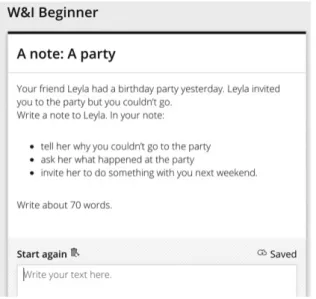
This study will consider Write & Improve, a free online tool for English learners provided by Cam- bridge English, which is part of the University of Cambridge (writeandimprove.com, 2019). It provides instant feedback on writing as well as a score based on the Common European Framework of Refer- ence (CEFR) scale from A1 (lowest) to C2 (highest). Tasks are offered at Beginner, Intermediate and Advanced levels, with each task providing a writing prompt, content suggestions and a minimum re-
Figure 1: An example writing prompt at beginner level
quired word count (see figure 1). These tasks vary in terms of topic, length and the vocabulary and grammar expected at each level. It is also possible for teachers to create tasks based on class home- work or on topics of personal interest.
Interface
The interface is clean and simple in its design. The task prompt is at the top left of the screen, the student’s writing is below, and the annotated version of the text is to the right―hand side. Having the student’s writing and the annotated version separate is important because it forces the students to look at their text and find the mistake, rather than just fixing the mistakes on the annotated version.
Furthermore, the only measurement that the students are given as they write is a word count as each task has a minimum word count before it can be checked. Learners can choose to set a timer, which gives them the opportunity to work against the clock. This could be beneficial for students who want to practice for timed writing tests such as IELTS.
Checking writing
After learners complete a draft of their task, they click “Check” and Write & Improve analyses their text, provides a score on the CEFR scale and offers feedback at both word―and sentence―level. Write
& Improve can support students by giving feedback on spelling, grammar, vocabulary choice, and style (such as register and punctuation). Learners are guided through the word level feedback and en- couraged to edit their work according to the feedback. The sentence level feedback is displayed using
grades of shading: no shading means that the sentence is acceptable as it is, while light, medium and dark shading indicate the degree of work required to improve a sentence (dark shading requiring the most work). The students make changes as they wish and then click “Check” once more to resubmit their work. They are free to repeat this process as many times as they wish. The CEFR score graph should hopefully show improvement from one draft to the next. This process effectively gamifies writ- ing. The instant feedback motivates the students to write as well as they can and encourages them to keep working and learning. Under usual circumstances, a student would have to wait for one or two weeks before they received feedback from their teacher, which interrupts the momentum a student might have after finishing an assignment.
Cambridge English claim that their system is “context aware”, which is to say that it makes a judge- ment on the appropriateness of a response (writeandimprove.com, 2019). They also argue that this system encourages students to take responsibility for their own development rather than relying on their teacher. Also, as the Write & Improve program is online, Cambridge English can continually up- date the reference sources that they utilise, so the system is always improving.
Paid subscription version
A paid subscription of £9.99 per student per month allows access to the Test Zone, which provides practice on IELTS and FCE exam tasks and estimated grades for the writing the students submit. Fur- thermore, the Class View (£25 per month for up to 10 students and then £2 per student after that) al- lows teachers to set, mark and manage writing tasks. The teacher sets the tasks and the student’s util- ise the Write & Improve feedback cycle before submitting their final work to the teacher through the website. The teacher can then view the work that has already been marked by Write & Improve and then add their own comments and a final grade. It is also possible to generate class, task and student reports, which provide useful insights into the learning needs of the students.
Objectives
This article provided the opportunity to explore using an Automatic Writing Evaluation tool (in this case, Write & Improve) with students. The objectives were to assess the following:
1. How easily participants were able to use Write & Improve.
2. What mistakes participants made, the type of feedback they received and how they responded to it.
3. How the participants felt about using an Automatic Writing Evaluation tool.
Methodology
Participants
The participants in this study were 30 female university students (18 third―year students, 12 fourth―
year students) enrolled in an Internet English university class. The purpose of this class was for stu- dents to learn how to use computers and other devices to study English more effectively. The partici- pants began by creating an account on the Write & Improve website using their university email ad- dress and a password given to them by the teacher; this allowed the teacher to check the work com- pleted by each student.
Preparation
The participants were taught how to understand a Write & Improve writing prompt and how to plan what they were going to write. This was done because it was found that students often began writing their response to a prompt without planning what they wanted to write first, which resulted in unor- ganised writing and the omission of important elements of the task. The teacher demonstrated the recommended writing process on the classroom projector by completing a task from start to finish.
This helped the participants to understand how to enter text, how submit writing to be checked, how to understand the feedback that Write & Improve provides, and how to edit their writing.
Using Write & Improve
Participants were allowed to choose tasks from the Beginner Workbook as they wished and progress at their own pace. They were told to follow the planning process demonstrated by the teacher for each task before they started writing. When they completed their first draft, they were instructed to click “Check” for Write & Improve to analyse their work. The participants looked at their CEFR score, read the feedback they had received, and then immediately started revising their work. Once they made their first round of edits, the participants were told to click “Check” again and repeat the proc- ess. They were instructed to revise their work a maximum of four times, at which point they were to start another task. The reason for this was that it was felt that too much time spent micro―editing a text in the hope of a higher score would be less beneficial for participants than attempting another task.
Data collection
Data collection took two forms. Firstly, as the teacher could log into the accounts of each participant, he was able to see their work and the changes they had made in each draft. The second source of
data was through a questionnaire that participants completed after using Write & Improve.
Data analysis 1 − Ease of use
As this is subjective, the participants were asked what their feelings were about using Write & Im- prove. All participants answered that Write & Improve was easy to use, but an open―ended question revealed some frustrations. Some participants noted that, even though they were provided with prompts for each task, generating ideas for their writing was difficult and they were nervous to put their ideas on paper. The teacher, who saw this nervousness in class, had to remind participants that the focus of each task was on language use, not on giving honest or factually accurate responses. Par- ticipants also stated that they struggled to write enough words to complete a task, with even 50 words being a challenge for some participants. During the study, many participants seemed to be fixated on their word count, and the closer they got to the minimum word count, the more difficult they found it to write. Careful planning before the participants started to write was suggested as a way to mitigate this issue.
Participants also commented that they felt unable to produce natural English phrases, usually starting with a Japanese sentence and translating it. This would inevitably produce awkward English phrases as certain Japanese phrases cannot be easily translated into English.
2 − Errors made, feedback received and participant response
Write & Improve is designed to be cautious. This means that it will only provide feedback when it is 90% certain that an error has been made. The reasoning stated by Cambridge English is that an error left unmarked is less damaging for long―term learning than correct language use marked as incorrect.
This is particularly crucial when many users are using the tool without the support of a teacher. Fur- thermore, if a specific suggestion cannot be made but there seems to be a problem, a whole sentence is highlighted to focus the user’s attention on that sentence. Finally, Write & Improve has a hierarchy in terms of how it gives feedback. It does not provide too much feedback at one time, which may be demotivating for students. Alternatively, the first phase of feedback focuses on common errors and, once they are dealt with, the next phase of errors is identified. This staggered approach is designed to keep users motivated and engaged.
Errors identified by Write & Improve
Limiting participants to four checks enabled me to note what errors Write & Improve focused on at the early stage of writing. The first round of corrections identified spelling errors, which are high―cer- tainty errors as words can be easily referenced against the program’s dictionary. This type of error is not surprising, as the relationship between pronunciation and spelling in English is not always direct, so learners often struggle with words such as language, beautiful, restaurant and even high―frequency words like because.
The next most common errors were related to punctuation. Basic rules of punctuation, such as begin- ning a sentence with a capital letter and ending with a full stop, and finishing a question with a ques- tion mark were noted. Many participants also struggled to use apostrophes correctly, often missing them out when needed or adding them when not needed. Appropriate paragraphing was also a chal- lenge for some participants, who tended to write in single sentences rather than linking sentences to- gether to create a flow of information.
In terms of grammar, the most common errors were related to missing articles (a, an or the). These were followed by the use of determiners and their nouns (this pen is, and these pens are), or subject―
verb agreement (the pen is mine, and the pens are mine). Errors relating to verb tenses were mostly highlighted at sentence―level rather than at word―level by Write & Improve.
Adjective form was usually not identified as an error until the more common mistakes were treated.
Participants often used the―ing form to describe their feelings, rather than the―ed form; for example, I am really exciting about the concert rather than I am really excited about the concert.
Types of feedback
Write & Improve provides five types of feedback. Summative feedback provides an assessment of over- all writing competence and an estimated CEFR score for learners to benchmark their progress. Next, indirect, semi―corrective feedback focuses on word―level issues such as spelling, grammar and vocabu- lary choice, as well as a qualitative assessment on each sentence (shown by grades of shading). Im- portantly, there is no definite “right answer” given by Write & Improve, rather the user has to make the final decision on how to proceed; for example, Write & Improve might highlight a word and com- ment “did you forget something before this word?” This draws the user to that section of their writing and suggests that they think about (see figure 2). This encourages users to reflect on their work and
Figure 2: Feedback annotations in Write & Improve
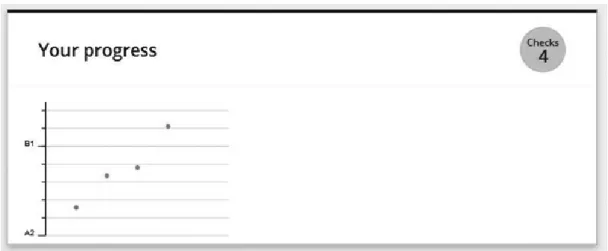
Figure 3: Personal progress graph showing CEFR scores for each draft
ultimately make their own decision about what they need to change. The next type of feedback are overview feedback bubbles, which offer teacherly encouragement. There are over 250 different bubbles that Write & Improve uses. Lastly, a personal progress graph charts the student’s CEFR scores to help them visualise their progress from draft to draft (see figure 3). Importantly, this helps learners to un- derstand that progress happens in small steps, not just in large steps from A1 to A2. Lastly, there is a prompt relevance score, which grades how well learners are responding to the task on scale of one to five. In all, this range of feedback types creates a powerful and supportive tool for users.
How participants responded
Participants struggled to respond to sentence―level feedback, as they did not seem to have an aware- ness of possible mistakes that they had made or how a sentence could be improved. However, the in- direct, semi―corrective feedback was very effective and participants were able to respond to that feed- back accordingly. By far the most important type of feedback for users was the CRFR rating. They were motivated when they saw it rise after making some changes, and dejected if it happened to fall.
3 − How participants felt about using an AWE tool
Was Write & Improve fun to use?
Almost all of the participants (26 out of 30) said that Write & Improve was fun to use. The main rea- son highlighted by those participants was that they enjoyed the gamification element (the challenge of trying to improve their CEFR score from one draft to the next) and being able to receive feedback in- stantly, rather than waiting for a week for a teacher to return their work. Were the participants to only receive feedback and no score, I predict that they would have been less eager to revise their work and submit it for another check. Participants also enjoyed the variety of tasks available and being able to select the tasks that appealed to them. In terms of the negative response, some participants com- mented that the minimum word count on each task put too much pressure on them. This is under- standable, because for participants who do not write often in English, reaching the target of 100 words can be challenging.
Most participants (21 out of 30) were motivated by the idea that they were writing for someone and therefore had a clear and specific purpose in mind. Some said that they found these communication scenarios challenging because they could not think of what to write. Participants acknowledged that they rarely write emails. In fact, 23 participants responded that they write emails only once or twice a week, with five participants saying that they never use email. The most common form of communica- tion for participants was in the form of social media messages which rarely involve full sentences and are punctuated with emoji.
Did Write & Improve help you to write better in English?
Responses to this question were split. Seventeen participants said that they felt that they could write better having used Write & Improve, while 13 claimed that they were able to respond appropriately to the feedback in Write & Improve, but they did not think that they were now better at writing in Eng- lish. Whether actual learning took place could only be assessed through a long―term study involving
follow―up writing tasks.
All participants responded that this was the first time that they systematically re―drafted their writing.
Usually, when they completed a writing task, they would get feedback, but would not be required to act upon it. With Write & Improve, the revision of the text was part of the task, so they did not hesi- tate to start editing their work. Also, during class, participants commented that Write & Improve was helping to remind them of grammatical structures that they had learned in school, but had forgotten about, and that they found this to be very valuable.
How did you feel getting feedback from a computer?
All participants said that they were happy to get feedback quickly, even if it was from Write & Im- prove and not a human. Observing the participants using the tool, many seemed nervous the first time they submitted their work but they soon became comfortable with it. It seemed that the gamification that I mentioned earlier helped them to overcome the initial embarrassment of submitting their work.
All participants said that they would like to be able to use Write & Improve in other classes to draft their writing before submitting it to their teacher.
Discussion Benefits for teachers
Write & Improve allows teachers to focus on the ‘big picture’ rather than details such as spelling, punctuation and basic grammar (treatable errors). The tool allows students to refine their work to the point where the teacher can step in to assess the elements that Write & Improve cannot give feed- back on with certainty. However, Write & Improve should be considered a teacher aid rather than a teacher replacement. It also provides a consistent and detailed level of feedback that teachers would struggle to replicate.
For a teacher, there is a lot to be learned about their students by seeing how their writing develops through various drafts. By periodically checking student work in Write & Improve, a wash―back effect will help to inform future class content and instruction. For example, it may become clear that stu- dents are struggling with a fundamental aspect of English that needs to be addressed in.
Benefits for students
The gamification of writing changes something that was viewed as boring and stressful into some-
thing that the students actively engaged in. The instant feedback means that students are still in the moment of writing, so they are able to reflect on their mistakes soon after they finish a draft. By con- trast, feedback from a teacher is received one week later at the earliest, so students may have forgot- ten what they had written about and may struggle to return to their writing. Furthermore, students benefit from being able to make small, quick changes to their work before re―submitting it, which they could not do if their work was being checked by a teacher; a teacher would not be able to man- age multiple drafts from a large number of students.
During classroom use, it is essential that students are required to plan before they start writing as each task requires the inclusion of certain pieces of information. They students must understand that in order to produce high―quality, thoughtful writing, they need to follow the writing process from start to finish. In particular, the students often do not review their writing once they finish. Therefore, Write & Improve essentially teaches students how to proofread and edit their work, which is a valu- able skill that all students should learn.
Use of online resources
It became clear that students lacked an awareness of the resources available to them online, such as learner dictionaries or grammar reference websites. Such resources should be known and readily available when writing, yet few students made use of such resources. The two resources that students were seen using were both translation tools: Google Translate and the Line Translation bot. While both of these are effective in certain situations, they are not infallible. However, the students tend to overestimate the accuracy of these translation tools. There are important differences between English and Japanese that can result in misleading translations. For example, levels of formality in Japanese or the use of pronouns in English often do not translate accurately. Even single―word translation is unre- liable as English has many homonyms. For example, the word pen could describe a writing imple- ment or a holding area for animals, while the word book could be something you read or the act of making a reservation or an appointment. Students should have ready access to a variety of online re- sources that they are familiar with in order to find the information that they need rather than relying solely on translation tools.
Conclusion
Not a complete solution, but beneficial
Write & Improve is not panacea for writing instruction, but it provides students with frequent checks
and a consistent standard of feedback, which are two things that they need in order to develop their writing. Infrequent and idiosyncratic feedback from a teacher can confuse and demotivate a student.
As detailed earlier, Write & Improve is lacking in terms of higher order levels of analysis, so it cannot replace a teacher completely, but that does not mean that it is not a valuable tool that can provide a place for students to practice writing independently.
The key to learning such that the knowledge is actually stored and can be retrieved is that the stu- dents are given the chance to actually correct their own mistakes. This is where Write & Improve ex- cels. It seems that students are given enough of a cue to locate the error, but have to make the change themselves. In previous studies, it has been found that just underlining errors to force learn- ers to really think about their work and allows them the chance to make corrections (Truscott & Hsu, 2008). Often, when giving face―to―face feedback, it is clear that once the location of the error has been identified and the students take a moment to think about what they have written, they are able to make the necessary correction.
It would be unrealistic to expect Write & Improve to help students improve every piece of writing from A1 level to C2 level. The student must provide enough substance for the program to work with in order to raise their score. If the task has a word count range of 50 to 120 words, then the student should offer a length of text at higher end of that range. A text of 50 words will not give the program enough material to give feedback on in order to improve their score.
The latest generation of AWE systems cannot judge tone and coherence, understand complex organi- zation and logic, or appreciate novelty (Byrne et al., 2010) and Write & Improve is no exception. As a result, the complexity of a text is judged on parameters such as sentence length, word frequency and the number of sentences per paragraph. While this is certainly a limiting factor, this does not mean that this tool has no uses at all. While Write & Improve may be unable to accurately grade a long, technical piece of writing, or even an informal, real―world piece of writing, it can provide useful and consistent feedback for grammar, vocabulary and collocations that would benefit learners at all ability levels, helping students to overcome the mistakes that hold them back.
Ways to improve Write & Improve
Write & Improve errs on the side of caution when giving feedback but, in certain cases, it would be helpful if it provided hyperlinks for students to click on that would take them to online resources that
would help them to learn or review a certain aspect of writing that they were having trouble with. For example, a link could direct students to an online grammar reference guide or information about word choice, such as an online collocation dictionary.
Augmenting Write & Improve by adding a level of peer―feedback could allow students to check for content and meaning in a way that the program currently cannot. Students could take their writing, which has been checked several times using Write & Improve, and then share it with their class- mates. This gives them a chance to have their writing checked, but also allows them to see other ex- amples of writing from their classmates. There is a lot that students can learn from each other; the words and phrases that one’s peers are using are good examples of what one can and should be us- ing.
In this study, participants were given the freedom to choose any task that appealed to them. However, there may be more benefit in moving the students forward in lock step. If all students are working on the same task, then the teacher would be able to discuss issues such as genre, content, structure and task―specific vocabulary in order to help the students to complete the task appropriately.
Lastly, after using Write & Improve for an extended period of time, students should begin to under- stand the types of errors that they are repeatedly making, which could form the basis of a personal- ised checklist that they can use to proofread their writing. Asking each student to log the errors that they make can help them to understanding where they need to concentrate their effort.
Future study and final thoughts Long―term study into learning
Most writing feedback studies are short―term in nature, often lasting just one semester. Therefore, it is not always clear whether feedback actually translates into learning. To analyse this, a long―term study would need to be conducted analysing not just at a sentence level within one text, but at a multi
―text level. One example would be to compare first drafts of the first three texts that students write
using Write & Improve and then comparing those with the three first drafts written after six months or a year of using Write & Improve. This would hopefully show whether learning had taken place.
Final thoughts
Teachers know the importance of writing in language development, but it is time―consuming to man-
age writing from large numbers of students. Write & Improve removes a large part of that burden, un- leashing those students who are motivated to learn and experiment with their writing. Crucially, Write
& Improve seems to be able to make learners not only better writers, but also effective planners and editors of their work.
References
Bitchener, J. (2008) Evidence in support of written corrective feedback. Journal of Second Language Writing, 17:
102―18.
Byrne, R., Tang, M., Truduc, J. and Tang, M. (2010) eGrader, a software application that automatically scores stu- dent essays: with a post―script on the ethical complexities. Journal of Systemics, Cybernetics & Informatics, 8 (6): 30―5
Chen, C.―F. and Cheng, W.―Y. (2006) The use of a computer―based writing program: facilitation or frustration? Pa- per presented at the 23 International Conference on English Teaching and Learning, Wenzao Ursuline College of Languages, Kaohsiung.
Ellis, R., Sheen, Y., Murakami, M. and Takashima, H. (2008) The effects of focused and unfocused written correc- tive feedback in an English as a foreign language context. System, 36: 353?71.
Evans, V. (2017). The Emoji Code: The Linguistics Behind Smiley Faces And Scaredy Cats. New York: Picador.
Fang, Y. (2010) Perceptions of the computer―assisted writing program among EFL college learners. Educational Technology and Society, 13(3): 246?56.
Fazio, L. (2001) The effect of corrections and commentaries on the journal writing accuracy of minority―and major- ity―language students. Journal of Second Language Writing, 10(4): 235―49.
Ferris, D. (1999) The case for grammar correction in L2 writing classes: a response to Truscott (1996). Journal of Second Language Writing, 8(1): 1?10.
Ferris, D.R. (2006) Does error feedback help student writers? New evidence on the short―and long―term effects of written error correction. In K. Hyland and F. Hyland (eds), Feedback in second language writing: contexts and issues (pp. 81―104). Cambridge: Cambridge University Press.
Hyland, K. (2013a) Student perceptions of hidden messages in teacher written feed―back. Studies in Educational Evaluation, 39(3): 180?7.
Li, J., Link, S. and Hegelheimer, V. (2015) Rethinking the role of automated writing evaluation (AWE) feedback in ESL writing instruction. Journal of Second Language Writing, 27: 1―18.
Perelman, L. (2013) Critique of Mark D. Shermis & Ben Hammer, ”Contrasting state―of―the―art automated scoring of essays: analysis”. The Journal of Writing Assessment, 6(1). http://www.journalofwritingassessment.org/arti- cle.php?article=69
Polio, C., Fleck, C. and Leder, N. (1998) “If I only had more time”: ESL learners’ changes in linguistic accuracy on essay revisions. Journal of Second Language Writing, 7(1): 43―68.
Shermis, M.D. and Hammer, B. (2012) Contrasting state―of―the―art automated scoring of essays: analysis. Retrieved
from http://www.scoreright.org/ NCME_2012_Paper3_29_12.pdf
Truscott, J. and Hsu, A. (2008) Error correction, revision, and learning. Journal of Second Language Writing, 17:
292―305.
Warschauer, M. and Ware, P. (2006) Automated writing evaluation: defining the class―room research agenda. Lan- guage Teaching Research, 10(2): 1―24.
Ware, P. and Kessler, G. (2013) CALL and digital feedback. In M. Thomas, H. Reinders and M. Warschauer (eds), Contemporary studies in linguistics: contemporary computer―assisted language learning (pp. 323―39). London:
Continuum.
Writeandimprove.com. (2019) Cambridge English Write & Improve. [online] Available at: https://writeandimprove.
com/ [Accessed 16 Dec. 2019].