supports cooperation work between different devices. The system offers to connect different devices wirelessly and allow multiple users to view and edit documents simultaneously. We have developed a technique to share and view documents between different devices even they have dif- ference screen sizes and resolutions. In a user study, we conducted exper- iments to evaluate the usefulness of the system. The result shows that users can perform the document inspection task more comfortably using the proposed system.
1 Interlocked Surfaces
We propose “Interlocked Surfaces” in this paper. The main function of “Inter- locked Surfaces” is to allow users to share, browse and edit information content effectively and smoothly, when they are working together with different devices.
The system permits users to connect many different devices and to share the contents among them.
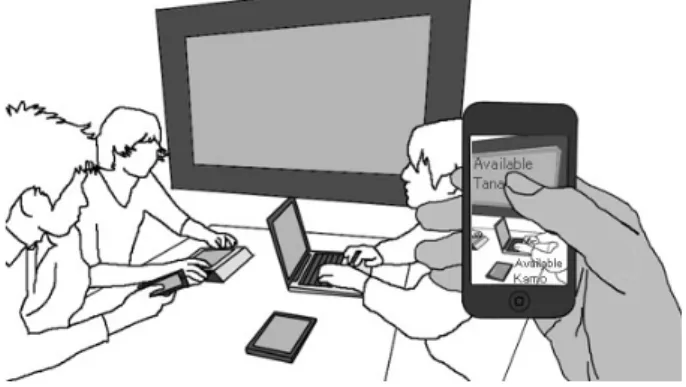
When using the system, a user can use a tablet or smartphone device that has a camera to capture video on other devices and tap on a particular device to make connection. Depending on the functions of the devices, we call the devices as “operating device” and “target device” respectively. See Figure 1.
After the user selected and connected a target device, then the information of a target device will show on an operating device. After this step, the user can operate the connected device remotely. And we call the connected target device as “pairing device”.
1.1 Selecting Target Device for Pairng
Depending on whether the device has a camera or not, two different methods for selecting a target device were developed.
If the operating device has a camera, then the user can capture the video on a target device and select it on the image that shown on the operating device. All available devices on the camera video will show as highlighted icons. The name and owner information of the devices are also shown on the screen of operating device (see Figure 1). The pairing action is intuitive that, the user can see the
S. Yamamoto (Ed.): HIMI/HCII 2013, Part III, LNCS 8018, pp. 317–325, 2013.
c Springer-Verlag Berlin Heidelberg 2013