Multi-Language Implementation Framework for
Legacy and New Systems
著者
Passos Anderson
雑誌名
比較文化
巻
17
ページ
85-93
発行年
2012
URL
http://id.nii.ac.jp/1106/00000481/
Multi-Language Implementation Framework
for Legacy and New Systems
Anderson Passos
ABSTRACT
Globalization is in the mind of business owners and managers all over the world. From small family-based companies in the suburb to big corporations, everyone knows that the world (for now) is the limit. For these people, using an IT system that speaks their language is something taken for granted. This paper presents a multi-language implementation framework that can be used in new as well as legacy systems. For new systems, it can be an integral part of the application’s backbone while for legacy systems it can be used as a totally independent translation system. We will go through some implementation aspects of our proposed framework without going too deep into technical details, allowing the reader to understand the concept without any technical background.
Keywords: language, system development, information technology, translation
Introduction
Around 10 to 15 years ago, companies were struggling to come up with solutions for e-commerce portals. The word Globalization was in everyone’s mind and the path to it, at least from a system’s design point of view, was to provide as many languages as possible to users.
Multiple languages or multiple interface languages are not only overseen by Internet users but also by business owners. It is easy to guess why a Japanese company will not implement a software solution if such has no support for Japanese language for example. Some companies like Rakuten, a Japanese Internet shopping mall operator, decided to hold all internal meetings in English in an effort to become a more global company. We can assume
that, for Rakuten, it would not be a problem to implement internal software in which the main menus and functions are written in English, but this is not feasible for every company.
Purpose of this work
The work introduced here tries not only to address the issue on providing multiple languages in the same interface for business applications, but also suggests a framework to be used when implementing such systems. In an attempt to keep the contents of this work reachable for people without any technical background, pseudo-code will be used instead of actual programming language code.
Learning through experiencing it
From this author’s personal experience, most projects developed in the period of 1998 to 2006 had one thing in common: They were all trying to keep content separated from functionality. This is somehow understandable since designers and programmers were, and still are, usually not very friendly to each other and once a problem in the project is detected program managers always experience flames flying around.
In 2002, Microsoft released a new programing language/framework called .NET (pronounced dot net) and one characteristic very welcomed by the developing community was the code-behind model, in which the content provided by the designer and the functionality provided by the programmer sit in two (or more) different files. Most programing languages provide such mechanism direct or indirectly, and the code necessary to deal with multiple-languages can be put into one of those files providing functionality to the program.
Proposed Method
It is important to notice that we will be using a database system as a backbone to implement our framework. The first thing to define is the structure of our system tables; We will need a table to hold the available languages in the system (tblSystemLanguage), a second table that will hold the keys to be replaced in the program’s interface (tblTextKey), and a third table that will connect both previous tables together (tblSystemText). Figure 1 shows our suggestion for such table layout.
The idea is that, once the program asks for a given text key (textKey) in a given language (languageID), our program is able to retrieve such information directly from
tblSystemText if the pair language/key (languageID, textKey) is provided.
The second thing is to define a common function that will be called every time we need to replace a label in our application. Depending on the programing language chosen this can be a relatively easy task with a simple function for more procedural ones or classes for object oriented ones.
It is important to mention that the textKey is not necessarily in a readable/understandable format. The idea of a textKey is that it would serve as a placeholder inside the text of a program or web page, making it possible to replace as many occurrences of the same textKey as possible. For example, in Figure 2 we have a login screen showing only the textKey in the placeholders.
Figure 2. A login page showing only the placeholders for textKeys (left) and the translated text (right)
Our wonder function: getText
Many programing languages provide a function with the same name. It is not our intention to lead the reader into confusion here. As in the PHP scripting language, getText makes use of resources sometimes out of reach from some programmers. Things like operational system resources or even making use of definitions that are loaded in memory (all at once, what require a lot of system resources) are common. It does not need to be a genius to realize that more memory you use, slower your application will perform. Furthermore, the use of text files and operational system resources is heavily discouraged.
Our getText function makes use of a database connection to retrieve a text string based on its key and the language. Figure 3 shows the pseudo-code for our function. Note that the first line inside the function says to use an opened database connection. This is a small technical detail that can determine the performance of an application.
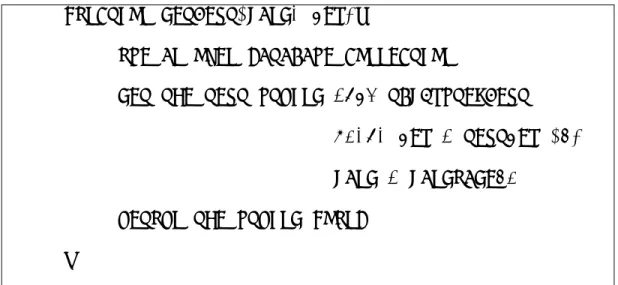
function getText(lang, Key){
use an open database connection
get the text string FROM tblSystemText
WHERE Key = textKey AND lang = languageID
return the string found }
Figure 3. Pseudo-code for the getText function
Opening and closing a connection for each function call is unnecessary and resource intensive, resulting in slow performance. To avoid such bottle neck, application programmers usually open one database connection and reuse it as many times as possible inside their functions. Of course, implementation depends on the programing language used;
Updating text in an application
Once the tables and function are in place, the process of updating text strings in a program becomes a trivial thing. It is natural to assume that when paying for a development company to develop new software, a new interface to manage the languages and the text strings will be needed. Such cost can be compensated when the organization asking for the development (the client) has no more to request updates and/or fixes in the menus or labels. Of course it is a case-by-case scenario and the reader should evaluate which one is more beneficial.
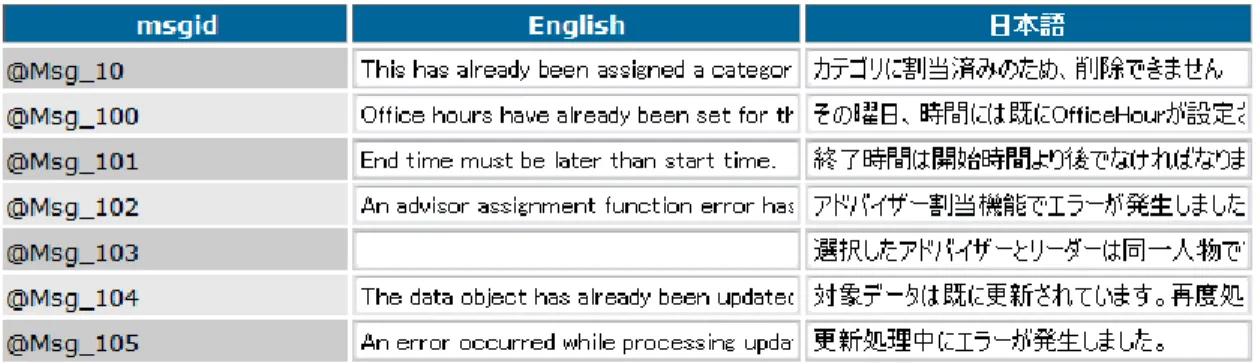
The updates can be done in two different ways. The first possibility is to update all text strings in a batch mode as shown in Figure 4.
Figure 4. One possible output for the administrative interface. Translation can easily be done in batches.
In case an application has too many languages, the above layout can prove itself difficult to visualize. As a suggestion, text can be updated in a one-by-one basis, always showing to the user what key he is updating and for which language like in Figure 5.
Figure 5. Different languages can be edited one by one and still use the proposed framework. Tabs with the different language allow the user to edit a given text in the corresponding language.
Additional functions
Clearly, additional functions are needed in order to manage the languages, texts and keys in the database. Table 1 lists the functions implemented during our prototype testing. Additional functions can be created to add new languages and keys as required.
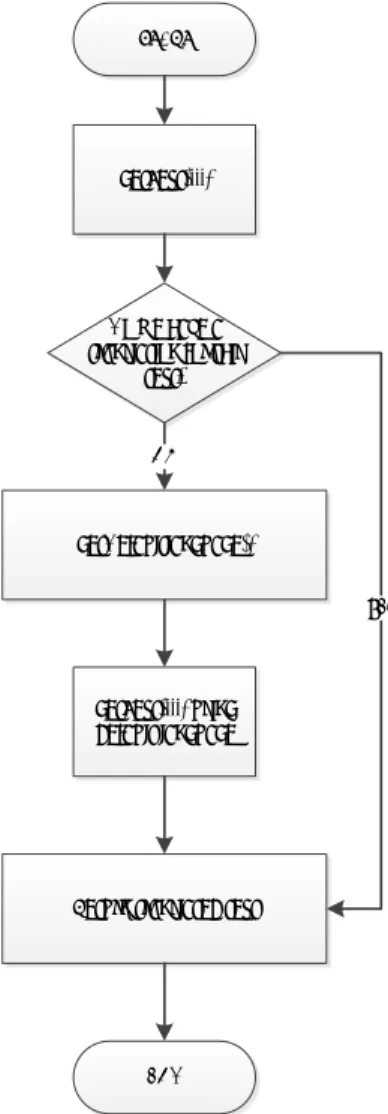
Figure 6 shows the pseudo code for an optional function called getDefaultLanguage. This function could be called every time getText is unable to find a translated text. A workflow exemplifying how this can be achieved is shown in Figure 7.
Table 1. Minimum required functions to implement
Function Parameters Explanation
getDefaultLanguage n/a Returns the default languageID. Useful when getText returns no value for a requested language.
updateText languageID, textKey, Text
Updates the text for the tuple textKey, Text
function getDefaultLanguage(){ return languageID for English }
Figure 6. Pseudo-code for the getDefaultLanguage function in case English is defines as the default system language
START
getText(...)
Do we have a translation for this
text?
END getDefaultlanguage()
getText(...) using default language
Return translated text NO
YES
Dealing with Legacy Systems
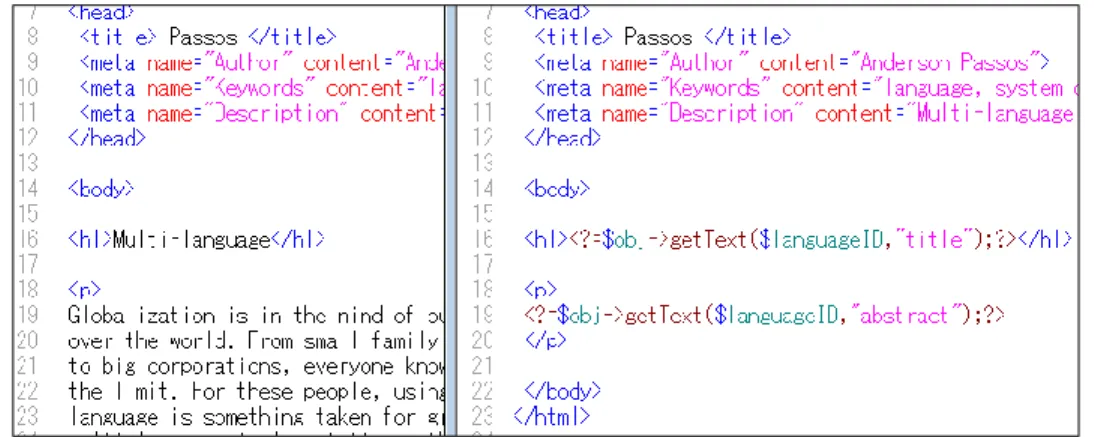
Legacy systems will, inevitably, require changes in the source code to be made. Depending on the programing language used and the programmer’s skill modules can be created and minor impact will be felt by end users. For illustration purposes only, an updated HTML code is shown in Figure 7. This is a very simplistic case where text that was previously displayed in the page from hard-coded strings is now loaded from a database using our suggested framework.
Figure 7. Old HTML code (left) and updated PHP script using the framework proposed in this study
Final Considerations
Still today, many software developers rely on setting an application interface language to the user’s system settings even knowing how cumbersome it is. GIMP, an open source image manipulation tool had it changed only in version 2.7 (not yet released at the time of this writing). This suggests that not only implementation of background methodologies on how to change language of a program in run-time has not evolved but also that such feature has been neglected until today.
The work showed here brings to the table an easy to implement and to understand framework for developing Multilanguage systems. New systems can have the set of tables and functions included in its blueprint while legacy systems will require a little bit more work. Such
work can be compensated later with the relative cut in time necessary to update a website or program language strings. For the final user, having a system that he can control by himself can end up cutting maintenance costs down the road.
References
Minoru Matsutani (2010). “Rakuten to hold all formal internal meetings in English”. The Japan
Times Online, May 18, 2010.
Richard Anderson et. Al. (2002). “Professional ASP.NET 1.0”, Wrox Press
PHP Manual (2012). Control Statements, Retrieved from http://php.net December 2012. PHP Manual (2012). Gettext functons, Retrieved from http://php.net December 2012. GNU Image Manipulation Program, GIMP 2.7 Release Notes, Retrieved from