GOT1000 Series Handbook describes the basic information about GOT1000 series of
MITSUBISHI Graphic Operation Terminal (hereinafter abbreviated as GOT), the information
required for the GOT installation, and others.
For more details, refer to the manuals shown in this handbook.
Be sure to use this handbook together with the following catalogs and manuals.
Catalog
The following catalog describes the information about new functions, the product lineup, the
cost, and others.
Manuals related to GOT1000 series
The manuals describe the detailed information for the GOT.
For details of the information shown in this handbook, refer to the related manuals of GOT1000
series.
The manuals related to GOT1000 series can be downloaded from the MITSUBISHI
ELECTRIC FA NETWORK SERVICE website (http://wwwf2.mitsubishielectric.co.jp/english/
index.html).
INTRODUCTION
HOW TO USE THIS HANDBOOK
For details of the connection configuration and software operation/installation, refer to the
following manuals.
For details about GOT hardware
• GT16 User's Manual (Hardware)
SH-080928ENG (1D7MD3)
• GT16 User's Manual (Basic Utility)
SH-080929ENG (1D7MD4)
• GT15 User's Manual
SH-080528ENG (1D7M23)
• GT11 User's Manual
JY997D17501 (09R815)
• GT10 User's Manual
JY997D24701 (09R819)
• GT16 Handy GOT User's Manual
*
JY997D41201, JY997D41202 (09R821)
• GT11 Handy GOT User's Manual
JY997D20101, JY997D20102 (09R817)
*: GT16 Handy GOT is coming soon.
For details about screen configurations, functions, and usage of GT
SoftGOT1000
• GT SoftGOT1000 Version3 Operating Manual for GT Works3
SH-080860ENG (1D7MA9)
For details about basic operation of screen design, data transfer operation, and
common settings of GT Designer3
• GT Designer3 Version1 Screen Design Manual (Fundamentals)
SH-080866ENG (1D7MB9)
For details about specifications and setting methods of object functions
• GT Designer3 Version1 Screen Design Manual (Functions)
SH-080867ENG (1D7MC1)
For details about screen configurations, functions, and usage of GT Simulator3
• GT Simulator3 Version1 Operating Manual for GT Works3
SH-080861ENG (1D7MB1)
For details about connection configurations and how to make cable
• GOT1000 Series Connection Manual (Mitsubishi Products) for GT Works3
SH-080868ENG (1D7MC2)
• GOT1000 Series Connection Manual (Non-Mitsubishi Products 1) for GT Works3
SH-080869ENG (1D7MC3)
• GOT1000 Series Connection Manual (Non-Mitsubishi Products 2) for GT Works3
SH-080870ENG (1D7MC4)
• GOT1000 Series Connection Manual (Microcomputer, MODBUS Products, Peripherals) for
GT Works3
SH-080871ENG (1D7MC5)
For details about extended functions and option functions
• GOT1000 Series User's Manual (Extended Functions, Option Functions) for GT Works3
SH-080863ENG (1D7MB3)
For details about specifications, system configurations, and setting methods of
gateway function
• GOT1000 Series Gateway Functions Manual for GT Works3
SH-080858ENG (1D7MA7)
For details about specifications, system configurations, and setting methods of
MES interface function
• GOT1000 Series MES Interface Function Manual for GT Works3
SH-080859ENG (1D7MA8)
The following shows newly added functions.
Added new model
Four models of 10.4 type (GT1675-VNBA, GT1675-VNBD, GT1672-VNBA and
GT1672-VNBD) and two models of 8.4 type (GT1662-VNBA and GT1662-VNBD) are
added to GT16.
GT16 User's Manual (Hardware)
GT16 User's Manual (Basic Utility)
Four models (GT1030-LBL, GT1030-LWL, GT1030-LBLW and GT1030-LWLW) are added
to GT10.
GT10 User's Manual
GT16 Handy (GT1665HS-VTBD) is added.
*
GT16 Handy GOT User's Manual
*
*: GT16 Handy GOT is coming soon.
GOT enhanced by new functions
SoftGOT-GOT link function
Connect GT SoftGOT1000 with GOT by an Ethernet connection.
Use the GOT's project data with GT SoftGOT1000 to monitor connected equipment.
Backlight intensity adjustment
Consider the conditions in the operation environment (daytime/nighttime etc.) and user
comfort.
You can adjust the brightness of the backlight while viewing the user screen.
NEWLY ADDED FUNCTIONS
As of September 2010
Ethernet
Worksite Office
GOT
QCPU/LCPU
Project data
27.. 75 $ 3*%273: 3,$4
470 62# 555& '4 4 /0 ) &.+0-4&'4 4 470 62#555& '4 4 /0 ) &.+0-4&'4 4 3:
# $% & '(
/1&'47 0 '4 4 75'4 $# 6 $116
27..
3,$4 3: 219'4 32#
Monitor
Monitor the screen of your onsite GOT from GT SoftGOT1000
Log viewer function
The logging data collected by LCPU and high speed data logger module can be displayed
on GOT.
By displaying two cursors (multi cursor), the changes of data can easily be checked.
The function enables to store the logging data using the front USB interface of the GOT, as
well as to browse the logging data and change the logging setting on GX LogViewer by
connecting the personal computer. (FA transparent function)
Motion SFC monitor function
Viewing the batch program monitor or the active step list enables you to can see the whole
status at a glance.
Motion SFC programs of Mitsubishi Motion Controller (Q Series) can be monitored.
You do not need to have any PCs on site.
Check logging data from GOT, and you can take
corrective actions quickly.
Bllue cursor Red cursor
LCPU High speed data logger module
Logging data Logging
data
3*%273: 3: 3,$4
# $ %& '(
3,$4 3:
Ethernet
Display logging data on GOT
Save logging data in the USB memory/CF card Use GX LogViewer to view and analyze logging data
) 'ZGEWVǦEJCPIGURGGF̍YJGP:10 /10CPF/10
( 2
%JCPIGURGGF
1DVCKPFKIKVCN59
&+0&: &&*( ( 5GNGEVFCVC
&.$+0 &
&.&-. &GXKEG 8CNWG ( QTOC V &
: & &. &. ('&%$# *
-r * $+0
-( 4GCNOQFGOCKP
4GCNOQFGOCKP *QNFKPIRQKPVRQUKVKQPKPI
SFC Chart
Block tabs
Step/transition
The active step is highlighted.
Touch the step to display the
detailed program window.
The SFC chart scrolls automatically
along with the progress of active
steps.
Touch a tab to display the block.
USB mouse/keyboard connection
In a user-created screen, you can use your mouse to click touch switches and your
keyboard to enter ASCII characters and numbers.
FA transparent function
Newly supports MR Configurator2, MX Component/MX Sheet and GX LogViewer.
Remote personal computer operation function (Ethernet)
A personal computer at a remote location can be operated from an onsite GOT when they
are connected via Ethernet.
A USB mouse/keyboard can be connected to the front USB interface.
USB mouse USB hub
USB keyboard
Use the mouse to click touch switches
Use the keyboard to enter ASCII characters and numbers
This is convenient when you need tooperate small
switches or enter many characters.
*: Not supported by GT16 Handy
Q25HCPUQX10 QX41 QJ71BR11
0 12 34 567 89 AB CD EF
QJ71BR11 QX41
Modem connection
MELSECNET/H Ethernet etc. Personal computer
with programming and setup software
Bus connection/direct CPU connection/computer link connection (QJ71C24 (N) (-R2/R4), QJ71CM0 (N)) Ethernet connection (QJ71E71 (-100), QnUDE (H)/LCPU, Q12DCCPU-V)
RS-422 connection
Mitsubishi inverter
Mitsubishi servo amplifier
SSCNETIII
Mitsubishi PLC USB/RS-232
Bus connection, direct CPU connection
Easy access to distant PLCs!
Ethernet
You can view files such as manuals stored on
your personal computer, or you can use
browsers and engineering tools.
PC screenWorksite Office
PC screen
Operation from mouse/keyboard Display on the PC screen
USB mouse USB hub
USB keyboard
*: Not supported by GT16 -VNB , GT16 Handy
MELSEC-L troubleshooting function
The maintenance screen dedicated to LCPU is installed. Without designing new screens
and even without using a personal computer, you can check CPU status/error information
easily.
Just touch the dedicated screen. You can jump to a function screen such as the intelligent
unit monitor to quickly take corrective actions on site.
Supporting the motion controller CPU (Q series)
GT10 supports the connection with the motion controller CPU (Q series).
Expanded manufactures and models of controllers
GT16/GT15/GT11/GT10
Connections with the MELSEC-L series, C language controller (Q12DCCPU-V), and
MELSEC-WS series are supported.
Programmable controllers (Q50UDEHCPU and Q100UDEHCPU) are added.
Motion controllers (Q172DCPU-S1 and Q173DCPU-S1) are added.
4.1 MITSUBISHI Programmable Controller
Third party programmable controller
Connection with the SICK safety controller is supported.
4.3.18 SICK safety controller
Third party robot controller
Connection with the IAI robot controller is supported.
4.4.3 IAI robot controller
GT16/GT15/GT11
Third party servo amplifier
Connection with the Panasonic servo amplifier is supported.
4.4.2 Panasonic servo amplifier
GT16/GT15
ABBREVIATIONS AND GENERIC TERMS
The following shows the abbreviations and generic terms used in this handbook.
GOT
Abbreviations and generic terms
Description
GOT1000
Series
GT1695
GT1695M-X
Abbreviation of GT1695M-XTBA, GT1695M-XTBD
GT1685
GT1685M-S
Abbreviation of GT1685M-STBA, GT1685M-STBD
GT1675
GT1675M-S
Abbreviation of GT1675M-STBA, GT1675M-STBD
GT1675M-V
Abbreviation of GT1675M-VTBA, GT1675M-VTBD
GT1675-VN
Abbreviation of GT1675-VNBA, GT1675-VNBD
GT1672
GT1672-VN
Abbreviation of GT1672-VNBA, GT1672-VNBD
GT1665
GT1665M-S
Abbreviation of GT1665M-STBA, GT1665M-STBD
GT1665M-V
Abbreviation of GT1665M-VTBA, GT1665M-VTBD
GT1662
GT1662-VN
Abbreviation of GT1662-VNBA, GT1662-VNBD
GT16
Abbreviation of GT1695, GT1685, GT1675, GT1672, GT1665, GT1662
GT1595
GT1595-X
Abbreviation of GT1595-XTBA, GT1595-XTBD
GT1585
GT1585V-S
Abbreviation of GT1585V-STBA, GT1585V-STBD
GT1585-S
Abbreviation of GT1585-STBA, GT1585-STBD
GT157
GT1575V-S
Abbreviation of GT1575V-STBA, GT1575V-STBD
GT1575-S
Abbreviation of GT1575-STBA, GT1575-STBD
GT1575-V
Abbreviation of GT1575-VTBA, GT1575-VTBD
GT1575-VN
Abbreviation of GT1575-VNBA, GT1575-VNBD
GT1572-VN
Abbreviation of GT1572-VNBA, GT1572-VNBD
GT156
GT1565-V
Abbreviation of GT1565-VTBA, GT1565-VTBD
GT1562-VN
Abbreviation of GT1562-VNBA, GT1562-VNBD
GT155
GT1555-V
Abbreviation of GT1555-VTBD
GT1555-Q
Abbreviation of GT1555-QTBD, GT1555-QSBD
GT1550-Q
Abbreviation of GT1550-QLBD
GT15
Abbreviation of GT1595, GT1585, GT157
, GT156
, GT155
GT115
GT1155-Q
Abbreviation of GT1155-QTBDQ, GT1155-QSBDQ, GT1155-QTBDA, GT1155-QSBDA,
GT1155-QTBD, GT1155-QSBD
GT1150-Q
Abbreviation of GT1150-QLBDQ, GT1150-QLBDA, GT1150-QLBD
Handy
GOT
GT1155HS-Q
Abbreviation of GT1155HS-QSBD
GT1150HS-Q
Abbreviation of GT1150HS-QLBD
GT11
Abbreviation of GT115
, GT11 Handy GOT,
GT105
GT1055-Q
Abbreviation of GT1055-QSBD
GT1050-Q
Abbreviation of GT1050-QBBD
GT104
GT1045-Q
Abbreviation of GT1045-QSBD
GT1040-Q
Abbreviation of GT1040-QBBD
GT1030
Abbreviation of GT1030-LBD, GT1030-LBD2, GT1030-LBL, GT1030-LBDW,
GT1030-LBDW2,
GT1030-LBLW, GT1030-LWD, GT1030-LWD2, GT1030-LWL, GT1030-LWDW,
GT1030-LWDW2, GT1030-LWLW
GT1020
Abbreviation of GT1020-LBD, GT1020-LBD2, GT1020-LBL, GT1020-LBDW,
GT1020-LBDW2,
GT1020-LBLW, GT1020-LWD, GT1020LWD2, GT1020-LWL, GT1020-LWDW,
GT1020-LWDW2, GT1020-LWLW
GT10
Abbreviation of GT105
, GT104
, GT1030, GT1020
GT SoftGOT1000
Abbreviation of GT SoftGOT1000
GOT900 Series
Abbreviation of GOT-A900 series, GOT-F900 series
Others
Abbreviations and
generic terms
Description
IAI
Abbreviation of IAI Corporation
OMRON
Abbreviation of OMRON Corporation
KEYENCE
Abbreviation of KEYENCE CORPORATION
KOYO EI
Abbreviation of KOYO ELECTRONICS INDUSTRIES CO., LTD.
SHARP
Abbreviation of Sharp Manufacturing Systems Corporation
JTEKT
Abbreviation of JTEKT Corporation
SHINKO
Abbreviation of Shinko Technos Co., Ltd.
CHINO
Abbreviation of CHINO CORPORATION
TOSHIBA
Abbreviation of TOSHIBA CORPORATION
TOSHIBA MACHINE
Abbreviation of TOSHIBA MACHINE CO., LTD.
HITACHI IES
Abbreviation of Hitachi Industrial Equipment Systems Co., Ltd.
HITACHI
Abbreviation of Hitachi, Ltd.
FUJI FA
Abbreviation of Fuji Electric FA Components & Systems Co., Ltd.
PANASONIC
Abbreviation of Panasonic Corporation
PANASONIC EW
Abbreviation of Panasonic Electric Works Co., Ltd.
FUJI SYS
Abbreviation of Fuji Electric Systems Co., Ltd.
YASKAWA
Abbreviation of YASKAWA Electric Corporation
YAMATAKE
Abbreviation of Yamatake Corporation
YOKOGAWA
Abbreviation of Yokogawa Electric Corporation
ALLEN-BRADLEY
Abbreviation of products manufactured by Rockwell Automation, Inc.
GE FANUC
Abbreviation of GE Fanuc Automation Corporation GE Fanuc Automation Corporation
LS IS
Abbreviation of LS Industrial Systems Co., Ltd.
SCHNEIDER
Abbreviation of Schneider Electric SA
SICK
Abbreviation of SICK AG
SIEMENS
Abbreviation of Siemens AG
RKC
Abbreviation of RKC INSTRUMENT INC.
HIRATA
Abbreviation of Hirata Corporation
PLC
Abbreviation of programmable controller
Temperature controller
Generic term for temperature controller manufactured by each corporation
Indicating controller
Generic term for indicating controller manufactured by each corporation
CHINO controller
Abbreviation of indicating controller manufactured by CHINO CORPORATION
PC CPU module
Abbreviation of PC CPU Unit manufactured by CONTEC CO., LTD
GOT (server)
Abbreviation of GOTs that use the server function
GOT (client)
Abbreviation of GOTs that use the client function
Windows
font
Abbreviation of TrueType font and OpenType font available for Windows
(Differs from the True Type fonts settable with GT Designer3)
Intelligent function module
Indicates the modules other than the PLC CPU, power supply module and I/O module that
are mounted to the base unit.
MODBUS
/RTU
Generic term for the protocol designed to use MODBUS
protocol messages on a serial
communication.
MODBUS
/TCP
Generic term for the protocol designed to use MODBUS
protocol messages on a TCP/
INTRODUCTION . . . A-1
HOW TO USE THIS HANDBOOK . . . .A-1
MANUALS . . . .A-2
NEWLY ADDED FUNCTIONS. . . A-3
ABBREVIATIONS AND GENERIC TERMS . . . .A-7
CONTENTS . . . .A-9
1 GOT
1
1.1 Product Lineup . . . 2
1.2 Specification . . . 12
1.3 Part Name. . . 20
1.4 Installation. . . 21
1.5 External Dimensions . . . 23
2 SOFTWARE
27
2.1 Product Lineup . . . 28
2.2 Specifications (Operating Environment) . . . 30
3 FUNCTION
33
3.1 Functions . . . 34
3.2 Precautions for Use . . . 36
3.3 Overview of Each Function . . . 58
4 CONNECTION CONFIGURATION
93
4.1 MITSUBISHI Programmable Controller . . . 94
4.1.1 Connection type . . . 94
4.1.2 Bus connection . . . 99
4.1.3 Details of bus connection . . . 102
4.1.4 Direct CPU connection . . . 120
4.1.5 Computer link connection . . . 149
4.1.6 MELSECNET/H connection . . . 164
4.1.7 MELSECNET/10 connection . . . 168
4.1.8 CC-Link IE controller network connection. . . 172
4.1.9 CC-Link connection (intelligent device station). . . 174
4.1.10 CC-Link connection (via G4) . . . 177
4.1.11 Ethernet connection. . . 181
4.2 Other MITSUBISHI controllers. . . 187
4.2.1 Inverter connection . . . 187
4.2.2 Servo amplifier connection . . . 190
4.2.3 Robot controller connection . . . 194
4.2.4 CNC (MELDAS C6/C64) connection . . . 196
4.2.5 GOT Multi-drop connection. . . 205
4.2.6 Multiple-GT11/GT10 connection. . . 209
4.3 Third Party Programmable Controller . . . 212
4.3.1 Connection type . . . 212
4.3.3 KEYENCE programmable controller . . . 219
4.3.4 KOYO EI programmable controller . . . 221
4.3.5 SHARP programmable controller . . . 223
4.3.6 JTEKT programmable controller . . . 225
4.3.7 TOSHIBA programmable controller . . . 227
4.3.8 TOSHIBA MACHINE programmable controller . . . 228
4.3.9 HITACHI IES programmable controller . . . 229
4.3.10 HITACHI programmable controller . . . 231
4.3.11 FUJI FA programmable controller. . . 232
4.3.12 PANASONIC EW programmable controller . . . 233
4.3.13 YASKAWA programmable controller . . . 235
4.3.14 YOKOGAWA programmable controller . . . 237
4.3.15 ALLEN-BRADLEY programmable controller . . . 240
4.3.16 GE FANUC programmable controller . . . 243
4.3.17 LS INDUSTRIAL SYSTEMS programmable controller . . . 245
4.3.18 SICK safety controller . . . 247
4.3.19 SIEMENS programmable controller . . . 248
4.4 Other third party devices . . . 250
4.4.1 Connection type. . . 250
4.4.2 Panasonic servo amplifier . . . 252
4.4.3 IAI robot controller . . . 253
4.5 Microcomputer connection. . . 254
4.5.1 Microcomputer connection (Serial) . . . 254
4.5.2 Microcomputer connection (Ethernet) . . . 258
4.6 MODBUS(R) connection . . . 259
4.6.1 MODBUS(R)/RTU connection . . . 259
4.6.2 MODBUS(R)/TCP connection . . . 262
4.7 Third Party Temperature Controller . . . 265
4.7.1 Connection type. . . 265
4.7.2 OMRON temperature controller . . . 269
4.7.3 SHINKO indicating controller . . . 270
4.7.4 CHINO controller . . . 272
4.7.5 FUJI SYS temperature controller . . . 274
4.7.6 YAMATAKE temperature controller . . . 276
4.7.7 YOKOGAWA temperature controller . . . 278
4.7.8 RKC temperature controller . . . 280
4.8 Other Devices . . . 282
4.8.1 Sound output . . . 282
4.8.2 External I/O . . . 283
4.8.3 Bar code reader connection. . . 284
4.8.4 Video/RGB connection . . . 285
4.8.5 Multimedia connection . . . 287
4.8.6 Printer connection . . . 289
4.8.7 Remote personal computer operation connection . . . 291
4.8.8 RFID connection . . . 293
4.9 Precautions . . . 294
5 COMPLIANCE WITH OVERSEAS STANDARDS
295
6 EQUIPMENT, SOFTWARE, AND MANUALS
301
This chapter describes the GOT overview.
1.1 Product Lineup . . . 2
1.2 Specification . . . 12
1.3 Part Name. . . 20
1.4 Installation . . . 21
1. GOT
1.1 Product Lineup
GT16
With a variety of integrated functions, such as Ethernet and multimedia
TFT
(High-brightness, wide viewing angle)TFT
(High-brightness, wide viewing angle) GT1695M-XTBAGT1695M-XTBD
GT1685M-STBA GT1685M-STBD Resolution: XGA 1024 768
Display color: 65536 colors Multimedia, video/RGB model
Resolution: SVGA 800 600 Display color: 65536 colors Multimedia, video/RGB model
TFT
(High intensity and wide angle view)TFT
(High intensity and wide angle view) GT1675M-STBAGT1675M-STBD
GT1675M-VTBA GT1675M-VTBD Resolution: SVGA 800 600
Display color: 65536 colors Multimedia, video/RGB model
Resolution: VGA 640 480 Display color: 65536 colors Multimedia, video/RGB model
TFT
TFT
GT1675-VNBA GT1675-VNBD
GT1672-VNBA GT1672-VNBD Resolution: VGA 640 480
Display color: 4096 colors
Resolution: VGA 640 480 Display color: 16 colors
type
15
type
12.1
AC type
AC type
DC type
DC type
AC type
AC type
DC type
DC type
type
10.4
type
10.4
AC type
AC type
DC type
DC type
AC type
AC type
DC type
DC type
type
10.4
type
10.4
AC type
AC type
DC type
DC type
AC type
AC type
DC type
1
GO
T
2
SO
FTW
A
R
E
3
FU
NCTIO
N
4
CO
NN
ECTIO
N
CO
NFIG
URA
TION
5
COM
P
LIA
NCE
WITH OV
ERSE
AS
ST
AN
DAR
DS
6
EQ
UIP
M
EN
T
,
SO
FTW
AR
E,
A
ND M
A
N
UALS
7
GLO
S
SA
R
Y
TFT
(High-brightness, wide viewing angle)TFT
(High-brightness, wide viewing angle)TFT
GT1665M-STBA GT1665M-STBD
GT1665M-VTBA GT1665M-VTBD
GT1662-VNBA GT1662-VNBD Resolution: SVGA 800 600
Display color: 65536 colors Multimedia, video/RGB model
Resolution: VGA 640 480 Display color: 65536 colors Multimedia, video/RGB model
Resolution: VGA 640 480 Display color: 16 colors
Handy GOT/ TFT
(High-brightness, wide viewing angle) GT1665HS-VTBDResolution: VGA 640 480 Display color: 65536 colors
type
8.4
type
8.4
type
8.4
AC type
AC type
DC type
DC type
AC type
AC type
DC type
DC type
AC type
AC type
DC type
DC type
Coming
soon
6.5
GT15
Wide range of use from network to stand alone
TFT
(High intensity and wide angle view)TFT
(High intensity and wide angle view)TFT
(High intensity and wide angle view) GT1595-XTBAGT1595-XTBD
GT1585V-STBA GT1585V-STBD
GT1585-STBA GT1585-STBD Resolution: XGA 1024 768
Display color: 65536 colors
Resolution: SVGA 800 600 Display color: 65536 colors Video/RGB compatible
Resolution: SVGA 800 600 Display color: 65536 colors
TFT
(High intensity and wide angle view)TFT
(High intensity and wide angle view)TFT
(High intensity and wide angle view) GT1575V-STBAGT1575V-STBD
GT1575-STBA GT1575-STBD
GT1575-VTBA GT1575-VTBD Resolution: SVGA 800 600
Display color: 65536 colors Video/RGB compatible
Resolution: SVGA 800 600 Display color: 65536 colors
Resolution: VGA 640 480 Display color: 65536 colors
TFT
TFT
GT1575-VNBA GT1575-VNBD
GT1572-VNBA GT1572-VNBD Resolution: VGA 640 480
Display color: 256 colors
Resolution: VGA 640 480 Display color: 16 colors
type
15
type
12.1
type
12.1
AC type
AC type
DC type
DC type
AC type
AC type
DC type
DC type
AC type
AC type
DC type
DC type
type
10.4
type
10.4
type
10.4
AC type
AC type
DC type
DC type
AC type
AC type
DC type
DC type
AC type
AC type
DC type
DC type
type
10.4
type
10.4
AC type
AC type
DC type
DC type
AC type
AC type
DC type
1
GO
T
2
SO
FTW
A
R
E
3
FU
NCTIO
N
4
CO
NN
ECTIO
N
CO
NFIG
URA
TION
5
COM
P
LIA
NCE
WITH OV
ERSE
AS
ST
AN
DAR
DS
6
EQ
UIP
M
EN
T
,
SO
FTW
AR
E,
A
ND M
A
N
UALS
7
GLO
S
SA
R
Y
TFT
(High intensity and wide angle view)TFT
GT1565-VTBA GT1565-VTBD
GT1562-VNBA GT1562-VNBD Resolution: VGA 640 480
Display color: 65536 colors
Resolution: VGA 640 480 Display color: 16 colors
TFT
(High intensity and wide angle view)TFT
(High intensity and wide angle view)GT1555-VTBD GT1555-QTBD
Resolution: VGA 640 480 Display color: 65536 colors
Resolution: QVGA 320 240 Display color: 65536 colors
STN
STN
GT1555-QSBD GT1550-QLBD
Resolution: QVGA 320 240 Display color: 4096 colors
Resolution: QVGA 320 240 Display color: Monochrome in 16-level
type
8.4
type
8.4
AC type
AC type
DC type
DC type
AC type
AC type
DC type
DC type
type
5.7
type
5.7
DC type
DC type
DC type
DC type
type
5.7
type
5.7
DC type
GT11
Enhanced with basic functions for stand alone application
*1: For QCPU (Q mode)/Motion controller CPU (Q series) connection
*2: For QnA/ACPU/Motion controller CPU (A series) connection
TFT
STN
STN
GT1155-QTBD GT1155-QSBD GT1150-QLBD
GT1155-QTBDQ Q bus connection*1 GT1155-QSBDQ Q bus connection*1 GT1150-QLBDQ Q bus connection*1
GT1155-QTBDA A bus connection*2 GT1155-QSBDA A bus connection*2 GT1150-QLBDA A bus connection*2
Resolution: QVGA 320 240 Display color: 256 colors
Resolution: QVGA 320 240 Display color: 256 colors
Resolution: QVGA 320 240 Display color: Monochrome in 16-level
Handy GOT/STN
GT1155HS-QSBD
Handy GOT/STN
GT1150HS-QLBD
Resolution: QVGA 320 240 Display color: 256 colors
Resolution: QVGA 320 240 Display color: Monochrome in 16-level
type
5.7
DC type
DC type
type
5.7
DC type
DC type
type
5.7
DC type
DC type
DC type
DC type
DC type
DC type
DC type
DC type
DC type
DC type
DC type
DC type
DC type
DC type
1
GO
T
2
SO
FTW
A
R
E
3
FU
NCTIO
N
4
CO
NN
ECTIO
N
CO
NFIG
URA
TION
5
COM
P
LIA
NCE
WITH OV
ERSE
AS
ST
AN
DAR
DS
6
EQ
UIP
M
EN
T
,
SO
FTW
AR
E,
A
ND M
A
N
UALS
7
GLO
S
SA
R
Y
GT10
Including all the basic functions required for a HMI display
STN
GT1055-QSBD
STN
GT1050-QBBD
Resolution: QVGA 320 240 Display color: 256 colors
Resolution: QVGA 320 240
Display color: Monochrome (white/blue) in 16-level
STN
GT1045-QSBD
STN
GT1040-QBBD
Resolution: QVGA 320 240 Display color: 256 colors
Resolution: QVGA 320 240
Display color: Monochrome (white/blue) in 16-level
type
5.7
24VDC type
type
5.7
24VDC type
4
.
7
STN
GT1030-LBD RS-422 connection GT1030-LBD2 RS-232 connection GT1030-LBL RS-422 connection GT1030-LWD RS-422 connection GT1030-LWD2 RS-232 connection GT1030-LWL RS-422 connection
STN
GT1030-LBDW RS-422 connection GT1030-LBDW2 RS-232 connection GT1030-LBLW RS-422 connection GT1030-LWDW RS-422 connection GT1030-LWDW2 RS-232 connection GT1030-LWLW RS-422 connection Resolution: 288 96
Display color: Monochrome (white/black) Backlight: 3-color LED (green/orange/red)
Resolution: 288 96
Display color: Monochrome (white/black) Backlight: 3-color LED (white/pink/red)
STN
GT1020-LBD RS-422 connection GT1020-LBD2 RS-232 connection GT1020-LBL RS-422 connection GT1020-LWD RS-422 connection GT1020-LWD2 RS-232 connection GT1020-LWL RS-422 connection
STN
GT1020-LBDW RS-422 connection GT1020-LBDW2 RS-232 connection GT1020-LBLW RS-422 connection GT1020-LWDW RS-422 connection GT1020-LWDW2 RS-232 connection GT1020-LWLW RS-422 connection Resolution: 160 64
Display color: Monochrome (white/black) Backlight: 3-color LED (green/orange/red)
Resolution: 160 64
Display color: Monochrome (white/black) Backlight: 3-color LED (white/pink/red)
type
4.5
Black24VDC type
Black
24VDC type
Black
5VDC type
White
24VDC type
White
24VDC type
White
5VDC type
type
4.5
Black24VDC type
Black
24VDC type
Black
5VDC type
White
24VDC type
White
24VDC type
White
5VDC type
type
3.7
Black24VDC type
Black
24VDC type
Black
5VDC type
White
24VDC type
White
24VDC type
White
5VDC type
type
3.7
Black24VDC type
Black
24VDC type
Black
5VDC type
White
24VDC type
White
24VDC type
1
GO
T
2
SO
FTW
A
R
E
3
FU
NCTIO
N
4
CO
NN
ECTIO
N
CO
NFIG
URA
TION
5
COM
P
LIA
NCE
WITH OV
ERSE
AS
ST
AN
DAR
DS
6
EQ
UIP
M
EN
T
,
SO
FTW
AR
E,
A
ND M
A
N
UALS
7
GLO
S
SA
R
Y
Use a personal computer or panel computer as a GOT.
Software recreates various GOT functionality.
Version3
Monitor the production site from a remote location
Connect with MELSEC process control for process control applications
PX Developer window screens and other tools
USB port license key
GT SoftGOT1000
GT SoftGOT1000 is the HMI software that provides GOT functions on personal computers
and panel computers.
This software connects with various types of equipment such as Mitsubishi PLCs and let
you see screens just like the GOT1000 series.
You can also reuse GOT's project data without modification.
Along with all the advantages of a GOT, you can also enjoy the convenience and flexibility
of personal computers and panel computers.
A license key is required on your PC's parallel port or USB port while using this software.
Reduce downtime
Use GT SoftGOT1000 to monitor the production site from
your office. You can collect information quickly when a
problem occurs, taking necessary actions immediately.
You can connect GT SoftGOT1000 to the monitor tools of the Engineering Environment PX Developer for design and
maintenance work for process control. In this way, a process control monitoring system can easily be constructed.
Use GOT project data from the production site
You can reuse project data of the GOT at your production
site as the project data of GT SoftGOT1000 to reduce the
design cost.
Line 1 Line 2 Line 3 Line 4
Personal computer
Personal computer
Production site Office
Worksite
Ethernet
Monitoring Line 1 Monitoring Line 2
Monitoring Line 4 Monitoring Line 3
Tools for monitoring, operating, and tuning loop
control tags. (The display position can be
specified.)
GT SoftGOT1000 touch switch/object
Clicking on touch switches and objects displays
various screens of PX Developer monitoring
tools. (The display position can be specified.)
PX Developer monitoring tool bar
Clicking on buttons executes various operations
such as starting up GT SoftGOT1000 and
switching base screens.
GT SoftGOT1000 base screen
Make your desktop into a graphic monitoring
window by displaying the GT SoftGOT1000 base
screen in full-screen mode and sending the
window to the back of the screen.
HMI software for the GOT1000 series
1
GO
T
2
SO
FTW
A
R
E
3
FU
NCTIO
N
4
CO
NN
ECTIO
N
CO
NFIG
URA
TION
5
COM
P
LIA
NCE
WITH OV
ERSE
AS
ST
AN
DAR
DS
6
EQ
UIP
M
EN
T
,
SO
FTW
AR
E,
A
ND M
A
N
UALS
7
GLO
S
SA
R
Y
The SoftGOT-GOT link function enhances the linkage to your onsite GOT
Link with other applications to construct a high-performance system
Ethernet
Worksite Office
GOT
QCPU/LCPU
Project data
PULL USB
Q25HCPU QX10 QJ71BR11T.PASSRUNSD
ERR MNG D.LINK RD ERR RUN T.PASSSD ERR MNG D.LINK RD ERR QX41
0 1 2 3 4 5 6 7 8 9 A B C D E F MODE RUN ERR USER BAT BOOT
PULL
QJ71BR11 QX41
POWER Q61P-A1
Monitor
Monitor the screen of your onsite GOT from GT SoftGOT1000
Ethernet
Able to make
operation
Not able to
make operation
Worksite Office
GOT
With
operating
authority
A dialog box opens with message
No Yes
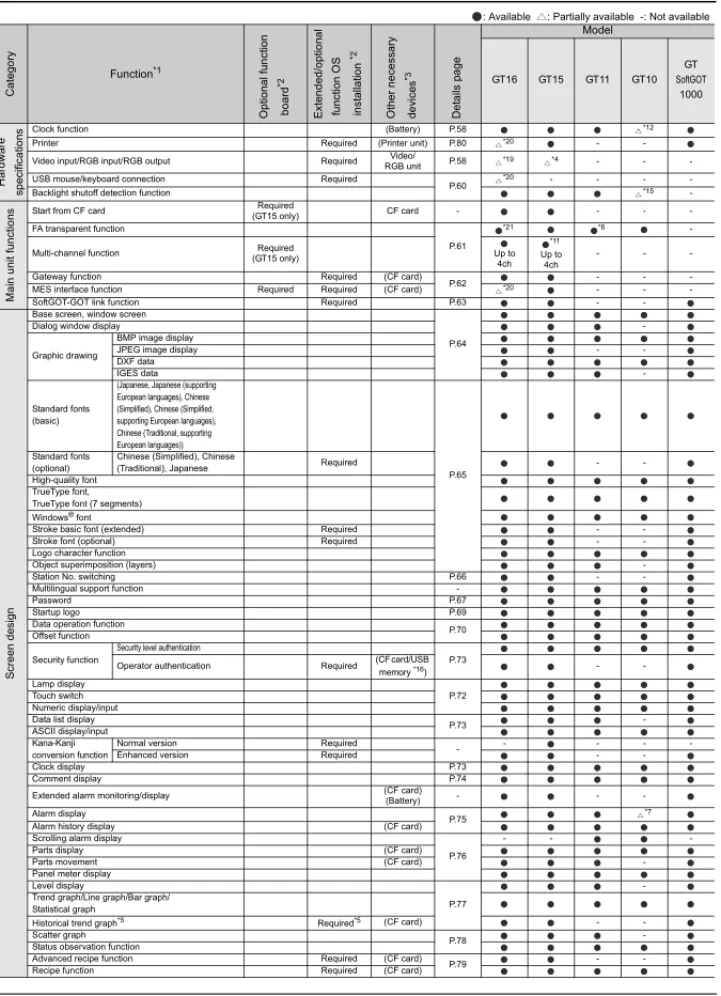
See "Specifications (Operating Environment)" (page 30), "Functions for each model" (page 34), and "Connectable models" (page 98).
NEW
You can use a user-created application to read and write information to and from internal devices of GT SoftGOT1000.
By linking data with user applications such as a data logger, you can construct a high-performance system package.
You can also use a touch switch on the GT SoftGOT1000 monitor to launch another application.
<Development environment of user applications>
Microsoft Visual C++.NET2003, Microsoft Visual C++ (Version.6.0), Microsoft Visual Basic.NET2003, Microsoft Visual Basic (Version.6.0)
® ®
® ®
Monitor the screen of your onsite GOT from GT SoftGOT1000
Connect GT SoftGOT1000 with GOT by an Ethernet connection.
Use the GOT's project data with GT SoftGOT1000 to monitor connected equipment.
*:Only CH1 can be monitored when GOT is connected via multi-channels.GOT and QCPU/LCPU can be connected by a bus connection, direct CPU connection, computer link connection, or Ethernet connection.
Prevent simultaneous operations from GT SoftGOT1000 and GOT
Operation of an input object (e.g. touch switch, numerical input) is allowed by either GT SoftGOT1000 or the GOT,
whichever has operating authority.
When one terminal does not have operating authority, a dialog box opens to show that the other terminal has operating
authority. This exclusive control method keeps prohibiting operation until the terminal obtains operating authority.
No Yes
The host is now in operation. Do you want to obtain operating authority ?
The host is now in operation. Do you want to obtain operating authority ?
1.2 Specification
GT16
General specifications
Performance specifications
Item
Specification
*1: The maximum operating ambient temperature should be 5 Clower than that shown in the table on the left when connecting to a multimedia unit (GT16M-MMR), MELSECNET/H communication unit (GT15-J71LP23-25 or GT15-J71BR13), or CC-Link communication unit (GT15-J61BT13). *2: Do not operate or store the GOT unit in pressurized
environments where the pressure exceeds the 0m elevation atmospheric pressure, as this could result in abnormal operation. Do not pressurize inside the control panel for air purge cleaning. The pressure could raise the surface sheet, making the touch panel difficult to operate or causing the sheet to come off. *3: Assuming that the device is connected at some point between a
public power distribution network and local system equipment. Category applies to devices that are supplied with power from fixed equipment. The surge withstand voltage is 2500V for devices with ratings up to 300V.
*4: Index that indicates the level of foreign conductive matter in the operating environment of the device. Contamination level 2 denotes contamination by non-conductive matter only, though momentary conductivity may occur due to occasional condensation.
*5: 0 to 40 C for GT1665HS *6: Excluding GT1665HS Operating ambient
temperature*1
Display 0 C to 50 C*5
Other than display 0 C to 55 C*5
Storage ambient temperature -20 C to 60 C Operating ambient humidity*5 10 to 90%RH, no condensation Storage ambient humidity 10 to 90%RH, no condensation
Vibration resistance
Conforming to JIS B 3502 and IEC 61131-2
Frequency Acceleration Half amplitude Sweep count Under
intermittent vibration
5 to 9Hz - 3.5mm 10 times each in X, Y and Z
directions 9 to 150Hz 9.8m/s2
-Under continuous vibration
5 to 9Hz - 1.75mm -9 to 150Hz 4.9m/s2
-Impact resistance Conforming to JIS B 3502 and IEC 61131-2 (147m/s2, 3 times in each of X, Y and Z directions) Operating atmosphere Free from oil mist, corrosive gases, flammable gases and excessive conductive dusts or direct sun beams (The same applies to unit storage.) Operating altitude*2 2000m or less
Installation location In control panel*6
Overvoltage category*3 or lower Contamination level*4 2 or less Cooling method Self-cooling
Grounding Type D grounding (100 or less). Connect to panel if unable to ground. Do not use or store the GOT under direct sun light or in an environment with excessively high temperature, dust, humidity or vibration.
Item
GT1695M-XTBASpecification
GT1695M-XTBD
GT1685M-STBA GT1685M-STBD
GT1675M-STBA GT1675M-STBD
GT1675M-VTBA GT1675M-VTBD
GT1675-VNBA GT1675-VNBD
GT1672-VNBA GT1672-VNBD
Display*1
Type TFT color LCD (high-brightness, wide viewing angle) TFT color LCD
Screen size 15" 12.1" 10.4"
Resolution XGA: 1024 768 [dots] SVGA: 800 600 [dots] VGA: 640 480 [dots] Display size 304.1(W) 228.1(H)[mm] 246(W) 184.5(H)[mm] 211(W) 158(H)[mm] No. of displayed
characters
16-dot standard font: 64 chars. 48 lines (2-byte)
12-dot standard font: 85 chars. 64 lines (2-byte)
16-dot standard font: 50 chars. 37 lines (2-byte) 12-dot standard font: 66 chars. 50 lines (2-byte)
16-dot standard font: 40 chars. 30 lines (2-byte) 12-dot standard font: 53 chars. 40 lines (2-byte)
Display colors 65536 colors 4096 colors 16 colors
View angle*2 Right/left: 75 , Up: 50 , Down: 60 Right/left: 80 , Up: 60 , Down: 80 Up/down/right/left: 88 Right/left: 45 , Up: 30 , Down: 20 Intensity 450 [cd/m2] 470 [cd/m2] 400 [cd/m2] 450[cd/m2] 200[cd/m2] Intensity adjustment 8-step adjustment 4-step adjustment Life (operating ambient temperature: 25 C)Approx. 52,000 hours (operating ambient temperature: 25 C)Approx. 43,000 hours (operating ambient temperature: 25 C)Approx. 52,000 hours
Backlight
Cold-cathode fluorescent tube (replaceable), with backlight OFF detection function. Backlight off time and screen save time can be set. Life*3 Approx. 50,000 hours or more
(Time for display intensity reaches 50% at operating ambient temperature of 25 C) Touch
panel
*10
Type Analog resistive type
Key size Min. 2 2 [dots](per key)
No. of simultaneous
touch points Simultaneous touch prohibited*4 (1 point only) Life 1,000,000 times or more (operating force 0.98N or less)
Human sensor
Detection distance 1[m]
-Detection range Right/left/up/down: 70
-Detection delay time 0 to 4 [sec]
-Detection temperature Temperature difference to be 4 C or more between human
body and ambient air
-Memory*5 C drive 15MB built-in flash memory (for saving project data and OS) 11MB built-in flash memory (for saving project data and OS)
Life (No. of writings) 100,000 times Battery
GT15-BAT type lithium battery
Backed up data Clock data, maintenance time notification data, system log data and SRAM user area (500KB) Life Approx. 5 years (operating ambient temperature: 25 C)
Built-in interface
RS-232*7
RS-232, 1ch
Transmission speed: 115200/57600/38400/19200/9600/4800bps,
Connector shape: D-sub 9-pin (male) Application: Communication with connected devices, connection to personal computer (project data upload/download, OS installation, FA transparent function)
RS-422/485
RS-422/485, 1ch
Transmission speed: 115200/57600/38400/19200/9600/4800bps Connector shape: 14-pin (female) Application: Communication with connected devices
Ethernet
Data transfer system: 100BASE-TX, 10BASE-T, 1ch*8
Connector shape: RJ-45 (modular jack)
Application: Communication with connected devices, gateway function, connection to personal computer (project data upload/download, OS installation, MES interface function)
USB
USB (full-speed 12Mbps), host 1ch Connector shape: TYPE-A Application: Data transfer and storage
USB (full-speed 12Mbps), device 1ch Connecter shape: TYPE Mini-B
Application: Connection to personal computer (project data upload/download, OS installation, FA transparent function) CF card Application: Data transfer, data storage, GOT startupCompact flash slot, 1ch, Connector shape: TYPE
Optional function board 1ch for optional function board installation Extension unit*7 2ch for communication unit/optional unit installation Buzzer output Single tone (tone length adjustable) Protective construction JEM1030 Front: IP67f*6 In panel: IP2X External dimensions
(without USB port cover) 397(W) 296(H) 61(D)[mm] 316(W) 242(H) 52(D)[mm] 303(W) 214(H) 49(D)[mm] Panel cut dimensions 383.5(W) 282.5(H)[mm] 302(W) 228(H)[mm] 289(W) 200(H)[mm]
Weight (excl. mounting brackets) 5.0[kg] 2.7[kg] 2.1[kg] 2.3[kg] Applicable
software packages
Screen design software
GT Works3 Version1 *11
1
GO
T
2
SO
FTW
A
R
E
3
FU
NCTIO
N
4
CO
NN
ECTIO
N
CO
NFIG
URA
TION
5
COM
P
LIA
NCE
WITH OV
ERSE
AS
ST
AN
DAR
DS
6
EQ
UIP
M
EN
T
,
SO
FTW
AR
E,
A
ND M
A
N
UALS
7
GLO
S
SA
R
Y
Power supply specifications
*1: Excluding GT1665HS
Performance specifications
Item
Specification
GT1695M-XTBA GT1685M-STBA GT1675M-STBA GT1675M-VTBA GT1675-VNBA GT1672-VNBA GT1665M-STBA GT1665M-VTBA GT1662-VNBA GT1695M-XTBD GT1685M-STBD GT1675M-STBD GT1675M-VTBD GT1675-VNBD GT1672-VNBD GT1665M-STBD GT1665M-VTBD GT1662-VNBD GT1665HS-VTBDInput power supply voltage 100 to 240VAC (+10%, -15%) 24VDC (+25%, -20%) 24VDC (+10%, -15%)
Input frequency 50/60Hz ±5%
-Input maximum apparent power 150VA (at max. load) 110VA (at max. load) 100VA (at max. load)
-Power consumption 64W or less 46W or less 39W or less 60W or less 40W or less 38W or less 11.6W or less With backlight off 38W or less 32W or less 30W or less 30W or less 26W or less 27W or less 8.2W or less Inrush current (4ms, at max. load)28A or less (75ms, at max. load)12A or less (55ms, at max. load)12A or less (2ms, at max. load)30A or less Permissible instantaneous
failure time Within 20ms (100VAC or more) Within 10ms Within 5ms Noise resistance Noise voltage 1500Vp-p, noise width 1µs by noise simulator with noise frequency 25 to 60Hz Noise voltage 500Vp-p, noise width 1µs by noise simulator with noise frequency 25 to 60Hz
Noise voltage 1000Vp-p, noise width 1µs by noise simulator with noise frequency 30 to 100Hz Withstand voltage 1500VAC for 1 minute between power supply terminal and ground 500VDC for 1 minute between power supply terminal and ground Insulation resistance 10M or higher with an insulation resistance tester (500VDC between power supply terminal and ground) Applicable wire size 0.75 to 2 [mm2]*1
Clamp terminal Clamp terminals for M3 screw RAV1.25-3, V2-S3.3, V2-N3A, FV2-N3A*1
Tightening torque
(terminal block's terminal screws) 0.5 to 0.8 [N•m]*1
Item
Specification
*1: On LCD screens, bright dots (permanently lit) and black dots (not to be lit) generally appear. Because the large number of display elements exist on an LCD screen, it is not possible to reduce appearance of the bright and black dots to zero.Note that the existence of bright and black dots is a standard characteristic of LCD screens, and it does not mean that the products are defective or damaged.
*2: LC panels have characteristics of tone reversal. Note that even within the indicated view angles, the screen display may not be clear enough depending on the display color. *3: Using the GOT screen save/backlight OFF
functions prevents screen burn-in and extends the backlight life.
*4: An analog resistive touch display is used. When 2 points on the screen are touched simultaneously, if a switch is located the middle of the 2 points then the switch will be activated. Therefore, avoid touching 2 points on the screen simultaneously.
*5: The memory is a ROM that permits overwriting of new data without having to delete the existing data.
*6: With the USB environmentally protective cover is on, pressing firmly the portion marked " " makes it conform to IP67f (JEM1030). (The USB interface conforms to IP2X (JEM1030) when a USB cable or a USB memory is connected.) However, this does not guarantee protection in all users' environments.
The unit may not be used in an environment where it is exposed to splashing oil or chemicals for a long time or it is soaked with full of oil mist. *7: Where more than one extension unit, barcode
reader, and RFID controller are used, the sum of their current consumptions should be within the current level which the GOT can supply. *8: For the currents which the extension units,
barcode reader, and RFID controller consume and the current level which the GOT can supply, see "3.2 Precautions for Use (Calculation of current consumed by units <GT16/15>)". The function version A of GT1695/GT1685 is not compatible with 10BASE-T. *9: This does not guarantee protection in all users'
environments. The specification is not applied when the interface protective cover and rear face protective cover are removed. *10: If necessary, use a stylus pen meeting the
following specifications. (excluding GT1665HS) • Material: Polyacetal resin • Pen point radius: 0.8mm or more *11: Use the software package of the latest version.
The latest version package can be confirmed in the MELFANSweb website (http:// www.MitsubishiElectric.co.jp/melfansweb). GT1665M-STBA GT1665M-STBD GT1665M-VTBA GT1665M-VTBD GT1662-VNBA GT1662-VNBD GT1665HS-VTBD Display*1
Type (high-brightness, wide viewing angle)TFT color LCD TFT color LCD
TFT color LCD (high-brightness, wide
viewing angle)
Screen size 8.4" 6.5"
Resolution SVGA: 800 600 [dots] VGA: 640 480 [dots]
Display size 171(W) 128(H)[mm] 132.5((W) 99.4(H)[mm] No. of displayed
characters
16-dot standard font: 50 chars. 37 lines (2-byte)
12-dot standard font: 66 chars. 50 lines (2-byte)
16-dot standard font: 40 chars. 30 lines (2-byte) 12-dot standard font: 53 chars. 40 lines (2-byte) Display colors 65536 colors 16 colors 65536 colors View angle*2 Right/left: 80 , Up: 80 , Down: 60 Right/left: 45 ,
Up/down: 20
Right/left: 80 , Up: 60 , Down: 80 Intensity 400 [cd/m2] 600[cd/m2] 200[cd/m2] 550[cd/m2]
Intensity adjustment 8-step adjustment 4-step adjustment 8-step adjustment Life
Approx. 43,000 hours (operating ambient temperature: 25 C)
Approx. 52,000 hours (operating ambient temperature: 25 C)
Approx. 41,000 hours (operating ambient temperature: 25 C)
Backlight
Cold-cathode fluorescent tube (replaceable), with backlight OFF detection function. Backlight off time and screen save time can be set.
LED Backlight off time and screen save time can be set. Life*3 Approx. 50,000 hours or more Approx.40,000 hours or more
-(Time for display intensity reaches 50% at operating ambient temperature of 25 C)
-Touch panel
*10
Type Analog resistive type Key size Min. 2 2 [dots](per key) No. of simultaneous
touch points Simultaneous touch prohibited*4 (1 point only) Life 1,000,000 times or more (operating force 0.98N or less)
Human sensor
Detection distance
-Detection range
-Detection delay time
-Detection temperature -Memory*5 C drive
15MB built-in flash memory (for saving project data and OS)
11MB built-in flash memory (for saving project data and OS)
15MB built-in flash memory (for saving project data and OS) Life (No. of writings) 100,000 times
Battery
GT15-BAT type lithium battery
Backed up data Clock data, maintenance time notification data, system log data and SRAM user area (500KB) Life Approx. 5 years (operating ambient temperature: 25 C)
Built-in interface RS-232*7
RS-232, 1ch Transmission speed: 115200/57600/38400/19200/9600/4800bps, Connector shape: D-sub 9-pin (male)
Application: Communication with connected devices, connection to personal computer (project data upload/download, OS installation, FA transparent function)
RS-232, RS-422/485, 1ch, each (When using, select one of the
channels.) Transmission speed: 115200/
57600/38400/19200/9600/ 4800bps Connector shape: Square, 42-pin
(male) Application: Communication with
connected devices RS-422/485
RS-422/485, 1ch
Transmission speed: 115200/57600/38400/19200/9600/4800bps Connector shape: 14-pin (female) Application: Communication with connected devices
Ethernet
Data transfer system: 100BASE-TX, 10BASE-T, 1ch Connector shape: RJ-45 (modular jack) Application: Communication with connected devices,
gateway function, connection to personal computer (project data upload/download, OS installation, MES interface function)
Data transfer system: 100BASE-TX, 10BASE-T, 1ch Connector shape: Square, 42-pin
(male) Application: Communication with
connected devices, gateway function, connection to personal
computer (project data upload/ download, OS installation)
USB
USB (full-speed 12Mbps), host 1ch Connector shape: TYPE-A Application: Data transfer and storage
USB (full-speed 12Mbps), device 1ch Connecter shape: TYPE Mini-B Application: Connection to personal computer (project data upload/download, OS installation, FA transparent function) CF card Compact flash slot, 1ch, Connector shape: TYPE
Application: Data transfer, data storage, GOT startup Optional function board 1ch for optional function board installation -Extension unit*7 2ch for communication unit/optional unit installation -Buzzer output Single tone (tone length adjustable)
Protective construction JEM1030 Front: IP67f*6 In panel: IP2X JEM1030 IP65fconnecting cable is fitted)*9 (when external External dimensions (without USB port cover) 241(W) 190(H) 52(D)[mm] 201((W) 230(H) 97(D)[mm] Panel cut dimensions 227(W) 176(H)[mm] -Weight (excl. mounting brackets) 1.7[kg] 1.8[kg] 1.2[kg] (main unit only) Applicable Screen design software
GT15
General specifications
Performance specifications
Item
Specification
*1: The maximum operating ambient temperature should be 5 C lower thanthat shown in the table on the left when connecting to a MELSECNET/H communication unit (GT15-J71LP23-25 or GT15-J71BR13), or CC-Link communication unit (GT15-J61BT13).
*2: Water bulb temperature for STN display type must be 39 C or lower. *3: Refer to the Communication Unit User's Manual for vibration resistance
specifications when using the MELSECNET/10 communication unit (GT15-75J71LP23-Z or GT15-75J71BR13-Z) or CC-Link communication unit (GT15-75J61BT13-Z). (The specifications of communication units are different from those of the GOT main unit.)
*4: Do not operate or store the GOT unit in pressurized environments where the pressure exceeds 0m elevation atmospheric pressure, as this could result in abnormal operation.
Do not pressurize inside the control panel for air purge cleaning. The pressure could raise the surface sheet, making the touch panel difficult to operate or causing the sheet to come off.
*5: Assuming that the device is connected at some point between a public power distribution network and local system equipment. Category applies to devices that are supplied with power from fixed equipment. The surge withstand voltage is 2500V for devices with ratings up to 300V. *6: Index that indicates the level of foreign conductive matter in the operating environment of the device. Contamination level 2 denotes contamination by non-conductive matter only, though momentary conductivity may occur due to occasional condensation.
Operating ambient temperature*1
Display 0 C to 50 C
Other than display 0 C to 55 C Storage ambient temperature -20 C to 60 C Operating ambient humidity*2 10 to 90%RH, no condensation Storage ambient humidity*2 10 to 90%RH, no condensation
Vibration resistance*3
Conforming to JIS B 3502 and IEC 61131-2
Frequency AccelerationHalf amplitude Sweep count Under
intermittent vibration
5 to 9Hz - 3.5mm 10 times each in X, Y
and Z directions 9 to 150Hz 9.8m/s2 -Under
continuous vibration
5 to 9Hz - 1.75mm -9 to 150Hz 4.9m/s2
-Impact resistance Conforming to JIS B 3502 and IEC 61131-2 (147m/s2, 3 times in each of X, Y and Z directions)
Operating atmosphere Free from oil mist, corrosive gases, flammable gases and excessive conductive dusts or direct sun beams (The same applies to unit storage.)
Operating altitude*4 2000m or less Installation location In control panel Overvoltage category*5 or lower Contamination level*6 2 or less Cooling method Self-cooling
Grounding Type D grounding (100 or less). Connect to panel if unable to ground.
Do not use or store the GOT under direct sun light or in an environment with excessively high temperature, dust, humidity or vibration.
Item
Specification
GT1595-XTBA GT1595-XTBD GT1585V-STBA GT1585V-STBD GT1585-STBA GT1585-STBD GT1575V-STBA GT1575V-STBD GT1575-STBA GT1575-STBD GT1575-VTBA GT1575-VTBD GT1575-VNBA GT1575-VNBD GT1572-VNBA GT1572-VNBD GT1565-VTBA GT1565-VTBD GT1562-VNBA GT1562-VNBD Display*1Type TFT color LCD (high-brightness, wide viewing angle) TFT color LCD
TFT color LCD (high-brightness, wide viewing angle)
TFT color LCD
Screen size 15" 12.1" 10.4" 8.4"
Resolution XGA: 1024 768 [dots] SVGA: 800 600 [dots] VGA: 640 480 [dots]
Display size 304.1(W) 228.1(H) [mm] 246(W) 184.5(H) [mm] 211(W) 158(H) [mm] 171(W) 128(H) [mm] No. of displayed
characters
16-dot standard font: 64 chars. 48 lines (2-byte) 12-dot standard font: 85 chars. 64 lines (2-byte)
16-dot standard font: 50 chars. 37 lines (2-byte)
12-dot standard font: 66 chars. 50 lines (2-byte)
16-dot standard font: 40 chars. 30 lines (2-byte) 12-dot standard font: 53 chars. 40 lines (2-byte)
Display colors 65536 colors 256 colors 16 colors 65536 colors 16 colors
View angle*3
Right/left: 75 , Up: 50 , Down: 60
GT1585V Right/left: 60 , Up: 40 , Down: 50 GT1585 Right/left: 65 , Up: 45 , Down: 55
Right/left/up/down: 85
Right/left/up/down: 85
Right/left: 45 , Up: 30 , Down: 20
Right/left: 65 , Up: 50 , Down: 60
Right/left: 45 , Up: 20 , Down: 20
Contrast adjustment
-Intensity 450 [cd/m2] GT1585V: 350 [cd/m
2]
GT1585: 400 [cd/m2] 400 [cd/m2] 380 [cd/m2] 200 [cd/m2] 380 [cd/m2] 150 [cd/m2] Intensity adjustment 8-step adjustment 4-step adjustment 8-step adjustment 4-step adjustment Life
Approx. 52,000 hours (operating ambient temperature: 25 C)
Approx. 50,000 hours (operating ambient temperature: 25 C)
Approx. 41,000 hours (operating ambient temperature: 25 C)
Backlight
Cold-cathode fluorescent tube (replaceable), with backlight OFF detection function. Backlight off time and screen save time can be set. Life*4 Approx. 50,000 hours or more Approx. 40,000 hours or more
(Time for display intensity reaches 50% at operating ambient temperature of 25 C)
Touch panel*9
Type Analog resistive type Matrix resistive type
No. of touch keys - 1900 keys/screen (38 lines 50 columns) 1200 keys/screen (30 lines 40 columns) Key size Min. 2 2 [dots]
(per key)
Min. 16 16 [dots] (per key) (16 8 only on lowermost line)
Min. 16 16 [dots] (per key) No. of simultaneous
touch points
Simultaneous touch
prohibited*5 (1 point only) Max. 2 points Life 1,000,000 times or more (operating force 0.98N or less)
Human sensor
Detection distance 1 [m]
-Detection range Right/left/up/down: 70
-Detection delay time 0 to 4 [sec]
-Detection temperature more between human body and ambient airTemperature difference to be 4 C or
-Memory*6 C drive (for saving project data and OS)9MB built-in flash memory (for saving project data and OS)5MB built-in flash memory
9MB built-in flash memory (for saving project data and OS)
5MB built-in flash memory (for saving project data and OS) Life (No. of writings) 100,000 times
Battery
GT15-BAT type lithium battery (optional) Backed up data Clock data and maintenance time notification data Life Approx. 5 years (operating ambient temperature: 25 C)
Built-in interface
RS-232*8
RS-232, 1ch, Transmission speed: 115200/57600/38400/19200/9600/4800bps, Connector shape: D-sub 9-pin (male)
Application: Communication with connected devices, connection to personal computer (project data upload/download, OS installation, FA transparent function) USB
USB (full-speed 12Mbps), device 1ch Connector shape: TYPE Mini-B
Application: Connection to personal computer (project data upload/download, OS installation, FA transparent function) CF card Compact flash slot, 1ch, Connector shape: TYPE , Application: Data transfer, data storage, GOT startup Optional function board 1ch for optional function board installation
Extension unit*8 2ch for communication unit/optional unit installation Buzzer output Single tone (tone length adjustable) Protective construction JEM1030 Front: IP67f*7 In panel: IP2X
External dimensions
(without USB port cover) 397(W) 296(H) 61(D) [mm]316(W) 242(H) 52(D) [mm] 303(W) 214(H) 49(D) [mm] 241(W) 190(H) 52(D) [mm] Panel cut dimensions 383.5(W) 282.5(H) [mm] 302(W) 228(H) [mm] 289(W) 200(H) [mm] 227(W) 176(H) [mm] Weight
(excl. mounting brackets) 5.0 [kg] 2.8 [kg]
GT1575V: 2.3 [kg]
GT1575: 2.4 [kg] 2.4 [kg] 2.3 [kg] 1.9 [kg] Applicable
software packages
Screen design software
GT Works3 Version1*10