3. C ONCLUSIONS AND F UTURE W ORKS S
UMMARY OFA
CHIEVEMENTSF
UTUREI
NSIGHTS48
S UMMARY OF A CHIEVEMENTS
The research we described in this thesis is a PhD research project which the author (Muhammad WANNOUS) conducted under supervision of Professor Hiroshi NAKANO at the Graduate School of Science and Technology, Kumamoto University, Japan. This project has contributed towards the development of a web-based laboratory system/tool for supporting Information and Communications Technology online and on-campus courses
At the beginning, we had some initial research questions that we thought it was necessary to find answers for, but while progressing in the research many new issues kept appearing all the time.
By answering the questions and solving the issues, we aimed to improve our own skills at facilitating distance learning using the Internet, and to develop the structure of online laboratories so that they can support— in a better way— a wider range of subjects.
The first question that we had in mind was: Which technologies are suitable for constructing a web-based laboratory? In Stage-1, we tried to answer this question by reviewing many related articles and carrying out experiments on the various scenarios. This stage resulted in successful construction of a core structure for the laboratory using Virtualization Technology provided by Xen and Virtual Network Computing Technology provided by RealVNC. The former was used to create a number of Virtual Machines for the learners to use during laboratory sessions, and the later was used to enables remote access to these machines.
Next, we wanted to create useful tools for learners to use with the technologies we adopted in
order to make the laboratory attractive and easier to construct. To address this point we came up
with two applications: Designer and Builder in the Stage-2. Designer is a Java application that can
be used to draw a network and save information on its components and how they are connected in
xml format. Builder, on the other hand, can read the xml formatted information and create Virtual
Machines that correspond to the devices in the network drawn in Designer from prototype Virtual
Machines that the instructors setup. The new two tools were included as an Applet and Servlet in a
web application (NVLab) that we developed and deployed on a host platform. We asked a group of
students to use NVLab for completing an exercise on Computer Network. The participants were
able to use the new two applications to create the networks they wished, and managed their devices
(Virtual Machines) using the management tool virt-manager by connecting to the host platform via
the VNC-server which was running on it. The experiment results showed that we succeeded to
present something useful and attractive to the learner but unleashed two technical issues that needed
to be worked on: 1) managing the Virtual Machines with virt-manager and 2) the network creation
time. We concluded this stage by solving these two issues through improving Builder performance
and introducing a new management tool with web-interface to be used with the VNC-Server
instances running on the Virtual Machines rather than the one on the host platform.
After that, we worked on linking our laboratory system with Sakai Collaboration and Learning Environment. The targets were to enable instructors include practical activities into their courses, put off the administration tasks, and include a number of Hosts rather than only one in the laboratory. In Stage-3 we worked towards our targets and used the linktool of Sakai to connect with NVLab which included a pool of Hosts. This arrangement required us to have a top-management- server that controls access to the pool machines because only one instance of the linktool could be used in every course. The new composition was tested by a group of learners who joined a trial lesson on Networking in Java course which we setup with a laboratory introductory activity.
Analysis of the feedback we received from the participants showed that the laboratory session was the top most useful tool for them to understand the concepts introduced. We can say that this stage resulted in achieving the goals we put for ourselves, but we discovered new things to work on.
Finally, we tested a new approach which is useful for constructing the Hosts in NVLab and enhanced it with two more functions. The new approach towards constructing the Hosts involved using Virtualization technology in layered fashion to construct both the Hosts and the Virtual Machines running on them. We adopted this approach to create a prototype Host and instantiate the rest from it by copying. The new way saved much time and efforts required for constructing a single machine previously. The other two enhancements were: adding a scheduling system for controlling access to the laboratory resources and a tracking system for monitoring the learners’ performance during sessions. The scheduling system was based on Google Calendar in which we setup a sub- calendar for each Host in the laboratory and used it for managing access to that Host. From the sub- calendars we could also get some valuable information on the time the learners spent on their tasks.
As for the tracking system, we added software pieces in the various components of NVLab to detect the events related to accessing the resources in the laboratory and the learners’ behavior while working on their Hosts. The software pieces reported all information to a web-service on Sakai side which saved them into special log file for future analysis. The new enhancements were tested successfully in a last trial on the system with a number of learners.
F UTURE I NSIGHTS
We can not claim that the web-based laboratory is complete; there are still some issues that
need to be taken care of besides some other enhancements that can be entered on it. One of the
issues that we faced in the last trial of the system is being unable to access the console of a Virtual
Machine due to firewall rules on the learner’s side. We think that it is an Internet Service Provider
problem, but we have to find an alternative for the case when the provider can’t/doesn’t want to
loosen its rules. Another issue that appeared in the last experiment of the tracking system is
50
detecting the “Back Space” button input from the keyboard which is not working for a reason that we think is related to Java Running Environment or software compatibility.
As of the time of writing, most of research question we had at the beginning were answered, but as mentioned above new questions kept appearing all time. Examples of the questions that we have in mind include:
1) How we can use the laboratory for more than one course at a time? For use with more than one course, it is necessary either to use the laboratory sequentially or to setup a number of pools with top-management-server for each one of them. What can be done in this regard is using one large laboratory but redirect learners according to the course they are taking by making use of the parameters which the linktool of Sakai provides (Figure 17) especially the Site parameter.
2) How to automatically analyze the data collected from the tracking system? Currently, instructors do analyze the collected data manually and this is time consuming task.
Previous work [58] has introduced a system for analyzing the logs to see what the learners were doing in Moodle. Exploring the possibility to do the same with Sakai is one option to go forward in this direction.
3) Is there a way to access the serial consoles of the Virtual Machines so that we can use them instead of the graphical interface (VNC) when the connection speed is not high?
In many places, a fast internet connection may not be available and therefore it is desired to access the serial console instead of the graphical one because this console does not require high speed connection. The tasks given to learners can, in case of using the serial console, will be limited to those accomplishable via the command-line.
This will also enable us to make a Virtual Student application that can be used to test the system by providing mixed of correct and arbitrary input through the serial console.
The use of the serial console will also enable us to check the output of the commands the learners enter and see whether all things are going in the desired direction or not.
4) How to link the data that we can collect from Google Calendar on the laboratory resources usage with the data of the tracking system? By linking the data collected from the two sources, we can determine who reserved the system and actually worked on it. One option to do this is by logging the reservation information into the logs of Sakai when the learner schedules a time for using the laboratory.
5) Should we introduce a management interface for the instructors to use for tuning the
different parameters in the system as they require? The session time, the type of Virtual
Machines used, and many other parameters need to be set in the laboratory system in
many places. A management tool for centralizing this task can make it easier to control these parameters.
6) How to link this laboratory system with other Course Management Systems such as Moodle and WebCT? So far, we successfully connected NVLab with Sakai, but there are other web-based systems for managing courses and contents and we think that it worth trying to integrate the laboratory tasks into the courses delivered within them especially that they are used at our university. The best solution, as we think, is to provide a universal laboratory system that can work with any Course Management System with least modifications. This can be accomplished by designing new tools for linking the Course Management System with the laboratory like the linktool in Sakai, but there might be another way.
We believe that these questions deserve being answered through serious research that can be
based on the results we obtained in our project.
52
4. A CKNOWLEDGMENT
The research project demonstrated in this thesis would not have succeeded to accomplish its goals without the encouragement, support, and supervision of Professor Hiroshi NAKANO who kindly and generously offered time and knowledge to progress it. I am also heartily thankful to Professor Takayuki NAGAI who had a very important impact on the project when he joined it in the third stage.
On the other hand, I want to express my gratitude to all friends and colleagues who positively participated in the trials conducted on the laboratory to check its functions and components. The feedback received from you all has been so valuable and important for rectifying our work and correcting many software bugs in our sources.
I owe many thanks and gratitude to my parents, my wife, my sisters, and my friends for their long lasting support and believing. Without you I would not be able to continue to this point and be who I am.
At last, I appreciate the help and support I received from the professors, students, and staff in
the Center for Multimedia and Information Technologies, Kumamoto University during the last five
years.
5. R EFERENCES
References included hereafter are formatted as indicated in the IEEE citation reference which is
available for download at http://www.ieee.org/documents/ieeecitationref.pdf
54
[1] D. A. Menasc´, "Virtualization: Concepts, Applications, And Performance Modeling," in Proc. 31st Int.
Computer Measurement Group Conf., Orlando, FL, 2005, pp. 407–414.
[2] T. Richardson, Q. Stafford-Fraser, K. R. Wood, A. Hopper "Virtual Network Computing," in IEEE Internet Computing, vol. 2, issue: 1 p.p:33-38, Jan/Feb 1998.
[3] Sakai Foundation (2009) "Product overview" [online]. Available: http://sakaiproject.org/
[4] D. Jonassen, D. Cernusca, and G. Ionas, “Constructivism and Instructional Design: The Emergence of the Learning Sciences and Design Research” in Trends and issues in instructional design and technology / edited by R. A. Reiser and J.V. Dempsey, 2nd ed. New Jersey, USA, Pearson Prentice Hall, 2007, ch.5, pp. 45-52.
[5] M. P. Driscoll, “Psychological Foundation of Instructional Design” in Trends and issues in instructional design and technology / edited by R. A. Reiser and J.V. Dempsey, 2nd ed. New Jersey, USA, Pearson Prentice Hall, 2007, ch.4, pp. 36-44.
[6] N. Linge and D. Parsons, "Problem-Based Learning as an Effective Tool for Teaching Computer Network Design," in IEEE Trans. Educ., vol. 49, no. 1, pp. 5-10, Feb 2006.
[7] P. Mateti, "A Laboratory-Based Course on Internet Security," in Proc. of the 34th SIGCSE technical symposium on Computer science education, Reno, Nevada, USA, 2003, pp.252-256.
[8] T. Zimmer, D. Geoffroy, M. Bilaud, "Best practice of on-line labs in electrical engineering education: a ten years experience at the University Bordeaux," in Proc. 8th Int. Conf. on IT in Higher Education and Training IHET2007, Kumamoto, Japan, 2007 pp. 162-167.
[9] H. A. Lahoud, Xin Tang "Information Security Labs in IDS/IPS for Distance Education," in Proc. 7th conference on Information Technology Education CITC, Minneapolis, Minnesota, USA, 2006, pp 47-52.
[10] C. S. Tzafestas and M. Alifragis, "Virtual and Remote Robotic Laboratory: Comparative Experimental Evolution," in IEEE Trans. Educ., vol. 49, no. 3, pp. 360-369, Aug 2006.
[11] N.I. Sarkar and J. H. Lian, "LAN-Designer: A Software Tool for Teaching and Learning LAN Design,"
in Third IEEE International Conference on Advanced Learning Technologies (ICALT'03), Athens, Greece, 2003, pp. 260-261.
[12] M. Duarte, B. P. Butz, S. M. Miller, A. Mahalingam "An Intelligent Universal Virtual Laboratory (UVL)," in IEEE Trans. Educ., vol. 51, no. 1, pp. 2-9, Feb 2008.
[13] A. Holzinger, M. Kickmeier-Rust, S. Wassertheurer, M. Hessinger, “Learning Performance with Interactive Simulations in Medical education: Lessons learned from results of learning complex physiological models with the HAEMOdynamics SIMulator” in Computers & Education, vol.52 no.2, pp.292-301, Feb 2009.
[14] A. Holzinger, M. Kickmeier-Rust, D. Albert, “Dynamic Media in Computer Science Education;
Content Complexity and Learning Performance: Is Less More?” in Educational Technology & Society, vol. 11 issue 1, pp. 279-290, Jan 2008.
[15] J. Nieh and C Vaill "Experiences Teaching Operating Systems Using Virtual Platforms and Linux," in ACM SIGOPS Operating Systems Review, vol. 40, no.2, pp. 100-104, Apr, 2006.
[16] C. Border, "The Development and Deployment of Multi-User, Remote Access Virtualization System for Networking, Security, and System Administration Classes," in ACM SIGCSE Bulletin, vol. 39, no.1, pp. 576-580, Mar. 2007.
[17] M. Anisetti, V. Bellandi, A. Colombo, M. Cremonini, E. Damiani, F. Frati, J. T. Hounson D. Rebeccani,
"Learning Computer Networking on Open Paravirtual Laboratories," in IEEE Trans. Educ., vol. 50, no.
4, pp. 302-311, Nov 2007.
[18] VMware Inc (2007) Understanding Full Virtualization, Paravirtualization, and Hardware Assist [online]. Available http://www.vmware.com/files/pdf/VMware_paravirtualization.pdf
[19] B. Dragovic, K. Fraser, S. Hand, T. Harris, A. Ho, I. Pratt, A.Warfield, P. Barham, and R. Neugebauer,
“Xen and the art of virtualization,” in Proc. ACM Symp. Operating Systems Principles, Bolton Landing, NY, 2003, pp. 164–177.
[20] M. Rosenblum and T. Garfinkel, “Virtual machine monitors: Current technology and future trends,” in IEEE Computer., vol. 38, no. 5, pp. 39–47, May 2005.
[21] A. Kivity, Y. Kamay, D. Laor, U. Lublin, A. Liguori, ”Kvm: the Linux Virtual Machine Monitor” in.
Proceeding of the Linux Symposium, Ottawa, Canada, 2007, pp. 225-230.
[22] Citrix Systems, Inc (2006) “Xen: Enterprise Grade Open Source Virtualization, Inside Xen 3.2 a Xen White Paper” [online]. Available http://www.xen.org/files/xenWhitePaper3.2.pdf
[23] H. Solomon, (2008). “KVM Nested Virtualization in the works” [online]. Available http://www.linux- kvm.com/content/kvm-nested-virtualization-works.
[24] Citrix Systems, Inc (2010) “XenNetworking” [online]. Available http://wiki.xensource.com/xenwiki/XenNetworking.
[25] Linux-kvm (2010) “Setting guest network” [online]. Available http://www.linux- kvm.org/page/Networking#User_Networking
[26] E. Siever, S. Figgins, R. Love, A. Robbins, “Virtualization Command-Line Tools” in. Linux in a Nutshell, 6th ed. Sebastopol, CA, USA, O’reilly Media, Inc, 2009, ch.15, pp. 837-864.
[27] Tristan Richardson (2009) "The RFB Protocol" [online]. Available http://www.realvnc.com/docs/rfbproto.pdf
[28] Object Technology International, Inc (2003) "Eclipse platform, technical Overview" [online].
Available: http://www.eclipse.org/whitepapers/eclipse-overview.pdf
[29] Oracle Corporation. (2009) "NetBeans" [online]. Available: http://netbeans.org/features/index.html [30] Sakai Foundation (2009) "AppBuilder" [online]. Available:
http://source.sakaiproject.org/appbuilder/updat
[31] The Apache Software Foundation (2010) “Apache Tomcat” [online]. Available http://tomcat.apache.org/
[32] The Apache Software Foundation (2010) “The Apache Software Foundation” [online]. Available http://www.apache.org/foundation/
[33] Oracle Corporation (2009) "The Java™ Tutorials" [online]. Available http://java.sun.com/docs/books/tutorial/networking/overview/index.html
[34] Wireshark Foundation (2010) “About Wireshark” [online]. Available http://www.wireshark.org/about.html
[35] Red Hat, Inc. and others (2010) “Fedora Project” [online]. Available http://fedoraproject.org/en/index [36] The CentOS Project (2009) “CentOS Overview” [online]. Available http://www.centos.org/
[37] M. Wannous, H. Nakano, T. Kita, K. Sugitani, "A Core System for a Web-based Virtual Computer Laboratory," in Proc. 8th Int. Conf. on IT in Higher Education and Training, Kumamoto, Japan, 2007 pp. 196-199.
[38] M. Wannous, H. Nakano, K. Sugitani, "Implementing Virtualization and Virtual Network Computing in NVLab, a web-based Computer Networks Laboratory," in proc. 33rd Annual Conf. of Japanese Society for Information and Systems in Education, Kumamoto, Japan, 2008 pp. 478-479.
[39] M. Wannous, T. Usagawa, H. Nakano, K. Sugitani, T. Kita "Implementing Virtualization and Virtual Network Computing in NVLab, a web-based Computer Networks Laboratory," in Proc. 6th Kumamoto University Forum, Nov 2008, Surabaya, Indonesia, pp. 58-59.
[40] M. Wannous, H. Nakano, "NVLab, A Networking Virtual Web-Based Laboratory that Implements Virtualization and Virtual Network Computing Technologies," IEEE Transactions on Learning Technologies, Vol.3, No. 2, pp. 129.138, June 2010.
[41] M. Wannous, H. Nakano, "Introducing a New GUI Management Tool for Xen Virtual Machines to be Used with Virtual Computer Laboratories," in Information Processing Society of Japan SG Technical Reports, 10th CMS Meeting, Kitakyushu, Japan,2008, pp. 19-22.
[42] M. Wannous, D. Ludena, H. Nakano, "A Virtual-Network Educational Management Interface for Motivating Learners in Web-based ICT Laboratories," in International Conference for Media in Education 2009, Seoul, South Korea,2009, pp. 286~291.
[43] M. Wannous, H. Nakano "Constructing and Tuning a Web-based Virtual Computer-Networks Laboratory", in IEEE Multidisciplinary Engineering Education Magazine, Vol.5, No. 2, pp 1~6, June 2010. [Online], available http://ewh.ieee.org/soc/e/sac/meem/index.php/meem/article/viewFile/102/97 [44] Moodle Trust (2010) “What is Moodle” [online]. Available http://moodle.org/about/
[45] Blackboard Inc. (2010) “Overview” [online]. Available
http://www.blackboard.com/Support/Overview.aspx
[46] Oracle Corporation. (2009) "The Java™ Tutorials" [online]. Available:
http://java.sun.com/docs/books/tutorial/networking/overview/index.html
[47] M. Wannous, H. Nakano, "Integrating a Web-based ICT Laboratory into the Context of Online Courses Delivered within the e-Learning System Sakai," in The 62nd Joint Conference of Electrical and Electronics Engineers in Kyushu cooperated with IEEE Computer Society Fukuoka Chapter, Kyushu, Japan, 2009, pp. 12_1A_10_1~12_1A_10_2.
[48] M. Wannous, H. Nakano, T. Nagai "How to Link an ICT Web-based Laboratory with Sakai CLE, Technical Issues." In Collaboration and Learning Environment Meeting (CLE01), Tokyo, Japan, 2010, Vol.2010-CLE-1 No.4. pp 1~4
[49] M. Wannous, H. Nakano, “Supporting the Delivery of Learning-Contents with Laboratory Activities in Sakai,” in The 1st Annual IEEE Engineering Education Conference (EDUCON2010), Madrid, Spain, 2010, pp 165~169
[50] Citrix Systems, Inc (2007) “Citrix Completes Acquisition of XenSource” [online]. Available http://www.citrix.com/English/NE/news/news.asp?newsID=683171
[51] Microsoft Corp (2001) “Microsoft Announces Windows XP and Office XP” [online]. Available http://www.microsoft.com/presspass/press/2001/feb01/02-05namingpr.mspx
[52] M. Wannous, H. Nakano, T. Nagai, "Utilization of Virtualization Technology in a Layered Fashion for Constructing an ICT Web-based Laboratory" in The 8th International Conference for Media in Education ICoME 2010, Kumamoto, Japan, July, 2010, pp 399~401
56
[53] M. Wannous, H. Nakano, T.Nagai, “To Know What They Are Doing in a Web-Based Laboratory, A System For Saving Information on The Learners’ Activities Into Sakai’s Logs” Submitted for publishing.
[54] M. Wannous, H. Nakano, T.Nagai, “Google Calendar™ for Managing and Monitoring The Utilization of A Web-based Laboratory’s Resources” Submitted for publishing.
[55] Y. Li, S. K. Esche, and C. Chassapis, “A Scheduling System for Shared Online Laboratory Resources.”, Proceedings of the 38th Annual ASEE/IEEE Frontiers In Education Conference, New York USA, 2008, pp.T2B-1~6.
[56] Google Inc (2010) “Google Calendar Overview” [online]. Available http://www.google.com/intl/en/googlecalendar/about.html
[57] Michael F. Beaudoin, “Learning or Lucking? Tracking the “invisible” online student” in The Internet and Higher Education, vol. 5, No. 2, pp. 147–155, April 2002.
[58] H. Zhang, K. Almeroth, A. Knight, M. Bulger, and R. Mayer, “Moodog: Tracking students' Online Learning Activities.” in Proceedings of World Conference on Educational Multimedia, Hypermedia and Telecommunication( ED MEDIA) Vancouver, CANADA, 2007 pp.4415–4422.
[59] Apache Software Foundation (2010) “Logging Services” [online]. Available http://logging.apache.org/
[60] TightVNC Software (2010) “TightVNC 1.3.10” [online]. Available http://www.tightvnc.com/download- old.php
[61] RealVNC Limited (2010) “VNC Free Edition 4.1” [online]. Available http://www.realvnc.com/products/free/4.1/index.html
[62] Refog Inc. (2010) "REFOG Keylogger" [online]. Available https://www.refog.com/keylogger.html
(6)
6. A PPENDIXES
T
ECHNOLOGIESD
EVELOPMENT ANDD
EPLOYMENTE
NVIRONMENTS
AMPLET
RACEF
ILEP
UBLISHED PAPERS6-2
T ECHNOLOGIES V
IRTUALIZATIONThe core technologies we adopted in our laboratory are the Virtualization [1] and Virtual Network Computing [2]. System virtualization was introduced to enable running multiple Operating System instances on the same hardware machine at a time when the scarce and expensive mainframes were the only platforms on which general computation was done. With the introduction of cheaper, yet more powerful, computing systems in the 1980s, virtualization importance faded away. However, the technology is strongly back into the scene to serve addressing new challenges such as reliability, security, complexity, etc. It also has been successfully used for constructing web- based laboratories as demonstrated in the introduction of this thesis.
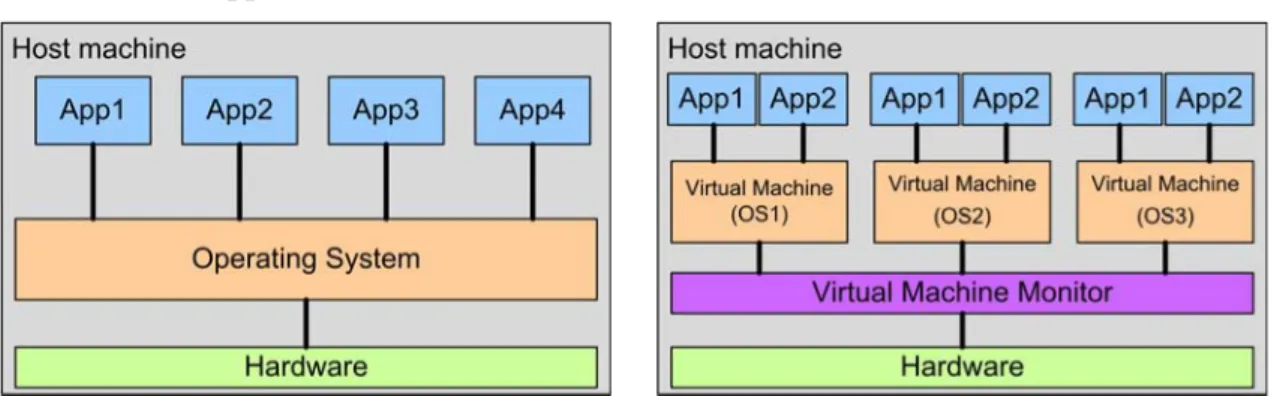
A typical non-virtualized computer system consists of a number of distinct layers as shown in Figure 38-a. These layers are:
1. The hardware of the machine.
2. The Operating System.
3. The user applications.
Figure 38 non-virtualized vs. virtualized systems
The Operating System usually runs in the supervisor-mode in which privileged instructions
(including those used to change the allocation or the state of a resource in the machine) and non-
privileged instructions can be executed. On the other hand, user applications run in the user-mode
in which only non-privileged instructions can be executed. The Operating System schedules
applications in timely manner and transfers control to the user application in turn after setting the
machine to run in the user-mode. Trying to execute a privileged instruction while running in the
user-mode, a user application will generate an interrupt which results in setting the machine to run
in the supervisor-mode and transferring control to the Operating System to handle the interrupt,
serve the application request, and pass the control back to the user application after setting the
machine to operate in the user-mode. In this way, the Operating System controls access to the
shared hardware resources of the machine [1].
System Virtualization adds on top of the hardware a new layer, referred to as the Virtual Machine Monitor [20], which provides the functions of all resources to a number of Virtual Machines that, instead of accessing the actual resources, will use these functions to run Guest Operating System instances [1]. The new arrangement enables sharing the resources of the host platform among the installed Virtual Machines as shown in Figure 38-b.
In the new architecture, the Virtual Machine Monitor runs in the supervisor-mode leaving the Virtual Machines to run in a less privileged operation mode. Any Virtual Machine trying to execute a privileged instruction will trap into the Virtual Machine Monitor which will emulate the execution of the instruction and return control back to it after modifying the operation mode. By this way, the Virtual Machine Monitor controls access to shared resources of the hardware platform. Applying virtualization in this way is known as virtualization through direct execution. It imposes a latency that is a function of the time required by the Virtual Machine Monitor to emulate executing a privileged instruction.
Implementing Virtualization requires special support for this technology on the hardware level especially the CPU in which the operation mode of the machine is set. A CPU with virtualization support is able to run the Virtual Machine Monitor in the highest privilege level, the Guest Operating System in a lower privilege level, and the user applications in the lowest privilege level.
When virtualization support is present at the hardware level of the host platform, the Virtual Machine Monitor is able to provide the functions of the below hardware to the Virtual Machines without any modifications required to the Guest Operating Systems running in them. This case is referred to as full virtualization. However, not all structures support this technology especially those which were not originally designed to do, the “x86” architecture for example. In the case of the x86 CPU, only two privilege levels are provided: supervisor-mode and user-mode. The Virtual Machine Monitor in this case will run in the supervisor-mode, while the Guest Operating System and the user applications will run in the user-mode. To make this combination work, some modifications need to be added inside the Guest Operating System. The new modifications are implemented by inserting virtual instructions that replace part of the original code used to access the system resources i.e. the Guest Operating System will be aware that it is running in a Virtual Machine. This approach is referred to as para virtualization and was originally introduced by with Xen [19].
The performance figure of para virtualization is higher than that of full virtualization since the
Guest Operating System is aware of the virtualized environment it is running in, and therefore can
be optimized for this type of environment. However, full virtualization environment enables
running the Guest Operating System unmodified which is suitable for running legacy applications
[1].
6-4
To preserve compatibility while providing high performance a new technology that combines direct execution and fast binary translation has been developed by VMware [18] [20]. A binary translator can run in the supervisor-mode patching unchangeable "x86" instructions. Rather than applying modifications to the Guest Operating System or applications, the binary translator applies changes when the code is first executed. The result is high performance Virtual Machine that maintains software compatibility.
Recently and during the time this project was ongoing, a new trend in designing the Virtual Machine Monitor called Kernel-based Virtual Machine (KVM) appeared [21]. In KVM, the Virtual Machine Monitor is developed as a new Linux subsystem that enables running a number o f Virtual Machines on top of the Operating System. The machines appear as normal Linux processes and integrate with the rest of the system.
Virtualization: pros and cons
Virtualization brings several advantages to the design of modern systems including:
- Better security implementation: applications with different security requirements can be run in separate Virtual Machines implementing the required security settings.
- Higher reliability and availability: Virtual Machines will be running separately on more reliable hardware specially designed to support Virtualization and the failure in one Virtual Machine does not affect the others.
- Cost saving: consolidating a number of smaller machines into a more powerful one means less space occupied, less administration cost, and less power consumption which will significantly reduce the cost of the whole system.
- Adaptability to workload variations: as the Virtual Machine Monitor monitors the load levels of all running Virtual Machines, it can shift resources and priority allocations to those witnessing intense workload.
- Load balancing: Virtual Machines can be migrated between platforms in order to improve performance by balancing the load of the different host machines.
- Legacy applications: it is possible to have legacy applications kept running in their native Operating Systems within Virtual Machines.
- Platform independency: the Virtual Machine Monitor provides the functions of the underlying hardware in a uniform way which enables running Virtual Machines on any available host machine.
- Ease of replication: brining new services online can be done with less effort and without disturbing the currently running services or having to restart the machine.
- Software distribution: software companies will be able to distribute their complex
software within pre-configured Virtual Machines environment.
However, a serious drawback of implementing Virtualization technology is that any software failure on the Virtual Machine Monitor level is catastrophic and will result in crashing all running Virtual Machines.
Implementation Considerations
Compatibility, performance, and robustness are essential design targets to be considered when designing a Virtual Machine Monitor. Compatibility is important since legacy software support is one of the advantages of implementing Virtualization. And high performance, reflected by minimum virtualization overhead, is significant to run the Virtual Machine at a speed as close to that when running the software on a real machine rather in a virtualized environment as possible.
Moreover, robustness is vital to ensure that the Virtual Machine Monitor is free of bugs that may lead to software failure or that attackers could use to compromise the system.
Virtual CPU
Being run on a machine with a CPU designed with virtualization support taken into account, a Virtual Machine Monitor can create and run full-virtualized Virtual Machines. As mentioned before, the Virtual Machine Monitor in this case will run in the highest privilege level letting the Guest Operating System run in a lower privilege level and the user application run in lowest privilege level.
However, when running a Virtual Machine Monitor on a machine with a CPU that does not include Virtualization support, para-virtualization or binary translation technology can be used to run the Virtual Machines.
Virtual Memory
The Virtual Machine Monitor maintains a shadow of the memory of the Virtual Machine management data structure which enables the Virtual Machine Monitor precisely control which pages of the memory of the Virtual Machine are available to it. Any changes done to the memory management data structure by the Guest Operating System will be detected by the Virtual Machine Monitor and the shadow structure is updated accordingly to point to the actual location in the hardware memory. The Virtual Machine Monitor can also page the memory of the Virtual Machine to a disk rather than allocating it to the hardware memory which brings the possibility of allocating memory size beyond the systems hardware memory size.
Since the amount of memory required by modern Operating Systems and applications is quite large, a new technology referred to as content-based page sharing has been developed to address this issue [20]. The Virtual Machine Monitor in this case compares the contents of the physical pages and when two pages are identical it modifies the shadow structures of the Virtual Machines' to point to one single copy and de-allocate the other copy erasing the memory for other use.
Content-based page sharing is most useful when the Virtual Machine Monitor has a large number
6-6
of Virtual Machines running the same Guest Operating System. In this case, only one copy of the kernel is placed in the physical memory with all entries in the shadow structure pointing to it.
Virtual I/O
The conventional I/O subsystem is relatively easy to be virtualized with very low virtualization overhead due to the use of channel-based architecture introduced by IBM [20]. However, the introduction of huge collection of new I/O systems and high performance graphic devices and network interfaces makes writing a Virtual Machine Monitor layer capable of virtualizing all these systems a huge effort.
X
EN™
Several choices were available at the time when we had to decide the virtualization technology to adopt in our system. Among them Xen was the most recent and promising technology for the future in addition to being free for use. So, the vote went for it [22].
Xen is a Virtual Machine Monitor (Hypervisor) that allows running several instances of different Operating Systems within Virtual Machines on a shared conventional hardware in a safe and resource-managed fashion [19]. It is intended for scaling up to approximately 100 Virtual Machines running industry standard applications. Xen has been designed with certain considerations taken into account: first, the Virtual Machines must be isolated from each other;
second, it should be possible to run different Operating Systems within the Virtual Machines to cover the diversity of popular applications; and third, the overhead imposed by Virtualization should be small. In Xen terminology, the Guest Operating Systems are called Domains with a special privilege given to Domain-0 in which the Hypervisor itself runs. This privileged domain will handle the resources provided to the running Virtual Machines.
Xen supports full and para virtualization modes. In full virtualization mode the Virtual Machines run on platforms that support virtualization such as the modern "x86" architecture. In such architecture, four distinct privilege levels (0 to 3) are available with the level-0 being the most privileged and the level-3 the least. While Operating Systems usually run in the most privileged level and user application run in the least privileged level, levels-1 and level-2 have generally not been used. Any Operating System that follows this approach can be ported to Xen by running it in level-1 instead of level-0 in which Xen runs.
Although Operating Systems can be run unmodified in the full virtualization mode where all
system resources are virtualized, in some situation it is desired for the Guest Operating System to
see real as well as virtualized resources. For example, providing real and virtual time allows the
Guest Operating System to better support time-sensitive tasks such as TCP timeouts. Para
virtualization mode, in which an abstraction layer that is similar but not identical to the underlying
hardware is presented, lets the Guest Operating System gain access to some real resources by
making calls into an API that is offered by Xen [22]. This API is mapped into the address space of each Guest Operating System resulting in reduced switching overhead between it and the Virtual Machine Monitor and consequently the performance figure is elevated. On the other hand, Xen elevates the performance figure of the Virtual Machine running in the full-virtualization mode by extending para virtualization into the device drivers of the Guest Operating System(Figure 39).
Figure 39 para virtualization in Xen (reproduced from [22])
KVM™
The appearance of KVM, the new approach in Virtualization, was enforced by the extensions added to the “x86” architecture to make virtualization easier. These extensions consist of a new guest operating mode, hardware state switch, and exit reason supporting [21]. The guest-mode joined the existing user-mode and the kernel-mode in Linux to enables running the CPU of the Virtual Machine collaboratively. The hardware switch handles special registers in the processor when switching to guest mode and back. The exit reason is necessary for the software to take the appropriate action when switching back from the guest mode.
KVM is structured as a typical Linux character device which exposes a new node (/dev/kvm) that can be used by the user-space for creating and running Virtual Machines. The operations provided by this node include:
- Creating a new Virtual Machine.
- Allocating memory for a Virtual Machine.
- Reading and writing from/to the registers of a Virtual Machine CPU.
- Generating an interrupt on a Virtual Machine CPU.
- Running Virtual Machines CPUs.
The memory of the Virtual Machine is separated from the user-space that created it; however,
its CPU is not scheduled on its own.
6-8
Tight integration into Linux brought benefits to KVM like the possibility to use existing functionalities within the kernel on the developer-level, and the ability to use Linux process management infrastructure to handle Virtual Machines on the user-level.
V
IRTUALIZATION IN LAYERED FASHIONAt a certain stage of the laboratory development we explored the possibility of using Virtualization in layered fashion in order to solve a scaling problem. Use of the technology in layered fashion (sometimes it is referred to as nested Virtualization [23]) became possible when the Virtual Machine Monitor supplied a CPU that also supports Virtualization to the Guest Operating System and this enabled running another Virtual Machine Monitor in the Virtual Machine. We could successfully adopt this approach in our system with KVM in the form illustrated in Figure 40.
Hardware resources Virtual Machine Monitor (VMM)
Virtual Machine Virtual Machine Monitor (VMM) Virtual Machine
Virtual Machine
Virtual Machine App App App App
App App
App App
Figure 40 Virtualization implemented in layered fashion.
N
ETWORKINGS
CENARIOS APPLIED TOV
IRTUALM
ACHINESBecause of the different requirements for the different subjects in ICT courses, one of the major features that we used and depended on is networking, i.e. the available solutions to interconnect the Virtual Machines running on one hardware platform among each other and with the external world.
It is very important to enable communication among the learner’s Virtual Machines; however, it is highly desired, for many reasons that we considered, that the devices the learners are working on be isolated from the external world. This does not mean that the Virtual Machines are not accessible from remote location since there are many scenarios where the learner’s machines use the TCP ports of the host platform to communicate with remote locations.
Virtual Machine Monitors have presented a number of scenarios to connect the Virtual
Machines [24] [25]. The common in all of these scenarios is that a Virtual Interface which is
bounded to one network interface in the Virtual Machine will be used to pass the traffic to/from this
network interface. The Operating System running on the host machine will use standard
mechanisms for bridging, routing, rate limiting…etc to handle the traffic to/from this Virtual
Interface. The pair consisting of the interface of the Virtual Machine and the Virtual Interface
bounded to it can be thought of as two Ethernet interfaces connected by an internal crossover cable
and will be assigned one MAC address. The Virtual Interface will usually be connected, through
software mechanisms, to one software-switch inside the host machine. This switch is a software
implementation of a Layer-2 switch that enables communication among the devices connected to its interfaces. This is visually represented in Figure 41.
Figure 41 the Virtual Interface and the Ethernet of the Virtual Machine as cross over cable (reproduced from [24])
When the software switch is bound to a physical interface in the host machine, the Virtual Machines connected to this software-switch will be able to communicate with the external world through that interface using their real addresses. This scenario is referred to as bridged-networking and it is visually represented in Figure 42. The software switch in this case will bind to the physical interface and distribute the traffic arriving at it among the connected Virtual Interfaces including that belonging to the host machine based on the L-2 addresses included in it.
Figure 42 Bridged Networking (reproduced from [24])
On the other hand, when the software-switch is not bound to a physical interface the Virtual
Machines connected to it are considered to be in a Virtual Local Area Network that can be totally
6-10
isolated from the external world, or may be connected with the external world in one of two ways:
1) IP masquerading or 2) Routing through a physical interface provided by the Virtual Machine Monitor as illustrated in Figure 43. In the case of the Virtual Local Area Network and depending on the implementation of the Virtual Machine Monitor, some Virtual Machine Monitors provide Dynamic Host Configuration Protocol DHCP service to the Virtual Machines.
Figure 43 Virtual LAN (reproduced from [24])
M
ANAGEMENTT
OOLSThere is a collection of tools that are designed for managing the Virtual Machines built with the technologies discussed so far. Some of these tools are command-line based like xm and virsh, while others are designed with a Graphical User Interface like virt-manager [26].
xm
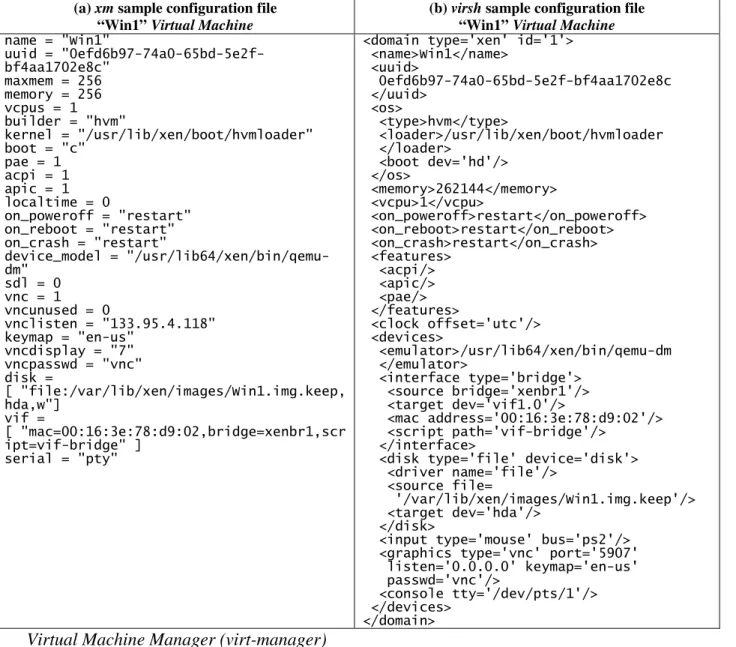
xm is the command-line management interface of Xen hypervisor that is used for installing and managing domains. It can also be used for configuring Virtual Machine access rights and security polices. The line command format used xm is “xm [options] command” where the command defines a specific function that the xm tool is required to perform like create, destroy, or list…etc. The tool also accepts a command-line argument that specifies a configuration file, a Python executable file, which lists all Virtual Machine properties and resources available to it. Sample configuration file for xm is shown in Table 7(a).
virsh
virsh is yet another command-line tool for managing Xen and KVM Virtual Machines but it is
based on libvirt virtualization API. The line command format is similar to that of xm “virsh
[options] [command [command-options]]” and it accepts a command-line argument that specifies an
XML file that lists all the Virtual Machine properties and resources available to it. A sample XML file that has been used with virsh is demonstrated in Table 7(b).
Table 7 xm and virsh sample configuration files for the same Virtual Machine
(a) xm sample configuration file
“Win1” Virtual Machine
(b) virsh sample configuration file
“Win1” Virtual Machine name = "Win1"
uuid = "0efd6b97-74a0-65bd-5e2f- bf4aa1702e8c"
maxmem = 256 memory = 256 vcpus = 1 builder = "hvm"
kernel = "/usr/lib/xen/boot/hvmloader"
boot = "c"
pae = 1 acpi = 1 apic = 1 localtime = 0
on_poweroff = "restart"
on_reboot = "restart"
on_crash = "restart"
device_model = "/usr/lib64/xen/bin/qemu- dm"
sdl = 0 vnc = 1 vncunused = 0
vnclisten = "133.95.4.118"
keymap = "en-us"
vncdisplay = "7"
vncpasswd = "vnc"
disk =
[ "file:/var/lib/xen/images/Win1.img.keep, hda,w"]
vif =
[ "mac=00:16:3e:78:d9:02,bridge=xenbr1,scr ipt=vif-bridge" ]
serial = "pty"
<domain type='xen' id='1'>
<name>Win1</name>
<uuid>
0efd6b97-74a0-65bd-5e2f-bf4aa1702e8c </uuid>
<os>
<type>hvm</type>
<loader>/usr/lib/xen/boot/hvmloader </loader>
<boot dev='hd'/>
</os>
<memory>262144</memory>
<vcpu>1</vcpu>
<on_poweroff>restart</on_poweroff>
<on_reboot>restart</on_reboot>
<on_crash>restart</on_crash>
<features>
<acpi/>
<apic/>
<pae/>
</features>
<clock offset='utc'/>
<devices>
<emulator>/usr/lib64/xen/bin/qemu-dm </emulator>
<interface type='bridge'>
<source bridge='xenbr1'/>
<target dev='vif1.0'/>
<mac address='00:16:3e:78:d9:02'/>
<script path='vif-bridge'/>
</interface>
<disk type='file' device='disk'>
<driver name='file'/>
<source file=
'/var/lib/xen/images/Win1.img.keep'/>
<target dev='hda'/>
</disk>
<input type='mouse' bus='ps2'/>
<graphics type='vnc' port='5907' listen='0.0.0.0' keymap='en-us' passwd='vnc'/>
<console tty='/dev/pts/1'/>
</devices>
</domain>
Virtual Machine Manager (virt-manager)
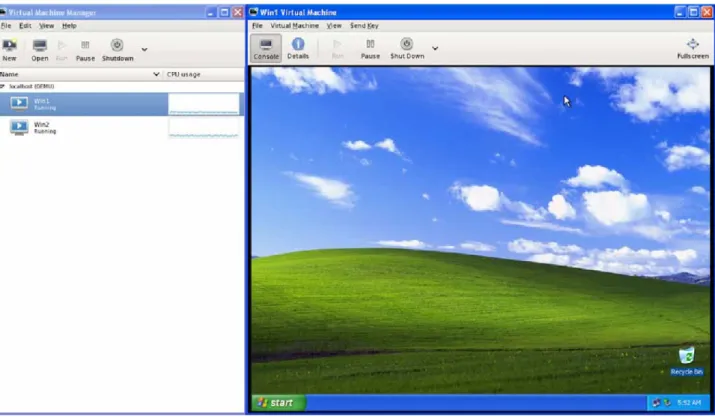
virt-manager is a tool that has been designed with a GUI that enables the user manage the Virtual Machines installed on the host platform and interact with their consoles as shown in Figure 44. This tool can be used with both Xen and KVM Virtual Machines and is able to deal with both formats of configuration files discussed before and provides the user with an interface to modify their contents as required.
V
IRTUALN
ETWORKC
OMPUTINGThe second technology that we largely depended on in our laboratory is the Virtual Network
Computing (VNC). It provides an entire computing desktop environment that can be accessed from
any device connected to the internet by running simple or generic software [2].
6-12
Underlying this technology is the Remote Frame Buffer (RFB) [27], a simple protocol designed for accessing Graphical User Interfaces remotely. As implied in the name, RFB works on the Frame-Buffer level which makes it applicable to Operating Systems with windowing sub-systems.
The simplicity of the protocol and independency of the Operating System are major factors that make Virtual Network Computing system so powerful and widely accepted.
Figure 44 virt-manager GUI (left) and one Virtual Machines console (right)
Virtual Network Computing is based on a client-server model in which the client is the end where user input/output take place; and the server is the end where the resources to be accessed are located and the changes to the frame buffer originate (Figure 45). The Server and the Client communicate over any reliable transport protocol such as TCP/IP through specified ports. Clients in Virtual Network Computing system are kept stateless i.e. either side of the system can close the connection at any time without undesired consequences. When a client is disconnected from a server the user interface state is preserved, and when later on the user reconnects to the same server he/she will continue from where they stopped.
The Virtual Network Computing protocol transfers data in three major message-types: display,
update, and input. A display message is used to put a rectangle of pixel data on a certain position on
the client's screen. Pixel data sent from the server can be encoded in many schemes with the so-
called raw encoding being the common one where pixel data is sent for a rectangle in left-to-right
scaling order. Update is the second message-type and is driven by user-demand, i.e. a frame buffer
update is sent in response to the client's request. All screen changes since the client's last request are
enclosed into a single update. The third message-type is input which is based on a standard
workstation model of a keyboard and a pointing device with multiple buttons. The client sends
input events to the server whenever the user presses a key or a pointer button, or moved the pointing device.
Establishing a server-client connection in Virtual Network Computing goes through 3 stages:
1. User authentication: this is done by using challenge-response scheme. In this phase the user is prompted to enter a password to login through system.
2. Parameter negotiation: in this phase, the server and the client will exchange message to agree on the desktop size, pixel format, and encoding schemes. Negotiation is done on a base that the server must be able to provide that data in the format the client wants;
however, if the client has the capability to handle different data formats, then it may choose the one easier for the server to produce.
3. Normal protocol interaction: in this phase the client can send whichever messages it wants and receive responses from the server.
Figure 45. The architecture of Virtual Network Computing
Figure 46 Client Applet as shown on the client machine
6-14
While writing a VNC-client is relatively a simple task since it is required to have reliable communication and pixel displaying capabilities, writing a VNC-server is harder because the protocol is designed to make the client as simple as possible. The server has been implemented in UNIX-based environments in a way that enables running a number of servers for different users with each representing a distinct Desktop. The Windows VNC-server simply mirrors the real display to the remote client i.e. only a single Desktop is available from any PC.
With the introduction of Java programming language, the server was implemented as an HTTP
server and the client became an Applet that can be displayed on any Java-capable web browser on
the client side (Figure 46). Communication between the web browser and the server appears over
TCP ports “5800+x” and “5900+x” where x is the Virtual Network Computing display number that
can be assigned to the user defined in the system.
D EVELOPMENT AND D EPLOYMENT E NVIRONMENT
We used Java programming language for writing the code of all components of the laboratory system because we owned certain level of language proficiency since the beginning. Java is used for developing both client-side and server-side applications. It has gained much popularity for many reasons such as portability, wide range of applicability, and support.
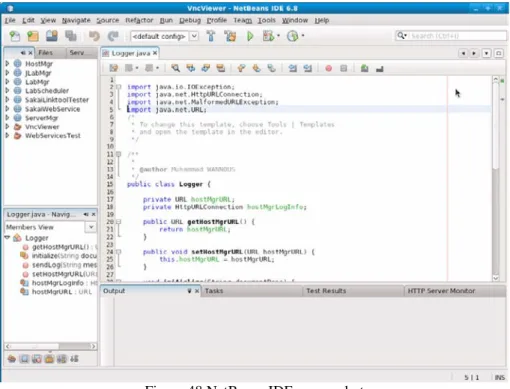
Many commercial and free Integrated Development Environments (IDE) support Java language and from them we selected Eclipse [28] and NetBeans [29] which are available for free. Besides helping the developer with code writing, they come with supplementary tools that ease managing the source files, deploying and testing web applications, and controlling web servers.
Figure 47 Eclipse IDE, screenshot
We used Eclipse IDE (sample screenshot in Figure 47) at the beginning of the project for developing the Java Applet and Servlets required for the work of the system. Later, we used it also for developing Sakai tool which we required at the stage when we linked the stand-alone laboratory with the CLE. In the third year of the project development we moved to NetBeans IDE (sample screenshot in Figure 48) which offers variety of compatible plug-ins and tools for developing Java and other language applications. However, most of Sakai developers use Eclipse and introduced a plug-in (appBuilder [30]) that makes building a new tool easier.
For testing and deployment, we decided to use Apache Tomcat [31], an open source Servlet
container developed by the Apache Software Foundation [32]. Apache Tomcat is developed in an
open and participatory environment, and is intended to be a collaboration of the best developers
6-16
from around the world. It is used to run numerous large-scale, mission-critical web applications across a wide range of industries and organizations.
Figure 48 NetBeans IDE, screenshot
When we decided to link our laboratory with one Course Management System we selected to apply this with Sakai Collaboration and Learning Environment [3]. Sakai has been selected for some specific reasons: 1) it is an open and freely available on the Internet; 2) it is evolving all the time and the number of organizations implementing it is increasing; 3) Sakai is written in Java language and deployed under Apache Tomcat and this would make our progress faster.
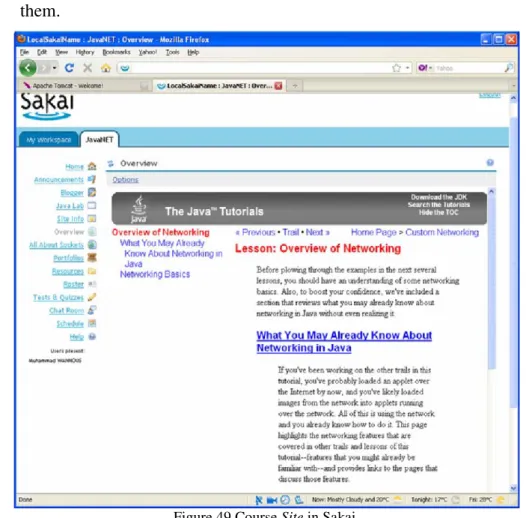
Courses in Sakai are created using Sites, and each Site is a workspace that has a number of tools available for all participants. Tools available in Sakai are of wide range to cover the students’ and faculty staff needs. These include: general collaboration tools (like resources), teaching and learning tools (like syllabus), portfolio tools (like reports), and administrative tools (like users). The instructor has the right to include the tools he/she sees necessary for conducting the various tasks within the course from the rich tool-pool of Sakai.
Figure 49 shows one course-Site titled JavaNET which uses the web-contents tool of Sakai for introducing some information related to Networking in Java from the website of Oracle [33]. We used this Site for demonstrating the way to use the laboratory activities within the course context.
For this purpose we depended mainly on the tools:
-
Portfolios for adding contents to the course by the instructors.
-
Web Contents for including related contents from external locations.
-
Resources for saving the course materials.
-
Linktool for linking to the external laboratory.
-
Tests and Quizzes for evaluating the learners’ progress and getting feedback from them.
Figure 49 Course Site in Sakai
Another application that we frequently used for troubleshooting the work of some parts of our project is Wireshark [34] which is a free and open source network protocol analyzer (sample screenshot is shown in Figure 50). Wireshark is widely used in industry and education for filtering packets that satisfy certain criteria. It helped us detect many problems while developing parts of the project that exchange data over the Internet and fix them later.
Figure 50 Wireshark, screenshot
6-18
![Figure 39 para virtualization in Xen (reproduced from [22])](https://thumb-ap.123doks.com/thumbv2/123deta/5681539.2012369/17.892.200.727.293.549/figure-para-virtualization-xen-reproduced.webp)
![Figure 41 the Virtual Interface and the Ethernet of the Virtual Machine as cross over cable (reproduced from [24])](https://thumb-ap.123doks.com/thumbv2/123deta/5681539.2012369/19.892.262.674.163.518/figure-virtual-interface-ethernet-virtual-machine-cross-reproduced.webp)
![Figure 43 Virtual LAN (reproduced from [24])](https://thumb-ap.123doks.com/thumbv2/123deta/5681539.2012369/20.892.263.674.260.613/figure-virtual-lan-reproduced-from.webp)