IEICE TRANS. INF. & SYST., VOL.E102–D, NO.9 SEPTEMBER 2019
1887
LETTER
APS: Audience Presentation System Using Mobile Devices
Haeyoung LEE†a),Member
SUMMARY It is not easy for a student to present a question or com- ment to the lecturer and other students in large classes. This paper intro- duces a new audience presentation system (APS), which creates slide pre- sentations of students’ mobile responses in the classroom. Experimental surveys demonstrate the utility of this APS for classroom interactivity.
key words: audience presentation system, response presentation system, mobile presentation system, classroom interactivity
1. Introduction
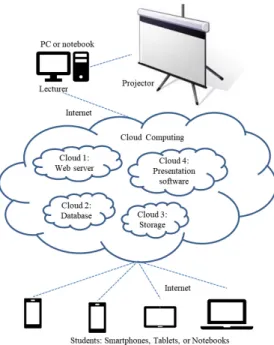
In a large class, the lecture is usually presented first, and then students ask questions later. Due to limited class time, it is hard for a lecturer to deal with the questions of every student. Moreover, the lecturer and most students may not clearly hear questions due to distance or quiet voices. This paper introduces a new audience presentation system (APS), which creates a classroom presentation using students’ mo- bile responses as shown in Fig. 1[1].
The advances in mobile technology have inspired vari- ous mobile learning systems such as: subject-related learn- ing systems[2], general-purpose response systems[3], or gamified response systems[4],[5]. Cloud computing has also been integrated into mobile learning systems[6]. How- ever, those previous systems have usually focused on in- teractive assessments in the classroom. Student questions were usually dealt with via individual communication be- tween the lecturer and the student. Also, student answers, mostly to multiple choice quizzes, were not displayed in the classroom. This APS facilitates sharing questions, or even answers of students with all participants in the classroom.
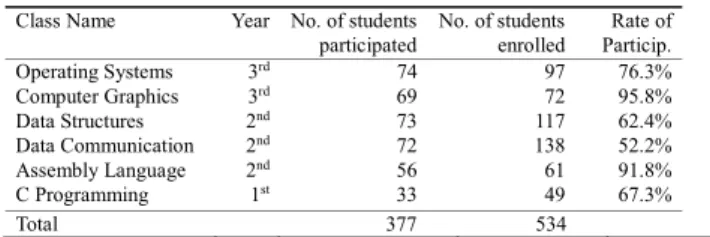
The experimental results show the effectiveness of the proposed APS. Table 1 and Table 2 show that it took about 8.3 seconds to create and present slides of up to 300 student responses after collecting them. Most lecturers and students surveyed, 91.7% and 75.7% on average, said this APS en- hanced their teaching or learning in the classroom as shown in Table 3, Table 4, and Table 5.
2. Audience Presentation System (APS)
By asking questions, students can enhance their learning Manuscript received March 22, 2019.
Manuscript revised May 21, 2019.
Manuscript publicized June 4, 2019.
†The author is with Computer Engineering Dept., Hongik Uni- versity, T703, 94 Wausan-ro Mapo-gu, Seoul, Korea.
a) E-mail: [email protected]
DOI: 10.1587/transinf.2019EDL8061
Fig. 1 Overview of the proposed APS: questions or comments from stu- dents’ smartphones will be shared as presentations in the classroom[1].
and a lecturer’s teaching[7]. This paper presents a new APS which provides a classroom presentation containing students’ mobile responses as shown in Fig. 1[1]. This APS enables a lecturer to collect and show every student’s re- sponse in a limited time in the classroom. This APS also helps students clearly present their questions or comments to the lecturer and to their classmates. Moreover, this APS can also be used in conjunction with previous learning sys- tems or teaching materials.
2.1 The Cloud-Based Architecture of the APS
Cloud-based computing systems provide users with reliable infrastructure, platforms, and application software free or at low cost. Furthermore, heterogeneous devices can easily be integrated into cloud-based computing[6]. The proposed APS also utilizes a web server, storage, a database, and a slide application in the cloud as illustrated in Fig. 2. This APS allows students to use any mobile device using an An- droid or iOS operating system. A lecturer can also use a Windows, macOS, or Linux PC. No additional work is re- quired for the lecturer or students to manage the APS.
2.2 The Implementation and Procedure of the APS Google Drive API v.3, Firebase database and hosting, and Google Slides were used to realize this APS. Web interfaces were programmed using HTML and JavaScript for a lec- turer’s PC and the students’ mobile devices[8].
Copyright c2019 The Institute of Electronics, Information and Communication Engineers
1888
IEICE TRANS. INF. & SYST., VOL.E102–D, NO.9 SEPTEMBER 2019
The procedure of this APS is summarized in Fig. 3.
First, the lecturer and students login to a website in the cloud[1]. The lecturer initiates the APS by clicking the
“START” button. Then the students can send responses us- ing their mobile devices, with keywords if applicable. Each student response is saved in the cloud database, Firebase.
Then Firebase sends a copy of each response to the lecturer’s PC. If the lecturer wants to deal with a question whenever it occurs, a button “VIEW” must be clicked. Each response
Fig. 2 The architecture of the proposed APS: mobile systems are inte- grated into cloud computing environments.
Fig. 3 The procedure of the proposed APS. The processes implemented by cloud computing are presented in ellipse. The green commands such as Start, View, and Stop are simple controls for a lecturer.
will be displayed immediately as an HTML page. Student responses are compiled, and a slideshow is started when the lecturer clicks the “STOP” button. All the responses are sent to Google Slides, which creates and saves a presentation file in the lecturer’s Google Drive. A slide is assigned to each student’s response respectively. The presentation file will be sent to the lecturer’s PC. Finally, a slideshow will be started in the classroom.
Optionally, anonymity can be maintained. Keywords and categorized responses can help the lecturer deal with important questions. Moreover, the lecturer can filter out inappropriate responses by previewing the responses.
3. Experiment
3.1 Processing Time of the APS
The averaged processing times for immediately viewing a mobile response (VIEW) are listed in Table 1. View- ing a message of 134 characters was tested during 5 trials on the iPhone 6S, Galaxy Note5, and Galaxy S4 respec- tively. The overall averaged time is 0.59 seconds per re- sponse. Table 2 also shows the averaged processing time for a slideshow (STOP). The time was averaged from 12 trials each for slideshows of 10, 30, 50, 100, and 300 responses:
Four trials for each slideshow in the morning, afternoon, and evening. A MacBook Pro and a MS Windows Note- book were used. The MacBook Pro has 2.5 GHz Intel Core i5 and 8 GB 1600 MHz DDR3. The Windows Notebook has IntelR CoreTM i7-7700HQ CPU 2.81 GHz and 16 GB RAM. For a presentation of 300 slides, the APS required 8.31 seconds on average. Therefore, the time for typing questions on smartphones, collecting, and presenting up to 300 mobile responses only takes a few minutes in the class- room.
3.2 User Survey
This experiment was conducted in the Dept. of Computer Engineering at Hongik University during the 2nd semester in 2018. As listed in Table 3, six professors volunteered to use the APS in their large classes. They kept the APS on and encouraged students to use the APS for questions and comments during their classes. About 74% of the students, on average, voluntarily used the APS.
An anonymous paper survey was conducted at the end of the semester. The following questions were given to the participants:
Table 1 Processing time for an immediate view of a response (VIEW)
Table 2 Processing time for a slideshow (STOP)
LETTER
1889 Table 3 Large classes volunteered to evaluate the APS
Table 4 Survey results of 6 lecturers
Table 5 Survey results of 377 students
a) What was the usage of the APS? (multiple choice) 1) quizzes 2) questions 3) comments 4) other ( ) b) How many times did you use the APS?
1) 1∼3 2) 4∼6 3) 7∼9 4) more than 10 times c) How hard was it to use the APS?
1) very easy 2) easy 3) ordinary 4) hard 5) very hard d) Does the APS help facilitate communication be-
tween the lecturer and students?
1) very helpful 2) helpful 3) ordinary 4) low 5) no e) Does the APS help your teaching or learning?
1) very helpful 2) helpful 3) ordinary 4) low 5) no Participants were given the option to write comments about this APS, if they had any.
3.3 Discussion
The survey results are listed in Table 4 and Table 5. The positivity indicates the rate of positive replies of 1) and 2) to questions c), d), and e). The highly positive results illustrate that this APS enabled students to actively contribute to the class through various interactions.
As shown in Table 4, 91.7% of the lecturers surveyed said that the APS helped their teaching and enhanced their communication with students. Most lecturers wrote that the APS significantly reduced students’ fear and annoyance of asking questions in front of others and encouraged shy stu- dents to present their responses actively. Some lecturers in- dicated that they would like to be able to collect responses before or after class with advanced GUIs, which resulted in relatively low easiness 66.7% in survey c).
As listed in Table 5, most students surveyed, about 77%
on average, were satisfied with the APS. There was no sig- nificant difference in the survey results of students by class
or year. In survey a) about usage, a student checked the fourth option “4) other” and stated that the APS was used by some students to answer their lecturer’s questions during the class. Students stated that the advantages of the APS are:
Without interrupting the class, students could present ques- tions or comments. Anonymity allowed them to ask more questions including potentially invalid ones, without fear.
Students could also clearly see other students’ questions, answers, or comments. Students also stated that they bet- ter understood the lecture thanks to the responses other stu- dents presented. Some students indicated that they wanted to be able to retrieve their messages later to check or modify them.
This survey shows that this APS enhances teaching and learning through clearly presenting and sharing student re- sponses as a slideshow in the classroom.
4. Conclusion
A new APS is introduced in this paper. This APS enables a lecturer to share students’ mobile responses as a presen- tation. The experiment verified the utility of this APS. Fu- ture research will focus on enhancing message management.
The improved APS will enable student responses to be col- lected and retrieved in any time as well as during class.
Acknowledgments
The author would like to thank the 6 professors and 377 students in Computer Engineering at Hongik University for their advice on the proposed APS. The author would also like to thank Weonjoon Choi at SunnyGraphy in Korea for his assistance with cloud computing.
References
[1] https://response-slide.com, accessed May 20. 2019.
[2] W.-H. Wu, Y.-C.J. Wu, C.-Y. Chen, H.-Y. Kao, C.-H. Lin, and S.-H.
Huang, “Review of trends from mobile learning studies: A meta-anal- ysis,” Computers & Education, vol.59, no.2, pp.817–827, Sept. 2012.
[3] M. Fuad, D. Deb, J. Etim and C. Gloster, “Mobile response system: a novel approach to interactive and hands-on activity in the classroom,”
J. of Education Tech Research and Dev, vol.66, no.2, pp.493–514, April 2018.
[4] H. Lee, “A practical system for instant 3D games using quizzes,”
IEICE Trans. Inf. & Syst., vol.E99-D, no.2, pp.424–434, Feb. 2016.
[5] C.M. Barrio, M. Mu˜noz-Organero, and J.S. Soriano, “Can gamifica- tion improve the benefits of student response systems in learning?
An experimental study,” IEEE Trans. Emerging Topics in Computing, vol.4, no.3, pp.429–438, July-Sept. 2016.
[6] H.T. Dinh, C. Lee, D. Niyato, and P. Wang, “A survey of mo- bile cloud computing: architecture, applications, and approaches,”
Wireless Communications and Mobile Computing, vol.13, no.18, pp.1587–1611, Dec. 2013. https://doi.org/10.1002/wcm.1203 [7] P.A. Almeida, “Can I ask a question? the importance of class-
room questioning,” Procedia - Social and Behavioral Sciences, vol.31, pp.634–638, 2012. https://doi.org/10.1016/j.sbspro.2011.12.116 [8] H. Lee, “SmartUI: resource-saving and editable smartphone user
interface for fast remote PC control,” IEICE Trans. Inf. & Syst., vol.E99-d, no.7, pp.1852–1861, July 2016.
![Fig. 1 Overview of the proposed APS: questions or comments from stu- stu-dents’ smartphones will be shared as presentations in the classroom [1].](https://thumb-ap.123doks.com/thumbv2/123deta/5630327.1500942/1.892.484.798.283.541/overview-proposed-questions-comments-smartphones-shared-presentations-classroom.webp)