* 愛知工業大学 基礎教育センター(豊田市)
ムードルでESLシングルトピックユニットの作成
Creating ESL Single-Topic Units in Moodle
Bruce Vorland *ブルース ボーランド
Abstract: This paper will discuss how Single-Topic Units can be created in Moodle using various modules. Although the initial time investment is considerable, once created a completed unit is very easy to update, correct, add to, and embellish. Moodle single-topic units are easily shared and used with other courses. Select pages of an example Single-Topic Unit will be shown and explained. The example unit can be seen at http://www.studypage.org/doodle/.
1. Introduction
A single-topic unit is a collection of learning activities and assignments that are all based on one topic and can be used to supplement other courses. Having activities based on one topic repeatedly exposes students to the same vocabulary and expressions in various but yet similar contexts. Repetition and reinforcement help students become more comfortable with the topic, and they can be encouraged to ‘use’ English rather than ‘study’ in the learning activities.
To the students in a topic it is important to make a variety of activities and make use of images, audio, and video. The author has found that Moodle, a free open source Course Management System, is very suitable for this. The many Moodle modules allow for the creation of a variety of activities using audio and visual elements and the immediate feedback in the form of scores and teacher responses that can be written into the activities can boost students’ confidence by helping them to evaluate their own progress. Moodle also has extensive student/group tracking and score analysis systems that are very useful to the teacher both for improving activities and grading.
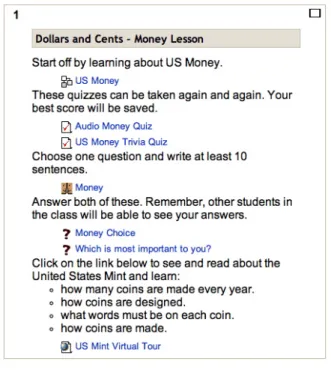
1.1 Using Moodle to create a Single-Topic Unit The author has created an example single-topic unit in Moodle based on US money using some of the most useful modules. (See fig.1) The unit is relatively simple
Figure 1: Example Single-Topic Unit
on its surface but some of the activities are quite involved. The unit begins with an activity created using the Lesson module followed by two quiz activities
created with the Quiz module. The Forum module is used to make a writing activity and students are polled using the Choice module. Finally, students are given a link to a topic-related site using the Link resource. These modules will be explained individually and select pages will be shown.
2. The Moodle Single-Topic Unit
2.1Using the Moodle Lesson Module
The Moodle Lesson Module is an ideal way to introduce new material to a student because the module allows the teacher to control a student’s path through the lesson by allowing the lesson creator to determine the order in which students see the pages. Students cannot reach the end of the lesson without completing each of the steps that the teacher has decided to include.
Figure 2: Linear Progression with Branch
Also, a lesson can be constructed in such a way that students must correctly answer one or several questions about earlier content before being allowed to proceed on to further content. Students who indicate through incorrect answers that they do not understand the content can be sent on a different path. One option is to simply send these students to an earlier page to review the content and then answer the same question(s). However, this may not help all students who are struggling with
the content. With the lesson module another, more effective, option is to add an entirely new branch with more detailed content and questions to further test the understanding of the content. The branch could have one page or an entire series of pages. (See fig.2)
There are many uses of branches in the lesson module. In a lesson on restaurants, for example, students could be asked if they want to learn more about the custom of tipping. If they answered ‘no’ they would just continue on the main path of the lesson but if they answered ‘yes’ they would be sent off on a branch that explains the custom in detail. One can imagine that a Moodle lesson with 10 pages of content and 20 questions/choices could provide students with quite a variety of lesson paths.
Figure 3: US Money Lesson
The example lesson, US Money, (see fig.3) is made up of 18 unique pages, 10 of which are questions. A perfect score is 30 points with simple questions allotted fewer points and difficult questions allotted more. The primary goal of this lesson is to teach students to recognize US bills and coins and learn their respective values.
The teacher has a number of settings options when using the lesson module. As do most modules, there are settings for controlling when the lesson can be accessed and how many times. The example lesson is set so that students can take it up to ten times with only the highest score being counted. The time limit setting is disabled to encourage re-takes and the ‘minimum number of questions’ is set to 10 so students must answer all the questions in the lesson.
Figure 4: US Money Lesson Content Page
In the US Money lesson, the second page (See fig.4) is a content page followed by two multiple-choice questions to check the students’ understanding of that content. The first of these is a question asking what countries use dollars and cents. (See fig.5) This is
Figure 5: US Money Lesson Question #1
considered incidental information and not crucial to the student when continuing the lesson so students answering incorrectly will merely see a teacher response and continue on the main lesson path with 0 points for the question. (See fig.6) The second question checks whether students understand that there are one hundred cents in one dollar. In this lesson this is considered to be crucial information so students who give incorrect answers will be sent to a page that re-explains the information and then back to the second question.
Figure 6: Money Lesson Teaching Question
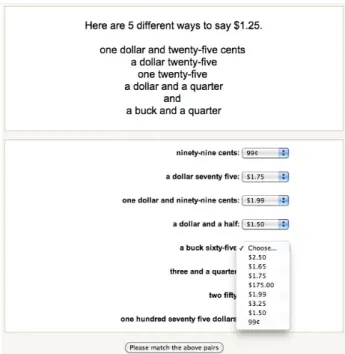
Content can also be presented in question form. In a matching-type question (See fig.7) students are shown some content and then asked to match up a number of dollar amounts. The content is introduced in this way to impress upon students the fact that, in English, there are several ways to express the same dollar amount.
Figure 7: Money Lesson Teaching Question
A number of questions have photos of various combinations of US currency and the students are asked to choose the correct dollar value. The questions become increasingly difficult as more currency is introduced. Incorrect answers in the earlier questions will send students to ‘hint’ pages with pictures of coins and their respective names and values.
Figure 8: Money Lesson - Counting Question
2.2 Using the Quiz Activity Module
The Quiz Activity Module helps a teacher test what a student knows or has learned. With the module’s quiz report capabilities a teacher can see quiz scores and detailed results either for individuals or for an entire class. A carefully crafted quiz followed by attention to the quiz report statistics can give the teacher useful insight into what students do and don’t understand about the subject matter. For the student, there is the advantage of immediate feedback that the quiz activity affords. With thoughtful teacher responses entered for correct and incorrect answers, students can have a better understanding of their own strengths and weaknesses.
Quizzes can also be used for learning, practicing and reviewing. For example, the quiz activity could be set up as a daily or weekly listening practice. Quizzes can easily be used as review activities because questions can be shared by more than one quiz. A quiz activity is easier and quicker to set up than a lesson activity and gives the teacher almost double the question-type choices.
In Moodle, questions are created in the question bank where all the questions for a course are stored. When a new quiz is made, individual questions chosen from the question bank are assigned to the quiz. It is also possible to assign a question category to a quiz and have Moodle choose a set number of random questions from that category for each student or for each attempt. This system used along with question and answer shuffling can ensure that students will see different quizzes.
It is probably best to not rely too much on Moodle quizzes for grading purposes. The possibilities for taking advantage of the system are many, ranging from the sharing of quiz questions and answers between students to students having someone else take the quiz for them. Because of this, perhaps the quiz activity is best used as a tool for teachers and students to keep an eye on progress and as forced learning activities.
2.2.1 A Quiz Using Audio
In the example single-topic unit on US Money there are two quizzes. The first is a ten-question quiz which is set to display one question per page. Each question is worth one point for a total of ten points. Questions become more difficult as the quiz progresses so questions are set to appear in the same order each time but the answer choice order is set to shuffle on re-takes. This quiz is meant to be a learning quiz so students can make unlimited attempts and only their best score will be counted.
Students can submit an answer for one question and immediately find out whether the answer was correct or not. If the answer is incorrect they can choose another answer to submit. However, this quiz is set so that there is a penalty of 0.3 for each incorrect answer. In other words, when students get the answer correct on the first try they get the full one point, but if they get the answer correct on the third try they will be penalized 0.6 for their first and second incorrect answers and their score will be 0.4 for that question. When students know that a quiz is set for unlimited-attempts and for highest-score they will often re-take the quiz until they get a perfect score.
In the example Audio Money Quiz, multiple-choice questions with both written and audio elements are used. In earlier questions the audio sentences are very similar
to the written sentences. In question #2 (see fig.9) what students hear is identical to the written sentence except for a different dollar amount. In other questions the sentence structure is the same but the words are different.
Figure 9: Audio Quiz Question #2
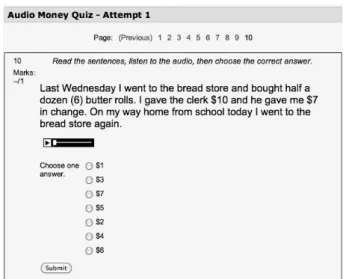
As more expressions and vocabulary are introduced the questions become longer and more difficult. In question #10 (see fig.10) the student is introduced to the word ‘dozen’ and the phrases ‘half a dozen’ and ‘$7 in change.’ Clicking on the audio bar, students will hear
Figure 10: Audio Quiz Question #10
“This time I bought a dozen butter rolls. I gave the clerk $10. How much change did he give me?” Students will have to deduce that because the change was $7 dollars when they gave the clerk $10 that the cost of half a dozen butter rolls is $3. Based on that, they must deduce that a dozen is probably double ‘half a dozen’ and so the dozen butter rolls cost $6 and the change should be $4. In answering this question English has become just a
tool to solve a problem and students are improving their language skills through use.
2.2.2 A Trivia Quiz
The second of the two quizzes is called US Money Trivia Quiz. The aims of this quiz are to introduce vocabulary along with some interesting facts about US money and, again, to get the student to use English as a tool.
Figure 11: Audio Quiz Question #2
The settings are similar to the audio quiz. In this quiz students are not expected to know the answers beforehand but are expected to learn the answers by re-taking the quiz until they get a satisfactory score. The student will learn during the process of considering the question, choosing an answer and then reading the teacher’s responses.
In question #1 (See fig.11) students are made to think about how long paper money lasts in circulation. The question introduces and teaches the phrase ‘average life span’ through example rather than definition. Students are expected to guess the meaning of a phrase they encounter for the first time by considering the context.
In question #2 students are asked to consider what animal would weigh about the same as $1,000,000 in one-dollar bills. (See fig.12) The teacher response to the incorrect answer, in this case ‘a pig’, will give them the additional hint of how much a pig weighs in $1 bills. With this hint they will have a better chance at guessing correctly on the second try.
Figure 12: Trivia Quiz Question #5
Figure 13: Trivia Quiz Question #7
In question #7 of the Trivia Quiz students may be seeing some vocabulary words for the first time. (See fig.13) “Shield’ is not a common English word but
students should be able to guess the meaning because of the context. The words ‘bald eagle’ were introduced in an earlier question but there was no image, so this image should act as reinforcement. The teacher response (see fig.14) gives additional information that helps to explain why an unlucky number would appear so many times on US currency.
2.3 Using the Forum Module
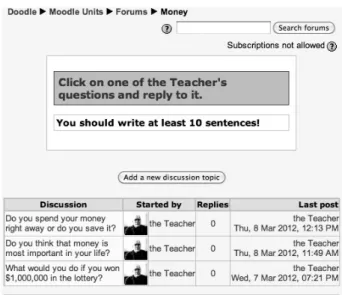
After students have become acquainted with the topic they can be encouraged to practice their writing skills. The Forum Module is ideal for this and can also add a sense of community to the unit with students sharing and reading other students’ opinion. There are several forum types available in Moodle. One type is better for having students write on one topic. Another is a Q and A type forum. For the example unit the ‘standard forum for general use’ was used because the teacher wanted to give the students a choice of questions to answer but still keep all the students in the same forum. Students can choose from three money-related questions and are asked to write at least 10 sentences on the subject. (See fig.15)
Figure 15: Forum Questions
It is important for students to understand that in forums there is only a 30-minute window of opportunity to edit after posting. Students should be encouraged to
read what others are writing. One method is to require that students also comment on a certain number of other postings.
2.4 Using the Choice Module
The Choice activity is used to poll students on a chosen topic and is easy and quick for the teacher to set up. It invites students to share their opinions and to see how their opinions compare with those of their peers. The text can be in the form of a question or a statement and students can be given any number of replies to choose from.
A set of choice questions could be used at the end of the unit to generate feedback for the teacher. One question could ask which part of the lesson was the most interesting, listing the different parts of the unit as choices. Another could ask which was the least interesting. This is an easy one-click method for students to provide the teacher with important feedback.
There are various settings and options to choose from. There are the usual time-limitation settings but also settings that determine when a student sees the results and whether the results are anonymous or not. Yet another setting can allow students to change their choice.
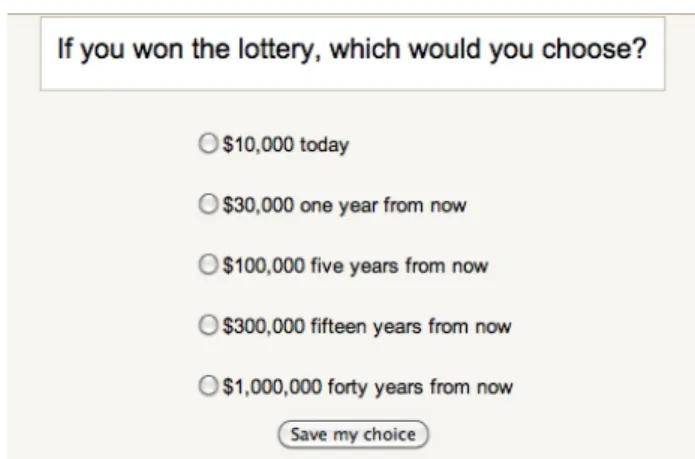
Figure 16: Choice Question #1
The example single-topic unit uses the choice activity to ask a question about how students would prefer to collect their lottery winnings. (See fig.16) The example choice activity is set to show students the full results, showing both names and choices, but only after they have submitted their own choices. Because the results
will be public, the choice activity is set so that students can change their choice.
2.5 Using Links
The link resource in Moodle can be used to link other sites to the Single-Topic Unit. In the example unit on US Money there is a single link to the US Mint Virtual tour at usmint.gov; a huge site with a plethora of pages including everything from educational activities to an online shop. Instead of sending students to a large site just to ‘look around’, a specific page in the educational section of the site was chosen as the target page. A short write-up (see fig.17) prepares the student for what to expect and what to look for. In the example lesson the student is only asked to go the site but the students could be asked to find specific information on the linked site as well.
Figure 17: Link Resource
In the example unit the links were set to open in a new window and the size of that window was set so that it would be an appropriate size for the screen of the virtual tour.
3. Conclusion
By using images, audio, and video in various Moodle modules, teachers can create single–topic units that engage students in the topic and in the language, encouraging students to use English as a tool. Making a single-topic unit in Moodle is very time consuming but the benefits are many. It is easy for teachers to collaborate in the making of units which, once completed, are very easily shared with other Moodle users to supplement various courses. Finally, all of the statistics, student tracking, and feedback that Moodle affords can help teachers both when following their students’ progress and when updating, adding to, and improving the unit.
References 1) Moodle.org documentation
<http://docs.moodle.org/en>
2) Rice, William. “Moodle Teaching Techniques” Packt Publishing. 20 September 2007
3) Smith, Nash. Susan and Rice, William. “Moodle1.9 Teaching Techniques” Packt Publishing. 20 January, 2010 4) Stanford, Jeff. “Moodle 1.9 for Second
Language Teaching”
Packt Publishing. 30 October, 2009
5) Rice, William. “Moodle 2.0 E-Learning Course Development”
Packt Publishing. 25 August, 2011