Supporting Ubiquitous Learning
by Linking Physical Objects and Videos
Toru Misumi, Hiroaki Ogata, Yoshiki Matsuka, Moushir M. El-Bishouty and Yoneo Yano Dept. of Information Science and Intelligent Systems, Faculty of Engineering, University of Tokushima, Japan
Abstract: This paper proposes a personal learning assistant called LORAMS (Link of RFID and Movies System), which supports the learners with a system to share and reuse learning experience by linking movies and environmental objects. These movies are not only kind of classes’ experiments but also daily experiences movies. LORAMS can infer some contexts from objects around the learner, and search for shared movies that match with the contexts. We improved two functions of the pervious version of LORAMS. One function is to compare the learner’s video with the video of a similar situation. By this function, the learner can notice her/his good and bad actions. The other function is to allow the learner to add video annotations. By this function, the learners can obtain information that it’s difficult for them to understand from only the video. We think that these videos are very useful to learn various kinds of subjects. We did an experiment (cooking), and we investigated the effect of using the video comparison. Then, we got the result that the learner’s performance of doing a task using this comparison system is better than before.
Keywords: Ubiquitous Learning, RFID tag, multimedia, richmedia, comparison
Introduction
Ubiquitous computing [1] will help organize and mediate social interactions whenever and wherever these situations might occur [9]. Its evolution has recently been accelerated by improved wireless telecommunications capabilities, open networks, continued increases in computing power, improved battery technology, and the emergence of flexible software architectures [15]. With those technologies, CSUL (Computer Supported Ubiquitous Learning) is realized, where an individual and collaborative learning in our daily life can be seamlessly included.
One of the most important ubiquitous computing technologies is RFID (radio frequency identification) tag, which is a rewritable IC memory with non-contact communication facility [4]. This cheap, tiny RFID tag will make it possible to tag almost everything, replace the barcode, helps computers to be aware of their surrounding objects by themselves, and detect the user’s context [3].
We assume that almost all the products will be attached with RFID tags in the near future, where we will be able to learn at anytime at anyplace from every object by scanning its RFID tag.
The fundamental issues in CSUL are
(1) How to capture and share learning experiences that happen at anytime and anyplace.
(2) How to retrieve and reuse them for learning.
As for the first issue, video recording with handheld devices will allow us to capture learning experiences. Also consumer generated media (CGM) services such as YouTube [http://www.youtube.com/] help to share those videos. The second issue will be solved, by linking the objects in a video with RFID tags so that the system can recommend the videos in similar situations to the situation where the learner has a problem. In addition, the learning will be improved by comparing the video of the learner’s experience with the video of a similar situation.
This paper proposes LORAMS (Linking of RFID and Movie System) for CSUL. There are two kinds of users in this system. One is a provider who records his/her experience into videos. The other is a user who has some problems and retrieves the videos. In this system, a user uses his/her own PDA equipped by RFID tag reader and digital camera, and links real objects with the corresponding objects in a movie and shares it among other learners. Scanning RFID tags around the learner enables us to bridge the real objects and their information into the virtual world. LORAMS detects the objects around the user using RFID tags, and provides the user with the right information in that context.
As for related works, there are two kinds of educational applications using RFID tags. The first type is the applications that can identify the objects on a table and support face-to-face collaboration. For example, EDC (Envisionment and Discovery Collaboratory) [2] and Caretta [17] consist of a sensing board and objects with RFID tags such as house, school, etc. Detecting objects on the table enables the systems to show the simulation such as urban planning. Also TANGO (Tag Added learNinG Objects) system supports learning vocabularies [11][12][13][14]. The idea of this system is to stick RFID tags on real objects instead of sticky labels, annotate them (e.g., questions and answers), and share them among others. The tags bridge authentic objects and their information into the virtual world.
The second type is the applications that can detect the learner’s location using RFID tags that allows the system to track the learner’s positions and to send the right messages to the learner. eXspot [7] is an example of this type of application, which is designed for museum educators, it can capture the user’s experiences at a museum for later reflection. This system consists of a small RFID reader for mounting on museum exhibits, and RFID tag for each visitor. While using RFID, a visitor can bookmark the exhibit s/he is visiting, and then the system records the visitor’s conceptual pathway. After visiting the museum, the visitor can review additional science articles, explore online exhibits, and download hands on kits at home via a personalized web page.
In this way, RFID is very useful for identifying objects precisely. LORAMS system utilizes the full advantage of RFID to capture, share and reuse personal experiences for ubiquitous learning.
1. LORAMS
1.1 Features
The characteristics of LORAMS are as follows:
(1) Learner’s experience is recorded into a video and linked to RFID tags of physical objects. The video can be shared with other learners.
(2) When the learner up-loads the video, it will be automatically encoded with the server.
(3) Learners can find suitable videos by scanning RFID tags and/or entering keywords of physical objects around them.
(4) The learner can compare the video of a similar situation with the learner’s video. (5) All learners can freely add the annotation to videos.
There are three phases for LORAMS as follows: (1) Video recording phase.
(2) Video search phase. (3) Video replay phase.
A) Normal Replay (NR)
B) Comparing Multi Replay(CMR)
Video recording process needs PDA, RFID tag reader, video camera and wireless access to the Internet. First, the user has to start recording video at the beginning of the task. Before using the objects, the user scans RFID tags and the system automatically sends the object data to the server. This data recorded in the database with timestamp. The user scans RFID tags again when the user finishes using the object. The user repeats the previous procedure until finishing the task. After completing the task, the user uploads the video file to the server. Then, the server automatically starts encoding the video file. After encoding, the user inputs some personal information.
On the other hand, video search and replay processes need PDA, RFID tag reader, and Web browser. The learner scans RFID tags around him and/or enters some keywords, then the system sends them to the server and shows the list of the videos that match the objects and/or the keywords.
1.2 User Interface
In recording phase, the learner sets up the information for the RFID reader such as port number and code type. At the beginning of the task, the learner inputs the user name and pushes on “Send” button (1). Then, the learner pushes on “Start-Read” button at the same time that recording starts (2). When you read RFID tags, the data will be automatically stored in the server. As shown in the right side of figure 1, the RFIDs are linked to thevideo.
In the search phase, as shown in figure 2, the user scans RFIDs and/or enters keywords in (B), then the images of the scanned objects will be automatically displayed at the top of
Figure 1: The interface of the recording phase (left) and video timeline (right).
Figure 2: The interface of index page (left) and retrieval results (right).
the page as shown in (A). Also, the system will display the retrieval results in the right side of figure 2. In (C), the system recommends the videos according to the evaluation from learners. It is easy to recognize the content of the video from its thumbnail.
Figure 3: The interface of Normal Replay
The video can be replayed using Flash 8 player as shown in figure 3. The list of the used objects in the video is displayed in (D). By drugging & dropping the icon shown in (E) on the screen, all learners can freely add the annotation to the video. And, the system automatically retrieves similar situations to learner’s video in (F). In figure 4, two videos are replayed to make a comparison. In (G), a bar shows when and what objects the learner is using.
1.3 System configuration
Figure 4: The interface of Comparing Multi Replay.
We have developed LORAMS, which works on a Fujitsu Pocket Loox v70 with Windows Mobile 2003 2nd Edition, RFID tag reader/writer (OMRON V720S-HMF01), and WiFi (IEEE 802.11b) access. RFID tag reader/writer is attached on a CF (Compact Flash) card slot of PDA. The tag unit can read and write data into and from RFID tags within 5 cm distance, and it works with a wireless LAN at the same time. The LORAMS program has been implemented using Embedded Visual C++ 4.0, PHP 5.2.0, Perl 5.8.8 and Flash 8. Figure 5 shows the system configuration.
The video is played according to following mechanism:
1) The player (A) sends a unique ID of the video to the server.
2) XML conversion module (B) receives the video ID and extracts video information from the database (C) and converts it into XML formats.
3) The XML file is passed to the player, then the file is analyzed using ActionScript. 4) When the player (A) receives the video information, the video file will be
downloaded. Because the file is downloaded by the progressive download method, it is possible to replay while downloading it.
Figure 5: System configuration
1.4 Recommend method of similar situation with the learner’s video
The following algorithms are used in LORAMS to look for a video which contains a similar situation to the learner's video. There are two criteria. One is to consider the rate of the same objects, while the other is to calculate the similarity of the order of the objects, as follows:
1) The videos are listed according to the rates of the same objects in the different videos. 2) If the rates of 1) are the same, then the videos are listed according to the similarity of
the order of the objects.
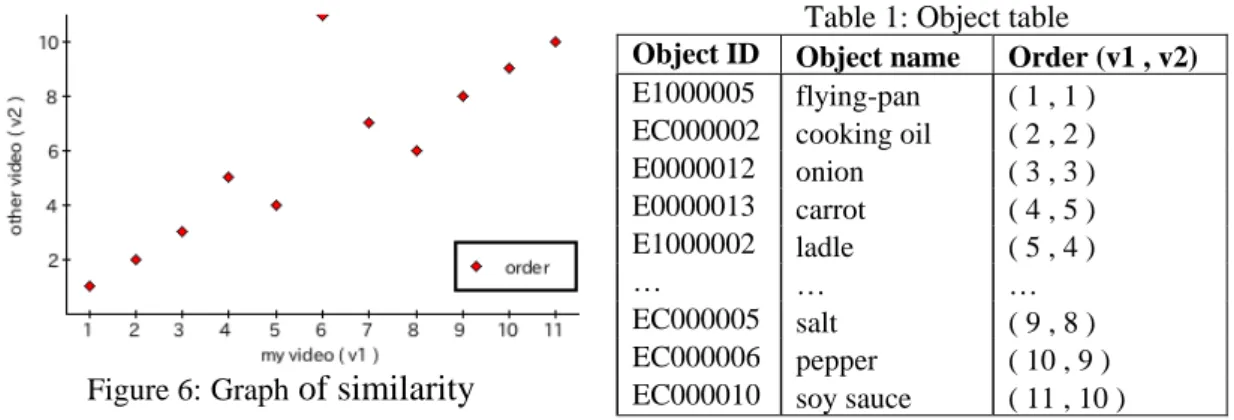
We use “Kendall’s rank correlation coefficient” in the second algorithm. To apply this algorithm, we selected common objects of two videos. The common objects are re-numbered according to the order in which the objects were used. Then, the algorithm is applied to the set as shown in Table 1. And, the learner can visually confirm the similarity in the graph as shown in Figure 6.
Figure 6:Graph of similarity
Table 1: Object table
Object ID Object name Order (v1 , v2) E1000005 flying-pan ( 1 , 1 )
EC000002 cooking oil ( 2 , 2 ) E0000012 onion ( 3 , 3 ) E0000013 carrot ( 4 , 5 ) E1000002 ladle ( 5 , 4 )
… … …
EC000005 salt ( 9 , 8 ) EC000006 pepper ( 10 , 9 ) EC000010 soy sauce ( 11 , 10 )
2. Experimentation
We investigated the effect of using the video comparison. The task was cooking a fried rice. The cooking method, utensil and ingredient vary from person to person, therefore we
think that cooking is a suitable task for the evaluation process.
2.1 Experimentation design
Twenty-one students from the department of computer science in the University of Tokushima were involved in the experiment. These 21 people were divided into groups A (11 people) who were experts in cooking and groups B (10 people) who were beginners.
We assume that learner is cooking at home and shoots a video by himself. Therefore, the camera is fixed and captures at hand activity. It is difficult for learners to cook fried rice while scanning RFID tags. So, in this evaluation, an operator was scanning RFID tags for the learner. In the future, if the RFID reader becomes smaller, it will be easy for the learner to read the RFID tags by himself. The left side of figure 5 shows an actual appearance.
Figure 7: Appearance of the experiment (left) and a part of the ingredients and tools (right)
The learner can freely cook and select various utensil and ingredients. We prepared 8 kinds of seasonings, 17 kinds of ingredients and 5 kinds of utensil. The right side of figure 5 shows a part of the ingredients.
2.2 Result
After the experiment, all students filled in a questionnaire. They gave a rate from 1 (the worst) to 5 (the best) as an answer for each question. The result is shown in table 2. The average (Avg.) and standard deviation (SD) for the learners’ answers are illustrated.
Table 2: Results of the questionnaire
No. Questionnaire Avg SD
Q1 Does the LORAMS serve as a reference in cooking? 4.3 0.59
Q2 Did you get the new knowledge by using LORAMS? 4.3 0.47
Q3 Are you able to recognize your mistake and the difference with others by watching
the video that the system offered? 4.6 0.62
Q4 Is it easy to compare multi replay? 4.1 0.86
Q5 Which learning method is easy to learn, comparison multi replay or normal replay? 4.1 0.93
Q6 Can you notice your mistake by using LORAMS? 4.6 0.51
Q7 Do you want to make some studies use of LORAMS in the future? 4.4 0.71 Q8 Do you want to share your learning experience with others? 4.0 1.00 Q9 How about the taste of the fried rice that you made? 3.1 0.94
The learner watched and compared other learners’ videos by using the system after cooking. And some learners cooked again later. Consequently, the learner who had made
the same kind of fried rice had a tendency to become skillful. Some learners were stimulated to other learners' video, and challenged a different kind of fried rice.
According to Q7 and Q8, almost everyone wants to use LORAMS as a learning assistance. By contrast, they are not enthusiastic about sharing videos. This result can be understood from the followings reasons.
- “I am ashamed to share clumsy videos.”
- “I want to share videos after improving my cooking.”
Table 3: Number of replay
Group Replay NR Avg. CMR Avg.
A 205 157 11.3 48 4.4
B 367 316 31.6 51 5.1
Total 572 473 22.5 99 4.7
Table 4: Reflection points (A) Timing in which egg in put (B) Timing in which vegetable is put (C) Stir-fried time
(D) How to handle frying-pan (E) Smoothness of work
…
According to Table 3, the total replaying were 572 in two days. It shows that the learners have a deep interest in the experience videos. Table 4 is a part of the reflection points that the learner obtained by the comparison. It seems that there are three types of reflection point. The first is timing such as (A) and (B). The reflection point of this type can be get from the timeline. The second is time such as (C). This can be get from the timeline, too. The last is the actions such as (D) and (E). The reflection point of this type is obtained by comparing the video. Timing and actions are important in the cooking. This result shows that the learners are able to learn the important point by using LORAMS.
Figure 8 shows an example of the comparison. This is a timeline of an expert learner in cooking (upper) and the learner who has scorched the fried rice (bottom). We can notice two points that should be paid attention from the timeline. First, this learner takes longer time to finish up the cooking compared with the period (A) of the expert learner. Second, the learner spent longer time than the expert, without putting anything in the frying pan in (B). Expert is regularly putting the ingredients. The temperature of the frying-pan falls by putting the foodstuff. Therefore, the time that this learner spent without putting the foodstuff in frying-pan caused to scorch it. Figure 9 shows the timeline of the learner before using LORAMS (upper) and after using it (bottom). The learner becomes good cooker after using LORAMS.
Figure 8: Example of the comparison.
Figure 9: before using LORAMS (upper), after using LORAMS (bottom)
4. Conclusion
This paper proposes a ubiquitous learning environment called LORAMS (Link of RFID and Movies System), which supports the learners with a system to share and reuse learning experience by linking movies and environmental objects.
In future work, we will enhance the user interface, improve the recommendation method, and allow the learner to add more annotation on the video. This experiment only examined whether the system was able to be applied to the cooking. So, we will be firmly evaluated on the study side in the future. Moreover, we will apply to other domains such as the personal computer assembling and car maintenance.
In addition, we will develop a desktop gadget that supports awareness in cooperation with LORAMS.
References
[1] Abowd, G.D., and Mynatt, E.D. (2000): Charting Past, Present, and Future Research in Ubiquitous Computing, ACM Transaction on Computer-Human Interaction, Vol.7, No.1, pp.29-58.
[2] Arias, E., Eden, H., Fischer, G., Gorman, A. and Scharff E., Beyond Access (1999): Informed Participation and Empowerment. Proceedings of (CSCL '99), pp 20 - 32.
[3] Borriello, G. (2005): RFID: Tagging the World, Communications of the ACM, vol.48, No.9, pp.34-37. [4] Brown, J. S., Collins, A., and Duguid, P. (1989): Situated Cognition and the Culture of Learning.
Educational Researcher, (Jan.-Feb.), pp.32-42.
[5] Davis, M. (1993): An Iconic Visual Language for Video Annotation. , in Proceedings of IEEE Symposium on Visual Language, pp. 196-202.
[6] Fischer, G. (2001): User Modeling in Human-Computer Interaction, Journal of User Modeling and User-Adapted Interaction (UMUAI), Vol. 11, No.1/2, pp.65-86.
[7] Hsi, S. and Fait, H. (2005): RFID Enhances Museum Visitors' Experiences at the Exploratorium. Communications of the ACM. Special Issue on RFID, September, Vol. 48, No. 9, pp.60-65.
[8] Kawamura, T., Fukuhara, T., Murata, S., Takeda, H., Kono, Y., Kidode, M. (2005): Ubiquitous Memories: Associating Everyday Memory with Real World Objects using a Touching Operation, The Institute of Electronics, Information and Communication Engineers Vol.J-88-D-I ’No.7’ pp.1143-1155. [9] Lyytinen, K. and Yoo, Y., “Issues and Challenges in Ubiquitous Computing”, Communications of ACM,
Vol.45, No.12, pp.63-65, 2002.
[10] Nagao, K., Shirai, Y., and Squire, K. (2001): Semantic Annotation and Transcoding: Making Web Content More Accessible, IEEE MultiMedia, Vol. 8, No. 2, pp.69-81.
[11] Ogata, H., and Yano, Y. (2003): Supporting Knowledge Awareness for a Ubiquitous CSCL, Proc. of E-Learn 2003, pp.2362-2369.
[12]Ogata, H., and Yano, Y (2004): Knowledge Awareness Map for Computer-Supported Ubiquitous Language-Learning, Proc. of IEEE WMTE2004, pp.19-26.
[13] Ogata, H., and Yano, Y (2004): Context-Aware Support for Computer-Supported Ubiquitous Learning, Proc. of IEEE WMTE2004, pp.27-34.
[14] Ogata, H., Akamatsu, R. and Yano, Y. (2004): Computer supported ubiquitous learning environment for vocabulary learning using RFID tags, Proc. of Workshop on TEL (Technology Enhanced Learning). [15] Sakamura, K. and Koshizuka, N. (2005). Ubiquitous Computing Technologies for Ubiquitous Learning.
Proceeding of the International Workshop on Wireless and Mobile Technologies in Education, Japan, IEEE Computer Society, pp. 11-18.
[16] Smith, J. R. and Lugeon, B. (2000): A Visual Annotation Tool for Multimedia Content Description, in Proceedings of SPIE Photonics East, Internet Multimedia Management Systems, Vol.4210, pp.49-59. [17] Sugimoto, M., Hosoi, K., Hashizume, H. (2004): Caretta: A System for Supporting Face-to-face
Collaboration by Integrating Personal and Shared Spaces, in Proceedings of CHI2004, pp.41-48.
[18] Yamamoto, D., Nagao, K. (2005): Web-based Video Annotation and its Applications, Journal of the Japanese Society for Artificial Intelligence, Vol.20, No.1, pp.67-75.