Abstract--This paper describes an online markup-based collaborative writing environment system called CoCoAJ (Communicative Collection Assisting System for Java). It allows authors and editors to exchange marked-up documents via Internet, and its environment is very similar to a real world one in which people use pen and paper. In order to record and exchange corrected compositions with marks and comments, this paper proposes XCCML (eXtensible Communicative Correction Mark-up Language), that is based on XML (eXtensible Mark-up Language). XCCML facilitates editors to analyze and reuse the marked-up documents for the instruction.
Index terms-- CSCW, collaborative editing, computer assisted language learning, XML, online proofreading
I. INTRODUCTION
Recently, editor-centered instructional approaches in traditional writing classrooms are replaced with more active and author-centered learning approaches with collaborative writing tools (Bonk et al, 1995). These tools can (1) change the way authors and editors interact; (2) enhance collaborative learning opportunities; (3) facilitate class discussion; and (4) move writing from solitary to more active and social learning. Writing compositions includes various sub-processes such as planning, transcribing, and revising, which do not need to occur in any fixed order (Scardamalia & Berieter 1986). In particular, the review process assisted with computer-based writing tools, has recently received much interest (see as examples (Kehagia
& Cox 1997; Coniam 1997)).
Many researchers developed online markup systems employing some markup models. However, it is very difficult to analyze and reuse the marked documents that are collected through the writing classroom because the documents do not have a common structure. Therefore, it is necessary to define the generalized format for encoding and exchanging the marked-up documents in order that online markup systems are used easily and widely.
CoCoA (Communicative Correction Assistant system) has been developed for supporting foreigners and editors to
Dept. of Information Science and Intelligent Systems, Faculty of Engineering, Tokushima University, 2-1, Minamijosanjima, Tokushima 770-8506, Japan
exchange marked-up documents by e-mail (Ogata et al., 1997). Its environment is very similar to a real one in which people use paper and pen. CoCoA allows editors not only to correct the compositions sent from foreigners by E-mail, but also foreigners to see where and why the editor had corrected them. CoCoA improves the opportunities that foreigners have for writing Japanese compositions and for receiving instructions from editors. CCML (Communicative Correction Mark-up Language) (Ogata et al., 1998) has also been proposed for the representation of marked-up documents, which is based on SGML (Standard Generalized Mark-up Language) (Herwijnen, 1990). With CCML, editors and authors can exchange marked-up documents via e-mail (Ogata et al., 1999, Ogata et al., 2000). In the experimental use of CoCoA, most of users commented that CoCoA was easy for them to understand the mistakes in documents because of the use of marks, and that the optional view of the original, marked or revised text was very useful. However, CoCoA cannot show users a hypermedia document including figures, tables, movies and links because it deals with only text.
This paper tackles how to correct hypermedia documents by the extension of CoCoA. This paper proposes CoCoAJ (CoCoA for Java) to do so. Also this paper describes XCCML (eXtensible CCML) for correcting hypermedia documents, that are based on XML (eXtensible Markup Language). XCCML is combined CCML with HTML (Hyper Text Markup Language) that can represent hypermedia documents including pictures, movies, audios and so on.
We have been investigating technological support for Japanese language learning among overseas authors. For example, CAI systems called Kanji Laboratory (Hayashi & Yano 1994), JUGAME (Yano et al. 1993), GRACILE (Ayala & Yano 1995) and JULLIET (Ochi et al. 1996) were developed to support Japanese language learning. However, an on-line mark-up supporting system for Japanese language learning has not yet been proposed. Usually, in a Japanese writing classroom, editors have to individually review authors’ documents using pen and paper (Sato et al. 1994). It takes a lot of time for editors to do this. Therefore, we have implemented CoCoA for writing Japanese composition.
Computer Supported Online Correction
for Collaborative Writing
Hiroaki Ogata, Yoshiaki Hada and Yoneo Yano
, Member, IEEEII. ONLINE MARKUP MODELS
There are some editing systems that support editors to review and correct the authors’ drafts with online mark-up. Farkas & Poltrock (1995) classified the mark-up models as followings:
A. Silent editing model
This is the simplest model and it requires no special techniques. However, it is very difficult for the author to check the editor’s work. This model is destructive because the editor cannot readily recover the original words once he/she has changed it.
B. Comment model
This model employs pop-up notes, temporary footnotes, hidden text, and special symbols placed within the text. This model can work for special groups and ad-hoc situations. A system called XyWrite (Kincade & Oppenheim 1994) was proposed with this model.
C. Edit trace model
In this model, the editor works in the manner of an author, deleting, adding, and moving text as usual. The computer can compare the editor’s new version with the original text, and allows the author to view the draft that contains the editor’s changes. This model is apt to encourage heavier editing and less regard for the author’s original text. Microsoft Word accepts this model.
D. Traditional mark-up model
This adapts the traditional paper mark-up model to the computer screen. The symbols are both familiar and intuitive for editors and authors; for example, deletion, insertion, and move. For instance, Red Pencil allows the editor to apply a complete set of traditional editing symbols directly to a document. The editor uses “digital ink” to mark a traditional editing symbol along with the words. Moreover, MATE (Hardock et al. 1993) allows the editors to use both digital ink and voice command toward pen and voice computing. In this model, authors and editors can interpret the editor’s markings much more readily than in the edit trace model.
There are many systems that employ traditional mark-up that allows multiple users to mark-up an electronic document as if they were marking up a printed copy of the document. However, such systems do not globally come into practical and wide use in composition writing classes because of their special format. Moreover, it is very difficult to analyze and reuse the marked documents because the marked documents are unstructured. Therefore, the system should provide a generalized and structured format for encoding and interchanging marked- up documents via the Internet.
III. XCCML
Based on the experimental results, we propose XCCML for exchanging marked-up documents. XCCML is an
application of XML, and it supplies a formal notation for the definition of generalized mark-up languages. XML is a device- and system-independent method of representing texts in electronic form. That is to say, XML is a set of mark-up conventions used together for encoding texts. A mark-up language must specify what mark-up is allowed, what mark-up is required, how mark-up is to be distinguished from text and what the mark-up means.
A. Features of XCCML
The main characteristics of XCCML are:
(1) Based on the experiment, XCCML presents six marks and annotation XCCML tags.
(2) The marks have three degrees of importance levels against respective corrections.
(3) The original text is generated by removing all the XCCML tags.
(4) The revised text is derived from the XCCML document.
(5) Because XCCML documents are text-formated, it is easy to send them by e-mail.
(6) CCML documents easily make up a full-text databases.
Needless to say, XCCML inherits its features from XML. B. XCCML structure
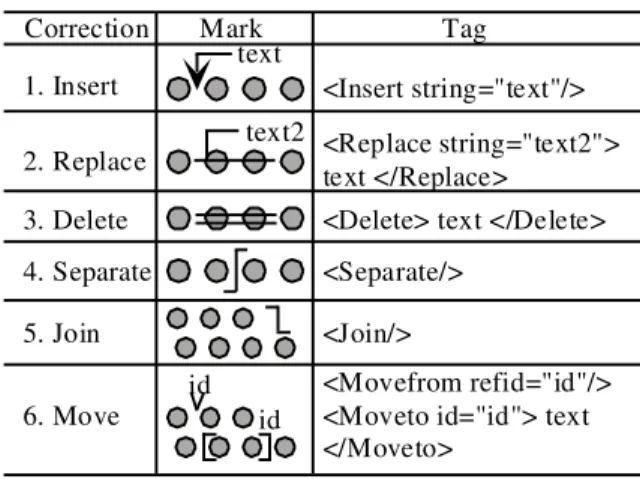
As shown in table 1, XCCML documents consist of three parts: header, body and close. “Leader” represents additional information about the document. For instance,
“Next” tag denotes the next version of the document. The marks for review are shown in the “Body” as XCCML tags.
“Close” shows the editor’s comments. In one sentence,
“Insert,” “Replace” and “delete” marks were used, while
“Join,” “Separate” and “move” marks were used over two sentences. The part between the start tag and the end tag denotes the author’s mistakes. The “String” attribute represents the revised part of the document.
Table 1: Marks and XCCML tags.
Correction 1. Insert
text
<Insert string="text"/>
2. Replace 3. Delete 4. Separate 5. Join
6. Move
text2 <Replace string="text2"> text </Replace>
<Delete> text </Delete>
<Separate/>
<Join/> id
id
<Movefrom refid="id"/>
<Moveto id="id"> text
</Moveto>
Mark Tag
C. Level of marks
We found that the marks do not have the same level of importance. We identify corrections on the following levels:
(1) Weak correction: The author does not need to revise the document.
(2) Normal correction: The author should correct the document.
(3) Strong correction: The author must correct the document.
The strong corrections denote the important part of marks to be revised in the document. Using the importance level that the editor had entered, the system provides the author with the marks he/she wants to see. Therefore, the author can avoid information overload from the reviewed documents. Every tag in table 1 has an attribute “Level” that a editor gives a number from one to three. Its default is two as normal correction.
D. Level of annotations
It is very important for a editor to annotate the marked text for instruction in composition. For example, PREP Editor (Neuwirth et al, 1996) is a word processor that allows writers and reviewers to create electronic margins, or columns, in which they can write and communicate through their annotations. We identify the following different kinds of annotations:
(1) Explanation: This is used for explaining the reason of a correction.
(2) Question: This is used for asking the author a question; e.g., what do you want to write?
(3) Comment: This shows the educational view of the editor with respect to the document.
IV. COCOAJ
CoCoAJ consists of CoCoAJ_Editor and CoCoAJ_Viewer. An editor corrects the document of authors with CoCoAJ_Editor and the system saves the marked document in XCCML format. CoCoAJ_Viewer interprets the XCCML document, and shows the author the marked document.
A. Collaborative writing processes using CoCoAJ By using CoCoAJ, an author receives instruction about a Japanese composition from a editor with the following processes:
(1) The author writes an original text with his/her familiar editor.
(2) The author sends the document to his/her editor with his/her own e-mail tool.
(3) CoCoAJ_Editor makes the document double-spaced. The editor corrects the document with online marks and annotations. Then, the system allows the editor to set the importance level to the marks in the document.
(4) After CoCoAJ_Editor saves the marked text as a XCCML document, the editor sends it to the author by e-mail.
(5) CoCoAJ_Viewer provides the author with the marked text after interpreting the XCCML document. Then, the system allows the author to select the importance level to see the important part of the marked text. (6) CoCoAJ_Viewer automatically generates both the
original text and the revised one from the XCCML document. After editing the revised text, the author can send it again to the editor and continue refining the text.
(7) CoCoAJ maintains the version of the document, if the author wants to revise the same document.
B. System configuration
Figure 1 depicts the system configuration of CoCoAJ. (1) XCCML parser: This module analyzes XCCML
documents using the XCCML parser after reading them through the file management module. Then, it provides the results of correction according to the level of importance of marks.
(2) Correction module: This module inserts XCCML tags into the author’s document, according to the revision of the editor. After saving the marked text, the editor sends it by e-mail to the author.
(3) Original text display module: This module generates the original text from the XCCML document by removing all the XCCML tags.
(4) Revised text display module: This module generates the revised text by applying XCCML tags.
(5) File management module: This module manages the versions of the documents. When the author sends the editor the revised document, the system creates a new XCCML document, inserts the “Next” tag into the old XCCML document, and also enters the 菟 revious” tag into the new XCCML document.
Editor module Mailer XCCML converter
XCCML Parser
CoCoA-J Editor
XCCML Parser XCCML converter
Viewer module Mailer
CoCoA-J Viewer HTML/Text
XCCML XCCML HTML/Text
JavaMail Editor module Mailer
XCCML converter
XCCML Parser
CoCoA-J Editor
XCCML Parser XCCML converter
Viewer module Mailer
CoCoA-J Viewer HTML/Text
HTML/Text HTML/TextHTML/Text
JavaMail
Figure 1: System configuration of CoCoAJ.
C. User interface
Figure 2 shows the screen snapshot of CoCoAJ-Editor. First, the author writes compositions with a word processor and saves the document as HTML format. After that, the author sends the document to the editor by e-mail. By selecting a mark from the mark palette shown in the upper window, the editor can revise the document. Moreover, the editor can annotate the document using the annotation palette, and he/she can classify the marks according to the level of importance. The user can see the correcting document at the left side in the window and “*” means the user inserted the comment. The user can see the comments for the correction at the right side in the window. In this figure, the editor substitutes “Allow” with “Allows” and gives a comment “*2”. Also the editor can see the original document and revised one by selecting window tag. After saving the marked document as a XCCML (see
appendix C), the editor can send it to the author by e-mail. Using CoCoAJ-Viewer, the author obtains the same marked text that the editor revised. By selecting the level of importance, CoCoAJ_Viewer provides only the marks over the level. The author can reply to the editor’s comments and collaboratively write compositions with the editor.
V. CONCLUSIONS
This paper proposed a computer-mediated collaborative- writing system called CoCoAJ and XCCML for exchanging electronic marked-up documents. Now we are trying to propose XCCML to W3C (World Wide Web Consortium), and to show an XCCML document into Web browsers. After that, CoCoAJ will be able to be used for writing any language. In our future research, we will investigate how to classify users’ writing errors in their drafts, and how to assist a review process with AI technologies.
Revi s ed mar ks Level of i mpor t anc e Comment s
Figure 2: Screen snapshots of CoCoAJ_Editor.
VI. ACKNOWLEDGMENT
This research was supported in part by the Grant-in-Aid for Scientific Research (B) (2) No.09558017, No.09480036, and No.09230214 from the Ministry of Education, Science, Sports and Culture in Japan.
VII. REFERENCES
[1] Ayala, G. & Yano, Y. (1995). “GRACILE: A framework for collaborative intelligent learning environments”, Journal of the Japanese Society of Artificial Intelligence, vol.10. no. 6. pp.156-170. [2] Bonk, J. C. & King, S. K. (1995). “Computer conferencing and
collaborative writing tools: Starting a dialogue about author dialogue,” 1995 Proc. of Computer Supported Collaborative Learning.
[3] Brock, N. M. (1995). “Computerised text analysis: Roots and research,” Computer Assisted Language Learning, vol.8, no.2-3, pp.227-258.
[4] Coniam, D. (1997) “A computerised English language proofing cloze program,” Computer Assisted Language Learning, vol. 10, no. 1, pp.83-97.
[5] Farkas K. D., & Poltrock, E. S. (1995). “Online editing mark-up models, and the workspace lives of editors and writers,” IEEE Trans. in Professional Communication, 38(2), pp.110-117.
[6] Hardock, G., Kurtecbach, G., & Buxton, W. (1993). “A marking based interface for collaborative writing,” Proc. of the ACM Symposium on User Interface Software Techonogy, pp.259-266. [7] Hayashi, T., & Yano, Y. (1994). “Kanji Laboratory: An
environmental ICAI system for Kanji learning,” IEICE Trans. on Information and Systems, E77-D(1), pp.80-88.
[8] Herwijnen, E. (1990). Practical SGML, Kluwer Academic Publishers.
[9] Kehagia, O. & Cox, M. (1997). “Revision changes when using word processors in an English as foreign languages context,” Computer Assisted Language Learning, vol. 10, no. 3, pp.239-253. [10] Kincade, D. & Oppenheim, L (1994) “Marking it up as we go
along: Into editorial production’s electronic future,” Journal of Scholarly Publishing, Vol. 25, No. 3, pp.233-242.
[11] Matsumoto, Y, Kitauchi, A., Yamashita, T., Hirano, Y., Imaichi, O. & Imamura, T. (1997) “Japanese Morphological Analysis System ChaSen Manual,” Nara Institute of Science and Technology Technical Report NAIST-IS-TR 97007. (in Japanese)
[12] Neuwirth, M. C., & Wojahn, G. P. (1996). “Learning to write: Computer support for a cooperative process,” CSCL: Theory and practice of an emerging paradigm, Koshmann, T. (Ed.), Lawrence Erlbaum Associates, Publishers, pp.147-170.
[13] Ochi, Y., Yano, Y., & Hayashi, T. (1996). “JULLIET: Interactive learning environment for Kanji compounds learning,” Proc. of Educational Multimedia and Hypermedia 1996, pp.539-544. [14] Ogata, H. and Yano, Y. (1997). CoCoA: Communicative
Correction Assisting System for Composition Studies, Proc. of ICCE 97, pp.461-468.
[15] Ogata, H. , Yano, Y., and Wakita, R. (1998). CCML: Exchanging Marked-up Documents in a Networked Writing Classroom, International Journal of Computer Assisted Language Learning, Vol.11, No.2, pp.201-214.
[16] Ogata, H., Feng, C., Hada, Y., and Yano, Y. (1999). Computer Supported Proofreading Exercise in a Networked Writing Classroom, Proc. of ICCE 99, Vol.1, pp.414-417.
[17] Ogata, H. , Feng, C., Hada, Y. and Yano, Y. (2000). Online Markup Based Language Learning Environment, International Journal of Computers & Education, Vol.34, No.1, pp.51-66. [18] Sato, M., Kano, C., Tanabe, K., & Nishimura, Y. (1994).
Practical Japanese Compositions, Bonjin-sya. (in Japanese) [19] Scardamalia, M., & Bereiter, C. (1986). “Research on written
composition,” M. Wittrock (Ed.), Handbook of research on teaching (third ed.), Macmilian, pp.778-801.
[20] Schwind, B. C. (1995) “Error analysis and explanation in knowledge based language tutoring,” Computer Assisted Language Learning, vol.8, no.4, pp.295-324.
[21] Shimano, H. (1986). Handbook of proofreading, Miki Publishers, Japan, in Japanese.
[22] Yano, Y., Miyoshi, K., & Hayashi, T. (1993). “Development of a game style environmental ICAI system for Kanji idiom learning,” Proc. of International Conference on Computers in Education ’93, pp.411-413.
[23] Yano, Y., Ogata, H., Sakakibara, R., & Wakita R. (1997).
“CoCoA: Communicative correction assisting system for learning Japanese compositions”, Transactions of Japanese Society for Information and Systems in Education, vol. 14, no.3, pp.21-28. (in Japanese)
Appendix A:XCCML tags. (1) Root tags
Tag name Explanation Attribute Attribute’s contents End tag XCCML Beginning of XCCML tag Version Version number </XCCML>
Head Header information None </Head>
Body Corrected document None </Body>
Close Overall comments None </Close>
(2) Tags in header section
Tag name Explanation Attribute Attribute’s contents End tag
Title Title of the document String Title name None
Editor People who corrected the document
Name Name of the editor None
Email Email address Author People who write the
original document
Name Name of the author None
Email Email address (3) Tags in body section
Tag name Explanation Attribute Attribute’s contents End tag
Insert Insert words String Inserted words </Insert>
Level Level of importance
Comment Comment for the
correction
Replace Change words String Corrected words </Replace> Level Level of importance
Comment Comment for the
correction
Delete Delete words Level Level of importance None
Comment Comment for the
correction
Separate Separate a paragraph Level Level of importance None
Comment Comment for the
correction
Join Join paragraphs Level Level of importance None
Comment Comment for the
correction Moveto Moved position from the
original spot
Fromid ID None
Comment Comment for the
correction Movefrom Original position of the
words
Toid ID </Movefrom>
Level Level of importance
Annotate Comment for the
correction
String Annotation contents None Level Level of importance
(4) Tags in close section
Tag name Explanation Attribute Attribute’s contents End tag
Comment Overall comment None None Necessary
Appendix B: XCCML DTD.
<?xml encoding="Shift_JIS"?>
<!ELEMENT XCCML (HEAD, BODY, CLOSE?)>
<!ATTLIST XCCML version CDATA #IMPLIED>
<!-- The part of Header -->
<!ELEMENT HEAD (Title|Author|Editor)>
<!ELEMENT Title (#PCDATA)>
<!ELEMENT Author (#PCDATA)>
<!ELEMENT Editor (#PCDATA)>
<!ATTLIST Title string CDATA #REQUIRED>
<!ATTLIST Author name CDATA #REQUIRED email CDATA #REQUIRED>
<!ATTLIST Editor name CDATA #REQUIRED email CDATA #REQUIRED>
<!-- The part of BODY -->
<!ELEMENT BODY (#PCDATA | Insert | Replace | Delete | Separate | Join |MoveFrom | MoveTo | Annotate | Format)*>
<!ELEMENT Insert (EMPTY)>
<!ELEMENT Replace (#PCDATA | Insert | Replace | Delete | Separate | Join |MoveFrom | MoveTo)*>
<!ELEMENT Delete (#PCDATA)>
<!ELEMENT Separate (EMPTY)>
<!ELEMENT Join (EMPTY)>
<!ELEMENT MoveTo (EMPTY)>
<!ELEMENT MoveFrom (#PCDATA | Insert | Replace | Delete | Separate | Join |MoveFrom | MoveTo)*>
<!ELEMENT Anotate (EMPTY)>
<!-- ATTLIST CCML Writer VALUE DEFAULT -->
<!ATTLIST Insert string CDATA #REQUIRED level (1 | 2 | 3)
"2"
comment CDATA #IMPLIED>
<!ATTLIST Replace string CDATA #REQUIRED level (1 | 2 | 3)
"2"
comment CDATA #IMPLIED>
<!ATTLIST Delete level (1 | 2 | 3) "2" comment CDATA
#IMPLIED>
<!ATTLIST Separate level (1 | 2 | 3) "2" comment CDATA #IMPLIED>
<!ATTLIST Join level (1 | 2 | 3) "2" comment CDATA
#IMPLIED>
<!ATTLIST MoveTo fromid CDATA #REQUIRED level (1 | 2 | 3)
"2"
comment CDATA #IMPLIED>
<!ATTLIST MoveFrom toid CDATA #REQUIRED level (1 | 2 | 3)
"2">
<!ATTLIST Annotate level (1 | 2 | 3) "2" comment CDATA #IMPLIED>
<!-- The part of CLOSE -->
<!ELEMENT CLOSE (Comment)>
<!ELEMENT Comment (#PCDATA)>
<!-- END for XCCML -->
Appendix C: Sample document of XCCML.
<?xml version="1.0" encoding="Shift_JIS"?>
<!DOCTYPE XCCML SYSTEM "XCCML.dtd">
<XCCML>
<HEAD>
<Title string="Overview of CoCoA"/>
<Editor name="Hiroaki Ogata" email="[email protected]"/>
<Author name="Yoshiaki Hada" email="[email protected]"/>
</HEAD>
<BODY>
<CENTER><IMG width="128" height="128"
src="image001.gif"/></CENTER><CENTER><H2>Overview of CoCoA</H2></CENTER> <H4> CoCoA <Annotate level="3" comment="What is short for CoCoA?"/> is<Insert string="a" level="3"/> computer supported language learning system based ononline markup.<BR/>
It<Replace string="allows" level="3" comment="Please add "s"."> allow </Replace> authors and editors to exchange<Replace string="marked-up" level="3"> mark-uped</Replace> document via
<Replace string="Internet" level="1" comment="You had better use a captal letter.">
internet</Replace>,<BR/> and its environment is very similar to a real one in which people use paper<BR/> and pen. <MoveTo fromid="1" level="2" comment="Please note the initail letter."/>This paper also proposes CCML (<U>C</U>ommunicative<BR/> <U>C</U>orrection <U>M</U>ark-up
<U>L</U>angua<Replace string="that" level="3">ge)</Replace> who is based on SGML<BR/> (<U>S</U>tandard <U>G</U>eneralized <U>M</U>ark-up <U>L</U>anguage)<BR/>
<MoveFrom toid="1" level="2">in order to record and exchange corrected compositions with marks and comments.</MoveFrom></H4></BODY>
<CLOSE>
<Comment/></CLOSE>
</XCCML>