Asynchronous Virtual Classroom
- Agent-Based Reusable Learning Environment-
Yoneo Yano, Kenji Matsuura and Hiroaki Ogata
Faculty of Engineering, Tokushima University 2-1, Minami-josanjima, Tokushima-shi, 770-8506, Japan
E-mail: (yano, matsuura, ogata)@is.tokushima-u.ac.jp
Abstract: A shift from the face-to-face lectures performed conventionally in universities to the remote ones using the computers and networks has occurred in recent years, especially in the last decade in 20th century. This means that the lecture halls are no longer restricted with time and space. Such anytime/anywhere virtual learning spaces, however, may produce contrary effects of sparse communications among participants. Therefore, the designer who designs an asynchronous virtual learning environment should promote the chance to communicate in it. AVC, which stands for Asynchronous Virtual Classroom, uses a video with simultaneous slides and advice as main learning materials, asynchronous communication for collaboration, and a lecture notebook for individual/shared annotation. The AVC system accumulates and manages each participant's actions and interactions in order to reuse them for subsequent learners. In this way, AVC system encourages both individual and collaborative learning.
Keywords: Asynchronous Virtual Classroom, Video On Demand for Education, Virtual Reality, Distance Learning, Software Agent
1 Introduction
It is getting more common to communicate with others in cyber-space via the Internet. This movement called CMC (Computer Mediated Communication) makes the school-based conventional classroom shift to a virtual one using computers and networks [1]. Commonly, these approaches contain potential to cover not only a spatial distance but also a time lag of participation. For instance, we can find the traditional CMC tools, which include e-mail, bulletin board, etc. in many CSCL (Computer Supported Collaborative Learning) environments [2]. Some researchers apply CMC tools to lifelong learning (L3) environments [3]. L3 learners, however, cannot spare enough time to learn in a synchronous environment generally because they are forced to engage in their own work at the scheduled lecture time. Although the traditional CMC tools can serve as a sort of chance to communicate with others in an asynchronous environment, they cannot prompt learners to do so enthusiastically. Therefore, the contrivance of traditional CMC tools in L3 environments is necessary for learners to attend the lecture and to communicate with others positively in their free time. We believe L3 environments should promote to encourage both individual and collaborative learning in this way. Especially, to utilize the outcome of past interaction is more effective and practical to increase opportunities to communicate with others spontaneously.
Hence, we have been developing AVC (Asynchronous Virtual Classroom) that allows learners to participate in it at anytime [4-5]. The basic concept is that the system compensates each learner for loss time in absence using interface agents. Agents in the AVC system reuse the results appropriately for subsequent participants by means of the remaking animation for real and asynchronous learners. The past activities are synchronized with learning materials (e.g. video of the lecture, slides, and text-based communication tools.) in sequence on discrete time. The system combines the multimedia-learning materials with the animation environment effectively. The objective of our research is to develop such framework with some peculiar functions and to evaluate the methods through the experimental use.
Next, we introduce the taxonomy of a wide variety of classrooms from the viewpoints of spatial and time classificatory criterion. The third part provides a full outline of AVC. The forth part presents two
types of implementation. The last part discusses future tasks.
2 Taxonomy
2.1 Spatial Classification
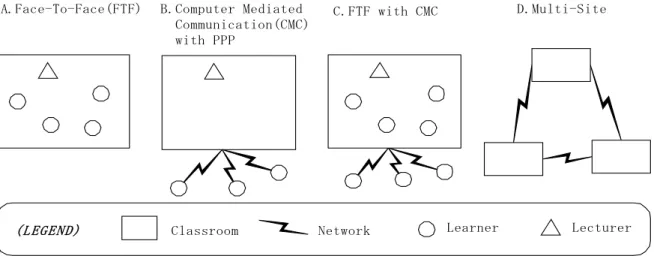
Classroom Network Learner Lecturer
D.Multi-Site B.Computer Mediated
Communication(CMC) with PPP
A.Face-To-Face(FTF) C.FTF with CMC
(LEGEND)
Figure 1 Spatial classification of a computerized classroom
The traditional campus-based classrooms were widely diversified. One of these classificatory criterions is the location of participation. Some typical examples are found in Figure 1.
-Type A is a traditional FTF classroom that learners and a lecturer are in the real classroom.
-Type B is a CMC-based environment that learners attend the classroom from outside of the campus. -Type C is a combined classroom of Type A&B
-Type D is a connected multiple classroom.
In general, computerized FTF situation (e.g; [6-7]) has an advantage that participants can talk each other directly despite a disadvantage of appointed time and place. On the contrary, CMC-based situation enables learners to participate from distributed sites (e.g; [8-9]). In order to propose well interactive environment in such a situation, expensive equipment of a video camera etc. may be required for each site. However, since an important thing in the distributed lecture is the communication about the contents, the communication with texts or sounds is the necessary minimum method. At present, some experiments are also conducted, using a large capacity of communication between the lecture rooms in which the camera and other communication methods are installed under a situation like D (e.g; TIDE project1). These are typical examples. There might be other types of classifications.
2.2 Synchronous and Asynchronous Participation
Since the foregoing section showed the spatial diversity of computerized classroom, time variation is discussed in this section. We can easily imagine the simple development of the asynchronous participating system against the synchronous one. Today many of the university lecturers publish the digital contents of the lecture on the Internet. Such on-demand digital contents are primitive implementation for asynchronous participating lecture. The next progress is the communication among participants. The functions of combing on-demand learning materials and the asynchronous communication space makes the primitive learning environment become an asynchronous classroom. We can grasp the meaning of this style as the time extension of type B in Figure 1. Actually, in order to present such environment, there are many well-known commercial products of courseware to develop distant lecture systems. They have the purpose to encourage individual learning using the Internet and to propose simple communication channels among asynchronous learners.
The possibilities to extend other types are expected similar to the above discussion on B. Above all,
1 http://www.cdi.ucla.edu/ & http://sage.media.kyoto-u.ac.jp/distlearn/
the essential key technology for them may be agents [10]. Agents play a role in action for real learner at other environment, in mediation between relevant learners, and in management of the learning. Such functions of agents make a learner feel a virtual environment as more realistic classroom. In such an environment, learners could be presented the collaborative learning environment well directed by agents. A AVC system is originally based on type B in Figure 1. But combining on-demand materials and agents makes the environment assume type A. It is our motivation for the research.
3 Asynchronous Virtual Classroom
3.1 Design concepts
To develop an effective distance-learning environment, the concept-based designing should be estimated in advance. To determine the condition of participating in each classroom is especially important. What kind of classroom would be well fitted to a proposed system (e.g., scientific area like physics or chemistry, linguistic one, etc.)? Does the classroom open to the public, or close? These questions make designers discover characteristic functions for each domain. However, as for our AVC environment, we propose a framework of general design for the collaborative distance learning.
As is often the case with learners using the synchronous distance classroom, there is nothing for it but to impose some constraints on participation. For example, they are forced to participate the classroom at the same time. Imposing the constraints on synchronous learning environment, they are condensed into three restrictions; simultaneous participation, limited number of the participants, and one-time participation. Meanwhile, the further aspect of the asynchronous learning environment is essentially to abolish the above restriction on the participation. By virtue of this premise, following design concepts have been devised at the first stage of this research.
i) Removal of a restriction on synchronous participation: The system proposes the on-demand online learning materials so that learners can participate and learn in the virtual classroom whenever they want. Learners no longer do not have to participate simultaneously.
ii) Over times attendee: The system proposes alternative situation and the up-to-date contents, whenever the same learner participates in it. That prompts learners to attend the same classroom again. iii) No limitation on the number of participants: Owing to the delicate capacity of network and the server spec, many synchronous lecture systems reduce the number of participants. However, in many cases, the designer needs not to take into account of the reduction for an asynchronous system, because of the decrease of simultaneous participation.
3.2 Features of AVC
A transformation from text-based learning to multimedia learning makes great progress. The use of multimedia contributes not only to the increase of realistic presence but also to the promotion of interactivity among learners. Especially, video-based hypermedia environment might be fitted to use in distance learning. Therefore, a AVC system presents multimedia contents as learning materials, which includes on-demand-video, coincident slides with sections in a video, and text-based advices from the lecturer (See table.1).
Table 1 Media as stable learning materials in AVC
Media Explanations
Video (Streaming media) A video presents the animated image of real lecture. It plays a role on basis of other learning medias.
Slide (generated by PowerPoint files)
Each slide is updated according to the video time. It is used as the supplementation of the video.
Advice (on an applet frame) It is also used for supplementation. The lecturer can put the message on relative time of the lecture.
The initial of learning materials of each classroom must be set by the time when the materials are open to the public. Although these are stable contents, a lecturer can update them at anytime according to her/his will. The system integrates additional learning materials that can be updated automatically as other learners take new actions on the system. All other learning materials except video are synchronized with the video’s time flow. Using the stable and other synchronized materials, the envisioned effects of AVC are pointed out as follows:
a) Anytime/Anywhere learning: If once a learner registers as classroom attendee, s/he can access the resources on WWW whenever s/he wants to learn.
b) Growing classroom: Each classroom will grow quantitatively because the number of participants in a classroom increases, besides its shared knowledge space will be sophisticated qualitatively as often as the collaboration happens.
c) Seamless Learning: Since the lecturer can link a classroom with others, which will come to be seen on the user interface so that a learner may moves to there at anytime. Because of links based on the lecturer’s intention, a learner can learn related matters and subjects.
d) Learning by observing: Observing the interaction both among other learners and between a learner and the instructor enables to construct effective discussing way for the learner and to be aware of various viewpoints or knowledge itself.
e) Learning through collaboration: The AVC system provides learners a collaboration space with others. As the concrete tools, they can use text-based bulletin board, animation of reproducing communication logs, and sharable notebook. In such an environment, a learner can refine her/his acquired knowledge through the arguments.
3.3 Agents in AVC
Agents are one of the most prominent and attractive technologies in development of a distance-learning environment. Since all participants in a lecture can be divided into two characters that one is a learner and the other is a lecturer, we should develop the two types of agents that act for each owner. This section highlights the rough sketch of those two types of agents from the viewpoints of each commitment and action.
(1) Lecturer’s agent
As in normal face-to-face lecture, a lecturer sometimes needs supplemental explanations that make learners get the applied knowledge other than basic one to be acquired. Similarly, the annotation or supplemental comment to the video-based material produces a good result for learning. The agent of lecturer takes the role of supplemental explanation to main learning materials in place of the real lecturer. When it becomes the scheduled times of video, an agent appears and gives a question or an auxiliary utterance to the current learner. Some actions of this agent require the reaction of the current learner and others don’t. It depends on an attribute of each action that a lecturer must setup in advance. Actually, we have implemented some types of allowed attributes as the reactions. We have defined typical reactions. For example, the first is multiple choice that an agent can give the correct answer to the current learner immediately after getting the answer, and the second is free sentences that are passed on a lecturer automatically. These behaviors of agents make learners activate their learning.
(2) Learner’s agent
It is more effective for learners to get the reaction to her/his action immediately. This requirement gives the motivation to develop the learner agent. On the other hand, the asynchronous participating environment has the character that a learner does not tend to make the difference in her/his absence in spite of alternative situation. The basic idea to cover the loss in the learner’s absence is to show the other’s actions by the interface agents as the virtual classmates. The specific functions for this agent activity are listed up as follows:
(1) All the allowed actions of the current learner are monitored and stored on the server at both time of ongoing auditing and after the participation.
(2)
At the beginning of auditing, the agent of each learner checks the redundant actions at the same time in video. After this check, the agent on server sends the data to the client in order to organize the virtual classmates. If the redundancies are found, the action filtering method adjusts them without any conflicts. The filtered out activities can be showed implicitly according to the learner’s requests [11].(3)
The agent also gives the candidate answers to the current learner whose statement has the“question” attribute. In order to find the relevant answers from the past activities, the agent retrieves the database on the server. If the other learners participate in the same classroom semi-synchronously, the agents also mediate and ask them to answer the current learner’s question. After these agent’s activities, the current learner’s question will be reflected in subsequent learner’s environment.
3.4 Reproduction of others’ action
Real Time Flow
Learner A
Learner B
Learner C
New statement
Statement in Dialogue 1
Statement in Dialogue 2
Statement in Dialogue 3
Video, slides, advices
notice
notice
notice
Summary message
Real Time Flow
Learner A
Learner B
Learner C
New statement
Statement in Dialogue 1
Statement in Dialogue 2
Statement in Dialogue 3
Video, slides, advices
notice
notice
notice
Summary message
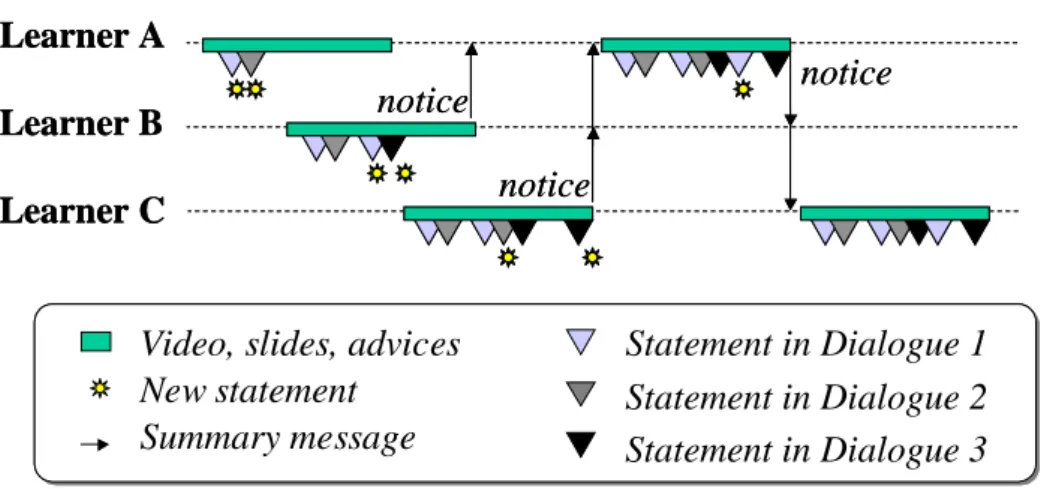
Figure 2 Time flow in AVC
Figure 2 shows the time flow in AVC. In this figure, a dialogue consists of coherent statements that belong to the same context. Learner-A is the first learner of a classroom. S/he can learn through only referring initial learning materials; e.g., Video, slides, and advices of the lecturer. If s/he gives two statements with making new dialogue-1&-2, her/his actions are stored on the server-side database as an action log. These statements will appear in the animation environment with the picture of her/his face on the subsequent learners’ (-B, -C) user interface. Learner B can notice the learner-A’s asynchronous existence and her/his statement. In case learner-B replies to the statement of past learner-A in the system, a dialogue between A and B will be appeared on next learner-C’s environment. Then, learner-C may reply to the statements in dialogue-1, -2, and -3 additionally. A learner can also create a new context as well as a new dialogue. The system gives the summarized information of the current participant’s actions to relevant participants after closing a lecture. It is convenient for them to attend the lecture again. In this way, learner-A can detect the changes of the performance in a classroom. Actually in the second time attendance, s/he learns through the updated lecture contents.
Since the AVC system shortens the past discussion time, each statement that past learners have made with synchronous or asynchronous communication tools has to be tuned to the relative time in each lecture. The first statement in a dialogue is setup at the relative time (RT) from the beginning of the lecture. As to the other statements, the system calculates the start time in the way to summate RT plus each statement’s calculated interval time. The AVC system allows user to register under an anonymous name and picture. Then each statement appears with each owner’s picture in RT order. The learner can ask some questions or give comments on her/his opinions during participating a discussion without stopping the video. Then the statement is added at the relative time of the dialogue. If s/he wants to cut
in on the dialogue, s/he must start a new discussion-thread with a new title. In this way, asynchronous dialogue will spread and continue with subsequent learners.
4. Case Study
4.1 Web-based System
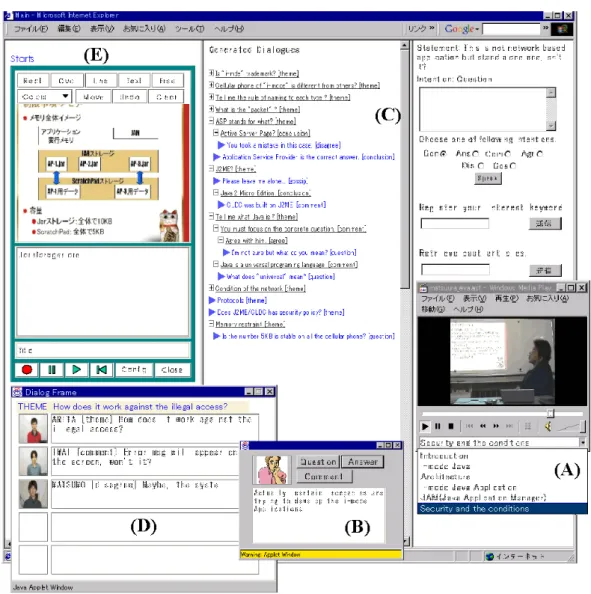
Figure 3 Snapshot of Web-based AVC system
A snapshot of AVC2 system
A prototype system for original AVC was built as a WWW-based application. The system provided the basic functions for some learning materials and the asynchronous communication space. Figure 3 shows the snapshot of AVC2, which is a revised version of original AVC. A learner watches the video in window (A), which proposes the menu of sections in a lecture. Selecting a section makes all the other contents displayed in these windows be updated at the relative time of video. Window (B) is an advisory window, which shows the statement or gives examination of lecturer. Frame (E) shows the slide of the lecture, in which a learner can annotate on it. Frame (C) and window (D) support asynchronous dialogues among learners. A learner can see all the past dialogue threads in frame (C) with tree structure. The top node of each dialogue shows the first statement, in many cases, which indicates the theme of the discussion. Since the list commands a view of the titles, a learner can select one of interesting topics and open the branch. A learner can also add a new statement with her/his intention in the right-side frame of (C). According to learner’s operation in (C), the system automatically reflects the animated dialogues in window (D). The system sorts out the dialogues based on her/his curiosity and reproduces them in priority order. In this window, a picture of each author of a statement is shown in the left side of the text. A learner can add the statement by clicking one of statements in (D), which is interpolated like the
operation in frame (C). In this way, the asynchronous dialogues can be augmented.
Some learners in our university have already used this system several times. A result of the evaluation has gained popularity on the whole system. Especially the function of animated reproduction of the past actions received the favorable comment. The quantitative evaluation of data, which the number of activity rate for interaction increases three times using these functions compared with the system without these functions, also indicates this function prompted asynchronous learners to communicate more frequent than the system without this function [5].
4.2 C/S Application
(A)
(B)
(C)
(D)
Figure 4 Snapshot of a application of AVC3
A snapshot of AVC3 system
While the first system and the revised version were developed on the web, the other renewal system is under constructing as the Java Application. Figure 4 is a snapshot of the interface of client application named “ChoronoClass”, which is now available with only Japanese language. In (A), a learner can control the dialogue and the interface agent: e.g. inputting a question, adding the comment to the past dialogues, and retrieve the past statements. If the current learner wants to create new theme, s/he can make new dialogue thread in it. Frame (B) shows the main materials of video image and the slides. Frame (C) reproduces the past dialogues animatedly. In frame (D), a learner can move the interface agent to select the person to talk to, who is not the current learner in real world. The basic functions are similar to the original web-based AVC system. This system attains superiorities to others as followings:
(A) XML-based data format: We have developed the original format to describe the agent activities. This XML-based format is an applied language of Grosof’s rule-based agent language [12]. Since this XML-based document is available to edit and upload directly by the learner, the representation of statements and the agent’s action rule can be modified.
(B)
VR-based classroom environment: To be more realistic, the client system combines the VR technology to the classroom environment. This environment proposes a learner not only to envision the real classmates but also to communicate them through the direct operation of the three dimensional character.5. Summary and Future Work
In the recent computerized society, learners no longer have to participate in the conventional school-based lecture hall. To develop such an environment, we have summarized our design concepts in the former part of this paper. As a substitute for a real lecturer, the system proposes on-demand learning materials of the lecture, e.g. video images, slides, and advice. In addition to these one-way deliveries, an asynchronous communication space is necessary to acquire the applied knowledge from other participants. Asynchronous environment has the advantages compared with a synchronous one:
1. Freedom of time; learners can participate with their own will 2. Enough time for reflection
3. Opportunities to explore and backup one's knowledge
4. Utilization of anonymity and lightening the burden of individuals.
Under these considerations, this paper has described the collaborative learning environment in AVC that combines multimedia learning materials and supporting asynchronous communication functions. Especially the characteristic function of agent proposes an effective method to promote the spontaneous communication by replaying the past activities of participants. The system proposes the virtual classmates in the asynchronous environment in place of each real participant. We continue our proposal that AVC increases the chance to communicate among users at anytime. We are convinced that the architecture of AVC is useful and accommodate to asynchronous participants. We will have continuous experience making a collection of public users on the Internet.
Acknowledgement
This research got financial support of Grant-in-Aid for Scientific Research of the Ministry of Education, Science, Sports and Culture of Japan, No.(A)13780121, (B)(2)12558011, and (B)(2)13480047. This work was also supported by the grant to the research project at Doshisha University named “Intelligent Information Science and It's Applications to Problem Solving in Engineering Fields”. We thank all the contributors for this research.
References
[1] Harasim, L., Hiltz, S. R., Teles, L., and Turoff, M. : learning Networks, The MIT Press
[2] Koschmann, T. (Ed.): CSCL: THEORY and PRACTICE, Lawrence Erlbaum Associates Publishers [3] Longworth, Norman and W. Keith Davies: Lifelong Learning, Kogan Page
[4] Matsuura, K., Ogata,H., and Yano, Y.: Agent's contribution for an asynchronous virtual classroom, Proc. of Intelligent Tutoring System ‘2000, pp.344-353. Canada, Jun. 2000
[5] Matsuura, K., Ogata, H., and Yano, Y.: A framework of the seminar-typed virtual classroom system for asynchronous participants, Proc. of Intelligent Systems and Applications ’2000, Vol.2, pp.691-698, Australia, Dec. 2000
[6] Hoppe, H., U., Luther, W., Mühlenbrock, M., Otten, W., & Tewissen, F.: Interactive Presentation Support for an Electronic Lecture Hall –a practical report-, in Cumming, G., Okamoto, T., Gomez, L., (Eds.), Advanced research in computers and communications in education, Vol.1, pp.923-930, IOS Press, 1999
[7] Gregory D.A. Classroom 2000: An experiment with the instrumentation of a living educational environment, IBM Systems Journal, Vol.38, No.4, pp.508-530, 1999
[8] D. Bargeron, A. Gupta, J. Grudin, E. Sanocki, & F. Li.: Asynchronous Collaboration Around Multimedia and its Application to On-Demand Training, Proc. HICSS-34, CD-ROM, 10 pages, 2000 [9] Ogata, H., Matsuura, K., & Yano, Y.: Knowledge Awareness: Bridging between Shared Knowledge
and Collaboration in Sharlok, Proceedings of Educational Telecommunications 1996, pp.232-237, USA, 1996
[10] Frasson, C., Martin, L., Gouarderes, G., Aïmeur, E.: LANCA: A Distance Learning Architecture Based on Networked Cognitive Agents. Proc. Of Intelligent Tutoring System ‘98 pp.593-603, USA, 1998
[11] Matsuura, K., Ogata, H., and Yano, Y.: Synchronizing learners' interactions with learning materials in an Asynchronous Virtual Classroom, Journal of IPSJ, 2001 (in Japanese, in press)
[12] Grosof, B.N. and Labrou, Y.:An Approach to using XML and a Rule-based Content Language with an Agent Communication Language, Proc. of the IJCAI-99 Workshop on Agent Communication Languages, Sweden, 1999