日本
HP OpenSource/Linux
技術文書
LifeKeeper for Linux v8.0
ン
ン
Red Hat Enterprise Linux 6.2
+ HP P4300 G2
編
第
1
版
日本 ッ ッ 株式会社
目次
[本 ン い ] ... 4
1.環境 ... 5
2.設定手 ... 5
2-1. 1 2 Red Hat Enterprise Linux 6.2 ン ... 6
2-2.P4300 G2 設定 ... 6
2-3.PSP ProLiant Support Pack 適用 ... 10
2-4. bonding 設定 ... 10
2-5.iSCSI ニ ン 設定 ... 11
2-6. ッ ワ 確立... 12
2-7./etc/fstab 編集 ... 12
2-8.LifeKeeperソ ン ... 12
2-9.License Key ン ... 13
2-10.LifeKeeper 起動 ... 14
2-11.LifeKeeper GUI 起動 ... 14
2-12. 設定 P4300 G2 ソ 設定 ... 15
図表目次
図 1. ッ ワ 検出画面 ... 6
図 2. ン ッ 起動画面 ... 7
図 3. 管理 選択画面 ... 7
図 4. 管理者 追 画面 ... 8
図 5. 作成画面 ... 8
図 6. 仮想IP ッ 割 当 画面 ... 9
図 7. 新規 画面 ... 9
[
本
ン
い
]
本 ン 内容 い 充 ッ 確性 保証
物 あ 将来 予告 変更 あ
本 ン 使用 生 い 結果 利用者 責任 日本 ッ ッ 株式会社 本 ン 内容 一 責任 負い
本 ン 技術情報 構成 OS ン 使用環境 大幅 数値 変化 場合 あ 十 個別 実施
強く 薦 致
本 ン 内 表示 記載 い 会社 商品 等 各社 商標 又 登録商標
本 ン 共 iSCSI 構成 P4300 G2 使用 ProLiant
Red Hat Enterprise Linux 6.2 LifeKeeper for Linux v8.0 ン
注 当資料 対象 ン以外 OS iscsi-initiator-utils LifeKeeper等 使用 場合 ン や設定 手 異 場合 あ 場合 使用
ン ニ やRelease Notes等 記載 手 従 く い
1.
環境
実際 使用 環境 以
H/W環境
HP ProLiant DL360 G7 CPU Xeon L5630 2.13GHz ェ 2
24GB
RAID ン Smart P410i ン
iSCSI用 ッ ワ Broadcom製 ン 搭載 Gigabit NIC ェ 2
HP P4300 G2 SAN/iQ 9.5.00.1215.0 ェ 3
S/W環境
O/S Red Hat Enterprise Linux 6.2 kernel-2.6.32-220.el6.x86_64
ソ LifeKeeper for Linux v8.0
iSCSI ニ iscsi-initiator-utils-6.2.0.872-34.el6.x86_64
iSCSI用 ッ ワ bnx2 v2.1.12c
今回 2 構成 各 環境 一
以 2 1 2
2.
設定手
実際 手 流 以
1 2 Red Hat Enterprise Linux 6.2 ン
P4300 G2 設定
PSP ProLiant Support Pack 適用
bonding 設定
iSCSI ニ ン 設定
ッ ワ 確立
/etc/fstab 編集
LifeKeeperソ ン
License Key ン
LifeKeeper 起動
LifeKeeper GUI 起動
設定 P4300 G2 ソ 設定
2-1.
1
2
Red Hat Enterprise Linux 6.2
ン
1 2 Red Hat Enterprise Linux 6.2 ン く い 時
以 ッ ン く い
iscsi-initiator-utils-6.2.0.872-34.el6.x86_64.rpm libXau-1.0.5-1.el6.i686.rpm
libxcb-1.5-1.el6.i686.rpm libX11-1.3-2.el6.i686.rpm libXext-1.1-3.el6.i686.rpm libXi-1.3-3.el6.i686.rpm
libXtst-1.0.99.2-3.el6.i686.rpm
compat-libstdc++-33-3.2.3-69.el6.i686.rpm compat-libstdc++-296-2.96-144.el6.i686.rpm libgcc-4.4.6-3.el6.i686.rpm
nss-softokn-freebl-3.12.9-11.el6.i686.rpm glibc-2.12-1.47.el6.i686.rpm
bzip2-libs-1.0.5-7.el6_0.i686.rpm iptables-1.4.7-4.el6.i686.rpm libstdc++-4.4.6-3.el6.i686.rpm pam-1.1.1-10.el6.i686.rpm zlib-1.2.3-27.el6.i686.rpm
2-2.P4300 G2
設定
Central Management Console CMC 使 P4300 G2 設定 行い 細
い HP P4000 SAN ソ ン 参照 い
A) CMC 起動
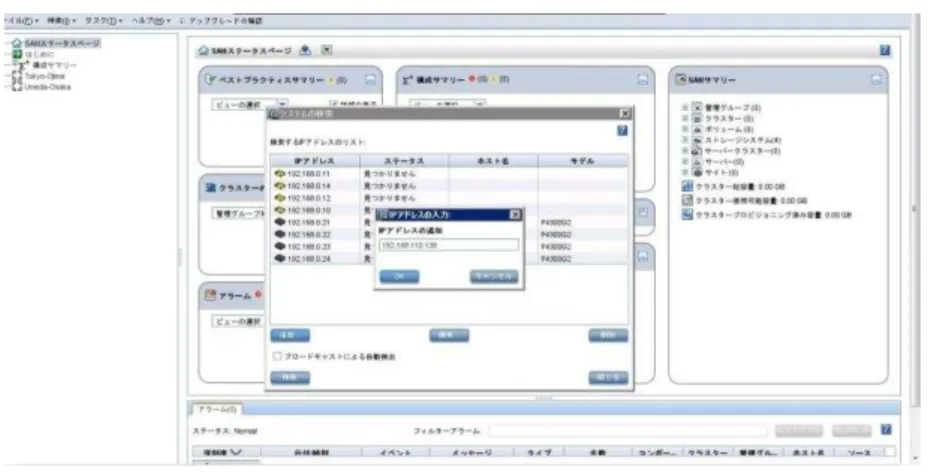
B) ッ ワ 検出 行い
C) [ ン ッ 起動] 用意 い [管理 び
] 使用 構成 セッ ッ
図 2. ン ッ 起動画面
D) 管理 作成
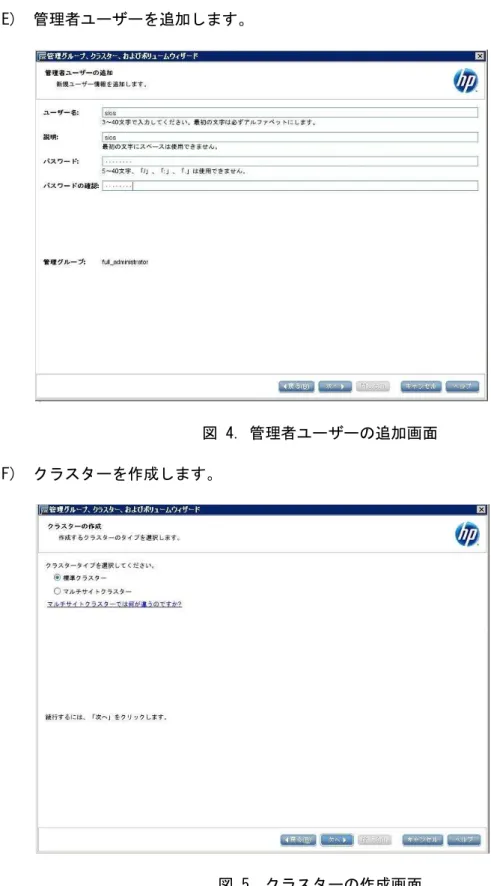
E) 管理者 追
図 4. 管理者 追 画面
F) 作成
G) 仮想IP ッ 割 当
図 6. 仮想IP ッ 割 当 画面
H) P4300 G2 セ LifeKeeper
1 2 登録
I) LifeKeeper 1 2 割 当
図 8. 割 当 画面
2-3.PSP
ProLiant Support Pack
適用
以 参考 各 PSP 適用 く い PSP 含 い 新 い ン 個別 提供 い 場合 新 い
ン 適用 推奨
http://h50146.www5.hp.com/products/software/oe/linux/mainstream/support/doc/general/mgmt/index.html#psp
PSP適用後 O/S reboot
# shutdown –r now
2-4.
bonding
設定
P4300 G2 接続 bonding 使用 以 eth2 eth3 active-backup
bonding 設定例 IP 設定 実際 環境 合わ 変更
く い 両 実行
A) root login
B) /etc/modprobe.d/bonding.conf 作成 編集
# vi /etc/modprobe.d/bonding.conf alias eth2 bnx2
alias eth3 bnx2 alias bond0 bonding
C) /etc/sysconfig/network-scripts/ifcfg-bond0 作成 編集
# vi /etc/sysconfig/network-scripts/ifcfg-bond0 DEVICE=bond0
D) /etc/sysconfig/network-scripts/ifcfg-eth2 編集
# vi /etc/sysconfig/network-scripts/ifcfg-eth2 DEVICE="eth2"
MASTER=bond0 SLAVE=yes BOOTPROTO=none
HWADDR="00:1B:78:92:02:46"
E) /etc/sysconfig/network-scripts/ifcfg-eth3 編集
# vi /etc/sysconfig/network-scripts/ifcfg-eth3 DEVICE="eth3"
MASTER=bond0 SLAVE=yes BOOTPROTO=none
HWADDR="00:1B:78:92:02:44" F) O/S reboot
# shutdown –r now
2-5.iSCSI
ニ
ン
設定
iSCSI ニ ン 設定 行い 以 実行 く い
A) 1 root login
B) iscsi-initiator-utils ン い 確認 入 い け ン
く い 確認:
# rpm -qa | grep iscsi-initiator
iscsi-initiator-utils-6.2.0.872-34.el6.x86_64
ン :
# rpm –ivh iscsi-initiator-utils-6.2.0.872-34.el6.x86_64.rpm
C) 起動時 iscsi iscsid ン 自動起動 う 設定
# chkconfig iscsi on # chkconfig iscsid on
D) iSCSI ッ P4300 G2 認識
# iscsiadm -m discovery -t sendtargets -p iSCSI ッ IP
E) iSCSI ッ ン
# iscsiadm –m node --login
F) P4300 G2 作成 LUN volume /dev/sda /dev/sdb /dev/sdc 認識
fdisk 実行
# fdisk /dev/sda
I) 当 対 作成 記 ext4
作成 例
# mkfs.ext4 /dev/sda1 J) ン ン 作成
# mkdir /mnt1
K) mount 常 ン 出来 事 確認
# mount /dev/sda1 /mnt1
L) 常 作成 確認
N) 2 root ン
O) B)~E) 実行
P) ン ン 作成 ン ン 必 1 一 く
い
# mkdir /mnt1
Q) mount 常 ン 出来 事 確認
# mount /dev/sda1 /mnt1
R) 先ほ 1 作成 常 見え 事 確認
S) 動作確認終了後 ン ン
# umount /mnt1
T) 再度 1 mount
# mount /dev/sda1 /mnt1
U) 両 ン 能 セ 能 あ 事 確認
ン 1
け く い
2-6.
ッ
ワ
確立
両 セッ ッ 完了 対 ping 能 確認
く い DNS く /etc/hosts 使用 前解
決 う く い
2-7./etc/fstab
編集
/etc/fstab ベ 使用 い 場合 ッ 変更 LifeKeeper /etc/fstab内 ベ く ッ 使用
推奨 い
2-8.LifeKeeper
ソ
ン
LifeKeeper for Linux v8.0 ン 両 以 実行
く い
A) 製品 配布 任意 mount 続い sps.img 任意
mount
# mount /dev/cdrom /media/cdrom
# mount /media/cdrom/sps.img /work -t iso9660 -o loop B) sps.img mount 移動
# cd /work C) ./setup 実行
D) 画面 表示 質問 応答 く い
E) 途中 以 う unique host ID 表示 ID 後 License Key
取得 時 必要 確 記録 い く い
The unique host ID for this system is listed below.
00XX7856XXX0
F) Would you like to install a license key now? (y/n) [n] ? 質問 License
G) Setup has completed successfully. 表示
H) 必要 応 ン Recovery Kit ッ ン く い
I) LifeKeeper for Linux v8.0 以 ッ ン
# rpm -qa | grep steeleye steeleye-libgcrypt-1.5.0-2.i386 steeleye-lkLIC-8.0.0-5104.i386 steeleye-perl-addons-5.8.8-18.i386 steeleye-lkDR-8.0.0-5104.noarch steeleye-lighttpd-fastcgi-1.4.26-2.8.i386 steeleye-openssl-0.9.7a-43.3.i386 steeleye-curl-7.21.7-3.i386 steeleye-gnutls-2.8.6-3.i386 steeleye-gnutls-utils-2.8.6-3.i386 steeleye-lkGUI-8.0.0-5104.i386 steeleye-libgpg-error-1.10-2.i386 steeleye-libxml2-static-2.7.8-7.i386 steeleye-readline-4.3-14.i386 steeleye-lkRAW-8.0.0-5104.noarch steeleye-perl32-5.8.8-7.i386 steeleye-lkapi-client-8.0.0-5104.i386 steeleye-runit-2.0.0-4.4.i386 steeleye-lkMAN-8.0.0-5104.noarch steeleye-lkRHAS-8.0.0-5104.noarch steeleye-libcurl-7.21.7-3.i386 steeleye-lighttpd-1.4.26-2.8.i386 steeleye-lk-8.0.0-5104.i386 steeleye-openssl-perl-0.9.7a-43.3.i386 steeleye-lkapi-8.0.0-5104.i386 steeleye-libxml2-2.7.8-7.i386 steeleye-lkCCISS-8.0.0-5104.i386 steeleye-pcre-4.5-2.i386 steeleye-lkIP-8.0.0-5104.noarch
I) 環境変数PATH びMANPATH 以 う 設定 く 便利
PATH=$PATH:/opt/LifeKeeper/bin MANPATH=$MANPATH:/opt/LifeKeeper/man J) /var/log/LK_install.log 書
2-9.License Key
ン
以 手 各 License Key ン く い
A) 2-8.LifeKeeperソ ン 手 E) 表示 unique host ID
LifeKeeperソ 梱 い Entitlement ID Authorization Code
米国 社 http://us.sios.com LICENSE KEY ン 各
License Key 入手 く い
B) 各 root login
D) 画面 表示 質問 適 応答 く い
E) LifeKeeper license key installation was successful! 表示 License
Key ン 成
2-10.LifeKeeper
起動
LifeKeeper 起動 両 以 実行 く い
A) LifeKeeper 起動
# /opt/LifeKeeper/bin/lkstart
LifeKeeper 起動時 次 ッセ 表示 場合 あ 無視 く
い
WARNING: All config files need .conf: /etc/modprobe.d/fc-hba.conf.old, it will be ignored in a future release.
B) lktest ン 実行 LifeKeeper 起動 確認
# /opt/LifeKeeper/bin/lktest
F S UID PID PPID C CLS PRI NI SZ STIME TIME CMD 4 S root 2736 2432 0 TS 39 -20 1458 00:59 00:00:00 lcm 4 S root 2743 2434 0 TS 39 -20 2422 00:59 00:00:00 ttymonlcm 4 S root 2746 2430 0 TS 29 -10 4182 00:59 00:00:00 lcd C) LifeKeeper 停 場合 以 ン 実行 く い
# /opt/LifeKeeper/bin/lkstop
2-11.LifeKeeper GUI
起動
LifeKeeper GUI 起動 両 以 実行 く い
今回 構成 LifeKeeper GUI ン / 一 ン
A) LifeKeeper GUI ッ ン い rpm ン 確認
# rpm –qa |grep steeleye-lkGUI
B) 以 う 表示 OK
steeleye-lkGUI-8.0.0-5104.i386
C) LifeKeeper GUI 起動 い ps ン 確認
# ps -ef | grep runGuiSer D) 以 う 表示 OK
root 12722 23174 0 17:55 ? 00:00:00 /bin/sh /opt/LifeKeeper/bin/runGuiServer E) LifeKeeper GUI 起動 い け 以 ン 実行 起
動
# /opt/LifeKeeper/bin/lkGUIserver start
F) LifeKeeper GUI 起動 X Window 以 ン 実行
# /opt/LifeKeeper/bin/lkGUIapp G) Cluster Connect Dialog 表示
H) LifeKeeper GUI 停 場合 以 ン 実行 く い
# /opt/LifeKeeper/bin/lkGUIserver stop
I) 初期 ン ン後 一度 LifeKeeper GUI 起動 LifeKeeper
J) LifeKeeper 以 番号 使用 い 点 考慮 ッ
ン い
7365(TCP : ニ ン (TCP) 通信 使用
81(TCP) : GUI セ 使用
82(TCP) : GUI セ 使用
1024(TCP) ~ : GUI RMI通信 使用
2-12.
設定
P4300 G2
ソ
設定
LifeKeeper GUI 設定 行い 以 作業 1 行い
A) 構成
2 ニ ン 構築
Edit > Server > Create Comm Path 2本 ニ ン 2
構築
B) FileSystem ソ 作成
Edit > Server > Create Resource Hierarchy 選び
Select Recovery Kit File System 選び Mount Point 目 ン
い 表示 Wizard 進 いく ソ 作成
3.
注意事
A) /etc/fstab 編集
/etc/fstab ベ 使用 い 場合 ッ 変更 く
い LifeKeeper /etc/fstab内 ベ く ッ 使
用 推奨 い
B) LifeKeeper起動時 表示 ッセ
LifeKeeper起動時 次 ッセ 表示 場合 あ 無視 く い
WARNING: All config files need .conf: /etc/modprobe.d/fc-hba.conf.old, it will be ignored in a future release.
C) LifeKeeper 使用 番号
LifeKeeper 以 番号 使用 い 点 考慮 ッ
ン い
7365(TCP : ニ ン (TCP) 通信 使用
81(TCP) : GUI セ 使用
82(TCP) : GUI セ 使用
1024(TCP) ~ : GUI RMI通信 使用