[Issue No.] T09-0016-A
[Page] 1/3
[Title] Causes of error code: F222
Hby the mistaken operation
[Date of Issue] Sep., '04
and relative countermeasures (Cautions for access to
other station in the MELSECNET/H network systems)
[Relevant Models] QJ71LP21-25, QJ71LP21S-25, QJ71LP21G, QJ71LP21GE, QJ71BR11
HEAD OFFICE : 1-8-12, OFFICE TOWER Z 14F HARUMI CHUO-KU 104-6212, JAPAN NAGOYA WORKS : 1-14, YADA-MINAMI 5-CHOME, HIGASHI-KU, NAGOYA, JAPAN
T ECH N I CAL BU LLET I N
Thank you for your continued support of Mitsubishi programmable controllers, MELSEC-Q Series.
1. Phenomena
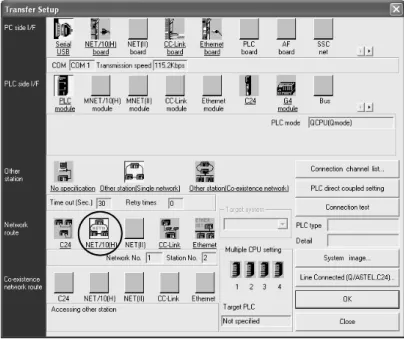
If other station access is executed after the network route on the GX Developer Connection Setup screen is set to C24 or CC-Link by mistake, in the MELSECNET/H network system, the following phenomena may occur.
1) The task operation may be delayed when using the GX Developer Monitor/PLC read/write functions.
2) The error dialog for error code: F222H appears when using the GX Developer, and the access to the PLC CPU is
disabled. Or the timeout error dialog is displayed and the access to the PLC CPU is disabled.
3) The dedicated instructions for accessing other stations as READ/WRITE instruction (105 words or less) is not normally completed. (Error code: F222H)
4) For the MELSECNET/H compliant PC-board, the speed of device access as screen display slows down. Or the error F222H occurs when accessing other stations (transient transmission).
The cyclic transmission among PLCs operates normally.
2. Cause
When a MELSECNET/H module receives the request message for C24 or CC-Link mistakenly by the operation above, the MELSECNET/H module transmits the request message to all stations. If the head I/O No. of the MELSECNET/H module corresponds to that of the station which transmitted the request message, the MELSECNET/H module transmits the request message to all stations, resulting in congestion at each station, and the phenomena 1) to 4) occur.
[Issue No.] T09-0016-A
[Page] 2/3
[Title] Causes of error code: F222
Hby the mistaken operation
[Date of Issue] Sep., '04
and relative countermeasures (Cautions for access to
other station in the MELSECNET/H network systems)
[Relevant Models] QJ71LP21-25, QJ71LP21S-25, QJ71LP21G, QJ71LP21GE, QJ71BR11
HEAD OFFICE : 1-8-12, OFFICE TOWER Z 14F HARUMI CHUO-KU 104-6212, JAPAN NAGOYA WORKS : 1-14, YADA-MINAMI 5-CHOME, HIGASHI-KU, NAGOYA, JAPAN
T ECH N I CAL BU LLET I N
[GX Developer setting]
1) Correct setting (when select NET/10(H) for the network route)
2) Incorrect setting (when select C24 for the network route)
C24 is set by mistake while the MELSECNET/H module is mounted on head I/O No.0.
[Issue No.] T09-0016-A
[Page] 3/3
[Title] Causes of error code: F222
Hby the mistaken operation
[Date of Issue] Sep., '04
and relative countermeasures (Cautions for access to
other station in the MELSECNET/H network systems)
[Relevant Models] QJ71LP21-25, QJ71LP21S-25, QJ71LP21G, QJ71LP21GE, QJ71BR11
HEAD OFFICE : 1-8-12, OFFICE TOWER Z 14F HARUMI CHUO-KU 104-6212, JAPAN NAGOYA WORKS : 1-14, YADA-MINAMI 5-CHOME, HIGASHI-KU, NAGOYA, JAPAN
T ECH N I CAL BU LLET I N
3. System configuration
GX Developer Station No. 1 Station No. 2 Station No. 3
MELSECNET/H Network No.1
4. Conditions
The phenomena above occur in the system in which all of the following conditions are met.
1) The network route on the GX Developer Connection Setup screen is set to C24 or CC-Link by mistake. 2) The MELSECNET/H module is mounted on the head I/O No. of setting 1).
3) The other MELSECNET/H modules are mounted on the head I/O Nos. of the other stations in the same network.
In addition, when a network module other than the MELSECNET/H or intelligent function module is mounted to the head I/O No. set by 1), ERROR LED of the mounted module may lit.
5. System restoration procedure
If the above situations occur, perform the following operation to restore the system. y Power off all PLC CPUs in the network in which error code: F222H is occurred.
(The PLC CPUs of all stations has to be powered off.)
6. Others
The MELSECNET/H module with the serial No. (first 5 digits) 05102 or later has been improved so that the error response is returned when the network route is mistakenly set.
The serial No. of MELSECNET/H module is located on the rating plate at the side of the module.
05102