AccuMotion:
intuitive recognition algorithm for new interactions and experiences
for the post-PC era
Takuya SAKAI
Kanagawa Institute of Technology
[email protected]
Wataru FUJIMURA
Kanagawa Institute of Technology
[email protected]
Songer ROBERT
Kanazawa Technical College
[email protected]
Takayuki KOSAKA
Kanagawa Institute of Technology
[email protected]
Akihiko SHIRAI
Kanagawa Institute of Technology
[email protected]
ABSTRACT
This article contributes to the improvement of natural user inter- faces (NUI) using depth-based kinematics recognition tools like the Microsoft Kinect. The proposed method, “AccuMotion” is com- prised of tracking sequential key poses as accumulated motion. The AccuMotion recognition algorithm is based on multiple kinematics evaluation functions that evaluate the dot products of target bone structures with the user’s kinematic bone structure. Each function continuously outputs a similarity ratio between its respective target and input from the user’s kinematic data. Target bone structures are defined by the developers as ideal or arbitrary values. This method is effective for a wide range of users due to its use of a kinematics data that allows for differences of length in user bones. The same target poses apply to a wide range of users through the use of a generic algorithm and user profiling. As an experiment, the recog- nition function was tested for four directional inputs indicated by user arm movements. The results suggest AccuMotion is suitable for navigating presentation software such as slideshows and video players with solid stability.
Categories and Subject Descriptors
H.1.2 [Information Systems]: User/Machine SystemsHuman in- formation processing; H.5.2 [User Interfaces]: Interaction styles; I.3.6 [Methodology and Techniques]: Interaction techniques
General Terms
Algorithms
Keywords
AccuMotion, Kinect, NUI (Natural User Interfaces), Interaction, Human Information Processing
Permission to make digital or hard copies of all or part of this work for personal or classroom use is granted without fee provided that copies are not made or distributed for profit or commercial advantage and that copies bear this notice and the full citation on the first page. To copy otherwise, to republish, to post on servers or to redistribute to lists, requires prior specific permission and/or a fee.
Laval Virtual VRIC’12, March 28-April 1, 2012 Laval, France Copyright 2012 ACM 978-1-4503-1243-1 ...$10.00.
1. MOTIVATION
Recently, applications of natural user interfaces (NUI) have been growing in fields such as augmented reality, video games, digital- signage, experimental advertising, installation-based museum ex- hibitions, physical exercising and rehabilitation, modeling, secu- rity, and accessibility solutions for people with disabilities. Depth- based kinematics sensors like the Microsoft Kinect [9, 10, 11, 16, 17, 18, 2] are major breakthroughs for helping developers real- ize NUI applications. The Kinect sensor in particular provides the benefits of stable mass production and open source availability with APIs like OpenNI [5], PrimeSense NiTE middleware [3], and Kinect for Windows SDK Beta [1]. While these APIs allow easy access to user kinematics data, they do not offer advanced support for interaction design within the application layer. Each application must implement its interaction method which may be difficult for the user to learn if not done intuitively. Especially for kinematics- based recognition, developers must pay close attention to physical traits of the user, such as arm length or movement speed. Ideally, the development of a generic method that allows for the interactive movements of a wide range of users would benefit the growth of spatial gesture NUIs into new fields.
2. RELATED WORKS
In the video game industry, Omek Interactive reported success in
“blending full-body tracking and gesture animation” [6]. The re- sult was an impressive realization of synchronous avatar animation by interpolating pre-recorded motion data with depth-based real- time motion capture data. They also released the Omek Beckon Development Suite [4] middleware and SDK to make their algo- rithms available to application developers. Such NUIs will be made more popular by the current video game industry with the creation of game content and by experimental applications for everyday liv- ing.
Poupyrev’s “The go-go interaction technique” contributed non-linear mapping for direct manipulation within a virtual environment [14]. This technique uses a hand icon to manipulate objects inside a vir- tual environment. Ray is trying to reuse such interaction in a virtual reality toolkit [15]. In a natural living space, however, it is difficult to define which motions should be recognized as deliberate com- mands because user activity is based on a mix of both conscious and unconscious motion. With touch panel user interfaces like those on smart phones, “flick” actions are popularly used for input related to
direction or speed. However, flicks require the user to be touching a physical panel and so are easier to detect than natural spatial ges- turing. When only using motion vector data of user bones, spatial gesturing has relatively less discernible clues for indicating delib- erate commands from the user.
Norrie suggests “virtual sensors”, a method for rapidly prototyping ubiquitous interaction between a mobile phone and a Kinect sensor [13]. Establishing such virtual sensors throughout a living space may provide ideal conditions for a sensing system, but not for an interaction system since natural gesticulations may be falsely rec- ognized as deliberate commands. Recognition results should be bi- nary output determined by the evaluation of virtual switches, so it is important to focus on digital input commands rather than analog ones for spatial interaction.
3. RECOGNITION OF “ACCUMOTION”
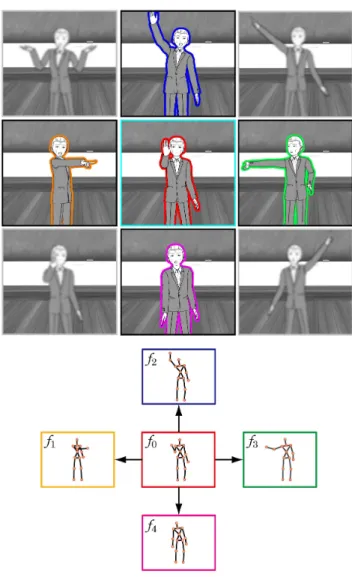
Figure 1: AccuMotion Concept: all target sequences start from the starting pose f0
One advantage of a spatial gesturing NUI is the freedom of pro- viding natural input without requiring any wearable devices. This does not however suggest inputs should be limited to unregulated analog commands. A new approach adopts this point of view us- ing sequential key poses to improve user affinity with an avatar
and enhance the sense of immersion within a virtual environment. This technique has been illustrated by the previous research of the GAMIC [12] and CartooNect [8, 7]projects using a Kinect sensor. Some of the primary use cases are as follows:
• Searching and selecting movie files with Yes/No input,
• Navigating presentation slides with grand gestures,
• Final confirmation in online shopping, etc.
The above examples require stable and accurate, discrete input rather than the free movements that may come from a mouse or touch panel.
The proposed algorithm, AccuMotion, realizes accurate motion recog- nition of natural movements for a wide range of users. This recog- nition algorithm is based on multiple kinematics evaluation func- tions based on taking the dot products of a target bone position Ti and the user bone position Vi.
fn=1 k
∑
k i=0( ⟨Ti,Vi⟩
||Ti|| · ||Vi|| )
(k : bones) (1)
K is the number of bones, which total 20 per user for the Microsoft Kinect SDK. Each evaluation function f0, f1,..., fn continuously outputs a similarity ratio for comparing the user’s posture as a ag- gregate of bone positions to a target posture that the developers define by ideal or arbitrary values.
Human movement can be described as a non-discrete process. In order to separate a motion representing a deliberate command from unintentional natural motion, a precursor or sequential gesture (sim- ilar to holding down the mouse button before a drag operation) can be useful as a temporal ready state. However, the duration of the ready state may be inconsistent and difficult to define due to differ- ences in the movements of various users.
Figure 2: Principle: Target gesture Tiand user’s current one Vi
Each evaluation function represents a key pose in the AccuMotion algorithm. In a test application, for instance, f0defined the starting pose for the input of a deliberate command by raising the right hand in front.
f1 to f4 were defined as moving the right hand up, to the right, down, and to the left, respectively. If the similarity ratio evaluates to be greater than the threshold Pn, the result is recognition of the input as a command, such as in a step function. These functions can be interpreted as still motion classifiers; however, they also misinterpret natural motions that match the target poses, resulting
in false recognition of commands. AccuMotion defines absolute ordinal structures for each function and limits command input to the f0switch before evaluating the f1to f4functions. This simple change results in a very simple, stable and accurate method that is relatively faster compared to matching algorithms for various users with various commands. Visual feedback for this method may re- quire flashing the screen or issuing a beep upon the successful de- tection of f0as opposed to the appearance of a cursor or pointer in other methods.
AccuMotion is applicable to a wide range of users due to its ba- sis on kinematics data that allows for differences in length of user bones. Identical target positions may be used for users of differing height through the use of a generic algorithm and user profiling.
4. VERIFICATION
To verify the algorithm, the recognition function was tested for four directional inputs indicated by user arm movements. For this pur- pose, a test application using the proposed algorithm was developed and employed in an experiment environment as shown in figure 3. With the Kinect sensor placed at a height of 75 cm, the subject performed input commands from a distance of 2.5 to 3.0 meters from the sensor so as to achieve full body capture.
Figure 3: Experiment setup
Figure 4: A screenshot of the AccuMotion test application
The experimental tasks included the input of four unique direc- tional commands performed together as one set five times for a total of 20 directional commands.
For each function f0to f4, the respective command poses (the ready pose f0, and up, right, down, and left poses f1to f4) were set by a researcher. Each threshold Pnwas set by the researchers to 94% or 95% (Table 1). The required hold duration was set to 1 second. When f0surpassed p0, visual feedback was set to turn the screen background from blue to white (figure 4).
Table 1: Commands and thresholds of the evaluation functions
fn Commands Pn:threshold of fn(%)
f0 Starting 94
f1 Up 94
f2 Right 95
f3 Down 94
f4 Left 95
Figure 5: The flow of “AccuMotion” shows the tracking of se- quential key poses as accumulated motion
At the beginning of the experiment, the subject was given simple instructions from the researcher to quickly input the four directional commands, and was then allowed to practice each of the four com- mands with a single set of input operations.
When inputting commands, the subject would first assume the ready pose ( f0) for 1 second. When this pose is recognized, the screen background color would change from blue to white and the up, down, left, and right commands become enabled. At this time, the four directional commands being displayed must be input in order. Denoting a set of four directional commands as one task, the re- quired time for performing five tasks was measured. If a command was particularly difficult for a user, the experiment would have a longer duration. After finishing, the user’s impressions were then gathered orally.
The subjects included one female and 12 males aged 20 to 38 be- tween the heights of 150 to 180 cm. The same target posture data for the evaluation functions was used for all subjects without any changes done according to a subject’s gender or body type. Results are shown in figure 6 and 7. With one set of four commands being one task and the duration being the time it took for tasks T1 to T5, the mean duration of all the subjects was 11.6 seconds with a standard deviation of± 7.5 seconds. This suggests that many of the subjects could understand the input method and perform the tasks both quickly and accurately.
It can be seen that although many subjects required significant time for the first command, the input time for the first command of each successive task became progressively shorter (figure 7). Opera- tional proficiency can be confirmed for 92% of the subjects follow- ing the successive repetitions of T1 (mean = 14.2 sec.) to T5 (mean
= 10.9 sec). For 84% of the subjects, their individual standard devi- ations were within± 4 seconds and the largest standard deviation was 8.29 seconds (subject M). None of the users triggered a false recognition during this experiment. These results suggest the pro- posed algorithm achieves the reliable performance of accurate input commands for a wide range of users.
Figure 6: Operational durations and proficiency of various users
In the post-experiment interview, many subjects expressed a dif- ference in the input recognition for left-and-right movements. The threshold values for these commands (P2, P4) should be adjusted. In this experiment, the recognition function was tested with four di- rectional input commands performed by user arm movements. The results suggest this method is suitable for navigating presentation software with solid reliability. It can be used to control slides and video playback with gestures free of any false recognition.
Figure 7: Individual duration and standard deviations
5. APPLICATION
5.1 Presentation by NUI
AccuMotion can be effectively employed in a presentation appli- cation with a spatial gesturing interface. Faulty operation of the interface can be dramatically reduced when using AccuMotion and make it feel more natural. Considering the possible gesture com- mands for a presentation, some options might be “right hand right” for “next slide” and “right hand left” for “previous slide”. Without using the AccuMotion technique, when the control hand returns immediately following the transition, there is a high likelihood that a faulty “previous slide” command will register. Additionally, nor- mal gesticulation during a presentation may cause false recognition
of commands. This problem is solved by using accumulated key poses as a solution.
5.2 Controlling home electronics devices by NUI
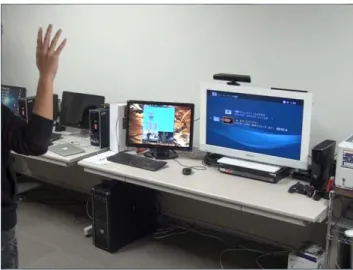
This technique may be applied to not only PC applications but also home appliances. For example, the proposed algorithm can be used to browse video files on a playback device. As a sensing algorithm aimed at an everyday living space, the proposed algorithm is also useful for preventing input malfunctions. For the purpose of feed- back for the accumulated motion recognition in the video recorder application, the command that navigates to the menu screen from the video playback display can be used in place of the color chang- ing screen that was used during the experiment. The bent right arm pose was reliable used for selecting an icon (figure 8).
Figure 8: Controlling home electronics devices by NUI
5.3 Future applications
The AccuMotion algorithm is flexible enough to provide steady NUI experiments using only a few parameters to target a wide range of users. In the experiment described above, the target poses and thresholds Pnwere set by the researchers. However, there are other ways to decide Pn, such as by letting the user set the target poses and recognition difficulty, or finding Pn based on the application of computer science learning theories to determine the independent bounds of each gesture. Furthermore, this technique is not limited to gestures in the four directions. By linking each target pose, more complicated operations (such as text or analog inputs) become pos- sible. In this way, existing virtual environments and applications for people with disabilities can make use of a simple sensing sys- tem for a wider range of users, devices, and environments.
6. CONCLUSION
The authors have proposed an intuitive recognition algorithm for accumulated dynamic motion called “AccuMotion”. Using this al- gorithm, firm and accurate input commands have been realized for a wide range of users with different arm and body lengths. Ac- cuMotion employs the Kinect sensor to manage sequential poses of differing durations according to a simple parameter structure of target poses and threshold values. Hereafter, the authors hope to extend the applications for a new kind of interactive living with
practical implementations of this algorithm in home appliances and everyday living environments.
7. REFERENCES
[1] Kinect for windows sdk.
http://kinectforwindows.org/. [2] Microsoft kinect.
http://www.xbox.com/en-US/kinect. [3] Nite middleware framework.
http://www.primesense.com/nite. [4] Omek beckon development suite.http:
//www.omekinteractive.com/products.html. [5] OpenNI (Natural Interaction).http://openni.org/. [6] A. Bleiweiss, D. Eshar, G. Kutliroff, A. Lerner, Y. Oshrat,
and Y. Yanai. Enhanced interactive gaming by blending full-body tracking and gesture animation. In ACM SIGGRAPH ASIA 2010 Sketches, SA ’10, pages 34:1–34:2, New York, NY, USA, 2010. ACM.
[7] K. T. H. M. S. A. FUJIMURA Wataru, MISUMI Hajime. Development of serious game which use full body interaction and accumulated motion. In NICOGRAPH International 2011, NICOGRAPH International, page 13, 2011. [8] S. A. FUJIMURA Wataru, IWDATE Shoto. Cartoonect:
Sensory motor playing system using cartoon actions. In Virtual Reality International Conference (VRIC 2011), Laval Virtual, pages 27–30, New York, NY, USA, 2011.
[9] J.-M. Gottfried, J. Fehr, and C. S. Garbe. Computing range flow from multi-modal kinect data. In Proceedings of the 7th international conference on Advances in visual computing - Volume Part I, ISVC’11, pages 758–767, Berlin, Heidelberg, 2011. Springer-Verlag.
[10] J.-D. Huang. Kinerehab: a kinect-based system for physical rehabilitation: a pilot study for young adults with motor disabilities. In The proceedings of the 13th international ACM SIGACCESS conference on Computers and
accessibility, ASSETS ’11, pages 319–320, New York, NY, USA, 2011. ACM.
[11] T. Leyvand, C. Meekhof, Y.-C. Wei, J. Sun, and B. Guo. Kinect identity: Technology and experience. Computer, 44:94–96, April 2011.
[12] H. Misumi, W. Fujimura, T. Kosaka, M. Hattori, and A. Shirai. Gamic: exaggerated real time character animation control method for full-body gesture interaction systems. In ACM SIGGRAPH 2011 Posters, SIGGRAPH ’11, pages 5:1–5:1, New York, NY, USA, 2011. ACM.
[13] L. Norrie and R. Murray-Smith. Virtual sensors: rapid prototyping of ubiquitous interaction with a mobile phone and a kinect. In Proceedings of the 13th International Conference on Human Computer Interaction with Mobile Devices and Services, MobileHCI ’11, pages 25–28, New York, NY, USA, 2011. ACM.
[14] I. Poupyrev, M. Billinghurst, S. Weghorst, and T. Ichikawa. The go-go interaction technique: non-linear mapping for direct manipulation in vr. In Proceedings of the 9th annual ACM symposium on User interface software and technology, UIST ’96, pages 79–80, New York, NY, USA, 1996. ACM. [15] A. Ray and D. A. Bowman. Towards a system for reusable
3d interaction techniques. In Proceedings of the 2007 ACM symposium on Virtual reality software and technology, VRST
’07, pages 187–190, New York, NY, USA, 2007. ACM. [16] E. S. Santos, E. A. Lamounier, and A. Cardoso. Interaction
in augmented reality environments using kinect. In Proceedings of the 2011 XIII Symposium on Virtual Reality, SVR ’11, pages 112–121, Washington, DC, USA, 2011. IEEE Computer Society.
[17] Y. Tang, B. Lam, I. Stavness, and S. Fels. Kinect-based augmented reality projection with perspective correction. In ACM SIGGRAPH 2011 Posters, SIGGRAPH ’11, pages 79:1–79:1, New York, NY, USA, 2011. ACM.
[18] L. Vera, J. Gimeno, I. Coma, and M. Fernández. Augmented mirror: interactive augmented reality system based on kinect. In Proceedings of the 13th IFIP TC 13 international conference on Human-computer interaction - Volume Part IV, INTERACT’11, pages 483–486, Berlin, Heidelberg, 2011. Springer-Verlag.