[Issue No.]
GOT-A-0043
[Page]
1/11
[Title]
Precautions when Replacing GT15 Models with GT16 Models
[Date of Issue]
Ver. *: May 2011
[Relevant Models]
GOT1000 Series
TECHNICAL BULLETIN
Thank you for your continued support of Mitsubishi Graphic Operation Terminal (GOT).
We released GT16 models with high functions and performance as an alternative of GT15 models in August 2008. We highly recommend that you replace GT15 models with GT16 models for using new sophisticated features.
Table of Contents
1. Requests for customers ··· 2
2. Selection of GOT ··· 2
3. Monitor screen data··· 3
3.1 Changing the controller setting (Ethernet connection only) ··· 3
3.1.1 How to change the controller setting when using GT Works3 Version1···· 3
3.1.2 How to change the controller setting when using GT Designer2 Version2 ··· 4
3.2 Changing the utility call key setting ··· 6
4. Communication units and options··· 7
5. Cables··· 10
5.1 Bus connection cables ··· 10
5.2 RS-232 cables ··· 10
5.3 RS-422/485 cables··· 10
5.4 Network cables (MELSECNET/H, MELSECNET/10, Ethernet, CC-Link IE, CC-Link) ··· 10
5.5 Other cables ··· 10
6. Mounting intervals··· 11
6.1 Downward dimension (Dimension A) ··· 11
[Issue No.]
GOT-A-0043
[Page]
2/11
[Title]
Precautions when Replacing GT15 Models with GT16 Models
[Date of Issue]
Ver. *: May 2011
[Relevant Models]
GOT1000 Series
TECHNICAL BULLETIN
1. Requests for customers
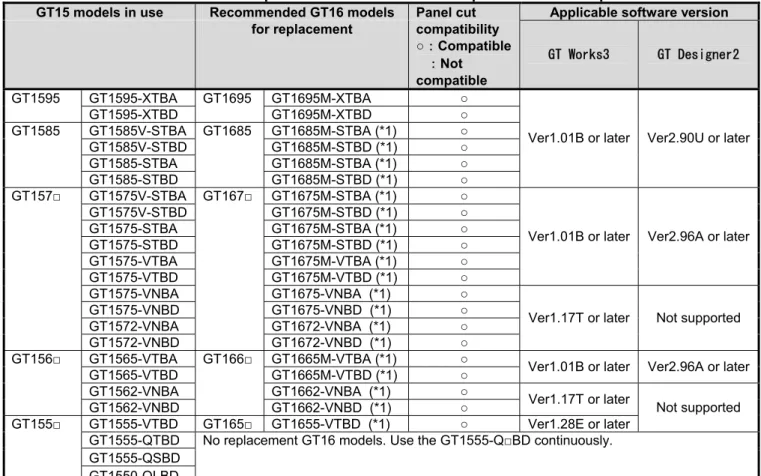
We released GT16 models with high functions and performance as alternative of GT15 models in August 2008. We highly recommend that you replace GT15 models with GT16 models for using new sophisticated features. For the replacement models, refer to “Table 2-1 Recommended replacement GT16 models and precautions for replacement” in Chapter 2 below.
2. Selection of GOT
The following table lists the recommended replacement GT16 models and the precautions for replacement. For the details, refer to the precautions in each chapter.
When you use a replacement GT16 model, according to the model and its functions, the required drawing software and the version of the software differ. For the details, refer to the catalogs, the user’s manuals, or the MELFANSweb website, and prepare the appropriate drawing software.
Table 2-1 Recommended replacement GT16 models and precautions for replacement
GT15 models in use Recommended GT16 models Panel cut Applicable software version for replacement compatibility
○:Compatible :Not compatible
GT Works3 GT Designer2
GT1595-XTBA GT1695M-XTBA ○
GT1595
GT1595-XTBD
GT1695
GT1695M-XTBD ○
GT1585V-STBA GT1685M-STBA (*1) ○
GT1585V-STBD GT1685M-STBD (*1) ○
GT1585-STBA GT1685M-STBA (*1) ○
GT1585
GT1585-STBD
GT1685
GT1685M-STBD (*1) ○
Ver1.01B or later Ver2.90U or later
GT1575V-STBA GT1675M-STBA (*1) ○
GT1575V-STBD GT1675M-STBD (*1) ○
GT1575-STBA GT1675M-STBA (*1) ○
GT1575-STBD GT1675M-STBD (*1) ○
GT1575-VTBA GT1675M-VTBA (*1) ○
GT1575-VTBD GT1675M-VTBD (*1) ○
Ver1.01B or later Ver2.96A or later
GT1575-VNBA GT1675-VNBA (*1) ○
GT1575-VNBD GT1675-VNBD (*1) ○
GT1572-VNBA GT1672-VNBA (*1) ○
GT157□
GT1572-VNBD
GT167□
GT1672-VNBD (*1) ○
Ver1.17T or later Not supported
GT1565-VTBA GT1665M-VTBA (*1) ○
GT1565-VTBD GT1665M-VTBD (*1) ○ Ver1.01B or later Ver2.96A or later
GT1562-VNBA GT1662-VNBA (*1) ○
GT156□
GT1562-VNBD
GT166□
GT1662-VNBD (*1) ○ Ver1.17T or later
GT1555-VTBD GT165□ GT1655-VTBD (*1) ○ Ver1.28E or later
Not supported
GT1555-QTBD GT1555-QSBD
GT155□
GT1550-QLBD
No replacement GT16 models. Use the GT1555-Q□BD continuously.
*1: Since the touch panel type is the analog resistive film, only one point can be touched. When the simultaneous 2-point press is required, use the GT15 model continuously.
For the precautions for replacement, refer to each chapter as shown below. - Monitor screen data: Chapter 3
- Communication units and options: Chapter 4 - Cables: Chapter 5
[Issue No.]
GOT-A-0043
[Page]
3/11
[Title]
Precautions when Replacing GT15 Models with GT16 Models
[Date of Issue]
Ver. *: May 2011
[Relevant Models]
GOT1000 Series
TECHNICAL BULLETIN
3. Monitor screen data
The monitor screen data used with the GT15 model can also be used with the GT16 model by converting the GOT type on the applicable drawing software.
3.1 Changing the controller setting (Ethernet connection only)
When the GT15 model is connected via Ethernet, change the controller setting for the GT16 model.
In the Ethernet setting, though the extension interface is specified for the GT15 model, specify the standard interface for the GT16 model.
3.1.1 How to change the controller setting when using GT Works3 Version1
1) When the GT15 model is connected via Ethernet, the extension interface (among options ranging from [Extend I/F-1(1st)] to [Extend I/F-2(3rd)]) is set for [I/F].
When [Extend I/F-1(1st)] is set for [I/F]
2) When the GOT type is changed from the GT15 model to the GT16 model, [I/F] is not changed and [Driver] is changed to [Bus(Q)], [Bus(A/QnA)], or [MELSEC-FX] according to [Type].
When [MELSEC-QnU/DC], [Q17nD/M/NC/DR], or [CRnD-700] is set for [Type]
[Issue No.]
GOT-A-0043
[Page]
4/11
[Title]
Precautions when Replacing GT15 Models with GT16 Models
[Date of Issue]
Ver. *: May 2011
[Relevant Models]
GOT1000 Series
TECHNICAL BULLETIN
4) After setting [I/F], set the IP address and others in [Detail Setting].
By changing the Ethernet interface from the extension interface to the standard interface, the configuration of the extension units may require changes. Therefore, change the controller setting overall.
3.1.2 How to change the controller setting when using GT Designer2 Version2
1) When the GT15 model is connected via Ethernet, [Extend I/F Setting] is configured with one ranging from [Extend I/F-1] (1st) to [Extend I/F-2] (3rd).
[Issue No.]
GOT-A-0043
[Page]
5/11
[Title]
Precautions when Replacing GT15 Models with GT16 Models
[Date of Issue]
Ver. *: May 2011
[Relevant Models]
GOT1000 Series
TECHNICAL BULLETIN
2) When the GOT type is changed from the GT15 model to the GT16 model, [Driver] for [Extend I/F Setting] in [Communication Settings] is changed to [Bus(Q)], [Bus(A/QnA)], or [MELSEC-FX] according to [Controller Type] in [System Settings].
When [MELSEC-QnU/DC], [Q17nD/M/NC/DR], or [CRnD-700] is set for [Type]
3) In [Communication Settings], set 0 for [CH No.] of [Extend I/F-1] (1st) in [Extend I/F Setting] and set 4 for [CH No.] of [Standard I/F-4] in [Standard I/F Settings]. [Driver] is automatically changed.
4) After setting [Standard I/F Settings], set the IP address and others in [Detail Setting].
[Issue No.]
GOT-A-0043
[Page]
6/11
[Title]
Precautions when Replacing GT15 Models with GT16 Models
[Date of Issue]
Ver. *: May 2011
[Relevant Models]
GOT1000 Series
TECHNICAL BULLETIN
3.2 Changing the utility call key setting
While a user-created screen is displayed, touching a utility call key displays the main menu.
The utility call keys for the GT15 models (excluding GT1595) are located at upper-left and upper-right corners on the GOT screen for simultaneous 2-point press. The utility call key for the GT16 model is located at upper-left corner on the GOT screen for only 1-point press.
The positions of the utility call keys can be changed with the GOT utility, GT Designer3, or GT Designer2. The following table shows the factory default position of the utility call keys for the GT15 models.
Model Utility call key (Factory default)
GT1595 Only 1-point press on the GOT screen upper-left corner
GT1585
GT157□
GT156□
GT155□
Simultaneous 2-point press on the GOT screen upper-left and upper-right corners
The following table shows the factory default position of the utility call key for the GT16 models. Model Utility call key (Factory default)
[Issue No.]
GOT-A-0043
[Page]
7/11
[Title]
Precautions when Replacing GT15 Models with GT16 Models
[Date of Issue]
Ver. *: May 2011
[Relevant Models]
GOT1000 Series
TECHNICAL BULLETIN
4. Communication units and options
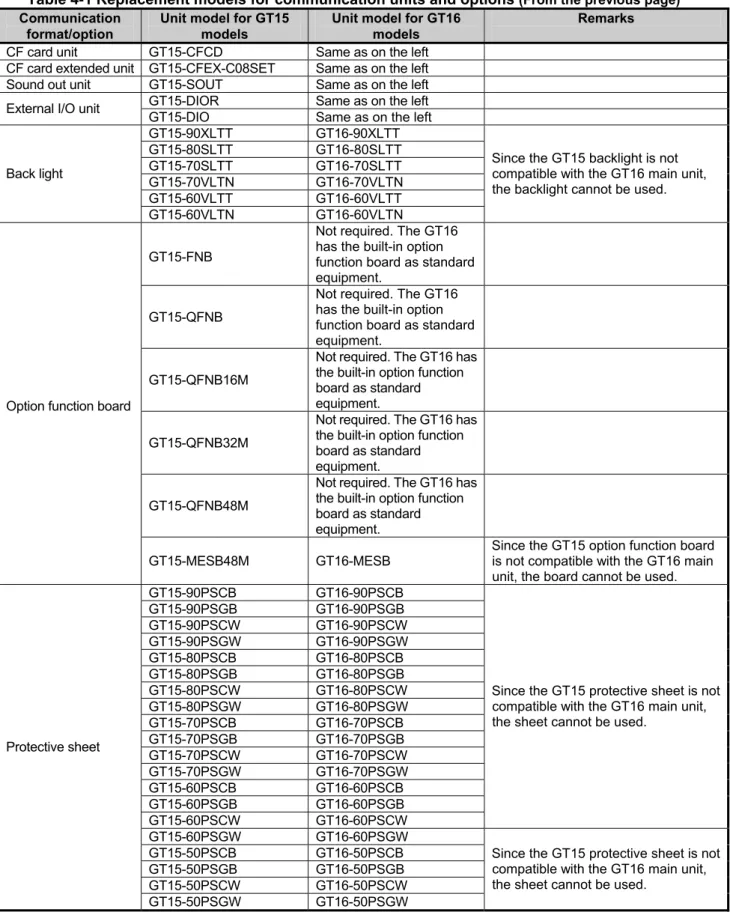
When checking whether the communication units and the options for the GT15 models can be used for the GT16 main unit, refer to the following.
Table 4 Replacement models for communication units and options
Communication format/option
Unit model for GT15 models
Unit model for GT16 models
Remarks
GT15-QBUS Same as on the left
GT15-QBUS2 Same as on the left
GT15-75QBUSL Same as on the left Slim model (*1)
Q bus connection
GT15-75QBUS2L Same as on the left Slim model (*1)
GT15-ABUS Same as on the left
GT15-ABUS2 Same as on the left
GT15-75ABUSL Same as on the left Slim model (*1)
A bus connection
GT15-75ABUS2L Same as on the left Slim model (*1)
GT15-RS2-9P Same as on the left
RS-232 connection
GOT built-in interface Same as on the left
Same as on the left
GT15-RS4-9P GOT built-in RS-422/485
interface
The conversion cable
(GT16-C02R4-9S) is required.
GT15-RS4-TE Same as on the left
Same as on the left (*2)
GT15-RS2T4-9P GOT built-in RS-422/485
interface
The conversion cable
(GT16-C02R4-9S) is required. Same as on the left (*2)
RS-422 connection
GT15-RS2T4-25P GOT built-in RS-422/485
interface
The conversion cable
(GT16-C02R4-25S) is required.
GT15-J71LP23-25 Same as on the left
MELSECNET/H
connection GT15-J71BR13 Same as on the left
GT15-J71LP23-25 Same as on the left
GT15-75J71LP23-Z GT15-J71LP23-25
GT15-J71BR13 Same as on the left
MELSECNET/10 connection
GT15-75J71BR13-Z GT15-J71BR13
Use the MELSECNET/H communication unit in the MELSECNET/10 mode.
GT15-J71LP23-25 Same as on the left
MELSECNET/B
connection GT15-J71BR13 Same as on the left
CC-Link Controller
connection GT15-J71GP23-SX Same as on the left
GT15-J61BT13 Same as on the left
CC-Link connection
GT15-75J61BR13-Z GT15-J61BT13
Use the unit dedicated to the CC-Link ver.2 network system in the mode for the CC-Link ver.1 network system mode.
Ethernet connection GT15-J71E71-100 GOT built-in Ethernet
interface
The Ethernet communication unit cannot be mounted on the GT16 main unit.
Serial Multi drop
connection GT01-RS4-M Same as on the left
GT15-PRN Same as on the left PictBridge compatible printer (*4)
GT15-RS2-9P Same as on the left
Printer interface
GOT built-in interface Same as on the left (*3) Serial printer (*4)
GT15V-75V4 GT16M-V4 GT15V-75R1 GT16M-R2 GT15V-75V4R1 GT16M-V4R1 Video/RGB connection GT15V-75ROUT GT16M-ROUT
[Issue No.]
GOT-A-0043
[Page]
8/11
[Title]
Precautions when Replacing GT15 Models with GT16 Models
[Date of Issue]
Ver. *: May 2011
[Relevant Models]
GOT1000 Series
TECHNICAL BULLETIN
Table 4-1 Replacement models for communication units and options (From the previous page) Communication
format/option
Unit model for GT15 models
Unit model for GT16 models
Remarks
CF card unit GT15-CFCD Same as on the left
CF card extended unit GT15-CFEX-C08SET Same as on the left
Sound out unit GT15-SOUT Same as on the left
GT15-DIOR Same as on the left
External I/O unit
GT15-DIO Same as on the left
GT15-90XLTT GT16-90XLTT GT15-80SLTT GT16-80SLTT GT15-70SLTT GT16-70SLTT GT15-70VLTN GT16-70VLTN GT15-60VLTT GT16-60VLTT Back light GT15-60VLTN GT16-60VLTN
Since the GT15 backlight is not compatible with the GT16 main unit, the backlight cannot be used.
GT15-FNB
Not required. The GT16 has the built-in option function board as standard equipment.
GT15-QFNB
Not required. The GT16 has the built-in option function board as standard equipment.
GT15-QFNB16M
Not required. The GT16 has the built-in option function board as standard equipment.
GT15-QFNB32M
Not required. The GT16 has the built-in option function board as standard equipment.
GT15-QFNB48M
Not required. The GT16 has the built-in option function board as standard equipment. Option function board
GT15-MESB48M GT16-MESB
Since the GT15 option function board is not compatible with the GT16 main unit, the board cannot be used. GT15-90PSCB GT16-90PSCB GT15-90PSGB GT16-90PSGB GT15-90PSCW GT16-90PSCW GT15-90PSGW GT16-90PSGW GT15-80PSCB GT16-80PSCB GT15-80PSGB GT16-80PSGB GT15-80PSCW GT16-80PSCW GT15-80PSGW GT16-80PSGW GT15-70PSCB GT16-70PSCB GT15-70PSGB GT16-70PSGB GT15-70PSCW GT16-70PSCW GT15-70PSGW GT16-70PSGW GT15-60PSCB GT16-60PSCB GT15-60PSGB GT16-60PSGB GT15-60PSCW GT16-60PSCW
Since the GT15 protective sheet is not compatible with the GT16 main unit, the sheet cannot be used.
GT15-60PSGW GT16-60PSGW GT15-50PSCB GT16-50PSCB Protective sheet
[Issue No.]
GOT-A-0043
[Page]
9/11
[Title]
Precautions when Replacing GT15 Models with GT16 Models
[Date of Issue]
Ver. *: May 2011
[Relevant Models]
GOT1000 Series
TECHNICAL BULLETIN
Table 4-1 Replacement models for communication units and options (From the previous page) Communication
format/option
Unit model for GT15 models
Unit model for GT16 models
Remarks
GT15-UCOV GT16-UCOV
Except the GT1655
Since the GT15 environmental protection cover is not compatible with the GT16 main unit, the cover cannot be used.
USB environmental protection cover
GT11-50UCOV GT16-50UCOV
GT1655 only
Since the GT15 environmental protection cover is not compatible with the GT16 main unit, the cover cannot be used.
GT05-90PCO Same as on the left
GT05-80PCO Same as on the left
GT05-70PCO Same as on the left
GT05-60PCO Same as on the left
Protective cover for oil
GT05-50PCO GT16-50PCO
Since the GT15 protective cover for oil is not compatible with the GT16 main unit, the cover cannot be used.
GT15-90STAND Same as on the left
GT15-80STAND Same as on the left
GT15-70STAND Same as on the left
Stand
GT05-50STAND Same as on the left
GT05-MEM-16MC Same as on the left
GT05-MEM-32MC Same as on the left
GT05-MEM-64MC Same as on the left
GT05-MEM-128MC Same as on the left
GT05-MEM-256MC Same as on the left
GT05-MEM-512MC Same as on the left
GT05-MEM-1GC Same as on the left
GT05-MEM-2GC Same as on the left
Applicable to the GT16.
When storing the project data in the CF card, and using the data in the CF card, change the GOT type setting.
- GT05-MEM-4GC (*5)
- GT05-MEM-8GC (*5)
CF card
- GT05-MEM-16GC (*5)
Select the CF card when 2GB or more is required.
Memory card
adaptor GT05-MEM-ADPC Same as on the left
GT15-70ATT-98 Same as on the left
GT15-70ATT-87 Same as on the left
GT15-60ATT-97 Same as on the left
GT15-60ATT-96 Same as on the left
GT15-60ATT-87 Same as on the left
GT15-60ATT-77 Same as on the left
GT15-50ATT-95W Same as on the left
Attachment
GT15-50ATT-85 Same as on the left
Same as on the left
Except the GT1655
The GT16 has the built-in battery as standard equipment.
Battery GT15-BAT
GT11-50BAT
GT1655 only
Since the GT15 battery is not compatible with the GT16 main unit, the battery cannot be used.
*1 The slim model has limitation for combination with other units. To use the slim model with the units for the functions, including the external I/O function, the sound output function, the printer function, and the video/RGB I/O function, use the following units.
[Issue No.]
GOT-A-0043
[Page]
10/11
[Title]
Precautions when Replacing GT15 Models with GT16 Models
[Date of Issue]
Ver. *: May 2011
[Relevant Models]
GOT1000 Series
TECHNICAL BULLETIN
*2 Not applicable for the GT1655.
*3 To download monitor screen data and others from a personal computer to the GOT via the GOT built-in RS-232 interface, the cable must be replaced.
*4 For the printer models applicable to the GOT1000 series (validated models), refer to TECHNICAL BULLETIN GOT-A-0010 “List of Valid Devices Applicable for GOT1000 Series” on the MELFANSweb website.
To use the serial printer, GT Works3 with version 1.15R or later is required. *5 GOT BootOS version 05.09.00AF or later supported
If you use the GOT with the BootOS whose version is earlier than 05.09.00AF installed, install the latest BootOS on the GOT by using GT Designer3 with version 1.15R or later.
5. Cables
5.1 Bus connection cables
The bus connection cables for the GT15 model are available for the GT16 model.
5.2 RS-232 cables
The RS-232 cables for the GT15 model are available for the GT16 model.
5.3 RS-422/485 cables
The RS-422/485 cables for the GT15 model are available for the GT16 model.
When the GT15-RS4-9P or the GT15-RS2T4-9P for the GT15 model is used and the GT15 model is replaced with the GT16 model with the GOT built-in interface, the GT16-C02R4-9S (RS-422 connector conversion cable) is required.When the GT15-RS2T4-25P for the GT15 model is used and the GT15 model is replaced with the GT16 model with the GOT built-in interface, the GT16-C02R4-25S (RS-422 connector conversion cable) is required.
5.4 Network cables (MELSECNET/H, MELSECNET/10, Ethernet, CC-Link IE, CC-Link)
The network cables for the GT15 model are available for the GT16 model.
For the Ethernet connection, the Ethernet communication unit for the GT15 is replaced with the GT16 built-in Ethernet interface. (The Ethernet communication unit cannot be mounted on the GT16.)
Since the connection location of the Ethernet cable is changed, check the wiring of the cable.
5.5 Other cables
The following cables for the GT15 model are available for the GT16 model. - Printer cable
- CRT connection cable
- Coaxial cable for displaying video image
- Nine-core composite cable for the RGB display screen - Connection cable for the Non-Mitsubishi FA devices - Conversion cable for connecting the external I/O unit - Analog RGB cable
[Issue No.]
GOT-A-0043
[Page]
11/11
[Title]
Precautions when Replacing GT15 Models with GT16 Models
[Date of Issue]
Ver. *: May 2011
[Relevant Models]
GOT1000 Series
TECHNICAL BULLETIN
6. Mounting intervals
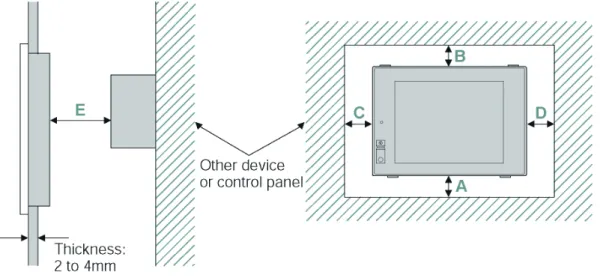
When the GT15 model is replaced with the GT16 model, only the dimensions A and C are changed among the mounting intervals (Dimensions A to F in the below figure). The following explains the precautions for the mounting intervals.
For intervals required for each product, refer to the mounting intervals in the catalog.
In addition, when mounting a communication unit or option unit on the GOT to use the multi-channel function, refer to the user’s manual of each communication unit and/or option for the dimensions E and F.
6.1 Downward dimension (Dimension A)
When the GT1555 main unit with no communication unit and the GT1555 is replaced with the GT1655, the following downward dimension (Dimension A) is required.
Table 6-1 Downward dimension (Dimension A) (Unit: mm)
GT15 model in use Replacement GT16 model Downward dimension (Dimension A)
GT155□ GT1555-VTBD GT165□ GT1655-VTBD 46 or more→61 or more
For the details, refer to the external dimensions in the appendixes of the GT15 User's Manual (SH-080528ENG) or the GT16 User's Manual (Hardware) (SH-080928ENG).
6.2 Side dimension (Dimension C)
When the GT1555 is replaced with the GT1655, changing the side dimension (Dimension C) is not required. When the battery and/or the CF card are used, more space is required for installing or removing the battery and the CF card. Therefore, the following side dimension (Dimension C) is required.
Table 6-2 Side dimension (Dimension C) (Unit: mm)
GT15 model in use Replacement GT16 model Side dimension (Dimension C)
GT155□ GT1555-VTBD GT165□ GT1655-VTBD 50 or more (20 or more)→100 or more
For the details, refer to the external dimensions in the appendixes of the GT15 User's Manual (SH-080528ENG) or the GT16 User's Manual (Hardware) (SH-080928ENG).
Version Print date Revision